
RBFLAB
From geometry to equations, with radial basis functions.
Build labeled 2D and 3D point clouds, write equations with SymPy, and choose global collocation, local Hermite interpolation or RBF-FD. Inspect local weights and sparse matrices when you want to go beyond the high-level API.
Read the manual · 2D shapes and holes · Mathematical foundations · API reference
Install and start
python -m pip install rbflab
# Optional plots and animations:
python -m pip install "rbflab[examples]"
The Python core needs no compiler, Gmsh or tensor framework. Geometry generation is built in. See the installation guide for optional backends and exact dependencies. The new polygon and hole-composition examples below require RBFLAB 0.4 or newer.
One domain. One equation. A numerical solution.
Solve Poisson's equation on an ellipse with two holes. Here a known solution,
sin(x)*cos(y), supplies boundary data and lets us check the numerical error.
import sympy as sp
import rbflab as rbf
from rbflab import geometry, meshgen

domain = geometry.with_holes(
    geometry.Ellipse(1.6, 1., labels=("wall",)),
    {"round_hole": geometry.Disk(.28, center=(-.65, 0)),
     "slot": geometry.Ellipse(.24, .43, center=(.6, 0), angle=-.3)},
)
cloud = meshgen.generate(domain, interior=500,
    boundary={"wall": 120, "round_hole": 32, "slot": 40}, seed=42)

model = rbf.SymbolicScalar(2)
u = model.field
x, y = model.coordinates
exact = sp.sin(x)*sp.cos(y)
problem = model.stationary(
    sp.Eq(-model.laplacian(u), 2*exact),
    boundary=[model.bc(label, sp.Eq(u, exact)) for label in domain.boundaries],
)
method = rbf.RBFFD(rbf.PHS(5), 35, polynomial_degree=3,
    stencil_policy=rbf.StencilPolicy(scaling="local"),
    local_backend=rbf.PythonBackend(compute_condition=False))
solution = problem.solve(cloud, method)
print(solution.evaluate([[0., 0.], [0., .5]]))
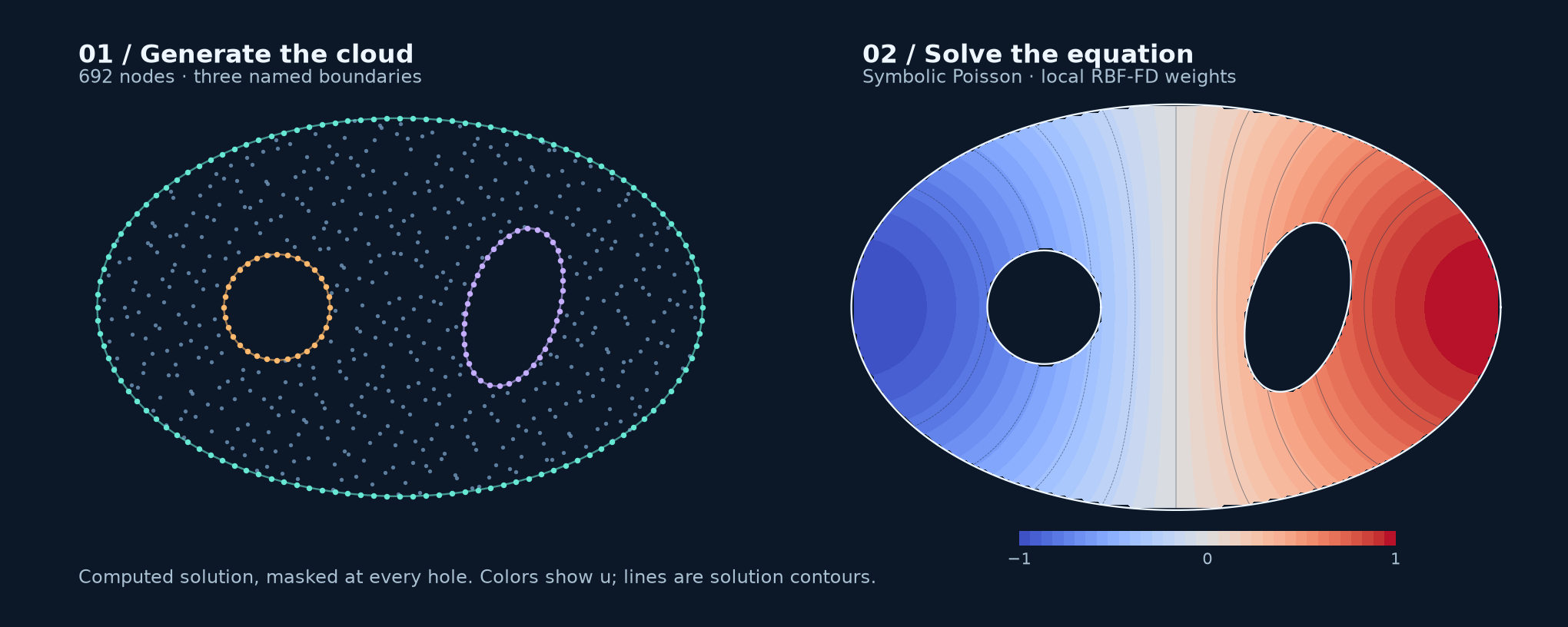
With this 692-node recipe, the Float64 Python run gives maximum nodal error 3.77 × 10⁻⁵ and independent off-node error 3.86 × 10⁻⁵. Read the step-by-step tutorial for the mathematics, plotting, and checks on independent clouds.
Plotting stays short:
from rbflab import viz
fig, ax = viz.plot_scalar(solution, domain=domain, title="Poisson / two holes")
fig.savefig("solution.png", dpi=180)
Construct your own numerical method
RBFLAB 0.5 exposes sampled functionals, trial functions and named
sparse blocks through LocalApproximation. Ordinary RBF-FD and local Hermite
interpolation use the same mathematical construction. Assemble stiffness, mass,
forcing and boundary contributions yourself, then write a SciPy solve or time
loop. Existing PDE convenience interfaces remain available.
These interfaces are included in RBFLAB 0.5.0. Upgrade with
python -m pip install --upgrade "rbflab>=0.5".
import numpy as np
import rbflab as rbf

X = rbf.geometry.unit_box_grid(5).points
space = rbf.ScalarSpace(rbf.PHS(5), polynomial_degree=2)
source = {"u": rbf.Samples(X, size=20)}
local = rbf.LocalApproximation(source=source, trial=space.representers(source))
ops = local.operators(targets=X, operators={"lap": rbf.Laplacian(2)})
U = np.sum(X**2, axis=1)
print(ops.lap["u"] @ U)  # approximately 4 at every target
D = ops.lap["u"].matrix  # reusable sparse matrix
See the methods at work
 |
 |
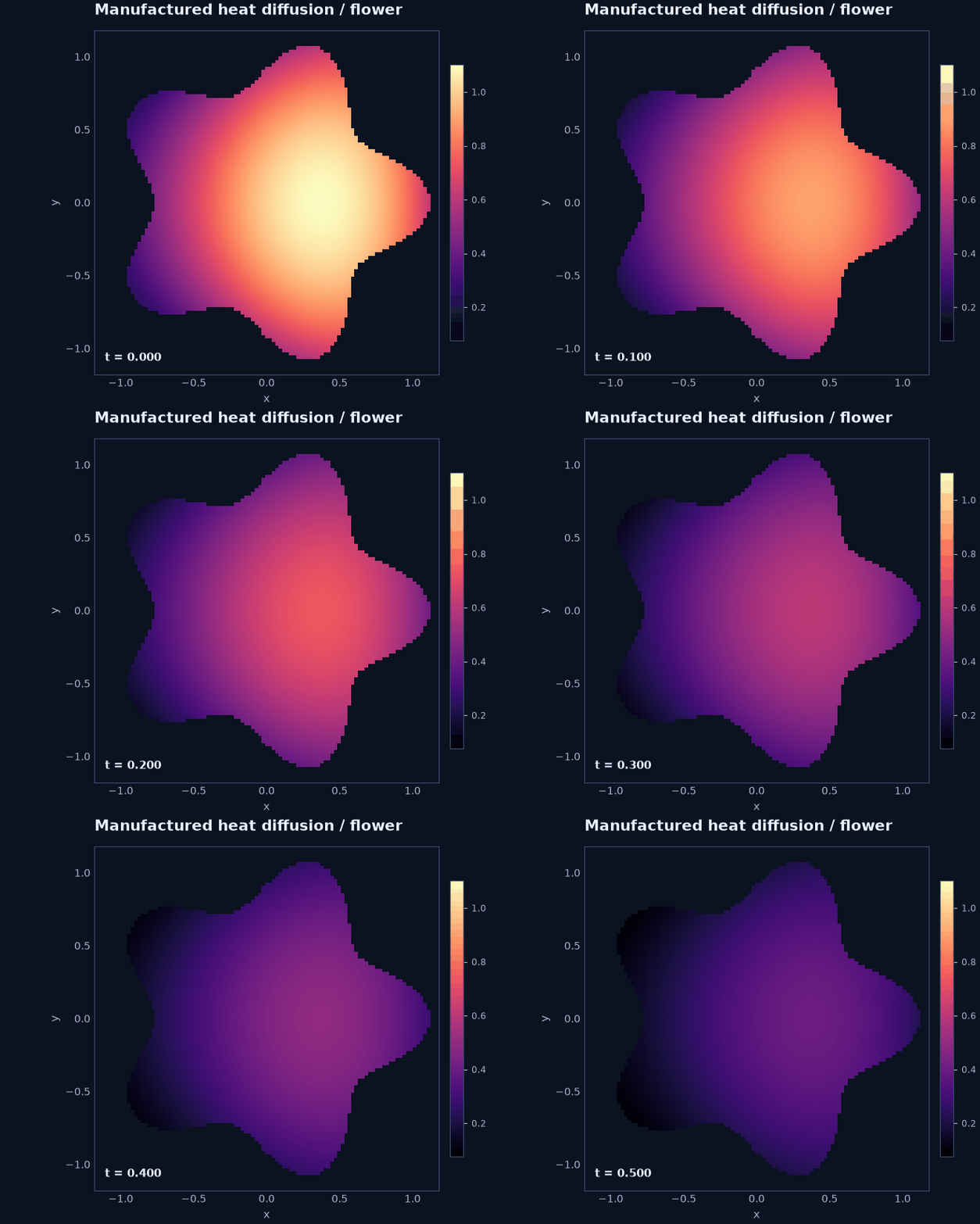
| Heat on a flower Symbolic forcing, BDF2 time stepping and animation. |
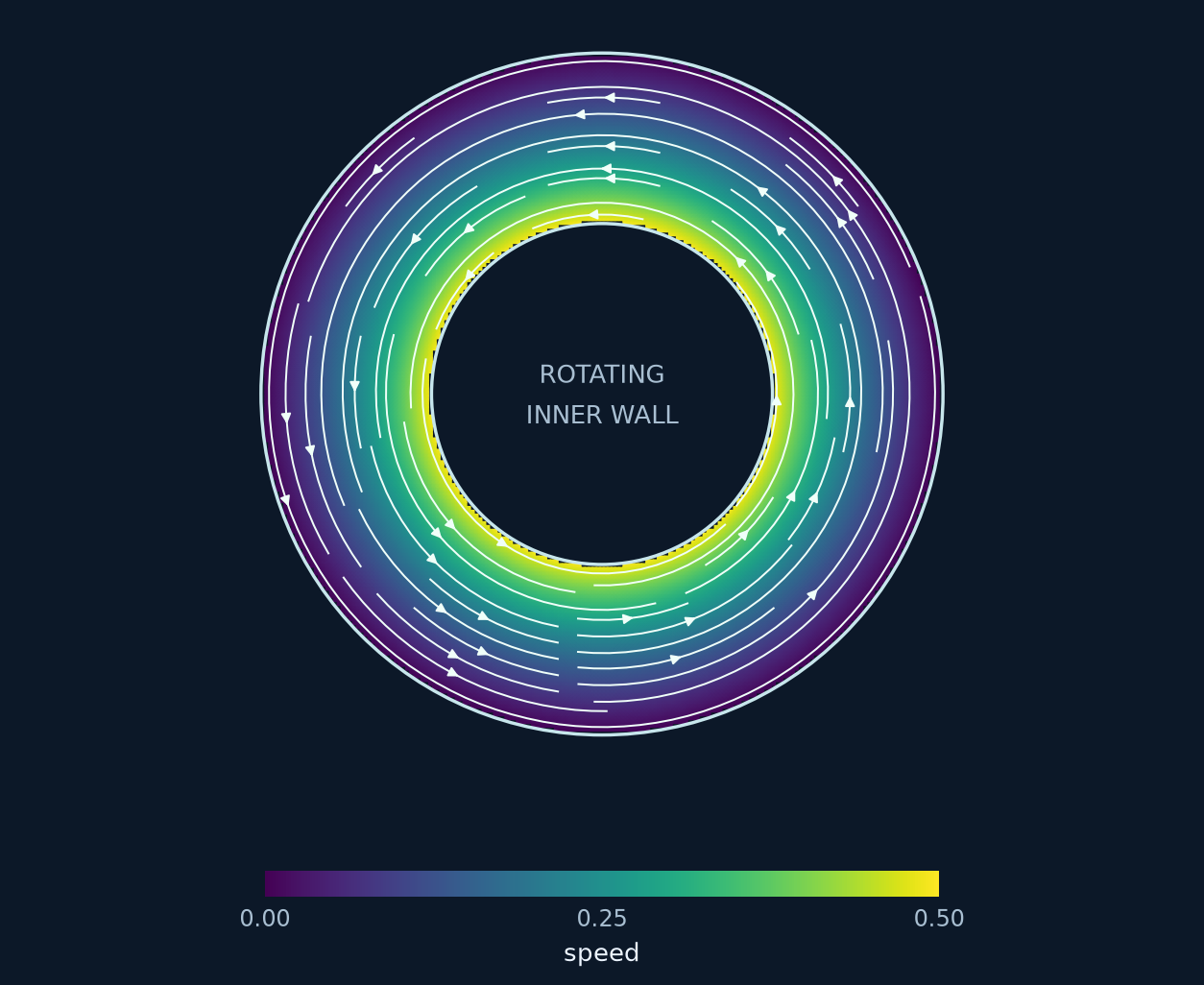
Stokes between cylinders Divergence-free velocity spaces on a curved domain. |
| Explore | Learn to use |
|---|---|
| 2D shapes and holes | Named walls, holes, concave polygons and 3D volumes |
| Interpolate data | Arrays, interpolants and field derivatives |
| Your own PDE assembly | Combine RBF maps with ordinary SciPy algebra |
| Teach with RBFLAB | Lesson sequences and mathematical modification exercises |
| One local stencil | Approximation, differentiation weights and sparse rows |
| Heat from matrices | RBF spatial matrices and explicit time-integration code |
| Mixed conditions | Dirichlet, Neumann and Robin data on curved boundaries |
| Compare methods | Global collocation and local Hermite interpolation |
| Poisson in a ball | 3D scalar operators and independent error checks |
| Custom kernels | Symbolic kernels, derivatives and optional C++ compilation |
| Navier–Stokes cavity | An experimental staggered-flow showcase with documented limitations |
Build a domain from labeled curves
Symbolic curves derive tangents and outward normals automatically:
import sympy as sp
from rbflab import geometry, meshgen

t = sp.symbols("t", real=True)
outer = geometry.Border((sp.cos(t), sp.sin(t)), "outer", 0, 2*sp.pi)
hole = geometry.Border((sp.cos(t)/3, sp.sin(t)/3), "hole", 0, 2*sp.pi)
cloud = meshgen.generate([outer(96), hole(-48)], interior=240, seed=42)
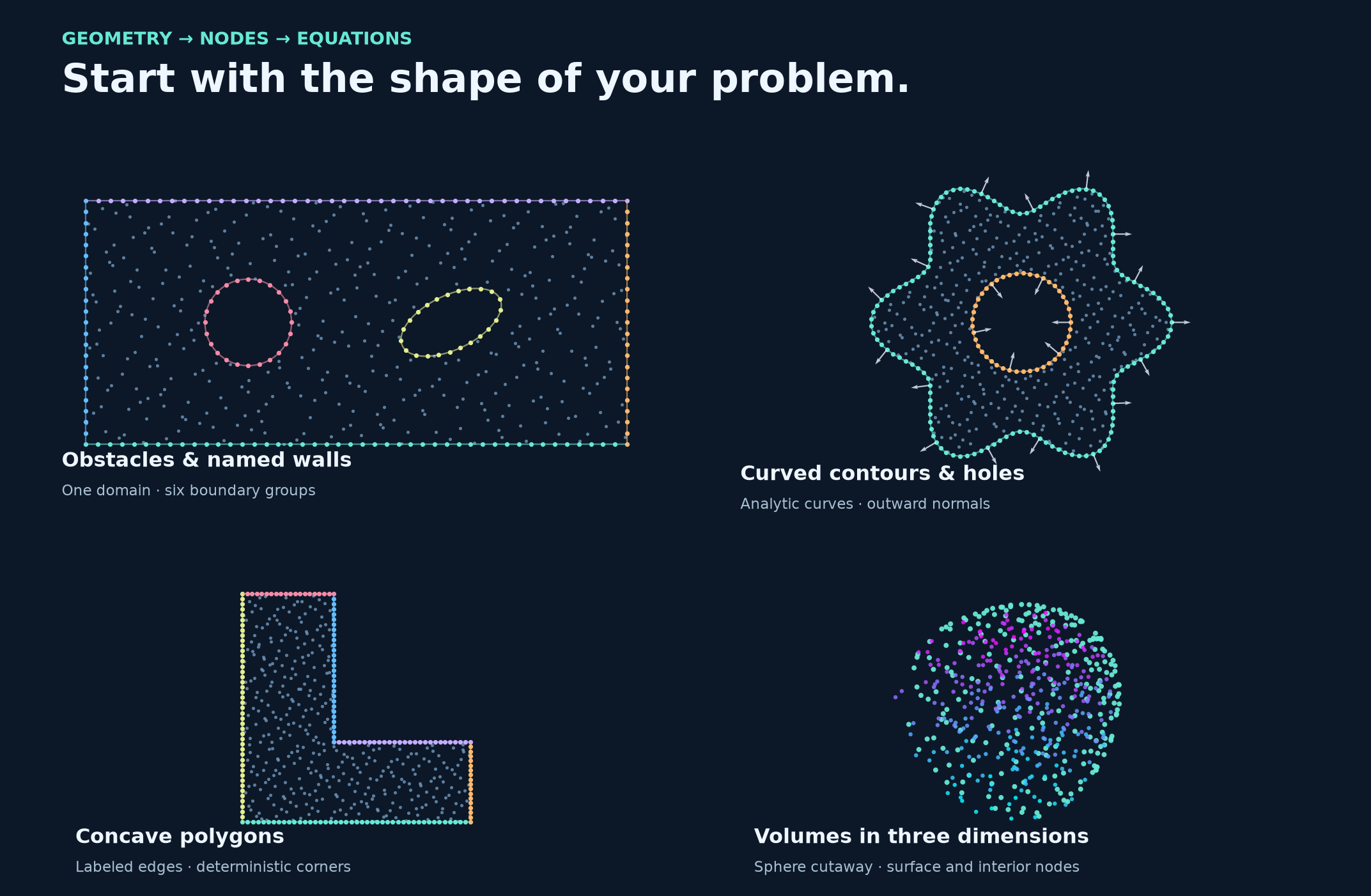
Ordinary callables accept optional tangents and explicit normals, with a documented numerical derivative fallback. The mesh-generation chapter explains both curve APIs, boundary labels, sampling, 3D volumes/surfaces and staggered clouds, with images of the constructions. These unified curve features require RBFLAB 0.4 or newer.
Choose a backend; keep the problem
| Backend | Installation | Role |
|---|---|---|
| Python / NumPy / SciPy | pip install rbflab |
Default numerical implementation |
| C++ / Eigen | Source-build setup | Supported local assembly in Float64 or MPFR |
| PyTorch | pip install "rbflab[torch]" |
Supported local tensor assembly; documented CPU Float64 path |
| Gmsh (optional geometry) | pip install "rbflab[mesh]" |
Tagged meshes and explicit staggered layouts |
From a source checkout, run the same example with a different local backend:
python -m examples.poisson_perforated --backend python --plot solution.png
python -m examples.poisson_perforated --backend cpp
python -m examples.poisson_perforated --backend torch
The example prepares compiled/tensor kernels before assembly. Its global sparse solve uses SciPy Float64. Backend coverage and precision differ by method; see capabilities. Small problems do not necessarily run faster with extra threads or a tensor backend.
Research tools with explicit limits
- Use
PointCloudwith your own coordinates, or generate labeled nodes in RBFLAB. The sampler does not enforce minimum inter-node separation. - Access discrete operators, sparse matrices, local weights and reconstruction diagnostics. Keep algebraic residuals separate from solution and PDE errors.
- Divergence-free Stokes spaces build incompressibility into the velocity kernel. LHI pressure-gradient reconstruction and nearest-stencil off-node evaluation have their own accuracy limits.
- Extended-precision local weights do not automatically make a global sparse solve extended precision. The cavity showcase is not a validated general Navier–Stokes solver.
Contribute and reproduce
Source code lives in python/rbflab, runnable examples in examples, and focused
regression tests in tests. Gallery figures are reproducible from
geometry_gallery.py and
make_method_gallery.py.
1 maintainer

Metadata
1 maintainer
Release files for rbflab 0.5.0
For a detailed explanation of source distributions (sdists) and built distributions (wheels), please see the package formats documentation.
Source distribution (sdist)
| File | Size | Uploaded | Provenance | Actions |
|---|---|---|---|---|
| rbflab-0.5.0.tar.gz | 9.7 MB | With provenance | Details for rbflab-0.5.0.tar.gz |
Built distribution (wheel)
| File | Interpreter | ABI | Platform | Actions Reset |
|---|---|---|---|---|
| rbflab-0.5.0-py3-none-any.whl | Python 3 | none | any | Details for rbflab-0.5.0-py3-none-any.whl |
Total release size: 9.9 MB
Release files / rbflab-0.5.0.tar.gz
| Download URL | rbflab-0.5.0.tar.gz |
|---|---|
| Size | 9.7 MB |
| Tags | Source |
|
SHA-256 checksum How to use checksums |
1a5f557f44495740e306ea0d4475c827aaf19cd0ad2bcad6af1fc511f720fa18
|
|
BLAKE2b-256 checksum How to use checksums |
79ab454469b9ec489e0669b411ff60e69a3300beb3e7eb0e0f24dc5c3c1975b8
|
| Upload date | |
|
Uploaded using Trusted Publishing? What is trusted publishing? |
Yes |
| Uploaded via |
twine/7.0.0 CPython/3.13.14
|
Provenance
Provenance describes where a file came from. On PyPI, provenance is shared via attestations, which provide a verifiable record of the build or publishing details. View details, limitations and caveats.


PyPI Publish Attestation
PyPI verified that this artifact, at this checksum, originated from the publisher listed below.
Signed by GitHub Actions, verified by PyPI on Oct 10, 2026.
Transparency logRelease files / rbflab-0.5.0-py3-none-any.whl
| Download URL | rbflab-0.5.0-py3-none-any.whl |
|---|---|
| Size | 213.2 kB |
| Tags | Python 3 |
|
SHA-256 checksum How to use checksums |
a9574fcec40e2ac44434a047ad8c758be793549866c31986ba3c4c2a6db7a426
|
|
BLAKE2b-256 checksum How to use checksums |
e923d797cee3541a82dd4ac78bfd286da8f2a2296c8855aa25801a89bd23f4a8
|
| Upload date | |
|
Uploaded using Trusted Publishing? What is trusted publishing? |
Yes |
| Uploaded via |
twine/7.0.0 CPython/3.13.14
|
Provenance
Provenance describes where a file came from. On PyPI, provenance is shared via attestations, which provide a verifiable record of the build or publishing details. View details, limitations and caveats.
PyPI Publish Attestation
PyPI verified that this artifact, at this checksum, originated from the publisher listed below.
Signed by GitHub Actions, verified by PyPI on Oct 10, 2026.
Transparency logSecurity for rbflab 0.5.0
Provenance
Provenance describes where a file came from. On PyPI, provenance is shared via attestations, which provide a verifiable record of the build or publishing details. View details, limitations and caveats.
Full provenance
Both files in this release have been uploaded with provenance metadata.
Attestation for rbflab-0.5.0.tar.gz
PyPI Publish Attestation
PyPI verified that this artifact, at this checksum, originated from the publisher listed below.
Signed by GitHub Actions, verified by PyPI on Oct 10, 2026.
Transparency logA note on package security
PyPI is a repository for distributing packages, not a service for auditing them. While third-party security researchers and our staff do their best to detect and remove malicious packages, PyPI cannot guarantee the quality, security or suitability of any given package.
To learn more about protecting yourself from malicious actors, visit our package security documentation.














