
No project description provided

Project description
rbot (Rusty bot framwrok for crypto trading)
rbot is a python crypt trading bot framework written in Rust.
The feature is;
- Store historical transaction data(tick) in sqlite database.
- Calculate OHLCV data with any window sizefrom historical tick data
- Provide bot framework that enables
backtest,dry_runandproduction.
the execution sample
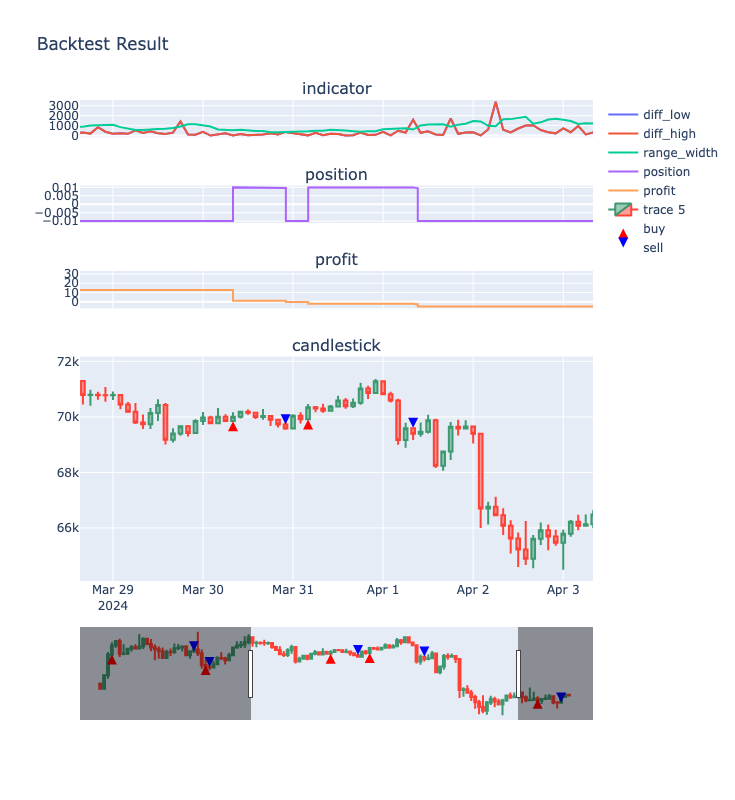
In the backtest mode, you can run with Jupyter notebook. So, you can make such analysis below. This example is provided in the github, which can be executed on the Google colab!! Please try.
sample1: basil bot sample2: breakout bot
Architecture
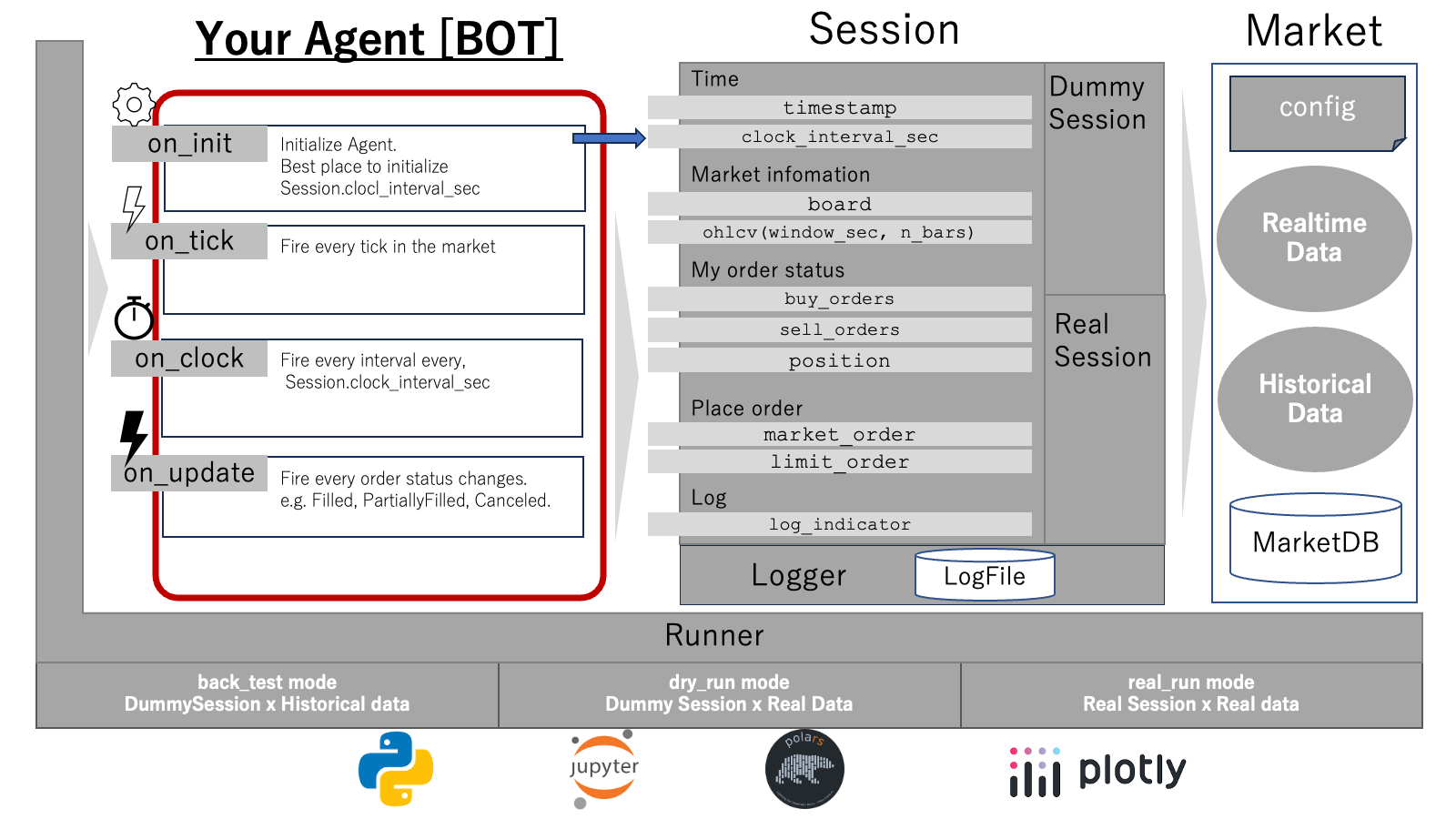
The only you have to make is Agent. The other class will support you Agent will work.
Sessionwill provide abstruction layer to the Market. Agent only interact withSessionfor ordering, fetching market information and current order status.Marketis the API and DB wrapper for each trading pair in the exchange. At this versionBybitandBiannceexchange are supportd.Runnermakes session to runback_test,dry_runorreal_run.Loggerstores the result of execution. That provide the result in polarsDataFrame.
install
$ pip install rbot
download historical data
create market object
from rbot import Bybit, BybitConfig
exchange = Bybit(production=True)

config = BybitConfig.BTCUSDT          # use BTC/USDT pair
market = exchange.open_market(config)
you can find the locatin of data base.
market.file_name
In case you want to alter the location of db, you can specify the path by environment variable RBOT_DB_ROOT.
enable order
Ordering is disabled by default. You can enable it by setting enable_order_with_my_own_risk to True.
exchange.enable_order_with_my_own_risk = True
download archive data
market.download_archive(
    ndays=1,        # specify from past days
    force=False,    # if false, the cache data will be used.
    verbose=True    # verbose to print download progress.
)
get OHLCV data
ohlcv = market.ohlcv(
    start_time=0,           # start time in unix timestamp(microseconds)
    end_time=0,             # end time in unix timestamp(microseconds)
    window_sec=60           # ohlc bar window size in seconds
)
The OHLCV data is a polars data frames with the following columns:
- timestamp
- open
- high
- low
- close
- volume (sum of volume in order size)
- count (number of ticks)
if you want to use it as pandas dataframe, you can convert it by the following code.
pandas_df = ohlcv.to_pandas(use_pyarrow_extension_array=True)
Creating skelton bot
You can make Bot class with any kind of names. Only rules is you must implement on_init, on_tick, on_clock, and on_update, if you want to recieve such event(It is not necessary to implement all of them).
Each method receives session object. You can use it to get market information, place order, cancel order, etc.
Example:
class SkeltonAgent:      # you can use any names for trading bot agent / クラス名は任意です
    def on_init(self, session):
        """
        Bot initialization process. Bot initialization time. Called once at the start of the bot.
        It is best place to seting up session.clock_interval_sec which is interval of on_clock call.
        Args:
            session: Session class
        """
        session.clock_interval_sec = 60 * 60 * 1        # 1時間ごとにon_clockを呼び出す

    def on_tick(self, session, side, price, size):
        """
        If you implement this method, you can receive all tick data from exchange.
        Args:
            session: Session object (that can be used to order and get market information)
            side: "Sell" or "Order"
            price: executed price of tick
            size: executed size of the tick
        """
        pass

    def on_clock(self, session, clock):
        """
        If you implement this method and seting up session.clock_interval_sec,
        you can receive clock event in specified interval.
        Args:
            session: Session object(that can be used to order or get market information)
            clock: Unix time stamp in micro seconds.
        """
        pass

    def on_update(self, session, updated_order):
        """
        If your order's status is changed, this method is called.
        Args:
            session: Session object
            updated_order: Updated order
        """
        pass
Session API
In your on_init, on_tick, on_clock, and on_update, you can use session object to get market information, place order, cancel order, etc.
OHLCV data
ohlcv = session.ohlcv(
    start_time=0,           # start time in unix timestamp(microseconds)
    end_time=0,             # end time in unix timestamp(microseconds)
    window_sec=60           # ohlc bar window size in seconds
)
order book
bid, ask = session.board
bid, ask are polars dataframes with the following columns:
- price: price of the order
- size: size of the order
- sum: cumulative size of the order
place order
market order
size = 0.001
market_order = session.market_order("BUY", size)
limit order
price = 50000.0
size = 0.001
sell_limit_order = session.limit_order("SELL", price, size)
cancel order
cancelled_order =session.cancel_order(config, id_to_cancel)
order queue status
You can get the order queue status(Limit orders that is not fullfied)
buy_orders = session.buy_orders
sell_orders = session.sell_orders
expire order
Expire the order in the order queue.
expire_time = 60 * 60   # expire older than 1H
session.expire_order(expire_time)
position
calculate psudo-position from the session starts.
position = session.position
Running bot
You can run Agent without modification in three modes; backtest, dry_run, and production.
backtest
from rbot import Runner

agent = SkeltonAgent()
runner = Runner()

session = runner.back_test(
                exchange=exchange,  # exchange object
                market=market,    # market object
                agent=agent,      # agent object
                start_time=0,    # start time in unix timestamp(microseconds)` 0 means from the beginig of DB
                end_time=0,      # end time in unix timestamp(microseconds) 0 means to the end of the DB
                verbose=True     # verbose to print progress.
            )
dry run
from rbot import Runner

agent = SkeltonAgent()
runner = Runner()

session = runner.dry_run(
                exchange=exchange,  # exchange object
                market=market,    # market object
                agent=agent,      # agent object
                execute_time = 60,  # Time(Seconds) to execute
                verbose=True     # verbose to print progress.
            )
real run(production)
from rbot import Runner

agent = SkeltonAgent()
runner = Runner()

session = runner.real_run(
                exchange=exchange,  # exchange object
                market=market,    # market object
                agent=agent,      # agent object
                #execute_time = 60,  # execute time, if not set, it runs forever
                verbose=True,
                log_file="skelton_bot.log"
            )
analize bot performance
you can get orders dataframe list by session.orders.
- log_id
- symbol
- update_time
- create_time
- status
- order_id
- client_order_id
- order_side
- order_type
- order_price
- order_size
- remain_size
- transaction_id
- execute_price
- execute_size
- quote_vol
- commission
- commission_asset
- is_maker
- message
- commission_home
- commission_foreign
- home_change
- foreign_change
- free_home_change
- free_foreign_change
- lock_home_change
- lock_foreign_change
- open_position
- close_position
- position
- profit
- fee
- total_profit
- sum_profit
note
for real run mode, you can retreive log as below
from rbot import Logger

log = Logger()
log.restore("skelton_bot.log")
Changes from release-0.2
- Exchange and market is separated. So you must make Exchange(such as
Bybit) first, thenopen_marketto build market object. Market#downloadis separated into threeMarket#download_archive,Market#download_latestandMarket#donwload_gapRunner#real_runandRunner#dry_runnow haveno_downloadoptional flag.- Support
Bybitexchange.
links
copyright(c) 2024 yasstake. All rights reserved. Distributed under LGPL license. NOTE: For some echange, it may have a such kind of an affliate link.


Download files
Download the file for your platform. If you're not sure which to choose, learn more about installing packages.
Source Distribution
Built Distributions
Filter files by name, interpreter, ABI, and platform.
If you're not sure about the file name format, learn more about wheel file names.
Copy a direct link to the current filters
File details
Details for the file rbot-0.3.4.tar.gz.
File metadata
- Download URL: rbot-0.3.4.tar.gz
- Upload date:
- Size: 128.3 kB
- Tags: Source
- Uploaded using Trusted Publishing? No
- Uploaded via: twine/4.0.2 CPython/3.11.6
File hashes
| Algorithm | Hash digest | |
|---|---|---|
| SHA256 |
37d205d6e7e2411c6e6bfdb1c108f82f97c4811aa2e68f2a68cdce54bc1fa4fe
|
|
| MD5 |
076169cfd4a90deff5080ed60962c9a6
|
|
| BLAKE2b-256 |
c9ec4ad39854af15c44006e8932ef88c77e67e50bba49a8a431c41e1ee6bf527
|
File details
Details for the file rbot-0.3.4-cp38-abi3-win_amd64.whl.
File metadata
- Download URL: rbot-0.3.4-cp38-abi3-win_amd64.whl
- Upload date:
- Size: 12.8 MB
- Tags: CPython 3.8+, Windows x86-64
- Uploaded using Trusted Publishing? No
- Uploaded via: twine/4.0.2 CPython/3.11.6
File hashes
| Algorithm | Hash digest | |
|---|---|---|
| SHA256 |
3c01c168e4c067ef1a35dafd0446527d575b04d6fa1b922592a89cc4d2670e12
|
|
| MD5 |
3c1d299ab249c39a7bf311e35278cbfc
|
|
| BLAKE2b-256 |
ffb65c1563c1bdda220a5b4f8ddfc8360ab1ef5261c634faef37960be2146ec3
|
File details
Details for the file rbot-0.3.4-cp38-abi3-manylinux_2_17_x86_64.manylinux2014_x86_64.whl.
File metadata
- Download URL: rbot-0.3.4-cp38-abi3-manylinux_2_17_x86_64.manylinux2014_x86_64.whl
- Upload date:
- Size: 17.7 MB
- Tags: CPython 3.8+, manylinux: glibc 2.17+ x86-64
- Uploaded using Trusted Publishing? No
- Uploaded via: twine/4.0.2 CPython/3.11.6
File hashes
| Algorithm | Hash digest | |
|---|---|---|
| SHA256 |
5522f456579b76b0c0066dc7b104fba3b883563d79a8c4746af53859f53006d5
|
|
| MD5 |
4201e0ccf7751727de22d189b695582b
|
|
| BLAKE2b-256 |
31c50b4aa8087fa112cd06f4403d950461fa1f6c3920e40ea9ffd5e5b62e2e11
|
File details
Details for the file rbot-0.3.4-cp38-abi3-macosx_10_9_x86_64.macosx_11_0_arm64.macosx_10_9_universal2.whl.
File metadata
- Download URL: rbot-0.3.4-cp38-abi3-macosx_10_9_x86_64.macosx_11_0_arm64.macosx_10_9_universal2.whl
- Upload date:
- Size: 26.6 MB
- Tags: CPython 3.8+, macOS 10.9+ universal2 (ARM64, x86-64), macOS 10.9+ x86-64, macOS 11.0+ ARM64
- Uploaded using Trusted Publishing? No
- Uploaded via: twine/4.0.2 CPython/3.11.6
File hashes
| Algorithm | Hash digest | |
|---|---|---|
| SHA256 |
bbe71161dbad4f9758e74eebd50c47889f5a665ba78d891f4749593cc003ce76
|
|
| MD5 |
7cca20c781a33ca2ada444936148f6c2
|
|
| BLAKE2b-256 |
f3103553adb284bd34f45364304a9e297f580c8c59b506b125d2bf3bb46d9295
|






