
rchf 🌈
Custom Rich Help Formatter - A beautifully styled argparse formatter with rich formatting and multi-config support



✨ Make your CLI help beautiful with rich formatting ✨
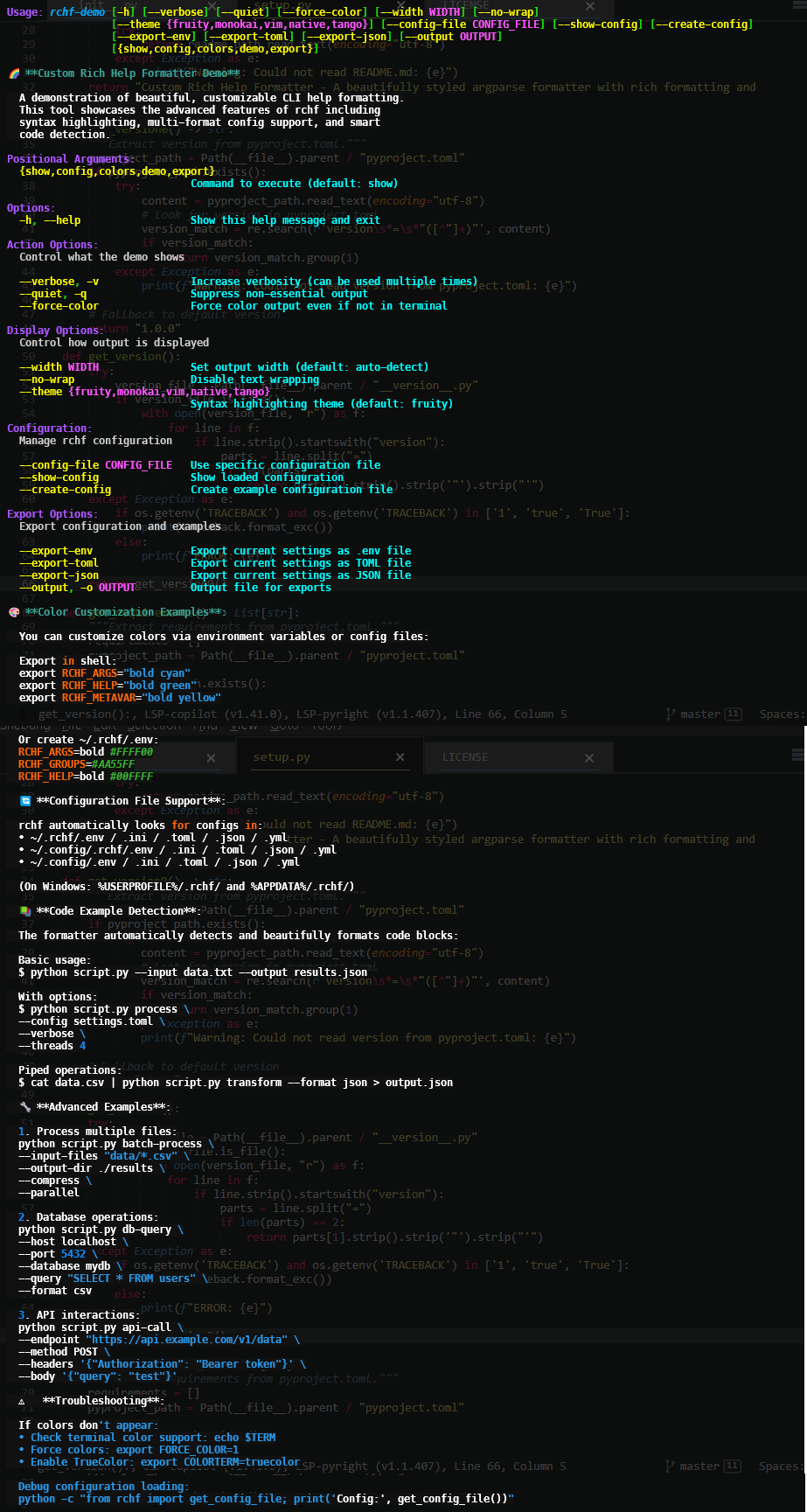
📋 Features
- 🎨 Rich Terminal Formatting: Beautiful syntax highlighting for code examples
- 🎯 Customizable Styles: Configure colors and styles via environment variables
- 📁 Multi-Format Config Support:
.env,.ini,.toml,.json,.yml - 🖥️ Cross-Platform: Works on Windows, macOS, and Linux
- 🔧 Easy Integration: Drop-in replacement for argparse formatters
- 📝 Smart Code Detection: Automatically detects and formats code blocks
- 🎪 Flexible Styling: Customize every aspect of your help output
🚀 Quick Start
Installation
pip install rchf
Basic Usage
#!/usr/bin/env python3

import argparse
from rchf import CustomRichHelpFormatter

parser = argparse.ArgumentParser(
    description="My Awesome CLI Tool",
    formatter_class=CustomRichHelpFormatter,
    epilog="""
Examples:
  python myapp.py process --input data.txt --output results.json
  python myapp.py validate --config config.toml --verbose
""",
)

parser.add_argument("command", help="Command to execute")
parser.add_argument("--input", "-i", help="Input file path")
parser.add_argument("--output", "-o", help="Output file path")
parser.add_argument("--verbose", "-v", action="store_true", help="Enable verbose mode")

args = parser.parse_args()
🎨 Customization
Environment Variables
Customize colors and styles using environment variables:
# Set in your shell or .env file
export RCHF_ARGS="bold cyan"
export RCHF_GROUPS="magenta"
export RCHF_HELP="bold green"
export RCHF_METAVAR="bold yellow"
export RCHF_SYNTAX="underline"
export RCHF_TEXT="white"
export RCHF_PROG="bold blue italic"
export RCHF_DEFAULT="bold"
Configuration Files
rchf automatically looks for configuration in multiple locations and formats:
-
Priority Order (Unix/macOS):
~/.rchf/.env~/.config/.rchf/.env~/.config/.env~/.rchf/rchf.ini/.toml/.json/.yml~/.config/.rchf/rchf.ini/.toml/.json/.yml~/.config/rchf.ini/.toml/.json/.yml
-
Priority Order (Windows):
%USERPROFILE%/.rchf/.env%APPDATA%/.rchf/rchf.ini/.toml/.json/.yml%USERPROFILE%/.rchf/rchf.ini/.toml/.json/.yml
Example Configuration Files
.env file:
RCHF_ARGS=bold #FFFF00
RCHF_GROUPS=#AA55FF
RCHF_HELP=bold #00FFFF
RCHF_METAVAR=bold #FF55FF
RCHF_SYNTAX=underline
RCHF_TEXT=white
RCHF_PROG=bold #00AAFF italic
RCHF_DEFAULT=bold
TOML file:
RCHF_ARGS = "bold #FFFF00"
RCHF_GROUPS = "#AA55FF"
RCHF_HELP = "bold #00FFFF"
RCHF_METAVAR = "bold #FF55FF"
RCHF_SYNTAX = "underline"
RCHF_TEXT = "white"
RCHF_PROG = "bold #00AAFF italic"
RCHF_DEFAULT = "bold"
YAML file:
RCHF_ARGS: "bold #FFFF00"
RCHF_GROUPS: "#AA55FF"
RCHF_HELP: "bold #00FFFF"
RCHF_METAVAR: "bold #FF55FF"
RCHF_SYNTAX: "underline"
RCHF_TEXT: "white"
RCHF_PROG: "bold #00AAFF italic"
RCHF_DEFAULT: "bold"
📚 Advanced Usage
Custom Epilog with Code Examples
from rchf import CustomRichHelpFormatter

parser = argparse.ArgumentParser(
    formatter_class=lambda prog: CustomRichHelpFormatter(
        prog,
        epilog="""
Getting Started:

  Create a configuration file:

    $ echo 'RCHF_ARGS="bold cyan"' > ~/.rchf/.env

  Run your application:

    python app.py --help

  You'll see beautifully formatted help with syntax highlighting!

Advanced Examples:

  python app.py process \\
    --input large_dataset.csv \\
    --output processed_results.json \\
    --verbose

  python app.py analyze \\
    --config analysis_config.toml \\
    --threads 4 \\
    --batch-size 1000

Troubleshooting:

  If colors don't appear, ensure your terminal supports 256 colors.
  Set FORCE_COLOR=1 to force color output.
""",
    )
)
Programmatic Style Customization
from rchf import CustomRichHelpFormatter

class MyCustomFormatter(CustomRichHelpFormatter):
    styles = {
        "argparse.args": "bold #FF9900",  # Orange
        "argparse.groups": "#66CCFF",     # Light Blue
        "argparse.help": "italic #33FF33", # Green
        "argparse.metavar": "bold #FF66FF", # Pink
        "argparse.syntax": "bold",
        "argparse.text": "#CCCCCC",       # Light Gray
        "argparse.prog": "bold #FFFFFF",  # White
        "argparse.default": "italic",
    }
📁 Project Structure
rchf/
├── rchf/
│   ├── __init__.py          # Main implementation
│   └── demo.py              # Example/demo script
├── tests/                   # Test suite
├── pyproject.toml          # Build configuration
├── README.md               # This file
└── LICENSE                 # MIT License
🔧 Development
Setup Development Environment
# Clone the repository
git clone https://github.com/cumulus13/rchf.git
cd rchf

# Install with development dependencies
pip install -e ".[dev]"

# Run tests
pytest

# Run type checking
mypy rchf/

# Format code
black rchf/
isort rchf/
ruff check --fix rchf/
Running Tests
# Run all tests with coverage
pytest --cov=rchf --cov-report=html

# Run specific test file
pytest tests/test_formatter.py -v
🤝 Contributing
Contributions are welcome! Please feel free to submit a Pull Request.
- Fork the repository
- Create your feature branch (
git checkout -b feature/amazing-feature) - Commit your changes (
git commit -m 'Add some amazing feature') - Push to the branch (
git push origin feature/amazing-feature) - Open a Pull Request
📄 License
This project is licensed under the MIT License - see the LICENSE file for details.
🙏 Acknowledgments
- Built on top of the amazing rich library
- Inspired by rich-argparse
- Uses envdot for configuration loading
🙎 Author
- Issues: GitHub Issues
- Email: cumulus13@gmail.com


Made with ❤️ by Hadi Cahyadi
Notes:
-
Package Name: I used
rchf(lowercase) as the package name, matching your directory structure. -
Dependencies: Included
rich,rich-argparse, andenvdotbased on your imports. -
Development Dependencies: Added common dev tools (pytest, black, mypy, ruff, isort).
-
Demo Script: Added a script entry point
rchf-demothat would point to a demo module. -
Configuration: The README explains the multi-format config file support that your code implements.
-
Styling: Showcased how to customize styles via environment variables and different config formats.
-
Icon: Used 🌈 emoji in the title as an icon representing colorful/rich formatting.
You might want to create a rchf/demo.py file to provide an example/demo script that shows the formatter in action.
1 maintainer

Metadata
1 maintainer
Release files for rchf 1.0.5
For a detailed explanation of source distributions (sdists) and built distributions (wheels), please see the package formats documentation.
Source distribution (sdist)
| File | Size | Uploaded | |
|---|---|---|---|
| rchf-1.0.5.tar.gz | 18.4 kB | Details |
Built distribution (wheel)
| File | Interpreter | ABI | Platform | Reset |
|---|---|---|---|---|
| rchf-1.0.5-py3-none-any.whl | Python 3 | none | any | Details |
Total release size: 31.7 kB
Release files / rchf-1.0.5.tar.gz
| Download URL | rchf-1.0.5.tar.gz |
|---|---|
| Size | 18.4 kB |
| Tags | Source |
|
SHA-256 checksum How to use checksums |
35864a232230cf6e4bc9688a173b20d3c1c8b355b2fe1d749e312c9cd38186d5
|
|
BLAKE2b-256 checksum How to use checksums |
d96a7fc6332887aabc54b393d51679ca0075985a4846edd78dda19a84eefc00c
|
| Upload date | |
|
Uploaded using Trusted Publishing? What is trusted publishing? |
No |
| Uploaded via |
twine/4.0.2 CPython/3.11.4
|
Release files / rchf-1.0.5-py3-none-any.whl
| Download URL | rchf-1.0.5-py3-none-any.whl |
|---|---|
| Size | 13.3 kB |
| Tags | Python 3 |
|
SHA-256 checksum How to use checksums |
869e8901680abae4cc993ca4264e59bb757c776bac7c63add172d146b3393189
|
|
BLAKE2b-256 checksum How to use checksums |
d943b9b22664497f5d1cbf9f02adf39646d1bc8d5de453d869971489f761eb49
|
| Upload date | |
|
Uploaded using Trusted Publishing? What is trusted publishing? |
No |
| Uploaded via |
twine/4.0.2 CPython/3.11.4
|














