
AI-Powered Command-Line Photo Search Tool

Project description
rclip - AI-Powered Command-Line Photo Search Tool

[Blog] [Demo on YouTube] [Paper]

rclip is a command-line photo search tool powered by the awesome OpenAI's CLIP neural network.
Installation
Linux
sudo snap install rclip
Alternative options (AppImage and pip)
If your Linux distribution doesn't support snap, you can use one of the alternative installation options:
AppImage (self-contained x86_64 executable)
On Linux x86_64, you can install rclip as a self-contained executable.
-
Download the AppImage from the latest release.
-
Execute the following commands:
chmod +x <downloaded AppImage filename>
sudo mv <downloaded AppImage filename> /usr/local/bin/rclip
Using pip
pip install --extra-index-url https://download.pytorch.org/whl/cpu rclip
macOS
brew install yurijmikhalevich/tap/rclip
Alternative option (pip)
pip install rclip
Windows
- Download the "*.msi" from the latest release.
- Install rclip by running the installer.
Note: if you previously installed rclip using the "-installer.exe" installer, you must manually uninstall the previous version.
Alternative option (pip)
pip install rclip
Usage
cd photos && rclip "search query"
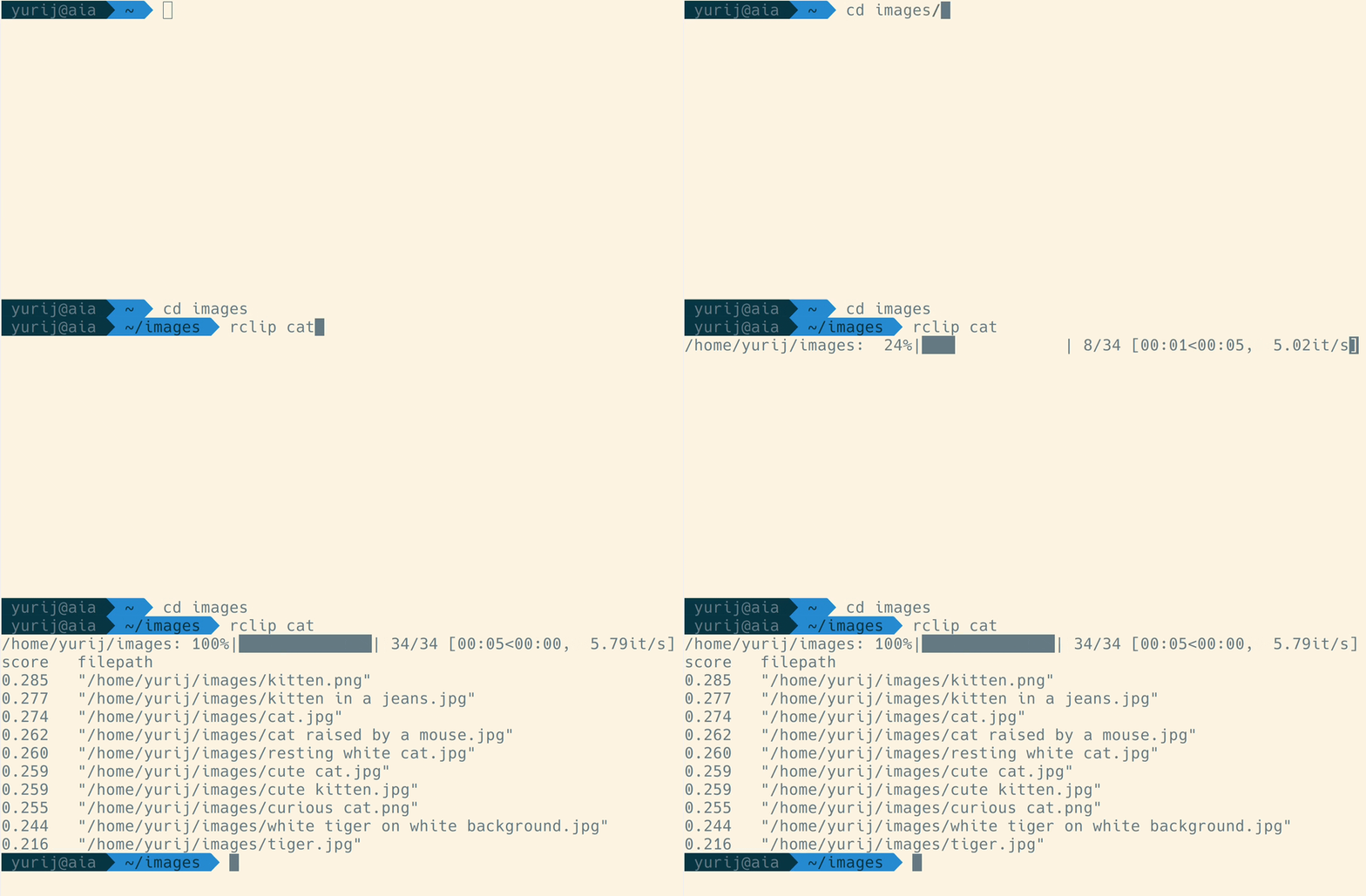
When you run rclip for the first time in a particular directory, it will extract features from the photos, which takes time. How long it will take depends on your CPU and the number of pictures you will search through. It took about a day to process 73 thousand photos on my NAS, which runs an old-ish Intel Celeron J3455, 7 minutes to index 50 thousand images on my MacBook with an M1 Max CPU, and three hours to process 1.28 million images on the same MacBook.
For a detailed demonstration, watch the video: https://www.youtube.com/watch?v=tAJHXOkHidw.
Similar image search
You can use another image as a query by passing a file path or even an URL to the image file, and rclip will find the images most similar to the one you used as a query. If you are referencing a local image via a relative path, you must prefix it with ./. For example:
cd photos && rclip ./cat.jpg

# or use URL
cd photos && rclip https://raw.githubusercontent.com/yurijmikhalevich/rclip/main/tests/e2e/images/cat.jpg
Check this video out for the image-to-image search demo: https://www.youtube.com/watch?v=1YQZKeCBxWM.
Combining multiple queries
You can add and subtract image and text queries from each other; here are a few usage examples:
cd photos && rclip horse + stripes
cd photos && rclip apple - fruit
cd photos && rclip "./new york city.jpg" + night
cd photos && rclip "2:golden retriever" + "./swimming pool.jpg"
cd photos && rclip "./racing car.jpg" - "2:sports car" + "2:snow"
If you want to see how these queries perform when executed on the 1.28 million images ImageNet-1k dataset, check out the demo on YouTube: https://www.youtube.com/watch?v=MsTgYdOpgcQ.
How do I preview the results?
If you are using either one of iTerm2, Konsole (version 22.04 and higher), wezterm, Mintty, or mlterm all you need to do is pass --preview (or -p) argument to rclip:
rclip -p kitty
Using a different terminal or viewer
If you are using any other terminal or want to view the results in your viewer of choice, you can pass the output of rclip to it. For example, on Linux, the command from below will open top-5 results for "kitty" in your default image viewer:
rclip -f -t 5 kitty | xargs -d '\n' -n 1 xdg-open
The -f param or --filepath-only makes rclip print the file paths only, without scores or the header, which makes it ideal to use together with a custom viewer as in the example.
I prefer to use feh's thumbnail mode to preview multiple results:
rclip -f -t 5 kitty | feh -f - -t
Help
rclip --help
Contributing
This repository follows the Conventional Commits standard.
Running locally from the source code
To run rclip locally from the source code, you must have Python and Poetry installed.
Then do:
# clone the source code repository
git clone git@github.com:yurijmikhalevich/rclip.git

# install dependencies and rclip
cd rclip
poetry install

# activate the new poetry environment
poetry shell
If the poetry environment is active, you can use rclip locally, as described in the Usage section above.
Contributors ✨
Thanks go to these wonderful people and organizations (emoji key):
 ramayer 💻 |
 Caphyon 🚇 |
Thanks to Caphyon and Advanced Installer team for generously supplying rclip project with the Professional Advanced Installer license for creating the Windows installer.
This project follows the all-contributors specification. Contributions of any kind are welcome!
License
MIT
Release history Release notifications | RSS feed


Download files
Download the file for your platform. If you're not sure which to choose, learn more about installing packages.
Source Distribution
Built Distribution
Filter files by name, interpreter, ABI, and platform.
If you're not sure about the file name format, learn more about wheel file names.
Copy a direct link to the current filters
File details
Details for the file rclip-1.7.9.tar.gz.
File metadata
- Download URL: rclip-1.7.9.tar.gz
- Upload date:
- Size: 16.5 kB
- Tags: Source
- Uploaded using Trusted Publishing? Yes
- Uploaded via: twine/4.0.2 CPython/3.11.7
File hashes
| Algorithm | Hash digest | |
|---|---|---|
| SHA256 |
118d68cadb02ec45e2e2a4565cff34af6c27eae1f0410f310abf713dfb9c0915
|
|
| MD5 |
9de2a23e66c2e0d7ffeb81c9204292f1
|
|
| BLAKE2b-256 |
46d35796d299c24445776e4e4b4536d3829cf786742585aed463dddd92e9c17e
|
File details
Details for the file rclip-1.7.9-py3-none-any.whl.
File metadata
- Download URL: rclip-1.7.9-py3-none-any.whl
- Upload date:
- Size: 16.1 kB
- Tags: Python 3
- Uploaded using Trusted Publishing? Yes
- Uploaded via: twine/4.0.2 CPython/3.11.7
File hashes
| Algorithm | Hash digest | |
|---|---|---|
| SHA256 |
79e853f80e4e2e26ee66f1c1c4b7048dd42125ad31b78318732a3640be139c15
|
|
| MD5 |
3de62acf9bb3974a0e19ddbb987bc9fc
|
|
| BLAKE2b-256 |
cec6c77b9a46ae45e764a43331bef29a0b82ab2a62469a9f4fc53e327cc3e872
|






