
Reddit to Markdown Scraper (rd2md)
This Python script uses PRAW (Python Reddit API Wrapper) to scrape interesting posts from a specified subreddit and save them in a formatted Markdown file. It also downloads and saves images associated with the posts.
Features
- Scrapes hot posts from a specified subreddit
- Filters posts based on score and whether they're stickied
- Downloads and saves images from posts
- Formats post content, including comments, into a Markdown file
- Handles both text posts and image posts
- Can be used as a standalone script or imported as a module
Prerequisites
- Python 3.12.3 or higher
- pip (Python package installer)
Installation
You can install rd2md directly from PyPI:
pip install rd-to-md
Setup
To use this script, you need to create a Reddit application to get the necessary credentials:
- Log in to your Reddit account
- Go to https://www.reddit.com/prefs/apps
- Scroll down and click "create another app..."
- Fill out the form:
- Choose a name for your application
- Select "script" as the app type
- For "redirect uri", use http://localhost:8080
- Add a description (optional)
- Click "create app"
After creating the app, note down the following:
- client_id: The string under "personal use script"
- client_secret: The string next to "secret"
Usage
As a Command-Line Tool
After installation, you can run rd2md from the command line:
rd2md --client_id=YOUR_CLIENT_ID --client_secret=YOUR_CLIENT_SECRET [options]
Options:
--client_id: Your Reddit API client ID (required if not set as an environment variable)--client_secret: Your Reddit API client secret (required if not set as an environment variable)--user_agent: User agent for Reddit API (default: "praw_bot")--subreddit: Subreddit to scrape (default: "LocalLLaMA")--limit: Number of posts to scrape (default: 3)
Example:
rd2md --client_id=YOUR_CLIENT_ID --client_secret=YOUR_CLIENT_SECRET --subreddit=ProgrammingHumor --limit=10
As an Importable Module
You can also use rd2md as a module in your Python code:
from rd2md import rd2md

# Scrape and save posts
filename, list_contents, list_images = rd2md(
    client_id="YOUR_CLIENT_ID",
    client_secret="YOUR_CLIENT_SECRET",
    subreddit_name="ProgrammingHumor",
    limit=10
)
Using Environment Variables
Instead of passing the client ID and secret as arguments, you can set them as environment variables:
export REDDIT_CLIENT_ID=your_client_id
export REDDIT_CLIENT_SECRET=your_client_secret
Then you can run the script without these arguments:
python rd2md.py --subreddit=ProgrammingHumor --limit=10
Output
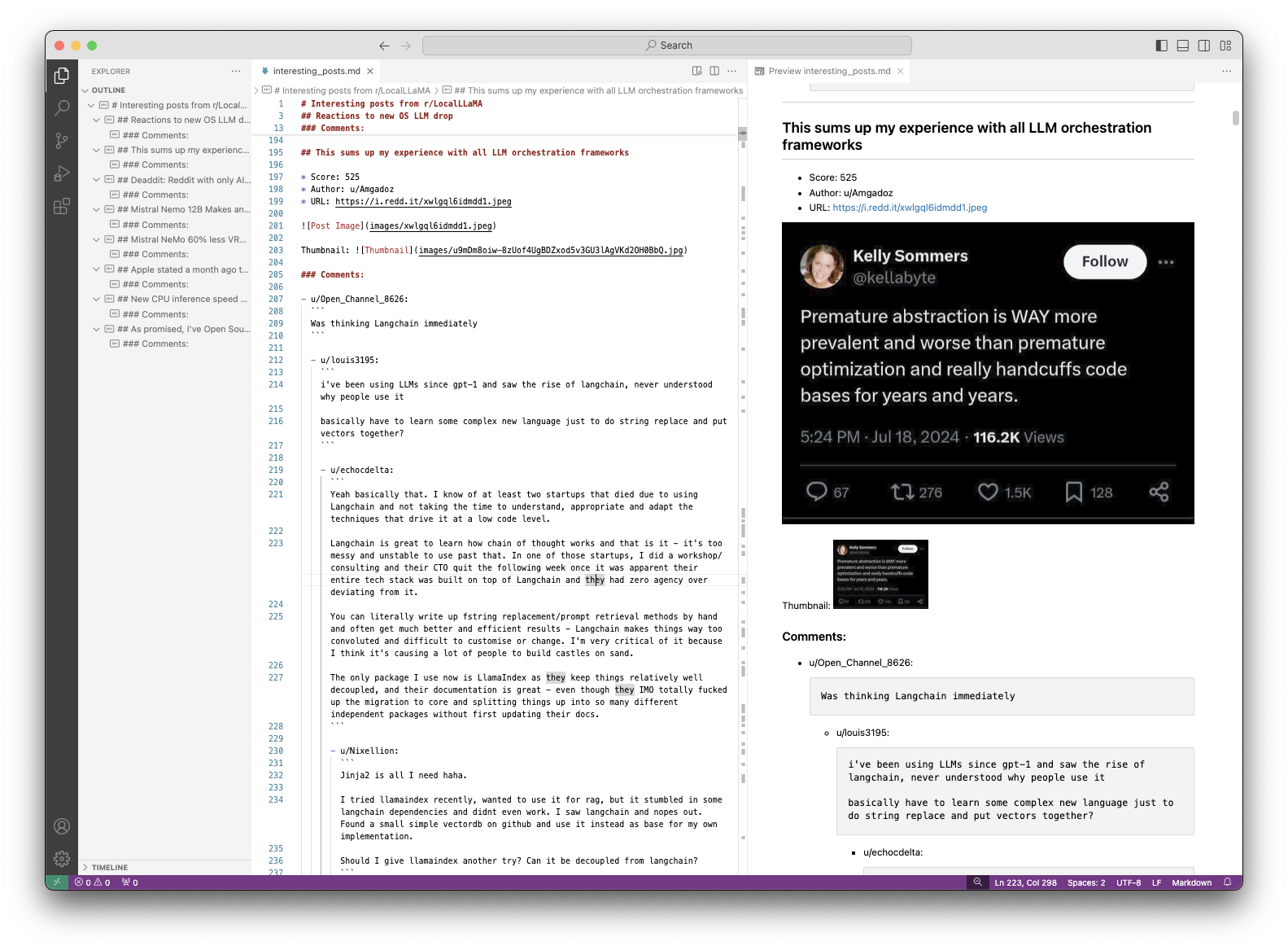
The script creates a new directory named {subreddit}_posts_{date} in the current working directory. This directory contains:
- A Markdown file named
{current_time}.mdwith the scraped post content - An
imagessubdirectory containing any downloaded images
LLM Integration
# https://github.com/JosefAlbers/Phi-3-Vision-MLX

from phi_3_vision_mlx import generate
from pathlib import Path
import json

filename, contents, images = rd2md(post_url='https://www.reddit.com/r/LocalLLaMA/comments/1e7pdig/this_sums_up_my_experience_with_all_llm/')
prompt = 'Write an executive summary of above (max 200 words). The article should capture the diverse range of opinions and key points discussed in the thread, presenting a balanced view of the topic without quoting specific users or comments directly. Focus on organizing the information cohesively, highlighting major arguments, counterarguments, and any emerging consensus or unresolved issues within the community.'
prompts = [f'{s}\n\n{prompt}' for s in contents]
results = [generate(prompts[i], images[i], max_tokens=512, blind_model=False, quantize_model=False, verbose=False) for i in range(len(prompts))]
with open(Path(filename).with_suffix('.json'), 'w') as f:
    json.dump({'prompts':prompts, 'images':images, 'results':results}, f, indent=4)
Click to expand output
The discussion revolves around the use of LLM (Language Learning Models) in software development, particularly focusing on the abstraction provided by Langchain. Opinions are divided, with some advocating for the convenience and ease of use Langchain offers, while others criticize it for being overly complex and hindering customization and understanding. The thread suggests that while Langchain may simplify certain tasks, it can also lead to a lack of control and flexibility, potentially resulting in technical debt. There is a consensus that understanding the underlying mechanisms is crucial, and that abstractions should be used judiciously to avoid over-complication. The thread also touches on the broader topic of software development practices, emphasizing the importance of clear, maintainable code and the potential pitfalls of over-reliance on abstractions. The community appears to be grappling with the balance between leveraging existing tools and maintaining the ability to adapt and innovate independently.<|end|>
Contributing
Contributions are welcome! Please feel free to submit a Pull Request.
License
This project is licensed under the MIT License - see the LICENSE file for details.
1 maintainer

Release files for rd-to-md 0.0.3
For a detailed explanation of source distributions (sdists) and built distributions (wheels), please see the package formats documentation.
Source distribution (sdist)
| File | Size | Uploaded | |
|---|---|---|---|
| rd_to_md-0.0.3.tar.gz | 5.9 kB | Details |
Built distribution (wheel)
| File | Interpreter | ABI | Platform | Reset |
|---|---|---|---|---|
| rd_to_md-0.0.3-py3-none-any.whl | Python 3 | none | any | Details |
Total release size: 11.9 kB
Release files / rd_to_md-0.0.3.tar.gz
| Download URL | rd_to_md-0.0.3.tar.gz |
|---|---|
| Size | 5.9 kB |
| Tags | Source |
|
SHA-256 checksum How to use checksums |
3dd73f6d408ec02d43e3013113dd86976273ca56a8c579c52297d6a2dfc5ac96
|
|
BLAKE2b-256 checksum How to use checksums |
0968a2dc524338e4cd233c5e827b930b9293cf068d842a110c8a93ff70f0be97
|
| Upload date | |
|
Uploaded using Trusted Publishing? What is trusted publishing? |
No |
| Uploaded via |
twine/5.1.0 CPython/3.12.3
|
Release files / rd_to_md-0.0.3-py3-none-any.whl
| Download URL | rd_to_md-0.0.3-py3-none-any.whl |
|---|---|
| Size | 6.1 kB |
| Tags | Python 3 |
|
SHA-256 checksum How to use checksums |
be3e319c82b20e35a6ad88cbd30c8995d76cb1989037b145df617e36a215f0b3
|
|
BLAKE2b-256 checksum How to use checksums |
7439afbba46c4b97bb352a3813653e6dd7fed90e824d7965e5c6d77b5044f50b
|
| Upload date | |
|
Uploaded using Trusted Publishing? What is trusted publishing? |
No |
| Uploaded via |
twine/5.1.0 CPython/3.12.3
|














