
RDFscope
A local RDF explorer. Open a file or connect to a SPARQL endpoint, follow connections, inspect the exact RDF terms, and save your investigation.
Try RDFscope in your browser → · Quickstart with uv
Explore the sample or open your own RDF file. No installation; your data stays in your browser.
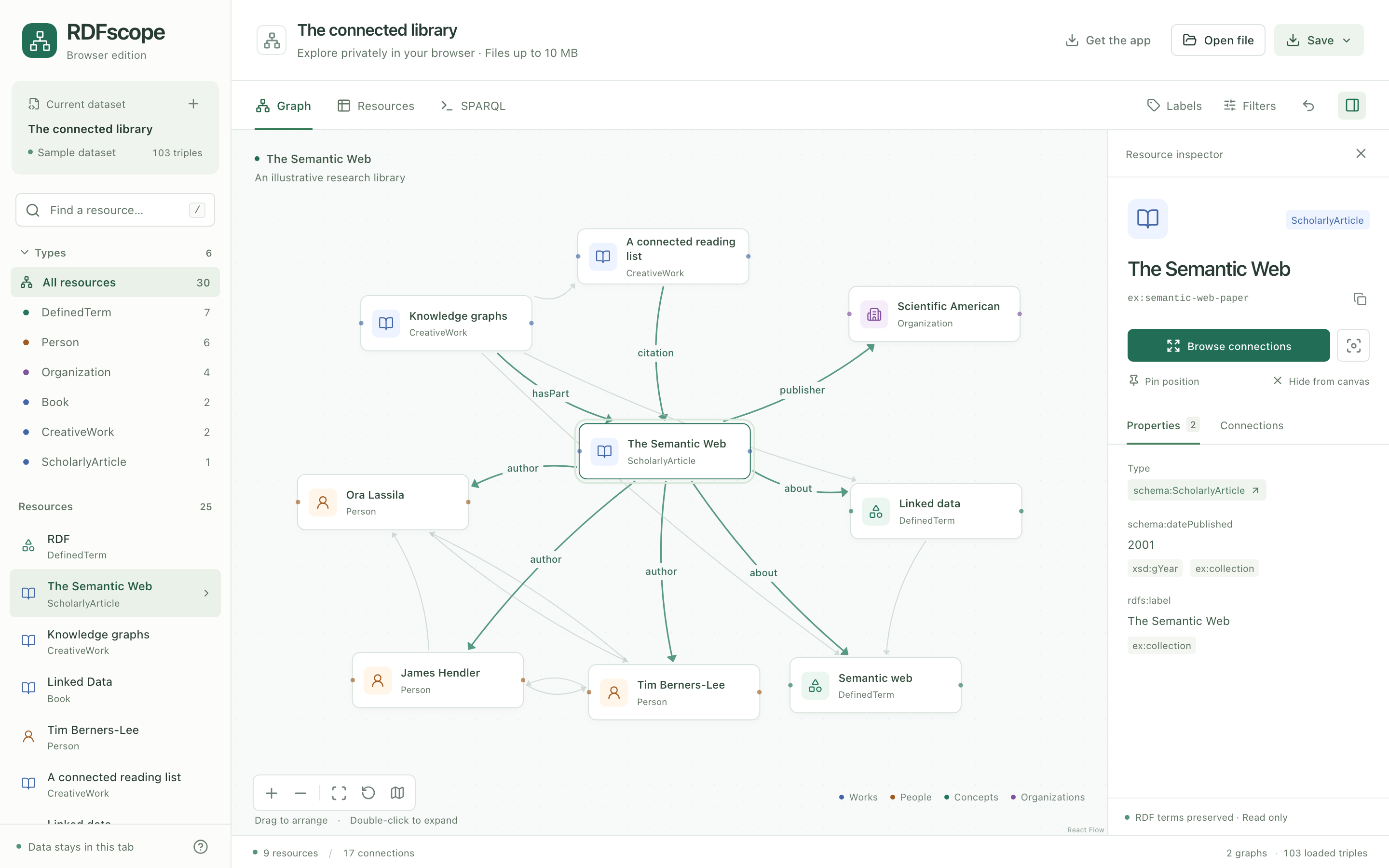
A real exploration of the bundled sample. Click the screenshot to try it yourself.
RDFscope is a Rust application with an embedded React interface and an in-process Oxigraph store. The built executable needs no Node.js, database server, Docker, or internet connection to explore local files.
Status: early release (alpha maturity). Version 0.1.1 is intended for developer exploration and feedback. Features, APIs, and saved workspace formats may change before 1.0. Keep your original RDF files; the store is disposable and in memory. See Data and operating limits before loading a dataset.
Quickstart with uv
With uv installed, try the bundled demo without a permanent install:
uvx rdfscope@0.1.1
This opens http://127.0.0.1:7878 in your browser. Double-click a resource to follow
its connections, select it to inspect its RDF, or open the SPARQL editor to query
the dataset. No dataset download or database setup is needed.
To explore your own local RDF file, pass its path:
uvx rdfscope@0.1.1 data.ttl
Or connect to a SPARQL endpoint (replace the example URL with yours):
uvx rdfscope@0.1.1 --endpoint https://example.org/sparql
In the connection dialog, you can optionally paste any resource IRI from the graph as your starting point. RDFscope opens that resource and its direct connections; the IRI does not need to be a designated root.
Press Ctrl+C in the terminal to stop the server. Each new process starts a fresh
session; save a workspace in the interface if you want to keep your investigation.
After the first download, cached local-file sessions can run offline with
uvx --offline rdfscope@0.1.1 data.ttl.
Install
For regular use, install the standalone application from PyPI:
uv tool install rdfscope==0.1.1
# Or: pipx install rdfscope==0.1.1
rdfscope data.ttl
The Python package distributes the Rust executable, with no Python runtime dependencies. Wheels target Linux (glibc 2.28+, x86-64 and ARM64), macOS (Intel and Apple Silicon), and Windows (x86-64). The installer needs Python 3.10 or newer.
Or install through Cargo with Rust 1.98 or newer:
cargo install rdfscope --version 0.1.1 --locked
Registry source packages include the compiled interface, so Cargo installs and Python source builds do not require Node.js. Python source builds require Rust and a native C toolchain. Standalone archives with SHA-256 checksums are also available on the GitHub releases page.
Browser edition
Open the browser demo to explore the bundled sample or your own files without installing anything or uploading data. It runs the same Rust RDF engine through WebAssembly, hosted as a static app on Cloudflare. Browser files are limited to 10 MB; endpoint connections use the installed app. Save a workspace before closing or reloading the tab.
See Build, test, and deploy the browser demo.
VS Code extension
Download the VSIX from the VS Code preview release and use Extensions → Install from VSIX. Right-click a Turtle or RDF file to explore it in VS Code, inspect terms, and run SPARQL. The text editor remains the default; browsing does not modify your file. See build and usage instructions.
Build and run
Development prerequisites: current stable Rust (tested with 1.98), Node.js 22.12 or newer, and npm.
make build
./target/release/rdfscope
The command opens http://127.0.0.1:7878 with the bundled sample library. To use your data:
./target/release/rdfscope data.ttl
./target/release/rdfscope dataset.trig --port 8080
./target/release/rdfscope --endpoint https://example.org/sparql
./target/release/rdfscope --endpoint https://example.org/sparql --token-env SPARQL_TOKEN
./target/release/rdfscope --no-open --port 0
--port 0 selects an available local port and prints the address. Endpoint credentials are read from the named environment variable; values are never printed. You can also enter a bearer token in the connection dialog.
Copy target/release/rdfscope to another machine with the same OS and CPU architecture to run it. All UI assets and sample data are embedded at compilation. Build separately for each target platform. Release builds are installed and smoke-tested on Linux x86-64 and ARM64, macOS Intel and Apple Silicon, and Windows x86-64.
Explore
- Open file: Turtle, TriG, N-Triples, N-Quads, RDF/XML, and JSON-LD. Drop a file onto the application or use the file dialog. Failed imports leave the current dataset intact.
- Find a resource: search labels or full IRIs and narrow by RDF type. Endpoint mode searches the live dataset in pages of 25; switch to Loaded data for the cached sample. Enter a complete IRI to open it directly. The type catalog describes loaded data.
- Follow connections: double-click a node to add its first 25 connections. Use Browse connections in the inspector to page through a neighborhood, filter incoming/outgoing relationships and graph scope, follow one exact predicate statement from its named graph, or add the full page. Browsing continues independently of the canvas limit. Existing positions stay fixed; arrange, pin, focus, hide, or undo graph changes.
- Inspect RDF: endpoint resources fetch literal properties on selection, and connection pages hydrate labels and types. Literal values retain their language and datatype. Outgoing and incoming statements identify their named graph. Resource types are shown in the inspector rather than as
rdf:typeedges on the canvas. - Filter: choose a relationship or named graph, or use the type filter. Filters apply to the resources currently on the canvas. Use SPARQL for full-dataset filtering.
- Query: SELECT, ASK, CONSTRUCT, and DESCRIBE run against the loaded store or connected endpoint. Example queries include named graphs explicitly. Result IRIs can be selected for inspection. Local SPARQL SERVICE requests and SPARQL Update are disabled.
- Trace requests: the Trace view shows generated SPARQL, timings, HTTP status, result counts, response sizes, and failures for the last 50 completed endpoint requests. Copy a query or open it in the SPARQL editor. Authentication headers and endpoint URL query parameters are excluded.
- Save: a
.rdfscope.jsonworkspace includes the loaded RDF, canvas, positions, pins, filters, labels, and query. Reopen it using Open file. Credentials are never included. Endpoint workspaces restore the cached sample as local data, and do not reconnect automatically. - Export: SVG of the visible graph, N-Quads of the loaded dataset, or JSON query results.
Keyboard shortcuts: / finds a resource, F fits the graph, ⌘/Ctrl S saves a workspace, and ⌘/Ctrl Enter runs the current query.
Data and operating limits
The store is in memory. Files are not modified, and application state ends when the process stops; save a workspace to retain your work. Multiple tabs connected to the same process share the active dataset, while their canvas arrangements are independent. Local files never leave the computer. Endpoint requests go to the endpoint you select. The interface itself uses no CDN, external fonts, accounts, or telemetry.
This first version intentionally bounds interactive work:
| Operation | Limit |
|---|---|
| RDF/workspace file import | 64 MB |
| Canvas | 200 resources, 2,000 edges |
| Connection / search page | 25 results in the UI; API accepts 1–50 |
| Relationship catalog | First 200 predicate/direction groups; all remain browsable |
| Inspector properties | 300 statements, with an explicit partial-results notice |
| Labels / types per fetch | 2,000 statements, with an explicit partial-results notice |
| Query display | 1,000 rows |
| Concurrent queries | 2 |
| Local query execution | 30 seconds, then cancellation |
| Endpoint request | 25 seconds, 8 MB response |
| Initial endpoint sample | 500 statements |
| Concurrent endpoint requests | 4; requests wait up to 5 seconds for a slot |
| Query trace | Last 50 completed requests, in memory |
The initial endpoint canvas is a cached sample, not a complete inventory. Sidebar counts describe loaded data; relationship counts and paginated connection searches query the endpoint directly. Connection pages show whether more results are available, without implying that the endpoint is fully loaded. Live data can change between pages; OFFSET pagination assumes a stable dataset. Label matching uses portable SPARQL substring searches, so large endpoints may need a more selective query. Local search is paginated; cached endpoint search considers the first 200 matches. Queries execute against the endpoint directly. Endpoint authentication supports bearer tokens; redirects are refused, so enter the final endpoint URL. Blank nodes are scoped to each endpoint response and cannot be reliably re-addressed across requests. JSON-LD files with embedded contexts are supported; automatic retrieval of remote contexts is not enabled. RDF 1.2/RDF-star and inferred reasoning are outside the current scope.
Relative IRIs in imported RDF use https://rdfscope.local/import/ as their fallback base unless the document defines a base. Use absolute IRIs or an explicit base when document-relative identifiers matter.
Development
cd web
npm ci
npm run build
cd ..
cargo run -- --no-open
For frontend hot reload, run npm run dev in web/ while the Rust process is running. Vite proxies API requests to port 7878. Rebuild the frontend before building a distributable binary; the binary embeds the files currently in web/dist/.
make test
python3 scripts/smoke.py http://127.0.0.1:7878
The smoke test uses a local mock SPARQL server, replaces the running app's dataset with test data, then restores the bundled sample. Run it against a disposable process. The Rust endpoint integration test also starts a loopback-only SPARQL fixture backed by real Oxigraph queries. It checks large-neighborhood pagination, named-graph identity, label/type hydration, remote search, counts, metadata failures, and trace privacy. Tests cover RDF semantics and serialization, all supported formats, incoming connections, query limits/cancellation, read-only enforcement, local request guards, stable graph expansion, quad deduplication, and endpoint interaction.
For repeatable browser testing against a live local SPARQL fixture:
python3 scripts/endpoint_fixture.py
Connect to the printed URL using the printed seed IRI. The fixture contains 138 outgoing connections across two named graphs and labels outside the initial neighborhood sample. Stop it with Ctrl+C; its temporary data and child process are cleaned up.
Source layout:
src/main.rs: CLI, local HTTP API, embedded assets, request guards.src/lib.rs: shared RDF engine used by the native CLI and browser adapter.src/dataset.rs: Oxigraph ingestion, indexes, graph projection, queries, serialization.src/remote.rs: endpoint discovery, bounded requests, metadata, and query trace.src/exploration.rs: shared search, property inspection, paginated connections, and exploration types.browser/: WebAssembly adapter; shares the root Cargo lockfile and builds without native dependencies.web/src/: React graph workspace, inspector, query editor, import flow.examples/: illustrative research library dataset.
Builds bind only to IPv4 loopback. Cross-origin requests and non-local Host headers are rejected. The API is intended for one local user, not shared hosting or direct public exposure.
Releases and license
See the release guide for package checks, workflow dry runs, registry setup, and recovery after a partial release.
RDFscope is licensed under MIT. The embedded interface includes its
dependency notices at /THIRD_PARTY_LICENSES.txt.
1 maintainer

Metadata
1 maintainer
Release files for rdfscope 0.1.1
For a detailed explanation of source distributions (sdists) and built distributions (wheels), please see the package formats documentation.
Source distribution (sdist)
| File | Size | Uploaded | Provenance | |
|---|---|---|---|---|
| rdfscope-0.1.1.tar.gz | 306.5 kB | Without provenance | Details |
Built distributions (wheels)
| File | Reset | |||
|---|---|---|---|---|
| rdfscope-0.1.1-py3-none-win_amd64.whl | Python 3 | none | Windows x86-64 | Details |
| rdfscope-0.1.1-py3-none-manylinux_2_28_x86_64.whl | Python 3 | none | Linux glibc 2.28+ x86-64 | Details |
| rdfscope-0.1.1-py3-none-manylinux_2_28_aarch64.whl | Python 3 | none | Linux glibc 2.28+ ARM64 | Details |
| rdfscope-0.1.1-py3-none-macosx_11_0_arm64.whl | Python 3 | none | macOS 11.0+ ARM64 | Details |
| rdfscope-0.1.1-py3-none-macosx_10_12_x86_64.whl | Python 3 | none | macOS 10.12+ x86-64 | Details |
Total release size: 23.9 MB
Release files / rdfscope-0.1.1.tar.gz
| Download URL | rdfscope-0.1.1.tar.gz |
|---|---|
| Size | 306.5 kB |
| Tags | Source |
|
SHA-256 checksum How to use checksums |
930fe14d324414c08b86eb68eab5267d68c379f33bd8421dfa416850197c7fa2
|
|
BLAKE2b-256 checksum How to use checksums |
aa9afe6923d9c51c552e4a9a78f73033e5c1c1d5f3c7794ab22817fe1032abe9
|
| Upload date | |
|
Uploaded using Trusted Publishing? What is trusted publishing? |
No |
| Uploaded via |
uv/0.12.17 {"installer":{"name":"uv","version":"0.12.17","subcommand":["publish"]},"python":null,"implementation":{"name":null,"version":null},"distro":{"name":"Ubuntu","version":"24.04","id":"noble","libc":null},"system":{"name":null,"release":null},"cpu":null,"openssl_version":null,"setuptools_version":null,"rustc_version":null,"ci":true}
|
Release files / rdfscope-0.1.1-py3-none-win_amd64.whl
| Download URL | rdfscope-0.1.1-py3-none-win_amd64.whl |
|---|---|
| Size | 4.8 MB |
| Tags | Python 3 Windows x86-64 |
|
SHA-256 checksum How to use checksums |
a3d6bde7805feacfc47717c4ff1ab077b5be91ae28be74a2e68f2797ebb94a8d
|
|
BLAKE2b-256 checksum How to use checksums |
2f53c536fea29f9099cf122ef9fcbb6093d02e647d4d78e19102ef7d1533609a
|
| Upload date | |
|
Uploaded using Trusted Publishing? What is trusted publishing? |
No |
| Uploaded via |
uv/0.12.17 {"installer":{"name":"uv","version":"0.12.17","subcommand":["publish"]},"python":null,"implementation":{"name":null,"version":null},"distro":{"name":"Ubuntu","version":"24.04","id":"noble","libc":null},"system":{"name":null,"release":null},"cpu":null,"openssl_version":null,"setuptools_version":null,"rustc_version":null,"ci":true}
|
Release files / rdfscope-0.1.1-py3-none-manylinux_2_28_x86_64.whl
| Download URL | rdfscope-0.1.1-py3-none-manylinux_2_28_x86_64.whl |
|---|---|
| Size | 4.9 MB |
| Tags | Linux glibc 2.28+ x86-64 Python 3 |
|
SHA-256 checksum How to use checksums |
eb6740ae4da20a5220021d624af517bf6e369367018147b5260ae1737d684c20
|
|
BLAKE2b-256 checksum How to use checksums |
9cb65bf497f36cc5f288de9f9d503e1d7e7fcdb47b6c47ca1a05fb693083eb4c
|
| Upload date | |
|
Uploaded using Trusted Publishing? What is trusted publishing? |
No |
| Uploaded via |
uv/0.12.17 {"installer":{"name":"uv","version":"0.12.17","subcommand":["publish"]},"python":null,"implementation":{"name":null,"version":null},"distro":{"name":"Ubuntu","version":"24.04","id":"noble","libc":null},"system":{"name":null,"release":null},"cpu":null,"openssl_version":null,"setuptools_version":null,"rustc_version":null,"ci":true}
|
Release files / rdfscope-0.1.1-py3-none-manylinux_2_28_aarch64.whl
| Download URL | rdfscope-0.1.1-py3-none-manylinux_2_28_aarch64.whl |
|---|---|
| Size | 4.7 MB |
| Tags | Linux glibc 2.28+ ARM64 Python 3 |
|
SHA-256 checksum How to use checksums |
9decd9d7566ae6eda7bf358e7df2a99d79c15962479e0127d36ea7aa33cd9fa4
|
|
BLAKE2b-256 checksum How to use checksums |
32926f8b7fe695003eb52cee42bb69e39339be32296c832880ff666f6969a609
|
| Upload date | |
|
Uploaded using Trusted Publishing? What is trusted publishing? |
No |
| Uploaded via |
uv/0.12.17 {"installer":{"name":"uv","version":"0.12.17","subcommand":["publish"]},"python":null,"implementation":{"name":null,"version":null},"distro":{"name":"Ubuntu","version":"24.04","id":"noble","libc":null},"system":{"name":null,"release":null},"cpu":null,"openssl_version":null,"setuptools_version":null,"rustc_version":null,"ci":true}
|
Release files / rdfscope-0.1.1-py3-none-macosx_11_0_arm64.whl
| Download URL | rdfscope-0.1.1-py3-none-macosx_11_0_arm64.whl |
|---|---|
| Size | 4.5 MB |
| Tags | Python 3 macOS 11.0+ ARM64 |
|
SHA-256 checksum How to use checksums |
854978629bf6f6169469706ff51a0236be649073b7d3748fd4c0d4d5984ed297
|
|
BLAKE2b-256 checksum How to use checksums |
6c95339db120803f078a3c27f5d77b8ea588466fa5b073e24446720ae2cb322e
|
| Upload date | |
|
Uploaded using Trusted Publishing? What is trusted publishing? |
No |
| Uploaded via |
uv/0.12.17 {"installer":{"name":"uv","version":"0.12.17","subcommand":["publish"]},"python":null,"implementation":{"name":null,"version":null},"distro":{"name":"Ubuntu","version":"24.04","id":"noble","libc":null},"system":{"name":null,"release":null},"cpu":null,"openssl_version":null,"setuptools_version":null,"rustc_version":null,"ci":true}
|
Release files / rdfscope-0.1.1-py3-none-macosx_10_12_x86_64.whl
| Download URL | rdfscope-0.1.1-py3-none-macosx_10_12_x86_64.whl |
|---|---|
| Size | 4.7 MB |
| Tags | Python 3 macOS 10.12+ x86-64 |
|
SHA-256 checksum How to use checksums |
33d7624aa37082c4a53018d064902db58bd9925fb53e43ad289395247326626e
|
|
BLAKE2b-256 checksum How to use checksums |
a5b62d9d2cbb83348fe18f2d2389ae8b2f2ba9bb8f0f6cea65bfe40b549d1216
|
| Upload date | |
|
Uploaded using Trusted Publishing? What is trusted publishing? |
No |
| Uploaded via |
uv/0.12.17 {"installer":{"name":"uv","version":"0.12.17","subcommand":["publish"]},"python":null,"implementation":{"name":null,"version":null},"distro":{"name":"Ubuntu","version":"24.04","id":"noble","libc":null},"system":{"name":null,"release":null},"cpu":null,"openssl_version":null,"setuptools_version":null,"rustc_version":null,"ci":true}
|
Security for rdfscope 0.1.1
Provenance
Provenance describes where a file came from. On PyPI, provenance is shared via attestations, which provide a verifiable record of the build or publishing details. View details, limitations and caveats.
No provenance found
None of the files in this release were uploaded with provenance metadata.
A note on package security
PyPI is a repository for distributing packages, not a service for auditing them. While third-party security researchers and our staff do their best to detect and remove malicious packages, PyPI cannot guarantee the quality, security or suitability of any given package.
To learn more about protecting yourself from malicious actors, visit our package security documentation.














