
rdmatop



htop, but for RDMA traffic — a real-time TUI monitor for RDMA network interfaces.
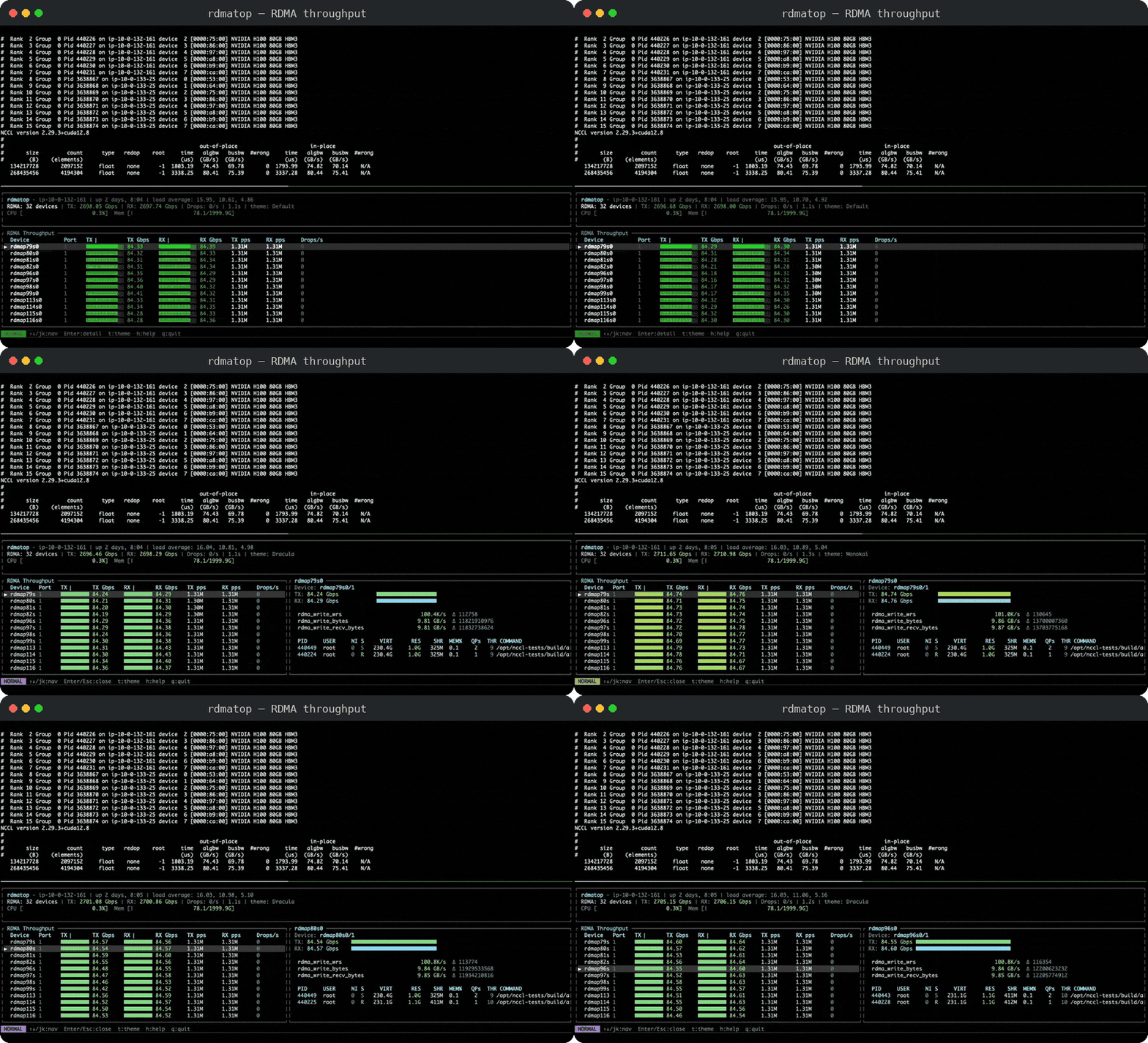
Monitors per-device throughput (Gbps, packets/s, drops), RDMA read/write counters, retransmits, health events, and shows which processes are using each RDMA device — all via RDMA netlink, the same interface used by rdma statistic.
Blogs
- rdmatop: Cross-Provider htop for RDMA Traffic (2026-06-15)
- NVSHMEM Multi-NIC Support with AWS EFA (2026-03-27)
Requirements
- Linux (netlink-based — macOS/Windows are not supported)
- RDMA-capable NICs (e.g., Mellanox/NVIDIA ConnectX, AWS EFA)
Installation
Python package
pip install rdmatop
Ubuntu (PPA)
On Ubuntu 22.04 (jammy), 24.04 (noble), or 26.04 (resolute) — amd64 and arm64:
sudo add-apt-repository ppa:crazyguitar/rdmatop
sudo apt update
sudo apt install rdmatop
Cargo
cargo install rdmatop
From source
make         # cargo build
make install # cargo install
Usage
rdmatop
Perfetto recording
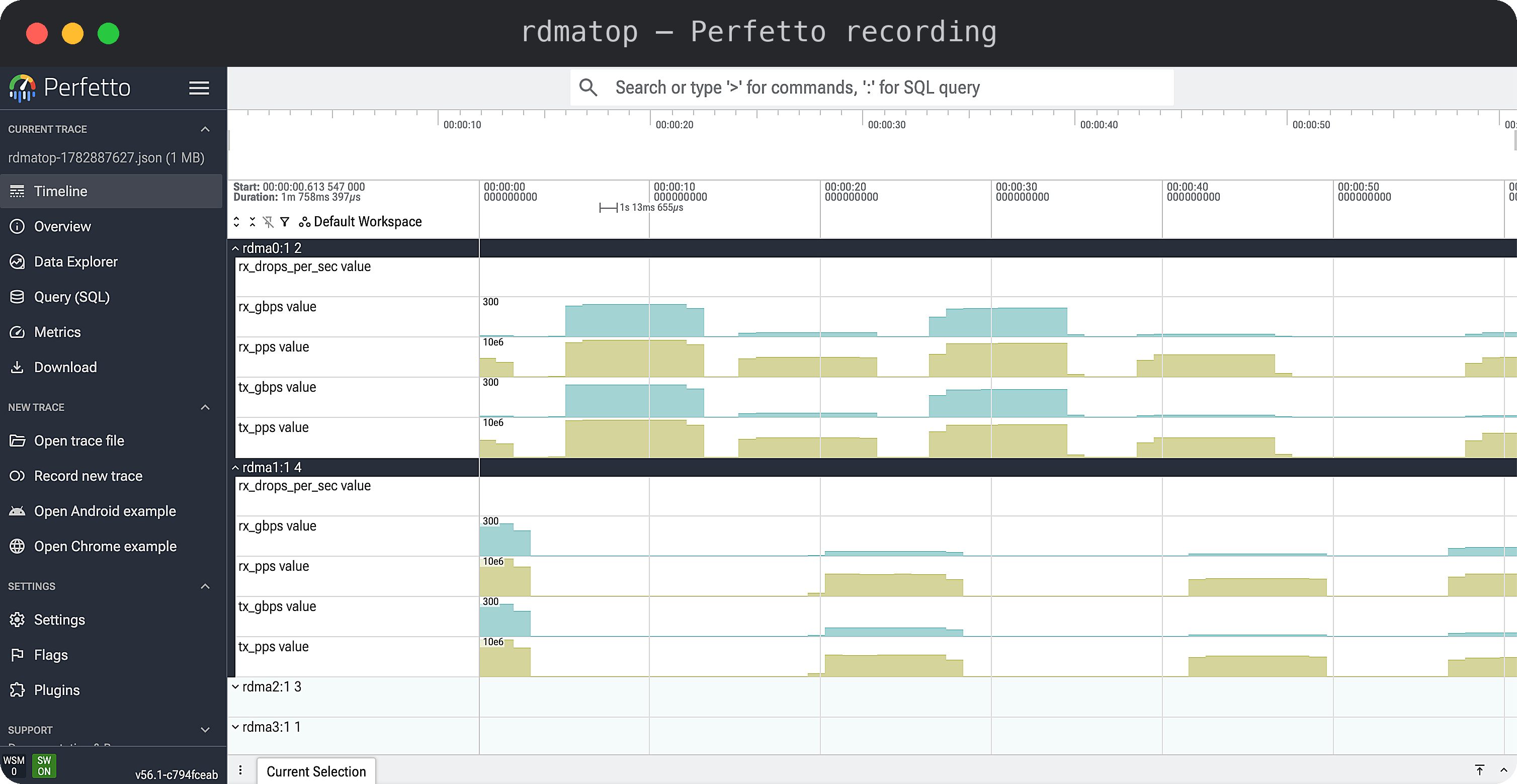
Press r to start and stop recording. rdmatop writes rdmatop-<timestamp>.json
to the current directory; open it in ui.perfetto.dev.
PyTorch profiler
Build from a checkout (needs cargo and a C++ compiler; rebuild after
upgrading torch):
pip install "setuptools>=77" "torch>=2.9"
pip install --no-build-isolation -e .
Call enable() before profiling; RDMA counters land in the same trace:
import rdmatop.kineto
from torch.profiler import ProfilerActivity, profile

rdmatop.kineto.enable()
with profile(activities=[ProfilerActivity.CPU, ProfilerActivity.CUDA]) as prof:
    train_step()
prof.export_chrome_trace("trace.json")
VizTracer
Add RDMA counters to a VizTracer trace from the CLI:
pip install "viztracer>=1.1.1"
viztracer --plugins rdmatop.viztracer -- my_script.py
Or in code:
from viztracer import VizTracer

with VizTracer(plugins=["rdmatop.viztracer"], output_file="trace.json"):
    train_step()
Set the sampling interval (ms, default 10) and limit to specific devices:
viztracer --plugins "rdmatop.viztracer --interval 1 --devices mlx5_0,mlx5_1" -- my_script.py
Examples
Use rdmatop to monitor RDMA traffic while running GPU
communication benchmarks:
- PyTorch — intranode NVLink/XGMI traffic
- IB Perftest — two-node
ib_write_bwbenchmark - UCX Perftest — two-node
ucx_perftestbandwidth / latency - NCCL — collective communication
- NIXL — point-to-point KV cache transfer
- NVSHMEM — one-sided GPU communication
- PPLX Kernels — MoE all-to-all dispatch/combine
- UCCL — DeepEP-compatible expert-parallel dispatch/combine
- RDMA Statistics — shell-based RDMA stats
- Kubernetes — DaemonSet deployment for Kubernetes
How It Works
- Device enumeration —
RDMA_NLDEV_CMD_GETvia netlink to discover all RDMA devices - HW counters —
RDMA_NLDEV_CMD_STAT_GETper device/port, same asrdma statistic show - Process detection —
RDMA_NLDEV_CMD_RES_QP_GETto map QPs → PIDs, enriched with/procdata - Throughput — Two snapshots per interval, delta / elapsed for rates
Contributing
See CONTRIBUTING.md for build/test instructions, design ground rules, and how to submit changes.
License
Apache-2.0
1 maintainer

Metadata
1 maintainer
Release files for rdmatop 0.1.32
For a detailed explanation of source distributions (sdists) and built distributions (wheels), please see the package formats documentation.
Source distribution (sdist)
| File | Size | Uploaded | |
|---|---|---|---|
| rdmatop-0.1.32.tar.gz | 92.2 kB | Details |
Release files / rdmatop-0.1.32.tar.gz
| Download URL | rdmatop-0.1.32.tar.gz |
|---|---|
| Size | 92.2 kB |
| Tags | Source |
|
SHA-256 checksum How to use checksums |
24c593fa389c31285d5258a6d62a70b12952b09c0b768ccba4fb1885a441ceb4
|
|
BLAKE2b-256 checksum How to use checksums |
5dbc86669ec3555afcf8520cc5241d1fc9ccb987eaa7d5568344ad88d294c1ae
|
| Upload date | |
|
Uploaded using Trusted Publishing? What is trusted publishing? |
Yes |
| Uploaded via |
twine/7.0.0 CPython/3.13.14
|
Provenance
Provenance describes where a file came from. On PyPI, provenance is shared via attestations, which provide a verifiable record of the build or publishing details. View details, limitations and caveats.


PyPI Publish Attestation
PyPI verified that this artifact, at this checksum, originated from the publisher listed below.
Signed by GitHub Actions, verified by PyPI on Oct 2, 2026.
Transparency log













