
reactpy-select
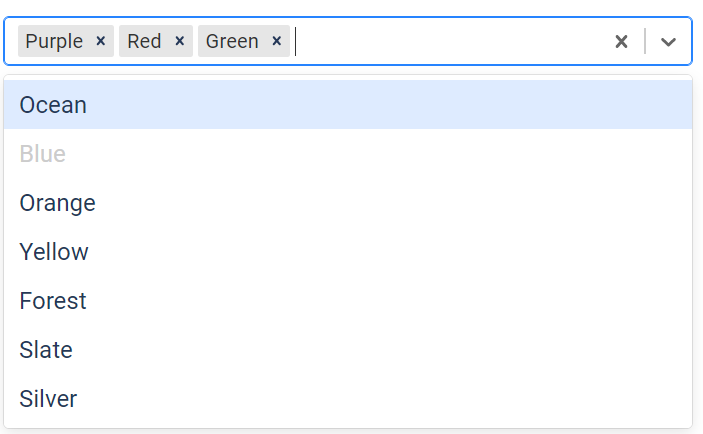
A minimal component wrapper for react-select.
Usage
pip install reactpy-select
from reactpy import html, component, event, run, use_state
from reactpy_select import Select, ActionMeta, Options

@component
def AppMain():
    values, set_values = use_state([])

    @event
    def on_change(new_value: Options, actionMeta: ActionMeta):
        set_values(new_value)

    return html.div(
        html.h2('Dropdown Example, default values (Custom styles)'),

        Select(
            value = values,
            default_value=[options[0], options[1]],
            multi=True,
            onchange=on_change,
            options=options
            ),

        html.h2(f"[{', '.join([v['value'] for v in values ])}]")
    )
Supported Functionality
- Current values
- Custom styling
- Default values
- IsClearable, isDisabled, isSearchable
- Multi-select
- OnChange events
- Placeholder
- Themes
Custom Styling
react-select uses a JavaScript callback mechanism to allow the component style to be customized. All aspects of the select component can be customized. See Adjusting the Styling on the react-select website for examples.
In reactpy the JavaScript is wrapped in a multi-line python string. Existing JavaScript code can be pasted into the string without modification.
STYLES = {
    'option': '''(defaultStyles, state) => ({
      ...defaultStyles,
      color: state.isSelected ? "#212529" : "#fff",
      backgroundColor: state.isSelected ? "#a0a0a0" : "#212529",
    })''',

    'control': '''(defaultStyles) => ({
      ...defaultStyles,
      backgroundColor: "#212529",
      padding: "10px",
      border: "none",
      boxShadow: "none",
    })''',

    'singleValue': '''(defaultStyles) => ({ ...defaultStyles, color: "#fff" })''',
  }

@component
def AppMain():
    return Select(styles=STYLES)
1 maintainer

Metadata
1 maintainer
Release files for reactpy-select 0.0.5
For a detailed explanation of source distributions (sdists) and built distributions (wheels), please see the package formats documentation.
Source distribution (sdist)
| File | Size | Uploaded | |
|---|---|---|---|
| reactpy_select-0.0.5.tar.gz | 490.0 kB | Details |
Built distribution (wheel)
| File | Interpreter | ABI | Platform | Reset |
|---|---|---|---|---|
| reactpy_select-0.0.5-py3-none-any.whl | Python 3 | none | any | Details |
Total release size: 984.5 kB
Release files / reactpy_select-0.0.5.tar.gz
| Download URL | reactpy_select-0.0.5.tar.gz |
|---|---|
| Size | 490.0 kB |
| Tags | Source |
|
SHA-256 checksum How to use checksums |
992c6614439d60b251de44b493325de34820f86420512fadb95750d108d6933d
|
|
BLAKE2b-256 checksum How to use checksums |
12466106b67df8e2510ff100afbedcf0ba565c1a93d54650fd3bdeb673abf20f
|
| Upload date | |
|
Uploaded using Trusted Publishing? What is trusted publishing? |
No |
| Uploaded via |
poetry/1.8.2 CPython/3.11.4 Windows/10
|
Release files / reactpy_select-0.0.5-py3-none-any.whl
| Download URL | reactpy_select-0.0.5-py3-none-any.whl |
|---|---|
| Size | 494.5 kB |
| Tags | Python 3 |
|
SHA-256 checksum How to use checksums |
7ebd223b8d5afac379760a97ebab30439b961c763259eea42a70c0ea2ced51df
|
|
BLAKE2b-256 checksum How to use checksums |
553c50aa06d8addb539213ec8c4c1abbfeab1f5d1fa9197cb8291a742d29d522
|
| Upload date | |
|
Uploaded using Trusted Publishing? What is trusted publishing? |
No |
| Uploaded via |
poetry/1.8.2 CPython/3.11.4 Windows/10
|














