
ReadAnyDoc






Parse and extract documents with vision models, on your own machine and your own model account. Open source, Reducto-compatible, built by Unmute. Website: https://arpitpatel25.github.io/ReadAnyDoc/
ReadAnyDoc reads every page of a PDF, scan, photo or Office file with a vision model (Claude Haiku 5.5 by default) and returns typed blocks, tables, Markdown, or the fields of your schema, each with the place on the page it came from. Around the model sits an engine that adds what a model alone does not give you: block types and positions, form fields, headers and footers, table checks, word-level citations. It runs as a Python library or as a server that speaks Reducto's HTTP API, so existing Reducto integrations work by changing one URL.
import readanydoc

result = readanydoc.parse("invoice.pdf")
print(result.markdown)
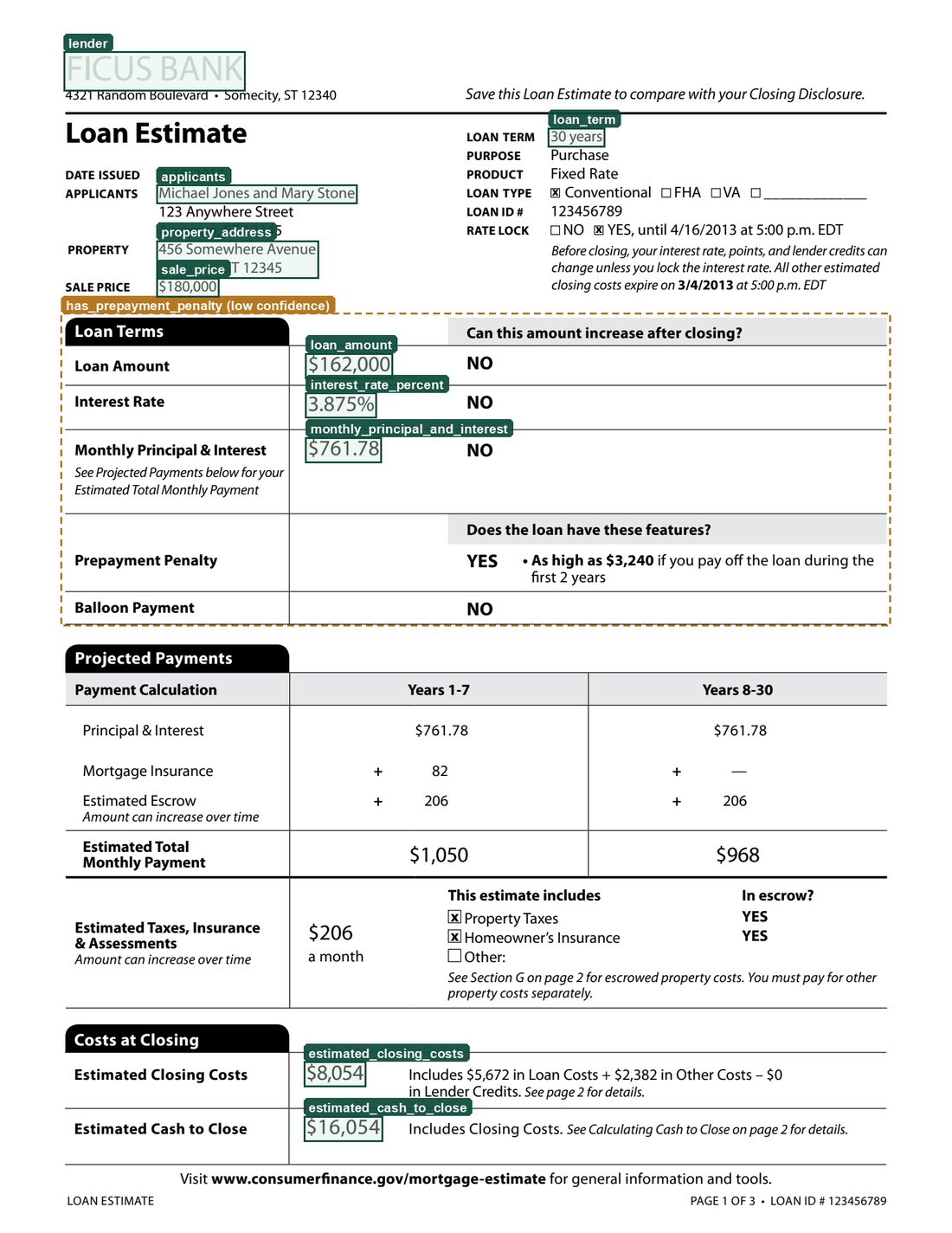
A real document, unedited: the US government's sample Loan Estimate, extracted in one call for about 1 cent. All 11 fields are right, and every box is a citation ReadAnyDoc returned. A yes/no answer that is not printed as one word is marked low confidence instead of pretending. A faded 1904 invoice is in the same folder: examples/showcase. If it looks useful, ⭐ star the repo.
Results
ReadAnyDoc against Reducto on public benchmarks (olmOCR-bench with 0.4.7, the others with 0.4.5), same documents and same requests, every score from the benchmark's own grader or from code (no AI judge). Details, per-document scores and caveats: BENCHMARKS.md.
Parsing
| Benchmark | Reducto | ReadAnyDoc |
|---|---|---|
| olmOCR-bench, overall (1,403 pages) | 80.9 | 85.4 |
| OmniDocBench, text error, lower is better (1,651 pages) | 0.095 | 0.073 |
| OmniDocBench, layout: block types right | 84.6% | 79.0% |
| RD-TableBench (1,000 tables) | 88.85 | 88.84 |
| FUNSD, form question/answer pairs (199 forms) | 78.6 | 77.4 |
| Cost per page | $0.010 | $0.003-0.005 |
Extraction (share of the answer key found, cost per document)
| Test set | Reducto | ReadAnyDoc |
|---|---|---|
| Long reports, table rows (LongExtract, 6 documents) | 9.1%, $1.02 | 56.4%, $0.44 |
| 10-Q and 10-K filings (ExtractBench, 5) | 48.9%, $1.24 | 79.1%, $0.34 |
| Research papers (ExtractBench, 3) | 49.9%, $0.33 | 68.4%, $0.074 |
| Credit agreements, 97-218 pages (ExtractBench, 3) | 83.3%, $2.83 | 82.2%, $0.20 |
| Invoices: photos, scans, handwriting (20) | 99.8%, $0.027 | 99.8%, $0.0045 |
| Commercial contracts (CUAD, 10) | not run | 86.5%, $0.026 |
Where Reducto is ahead: page layout (about 6 points), formulas, header and footer removal, precision on 10-Q filings (ReadAnyDoc writes more values than the answer key holds), and speed (seconds a page against 20-50 s here).
Install
pip install "readanydoc[engine]"        # the engine: layout model and OCR run on your CPU
pip install readanydoc                  # model-only mode, no local models
The engine also uses Tesseract when it is installed
(brew install tesseract / apt install tesseract-ocr). The layout and OCR weights (about 200 MB, Apache-2.0)
are downloaded on first use, so the very first parse takes a few minutes longer; later runs start straight away. Python 3.12 or 3.13.
Set your model provider's key: export ANTHROPIC_API_KEY=... (or OPENAI_API_KEY for OpenAI models).
Or let your coding agent set it up
Paste this into Claude Code, Codex or Cursor. It installs ReadAnyDoc, tests it on one of your files and wires it into your project the way you choose (what it follows):
Set up ReadAnyDoc in this project. Follow the instructions at
https://raw.githubusercontent.com/arpitpatel25/ReadAnyDoc/main/AGENT_SETUP.md
Use
Parse
result = readanydoc.parse("statement.pdf")
result.blocks          # [Block(type="Table", content="<table>...", bbox=BoundingBox(...)), ...]
result.tables          # the Table blocks
result.markdown        # the whole document as Markdown
result.usage           # model calls, tokens, cost in USD, seconds
result.warnings        # anything that went wrong on a page
Extract into your own types
from pydantic import BaseModel

class Invoice(BaseModel):
    number: str
    issued: str
    total: float

out = readanydoc.extract("invoice.pdf", schema=Invoice)
out.data                      # Invoice(number="INV-2041", issued="2026-03-01", total=1575.0)
out.citations["total"]        # [Citation(content="1,575.00", bbox=BoundingBox(page=1, left=0.81, ...))]
The result holds your fields and nothing else; the model writes only those, so a large schema costs what the
answer costs. Opt-in: review=True lists values to check (not printed as returned, ambiguous dates, crossed out,
lists shorter than their table; found by code, no model call), alternatives=True returns other values the document
gives for a field (a special term that changes a price). See Extract.
A JSON Schema dict works as well as a pydantic class. instructions= is the system prompt for the extraction
model; array_extract=True processes long documents in parts and merges their lists.
Choose the mode and the models
| Mode | What it does |
|---|---|
engine (default) |
The model reads each page; the engine adds layout, forms, headers/footers, table checks and citations |
model-only |
One model read per page and nothing else: cheapest, fastest, no structure beyond what the model writes |
Every model the pipeline uses can be chosen, with its effort level and any further request options:
readanydoc.parse(
    "form.pdf",
    mode="engine",
    model="claude-haiku-5-5", effort="high",                 # page reading (the default)
    model_options={"max_tokens": 32000},                     # sent as given to the provider
    handwriting_model="claude-sonnet-5-5",                   # handwritten pages (the default); None = like any page
)

readanydoc.extract("contract.pdf", schema=Terms,
                 model="claude-haiku-5-5",                   # reads the pages
                 extract_model="claude-sonnet-5-5", extract_effort="high")   # fills the schema
Models: any Claude model, OpenAI models (gpt-...), or any OpenAI-compatible endpoint written as
openai_compatible:<model>@<base_url>. The benchmark numbers above are for Claude Haiku 5.5; other models work
but have not been measured here.
Command line
readanydoc parse invoice.pdf --markdown
readanydoc parse scan.pdf --mode model-only --model claude-sonnet-5-5
readanydoc extract invoice.pdf --schema invoice.schema.json
Server (Reducto-compatible API)
readanydoc serve --port 8000
# or: docker compose up
from reducto import Reducto   # Reducto's own SDK, unchanged

client = Reducto(api_key="anything", base_url="http://127.0.0.1:8000")
upload = client.upload(file=Path("invoice.pdf"))
result = client.parse.run(input=upload.file_id)
Parse, extract, split, classify, edit, async jobs, webhooks and citations are implemented. Configuration, security settings and a route-by-route compatibility table: the documentation.
Inside Claude, Cursor and other assistants (MCP)
pip install "readanydoc[engine,mcp]"
claude mcp add readanydoc -e ANTHROPIC_API_KEY=your-key -- readanydoc mcp
In Claude Code you can install the plugin instead (server plus a skill): /plugin marketplace add arpitpatel25/ReadAnyDoc,
then /plugin install readanydoc@readanydoc.
Gives the assistant two tools, parse_document and extract_fields (with citations), on files on your computer.
Setup for Claude Desktop, Cursor and others: MCP guide.
LangChain and LlamaIndex
from readanydoc.integrations.langchain import ReadAnyDocLoader     # pip install "readanydoc[engine,langchain]"
from readanydoc.integrations.llamaindex import ReadAnyDocReader    # pip install "readanydoc[engine,llamaindex]"
One Markdown document per page with its page number. Guide.
Test it against what you use now
readanydoc bench list                                                      # invoices, receipts, filings, contracts, resumes...
readanydoc bench run invoices --systems readanydoc,plain:claude-haiku-5-5,reducto --limit 10
readanydoc bench mine ./my_docs --schema schema.json --answers ./answer_keys   # your own documents
Your own keys, a cost estimate before anything runs, scoring by code against answer keys, and an HTML report with every system's citations on the page. Guide.
How it works
Each page goes through a fixed sequence of stages (readanydoc/pipeline/): intake (file type, pages), triage
(digital or scanned, rotation), layout (an open layout model on CPU), read (the vision model; zoomed re-reads of
scanned pages where two reads must agree before a character changes; handwritten pages to a stronger model),
verify (table grids and printed totals checked without a model), ground (word and cell positions, block types,
form fields), assemble and shape (the requested output format). Nothing the model wrote is changed without
independent evidence. Design decisions and their reasons: docs/decisions.md.
Limits
- Slower than Reducto: 20-50 s per page here against about 5 s.
- About 1.5-3% of pages in large public benchmarks are declined by the model provider (content filtering). Those
pages fall back to plain OCR text at
lowconfidence, or to a second model if you setREADANYDOC_REFUSAL_READER; the response says so inwarnings. - Confidence values are tiers from how a value was found on the page, not calibrated probabilities.
Documentation
| BENCHMARKS.md | full results against Reducto, cost, method, caveats; per-document scores in results/ |
| docs/story.md | the whole story: the idea, how we measured, the parser, the extractor, two stages or one, what we learned |
| docs/research/journey.md | the parser research record: every stage, every experiment, what was kept and dropped and why |
| docs/research/extraction.md | the extraction research record: structured output, caching, page parts, citations, one stage |
| docs/decisions.md | every design decision with its reason |
| Documentation | guides, API reference, configuration, migrating from Reducto |
| examples/ | runnable scripts |
| AGENTS.md, llms.txt | a map of the repo for AI agents; point your agent at it to ask questions |
Community
If ReadAnyDoc saved you time, a star on GitHub helps other developers find it.
Questions, ideas and what you built: GitHub Discussions. Bugs: open an issue. Release news: watch the repository (Watch, Custom, Releases).
Contributing
See CONTRIBUTING.md. Security reports: SECURITY.md.
License
Apache-2.0. The layout model (Docling "heron") and the PP-OCR weights are Apache-2.0.
1 maintainer

Metadata
1 maintainer
Release files for readanydoc 0.4.7
For a detailed explanation of source distributions (sdists) and built distributions (wheels), please see the package formats documentation.
Source distribution (sdist)
| File | Size | Uploaded | Provenance | Actions |
|---|---|---|---|---|
| readanydoc-0.4.7.tar.gz | 794.5 kB | With provenance | Details for readanydoc-0.4.7.tar.gz |
Built distribution (wheel)
| File | Interpreter | ABI | Platform | Actions Reset |
|---|---|---|---|---|
| readanydoc-0.4.7-py3-none-any.whl | Python 3 | none | any | Details for readanydoc-0.4.7-py3-none-any.whl |
Total release size: 1.5 MB
Release files / readanydoc-0.4.7.tar.gz
| Download URL | readanydoc-0.4.7.tar.gz |
|---|---|
| Size | 794.5 kB |
| Tags | Source |
|
SHA-256 checksum How to use checksums |
e6a414aac2eb49c6766c9a1ec314b338d7d89dbea2d935d3dd2cedd5b794fc3f
|
|
BLAKE2b-256 checksum How to use checksums |
d6194d4d010cc40e9aedd9df3a1d2a6d61779788189eebda818d8b0d60954b92
|
| Upload date | |
|
Uploaded using Trusted Publishing? What is trusted publishing? |
Yes |
| Uploaded via |
twine/7.0.0 CPython/3.13.16
|
Provenance
Provenance describes where a file came from. On PyPI, provenance is shared via attestations, which provide a verifiable record of the build or publishing details. View details, limitations and caveats.


PyPI Publish Attestation
PyPI verified that this artifact, at this checksum, originated from the publisher listed below.
Signed by GitHub Actions, verified by PyPI on Nov 22, 2026.
Transparency logRelease files / readanydoc-0.4.7-py3-none-any.whl
| Download URL | readanydoc-0.4.7-py3-none-any.whl |
|---|---|
| Size | 669.8 kB |
| Tags | Python 3 |
|
SHA-256 checksum How to use checksums |
c82356fc6e72a29d33d5d3c37f04f22a54d01d6d74040bd8d3b71e5ef0d05db6
|
|
BLAKE2b-256 checksum How to use checksums |
5a929c3659e4d08b34126a9b64d56a2ca11e2713f964b8c291cafd551c656575
|
| Upload date | |
|
Uploaded using Trusted Publishing? What is trusted publishing? |
Yes |
| Uploaded via |
twine/7.0.0 CPython/3.13.16
|
Provenance
Provenance describes where a file came from. On PyPI, provenance is shared via attestations, which provide a verifiable record of the build or publishing details. View details, limitations and caveats.
PyPI Publish Attestation
PyPI verified that this artifact, at this checksum, originated from the publisher listed below.
Signed by GitHub Actions, verified by PyPI on Nov 22, 2026.
Transparency logSecurity for readanydoc 0.4.7
Provenance
Provenance describes where a file came from. On PyPI, provenance is shared via attestations, which provide a verifiable record of the build or publishing details. View details, limitations and caveats.
Full provenance
Both files in this release have been uploaded with provenance metadata.
Attestation for readanydoc-0.4.7.tar.gz
PyPI Publish Attestation
PyPI verified that this artifact, at this checksum, originated from the publisher listed below.
Signed by GitHub Actions, verified by PyPI on Nov 22, 2026.
Transparency logA note on package security
PyPI is a repository for distributing packages, not a service for auditing them. While third-party security researchers and our staff do their best to detect and remove malicious packages, PyPI cannot guarantee the quality, security or suitability of any given package.
To learn more about protecting yourself from malicious actors, visit our package security documentation.














