

One memory for all your coding agents.


Your coding agents forget everything between sessions, and none of them knows what you told the others. recall reads the chat history that Claude Code, Codex and Cursor already keep on your machine, and gives every agent:
- Search across every chat. "Find the Cursor chat where we planned the auth refactor" works in any agent, whichever tool the chat happened in.
- Memory. A small set of plain markdown notes, rewritten nightly: how you like to work, what each project needs, what was decided, what went wrong, and what is still open. Each note links to the chats it came from.
- Your projects, whichever tool you used. Clones, worktrees, moved folders and chats with no folder, grouped into the projects you actually work on, with the same rules given to every agent.
- Agents that know about each other. See what each chat is working on, and hear about it before two of them edit the same file.
It runs on your machine, and indexing and search make no LLM calls. For the nightly notes you choose the model: a local one that keeps everything private, your ChatGPT or Claude subscription, or your own API key or server.
you   › what did we decide about retries in the payments service?
agent › Searching your past chats… In "Payment webhook retries" (Codex, 2 Oct) you settled
        on exponential backoff capped at 5 attempts, and a dead-letter queue for the rest.
        Memory also notes: "Never retry card captures; they are not idempotent."
Install
Paste this into Claude Code, Codex or Cursor:
Install recall for me: follow https://raw.githubusercontent.com/alirng/recall/main/INSTALL.md
The agent checks what you have, asks which model should write your memories (the one choice that decides where chat text goes), installs, sets up, and checks it worked.
Or by hand, on macOS or Linux with Python 3.11+:
uv tool install 'recall-agents[embeddings]'     # or: pipx install 'recall-agents[embeddings]'
recall setup
Setup finds your agents, picks the model and tests it, indexes your history, asks what agents
should do when they share a file, connects the MCP tools, the /recall skill and the hooks,
schedules the nightly run, and starts the first one in the background. If you use Codex on a
Python older than 3.14, add the zstd extra (or install the zstd command) so recall can read
the chats Codex compresses after a week. Ask any agent about an
earlier conversation straight away. Once that first run has written notes, Claude Code and
Codex open each session with your preferences and the current project's notes loaded.
Results
recall is measured on public benchmarks built from coding work, and every number is
reproducible with recall eval. docs/benchmarks.md has every result,
the method, the caveats and the commands.
- Finds the earlier fix for a new bug 80% of the time (top five, SWE-ContextBench Lite: 99 GitHub issues searched against 300 Claude Code sessions). The memory products the benchmark's authors tested found it 39–73% of the time, each at its own cutoff, after running an LLM over every session. recall is ahead at each of those cutoffs.
- Agents follow your latest conventions. On MemoryCode, with recall's notes loaded at session start, Claude Haiku 5.5 writes code that follows the latest conventions on histories of 20 to 100 sessions 75% of the time, against 32% with search alone, and takes in 41% fewer tokens. Written by Claude Haiku 5.5, the notes hold nine in ten of the conventions in their latest form; written by gpt-6-luna, not quite two in three (which model to pick).
- No LLM calls to index or to search. On ~2,800 chats a search takes about 11 ms, or 47 ms with embeddings (median, on a laptop).
- Out of the way while agents work. In 0.5.0 a call to recall's tools takes 65 ms at the median, against 258 ms in 0.4.2, and agents answer as accurately (same day, three runs each; the comparison). It waits for power before background work on battery, and every agent's server shares one copy of the search vectors.
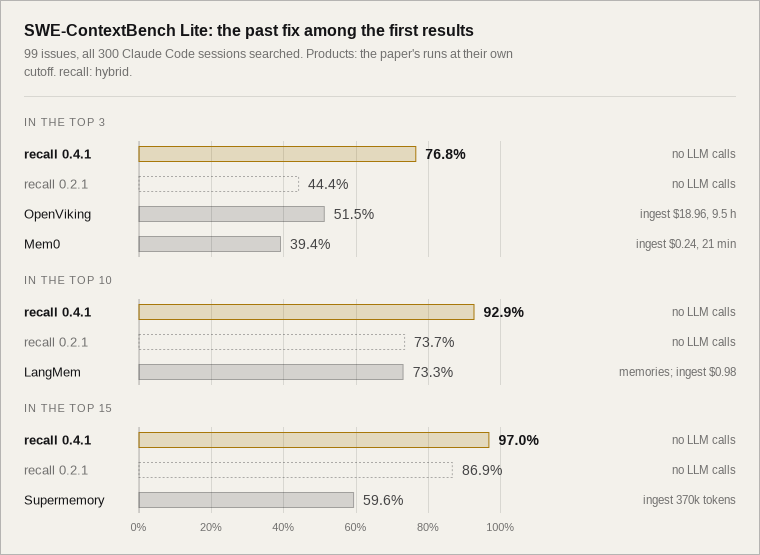
On LongMemEval, the chat benchmark memory products usually report, recall's search puts a session that answers the question in its top five 98.7% of the time (470 questions: the ones that have an answer session).
How agents use it
| Claude Code | Codex | Cursor | |
|---|---|---|---|
| Its chat history is searchable | yes | yes | yes, and older chats on macOS |
MCP tools and the /recall skill |
yes | yes | yes |
| Notes loaded at session start | automatically | automatically, once you trust the hook | on request |
- At session start, a hook loads your working preferences and the current project's notes, plus a line for each always-on rule the repo gives another agent but not this one.
- Mid-session, the same hook can hand over memory at the moment it applies: when your prompt closely matches an earlier chat, or when the agent reads a file that scoped rules, notes or an earlier chat cover. It stays quiet unless it is sure.
- On demand, MCP tools let the agent search and read past chats, and look up notes and
projects. Eight only read; the ninth,
message_chat, hands work to any other chat, waking it if it is idle. What the tools and hooks can do. - When you ask,
/recall what did we decide about authworks in any agent with skills.
Agents treat notes and transcripts as background, not instructions: the current request and the code win when they disagree. Beyond those three, recall reads the chat history of OpenCode, Antigravity, Gemini CLI, Pi, Copilot CLI, Goose and 28 more agents, and registers its MCP server in the ones that document a config file, and in Windsurf and Warp: docs/agents.md says what works in each. T3 Code's chats are Claude Code and Codex chats; see How agents use it.
Memory you can read
Notes are plain markdown, in a git repository at ~/.agents/memory:
---
id: run-migrations-through-make-3f2a
type: lesson
scope: project
title: Run migrations through make
project: github.com/acme/harbor
project_name: harbor
confidence: high
status: active
created: '2026-09-12'
updated: '2026-09-30'
last_seen: '2026-09-30'
sources:
- codex:0192f3a8-5c1e-7d2b-9e4f-3a6b8c1d2e4f
- claude:7c41e9b2-1f3a-4d5e-8b6c-9a0f2e3d4c5b
---
Run database migrations with `make migrate`, never by hand: the Makefile also seeds
the audit tables. Why: two hand-run migrations left staging without audit rows.
The files are the source of truth. Edit a note and recall keeps your edit; delete one and it
is never learned again. git log shows what each night changed, and git revert undoes it.
Newer chats supersede older notes, and work and personal memory can be kept apart. A rule you
state with /recall remember is written at once and kept in your words. How notes
are written and loaded: docs/how-it-works.md.
Projects and rules
A project is rarely one folder. It is a repo cloned twice, a dozen worktrees, the folder it lived in before you moved it, and the chats you had with no folder open at all. recall follows each project across all of that:
$ recall projects
                            May   Jun   Jul   Aug   Sep   Oct
harbor            work      ●─────●─────●─────●─────●─────●       412 chats
harbor-mobile     work                  └─────○─────●─────○       23 chats · from harbor
blog              personal                    ○─────●─────●       76 chats
tidepool          personal  ○                                     190 chats · paused
Each agent also reads its own instruction files (CLAUDE.md, AGENTS.md, .cursor/rules),
so a repo set up well for one agent is a stranger to the others. recall rules shows which
agent misses which rule, and --write copies the missing ones where all three read them.
More in docs/projects.md.
Several chats, one repo
Run agents side by side and sooner or later two of them change the same file. recall status
shows what each chat is working on, and where they overlap:
$ recall status
src/auth/session.py will conflict  (harbor · main ↔ new-login)
    Claude Code · Fix the login redirect
    Codex · Restyle the sign-in page
Before an agent edits a file another chat has open changes to, recall tells it, or stops it to check with you, by a rule you set. The two chats can message each other to agree who goes first. More in docs/coordination.md.
Which chat wrote this
$ recall why src/auth/session.py:42
src/auth/session.py:42  (github.com/acme/harbor)

3f9c2a1e  2026-09-14  Keep the redirect target through login  (1 line here)
  Claude Code · 2026-09-14 · Fix the login redirect
    made this commit and wrote 38 of its 41 lines · claude:5b1e…
    asked: "after login it lands on the home page, it should go back where you were"
recall why follows a file, a line or a commit back to the chats that produced it, and agents
can ask the same through MCP. The links stay in recall's index on your machine; nothing is
written to the repo. More in docs/commit-links.md.
Several accounts and installs
A personal and a work account, or Cursor next to Cursor Nightly, means several agent folders.
recall finds each one, indexes it, and connects it; recall doctor lists them:
claude          ~/.claude
                connected; 5,812 chats, last indexed 3 min ago; a***@***
claude-work     ~/.claude-work
                waiting for first launch (the agent has not used this folder yet; recall writes nothing there)
codex           ~/.codex
                hooks written, trust pending: trust them once with /hooks in Codex; 212 chats, last indexed 3 min ago
A second account's chats are searchable at once, and become memory only when you say so. recall can also keep every folder connected on its own, but only once you say yes to that. More in docs/accounts.md.
For apps
recall api serves your chats, notes, memory runs and status as JSON over a local unix socket
(mode 0600, no network port), with live updates. It also makes the few changes an app may make
(editing and forgetting notes, the coordination rules, the model, removing old copies), through the
same code as the command line. It starts when a client asks and exits when idle, so nothing runs in
between. The Mac app and the menu bar are built on it. More in docs/api.md.
Grok Bot
Grok Bot's personal agents keep their chats on your Mac too. If you opt in during recall setup,
recall reads that cache read-only into your personal context, so your coding agents can find what
you told a bot, and a bot can run recall search --context personal for what you told them. Work
sessions never get them. More in docs/grok-bot.md.
Choosing a model
recall writes its notes with a language model. Pick the one that fits your privacy and budget:
| Option | What it uses | Where chat excerpts go |
|---|---|---|
| Local model | Ollama, LM Studio or llama.cpp on this machine | nowhere: they stay on this machine |
| ChatGPT | your ChatGPT plan, through the Codex CLI | OpenAI, under your plan's data terms |
| Claude | your Claude plan, through Claude Code (haiku, sonnet and opus run the 5.5 models) |
Anthropic, under your plan's data terms |
| API key | OpenAI, Anthropic or OpenRouter | that provider, billed to your key |
| Your server | any OpenAI-compatible endpoint, such as vLLM or Ollama on another box | your server |
Change it any time with recall model. Configuration, semantic search and every command are
in docs/reference.md.
FAQ
Does recall send my chats anywhere? Only to the models you choose, and only after secrets are redacted: digests of chats to the model that writes notes, and message text to a hosted embedding service if you use one. With a local model on this machine nothing leaves it. recall has no telemetry. See SECURITY.md.
What does it cost? With a local model, nothing but electricity. With a subscription it uses your plan's allowance: the nightly run is capped at 80 model calls by default, so a first backfill of a few thousand chats spreads across several nights. With an API key, the nightly run uses the batch API at half price and stops at $1 a night by default (details).
How is this different from Claude Code's or Codex's own memory? Each tool's memory only knows that tool's chats and lives in its own format. recall spans all of them, keeps memory as plain files you own, and links every note to its source chats.
How long do my chats stay searchable?
As long as you keep recall's index. Claude Code deletes transcripts after 30 days by default,
but recall keeps a compressed copy of every chat it has indexed. recall forget removes one.
Retention and forgetting.
Will memory pick up something wrong? Sometimes. Every note carries its sources and a confidence level, newer chats supersede older notes, and you can edit or delete any note. Treat memory as a well-informed colleague's notes, not as ground truth.
Windows? Not yet. The chat parsers are portable, but file locking, the nightly scheduler and key storage need Windows equivalents. Contributions welcome.
Commands
| Command | Does |
|---|---|
recall setup |
the guided first run |
recall search <words> · recent |
your chat history |
recall memory |
browse notes |
recall projects |
your projects over time, as lanes |
recall rules |
which agent reads which instructions |
recall status |
what each agent is working on now |
recall why <file>[:line] |
the chats that wrote a file, a line or a commit |
recall doctor |
each agent folder, and whether recall is connected to it |
recall model |
choose the model that writes memories |
recall dream |
update memory now, instead of waiting for the night |
recall import <zip> |
add your claude.ai or ChatGPT chats from an account export (details) |
recall forget <chat id> |
remove a chat from recall |
recall --help lists the rest. Every command, the configuration and how to uninstall:
docs/reference.md.
Contributing
Contributions are welcome, especially new agent sources and model providers. See CONTRIBUTING.md to get set up, and SECURITY.md to report a vulnerability privately. Please never include real chat content in issues or pull requests.
License

1 maintainer

Metadata
1 maintainer
Release files for recall-agents 0.6.1
For a detailed explanation of source distributions (sdists) and built distributions (wheels), please see the package formats documentation.
Source distribution (sdist)
| File | Size | Uploaded | Provenance | Actions |
|---|---|---|---|---|
| recall_agents-0.6.1.tar.gz | 607.3 kB | With provenance | Details for recall_agents-0.6.1.tar.gz |
Built distribution (wheel)
| File | Interpreter | ABI | Platform | Actions Reset |
|---|---|---|---|---|
| recall_agents-0.6.1-py3-none-any.whl | Python 3 | none | any | Details for recall_agents-0.6.1-py3-none-any.whl |
Total release size: 1.3 MB
Release files / recall_agents-0.6.1.tar.gz
| Download URL | recall_agents-0.6.1.tar.gz |
|---|---|
| Size | 607.3 kB |
| Tags | Source |
|
SHA-256 checksum How to use checksums |
de5afab33986f279bbc667805312da503a6351e554ee79e0b815c80ce890cc24
|
|
BLAKE2b-256 checksum How to use checksums |
4e97c1ca72cc5198a1a2767b07124f582f69238df6393a9963982719bf37dbd3
|
| Upload date | |
|
Uploaded using Trusted Publishing? What is trusted publishing? |
Yes |
| Uploaded via |
twine/7.0.0 CPython/3.13.16
|
Provenance
Provenance describes where a file came from. On PyPI, provenance is shared via attestations, which provide a verifiable record of the build or publishing details. View details, limitations and caveats.


PyPI Publish Attestation
PyPI verified that this artifact, at this checksum, originated from the publisher listed below.
Signed by GitHub Actions, verified by PyPI on Nov 13, 2026.
Transparency logRelease files / recall_agents-0.6.1-py3-none-any.whl
| Download URL | recall_agents-0.6.1-py3-none-any.whl |
|---|---|
| Size | 650.4 kB |
| Tags | Python 3 |
|
SHA-256 checksum How to use checksums |
e302719ee54a7ec2db6cd4b21475bc615139398e91587fd739e75603d78ad663
|
|
BLAKE2b-256 checksum How to use checksums |
c481889c1c3d6c0a4d5c9b9a35f39f8405691fee1827caf28510abea39843b43
|
| Upload date | |
|
Uploaded using Trusted Publishing? What is trusted publishing? |
Yes |
| Uploaded via |
twine/7.0.0 CPython/3.13.16
|
Provenance
Provenance describes where a file came from. On PyPI, provenance is shared via attestations, which provide a verifiable record of the build or publishing details. View details, limitations and caveats.
PyPI Publish Attestation
PyPI verified that this artifact, at this checksum, originated from the publisher listed below.
Signed by GitHub Actions, verified by PyPI on Nov 13, 2026.
Transparency logSecurity for recall-agents 0.6.1
Provenance
Provenance describes where a file came from. On PyPI, provenance is shared via attestations, which provide a verifiable record of the build or publishing details. View details, limitations and caveats.
Full provenance
Both files in this release have been uploaded with provenance metadata.
Attestation for recall_agents-0.6.1.tar.gz
PyPI Publish Attestation
PyPI verified that this artifact, at this checksum, originated from the publisher listed below.
Signed by GitHub Actions, verified by PyPI on Nov 13, 2026.
Transparency logA note on package security
PyPI is a repository for distributing packages, not a service for auditing them. While third-party security researchers and our staff do their best to detect and remove malicious packages, PyPI cannot guarantee the quality, security or suitability of any given package.
To learn more about protecting yourself from malicious actors, visit our package security documentation.














