
receipt-statement-linker
Python program that links receipts/invoices to bank statements, extracting data from both into a single json file.
Sample receipt:
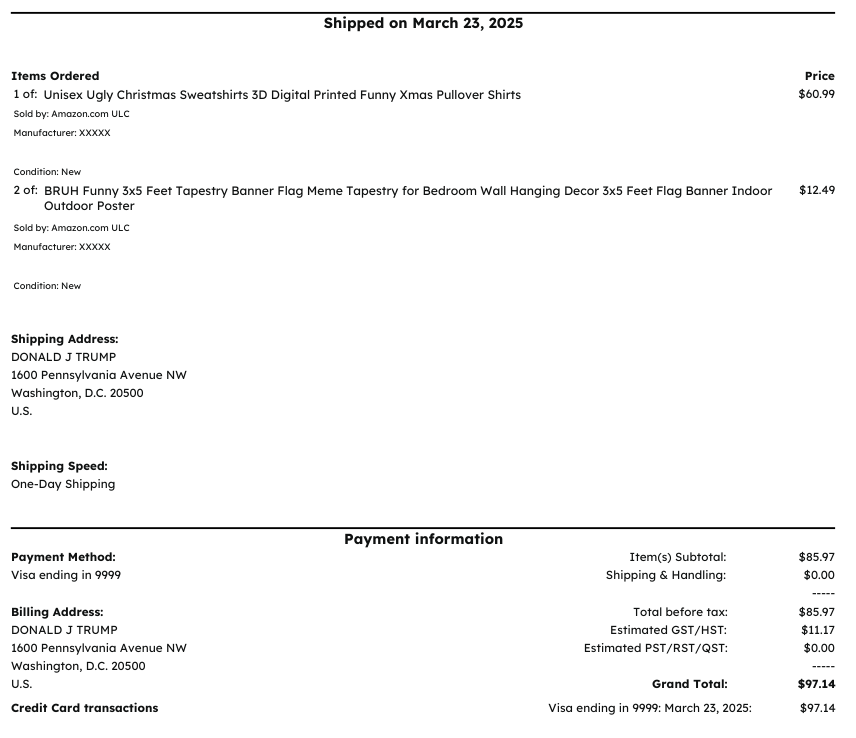
Sample bank statement transaction:

Sample linker output:
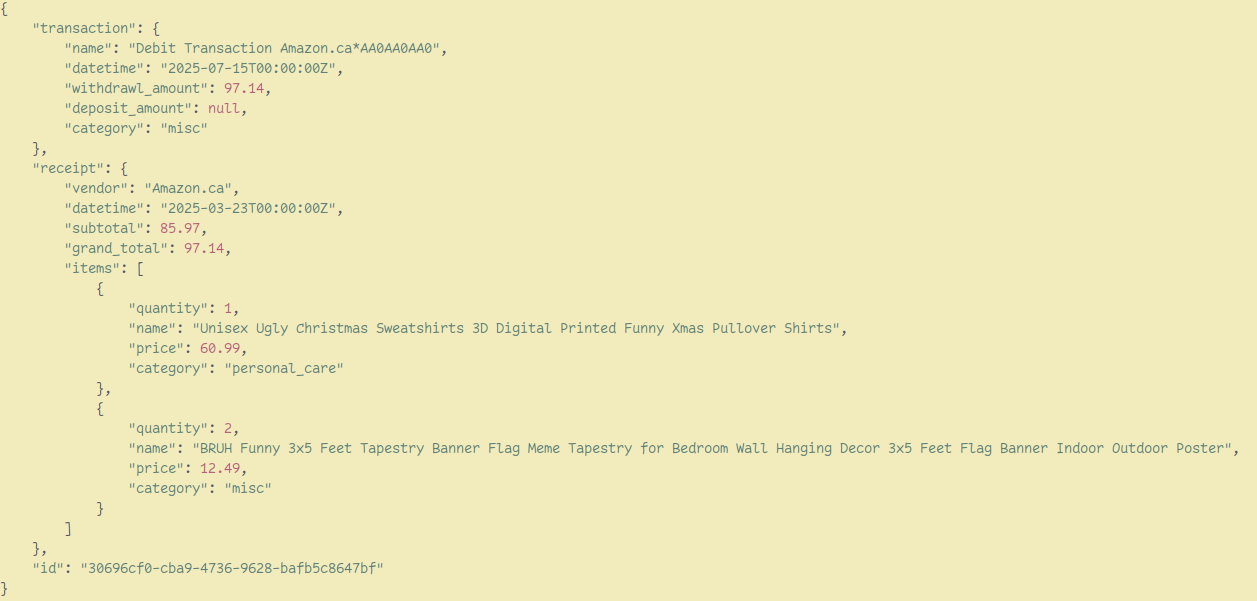
Command Line Options
--receipt-input receipt.jpg- Receipt/invoice files to process--statement-input statement.pdf- Bank statement files to process--receipt-output output.json- JSON filepath for output--categorize- Turn categorization on--categories category1 category2 ...- Categories to use for categorization (optional)
Config file
The config file can be found at $XDG_CONFIG_HOME/receipt_statement_linker/config.toml. The config file has the following fields:
transcription_model- model used for receipt & statement transcription.categorization_model- model used for receipt & statement categorization, if enabled.matching_model- model used for matching receipts to statement transactions when multiple transaction prices match the receipt price.categorization_notes- notes to provide extra context to the model when categorizing
Models are litellm model strings. You can find them by going here and selecting a provider.
Categorization
With categorization on, each entry will include a category for the transaction, and categorization for each item within the associated receipt. The default categories are:
DEFAULT_CATEGORIES = [
  "GROCERIES",
  "EATING_OUT",
  "TRANSPORTATION",
  "HOUSING",
  "HEALTHCARE",
  "PERSONAL_CARE",
  "ENTERTAINMENT",
  "SAVINGS_AND_INVESTMENTS",
  "DEBT_PAYMENT",
  "UTILITIES",
  "MISC",
]
Custom categories can be specified using --categories category1 category2 ....
Only labels may not be enough context for the categorization. To add more context to give to the model, you can add context in the config file like so:
categorization_notes = "'Liberty' is a theatre, so it falls under entertainment."
Supported Filetypes
The filetypes that are supported are based on whatever model is selected. The defualt is Gemini 2.5 Flash, and supported filetypes for this model can be found here.
Example
A sample invoice and statement can be found under example/. The output of running the following command can be found at example/example.json:
uvx receipt-statement-linker \
          --receipt-input     example/invoice-sample.pdf \
          --statement-input   example/bank-statement-sample.pdf \
          --categorize \
          --receipt-output    example/example.json
1 maintainer

Metadata
1 maintainer
Release files for receipt-statement-linker 0.2.1
For a detailed explanation of source distributions (sdists) and built distributions (wheels), please see the package formats documentation.
Source distribution (sdist)
| File | Size | Uploaded | Provenance | |
|---|---|---|---|---|
| receipt_statement_linker-0.2.1.tar.gz | 145.8 kB | Without provenance | Details |
Built distribution (wheel)
| File | Interpreter | ABI | Platform | Reset |
|---|---|---|---|---|
| receipt_statement_linker-0.2.1-py3-none-any.whl | Python 3 | none | any | Details |
Total release size: 168.7 kB
Release files / receipt_statement_linker-0.2.1.tar.gz
| Download URL | receipt_statement_linker-0.2.1.tar.gz |
|---|---|
| Size | 145.8 kB |
| Tags | Source |
|
SHA-256 checksum How to use checksums |
21b6ac5d9856bf665d5ebb6d8c6fbd8edd169c6518c3890771a20aa46d2300e1
|
|
BLAKE2b-256 checksum How to use checksums |
00f4ed228131bfb687ce8202a5ec6ce1181f4d0ee546bdfb3da46e56864d5a2b
|
| Upload date | |
|
Uploaded using Trusted Publishing? What is trusted publishing? |
No |
| Uploaded via |
uv/0.6.10
|
Release files / receipt_statement_linker-0.2.1-py3-none-any.whl
| Download URL | receipt_statement_linker-0.2.1-py3-none-any.whl |
|---|---|
| Size | 22.9 kB |
| Tags | Python 3 |
|
SHA-256 checksum How to use checksums |
f454d6fc227841cf4bce86d04885a9994e9da7ba6ba6d2cb119344092f8589e4
|
|
BLAKE2b-256 checksum How to use checksums |
e6dd70d75916fa00eae96cc55617ac1dd3bc71726aab2062b65948db46c032b6
|
| Upload date | |
|
Uploaded using Trusted Publishing? What is trusted publishing? |
No |
| Uploaded via |
uv/0.6.10
|
Security for receipt-statement-linker 0.2.1
Provenance
Provenance describes where a file came from. On PyPI, provenance is shared via attestations, which provide a verifiable record of the build or publishing details. View details, limitations and caveats.
No provenance found
None of the files in this release were uploaded with provenance metadata.
A note on package security
PyPI is a repository for distributing packages, not a service for auditing them. While third-party security researchers and our staff do their best to detect and remove malicious packages, PyPI cannot guarantee the quality, security or suitability of any given package.
To learn more about protecting yourself from malicious actors, visit our package security documentation.














