
Turn an OpenAPI spec into executable API checks and an HTML failure report.




Recon QA discovers endpoints, derives test cases from their schemas, executes them with bounded concurrency, and writes self-contained HTML and JSON reports. It works without an AI account; LLM-assisted generation and failure analysis are optional.
Use Recon only on applications you own or are explicitly authorized to test. Generated requests can create, update, or delete data described by the target API.
Try it in two minutes
Requires Python 3.12 or newer.
python -m pip install recon-qa
recon demo
recon demo starts an intentionally defective application on your machine, tests it, and produces a real report without an API key or external service. Finding failures is the expected successful outcome.
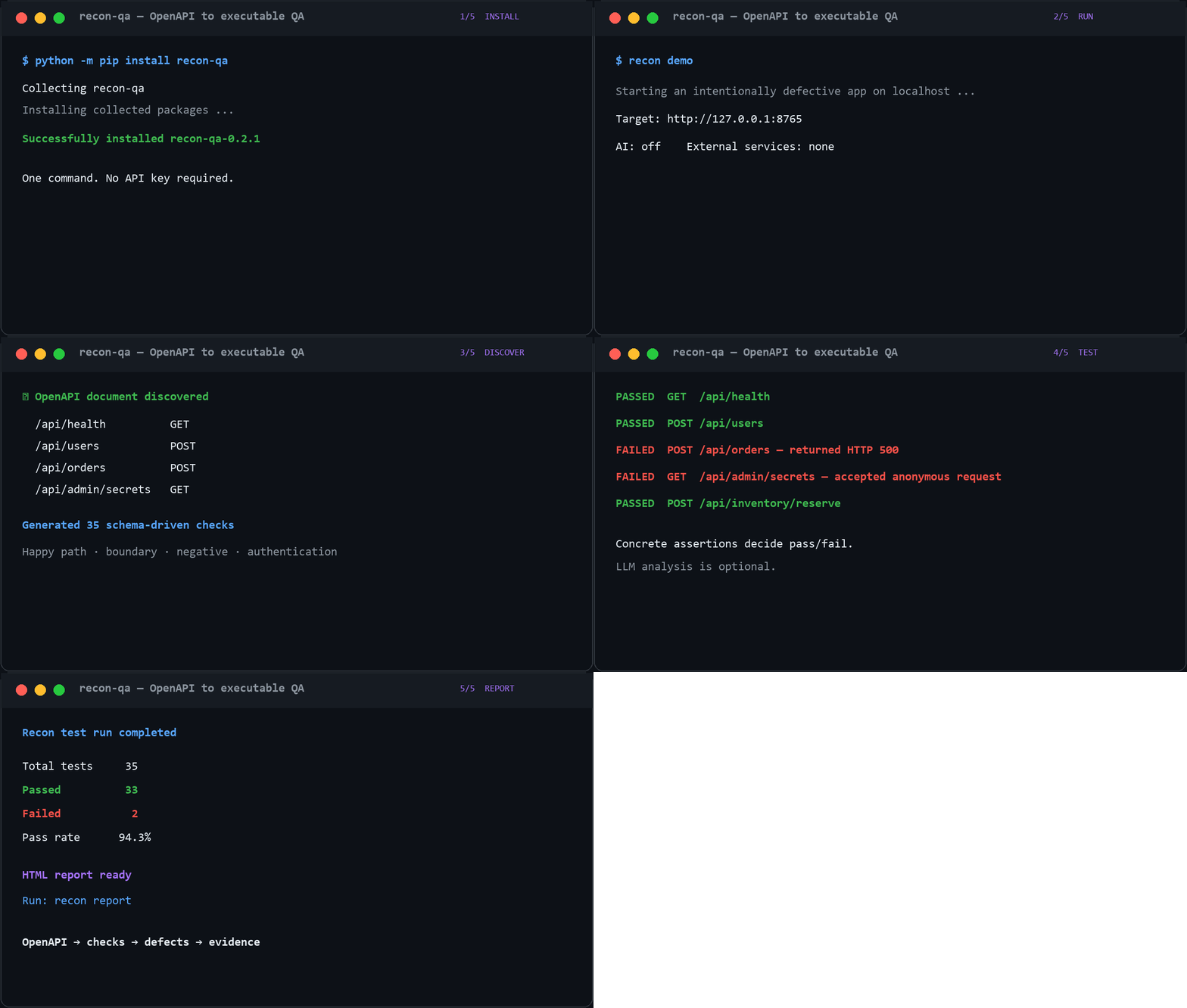
recon report
That opens the latest report in your browser, with every generated check, observed response, assertion, and failure classification available for review.
Test your own API
For an application that exposes OpenAPI at a conventional path such as /openapi.json or /swagger.json:
recon test http://localhost:8000 --no-ai
Pass a non-standard local or remote specification explicitly:
recon test http://localhost:8000 --spec ./openapi.yaml --no-ai
Common options:
# Include browser discovery and checks
python -m pip install "recon-qa[browser]"
python -m playwright install chromium
recon test http://localhost:8000 --browser --no-ai

# Supply authentication without storing it in Recon configuration
recon test http://localhost:8000 \
  --header "Authorization: Bearer <token>" \
  --no-ai

# Limit a run to selected routes
recon test http://localhost:8000 \
  --include "/api/orders*" \
  --exclude "/api/admin*" \
  --no-ai
On PowerShell, replace the trailing \ characters with backticks or put the command on one line.
Reports are stored under ~/.recon/reports/ by default. Use --report-dir to choose another location. A test run exits with code 1 when it finds failed checks, which makes the command useful as a CI quality gate.
What Recon checks
- Discovers OpenAPI 3.x and Swagger 2.0 operations.
- Generates happy-path, validation, boundary, negative, and authentication cases.
- Uses schema constraints including types, enums, numeric ranges, string lengths, and formats.
- Orders dependent operations and can reuse IDs returned by earlier requests.
- Applies bounded asynchronous concurrency.
- Classifies HTTP, timeout, assertion, and security-related failures.
- Produces standalone HTML reports and machine-readable JSON results.
- Optionally crawls pages and runs Playwright browser checks.
- Optionally asks a configured LLM for additional cases and failure explanations.
Recon is intended to expose suspicious behavior for review. It is not a proof of correctness, a replacement for application-specific tests, or a substitute for a professional security assessment.
Useful commands
recon demo                 Run the reproducible local example
recon scan <target>        Discover API routes and optional web pages
recon generate <target>    Write the generated test suite as JSON
recon test <target>        Run discovery, generation, execution, and reporting
recon report               Open the latest HTML report
recon doctor               Check the local runtime and optional browser setup
recon providers            Show available AI provider configuration
recon --help               Show every command and option
Optional AI analysis
The default provider is mock, a deterministic offline implementation used for development and demonstrations. Real providers are opt-in and use your own credentials.
recon set-key
recon use openai
recon test http://localhost:8000 --ai
Supported REST integrations include Gemini, OpenAI, Anthropic, Mistral, Ollama, and other OpenAI-compatible endpoints. Use recon providers to inspect the active configuration. Keep credentials in environment variables or Recon's local configuration—never commit them.
CI example
name: API quality
on: [push, pull_request]

jobs:
  recon:
    runs-on: ubuntu-latest
    steps:
      - uses: actions/checkout@v4
      - uses: actions/setup-python@v5
        with:
          python-version: "3.12"
      - run: pip install recon-qa
      - run: recon test http://127.0.0.1:8000 --no-ai
Start your application in an earlier step and upload the chosen report directory as an artifact if the report should be retained.
How the pipeline fits together
OpenAPI document / application URL
              │
              ▼
       Endpoint discovery
              │
              ▼
  Schema-driven test generation
              │
              ▼
 Stateful, bounded execution ───── optional Playwright checks
              │
              ▼
 Deterministic classification ──── optional LLM analysis
              │
              ▼
        HTML + JSON reports
The LLM layer does not decide whether deterministic assertions passed or failed.
Current limitations
- Python 3.12 or newer is required.
- Authentication discovery handles common flows but cannot infer every custom login or multi-factor workflow.
- Generated payloads are schema-driven and may not satisfy undocumented business rules.
- Browser support requires the
browserextra and a separate Chromium installation. - OpenAPI documents that rely heavily on vendor extensions may need a reduced reproduction and compatibility fix.
- The project is alpha software; review generated requests before pointing it at data-bearing environments.
Development
git clone https://github.com/ttnhan227/recon.git
cd recon
python -m pip install -e ".[browser,dev]"
python -m playwright install chromium

ruff check .
ruff format --check .
mypy recon tests
pytest -q
python -m build
See the contribution guide before proposing a change, the roadmap for current priorities, and the changelog for release history.
Feedback wanted
If you try Recon against a real API, please share what worked, what blocked you, and the framework or OpenAPI generator you used in the trial feedback form. Sanitized minimal specifications are especially useful. See the technical walkthrough for a concise explanation you can share with another developer.
License
Recon QA is available under the MIT License.
1 maintainer

Release files for recon-qa 0.2.1
For a detailed explanation of source distributions (sdists) and built distributions (wheels), please see the package formats documentation.
Source distribution (sdist)
| File | Size | Uploaded | |
|---|---|---|---|
| recon_qa-0.2.1.tar.gz | 80.3 kB | Details |
Built distribution (wheel)
| File | Interpreter | ABI | Platform | Reset |
|---|---|---|---|---|
| recon_qa-0.2.1-py3-none-any.whl | Python 3 | none | any | Details |
Total release size: 175.1 kB
Release files / recon_qa-0.2.1.tar.gz
| Download URL | recon_qa-0.2.1.tar.gz |
|---|---|
| Size | 80.3 kB |
| Tags | Source |
|
SHA-256 checksum How to use checksums |
9630da693552ce49030c66f3197610f9ae9a48064bf0d9d2f6356ca24b603562
|
|
BLAKE2b-256 checksum How to use checksums |
77ee0f7abface5391b7a752d2dd347fd53edc5db13779a99ce4c335d5e301b9b
|
| Upload date | |
|
Uploaded using Trusted Publishing? What is trusted publishing? |
No |
| Uploaded via |
twine/7.0.0 CPython/3.13.14
|
Release files / recon_qa-0.2.1-py3-none-any.whl
| Download URL | recon_qa-0.2.1-py3-none-any.whl |
|---|---|
| Size | 94.8 kB |
| Tags | Python 3 |
|
SHA-256 checksum How to use checksums |
0f1f424d554c876c15f46f528d3e90f91848f8dd626084adfd9abda0363bdc4d
|
|
BLAKE2b-256 checksum How to use checksums |
ef61a0a4c613b3f1a70218f1c2f52e16181fcf8e5275c9d3598a7856e9c4db3b
|
| Upload date | |
|
Uploaded using Trusted Publishing? What is trusted publishing? |
No |
| Uploaded via |
twine/7.0.0 CPython/3.13.14
|














