
recon





Point recon at a domain to see its public technology and identity footprint: email providers and controls, identity indicators, SaaS services, and cloud infrastructure. No credentials, API keys, or active scanning. Use the CLI for a quick lookup, versioned JSON for automation, or the local MCP server from an agent.
recon reports evidence-backed observations, not a complete inventory or a security verdict. A domain does not establish an organization's boundaries.
See the Output
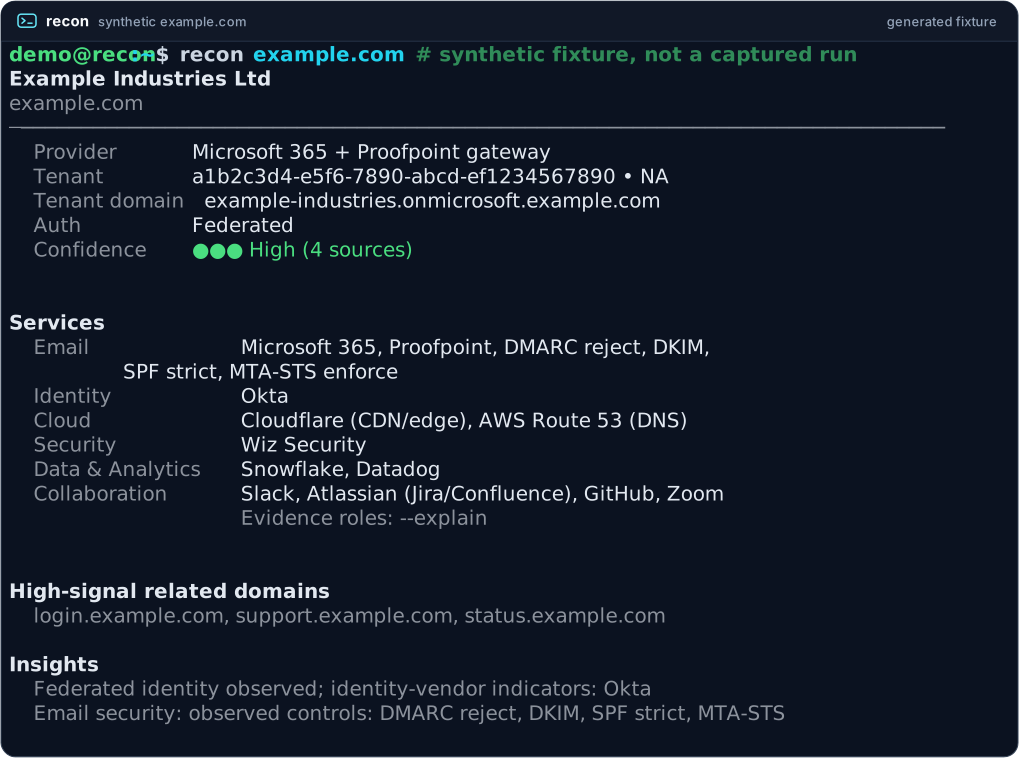
Synthetic illustration, generated, not captured. The real formatter renders
a deterministic, no-network fixture for Example Industries Ltd. No real
organization is depicted, and no live lookup of reserved example.com
reproduces this fixture.
Accessible text transcript
demo@recon:~$ recon example.com    # synthetic fixture, not a captured run
Example Industries Ltd
example.com
──────────────────────────────────────────────────────────────────────────────
  Provider     Microsoft 365 + Proofpoint gateway
  Tenant       a1b2c3d4-e5f6-7890-abcd-ef1234567890 • NA
  Tenant domain example-industries.onmicrosoft.example.com
  Auth         Federated
  Confidence   ●●● High (4 sources)


Services
  Email            Microsoft 365, Proofpoint, DMARC reject, DKIM,
                   SPF strict, MTA-STS enforce
  Identity         Okta
  Cloud            Cloudflare (CDN/edge), AWS Route 53 (DNS)
  Security         Wiz Security
  Data & Analytics Snowflake, Datadog
  Collaboration    Slack, Atlassian (Jira/Confluence), GitHub, Zoom
                   Evidence roles: --explain


High-signal related domains
  login.example.com, support.example.com, status.example.com

Insights
  Federated identity observed; identity-vendor indicators: Okta
  Email security: observed controls: DMARC reject, DKIM, SPF strict, MTA-STS
Quick Start
macOS / Linux:
curl -fsSL https://raw.githubusercontent.com/blisspixel/recon/main/scripts/install.sh | bash
Windows (PowerShell):
powershell -NoProfile -ExecutionPolicy Bypass -Command "irm https://raw.githubusercontent.com/blisspixel/recon/main/scripts/install.ps1 | iex"
The installer sets up recon for your user account, including Python when needed.
Open a new terminal afterward. Already have Python 3.11 through 3.14? Use
pip install recon-tool in a virtual environment, or uv tool install recon-tool /
pipx install recon-tool on managed distributions like Arch Linux and Omarchy.
For review-before-run instructions, other package managers, updates, and recovery,
see the installation guide.
recon --version      # offline install check
recon doctor         # online connectivity and installation diagnostics
Lookups make DNS queries visible to recursive and authoritative infrastructure.
MTA-STS is the only default target-owned HTTP request; Google CSE and BIMI
certificate probes require explicit --direct-probes. There is no port
scanning or application crawling. Replace the placeholder to start:
recon "<domain-you-want-to-review>"
Ordinary lookups may reuse the 24-hour result cache. Use --no-cache to bypass
it; certificate-transparency enrichment has a separate cache. See
first lookup and cache behavior.
Common Commands
The bare command stays compact. Request evidence or structured output when needed:
recon example.com                      # compact panel
recon example.com --explain             # evidence and source status
recon example.com --json                # structured record
recon example.com --plain               # linear text for screen readers and grep
recon review example.com               # fresh, evidence-linked review bundle
recon batch domains.txt --json          # look up a supplied domain list
recon delta example.com                # compare with a cached baseline
recon update                           # update through the original package manager
These examples use reserved domains; real lookups will not reproduce the synthetic illustration above. For multi-domain reviews, recon describes observed similarities and differences without inferring ownership or a corporate relationship. See the evidence-first review workflow and batch guide.
Use with an Agent
The PyPI package installs the CLI and MCP runtime. Connect the local server to Claude Desktop, Claude Code, Cursor, VS Code, Windsurf, or Kiro:
recon mcp install --client=claude-desktop
recon mcp doctor
Restart the client and begin with manual tool approvals. Ask for one domain's email and identity indicators, or a service comparison across supplied domains. Missing evidence means "not observed", not "not used"; collection failures remain explicit. Local execution is the default, and the project does not operate a hosted service.
See MCP setup and supported clients and skills, plugins, and their validation status.
Omarchy Desktop Shell Integration
recon includes a thin, keyboard-first desktop shell plugin for Omarchy
located in integrations/omarchy/:
- Keyboard-driven workflow: focus domain input automatically, press
Enterto run bounded inspection, and pressCtrl+Dto toggle baseline delta comparison. - Direct process invocation: passes structured arguments directly (
["recon", domain, "--json"]) without shell interpolation. - Safe clipboard handling: pasting text never triggers an automatic network request.
- Zero background daemons: runs unprivileged inside Omarchy's Quickshell environment.
See integrations/omarchy/README.md for installation and shortcuts.
Documentation
| Need | Guide |
|---|---|
| Install, update, uninstall, or troubleshoot | Getting started |
| Find a command or flag | CLI reference |
| Build automation or hand off evidence | JSON schema, review bundles |
| Understand results and their limits | How it works, limitations, reporting observations |
| Linux and Omarchy environment setup | Linux / Omarchy guide |
| Check plans and shipped changes | Roadmap, changelog |
| Find architecture, security, research, or release procedures | Full documentation index |
Contributing and Support
Catalog corrections and documented vendor patterns are especially useful. Start with CONTRIBUTING.md for setup, verification, and contribution requirements; coding agents should also read AGENTS.md.
Use issues for bugs and feature requests. Keep public examples reserved and synthetic; never post evaluated company domains, tenant IDs, or per-domain results. See the private reporting paths and security policy. Intended for defensive use.
License
1 maintainer

Metadata
1 maintainer
Release files for recon-tool 2.19.15
For a detailed explanation of source distributions (sdists) and built distributions (wheels), please see the package formats documentation.
Source distribution (sdist)
| File | Size | Uploaded | |
|---|---|---|---|
| recon_tool-2.19.15.tar.gz | 3.7 MB | Details |
Built distribution (wheel)
| File | Interpreter | ABI | Platform | Reset |
|---|---|---|---|---|
| recon_tool-2.19.15-py3-none-any.whl | Python 3 | none | any | Details |
Total release size: 4.5 MB
Release files / recon_tool-2.19.15.tar.gz
| Download URL | recon_tool-2.19.15.tar.gz |
|---|---|
| Size | 3.7 MB |
| Tags | Source |
|
SHA-256 checksum How to use checksums |
ef4abb40c005dc309d0f3dde51f46249c3bade82ed9bd57f86980c4592988d63
|
|
BLAKE2b-256 checksum How to use checksums |
2f4890911cef228d2995cecdee5781f3fbc7a237ce2dc334dabe708b67fcf187
|
| Upload date | |
|
Uploaded using Trusted Publishing? What is trusted publishing? |
Yes |
| Uploaded via |
twine/7.0.0 CPython/3.13.14
|
Provenance
Provenance describes where a file came from. On PyPI, provenance is shared via attestations, which provide a verifiable record of the build or publishing details. View details, limitations and caveats.


PyPI Publish Attestation
PyPI verified that this artifact, at this checksum, originated from the publisher listed below.
Signed by GitHub Actions, verified by PyPI on Oct 10, 2026.
Transparency logRelease files / recon_tool-2.19.15-py3-none-any.whl
| Download URL | recon_tool-2.19.15-py3-none-any.whl |
|---|---|
| Size | 865.4 kB |
| Tags | Python 3 |
|
SHA-256 checksum How to use checksums |
fc73752a7e09d23da1ee6e4c63b744ebf778085f187a6ca77533e6da827098bb
|
|
BLAKE2b-256 checksum How to use checksums |
a80fbe7dbdc87150c320715722cd1e3068adc8731800686aa9e1af7f0d821397
|
| Upload date | |
|
Uploaded using Trusted Publishing? What is trusted publishing? |
Yes |
| Uploaded via |
twine/7.0.0 CPython/3.13.14
|
Provenance
Provenance describes where a file came from. On PyPI, provenance is shared via attestations, which provide a verifiable record of the build or publishing details. View details, limitations and caveats.
PyPI Publish Attestation
PyPI verified that this artifact, at this checksum, originated from the publisher listed below.
Signed by GitHub Actions, verified by PyPI on Oct 10, 2026.
Transparency log













