
All-in-One Reconnaissance Tool for Penetration Testing and Bounty Hunting

Project description

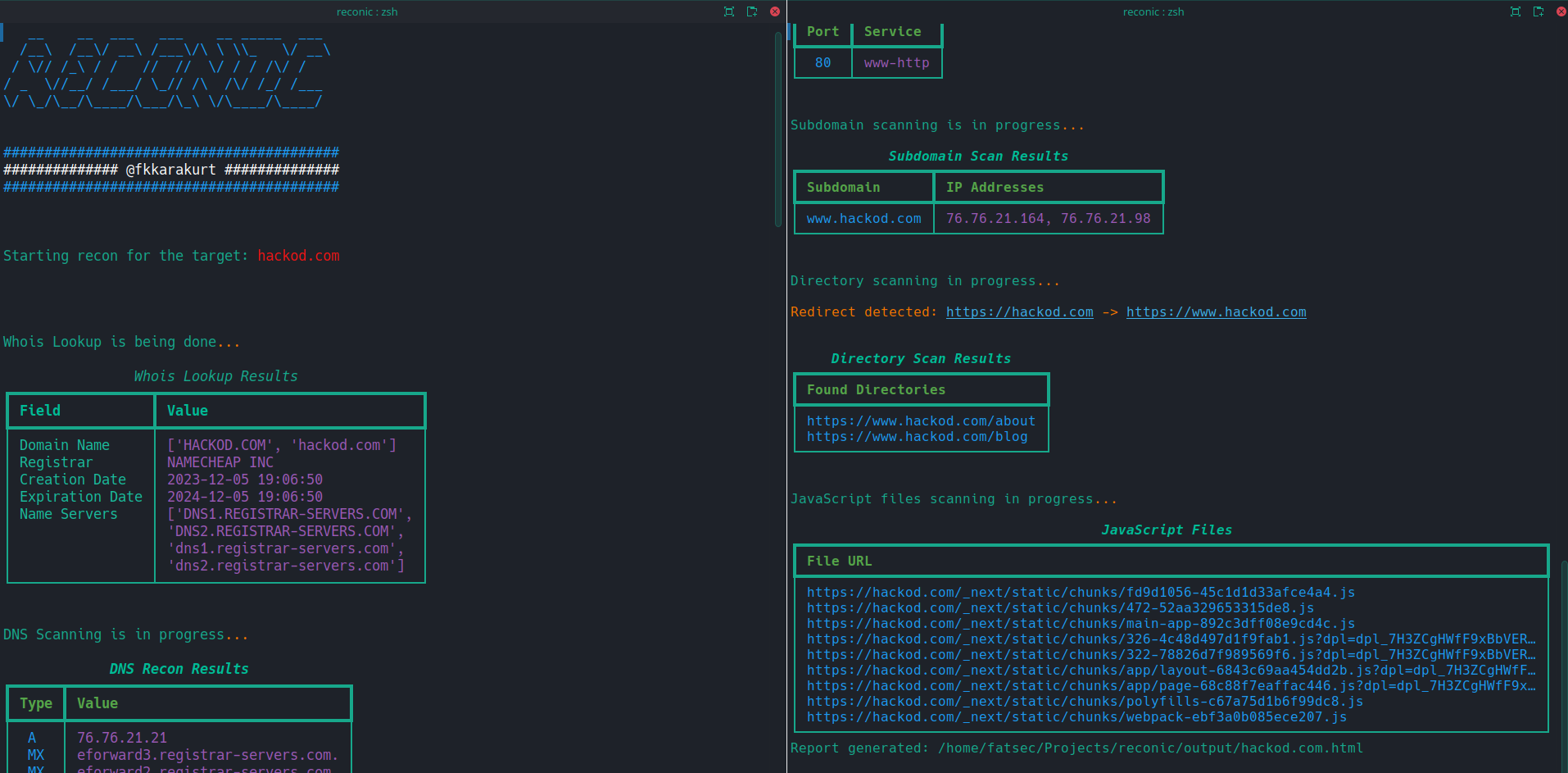
Reconic | All-in-One Reconnaissance Tool
Reconic is a network scanning and discovery tool designed to empower cybersecurity professionals and bug hunters in mapping, analyzing and securing digital infrastructures.
Features
-
WHOIS Lookup: Automates the retrieval of domain registration details, providing insights into the ownership and administrative contacts of a target domain.
-
DNS Resolution: Executes scans to resolve DNS records, uncovering associated domains, subdomains, and critical DNS configurations.
-
SSL/TLS Certificate Inspection: Inspects SSL/TLS certificates for validity, expiration, and configuration details.
-
HTTP Header Analysis: Captures HTTP headers.
-
Port Scanning: Scans for open ports, identifying exposed services and potential entry points for unauthorized access.
-
Subdomain Discovery: It gives a list of subdomains that do not return 404 with the DNS zone method.
-
Directory Traversal: Searches for accessible directories, identifying potentially sensitive information or misconfigured access controls.
-
JavaScript File Enumeration: Identifies and lists JavaScript files for further analysis, focusing on client-side code that may reveal vulnerabilities or sensitive information.
Each of these features is designed with precision to equip cybersecurity professionals with the necessary tools to conduct thorough and effective reconnaissance operations. By leveraging Reconic, security teams can gain invaluable insights into their targets' network architectures, identifying vulnerabilities and securing their digital environments against emerging threats.
Screenshots

Installation
To ensure a smooth and effective setup of Reconic, follow the step-by-step instructions below. These steps will guide you through installing the necessary dependencies using pip and a requirements.txt file, preparing your environment for Reconic's operation.
Prerequisites
Before proceeding with the installation, ensure you have the following prerequisites met:
- Python 3.6 or newer installed on your system. Reconic is developed with compatibility for Python 3.6 and above.
pip, Python's package installer, is up-to-date. You can updatepipusing the command:python -m pip install --upgrade pip.
Installation Steps
-
Clone the Repository
Begin by cloning the Reconic repository to your local machine. Open a terminal and run the following command:
git clone https://github.com/fkkarakurt/reconic
-
Navigate to the Project Directory
Change into the cloned project's directory:
cd reconic
-
Create a Virtual Environment (Optional)
It's recommended to create a virtual environment to isolate project dependencies. Run the following command to create a virtual environment named
venv:python3 -m venv venv
Activate the virtual environment:
- On Windows:
.\venv\Scripts\activate - On Unix or MacOS:
source venv/bin/activate
- On Windows:
-
Install Dependencies
Reconic's dependencies are listed in the
requirements.txtfile. Install them usingpip:pip install -r requirements.txt
This command will automatically download and install all the necessary packages defined in the
requirements.txtfile. -
Verify Installation
Once the installation process is complete, you can verify that Reconic has been installed correctly by running a simple
helpcommand.python3 reconic.py --help
Updating Reconic
To update Reconic to the latest version, pull the latest changes from the repository and reinstall the dependencies:
git pull origin main
pip install -r requirements.txt
Ensure you're in the Reconic project directory and your virtual environment is activated when performing the update.
Usage/Examples
To start using Reconic, you will need to specify a target URL using the -u or --url flag, along with a choice between using HTTP or HTTPS for web technology detection.
- If you want to perform the scan using HTTPS, you can use the following command:
python3 reconic.py -u <target-url> --https
- Alternatively, to force the scan over HTTP, use:
python3 reconic.py -u <target-url> --http
- You will see the results neatly in tables on your command line. Also, after the scan is finished, an HTML file will be created in the
outputdirectory of the main folder. You can also review the same results in your web browser.
./output/<target-url>.html
IMPORTANT! Reconic was developed to assist with bug bounty and penetration testing. Do not use this for malicious purposes. For any target URL you will crawl with Reconic, make sure you have the necessary permissions. This is a crime wherever you are.
License


Download files
Download the file for your platform. If you're not sure which to choose, learn more about installing packages.
Source Distribution
File details
Details for the file reconic1-1.6.2.tar.gz.
File metadata
- Download URL: reconic1-1.6.2.tar.gz
- Upload date:
- Size: 36.4 kB
- Tags: Source
- Uploaded using Trusted Publishing? No
- Uploaded via: twine/5.0.0 CPython/3.11.8
File hashes
| Algorithm | Hash digest | |
|---|---|---|
| SHA256 |
d6e4a095dc259e2c0f622d389fca5cbbf37f982a59087ca2b7601bcefa54c114
|
|
| MD5 |
f53d17a1260ea351be2650f4516900d4
|
|
| BLAKE2b-256 |
921e022222538969b39364f775e0b2cb86772d2248651172cc75733df0d64b2a
|






