
Recotem
Recipe-driven recommender systems — one YAML = one model = one recommendation API.







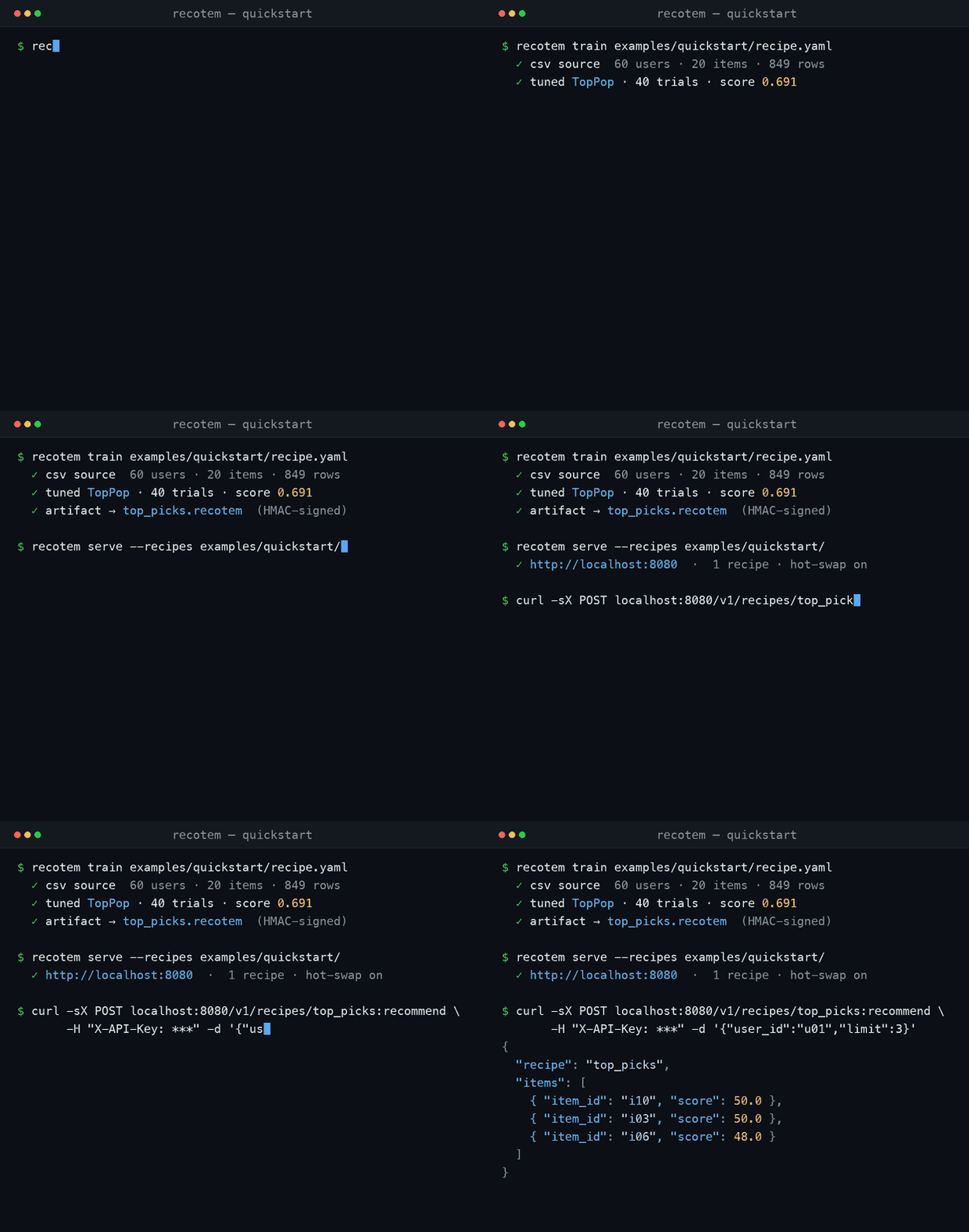
Recipe-driven recommender training and serving, built on
irspack. One YAML recipe describes
where the data lives, how to train, and where to write the result —
recotem train produces a signed binary artifact, recotem serve
mounts it under /v1/recipes/{name}:recommend (plus :recommend-related
and batch verbs) and hot-swaps when a new artifact appears. No database,
no message broker, no admin UI.
Why Recotem
Most recommender stacks pull in a service mesh of databases, queues, and control planes before you can train your first model. Recotem keeps the moving parts to a recipe file and a binary artifact:
- Single binary, two commands.
recotem trainruns as a batch job;recotem serveruns as a long-lived FastAPI process. They share nothing but the artifact file on disk (or object storage). - Reproducible by construction. Recipes are versioned with your code; artifacts are HMAC-signed with a SHA-checked header you can inspect without loading the model.
- Hot-swap, no restart. The serving process watches the artifact directory and atomically swaps the in-memory model when training emits a new file.
- Bring-your-own scheduler.
recotem trainis a normal process — drive it from cron, Airflow, a Kubernetes CronJob, or anything else.
Features
- Recipe-driven: 1 YAML = 1 model = 1
/v1/recipes/{name}:recommendendpoint (with related/batch verbs) - Hyperparameter search across irspack algorithms via Optuna
- Feature-aware iALS: attach item/user side features (categorical / numerical / multi_label) via a
features:recipe block - Cold-start serving: recommend for unknown users and unseen seed items from their attributes alone via
user_features/item_features - Pluggable data sources (built-in: CSV / Parquet / BigQuery / SQL; extend via Python entry points)
- HMAC-signed artifacts with multi-key rotation and a deterministic FQCN allow-list at deserialization time
- API-key authentication (
X-API-Key); keys hashed at rest - fsspec paths everywhere — local, S3, GCS, HTTPS, anything fsspec speaks
- Optional Prometheus metrics endpoint, structured JSON logs with built-in secret redaction
Data Sources
- CSV / Parquet — local files or any fsspec-reachable URL (S3, GCS, Azure, HTTPS).
- BigQuery — SQL queries with Storage Read API support.
- SQL (PostgreSQL / MySQL / MariaDB / SQLite) — via SQLAlchemy 2. See SQL data sources.
- Custom plugins — implement the
DataSourceProtocol and register viarecotem.datasourcesentry-points.
Install
pip install recotem                 # core
pip install "recotem[bigquery]"     # BigQuery data source
pip install "recotem[metrics]"      # Prometheus metrics endpoint
pip install 'recotem[postgres]'     # PostgreSQL via psycopg
pip install 'recotem[mysql]'        # MySQL/MariaDB via PyMySQL
pip install 'recotem[sqlite]'       # SQLite (stdlib)
pip install "recotem[s3]"           # s3://   paths (source, item_metadata, output)
pip install "recotem[gcs]"          # gs://   paths (source, item_metadata, output)
pip install "recotem[azure]"        # az:// / abfs(s):// paths
The three object-store extras are needed for output.path as well as for
reading: recotem train resolves the destination through fsspec, so writing an
artifact to gs://… without recotem[gcs] fails after the search has already
run. The published Docker image bundles s3 and gcs (not azure).
Requires Python 3.12+ and a platform every compiled dependency publishes a
wheel for, because none of them can be built without a C/C++ toolchain the
usual pip install host does not have. That set is glibc Linux on x86-64 or
arm64, macOS on Apple Silicon, and Windows on x86-64. Three platforms
are outside it:
| platform | what is missing | what pip prints |
|---|---|---|
| macOS on Intel | irspack — no wheel, and no sdist to build |
No matching distribution found for irspack==0.5.2 |
| Windows on arm64 | irspack — no wheel, and no sdist to build |
No matching distribution found for irspack==0.5.2 |
| musl Linux (Alpine), either arch | scikit-learn — no musllinux wheel at any version in the supported range |
falls back to the sdist and fails in its meson build: Unknown compiler(s) |
irspack does publish musllinux wheels, and so does every other compiled
dependency in the core set — scikit-learn alone is why Alpine does not work.
It ships an sdist, so a musl host with a full C/C++ toolchain, meson and
OpenMP can build it, but that is a build, not an install.
The table above is about pip install recotem. One extra is narrower than
the core set: bprfm installs lightfm-next, which publishes wheels only for
macOS (both architectures), manylinux x86-64 and musllinux x86-64. On
glibc Linux arm64 and Windows x86-64 — both inside the supported set
above — pip install "recotem[bprfm]" and "recotem[all]" fall back to the
sdist and need a C compiler:
error: command 'gcc' failed: No such file or directory
Every other extra is pure Python or already covered. pip install recotem
itself is unaffected on those platforms, and so is the published Docker image,
which compiles lightfm-next in its build stage.
Use the Docker image (which is glibc-based) on all three.
A multi-arch Docker image (linux/amd64, linux/arm64) is published to
ghcr.io/codelibs/recotem.
Quickstart
The repository ships with a self-contained example at
examples/quickstart/ — recipe, dataset, and
artifact directory all in one place. Train a TopPop recommender from a
60-user CSV in under a minute.
examples/ lives in the repository, not in the wheel, so clone the repo
first. The commands below use uv run, because uv sync installs the CLI
into .venv rather than onto PATH; with pip install recotem into an
active virtualenv, drop the uv run prefix.
# 1. Set demo keys. DEMO ONLY — for production, generate fresh keys with
#    `recotem keygen --type signing` and `recotem keygen --type api`.
export RECOTEM_SIGNING_KEYS="dev:0000000000000000000000000000000000000000000000000000000000000000"
export RECOTEM_API_PLAINTEXT="recotem-quickstart-demo-key-0000"
export RECOTEM_API_KEYS="dev:sha256:21be5c3be85b8d68123df9f9b6a26d8e307db30350ea8bcc844883e22ebcf125"

# 2. Train, serve
uv run recotem train examples/quickstart/recipe.yaml
uv run recotem serve --recipes examples/quickstart/ &

# Wait for the server to become ready before sending traffic.
until curl -s -o /dev/null -w "%{http_code}" http://localhost:8080/v1/health | grep -q "200"; do sleep 1; done

# 3. Recommend
# 3a. Recommend for a known user
curl -X POST http://localhost:8080/v1/recipes/top_picks:recommend \
  -H "X-API-Key: $RECOTEM_API_PLAINTEXT" \
  -H "Content-Type: application/json" \
  -d '{"user_id": "u01", "limit": 5}'

# 3b. Recommend items related to a seed item
curl -X POST http://localhost:8080/v1/recipes/top_picks:recommend-related \
  -H "X-API-Key: $RECOTEM_API_PLAINTEXT" \
  -H "Content-Type: application/json" \
  -d '{"seed_items": ["i00"], "limit": 5}'
Expected (the exact items / scores depend on training):
{
  "request_id": "a7d279d50b3e",
  "recipe": "top_picks",
  "model_version": "sha256:abc...",
  "items": [{"item_id": "i10", "score": 50.0}, {"item_id": "i06", "score": 48.0}]
}
score is whatever the winning algorithm produces, on that algorithm's own
scale — it is not a probability and is not normalised to 0–1. This recipe
trains TopPop, so the scores above are raw interaction counts.
The recipe itself is 11 lines — every other field has a sensible default.
See examples/quickstart/recipe.yaml
for the source of truth and
Recipe reference for the full schema.
Which env var is needed where?
| Variable | Required by | Purpose |
|---|---|---|
RECOTEM_SIGNING_KEYS |
train and serve |
HMAC sign / verify artifact files (server keeps plaintext; needed for both sides) |
RECOTEM_API_KEYS |
serve (optional) |
Authenticate /v1/recipes/* callers (server keeps hash only). Omit it and authentication is disabled — every /v1/recipes/* call is served without a key, and the bind is forced to loopback so it cannot be reached off the host |
X-API-Key: <plaintext> |
HTTP clients | Sent by clients on every /v1/recipes/* call; server re-hashes and compares |
Both variables accept multiple comma-separated entries (kid:value,kid2:value,…)
to enable zero-downtime key rotation — that is why they are pluralised.
Architecture
┌────────────────────────────────────────────────────────────────────────┐
│                  recotem (single Python package)                       │
├────────────────────────────────────────────────────────────────────────┤
│                                                                        │
│   recipe.yaml ──▶ recotem train ──▶ artifact.recotem ──▶ recotem serve │
│                   (batch job)        (HMAC-signed)        (FastAPI,    │
│                                                            hot-swap)   │
│                                                                        │
│   any scheduler          local FS, S3,         POST /v1/recipes/{name} │
│   (cron / k8s / …)       GCS, fsspec               X-API-Key auth      │
│                                                                        │
└────────────────────────────────────────────────────────────────────────┘
train and serve communicate only via signed artifact files. They
can run on different machines; the watcher swaps models per recipe based
on file mtime.
Documentation
Full documentation site: recotem.org.
- Getting started — Docker Compose / pip walkthrough end-to-end
- Recipe reference — every field documented
- API reference —
/v1endpoints and the request/response shape of every inference verb, including the batch ones - Operations — key rotation, sizing, troubleshooting
- Security — threat model, IAM scopes, secrets handling
- Plugin authoring — write a custom data source
- Documentation index
Contributing
Issues and pull requests welcome. Development uses uv for dependency management:
uv sync --all-extras
uv run pytest tests
uv run ruff check src tests
See CLAUDE.md (or the project guidelines therein) for the full
contributor workflow.
License
1 maintainer

Metadata
1 maintainer
Release files for recotem 2.1.0
For a detailed explanation of source distributions (sdists) and built distributions (wheels), please see the package formats documentation.
Source distribution (sdist)
| File | Size | Uploaded | |
|---|---|---|---|
| recotem-2.1.0.tar.gz | 354.9 kB | Details |
Built distribution (wheel)
| File | Interpreter | ABI | Platform | Reset |
|---|---|---|---|---|
| recotem-2.1.0-py3-none-any.whl | Python 3 | none | any | Details |
Total release size: 710.7 kB
Release files / recotem-2.1.0.tar.gz
| Download URL | recotem-2.1.0.tar.gz |
|---|---|
| Size | 354.9 kB |
| Tags | Source |
|
SHA-256 checksum How to use checksums |
9a3abb1b5fe537a22a66455258e853f67ae6b32d685d89dc54e9798a2fb535ab
|
|
BLAKE2b-256 checksum How to use checksums |
f95b0e986c6d0876a52ea017dec550fdf284d6f7ceb4b64b125cf0f0b1d58f64
|
| Upload date | |
|
Uploaded using Trusted Publishing? What is trusted publishing? |
Yes |
| Uploaded via |
twine/7.0.0 CPython/3.13.14
|
Provenance
Provenance describes where a file came from. On PyPI, provenance is shared via attestations, which provide a verifiable record of the build or publishing details. View details, limitations and caveats.


PyPI Publish Attestation
PyPI verified that this artifact, at this checksum, originated from the publisher listed below.
Signed by GitHub Actions, verified by PyPI on Sep 10, 2026.
Transparency logRelease files / recotem-2.1.0-py3-none-any.whl
| Download URL | recotem-2.1.0-py3-none-any.whl |
|---|---|
| Size | 355.8 kB |
| Tags | Python 3 |
|
SHA-256 checksum How to use checksums |
0d0343e432f87c27260de3228d074dcdda3c6264b6c2a00c0a70f9381b0c3be7
|
|
BLAKE2b-256 checksum How to use checksums |
280dcf6bc6bddc67c607fecc2bc6a6d98b0dccc1e3c993df8bb7880b1270c679
|
| Upload date | |
|
Uploaded using Trusted Publishing? What is trusted publishing? |
Yes |
| Uploaded via |
twine/7.0.0 CPython/3.13.14
|
Provenance
Provenance describes where a file came from. On PyPI, provenance is shared via attestations, which provide a verifiable record of the build or publishing details. View details, limitations and caveats.
PyPI Publish Attestation
PyPI verified that this artifact, at this checksum, originated from the publisher listed below.
Signed by GitHub Actions, verified by PyPI on Sep 10, 2026.
Transparency log













