
RecursionLens
English | 简体中文
See not just what recursion returns, but where the repeated work happens.
Try RecursionLens in the browser. The playground runs CS1302A examples with Pyodide and needs no installation. Follow a call from the tree to the subproblem graph, inspect a Recursion Doctor finding, or predict how much memoization will save. Browser walkthrough
RecursionLens is a zero-runtime-dependency Python package for exploring recursive execution in JupyterLab. It turns a traced run into an expandable call tree, a compressed subproblem DAG, and a quantitative naive-versus-memoized comparison.
JupyterLab tutorial, already executed: Open RecursionLens_Tutorial.ipynb (简体中文版). Sixteen code cells have saved output; the final cell opens the interactive player when you run it in a live kernel. If Jupyter hides HTML/SVG from a downloaded notebook, use its Trust action or click Run All Cells once. For a zero-setup preview, download and open the static HTML companion or its Chinese version.
Screenshots
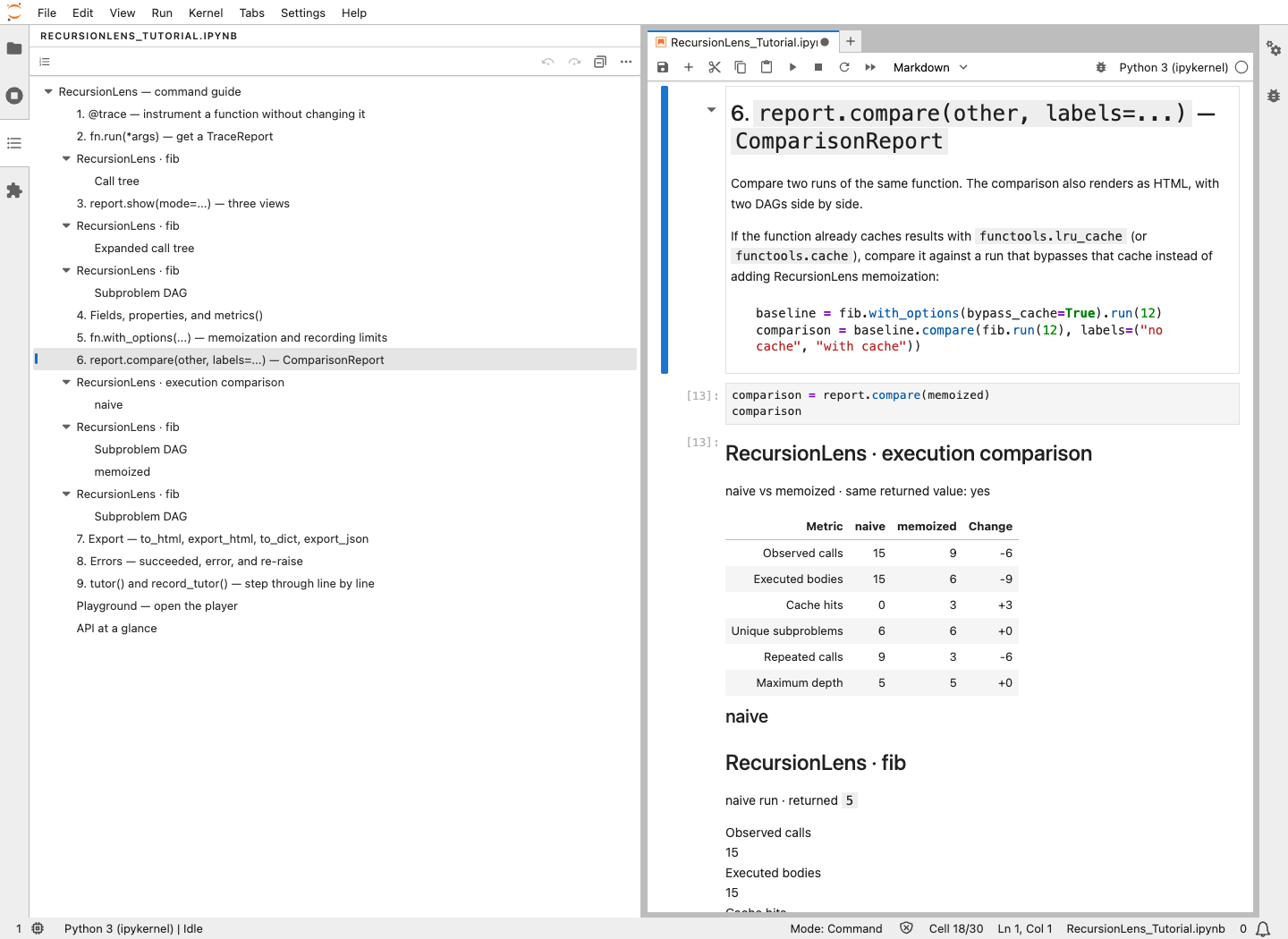
JupyterLab — execution comparison. report.compare() renders a metrics table and both DAGs inside the notebook, including how many bodies ran and how many calls were served from a cache.
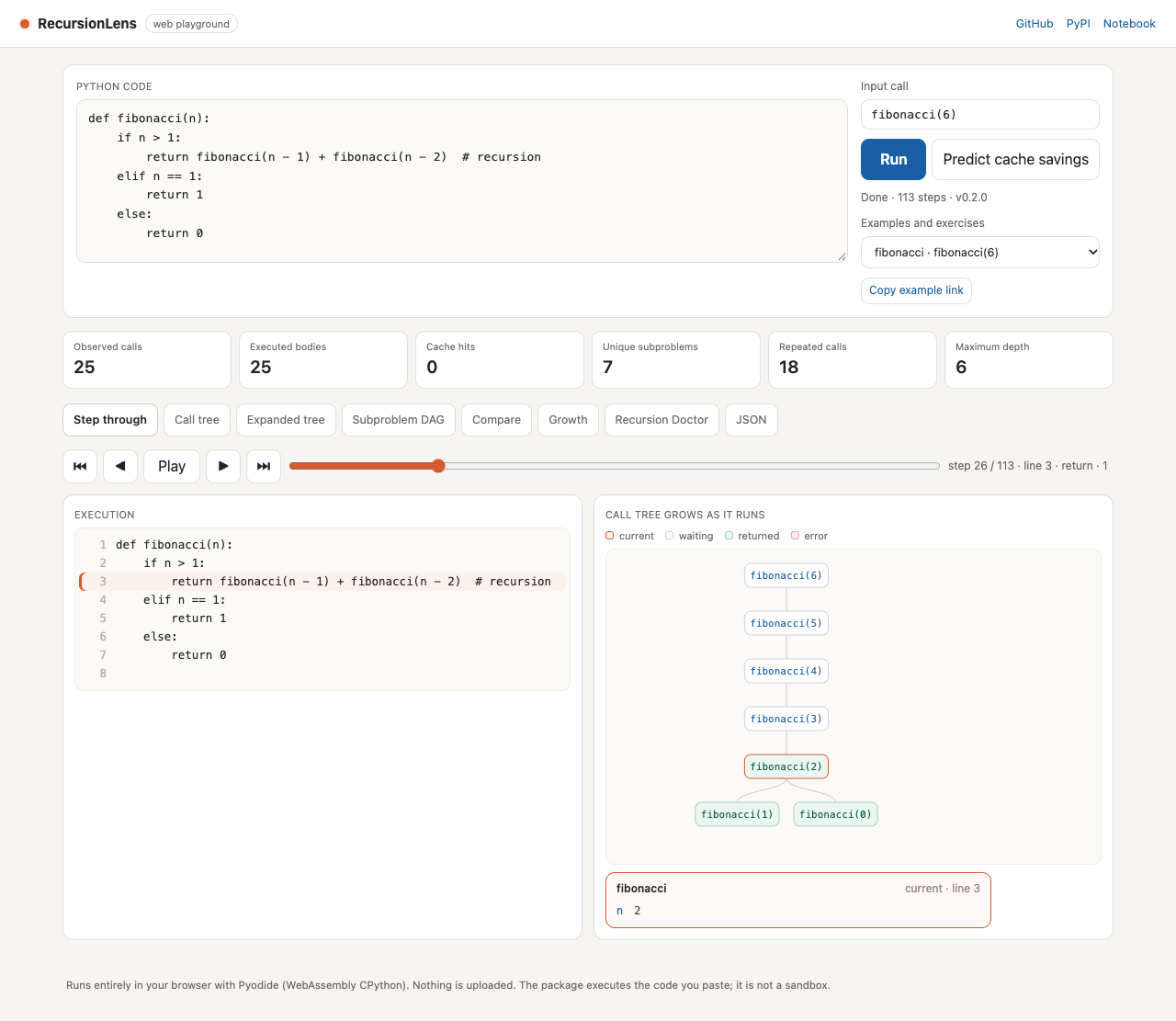
Web playground — step-through player. The call tree grows as the code runs: returned calls stay on screen in green, the current call is coral, and the current frame's locals sit underneath the tree.
Project team
CS1302A Group 50:
- Ziyu JIANG
- Xinyue CAI
- Kehan CAO
- Ruoxi LYU
- Haobo MA
Why RecursionLens?
RecursionLens grew out of a beginner's own difficulty with recursion. Loops can be read line by line, but a non-tail-recursive call such as fib or a tree traversal expands into many interleaved calls: the same subproblem is entered again and again, and a value only comes back after its whole subtree has finished. The step-by-step mentor provided by our course (OPT) is excellent for ordinary programs, since it shows one execution step at a time, yet a recursive run becomes a long stream of push and pop steps with no view of the overall shape of the computation, and no indication of which subproblems repeat. The usual fallback is to draw the call tree by hand on paper. RecursionLens automates that drawing and adds the numbers a hand-drawn tree cannot show.
It answers three different questions:
- Call tree: what actually happened, invocation by invocation?
- Subproblem DAG: how many distinct problems and dependencies exist after identical arguments are merged?
- Execution comparison: what changes when memoization is enabled?
For fib(5), that story is 15 observed calls → 6 unique subproblems → 6 executed bodies with memoization.
Innovation beyond a call graph
The existing rcviz package documents decorator-based recursion trees with arguments, return values, and Jupyter rendering. RecursionLens deliberately focuses on a different workflow:
- transform one trace between an invocation tree and a compressed subproblem DAG;
- show the complete call tree at once in an SVG view or keep a collapsible tree for larger runs;
- quantify repeated calls, executed bodies, cache hits, and maximum depth;
- compare naive and memoized runs in one report with side-by-side DAGs;
- render self-contained HTML/SVG in JupyterLab without Graphviz, native libraries, external JavaScript, or a CDN;
- export versioned JSON for reproducible analysis and testing.
Installation
RecursionLens requires Python 3.9 or later.
Install from PyPI:
python -m pip install recursionlens
For local development:
git clone https://github.com/ZiyuJiang07/recursionlens.git
cd recursionlens
python -m pip install -e ".[dev]"
The package has no runtime dependencies. The interactive tutor is the only optional extra, and it needs ipywidgets.
Quickstart in JupyterLab
from recursionlens import trace

@trace
def fib(n):
    if n < 2:
        return n
    return fib(n - 1) + fib(n - 2)

naive = fib.run(5)
naive  # expandable call tree in the notebook output area
Switch the same trace to the compressed subproblem DAG:
naive.show(mode="dag")
Or show every call at once as one compact SVG tree, with no nodes collapsed:
naive.show(mode="expanded")
Run the function again with memoization and compare the evidence:
memoized = fib.with_options(memoize=True).run(5)
comparison = naive.compare(memoized)
comparison
The comparison confirms the returned values match and reports the measured changes, including 15 → 6 executed function bodies.
Normal function behavior is preserved:
assert fib(5) == 5
assert fib.last_report.total_calls == 15
Step through a function line by line
Version 0.2.0 adds a Python Tutor-style player that runs inside the notebook. Paste a function, choose the call, and step through it:
from recursionlens import tutor

tutor()   # editable code panel, an input box for the call, and step controls
The player highlights the current line and grows the call tree as the run proceeds: waiting calls are blue, the call being executed is coral, and returned calls stay on screen in green. The current frame's local variables sit under the tree, and changing the call (for example fib(5) → fib(3)) records a fresh run and redraws from a single node. It reports each call, line, return, and exception, which makes the order of a recursion easy to follow.
The tutor runs the code you paste with normal Python semantics; it is not a sandbox.
tutor() needs ipywidgets:
python -m pip install "recursionlens[tutor]"
The recording is plain Python, so it also works without the widget:
from recursionlens import record_tutor

trace = record_tutor("def fib(n): ...", "fib(5)")
print(trace.describe())
trace.steps[0].frames        # stack snapshot for one step
Inspect a call in the browser
Open the online playground and wait for the default fib(5) trace to load.
In Step through, use Play to watch the call tree grow one step at a time. Click Pause to inspect the current frame, or drag the slider to jump to a step.
- Open Expanded tree and click a
fib(2)node. The Trace inspector shows its call path. One path isfib(5) → fib(4) → fib(3) → fib(2). In Call tree, use the Inspect button next to a call. - Click Show in DAG. The three calls to
fib(2)share one subproblem node. Select an entry under Recorded calls to jump back to that invocation in the tree. - Open Recursion Doctor. Find the entry for repeated
fib(2)work and click a Show call button to see the evidence in the tree.
The Doctor reports what it observed in the recorded calls for the selected input. If a call re-enters a subproblem that is still on the stack, check the stopping condition and recursive arguments. For functions whose results depend only on their arguments and that have no side effects, repeated work across branches is a reason to investigate memoization.
Try Debug a base case under Examples and exercises. In Recursion Doctor, click Show call to follow the error to reciprocal_sum(n=0). Change the base case to return 0 and rerun to check the fix. Open the debugging exercise
To share a built-in exercise, choose it under Examples and exercises and click Copy example link. The link opens the exercise with its original code and input. After editing the code or input, select a built-in exercise again to copy its link. Open the Grid paths exercise
To preview a local checkout, run python -m http.server 8000 from the repository root and open the local playground.
Predict cache savings
- Use the default
fib(5)or choose Grid paths under Examples and exercises to loadpaths(3, 3). - Click Predict cache savings and enter how many function body executions you expect memoization to skip.
- Press Run and check to see your guess next to the measured savings in Compare. The feedback shows the number of executions in both runs and how often the memoized run reused a result.
The exercise checks predictions when both runs finish successfully with matching return values. Use a function without its own cache, whose result depends only on its arguments and which has no side effects. For Grid paths, different orders of moving right and down can leave the same number of steps in each direction.
Check the grid path result
paths(3, 3) returns 20 routes. Memoization reduces function body executions from 39 to 15, saving 24 executions with 4 cache hits.
Compare growth across input sizes
Open Growth in the browser playground and select fibonacci or Grid paths. The two curves show measured function body executions with and without memoization. Each input size starts a fresh run for each curve. The Exact counts table lists the calls behind the points.
Fibonacci uses inputs 1 through 12. On fibonacci(12), memoization reduces body executions from 465 to 13. Grid paths compares square grids from 0 to 6 on each side. The count drops from 1,847 to 48 for paths(6, 6). Open the playground
Export a report
In Growth, click Download CSV to save the input sizes and measured counts for a spreadsheet. In JSON, click Download JSON to save the current trace report when it is available.
naive.export_html("fib-tree.html")
naive.export_html("fib-dag.html", mode="dag")
naive.export_json("fib-trace.json")
comparison.export_html("fib-comparison.html")
HTML reports are standalone files that can be opened without a notebook server. JSON contains the tree, DAG nodes and edges, metrics, warnings, and schema version.
Supported scope
Version 0.2.0 targets synchronous, deterministic teaching examples such as factorial, Fibonacci, and pure mathematical recursion.
- Memoization requires hashable bound arguments; unhashable arguments produce a warning instead of a crash.
- Identical arguments do not necessarily imply redundant work for functions with side effects or external state.
max_callscaps the stored call tree. Observed calls, executed bodies, and cache hits cover the full run. After truncation, tree and DAG metrics describe the recorded calls.- RecursionLens executes your function; it is not a sandbox for untrusted code.
- Async functions, generators, automatic Big-O inference, and automatic code rewriting are non-goals for 0.2.0.
Documentation and demo
- Command guide (English) - one example per public command: decorator, report object, three views, metrics, memoization, comparison, export, and error handling
- 命令手册(简体中文) - the same guide in Simplified Chinese
- Static HTML preview - English, no Jupyter required
- 静态 HTML 预览 - 中文,不需要 Jupyter
- Runnable example notebook
Development and testing
python -m pytest tests -v
python -m build
python -m twine check dist/*
The test suite covers trace invariants, cache behavior, signatures, exceptions, truncation, JSON, HTML escaping, DAG rendering, and comparison reports. Contributions should keep the public API, tests, and README synchronized.
Documentation is bilingual: README.md / README.zh-CN.md and docs/RecursionLens_Tutorial.ipynb / docs/RecursionLens_Tutorial.zh-CN.ipynb must be updated together, including their generated HTML files.
License
MIT © 2026 Ziyu JIANG, Xinyue CAI, Kehan CAO, Ruoxi LYU, Haobo MA.
1 maintainer

Metadata
1 maintainer
Release files for recursionlens 0.2.1
For a detailed explanation of source distributions (sdists) and built distributions (wheels), please see the package formats documentation.
Source distribution (sdist)
| File | Size | Uploaded | Provenance | Actions |
|---|---|---|---|---|
| recursionlens-0.2.1.tar.gz | 49.3 kB | Without provenance | Details for recursionlens-0.2.1.tar.gz |
Built distribution (wheel)
| File | Interpreter | ABI | Platform | Actions Reset |
|---|---|---|---|---|
| recursionlens-0.2.1-py3-none-any.whl | Python 3 | none | any | Details for recursionlens-0.2.1-py3-none-any.whl |
Total release size: 84.4 kB
Release files / recursionlens-0.2.1.tar.gz
| Download URL | recursionlens-0.2.1.tar.gz |
|---|---|
| Size | 49.3 kB |
| Tags | Source |
|
SHA-256 checksum How to use checksums |
3fb6f812c1130e11f7b87a7aafef26e41fa1e93c1df7e5e52d3245c6d287de55
|
|
BLAKE2b-256 checksum How to use checksums |
2e68773f6cd123341c56d806d8ecd5452b23e8ea39cde2082566f0f73ce25e5a
|
| Upload date | |
|
Uploaded using Trusted Publishing? What is trusted publishing? |
No |
| Uploaded via |
twine/7.0.0 CPython/3.13.12
|
Release files / recursionlens-0.2.1-py3-none-any.whl
| Download URL | recursionlens-0.2.1-py3-none-any.whl |
|---|---|
| Size | 35.1 kB |
| Tags | Python 3 |
|
SHA-256 checksum How to use checksums |
2b2dedf38184cb0f041b9125e70414cf9662b0f90395656e5b6b247fea127d31
|
|
BLAKE2b-256 checksum How to use checksums |
03ff4ec384dd8d027b2c8926630ce84df1e4e8d8da66e92e195b7062795b48d4
|
| Upload date | |
|
Uploaded using Trusted Publishing? What is trusted publishing? |
No |
| Uploaded via |
twine/7.0.0 CPython/3.13.12
|
Security for recursionlens 0.2.1
Provenance
Provenance describes where a file came from. On PyPI, provenance is shared via attestations, which provide a verifiable record of the build or publishing details. View details, limitations and caveats.
No provenance found
None of the files in this release were uploaded with provenance metadata.
A note on package security
PyPI is a repository for distributing packages, not a service for auditing them. While third-party security researchers and our staff do their best to detect and remove malicious packages, PyPI cannot guarantee the quality, security or suitability of any given package.
To learn more about protecting yourself from malicious actors, visit our package security documentation.














