
ReDefiNER
Define what to extract. In plain English.
A generalist 0.8B model for entity extraction and span labeling, guided by the rulebook you write.
0.8B · Runs on CPU · Extract and label · Rulebooks up to 10k tokens · Apache-2.0

Quickstart · See a rule at work · Benchmarks · Weights · Demo
You describe the entity types you want, in plain English, with any rules about what counts and what doesn't. The model finds and labels the spans (extract mode), or labels spans you already have (label mode). To change its behaviour, you change the rulebook, not the weights; nothing is retrained.
At a glance
| Task | Entity extraction (find and label spans) and span labeling (label spans you supply), in English |
| Control | A plain-English rulebook of types, one-line descriptions and rules; edit it to change the output, with no retraining |
| Output | Spans of your text, each with a type and a confidence; non-generative |
| Model size | 0.8B parameters, shipped as one 0.77 GB int8 file |
| Speed, CPU | About 0.5 s per sentence on a laptop once a rulebook is loaded (Apple M2) |
| Speed, GPU | About 0.05 s per text, or 0.38 s for 16 texts in one call, with a 2,000-token rulebook (NVIDIA A10) |
| Memory, CPU | About 1.1 GB peak with a short rulebook, about 2 GB with a 2,000-token rulebook (Apple M2) |
| Interfaces | Python (Tagger.extract, Tagger.label) and a local HTTP server (redefiner serve) |
| Licence | Apache-2.0 |
| Release | 1.0 · October 2026 |
Quickstart
pip install redefiner
from redefiner import Tagger

tagger = Tagger.from_pretrained("jungroo-ai/redefiner-0.8b")   # CPU by default; device="cuda" for a GPU

rulebook = """[RULES]
Extract every entity of the supplied types. Return exact spans from the text.

[TYPE] PERSON
[DESCRIPTION] A person's name.
PE1 Label the full name; leave out titles such as "Dr" or "Prof".

[TYPE] ORGANIZATION
[DESCRIPTION] A company, university or other institution.
"""

tagger.extract("Prof Ada Lovelace corresponded with the Royal Society.", rulebook)
# [{'start': 5, 'end': 17, 'text': 'Ada Lovelace', 'label': 'PERSON', 'confidence': 0.977},
#  {'start': 40, 'end': 53, 'text': 'Royal Society', 'label': 'ORGANIZATION', 'confidence': 0.489}]

# Without rule PE1, the same call keeps the title:
without_pe1 = rulebook.replace('PE1 Label the full name; leave out titles such as "Dr" or "Prof".\n', "")
tagger.extract("Prof Ada Lovelace corresponded with the Royal Society.", without_pe1)
# [{'start': 0, 'end': 17, 'text': 'Prof Ada Lovelace', 'label': 'PERSON', 'confidence': 0.606},
#  {'start': 40, 'end': 53, 'text': 'Royal Society', 'label': 'ORGANIZATION', 'confidence': 0.424}]
Label mode, when you already have the spans:
text = "Ada Lovelace corresponded with the Royal Society."
tagger.label(text, [(0, 12), (35, 48)], rulebook)
# [{'start': 0, 'end': 12, 'text': 'Ada Lovelace', 'label': 'PERSON', 'confidence': 1.0,
#    'alternatives': [('ORGANIZATION', 0.0)]},
#  {'start': 35, 'end': 48, 'text': 'Royal Society', 'label': 'ORGANIZATION', 'confidence': 0.997,
#    'alternatives': [('PERSON', 0.003)]}]
Both calls also take a list of texts (and, for label, one list of spans per text) and return one result list per text.
Writing your own rulebook: start from a template (a blank layout; PII, news, product reviews and scientific text; and a skeleton for types that depend on context), and see How to write rules that work.
See a rule at work
Every card below is real output: the released int8 model on a laptop CPU, with nothing retrained between runs. Only the rulebook changes. Green lines were added to the rulebook; spans outlined in red disappear, spans outlined in green are new or changed. Try your own text and rules in the demo.
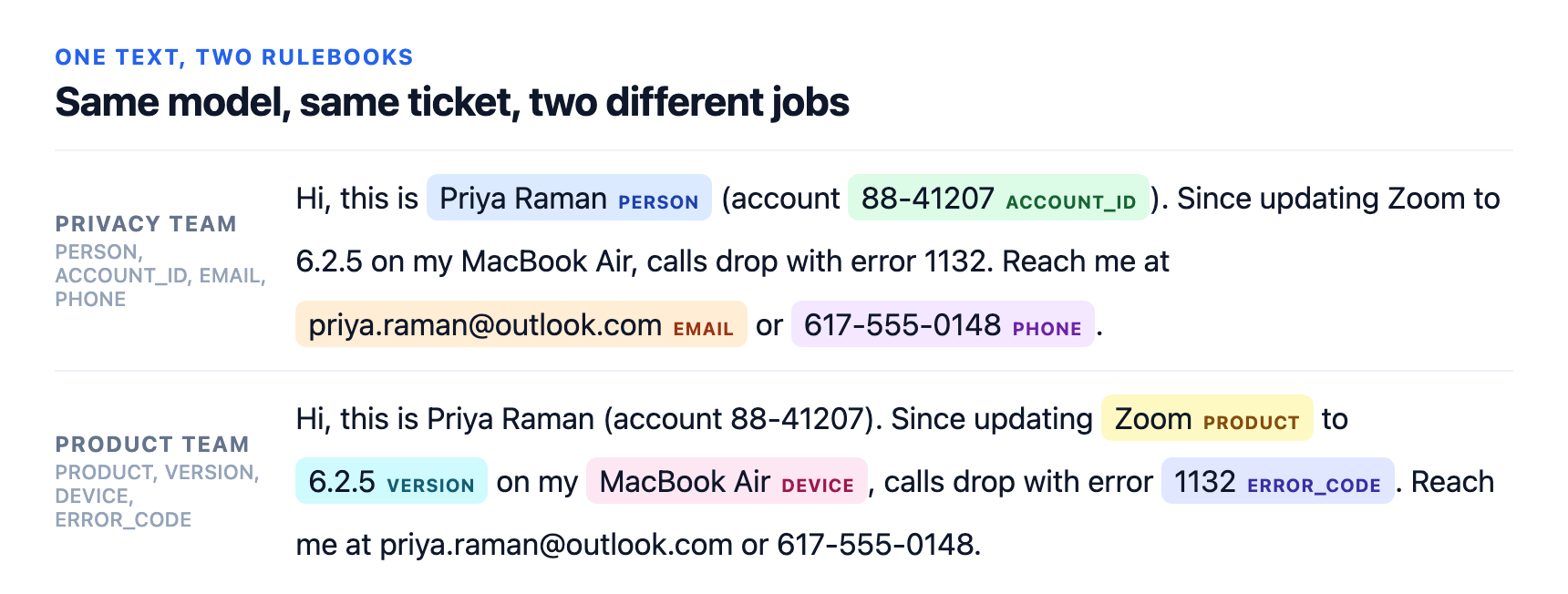
Same model, same ticket, two different jobs: the rulebooks and output as text
Privacy team
[RULES]
Extract every entity of the supplied types. Return exact spans from the text.

[TYPE] PERSON
[DESCRIPTION] A person's name.

[TYPE] ACCOUNT_ID
[DESCRIPTION] An account or customer number.

[TYPE] EMAIL
[DESCRIPTION] An email address.

[TYPE] PHONE
[DESCRIPTION] A phone number.
Output: Priya Raman PERSON · 88-41207 ACCOUNT_ID · priya.raman@outlook.com EMAIL · 617-555-0148 PHONE
Product team
[RULES]
Extract every entity of the supplied types. Return exact spans from the text.

[TYPE] PRODUCT
[DESCRIPTION] A named software product or app.

[TYPE] VERSION
[DESCRIPTION] A version number.

[TYPE] DEVICE
[DESCRIPTION] A named hardware model.

[TYPE] ERROR_CODE
[DESCRIPTION] An error code.
Output: Zoom PRODUCT · 6.2.5 VERSION · MacBook Air DEVICE · 1132 ERROR_CODE
Everyday edits
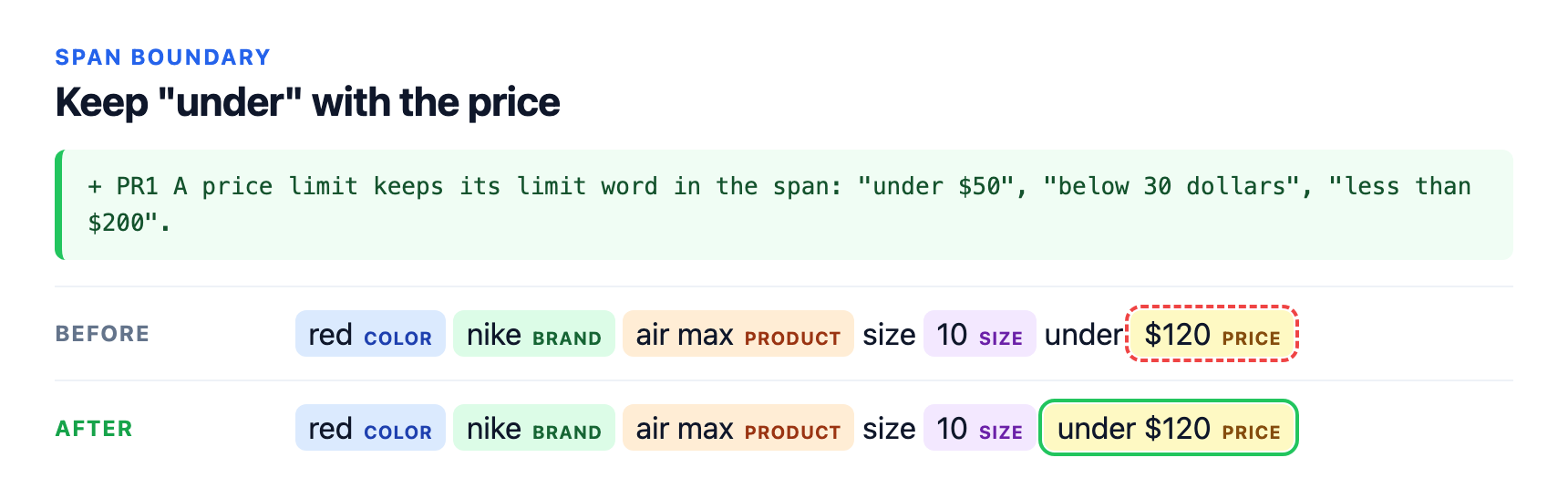
Keep "under" with the price: the rulebook and output as text
Before
[RULES]
Extract every entity of the supplied types. Return exact spans from the text.

[TYPE] BRAND
[DESCRIPTION] A brand name.

[TYPE] PRODUCT
[DESCRIPTION] A product line or model name.

[TYPE] COLOR
[DESCRIPTION] A colour.

[TYPE] SIZE
[DESCRIPTION] A size.

[TYPE] PRICE
[DESCRIPTION] A price or a price limit.
Output: red COLOR · nike BRAND · air max PRODUCT · 10 SIZE · $120 PRICE
After
[RULES]
Extract every entity of the supplied types. Return exact spans from the text.

[TYPE] BRAND
[DESCRIPTION] A brand name.

[TYPE] PRODUCT
[DESCRIPTION] A product line or model name.

[TYPE] COLOR
[DESCRIPTION] A colour.

[TYPE] SIZE
[DESCRIPTION] A size.

[TYPE] PRICE
[DESCRIPTION] A price or a price limit.
PR1 A price limit keeps its limit word in the span: "under $50", "below 30 dollars", "less than $200".
Output: red COLOR · nike BRAND · air max PRODUCT · 10 SIZE · under $120 PRICE
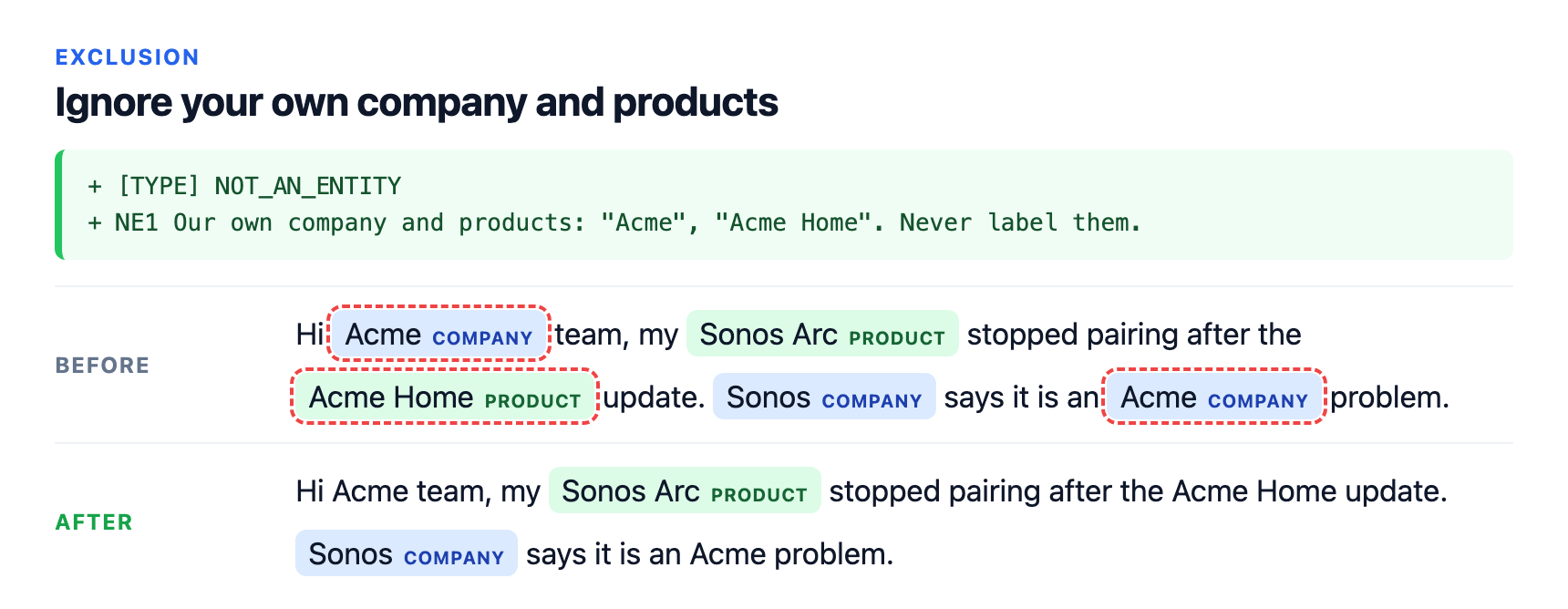
Ignore your own company and products: the rulebook and output as text
Before
[RULES]
Extract every entity of the supplied types. Return exact spans from the text.

[TYPE] COMPANY
[DESCRIPTION] A company name.

[TYPE] PRODUCT
[DESCRIPTION] A named product or device.
Output: Acme COMPANY · Sonos Arc PRODUCT · Acme Home PRODUCT · Sonos COMPANY · Acme COMPANY
After
[RULES]
Extract every entity of the supplied types. Return exact spans from the text.

[TYPE] COMPANY
[DESCRIPTION] A company name.

[TYPE] PRODUCT
[DESCRIPTION] A named product or device.

[TYPE] NOT_AN_ENTITY
NE1 Our own company and products: "Acme", "Acme Home". Never label them.
Output: Sonos Arc PRODUCT · Sonos COMPANY
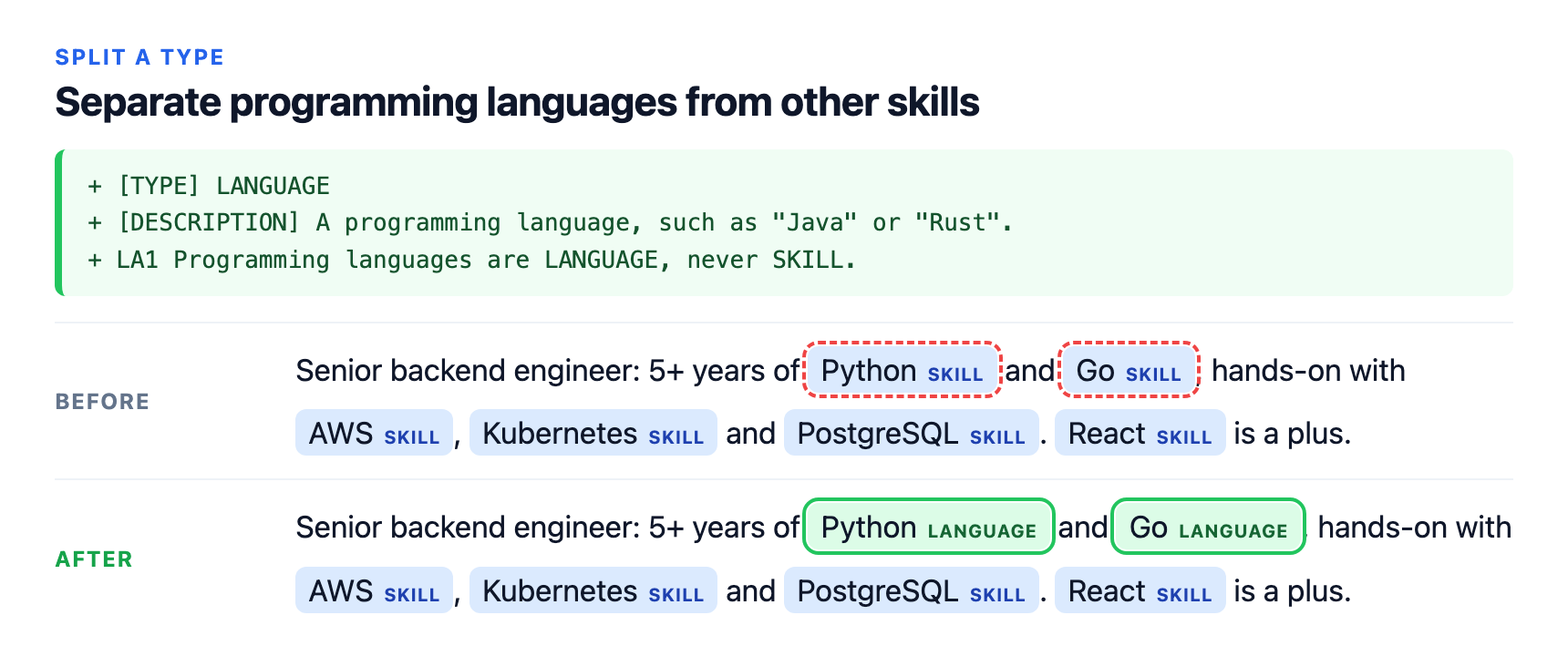
Separate programming languages from other skills: the rulebook and output as text
Before
[RULES]
Extract every entity of the supplied types. Return exact spans from the text.

[TYPE] SKILL
[DESCRIPTION] A technical skill: a programming language, framework, platform or tool.
Output: Python SKILL · Go SKILL · AWS SKILL · Kubernetes SKILL · PostgreSQL SKILL · React SKILL
After
[RULES]
Extract every entity of the supplied types. Return exact spans from the text.

[TYPE] SKILL
[DESCRIPTION] A technical skill: a programming language, framework, platform or tool.

[TYPE] LANGUAGE
[DESCRIPTION] A programming language, such as "Java" or "Rust".
LA1 Programming languages are LANGUAGE, never SKILL.
Output: Python LANGUAGE · Go LANGUAGE · AWS SKILL · Kubernetes SKILL · PostgreSQL SKILL · React SKILL
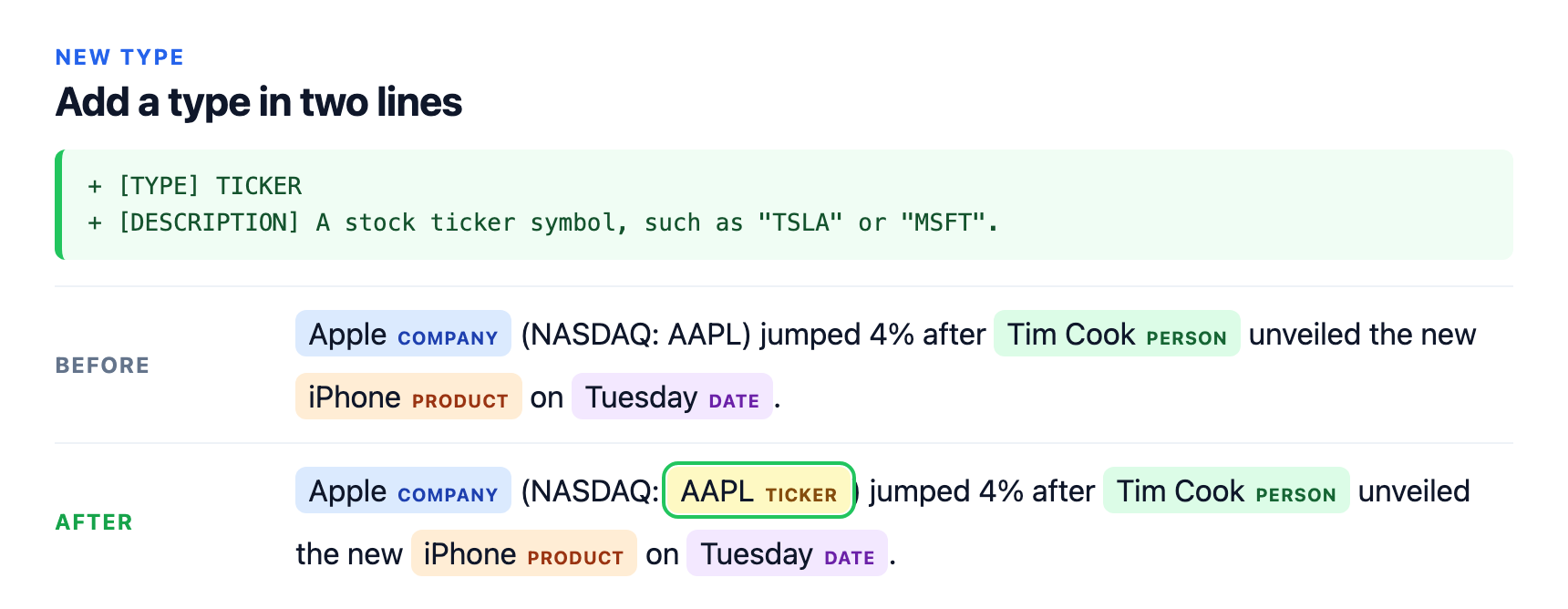
Add a type in two lines: the rulebook and output as text
Before
[RULES]
Extract every entity of the supplied types. Return exact spans from the text.

[TYPE] COMPANY
[DESCRIPTION] A company name.

[TYPE] PERSON
[DESCRIPTION] A person's name.

[TYPE] PRODUCT
[DESCRIPTION] A product name.

[TYPE] DATE
[DESCRIPTION] A date or day.
Output: Apple COMPANY · Tim Cook PERSON · iPhone PRODUCT · Tuesday DATE
After
[RULES]
Extract every entity of the supplied types. Return exact spans from the text.

[TYPE] COMPANY
[DESCRIPTION] A company name.

[TYPE] PERSON
[DESCRIPTION] A person's name.

[TYPE] PRODUCT
[DESCRIPTION] A product name.

[TYPE] DATE
[DESCRIPTION] A date or day.

[TYPE] TICKER
[DESCRIPTION] A stock ticker symbol, such as "TSLA" or "MSFT".
Output: Apple COMPANY · AAPL TICKER · Tim Cook PERSON · iPhone PRODUCT · Tuesday DATE
Hard rules
Rules that overrule the words in the text, or ask for something the model leaves out by default.
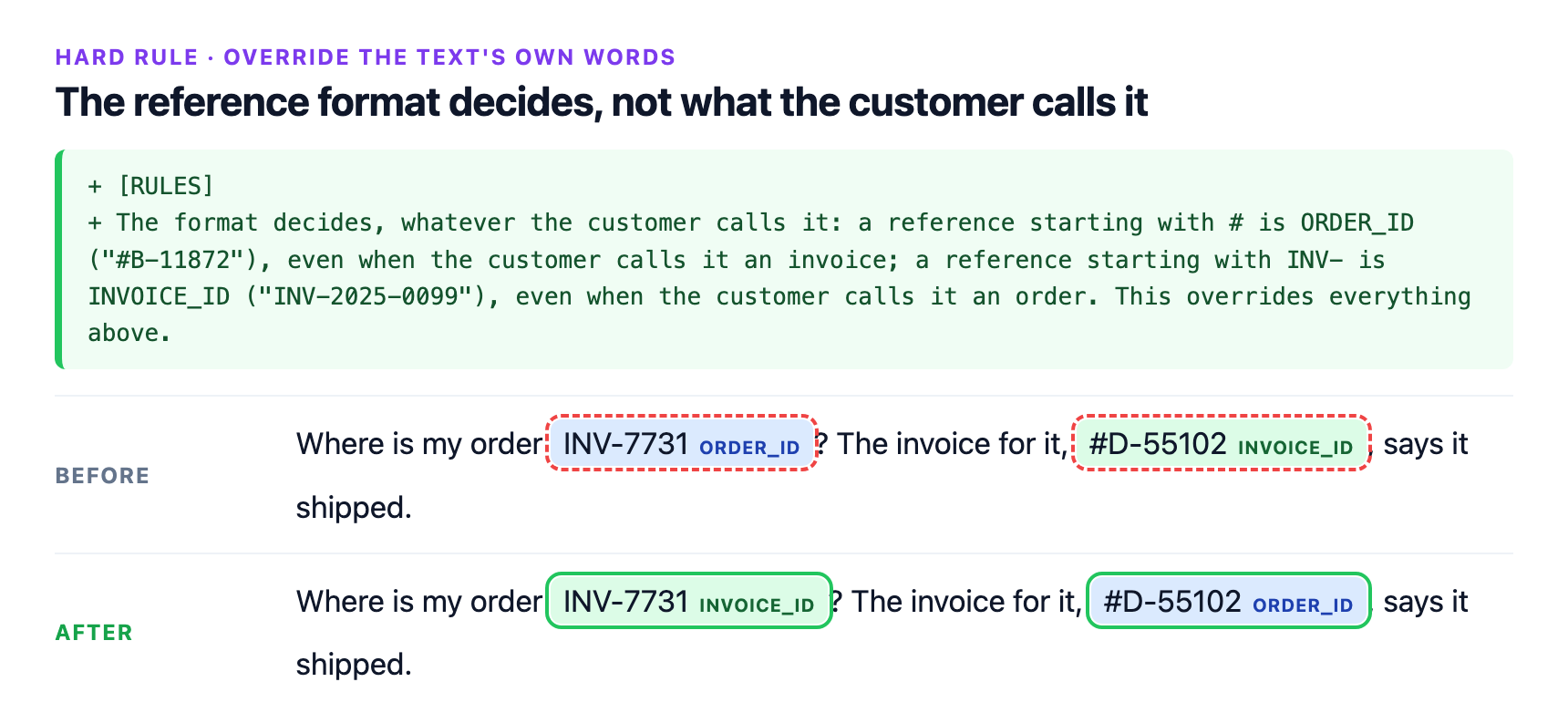
The reference format decides, not what the customer calls it: the rulebook and output as text
Before
[RULES]
Extract every entity of the supplied types. Return exact spans from the text.

[TYPE] ORDER_ID
[DESCRIPTION] An order number.

[TYPE] INVOICE_ID
[DESCRIPTION] An invoice number.
Output: INV-7731 ORDER_ID · #D-55102 INVOICE_ID
After
[RULES]
Extract every entity of the supplied types. Return exact spans from the text.

[TYPE] ORDER_ID
[DESCRIPTION] An order number.

[TYPE] INVOICE_ID
[DESCRIPTION] An invoice number.
[RULES]
The format decides, whatever the customer calls it: a reference starting with # is ORDER_ID ("#B-11872"), even when the customer calls it an invoice; a reference starting with INV- is INVOICE_ID ("INV-2025-0099"), even when the customer calls it an order. This overrides everything above.
Output: INV-7731 INVOICE_ID · #D-55102 ORDER_ID
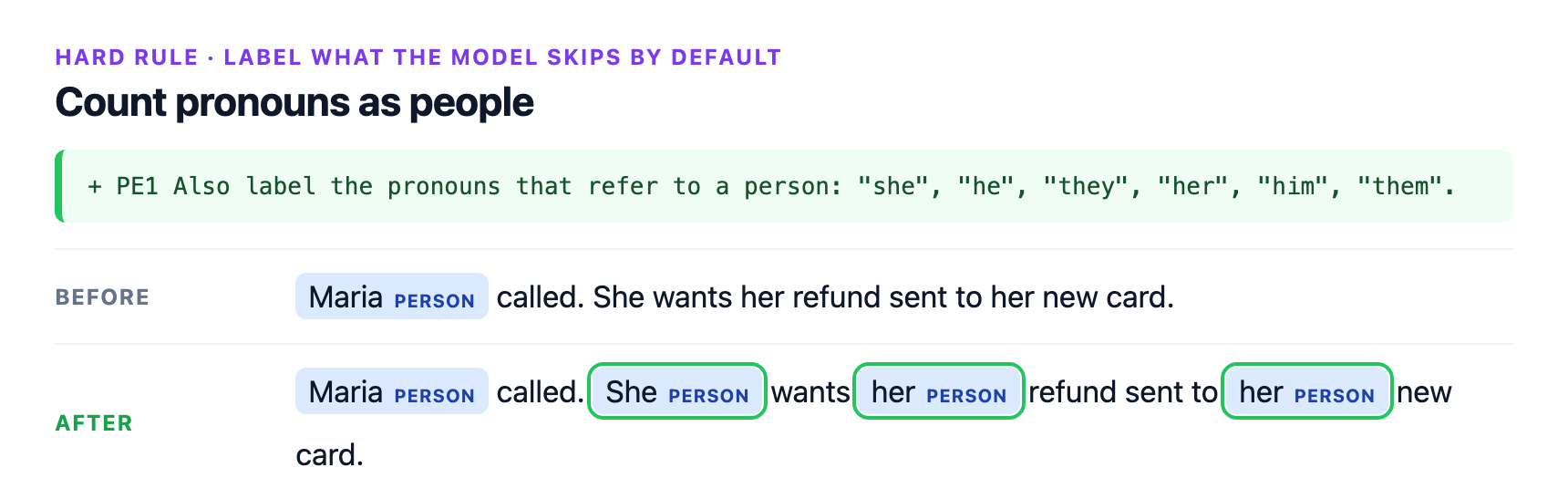
Count pronouns as people: the rulebook and output as text
Before
[RULES]
Extract every entity of the supplied types. Return exact spans from the text.

[TYPE] PERSON
[DESCRIPTION] A person's name.
Output: Maria PERSON
After
[RULES]
Extract every entity of the supplied types. Return exact spans from the text.

[TYPE] PERSON
[DESCRIPTION] A person's name.
PE1 Also label the pronouns that refer to a person: "she", "he", "they", "her", "him", "them".
Output: Maria PERSON · She PERSON · her PERSON · her PERSON
A full rulebook
The next three cards use one example rulebook for a travel desk, with 11 types, written the way the model reads best:
general rules, precedence rules that settle conflicts, numbered type rules with "query" -> span examples, and what
never to extract. "Before" is the same rulebook with only its types and descriptions.
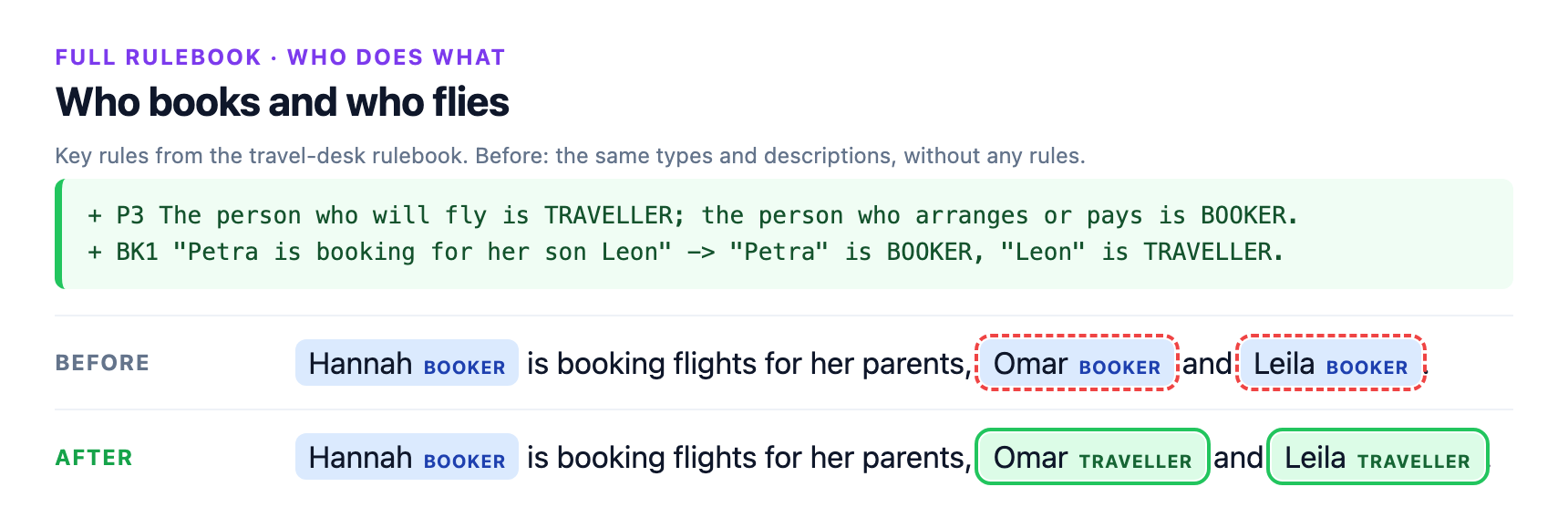
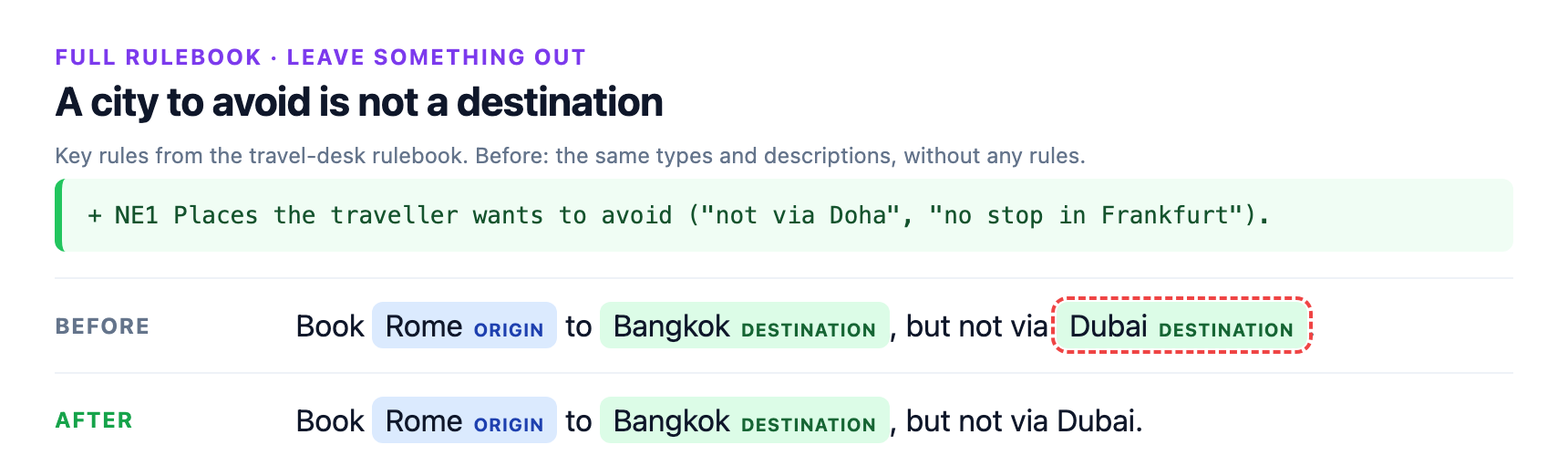
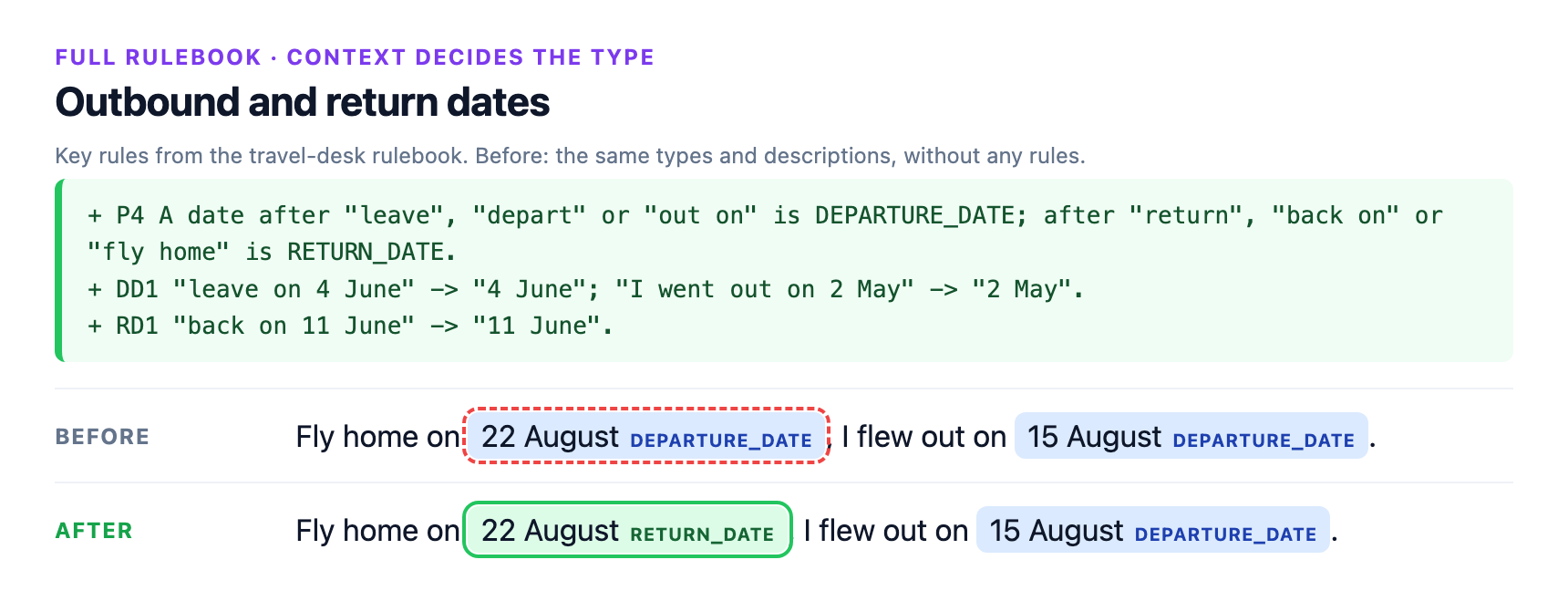
On 21 test queries the full rulebook got 19 exactly right, against 11 with types and descriptions only and 9 with type
names only. Both misses came from one rule: a single code with the wrong name ("my ticket number is ZK48TQ") keeps the
type of its name; the format rule works when both kinds of code appear together.
The layout is explained in Structure for hard rules, and docs/templates/hard-rules.txt is a blank copy to fill in.
The travel-desk rulebook (docs/examples/travel-desk-rulebook.txt)
[RULES] Travel desk rulebook. Label each entity in the traveller's message with one of the types below.
G1 Label all entities in the message, not only the first one.
G2 Keep each span as short as the entity itself ("a flight to Oslo" -> "Oslo").
G3 When two types fit, the precedence rules below decide.
[PRECEDENCE]
P1 An airport name or a three-letter airport code is AIRPORT, never ORIGIN or DESTINATION, even after "from" or "to".
P2 Direction decides between ORIGIN and DESTINATION: a place after "from", "out of" or "leaving" is ORIGIN; after "to", "into", "arriving in" or "back to" is DESTINATION.
P3 The person who will fly is TRAVELLER; the person who arranges or pays is BOOKER.
P4 A date after "leave", "depart" or "out on" is DEPARTURE_DATE; after "return", "back on" or "fly home" is RETURN_DATE.
P5 An airline name followed by a programme word ("Miles", "Club", "Rewards") is LOYALTY_PROGRAM; any other airline name is AIRLINE.
P6 The reference format decides, whatever the traveller calls it: a code that mixes letters and digits is BOOKING_REF, even when called a ticket number; a long code of digits only is TICKET_NUMBER, even when called a booking reference.
[TYPE] TRAVELLER
[DESCRIPTION] A person who will take the trip.
TR1 "Book Wanda on the morning flight" -> "Wanda"; "seats for Ilse and Gus" -> "Ilse", "Gus".
[TYPE] BOOKER
[DESCRIPTION] A person who arranges or pays for someone else's trip.
BK1 "Petra is booking for her son Leon" -> "Petra" is BOOKER, "Leon" is TRAVELLER.
BK2 "charge it to Viktor's card" -> "Viktor".
[TYPE] ORIGIN
[DESCRIPTION] The city or country the trip starts from.
OR1 "from Porto" -> "Porto"; "leaving Seoul" -> "Seoul".
[TYPE] DESTINATION
[DESCRIPTION] The city or country the trip goes to.
DS1 "to Nairobi" -> "Nairobi"; "back to Quito" -> "Quito".
[TYPE] AIRPORT
[DESCRIPTION] A named airport or a three-letter airport code.
AI1 "from YYZ" -> "YYZ"; "into Changi" -> "Changi".
[TYPE] DEPARTURE_DATE
[DESCRIPTION] The date the outbound trip starts.
DD1 "leave on 4 June" -> "4 June"; "I went out on 2 May" -> "2 May".
[TYPE] RETURN_DATE
[DESCRIPTION] The date of the return trip.
RD1 "back on 11 June" -> "11 June".
[TYPE] AIRLINE
[DESCRIPTION] An airline the traveller flies with.
AL1 "on Skyvane" -> "Skyvane".
[TYPE] LOYALTY_PROGRAM
[DESCRIPTION] An airline's points or membership programme.
LY1 The span keeps the programme word ("my Skyvane Club number" -> "Skyvane Club").
[TYPE] BOOKING_REF
[DESCRIPTION] A booking reference: a short code of letters and digits.
BR1 "reference QX7PLM" -> "QX7PLM"; "my ticket number is HB2RWA" -> "HB2RWA" is BOOKING_REF.
[TYPE] TICKET_NUMBER
[DESCRIPTION] An e-ticket number: a long code of digits only.
TN1 "ticket 2201234567890" -> "2201234567890"; "booking ref 1259876543210" -> "1259876543210" is TICKET_NUMBER.
[NOT_AN_ENTITY]
NE1 Places the traveller wants to avoid ("not via Doha", "no stop in Frankfurt").
NE2 Request phrases ("can you", "please") and generic words ("flight", "seat", "trip").
The quoted examples inside the rules ("under $50", "Java", "TSLA", "#B-11872") are not in the texts: the model
applies the rule, it doesn't copy it. Hard rules work when they are concrete, as here; a rule that asks the model
to judge what didn't happen ("only cities the writer actually visited, not ones they plan to") is not followed
yet. See Limitations. To regenerate the cards, run scripts/build_rule_cards.py; it stops if any output
differs from what the cards show.
Rulebooks
A rulebook has an optional [RULES] section with rules for every type, then one [TYPE] section per type: a one-line
[DESCRIPTION] and any number of rule lines. An optional [TYPE] NOT_AN_ENTITY section lists what is never tagged.
The same rulebook can be passed as a dict:
rulebook = {
    "general": ["Extract every entity of the supplied types."],
    "classes": [
        {"name": "PERSON", "description": "A person's name.",
         "rules": ['PE1 Label the full name; leave out titles such as "Dr" or "Prof".']},
        {"name": "ORGANIZATION", "description": "A company, university or other institution."},
    ],
    "never": ["Pronouns."],
}
Templates to copy are in docs/templates/.
What works, from the benchmarks (see How to write rules that work):
- Descriptions matter. With a one-line description per type the model scores 7 points higher than with type names alone on our open-NER sets; always write them.
- Boundary, exclusion and convention rules work. "The span includes the @ of a Twitter handle" took BroadTwitter from 45.5 to 70.6 F1. "Never label Houston, Texas or Harvey" cut those false positives from 389 to 5 on HarveyNER.
- Rules that fight a strong prior don't. Asking it to label a person's name as something other than a person, or to label pronouns and common nouns as entities, mostly has no effect. See Limitations.
Label mode
label(text, spans, rulebook, allow_none=False, snap=False)
- Spans are character offsets into the original text, start inclusive, end exclusive, as
(start, end)or{"start": .., "end": ..}. - Each span gets the best type and its confidence, plus the next two alternatives.
allow_none=False(default) forces a choice among the rulebook's types.allow_none=Truelets the model answer"NONE"for a span that isn't any of them.- A span the model can't read comes back with
"unsupported": reasoninstead of a label, never dropped and never changed silently:- it doesn't start and end on token boundaries ("would be snapped"), e.g. part of a word. Pass
snap=Trueto label it widened to whole tokens; the result then carries the widened offsets and"snapped": True; - it is longer than 16 tokens;
- its offsets are invalid.
- it doesn't start and end on token boundaries ("would be snapped"), e.g. part of a word. Pass
Long texts
The model reads up to 256 tokens of text per pass. Longer texts are split automatically into overlapping windows, cut at sentence ends where possible:
- in extract mode, where two windows disagree about a span, the one further from a window edge is kept;
- in label mode, each window is placed around the spans it labels.
Each window is read on its own, so the same name can get different labels in different parts of a long document.
If consistency matters, label each distinct string once with label and apply the result everywhere.
Speed
Measured on an Apple M2 (8 cores), CPU, int8, with a 4,300-character rulebook (14 types with descriptions, rules and examples):
| Seconds | |
|---|---|
| First text after loading or editing a rulebook | ~3.5 |
| Each further text, one at a time | 0.5–0.7 |
| 16 texts in one call | ~6.8 |
| Loading the model | ~1 |
The rulebook is encoded once and cached (the last 8 rulebooks are kept), so switching between rulebooks you've already used is fast. On CPU the package replaces one slow PyTorch operation (a depthwise convolution with no MKLDNN fast path) with an exact equivalent; that alone is a 7–14× speedup on Macs.
On one NVIDIA A10 (int8 weights, fp32 compute), with a 7,700-character rulebook of 16 types (about 2,000 tokens), measured through our benchmark server, HTTP included:
| Seconds | |
|---|---|
| First text after loading a new rulebook | 0.39 |
| Each further text, one at a time | 0.05 |
| 16 texts in one call | 0.38 |
GPU memory use was not measured.
HTTP server
redefiner serve --model jungroo-ai/redefiner-0.8b --port 8000
It listens on 127.0.0.1 (--host to change) and handles one request at a time. Both endpoints take a list of texts
and return one result list per text. The rulebook is text or, as here, the dict form of to_text:
RULEBOOK='{"general": ["Extract every entity of the supplied types. Return exact spans from the text."],
           "classes": [{"name": "PERSON", "description": "The name of a person."},
                       {"name": "ORGANIZATION", "description": "A company, university or other institution."}]}'

curl -s localhost:8000/extract -d "{\"rulebook\": $RULEBOOK, \"texts\": [\"Ada Lovelace corresponded with the Royal Society.\"]}"
# {"results": [[{"start": 0, "end": 12, "text": "Ada Lovelace", "label": "PERSON", "confidence": 0.989},
#               {"start": 35, "end": 48, "text": "Royal Society", "label": "ORGANIZATION", "confidence": 0.431}]], "ms": 2101}

curl -s localhost:8000/label -d "{\"rulebook\": $RULEBOOK, \"texts\": [\"Ada Lovelace corresponded with the Royal Society.\"], \"spans\": [[[0, 12], [35, 48]]]}"
# {"results": [[{"start": 0, "end": 12, "text": "Ada Lovelace", "label": "PERSON", "confidence": 0.999, "alternatives": [["ORGANIZATION", 0.001]]},
#               {"start": 35, "end": 48, "text": "Royal Society", "label": "ORGANIZATION", "confidence": 0.994, "alternatives": [["PERSON", 0.006]]}]], "ms": 302}
| Endpoint | Fields | Optional fields (default) |
|---|---|---|
POST /extract |
rulebook, texts |
threshold (0.5), none_bias (2) |
POST /label |
rulebook, texts, spans: one list of [start, end] per text |
allow_none (false), snap (false), none_bias (2) |
GET /info |
A span that can't be labelled comes back with an unsupported reason in place of a label (see
Label mode). A malformed request gets HTTP 400 and an error message.
Benchmarks
Entity-level F1 (exact boundary and type) unless marked; S1MB is accuracy. Full tables, protocols and caveats are on
the benchmark page, with every
rulebook it reports in benchmarks/rulebooks/.
| Benchmark | Metric | ReDefiNER 0.8B | Comparison |
|---|---|---|---|
| 13 GoLLIE NER sets, GoLLIE's own guidelines | F1 | 59.8 | GoLLIE 34B 58.1 |
| 7 CrossNER and MIT sets, other instruction-following NER models | F1 | 69.9 | B2NER 20B 72.1, B2NER 7B 69.8 |
| 13 GoLLIE sets, our rules tuned on dev (not equal-information) | F1 | 67.9 | GoLLIE 34B 58.1 |
| BUSTER, SLIMER's type wording | micro-F1 | 22.1 | SLIMER 7B 45.3; Liquid AI Policy-Linter 0.2 (our run) |
| BUSTER, our rules tuned on dev | micro-F1 | 35.8 | SLIMER 7B 45.3; Liquid AI Policy-Linter 2.2 (our run) |
| Open NER, 7 CrossNER and MIT sets, one-line type descriptions | F1 | 63.1 | GLiNER large 61.7, 62.2 with a dev-tuned threshold (our run) |
| Open NER, same sets, type names only | F1 | 56.2 | GNER-T5-large 63.5; GLiNER large 61.6, 63.1 tuned, and NuNER Zero-span 62.6 (our runs) |
| S1MB span labeling, 2 of its 137 tasks (Few-NERD, Gretel PII) | accuracy | 72.0 | best entry at 1B or less 92.3; on these two tasks ReDefiNER ranks 87 of 208, 3 of 60 at 1B or less; Liquid AI's d1-2B 74.3 (our run) |
All numbers use one fixed setting (int8, span threshold 0.5, NONE bias 2, 256-token query cap). Baseline numbers are published results unless marked as our run.
The 13 GoLLIE zero-shot NER sets, with GoLLIE's own guidelines
GoLLIE's guideline text and five examples per type, converted into a rulebook with nothing added; scored with GoLLIE's code. ReDefiNER scores are the mean over 3 orders of the types in the rulebook; GoLLIE scores are from its paper.
| Dataset | ReDefiNER 0.8B | GoLLIE 7B | GoLLIE 13B | GoLLIE 34B |
|---|---|---|---|---|
| FabNER | 32.7 | 24.8 | 25.4 | 26.3 |
| MultiNERD | 82.0 | 76.0 | 77.5 | 77.2 |
| BroadTwitter | 45.5 | 49.5 | 51.4 | 50.3 |
| HarveyNER | 33.5 | 37.3 | 41.3 | 38.9 |
| E3C | 47.7 | 59.0 | 59.0 | 60.0 |
| WikiEvents | 46.4 | 80.7 | 80.2 | 81.3 |
| CrossNER AI | 66.7 | 59.1 | 56.7 | 61.6 |
| CrossNER Literature | 70.1 | 62.7 | 59.7 | 59.1 |
| CrossNER Music | 73.7 | 67.8 | 65.5 | 68.4 |
| CrossNER Politics | 78.0 | 57.2 | 54.4 | 60.2 |
| CrossNER Science | 66.0 | 55.5 | 56.2 | 56.3 |
| MIT Movie | 71.3 | 63.0 | 62.5 | 62.4 |
| MIT Restaurant | 63.8 | 43.4 | 49.8 | 52.7 |
| Mean, all 13 | 59.8 | 56.6 | 56.9 | 58.1 |
ReDefiNER leads GoLLIE 34B on 9 of the 13 sets with about 1/40 of its parameters. The largest loss is WikiEvents, which labels pronouns and common nouns under the ACE05 scheme GoLLIE was trained on.
Open NER: the same 7 CrossNER and MIT test sets
Mean F1 over 6,470 sentences, with each type given as a one-line description or by its name only. For our runs of other models, the first number uses the model's default threshold and the second a threshold chosen on the dev sets; ReDefiNER uses its one fixed release setting.
| Model | With descriptions | Names only |
|---|---|---|
| ReDefiNER 0.8B | 63.1 | 56.2 |
| GLiNER large v2.5, our run | 61.7 / 62.2 | 61.6 / 63.1 |
| NuNER Zero-span 0.4B, our run | 26.5 / 55.5 | 62.6 / 62.6 |
| NuNER Zero 0.4B, our run | 25.8 / 46.6 | 56.8 / 56.9 |
| Liquid AI Policy-Linter 350M, our run | 47.5 / 48.5 | – |
| GNER-T5-large 0.78B, reported | – | 63.5 |
ReDefiNER leads when types are described, also against the tuned baselines. With names only it trails GLiNER large, NuNER Zero-span and GNER. Descriptions hurt both NuNER models, which were trained on short type names; their labels are lower-cased as NuNER's card requires. NuNER Zero's own reported 68.0 on these sets is token-level F1, which gives credit for partly right spans; scored that way, our run gives 67.9. The Policy-Linter takes free-text rules at inference, like ReDefiNER, but scores each word on its own, so multi-word names often break apart.
S1MB span labeling: Few-NERD and Gretel PII
| Model | Params | Few-NERD | Gretel PII | Mean |
|---|---|---|---|---|
| bekko-system-one-v0-400m, best entry at 1B or less | 0.39B | 89.4 | 95.2 | 92.3 |
| Liquid AI d1-2B, our run | 1.92B | 70.1 | 78.5 | 74.3 |
| ReDefiNER | 0.8B | 71.8 | 72.2 | 72.0 |
| Liquid AI d1-omni-600M, our run | 0.6B | 31.8 | 30.6 | 31.2 |
Accuracy on the benchmark's own cases. The d1 decision models got S1MB's records as they are, through their
system_one interface. Settings, prompts and every other caveat are on the benchmark page.
Limitations
- Rules against a strong prior are mostly ignored. Relabelling a person's name as something other than a person, asking for common nouns as entities, or "only revenue amounts, not every money amount" mostly has no effect. Pronouns do work when they are quoted in a short list under the type.
- Types that depend on context need structure. Precedence rules and numbered rules with worked examples help (see Structure for hard rules); rules that need counting or judging what didn't happen are still mostly ignored.
- Names-only rulebooks are weaker than descriptive ones; always write a one-line description per type.
- Abstaining is weak. When a type's condition isn't clearly met, the model tends to label anyway.
- Spans up to 16 tokens; text is read 256 tokens at a time, and longer texts are split into overlapping windows.
- English only; tested on English benchmarks only.
Intended use
ReDefiNER is meant for extracting entities from English text when you need control over what counts: your own entity types, document fields, search-query slots, and research on rule-following extraction.
- Check outputs before acting on them in legal, medical, financial or other high-stakes work. The model can miss or mislabel spans, and its confidences are model scores, not guarantees.
- Don't rely on it as the only safeguard when finding personal data for redaction or compliance; it will miss some.
- Don't use it to profile or track people without a legal basis and their consent.
Architecture
| Component | Description |
|---|---|
| Backbone | Qwen3.5-0.8B: 24 layers (18 linear-attention, 6 full-attention), hidden size 1,024. LoRA of rank 32 on the attention and MLP projections, merged into the weights |
| Rulebook encoding | The rulebook runs once through the backbone, with a marker after each type's section. Its states are cached, so each new text costs only the text |
| Span head | Scores every span of up to 16 tokens from its start and end states and a width embedding |
| Label head | Matches each span against the marker vectors of the rulebook's types, plus a learned "none" |
| Weights | int8 weight-only, with one fp32 scale per output channel; fp32 compute |
| Rulebook length | Works with rulebooks of up to about 10,000 tokens, the longest in our internal tests; the public benchmark rulebooks go up to about 2,000. Longer rulebooks fit in Qwen3.5's 262,144-token context but are untested. The rulebook is encoded in 1,024-token chunks, so memory does not grow with the square of its length; a long one takes longer to encode the first time and uses more memory |
| Text window | Texts are read 256 tokens per pass, the length the model was trained and tested on; longer texts are split into overlapping windows automatically. The pass length can be raised (max_query_tokens), but that is untested |
Repository
| Path | What it holds |
|---|---|
src/redefiner/ |
The package: Tagger (api.py), the model (model.py), the rulebook format (rulebook.py), long-text windows (windows.py), the HTTP server (serve.py) and the int8 export (export.py) |
benchmarks/ |
The benchmark page, every rulebook it reports, and reproduce/ to rerun one number per mode on your machine |
docs/ |
How to write rules that work, rulebook templates, the example travel-desk rulebook, and the images in "See a rule at work" |
space/ |
The demo app (Gradio) |
scripts/ |
The weight export, and the scripts that build the demo's stored outputs (details) |
tests/ |
Unit tests, and end-to-end tests that run when the weights are in weights/ |
Development
git clone https://github.com/jungroo-ai/redefiner && cd redefiner
pip install -e ".[dev]"
hf download jungroo-ai/redefiner-0.8b --local-dir weights   # optional: enables the end-to-end tests
pytest
ruff check .
To check a published number on your hardware: python benchmarks/reproduce/reproduce.py --model weights (CrossNER AI
for extract mode, S1MB Few-NERD for label mode, each compared with the A10 run).
Licence
Apache-2.0, for the code and the weights. The weights are a modified version of Qwen3.5-0.8B (Apache-2.0); NOTICE
in the model repo lists the modifications. The GoLLIE guideline text in
benchmarks/ comes from GoLLIE (Apache-2.0). The benchmark datasets keep
their own licences: test sentences and quoted examples from them (in benchmarks/ and the demo) are covered by those
licences, not by Apache-2.0; see Datasets and licences.
Citation
@misc{redefiner2026,
  title  = {ReDefiNER: Rule-Defined Named Entity Recognition},
  author = {{Jungroo AI Labs}},
  year   = {2026},
  url    = {https://huggingface.co/jungroo-ai/redefiner-0.8b},
  note   = {Release 1.0}
}
Credits
Created by Jungroo AI Labs.
1 maintainer

Metadata
1 maintainer
Release files for redefiner 1.0.1
For a detailed explanation of source distributions (sdists) and built distributions (wheels), please see the package formats documentation.
Source distribution (sdist)
| File | Size | Uploaded | Provenance | Actions |
|---|---|---|---|---|
| redefiner-1.0.1.tar.gz | 60.3 kB | Without provenance | Details for redefiner-1.0.1.tar.gz |
Built distribution (wheel)
| File | Interpreter | ABI | Platform | Actions Reset |
|---|---|---|---|---|
| redefiner-1.0.1-py3-none-any.whl | Python 3 | none | any | Details for redefiner-1.0.1-py3-none-any.whl |
Total release size: 97.5 kB
Release files / redefiner-1.0.1.tar.gz
| Download URL | redefiner-1.0.1.tar.gz |
|---|---|
| Size | 60.3 kB |
| Tags | Source |
|
SHA-256 checksum How to use checksums |
51c54875a0eead7ef004689f608161d7bf54f741582e71ee0e0f91f3fe106742
|
|
BLAKE2b-256 checksum How to use checksums |
9ed6e423bd38bdb5aafcd393bbe7c1d1d9b7ffd064db527540fc33ccc6ebacfe
|
| Upload date | |
|
Uploaded using Trusted Publishing? What is trusted publishing? |
No |
| Uploaded via |
twine/7.0.0 CPython/3.14.6
|
Release files / redefiner-1.0.1-py3-none-any.whl
| Download URL | redefiner-1.0.1-py3-none-any.whl |
|---|---|
| Size | 37.2 kB |
| Tags | Python 3 |
|
SHA-256 checksum How to use checksums |
44dc64cacda844e3db327cf7772ce606686feae6bd576f05a1958699b5ca12e8
|
|
BLAKE2b-256 checksum How to use checksums |
399f381d4ebf0911048c97367cf38696ce5ba118dfa235c2b6686688611f5174
|
| Upload date | |
|
Uploaded using Trusted Publishing? What is trusted publishing? |
No |
| Uploaded via |
twine/7.0.0 CPython/3.14.6
|
Security for redefiner 1.0.1
Provenance
Provenance describes where a file came from. On PyPI, provenance is shared via attestations, which provide a verifiable record of the build or publishing details. View details, limitations and caveats.
No provenance found
None of the files in this release were uploaded with provenance metadata.
A note on package security
PyPI is a repository for distributing packages, not a service for auditing them. While third-party security researchers and our staff do their best to detect and remove malicious packages, PyPI cannot guarantee the quality, security or suitability of any given package.
To learn more about protecting yourself from malicious actors, visit our package security documentation.














