
Redis distributed lock implementation for Python based on Pub/Sub messaging

Project description






Redis Lock with PubSub
Redis distributed lock implementation for Python based on Pub/Sub messaging.
1. Features
- Ensure atomicity by using the SETNX operation.
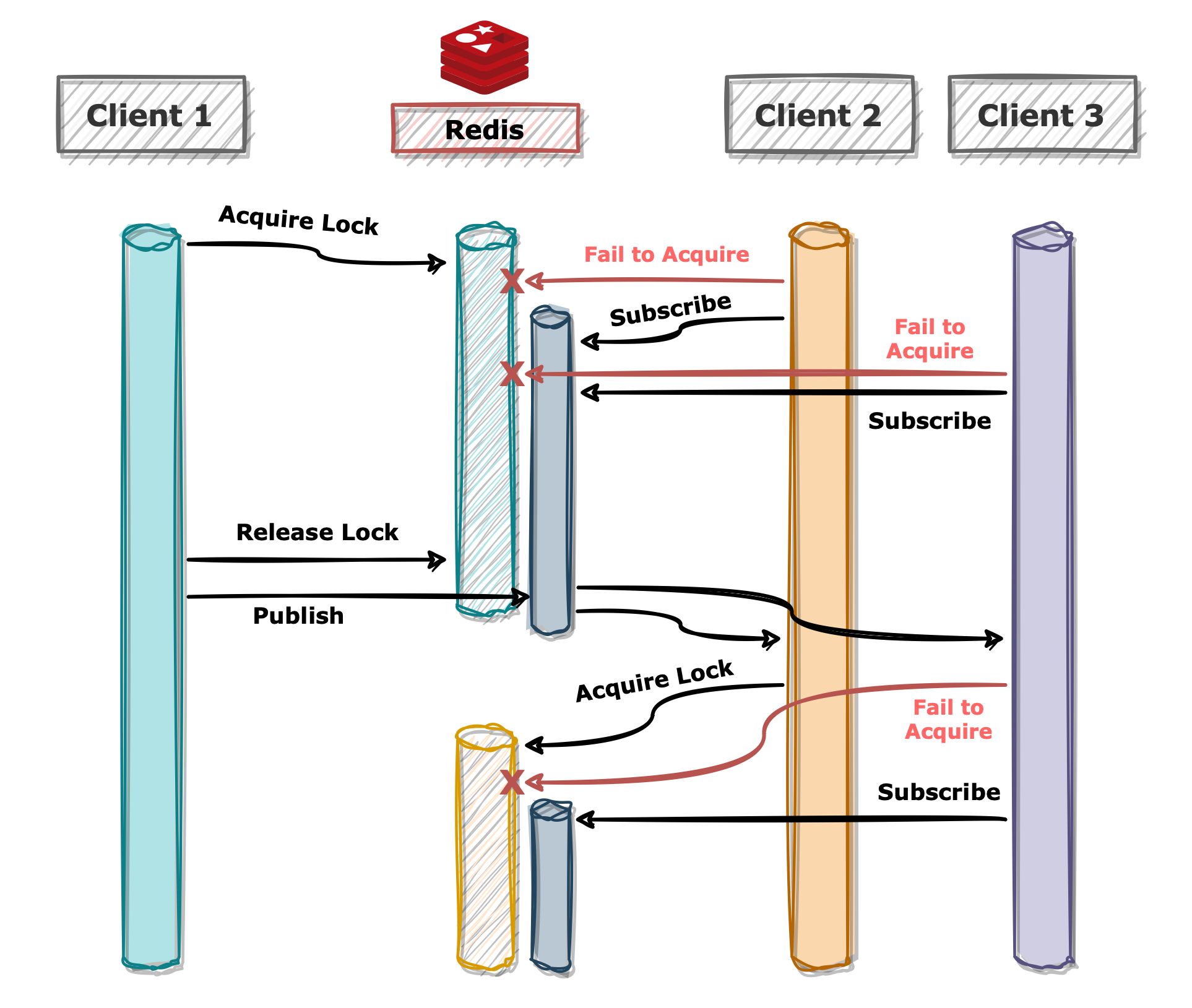
- Implements a Pub/Sub messaging system between the client attempting to acquire the lock and the one currently holding it.
- Includes a forced timeout mechanism to prevent infinite loops when attempting to acquire the lock.
- Supports asynchronous operations.
2. Installation
$> pip install redis-lock-py
Dependencies
- Python >= 3.9
- redis-py >= 5.2.0
3. Usage
3.1 Basic Example
import redis
from redis_lock import RedisLock

client = redis.Redis(host="127.0.0.1", port=6379)

name = "foo"
lock = RedisLock(client, name)
if not lock.acquire():
    raise Exception("Fail to acquire lock")
print("Acquired lock successfully!")
lock.release()
The redis-py library is required for Redis connection objects.
After successfully acquiring the lock using RedisLock.acquire, ensure to release it by calling RedisLock.release to prevent lock retention.
3.2 Using Context Managers
import redis
from redis_lock import RedisLock

client = redis.Redis(host="127.0.0.1", port=6379)

with RedisLock(client, name="foo", blocking_timeout=10):
    print("Acquired lock successfully!")
To avoid issues where the lock remains unreleased (potentially blocking other clients from acquiring it),
you can use RedisLock with a context manager, which ensures that the lock is automatically released at the end of the with block.
Both examples in sections 3.1 and 3.2 function in a same manner.
3.3 With Asyncio
from redis.asyncio import Redis
from redis_lock.asyncio import RedisLock

client = Redis(host="127.0.0.1", port=6379)

async with RedisLock(client, name="foo", blocking_timeout=10):
    print("Acquired lock successfully!")
redis-lock supports the asyncio platform.
3.4 Using Spin Lock
import redis
from redis_lock import RedisSpinLock

client = redis.Redis(host="127.0.0.1", port=6379)

lock = RedisSpinLock(client, name="foo")
if not lock.acquire(blocking=True, sleep_time=0.1):
    raise Exception("Fail to acquire lock")
print("Acquired lock successfully!")
lock.release()
While a spin lock is available, it is not recommended unless there is a compelling reason to use it, as it is less efficient compared to the Pub/Sub messaging system.
System Flow
Release history Release notifications | RSS feed


Download files
Download the file for your platform. If you're not sure which to choose, learn more about installing packages.
Source Distribution
Built Distribution
Filter files by name, interpreter, ABI, and platform.
If you're not sure about the file name format, learn more about wheel file names.
Copy a direct link to the current filters
File details
Details for the file redis_lock_py-1.2.0.tar.gz.
File metadata
- Download URL: redis_lock_py-1.2.0.tar.gz
- Upload date:
- Size: 7.3 kB
- Tags: Source
- Uploaded using Trusted Publishing? No
- Uploaded via: twine/6.1.0 CPython/3.12.9
File hashes
| Algorithm | Hash digest | |
|---|---|---|
| SHA256 |
80cee485e0293498051519126d09fb5626900b89eae411b7b55ba72217a5f6f8
|
|
| MD5 |
24e048171aaa40c5199d73029a355fea
|
|
| BLAKE2b-256 |
0aea68807079ae2d76579209503520c0294a3141643053dabad4d920f0359f4e
|
File details
Details for the file redis_lock_py-1.2.0-py3-none-any.whl.
File metadata
- Download URL: redis_lock_py-1.2.0-py3-none-any.whl
- Upload date:
- Size: 9.0 kB
- Tags: Python 3
- Uploaded using Trusted Publishing? No
- Uploaded via: twine/6.1.0 CPython/3.12.9
File hashes
| Algorithm | Hash digest | |
|---|---|---|
| SHA256 |
f5172a9ad5ea2e725062c4eb0d1e028ae309b35e32d1f6ef0f0bfe2f9dedc7f9
|
|
| MD5 |
c042a5654da3079805541661f35a7ddb
|
|
| BLAKE2b-256 |
6ceddbd5330863231ee636d260639f274a3f44ea0a7e67b4e25f37eef26d3880
|






