
redis-sizer
A simple command-line tool for analyzing memory usage across keys in a Redis database.
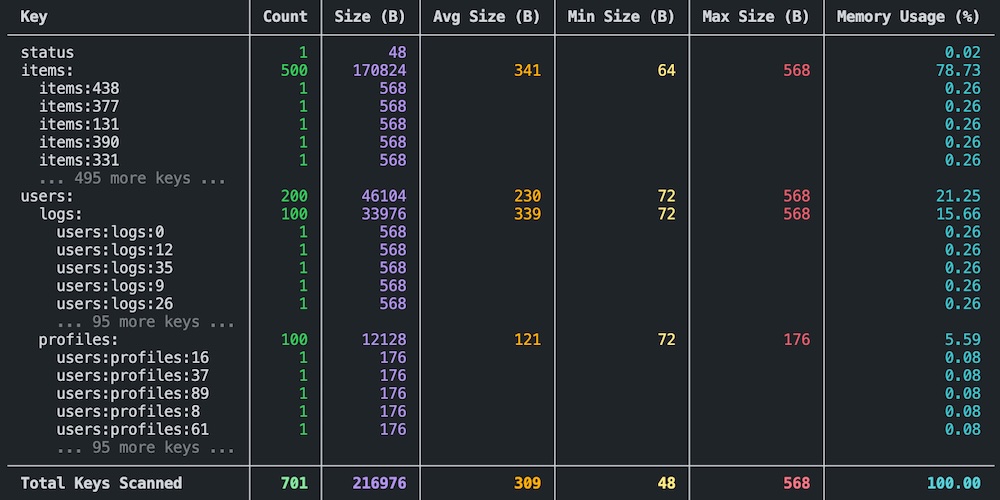
redis-sizer can help with the following problems:
- Optimize caching strategy.
- Gain insights into memory usage at different namespace levels.
- Identify which parts of your application consume the most memory.
Installation
Install via pip:
pip install redis-sizer
Usage
Run redis-sizer by specifying the Redis host along with any desired options:
redis-sizer [OPTIONS] HOST
Options:
--port: Port number [default: 6379]--db: DB number [default: 0]--password: Password [default: None]--socket-timeout: Socket timeout in seconds [default: 10]--socket-connect-timeout: Socket connect timeout in seconds [default: 10]--pattern: Pattern to filter keys [default: *]--sample-size: Number of keys to sample [default: None]--namespace-separator: Separator for key namespaces [default: :]--memory-unit: Memory unit for display in result table [default: B]--max-leaves: Maximum number of leaf keys to display per namespace [default: 5]--max-depth: Maximum tree depth to display (1 shows top-level rows) [default: 5]--batch-size: Batch size for scanning and calculating memory usage [default: 1000]
Aggregating Memory Usage by Key Groups
Many applications using Redis adopt hierarchical key naming conventions.
For example, if your keys follow a colon-delimited format (e.g., users:logs:..., users:profiles:...), they can be visualized as a nested or tree-like structure:
DB
├── users:
│   ├── logs:
│   │   └── ...
│   └── profiles:
│       └── ...
...
redis-sizer leverages this hierarchical structure to aggregate and analyze memory usage, and displays aggregated statistics for each namespace level.
Considerations
- Since data can change during analysis, the final result may not accurately reflect the database’s state at the beginning of the process.
- For databases with large collections of keys, consider using the
--sample-sizeoption to balance processing time with accuracy. If--sample-sizeis not specified, redis-sizer will perform perform a full scan. - Increasing
--batch-sizecan reduce network overhead. However, this can increase the load on the Redis server without providing meaningful performance improvements and, in some cases, may even lead to server blocking. Adjust these values carefully based on your server’s capacity.
Redis Version Compatibility
- This tool relies on the Redis
MEMORY USAGEcommand, which has been available since version 4.0.0. - It has been tested and verified to work with Redis versions 4, 5, 6, and 7.
Dependencies
redis-sizer depends on:
1 maintainer

Metadata
1 maintainer
Release files for redis-sizer 1.1.0
For a detailed explanation of source distributions (sdists) and built distributions (wheels), please see the package formats documentation.
Source distribution (sdist)
| File | Size | Uploaded | Provenance | |
|---|---|---|---|---|
| redis_sizer-1.1.0.tar.gz | 14.7 kB | Without provenance | Details |
Built distribution (wheel)
| File | Interpreter | ABI | Platform | Reset |
|---|---|---|---|---|
| redis_sizer-1.1.0-py3-none-any.whl | Python 3 | none | any | Details |
Total release size: 24.8 kB
Release files / redis_sizer-1.1.0.tar.gz
| Download URL | redis_sizer-1.1.0.tar.gz |
|---|---|
| Size | 14.7 kB |
| Tags | Source |
|
SHA-256 checksum How to use checksums |
8fb53c2d108847f9793cf0b8694b9c0c8a03627e7dcaa62003519e30ca4b2293
|
|
BLAKE2b-256 checksum How to use checksums |
87ecd4010f6bd63a9f913c6865ce2d85d5b0eede288956c7893467c859ce1441
|
| Upload date | |
|
Uploaded using Trusted Publishing? What is trusted publishing? |
No |
| Uploaded via |
pdm/2.29.3 CPython/3.11.4 Darwin/25.2.0
|
Release files / redis_sizer-1.1.0-py3-none-any.whl
| Download URL | redis_sizer-1.1.0-py3-none-any.whl |
|---|---|
| Size | 10.2 kB |
| Tags | Python 3 |
|
SHA-256 checksum How to use checksums |
c9ff74ef3611f8809a094d6a188e473fc20826e31dba079636de92aca0c313e8
|
|
BLAKE2b-256 checksum How to use checksums |
3582c5f6321e5b9431a12bb69157e0bd15694703f53a3ce3e59591b414bb6416
|
| Upload date | |
|
Uploaded using Trusted Publishing? What is trusted publishing? |
No |
| Uploaded via |
pdm/2.29.3 CPython/3.11.4 Darwin/25.2.0
|
Security for redis-sizer 1.1.0
Provenance
Provenance describes where a file came from. On PyPI, provenance is shared via attestations, which provide a verifiable record of the build or publishing details. View details, limitations and caveats.
No provenance found
None of the files in this release were uploaded with provenance metadata.
A note on package security
PyPI is a repository for distributing packages, not a service for auditing them. While third-party security researchers and our staff do their best to detect and remove malicious packages, PyPI cannot guarantee the quality, security or suitability of any given package.














