
RedKnot






A simple dependency graph generator powered by mermaid.js
What it does
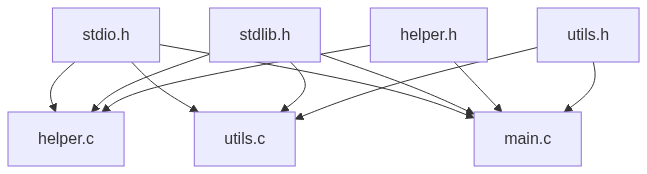
RedKnot is a dependency tree generator for your projects. It scans through the files in your project and graphs out the connections between them using mermaid.js.
Features
Currently supported languages:
- C
- C++
RedKnot can output just the mermaid.js code as well as a simple formatted HTML document which renders the mermaid.js graph.
Installation
RedKnot can be installed via pip:
pip install redknot
You can verify the installation by running:
redknot -version
RedKnot Version 0.0.1
By Sanyam Asthana

MIT License, 2025
Usage
To use RedKnot, just run redknot in your project folder.
redknot
graph TD
stdio.h --> helper.c
stdlib.h --> helper.c
helper.h --> helper.c
stdio.h --> utils.c
stdlib.h --> utils.c
utils.h --> utils.c
stdio.h --> main.c
stdlib.h --> main.c
helper.h --> main.c
utils.h --> main.c
To save the output of RedKnot to a file, you can redirect it using the redirection operator:
redknot > file.txt
To generate an HTML file which displays the graph, you can use the -html flag:
redknot -html
        <!DOCTYPE html>
        <html lang="en">
        <head>
            <meta charset="UTF-8">
            <meta name="viewport" content="width=device-width, initial-scale=1.0">
            <title>MermaDep Graph</title>
        </head>
        <body>
            <pre class="mermaid">

				graph TD
				stdio.h --> helper.c
				stdlib.h --> helper.c
				helper.h --> helper.c
				stdio.h --> utils.c
				stdlib.h --> utils.c
				utils.h --> utils.c
				stdio.h --> main.c
				stdlib.h --> main.c
				helper.h --> main.c
				utils.h --> main.c

            </pre>

            <script type="module">
                import mermaid from 'https://cdn.jsdelivr.net/npm/mermaid@11/dist/mermaid.esm.min.mjs';
            </script>
        </body>
        </html>
To save the HTML output in an HTML file, you can redirect it using the redirection operator:
redknot -html > index.html
By default, RedKnot displays any errors while reading files as mermaid.js comments. You can disable the comments by passing the -nocomm flag. The -html flag has comments disabled by default.
Author's Notes
Usually, I would put a section of technical details here, but since this is a one-file project which was made in like 10 minutes, there are not really a lot of details I can possible give. I am working towards supporting more languages like Python and Java, and any contribution to the project would mean a lot!
License
MIT License
1 maintainer

Release files for redknot 0.0.2
For a detailed explanation of source distributions (sdists) and built distributions (wheels), please see the package formats documentation.
Source distribution (sdist)
| File | Size | Uploaded | |
|---|---|---|---|
| redknot-0.0.2.tar.gz | 4.2 kB | Details |
Built distribution (wheel)
| File | Interpreter | ABI | Platform | Reset |
|---|---|---|---|---|
| redknot-0.0.2-py3-none-any.whl | Python 3 | none | any | Details |
Total release size:9.3 kB
Release files / redknot-0.0.2.tar.gz
| Download URL | redknot-0.0.2.tar.gz |
|---|---|
| Size | 4.2 kB |
| Tags | Source |
|
SHA-256 checksum How to use checksums |
5c27d7269b03344cb1c48951a6681b2b2e982bdad8b112808da296c1afcd7f62
|
|
BLAKE2b-256 checksum How to use checksums |
6141db97d1ca895d4a1781cdb9d6dca1dff1cf68782f796a3209e88a2ee5f964
|
| Upload date | |
|
Uploaded using Trusted Publishing? What is trusted publishing? |
No |
| Uploaded via |
twine/6.2.0 CPython/3.13.5
|
Release files / redknot-0.0.2-py3-none-any.whl
| Download URL | redknot-0.0.2-py3-none-any.whl |
|---|---|
| Size | 5.0 kB |
| Tags | Python 3 |
|
SHA-256 checksum How to use checksums |
f94ab79c61b8a17a62633a4eb8919d4d73445521bd2fdf5b3ab4e830e2f2a210
|
|
BLAKE2b-256 checksum How to use checksums |
00df1964e2e59fb5f88aba8129dd6ae5a66908085bc535ceb21ddfc81a835908
|
| Upload date | |
|
Uploaded using Trusted Publishing? What is trusted publishing? |
No |
| Uploaded via |
twine/6.2.0 CPython/3.13.5
|














