
redi

redi is a Redmine CLI/TUI tool that wraps the Redmine REST API.
Demo
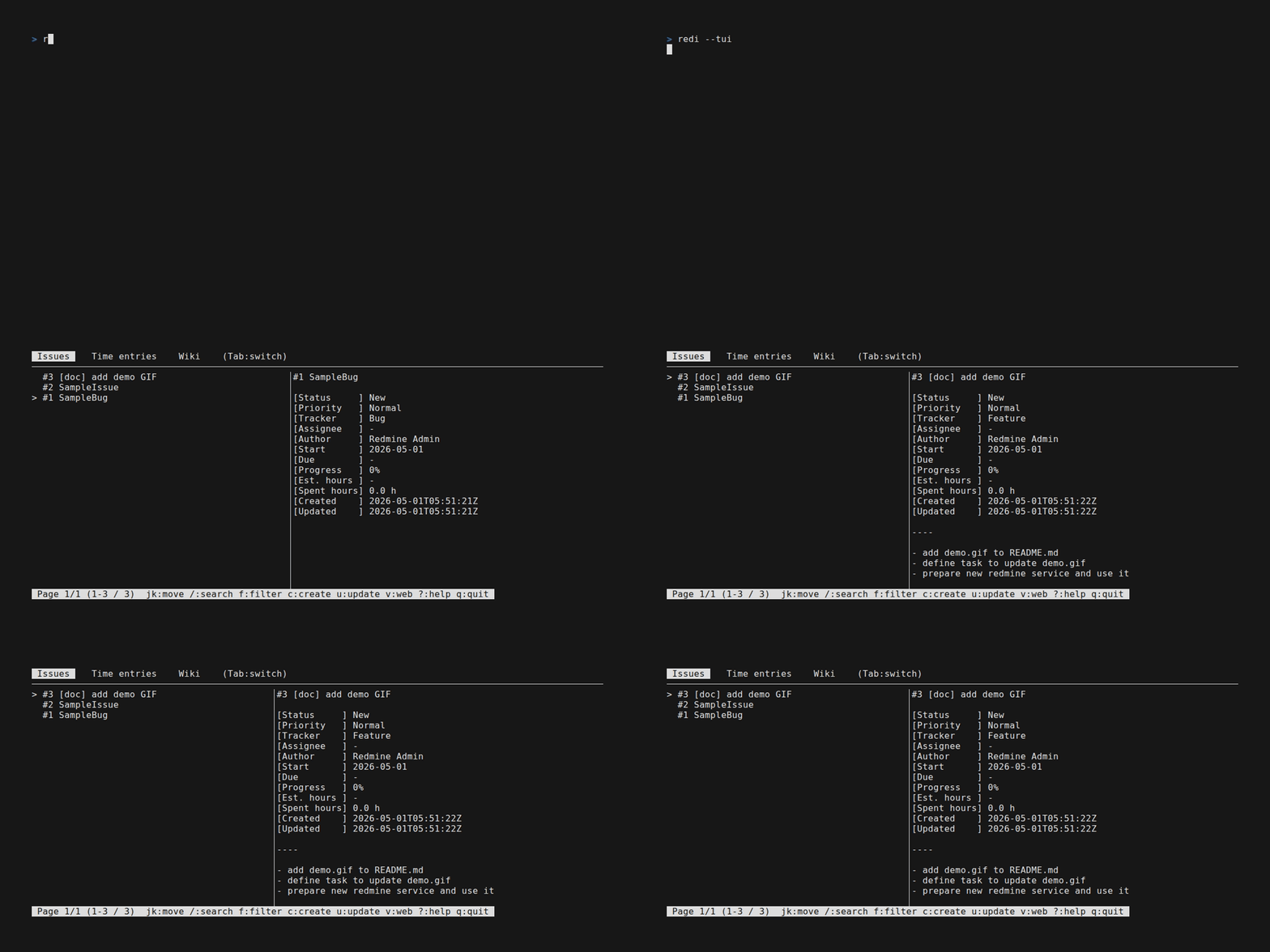
Quickstart
redi init                # interactive: select language, then enter Redmine URL and API key
redi --tui               # launch the TUI
redi issue               # or list issues
See Setup for profile / environment variable details and Usage (examples) for the full command reference.
Install
I recommend installation via uv.
uv tool install redtile # name on PyPI is redtile, NOT redi
Setup
Config
To use redi, you need to set the Redmine URL and API key in one of the ways below.
redi init (interactive, recommended for first time)
redi init
redi init first asks which language to use (en / ja), and the rest of the setup is shown in the selected language.
You can change it later with redi config update --language <en|ja>.
Then, profile will be created in ~/.config/redi/config.toml like below format.
You can also create profile by redi config create, and update profile by redi config update (and also by manual edit).
redi config create walks you through the same steps as redi init when the profile name, URL or API key is missing, so it works even after profiles exist.
default_profile = "default"
text_formatting = "markdown"  # default for all profiles: "markdown" (default) or "textile"

["default"]
redmine_url = "https://redmine.example.com"
redmine_api_key = "<your_api_key>"
default_project_id = "1"
wiki_project_id = "2"
editor = "nvim"
language = "en"  # "en" (default) or "ja"

["sub"]
redmine_url = "https://redmine.example.com"
redmine_api_key = "<your_api_key>"
default_project_id = "2"
wiki_project_id = "3"
editor = "code"
text_formatting = "textile"  # overrides the top-level value for this profile only
text_formatting (for AI agents)
Redmine renders issue descriptions, comments and wiki pages as Markdown or Textile depending on
"Administration → Settings → Text formatting". The REST API does not expose this setting, so
redi cannot detect it. Write it in config.toml as text_formatting (markdown / textile)
so that AI agents can look it up before posting:
- the top-level value is the default for all profiles
- a value inside a profile overrides it for that profile only
- when neither is set,
markdownis assumed (the default of a fresh Redmine install)
Agents should read it with redi config (resolved value for the current profile) or
redi config --full (every profile, with redmine_api_key removed) instead of reading
~/.config/redi/config.toml, which contains API keys.
environment variable
export REDMINE_URL=https://redmine.example.com
export REDMINE_API_KEY=<your_api_key>
Shell completion
uv tool install argcomplete
echo 'eval "$(register-python-argcomplete redi)"' >> ~/.zshrc
Agent skill
redmine-redi is a skill that lets coding agents (Claude Code, Codex) know to
reach for redi when a task involves Redmine.
Install it globally (user scope) so that it is available in every project.
curl needs no extra tooling:
# Claude Code
mkdir -p ~/.claude/skills/redmine-redi && \
  curl -sL https://raw.githubusercontent.com/kawagh/redi/main/skills/redmine-redi/SKILL.md \
    -o ~/.claude/skills/redmine-redi/SKILL.md

# Codex
mkdir -p ~/.agents/skills/redmine-redi && \
  curl -sL https://raw.githubusercontent.com/kawagh/redi/main/skills/redmine-redi/SKILL.md \
    -o ~/.agents/skills/redmine-redi/SKILL.md
Or with a skill manager:
npx skills add kawagh/redi --skill redmine-redi -g
gh skill install kawagh/redi redmine-redi --scope user  # requires gh v2.90+ and a GitHub account
Usage (examples)
Most commands follow the form:
redi <resource> <action> [<resource_id>] [options]
<resource>—issue,project,time_entry, ... (almost every resource has a short alias such asi/p/te;init/me/relationhave no alias)<action>—list/view/create/update/delete/comment(also has aliases:v/c/u/d/co)redi <resource>alone is shorthand forredi <resource> list
<resource_id>— required for actions that target a specific item (view,update,delete,comment)
# init
redi init # interactive: select language, then Redmine URL / API key / projects

# run TUI
redi --tui

# config (alias: c)
redi config
redi config create # interactive: profile name / Redmine URL / API key / projects
redi config create <profile_name> --url <url> --api_key <key> # create new profile
redi config create <profile_name> --url <url> --api_key <key> --set_default
redi config update # interactive: Enter to switch profile, u to update fields of the profile
redi config update --default_profile <profile_name> # switch profile
redi config update <profile_name> --editor nvim # update profile
redi config update --language ja # switch language ("en" or "ja")
redi config update --text_formatting textile # text formatting of the Redmine server ("markdown" or "textile")
redi --profile <profile_name> issue # temporarily switch profile for this command

# project (alias: p)
redi project # list projects
redi project list # same as above (`redi project l` / `redi p list` / `redi p l` / `redi p` also work)
redi project view <project_id> # view project
redi project view <project_id> --include trackers,issue_categories
redi project list --limit 10 --offset 10 # `list` returns Redmine's default 25 unless limited
redi project create # (interactive)
redi project create <name> <identifier>
redi project create <name> <identifier> -d "description" --is_public true
redi project create <name> <identifier> --homepage https://example.com --inherit_members true
redi project create <name> <identifier> --enabled_module_names issue_tracking,wiki --issue_custom_field_ids 1,2
redi project update <project_id> # (interactive)
redi project update <project_id> --name renamed_project
redi project update <project_id> --enabled_module_names issue_tracking,time_tracking,wiki
redi project update <project_id> --default_assigned_to_id 3 --default_version_id 5
redi project update <project_id> --default_assigned_to_id "" # unset

# issue (alias: i)
redi issue # list issues
redi issue -p <project_id> -a me -s open
redi issue -q <query_id>
redi issue view <issue_id>
redi issue view <issue_id> --web # view issue with web browser
redi issue view <issue_id> --include children,watchers # relations, attachments and journals are shown by default
redi issue create # (interactive)
redi issue create "subject" -p <project_id> -t <tracker_id> -a <user_id> -d "description"
redi issue create "subject" -p <project_id> --full # output created issue as full JSON
redi issue update <issue_id> # (interactive)
redi issue update <issue_id> --status_id <status_id> -n "notes"
redi issue update <issue_id> --start_date 2026-04-26 --due_date 2026-05-31 --estimated_hours 1.5
redi issue update <issue_id> --done_ratio 70
redi issue update <issue_id> --assigned_to_id <user_id>
redi issue update <issue_id> --assigned_to_id "" # unset assignee
redi issue update <issue_id> --project_id <project_id> # move issue to another project
redi issue update <issue_id> --relate relates --to <other_issue_id>
redi issue update <issue_id> --attach ./foo.png --attach ./bar.log
redi issue comment <issue_id> "hello~"
redi issue delete <issue_id> # (confirm before delete)
redi issue delete <issue_id> -y # skip confirmation

# version (alias: v)
redi version # list versions(fixed_versions)
redi version -p <project_id>
redi version view <version_id>
redi version create <name> -p <project_id> --due_date 2026-12-31 --status open
redi version update <version_id> --status closed

# wiki (alias: w)
redi wiki
redi wiki -p <project_id>
redi wiki view <page_title>
redi wiki create # (interactive)
redi wiki update # (interactive)

# file (alias: f, project files)
redi file -p <project_id> # list
redi file create ./foo.zip -p <project_id> -d "description"

# attachment (alias: a)
redi attachment view <attachment_id>
redi attachment download <attachment_id> # alias: dl, save with the original filename
redi attachment download <attachment_id> -o ./dir_or_path # confirm before overwrite (-y to skip)
redi attachment update <attachment_id> -f new_name.png -d "desc"
redi attachment delete <attachment_id> # confirm before delete (-y to skip)

# relation (issue relation details)
redi relation view <relation_id>

# issue_journal (alias: ij, requires Redmine 5.0+)
redi issue_journal update <journal_id> "updated note"
redi issue_journal update <journal_id> "" # updating with an empty note is equivalent to delete
redi issue_journal delete <journal_id> # confirm before delete (-y to skip)

# time_entry (alias: te)
redi time_entry -p <project_id> -u me
redi time_entry --from 2026-01-01 --to 2026-01-31 # filter by date range
redi time_entry --limit 50 --offset 100 # pagination
redi time_entry create 1.5 -i <issue_id> -a <activity_id> -c "comment"
redi time_entry update <time_entry_id> --hours 2.0
redi time_entry delete <time_entry_id> # confirm before delete (-y to skip)

# me (own account)
redi me
redi me update -f <firstname> -l <lastname> -m <mail>

# membership (alias: m)
redi membership -p <project_id>
redi membership list --limit 10 --offset 10
redi membership view <membership_id>

# news (alias: n)
redi news -p <project_id>
redi news list --limit 10 --offset 10
redi news view <news_id>
redi news view <news_id> --web # open in browser
redi news create -p <project_id> # interactive: title, summary (optional), then the description in an editor
redi news create "title" -p <project_id> # opens editor for the description
redi news create "title" -d "description" --summary "summary" -p <project_id>
redi news update # interactive: pick the news, then the items to update
redi news update <news_id> # interactive: pick the items to update
redi news update <news_id> --title "new title" -d "new description"
redi news update <news_id> -d # opens editor with the current description
redi news delete # interactive: pick the news to delete
redi news delete <news_id>

# issue_category (alias: ic)
redi issue_category -p <project_id>
redi issue_category create "category" -p <project_id>

# issue_template (alias: it)
# This command requires redmine_issue_templates plugin ( https://www.redmine.org/plugins/redmine_issue_templates )
redi issue_template # list issue_templates
redi issue_template -t <tracker_id> # list issue_templates for the tracker

# search (alias: s)
redi search "keyword" # search all projects
redi search "keyword" -p <project_id> # search within a project
redi search "keyword" --type issues # limit object types
redi search "keyword" --type issues,wiki_pages # comma separated (issues, news, documents, changesets, wiki_pages, messages, projects)
redi search "keyword" --scope my_projects # all, my_projects, bookmarks (cannot be combined with -p)
redi search "keyword" -p <project_id> --scope subprojects # search the project and its subprojects (-p is required)
redi search "keyword" --titles_only --open_issues
redi search "keyword" --no_all_words # match any word (default: all words)
redi search "keyword" --attachments only # 0: description only, 1: description and attachments, only: attachments only
redi search "keyword" --limit 10 --offset 10
redi search "keyword" --full # output full JSON

# user (alias: u, admin required)
redi user # list users
redi user list --status locked # active / registered / locked (default: active only)
redi user list --name kawagh # partial match on login / firstname / lastname / mail
redi user list --group_id <group_id> # members of the group
redi user --status locked list # filters can be placed before the subcommand too
redi user list --limit 10 --offset 10 # `list` returns Redmine's default 25 unless limited
redi user list --full # output full JSON

# others
redi tracker # list trackers (alias: t)
redi tracker list # 同上 (以下の一覧専用リソースも `list` / `l` を受け付ける)
redi issue_status # list issue statuses (alias: is)
redi issue_priority # list priorities (alias: ip)
redi time_entry_activity # list activities (alias: tea)
redi document_category # list document categories (alias: dc)
redi role # list roles (alias: r)
redi group # list groups (alias: g)
redi custom_field # list custom fields (alias: cf)
redi query # list custom queries (alias: q)
redi --version
Redmine version
redi is developed against Redmine 6.1, 7.0.
Development
install
uv tool install -e .
task
Common tasks (managed by task runner Task):
task check       # format → lint → typecheck → test (run before opening a PR)
task format      # uv run ruff format
task lint        # uv run ruff check
task typecheck   # uv run ty check
task test        # uv run pytest -v
task test:e2e    # E2E tests against every target Redmine version
task test:e2e:7.0 # E2E tests against Redmine 7.0 only (also: task test:e2e:6.1)
Debug
redi --debug <command> # log request URLs and response status codes to ~/.config/redi/redi-debug.log
redi --debug-tui   # dump rendered TUI screens as YAML to log
1 maintainer

Download files
Download the file for your platform. If you're not sure which to choose, learn more about installing packages.
Source Distribution
Built Distribution
Filter files by name, interpreter, ABI, and platform.
If you're not sure about the file name format, learn more about wheel file names.
Copy a direct link to the current filters
File details
Details for the file redtile-0.0.75.tar.gz.
File metadata
- Download URL: redtile-0.0.75.tar.gz
- Upload date:
- Size: 172.8 kB
- Tags: Source
- Uploaded using Trusted Publishing? Yes
- Uploaded via:
twine/7.0.0 CPython/3.13.14
File hashes
| Algorithm | Hash digest | |
|---|---|---|
| SHA256 |
54b1e451daffd8ef8af4724efde77463c3f2075187193bc27286e44539a0f11f
|
|
| MD5 |
382f9ee45c0c1c85c5feb40b7cc67526
|
|
| BLAKE2b-256 |
5357b6462a7101f434d534df885fa248032bca3e1d2fbf9cf4a05ffc50fd2d3d
|
Provenance
The following attestation bundles were made for redtile-0.0.75.tar.gz:
Publisher:
release.yml on kawagh/redi
-
Statement:
-
Statement type:
https://in-toto.io/Statement/v1 -
Predicate type:
https://docs.pypi.org/attestations/publish/v1 -
Subject name:
redtile-0.0.75.tar.gz -
Subject digest:
54b1e451daffd8ef8af4724efde77463c3f2075187193bc27286e44539a0f11f - Sigstore transparency entry: 2686803422
- Sigstore integration time:
-
Permalink:
kawagh/redi@d3e411b491bb75c75ba540e3908105c221ad052e -
Branch / Tag:
refs/tags/0.0.75 - Owner: https://github.com/kawagh
-
Access:
public
-
Token Issuer:
https://token.actions.githubusercontent.com -
Runner Environment:
github-hosted -
Publication workflow:
release.yml@d3e411b491bb75c75ba540e3908105c221ad052e -
Trigger Event:
push
-
Statement type:
File details
Details for the file redtile-0.0.75-py3-none-any.whl.
File metadata
- Download URL: redtile-0.0.75-py3-none-any.whl
- Upload date:
- Size: 250.0 kB
- Tags: Python 3
- Uploaded using Trusted Publishing? Yes
- Uploaded via:
twine/7.0.0 CPython/3.13.14
File hashes
| Algorithm | Hash digest | |
|---|---|---|
| SHA256 |
d172ba5feef9e1116e3c2a68408ad970b41f284b0b6d843a7c53b63977dfa347
|
|
| MD5 |
37c99d2c937573000b1453e22a17c8d7
|
|
| BLAKE2b-256 |
7c69c2124a9948695baa7688872ab37edbb761a0187fe524dbca456f8398957b
|
Provenance
The following attestation bundles were made for redtile-0.0.75-py3-none-any.whl:
Publisher:
release.yml on kawagh/redi
-
Statement:
-
Statement type:
https://in-toto.io/Statement/v1 -
Predicate type:
https://docs.pypi.org/attestations/publish/v1 -
Subject name:
redtile-0.0.75-py3-none-any.whl -
Subject digest:
d172ba5feef9e1116e3c2a68408ad970b41f284b0b6d843a7c53b63977dfa347 - Sigstore transparency entry: 2686803467
- Sigstore integration time:
-
Permalink:
kawagh/redi@d3e411b491bb75c75ba540e3908105c221ad052e -
Branch / Tag:
refs/tags/0.0.75 - Owner: https://github.com/kawagh
-
Access:
public
-
Token Issuer:
https://token.actions.githubusercontent.com -
Runner Environment:
github-hosted -
Publication workflow:
release.yml@d3e411b491bb75c75ba540e3908105c221ad052e -
Trigger Event:
push
-
Statement type:














