

Continual learning infra for self-improving agents





English | 中文
Reef is the first open-source infrastructure for continual self-improving agents. It connects agent inference, feedback, learning, and versioned delivery. Use it to train model weights with Slime and SGLang, or improve an agent's harness, including its prompts, rules, and skills.
🚀 Get started | 🗺️ Roadmap | 📣 Launch post | 💬 Join Discord | 📱 Join WeChat Group
🎯 When to use Reef
Use Reef when you want your agent to keep improving simply by learning from how you interact with your agent.
| Your goal | Learning path | What you need |
|---|---|---|
| Keep getting stronger model designed for you | Model weight training | A trainable model, a supported GPU stack, and feedback your recipe can use |
| Get your harness to self-improve | Harness optimization | A model endpoint, representative tasks, and an evaluator; no local training GPUs |
| Scientific discoveries | Test-time training | An execution environment, a correctness checker, and a measurable objective |
🧩 How Reef fits your stack
| Ability | Inference engine (vLLM, SGLang, …) | RL training framework (Slime, veRL, AReaL, …) | Reef |
|---|---|---|---|
| Serves live traffic | ✅ | ❌ | ✅ |
| Trains weights | ❌ | ✅ | ✅ |
| Version management | ❌ | ❌ | ✅ |
| Stays live through updates | ❌ | ❌ | ✅ |
| Evolves beyond weights (skills, harness) | ❌ | ❌ | ✅ |
🔄 How it works

Reef processes each learning cycle in four steps. The table also shows which modules implement each step.
| Step | What happens | Where it lives |
|---|---|---|
| 1 · Serve | Serve agent requests and record interactions. | service/ — agent requests and interaction recordsruntime/ — inference and artifact updates |
| 2 · Observe | Match feedback to recorded interactions. | storage/records.py — stored interactions and feedbacktrain/processors/ — feedback matching and eligibility |
| 3 · Grow | Produce an update from eligible records. | recipe/ — recipe integrationtrain/ — batches and update jobs |
| 4 · Commit | Apply the configured selection policy and publish accepted updates. | train/evaluation/ — candidate evaluationartifact/ — version historysurface/ — artifact delivery |
📦 Installation
💡 Note
Reef's artifact and checkpoint functionality requires the
git-lfssystem package. Reef initializes Git LFS locally for its artifact repositories.
We recommend uv for managing packages, and the commands below use it.
From PyPI
uv venv && source .venv/bin/activate
uv pip install reef-infra
python3 -c "import reef; print(reef.__version__)"
From source
git lfs install
git clone https://github.com/Human-Agent-Society/reef.git
cd reef
uv venv && source .venv/bin/activate
uv pip install -e .
python3 -c "import reef; print(reef.__version__)"
Use the source checkout for development and for the training examples below.
🔧 Using Reef
Reef supports two learning surfaces: model weights and agent harnesses. The deployment's recipe determines which surface its scenarios update.
As a minimal example, start Reef as a pure inference server:
uv run reef serve --inference.model-path Qwen/Qwen2.5-1.5B-Instruct
Weight-training deployment
Start the deployment
The following example starts the SAO (arXiv:2607.07508) example deployment. Run it from a Reef checkout in an environment that satisfies the GPU requirements in Evolve your model.
uv pip install -e ".[slime]" && uv pip install --no-deps --group runtime

export MODEL_PATH="Qwen/Qwen2.5-1.5B-Instruct"
export REEF_TOKEN="reef-local"

reef serve -c recipes/sao/examples/imo_answerbench/serve.yaml \
  --inference.model-path "$MODEL_PATH" \
  --reef.port "8900"

curl -f http://127.0.0.1:8900/healthz          # ready to serve
Send an inference request and report feedback
Send inference requests through Reef and report a score for each response. The SAO recipe uses each eligible scored rollout to run a training step.
Reef's inference endpoint is OpenAI- and Anthropic-compatible: /v1/chat/completions
and /v1/messages take the provider's own request body. A request includes the
x-reef-scenario header; a new name creates a scenario using the deployment's
configured recipe. Requests do not select recipes.
The response body uses the provider's OpenAI-compatible format. Reef adds the
x-reef-agent-record-id response header. Its value is the receipt that a
later report uses to identify this interaction. A report can contain a numeric
score, textual or structured feedback, and the receipts it evaluates. This
example reports both a score and a short explanation.
import os
import httpx

reef = httpx.Client(
    base_url="http://127.0.0.1:8900",
    headers={"Authorization": f"Bearer {os.environ['REEF_TOKEN']}", "x-reef-scenario": "hello-reef"},
    timeout=300,
)

# Send a provider-compatible inference request
response = reef.post(
    "/v1/chat/completions",
    json={
        "model": os.environ["MODEL_PATH"],
        "messages": [{"role": "user", "content": "Return exactly: reef is ready"}],
    },
)

response.raise_for_status()
receipt = response.headers["x-reef-agent-record-id"]
answer = response.json()["choices"][0]["message"]["content"]

# Sending report about the inference
matched = answer.strip() == "reef is ready"

reef.post(
    "/reef/report",
    json={"score": float(matched), "feedback": "matched" if matched else "wrong answer", "references": [receipt]},
).raise_for_status()
feedback carries the richer signal, plain text or a structured object,
for recipes that read more than a scalar. The endpoint will validate the
report schema (reef/core/reports/).
Watch it learn and grow
Once the recipe has enough feedback, it runs a training step and synchronizes the updated weights to the serving runtime. Later inference requests use the current version without restarting Reef.
Harness-evolving deployment
Refine a coding harness from plain-language asks, using a model API instead of GPUs.
Reefine is the built-in harness-refinement recipe and includes a deployment configuration; specify the provider URL and model. From your Reef checkout and activated Python environment:
reef serve --recipe reefine \
  --inference.upstream-url http://127.0.0.1:11434 \
  --inference.upstream-model gemma4:26b
For another provider, change
--inference.upstream-url and --inference.upstream-model, and set
REEF_UPSTREAM_API_KEY if authentication is required. With this configuration, Reef
listens on 127.0.0.1:8901 without authentication (set REEF_TOKEN before
starting it to require that token) and keeps its state under
.reef/reefine/ (--recipe harness-evolve, the former name, starts the same
configuration). To change anything else, copy
the deployment configuration and pass
your copy with -c.
In another terminal with the same Python environment activated (the install
bakes that terminal's python3 into reef-pi), create a scenario, install the
harness, and ask for a change:
curl -fsS -H "Content-Type: application/json" \
  -d '{"name": "my-harness"}' http://127.0.0.1:8901/reef/scenarios
curl -fsS -H "x-reef-scenario: my-harness" \
  'http://127.0.0.1:8901/reef/harness/install?adapter=pi' | bash

reef-pi evolve "when I ask you to fix a bug, reproduce it with a failing test first"
Inside a reef-pi session, /evolve <text> files the same ask. The served
model writes the change as a skill, a rules entry, an agent command, or a pi
extension. Where the host can isolate it (Linux with bwrap and pasta, as a
non-root user), or with REEF_PROPOSER_SANDBOX=none on a machine you trust, it
works as a coding agent that runs the changed harness before handing the change
back. The next session's update notice offers the install; a step that
settles while you are between turns offers its install right away. Review the
versions with /versions, which opens a step's page, and install one with
/versions <version> install. To change the model, restart
reef serve with another --inference.upstream-model and rerun the install
command: installation writes the model ID into the local harness configuration.
See the Reefine tutorial for scripted bug-fix and
research demos and the Reefine guide for
configuration.
📚 Recipes and examples
Pick a recipe by the task type of your workload and by what it should
evolve, model weights or the agent harness. Weight recipes need the GPU
training stack, while harness recipes need only a model endpoint. Each recipe
below links to its guide and each measured benchmark links to its results
page, and the recipe catalog
adds the code and example for every recipe. Reefine ships with reef-infra,
and the other implementations live in this repository's recipes/ cookbook,
selected by dotted class reference and not shipped in the Reef wheel.
| Task type | Task shape | Evolves the model | Evolves the harness | Standard benchmarks |
|---|---|---|---|---|
| Scientific discovery | Repeated attempts at one hard problem with a measurable objective | TTT-Discover, Guidance-TTT | None yet | Measured: TriMul, circle packing, Erdős minimum overlap. |
| Continual learning on a task stream | A stream of independent tasks that a verifier scores one by one | SAO | Meta-Harness, GEPA | Measured: AIME 2025, IMOAnswerBench, CEO-Bench, Terminal-Bench. |
| Learning from usage | Real interaction where no one reports a score or feedback arrives late | OpenClaw-RL | SkillClaw, Reefine | Measured: simulated student with GSM8K task stream, WildClawBench. |
recipes/basic/ is the record-only starting stack and stays
outside the catalog. For a small walkthrough of feedback, candidate edits, and
publication, start with the coding harness tutorial.
Each result page documents its task, evaluation setup, measurements, and
limitations.
📐 Architecture

📖 Learn more
The documentation is organized in the following order:
- Quickstart: install Reef, connect a client, and inspect the version history
- HTTP API: use the HTTP API and report feedback
- Write a recipe: configure how Reef processes data and produces updates
- Evolve your harness: evolve a harness instead of model weights
- Evolve your model: configure and operate a training deployment
- Recipes: the catalog of cookbook recipes by task type, with code, docs, example, and results for each
- The core loop: The core loop of Reef
- Glossary: Explanation of the terminologies used
🤝 Community & Contributing
Working on continual self-improving agent?
- Join Discord to share your recipes, ask implementation questions, and discuss new features.
- Join the WeChat group: the group is full, so add the assistant and it will invite you.
- Join the GitHub Discussions to ask questions, share ideas, and connect with the community.
- Start contributing with the contribution guide.
- Propose designs through an RFC issue.
- Report suspected vulnerabilities privately by following the security policy.
If Reef looks useful to you, please give it a ⭐ — it helps the community to discover and contribute to the project.
👥 The Team
Reef brings together people exploring how agents can learn from experience and improve over time. The people below help turn that idea into working infrastructure.
This list is non-exhaustive, with team members listed alphabetically by last name:
Wenhao Chai, Shuangrui Ding, Shiyi Zoe Du, Hao He, Haoze He, Chonghe Jiang, Nan Jiang, Xuan Jiang, Xiaochen Li, Paul Liang, Bo Liu, Boyuan Long, Qiuyang Mang, Zhenting Qi, Ao Qu, Mingruo Qu, Zhaokai Wang, Xuezhi Yan, Hanfei Yu, Haofei Yu, Simon Yu, Han Zheng, Kaichen Zhou, Zijian Zhou, Jiacheng Zhu, Dingyi Zhuang, Xinkai Zou.
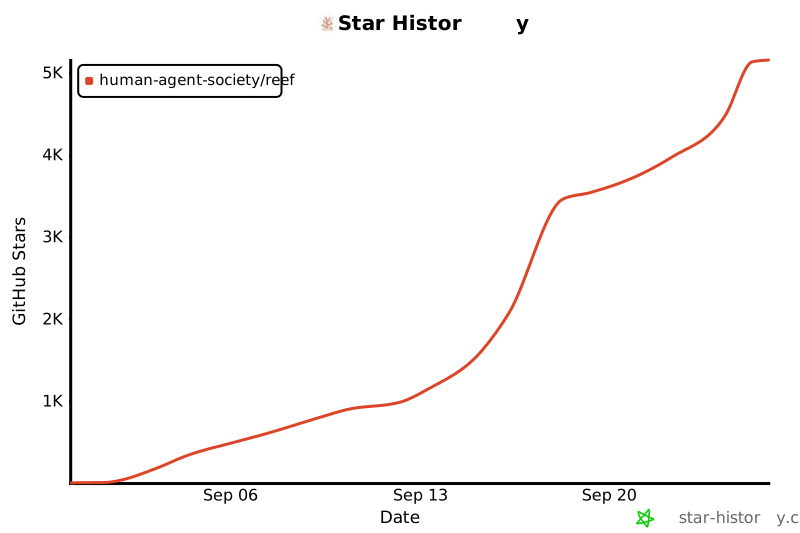
⭐ Star History
🙏 Acknowledgements
We are particularly grateful to these projects which power important parts of Reef:
1 maintainer

Release files for reef-infra 0.1.0
For a detailed explanation of source distributions (sdists) and built distributions (wheels), please see the package formats documentation.
Source distribution (sdist)
| File | Size | Uploaded | |
|---|---|---|---|
| reef_infra-0.1.0.tar.gz | 7.0 MB | Details |
Built distribution (wheel)
| File | Interpreter | ABI | Platform | Reset |
|---|---|---|---|---|
| reef_infra-0.1.0-py3-none-any.whl | Python 3 | none | any | Details |
Total release size: 8.1 MB
Release files / reef_infra-0.1.0.tar.gz
| Download URL | reef_infra-0.1.0.tar.gz |
|---|---|
| Size | 7.0 MB |
| Tags | Source |
|
SHA-256 checksum How to use checksums |
b36aa66e3ca69813e9bb81be286f8cfeead889dbb937c315044619b3ad4df5bb
|
|
BLAKE2b-256 checksum How to use checksums |
6163389222aa143c70ffc7686218815d5350dd354ae76b3f42c443032b977ed8
|
| Upload date | |
|
Uploaded using Trusted Publishing? What is trusted publishing? |
Yes |
| Uploaded via |
twine/7.0.0 CPython/3.13.14
|
Provenance
Provenance describes where a file came from. On PyPI, provenance is shared via attestations, which provide a verifiable record of the build or publishing details. View details, limitations and caveats.


PyPI Publish Attestation
PyPI verified that this artifact, at this checksum, originated from the publisher listed below.
Signed by GitHub Actions, verified by PyPI on Sep 23, 2026.
Transparency logRelease files / reef_infra-0.1.0-py3-none-any.whl
| Download URL | reef_infra-0.1.0-py3-none-any.whl |
|---|---|
| Size | 1.1 MB |
| Tags | Python 3 |
|
SHA-256 checksum How to use checksums |
6a25dde7e7700fa1d058054a658a9e72215c82b8898abda0a52f85ef827ed76c
|
|
BLAKE2b-256 checksum How to use checksums |
48bfdcaad5be5e1274f2af135e8d1930ca726b7faa74dbc82e771f5ff1ae7dcc
|
| Upload date | |
|
Uploaded using Trusted Publishing? What is trusted publishing? |
Yes |
| Uploaded via |
twine/7.0.0 CPython/3.13.14
|
Provenance
Provenance describes where a file came from. On PyPI, provenance is shared via attestations, which provide a verifiable record of the build or publishing details. View details, limitations and caveats.
PyPI Publish Attestation
PyPI verified that this artifact, at this checksum, originated from the publisher listed below.
Signed by GitHub Actions, verified by PyPI on Sep 23, 2026.
Transparency log













