

reeln


Platform-agnostic CLI toolkit for livestreamers.
reeln handles video manipulation, segment/highlight management, and media lifecycle — generic by default, sport-specific through configuration. Built by Streamn Dad.
Requirements
- Python 3.11+
- ffmpeg 5.0+ with libx264, aac, and libass
Important: reeln requires ffmpeg installed on your system. It is used for all video processing — merging, rendering, overlays, and encoding. Install it before using reeln, then run
reeln doctorto verify.# macOS brew install ffmpeg # Ubuntu / Debian sudo apt install ffmpeg # Windows winget install ffmpeg
Install
# With pip
pip install reeln

# With uv (recommended)
uv tool install reeln
Verify everything is working:
reeln --version
reeln doctor          # checks ffmpeg, codecs, config, permissions, plugins
Features
- Game lifecycle management — init, segment processing, highlights, events, finish
- Short-form rendering — crop, scale, speed, LUT, overlays — landscape to vertical/square
- FFmpeg-powered merging — concat segments into highlight reels with smart re-encoding
- Sport-agnostic segments — hockey periods, basketball quarters, soccer halves, and more
- Render profiles — save and reuse rendering settings, chain them with iterations
- Smart zoom — AI-powered tracking that follows the action (via plugin)
- Player overlays — roster-aware goal overlays with jersey number lookup
- Render queue — stage renders for review, then selectively publish to YouTube, Instagram, TikTok
- Team logo overlays — automatic logo placement on goal shorts from team profiles
- Plugin architecture — lifecycle hooks for YouTube, Instagram, cloud uploads, and more
- Flexible configuration — JSON config, XDG paths, env var overrides, named profiles
- Cross-platform — macOS, Linux, Windows
Quick start
# Initialize a hockey game
reeln game init roseville mahtomedi --sport hockey

# Process segments as the game progresses
reeln game segment 1
reeln game segment 2
reeln game segment 3

# Merge into a full-game highlight reel
reeln game highlights

# Render a vertical short for social media
reeln render short clip.mkv --crop crop --speed 0.5

# Finish the game
reeln game finish
See the examples for detailed walkthroughs of every workflow.
Looking for a GUI? reeln dock is a cross-platform desktop companion for reeln — visual render profiles, clip review, and game management without touching the terminal. Coming soon.
Supported sports
| Sport | Segment name | Count | Example directories |
|---|---|---|---|
| hockey | period | 3 | period-1/, period-2/, period-3/ |
| basketball | quarter | 4 | quarter-1/ through quarter-4/ |
| soccer | half | 2 | half-1/, half-2/ |
| football | half | 2 | half-1/, half-2/ |
| baseball | inning | 9 | inning-1/ through inning-9/ |
| lacrosse | quarter | 4 | quarter-1/ through quarter-4/ |
| generic | segment | 1 | segment-1/ |
CLI reference
System
| Command | Description |
|---|---|
reeln --version |
Show version and ffmpeg info |
reeln doctor |
Health check: ffmpeg, codecs, config, permissions, plugins |
Game lifecycle
| Command | Description |
|---|---|
reeln game init |
Set up game directory with sport-specific segments |
reeln game segment <N> |
Collect replays and merge segment highlights |
reeln game highlights |
Merge all segments into full-game highlight reel |
reeln game compile |
Compile event clips by type, segment, or player |
reeln game finish |
Finalize game and show summary |
reeln game prune |
Remove generated artifacts |
reeln game event list |
List registered events |
reeln game event tag |
Tag an event with type, player, metadata |
Rendering
| Command | Description |
|---|---|
reeln render short |
Render 9:16 or 1:1 short from clip |
reeln render preview |
Fast low-res preview render |
reeln render apply |
Apply a render profile (full-frame, no crop) |
reeln render reel |
Assemble rendered shorts into a reel |
Queue
| Command | Description |
|---|---|
reeln queue list |
List queued render items |
reeln queue show <ID> |
Show detailed queue item info |
reeln queue edit <ID> |
Edit title/description before publishing |
reeln queue publish <ID> |
Publish to one or all targets (--target <name>) |
reeln queue publish-all |
Publish all rendered items |
reeln queue remove <ID> |
Soft-delete queue item |
reeln queue targets |
List available publish targets |
Configuration
| Command | Description |
|---|---|
reeln config show |
Display resolved configuration |
reeln config doctor |
Validate config and warn on issues |
reeln config event-types |
Manage event types |
Plugins
| Command | Description |
|---|---|
reeln plugins search |
Search the plugin registry |
reeln plugins info <name> |
Show plugin details and config schema |
reeln plugins install <name> |
Install a plugin from the registry |
reeln plugins update [name] |
Update a plugin or all installed |
reeln plugins list |
List installed plugins |
reeln plugins enable <name> |
Enable a plugin |
reeln plugins disable <name> |
Disable a plugin |
reeln plugins uninstall <name> |
Uninstall a plugin |
reeln plugins auth |
Test plugin authentication |
Configuration
reeln uses a layered JSON config system:
- Bundled defaults — shipped with the package
- User config —
config.jsonin your XDG config directory - Game overrides —
game.jsonin the game directory - Environment variables —
REELN_<SECTION>_<KEY>
reeln config show
Smart zoom — AI-powered action tracking

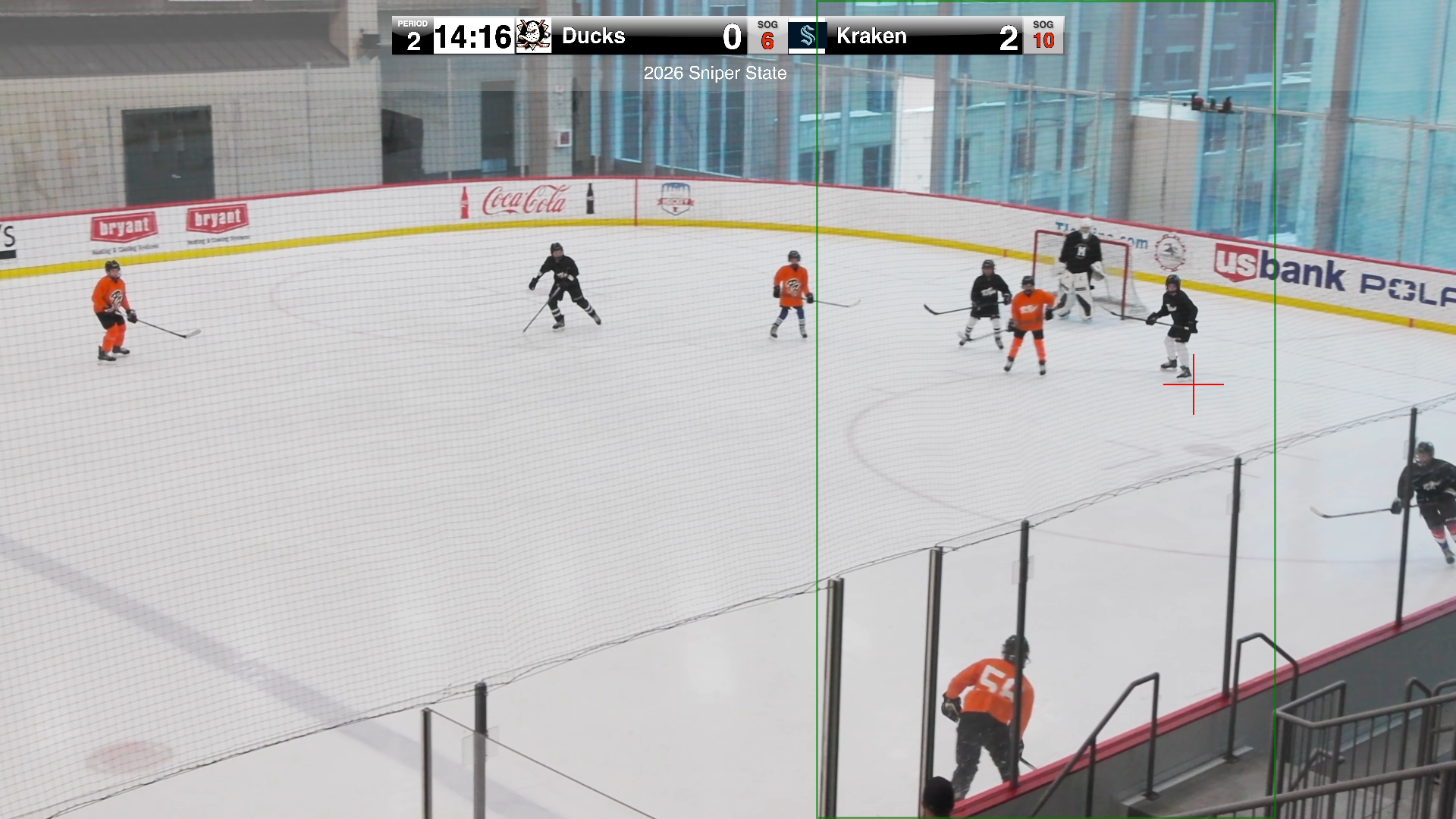
reeln render short --smart uses the OpenAI plugin to analyse extracted frames and track the action — dynamically cropping and panning the camera to follow the play in your 9:16 short. Read What happened when I let AI edit my youth hockey videos for the full story.
Add --debug to see exactly what the AI sees: annotated frames with crosshair tracking, crop regions, the full zoom path, and every ffmpeg filter chain.
Live debug example — real game clip with 16-frame smart zoom tracking.
Documentation
- Full documentation — install, guides, CLI reference
- Examples — step-by-step walkthroughs for common workflows
License
GNU Affero General Public License v3.0 (AGPL-3.0)
Links
- streamn.dad — project home
- Documentation — full docs
- @streamn_dad — highlights on Instagram
- YouTube — livestreams and highlights
Metadata
Release files for reeln 0.0.39
For a detailed explanation of source distributions (sdists) and built distributions (wheels), please see the package formats documentation.
Source distribution (sdist)
| File | Size | Uploaded | Provenance | |
|---|---|---|---|---|
| reeln-0.0.39.tar.gz | 9.1 MB | With provenance | Details |
Built distribution (wheel)
| File | Interpreter | ABI | Platform | Reset |
|---|---|---|---|---|
| reeln-0.0.39-py3-none-any.whl | Python 3 | none | any | Details |
Total release size: 9.2 MB
Release files / reeln-0.0.39.tar.gz
| Download URL | reeln-0.0.39.tar.gz |
|---|---|
| Size | 9.1 MB |
| Tags | Source |
|
SHA-256 checksum How to use checksums |
58b4a46fa9a38e18df58e26d470dc216306cee60d9899995216de29a10e629cb
|
|
BLAKE2b-256 checksum How to use checksums |
f83eabfaf9d02165df43756effde636e5e57609bf72334c768ba502ab74a99c5
|
| Upload date | |
|
Uploaded using Trusted Publishing? What is trusted publishing? |
Yes |
| Uploaded via |
twine/6.1.0 CPython/3.13.12
|
Provenance
Provenance describes where a file came from. On PyPI, provenance is shared via attestations, which provide a verifiable record of the build or publishing details. View details, limitations and caveats.


PyPI Publish Attestation
PyPI verified that this artifact, at this checksum, originated from the publisher listed below.
Signed by GitHub Actions, verified by PyPI on Apr 24, 2026.
Transparency logRelease files / reeln-0.0.39-py3-none-any.whl
| Download URL | reeln-0.0.39-py3-none-any.whl |
|---|---|
| Size | 165.6 kB |
| Tags | Python 3 |
|
SHA-256 checksum How to use checksums |
a65de8919591819e1fc62a1fa920f3961e3891ac7d08ac01dadf40a74e7ff5f7
|
|
BLAKE2b-256 checksum How to use checksums |
33514152d5e85fa5e3b061f643a5d8131a607e985d9115c10cd26d521fafb54b
|
| Upload date | |
|
Uploaded using Trusted Publishing? What is trusted publishing? |
Yes |
| Uploaded via |
twine/6.1.0 CPython/3.13.12
|
Provenance
Provenance describes where a file came from. On PyPI, provenance is shared via attestations, which provide a verifiable record of the build or publishing details. View details, limitations and caveats.
PyPI Publish Attestation
PyPI verified that this artifact, at this checksum, originated from the publisher listed below.
Signed by GitHub Actions, verified by PyPI on Apr 24, 2026.
Transparency logSecurity for reeln 0.0.39
Provenance
Provenance describes where a file came from. On PyPI, provenance is shared via attestations, which provide a verifiable record of the build or publishing details. View details, limitations and caveats.
Full provenance
All 2 files in this release have been uploaded with provenance metadata.
Attestation for reeln-0.0.39.tar.gz
PyPI Publish Attestation
PyPI verified that this artifact, at this checksum, originated from the publisher listed below.
Signed by GitHub Actions, verified by PyPI on Apr 24, 2026.
Transparency logA note on package security
PyPI is a repository for distributing packages, not a service for auditing them. While third-party security researchers and our staff do their best to detect and remove malicious packages, PyPI cannot guarantee the quality, security or suitability of any given package.
To learn more about protecting yourself from malicious actors, visit our package security documentation.














