
Run a Django backend (Django ORM, Django Admin) alongside a Reflex app.

Project description
reflex-django
Documentation
Full documentation lives in docs/ (installation, architecture, CRUD, auth, deployment, FAQ, and more).
For LLM/agent-oriented summaries, see llm.txt.
Table of contents
- About reflex-django
- Architecture
- How to set up
- Commands
- States, context, and bridges
- Declarative session login (mixins)
- Declarative model CRUD (
ModelCRUDView)
About reflex-django
reflex-django is a Reflex plugin that runs a Django ASGI application and your Reflex app in one process under a single dev command (reflex run). HTTP requests whose paths match configured prefixes (for example Django Admin, optional API routes, and path-based static URLs) are forwarded to Django. Everything else—including the compiled Reflex frontend and Reflex’s Socket.IO event channel under /_event/…—is handled by Reflex.
Why it exists. Reflex gives you a Python-first reactive UI. Django gives you the ORM, migrations, the admin, sessions, authentication, internationalization, and the ecosystem of HTTP views and middleware you already rely on. reflex-django lets you keep that Django surface area without standing up a separate HTTP server for local development or simple deployments, while still using Reflex for the interactive UI.
Why Django developers need it. Reflex user actions arrive over WebSocket events, not through Django’s normal request/response cycle, so Django’s HTTP middleware (sessions, auth, locale) does not run for those events by default. reflex-django adds an explicit event bridge that rebuilds a synthetic HttpRequest from the browser data Reflex provides, attaches the session and user, and exposes that request through small APIs your event handlers can call. A separate HTTP bridge routes ordinary browser HTTP traffic on selected path prefixes to Django’s ASGI app. Together, these bridges make Django session auth and related patterns usable from Reflex without pretending the two stacks share one router.
Author. This package is written by Mohannad Irshedat.
| Topic | Versions |
|---|---|
| Django | 6.0.x |
| Python | 3.12+ |
Architecture
At a high level, reflex-django does three coordinated things:
-
Plugin bootstrap — When
rxconfig.pyis loaded,ReflexDjangoPluginsetsDJANGO_SETTINGS_MODULE(if you passsettings_module), exports path prefix environment variables used by Django settings, and callsconfigure_django()so Django is initialized before your Reflex app module imports models or translation helpers. -
HTTP ASGI composition — After Reflex compiles your app, the plugin appends an
api_transformerthat wraps Reflex’s inner ASGI app. Incoming HTTP (and WebSocket upgrade traffic where applicable) is dispatched by URL path prefix: matching prefixes go to Django’s ASGI application (optionally wrapped for static files); non-matching traffic stays on Reflex. ASGI lifespan events are owned by Reflex. -
Per-event Django context — When
install_event_bridgeis true (the default), Reflex registersDjangoEventBridgemiddleware. On each Reflex event, the bridge builds a syntheticdjango.http.HttpRequestfromevent.router_data(cookies, headers, client IP, path), loads the Django session, optionally applies the same locale negotiation asLocaleMiddleware, resolvesrequest.uservia Django’s asyncaget_user, and binds that request on a context variable for the duration of the event. Your handlers callcurrent_user(),current_request(), and related helpers, which read that binding.
PyPI and other indexes do not resolve relative image paths in the project description. Use an absolute URL (below) and keep img.png on your GitHub default branch, or change the URL to match your fork and branch name.
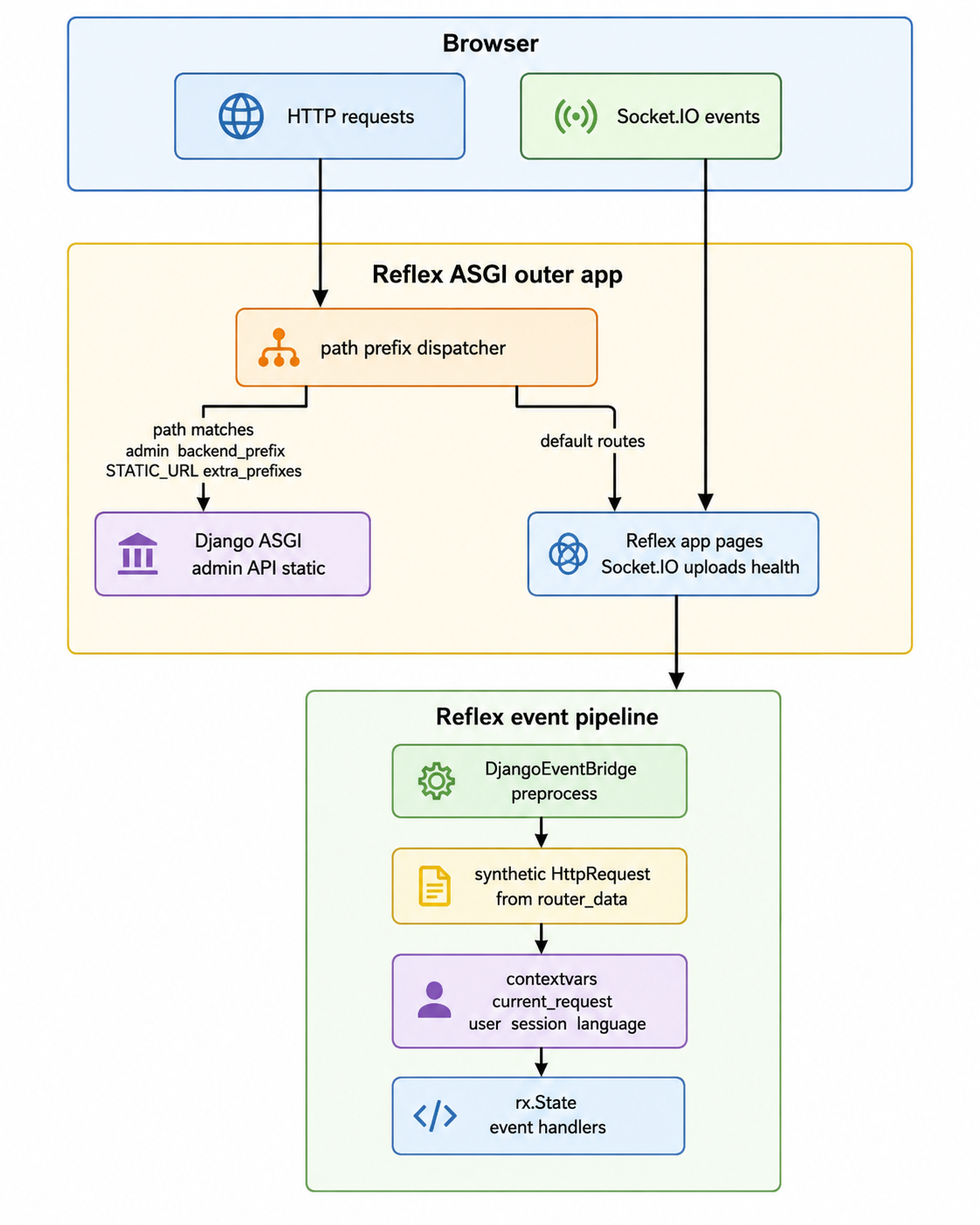
ASCII overview (same idea everywhere, including plain-text viewers):
Browser
  │ HTTP (paths under admin / api / static …)
  ├──────────────────────────────► Django ASGI
  │
  │ HTTP + Socket.IO (Reflex UI, /_event/ …)
  └──────────────────────────────► Reflex ASGI (prefix dispatcher)
                                           │
                                           ▼
                               Reflex event → DjangoEventBridge
                                           → contextvars (current_request, …)
                                           → your @rx.event handlers
How to set up
Use uv to create a project, add dependencies, scaffold the Reflex frontend, create a Django project, then wire the plugin in rxconfig.py.
-
Initialize a Python project:
uv init -
Add Reflex and reflex-django:
uv add reflex reflex-django
-
Initialize the Reflex frontend (app name and layout follow Reflex’s CLI):
uv run reflex init frontend
-
Create a Django project package named
backend(adjust the name if you prefer):uv run django-admin startproject backend .
This typically produces
backend/settings.py,backend/urls.py, andmanage.pyin the current directory. -
Configure
rxconfig.pyso Reflex loads Django with your settings module. Import the plugin and passsettings_moduleas the dotted path to your Django settings (for examplebackend.settings):import reflex as rx from reflex_django import ReflexDjangoPlugin config = rx.Config( app_name="myapp", plugins=[ ReflexDjangoPlugin(settings_module="backend.settings"), ], )
Minimal Django expectations. Your INSTALLED_APPS should include the Django contrib apps you need (for example django.contrib.auth, django.contrib.sessions, and often django.contrib.admin) and reflex_django if you use bundled helpers. Set ROOT_URLCONF and mount admin (and any HTTP routes under an optional backend_prefix) so path-based routing matches what you configure on ReflexDjangoPlugin. Run the app with:
uv run reflex run
Commands
reflex-django registers a django command group on the reflex CLI (via a small import hook installed with the package) and also ships a standalone console script reflex-django.
Running Django management commands
-
Through Reflex:
uv run reflex django migrate
uv run reflex django makemigrations
uv run reflex django createsuperuser
uv run reflex django shell
uv run reflex django collectstatic
uv run reflex django help
-
Through the standalone entry point (equivalent forwarding for normal manage.py subcommands):
uv run reflex-django migrate
uv run reflex-django help
Any subcommand name other than the special cases below is forwarded to Django’s execute_from_command_line. The wrapper first loads your rxconfig (so ReflexDjangoPlugin can set DJANGO_SETTINGS_MODULE and path prefixes) and then calls configure_django(), so the same settings module Reflex uses at runtime is used for migrations and other management commands.
Init scaffolding (omitted here). reflex django init and reflex-django init exist to scaffold a starter tree but are considered beta; this README does not document them. Prefer the manual flow in How to set up above.
States, context, and bridges
This section walks through Reflex state, Django’s per-event request context (context variables), the two bridges, and the helper states that mirror Django into Reflex UI state—each with a small example. For declarative Django session login/logout as a generated rx.State subclass, see Declarative session login (mixins). For declarative Django model CRUD, see Declarative model CRUD (mixins) below.
Reflex rx.State (baseline)
In Reflex, a State class subclasses rx.State. Fields you declare are synchronized with the client where appropriate; values must be JSON-serializable when they cross the wire. You define event handlers with @rx.event (often async def when you call async Django APIs).
import reflex as rx


class CounterState(rx.State):
    count: int = 0

    @rx.event
    def increment(self):
        self.count += 1
Per-event Django context (reflex_django.context)
Reflex events do not carry a Django HttpRequest object. reflex-django stores the synthetic request built for the current event on a context variable. Public read helpers:
| Function | Role |
|---|---|
current_request() |
Bound HttpRequest or None outside an event without the bridge |
current_user() |
Django user or AnonymousUser |
current_session() |
Session backend instance or None |
current_language() |
Active language code after locale activation |
Lower-level begin_event_request(request) and end_event_request() are used by the bridge and for tests or advanced scenarios; application code normally relies on the helpers above inside @rx.event handlers.
import reflex as rx
from reflex_django import current_user


class WhoamiState(rx.State):
    label: str = ""

    @rx.event
    async def refresh(self):
        user = current_user()
        self.label = user.get_username() if user.is_authenticated else "anonymous"
Bridge 1 — HTTP ASGI path dispatcher
ReflexDjangoPlugin installs an api_transformer that wraps Reflex’s ASGI app. Requests whose path starts with any configured prefix are sent to Django’s ASGI app; other paths stay on Reflex. Relevant plugin arguments:
| Argument | Meaning |
|---|---|
backend_prefix |
Optional prefix for your own Django HTTP routes (for example "/api") |
admin_prefix |
Prefix for Django Admin (default "/admin") |
extra_prefixes |
Additional path prefixes routed to Django |
install_event_bridge |
When True, registers DjangoEventBridge (default) |
ReflexDjangoPlugin(
    settings_module="backend.settings",
    backend_prefix="/api",
    admin_prefix="/admin",
    extra_prefixes=("/billing",),
)
Your ROOT_URLCONF must define routes under those prefixes so Django can serve them.
Development vs production routing
- Development (
reflex run): Reflex runs Vite onfrontend_portand the ASGI backend onbackend_port. The plugin injects matchingserver.proxyrules into.web/vite.config.jsso Django prefixes (/admin,/api,extra_prefixes, etc.) work from the frontend URL (for examplehttp://localhost:3000/admin). You can also use the backend URL directly (http://localhost:8000/admin). - Production (
reflex run --env prod): A single server serves the compiled frontend and the backend. The same path-prefix dispatcher applies. The plugin also patches Reflex's catch-allStaticFilesmount so WebSocket connections (for example Socket.IO at/_event) are not routed intoStaticFiles, which only accepts HTTP.
Bridge 2 — DjangoEventBridge (Reflex middleware)
DjangoEventBridge runs at the start of each Reflex event. It constructs a synthetic HttpRequest, attaches the session, optionally runs locale negotiation when USE_I18N and REFLEX_DJANGO_I18N_EVENT_BRIDGE allow it, and sets request.user using aget_user. It then calls begin_event_request(request) so current_user() and friends work in your handlers.
To disable this behavior (for example if you do not use Django session auth from Reflex):
ReflexDjangoPlugin(settings_module="backend.settings", install_event_bridge=False)
DjangoUserState
DjangoUserState is a rx.State subclass that mirrors a JSON-safe snapshot of the current user (user_id, username, email, names, is_authenticated, staff/superuser flags, optional group_names). Use it for navbar and conditional UI.
- Call
sync_from_djangofrom a page’son_load(it is an@rx.event). - After login or logout, call
await self.refresh_django_user_fields()from an async handler so the snapshot updates without a full navigation when appropriate.
Server-side authorization must still use current_user() (or stricter checks); client-visible state is for display only.
import reflex as rx
from reflex_django import DjangoUserState


class AuthState(DjangoUserState):
    pass


app = rx.App()

# app.add_page(index, on_load=AuthState.sync_from_django)
DjangoI18nState
DjangoI18nState exposes django_language_code and django_language_bidi, aligned with Django’s active language after the event bridge. Use sync_from_django on on_load, or await self.refresh_django_i18n_fields() after the user changes language via a Django-served view.
import reflex as rx
from reflex_django import DjangoI18nState


app = rx.App()

# app.add_page(home, on_load=DjangoI18nState.sync_from_django)
Reflex-facing Django context (processors and DjangoContextState)
Reflex serializes state to the browser, so any dict you merge into Reflex state must be JSON-serializable.
Two configuration modes (see reflex_django.reflex_context):
-
REFLEX_DJANGO_CONTEXT_PROCESSORS— A non-empty tuple of dotted paths to callables(request) -> dict(or async). When this list is set, it is used exclusively. You are responsible for JSON-safe values. -
Template context processors — If
REFLEX_DJANGO_CONTEXT_PROCESSORSis empty andREFLEX_DJANGO_USE_TEMPLATE_CONTEXT_PROCESSORSisTrue, the same dotted paths as inTEMPLATES[*].OPTIONS["context_processors"]are run, with built-in sanitization (for exampleuserbecomes a snapshot;request,perms,messagesare omitted; other values must pass plainjson.dumps).
Built-in processor callables you can list explicitly:
reflex_django.reflex_context.builtin_user_context— adds a template-shapeduserkey as a snapshot dict.reflex_django.reflex_context.builtin_i18n_context— addsLANGUAGE_CODE,LANGUAGE_BIDI, andLANGUAGES.
Example settings snippet:
REFLEX_DJANGO_CONTEXT_PROCESSORS = (
    "reflex_django.reflex_context.builtin_user_context",
    "reflex_django.reflex_context.builtin_i18n_context",
)
collect_reflex_context(request) runs the configured processor list and returns one merged dict. You can await it inside a handler when current_request() is bound:
from reflex_django import current_request
from reflex_django.reflex_context import collect_reflex_context


@rx.event
async def debug_context(self):
    merged = await collect_reflex_context(current_request())
    # use merged (e.g. assign JSON-safe keys to state)
DjangoContextState holds django_context and a stringified django_context_json. Call load_django_context from on_load to populate them from processors using the bound request:
from reflex_django import DjangoContextState


# app.add_page(about, on_load=DjangoContextState.load_django_context)
Helper functions template_context_processor_paths() and reflex_context_processor_paths() introspect settings for tooling or documentation.
user_snapshot vs current_user
user_snapshot(user) returns the same flat dict shape used by DjangoUserState, given a user instance. It is useful in custom context processors, tests, or logging—without touching Reflex state.
current_user() returns the live Django user (or anonymous) for the current Reflex event after the bridge runs. Use it for permissions, ownership checks, and mutations on the server.
DjangoUserState fields are a UI snapshot; always re-check authorization with current_user() (or equivalent) inside event handlers that change data.
from reflex_django import current_user
from reflex_django.auth_state import user_snapshot


@rx.event
async def audit_banner(self):
    self.snapshot_json = user_snapshot(current_user())  # dict for display
    assert current_user().is_authenticated  # real check for protected actions
Canned authentication pages
Inspired by reflex-local-auth, reflex-django ships ready-made login, registration, and password-reset pages backed by Django sessions and the stock User model.
Quick start
In django_settings.py (or your settings module):
REFLEX_DJANGO_AUTH = {
    "SIGNUP_ENABLED": True,
    "PASSWORD_RESET_ENABLED": True,
    "LOGIN_URL": "/login",
    "SIGNUP_URL": "/register",
    "LOGIN_REDIRECT_URL": "/",
    # "LOGIN_FIELDS": ["username"],           # default
    # "LOGIN_FIELDS": ["email"],              # email only
    # "LOGIN_FIELDS": ["username", "email"],  # username or email
}

EMAIL_BACKEND = "django.core.mail.backends.console.EmailBackend"
DEFAULT_FROM_EMAIL = "noreply@localhost"
In your Reflex app module:
import reflex as rx
from reflex_django.auth import add_auth_pages, login_required, routes
from reflex_django.auth.state import DjangoAuthState

app = rx.App()
add_auth_pages(app)  # quick start: all canned auth routes

@rx.page()
@login_required
def dashboard():
    return rx.heading("Members only")
Register pages individually (custom routes, titles, or UI):
from reflex_django.auth import (
    LoginPage,
    RegisterPage,
    DjangoAuthState,
    routes,
)

app = rx.App()
app.add_page(
    LoginPage,
    route=routes.LOGIN_ROUTE,
    title="Sign in",
    on_load=DjangoAuthState.on_load_login,
)
app.add_page(
    RegisterPage,
    route=routes.SIGNUP_ROUTE,
    title="Create account",
    on_load=DjangoAuthState.on_load_register,
)
Or use helpers that apply the same defaults as add_auth_pages:
from reflex_django.auth import register_login_page, LoginPage

register_login_page(app, page=LoginPage, route="/login")
Settings (REFLEX_DJANGO_AUTH)
| Key | Default | Purpose |
|---|---|---|
ENABLED |
True |
Master switch for canned pages |
SIGNUP_ENABLED |
True |
Register page at SIGNUP_URL |
PASSWORD_RESET_ENABLED |
True |
Forgot-password flow |
LOGIN_URL |
/login |
Login route (also used by login_required on event handlers) |
SIGNUP_URL |
/register |
Registration route |
PASSWORD_RESET_URL |
/password-reset |
Request reset email |
PASSWORD_RESET_CONFIRM_URL |
/password-reset/confirm/[uid]/[key] |
Set new password ([key] avoids clashing with Reflex's session token; [token] still supported) |
LOGIN_REDIRECT_URL |
/ |
After successful login |
LOGOUT_REDIRECT_URL |
/login |
After logout |
SIGNUP_REDIRECT_URL |
/login |
After registration (auto sign-in) |
REDIRECT_AUTHENTICATED_USER |
/ |
When visiting login/register while signed in |
LOGIN_FIELDS |
["username"] |
Login identifier(s): "username", "email", or both (e.g. ["username", "email"]) |
EMAIL_REQUIRED |
False |
Require email on signup |
PASSWORD_MIN_LENGTH |
8 |
Minimum password length |
MESSAGES |
(built-in dict) | User-facing copy (errors, headings, button labels; see below) |
MESSAGES UI keys (optional overrides): login_heading, login_submit, login_signup_link, login_forgot_link, register_heading, register_submit, register_signin_link, register_username_label, register_email_label, register_email_optional_label, register_password_label, register_confirm_password_label, reset_heading, reset_instructions, reset_submit, reset_back_link, reset_confirm_heading, reset_confirm_submit, reset_confirm_loading, reset_confirm_password_label, reset_confirm_confirm_label, plus error keys such as invalid_credentials, reset_email_sent, etc.
Legacy REFLEX_DJANGO_LOGIN_URL is still read when LOGIN_URL is omitted from the dict.
Security notes
@login_requiredon pages only redirects in the UI (like reflex-local-auth). Use@login_requiredon event handlers orrequire_login_user()when handlers return private data.- Password-reset emails use Django’s token generator; use a stable
SECRET_KEYin production. - Registration creates active users immediately; set
SIGNUP_ENABLED=Falseif only admins should create accounts.
Customization
Each canned page is a BaseAuthPage subclass with composable hooks (heading, form_fields, footer_links, …), state_cls (defaults to DjangoAuthState), and default_on_load (used by register_*_page).
Change copy via Django settings:
REFLEX_DJANGO_AUTH = {
    "MESSAGES": {"login_heading": "Welcome back"},
}
Change one hook (keep form + handlers):
class BrandedLogin(LoginPage):
    @classmethod
    def heading_text(cls) -> str:
        return "Welcome back"
Add a form field:
class LoginWithRemember(LoginPage):
    @classmethod
    def form_fields(cls, auth):
        return rx.vstack(
            LoginPage.form_fields(auth),
            rx.checkbox("Remember me", name="remember"),
            spacing="3",
            width="100%",
        )
Custom auth state (must expose the same events, e.g. submit_login_form):
from myapp.state import AppAuthState

class AppLogin(LoginPage):
    state_cls = AppAuthState

register_login_page(app, page=AppLogin)  # uses AppLogin.default_on_load
Full layout: override render() or call super().form_body(auth) inside a custom render().
Form name= keys must match mixins: login username / password; register username, email, password, confirm_password; reset email; confirm new_password, confirm_password.
- Import pages from
reflex_django.authorregister_*_page/app.add_page(LoginPage, …). - Reuse
reflex_django.auth.pages.componentsfor partial UI tweaks. - For hand-built forms, use
session_auth_mixin(see below).
Declarative session login (mixins)
reflex_django.mixins.session_auth (re-exported from reflex_django.mixins) builds a Reflex rx.State subclass from a frozen SessionAuthConfig: username/password/error string fields, input setters, an on_load-style handler that refreshes DjangoUserState and optionally redirects already-authenticated users, submit_login (async aauthenticate / alogin on current_request()), optional submit_login_form (same flow using form_data from rx.form.root — avoids stale bound fields on fast submit), and logout (alogout then navigation).
Successful login calls await request.session.asave() then mirrors the new session key into document.cookie via rx.call_script (see reflex_django.session_js) and performs a short deferred full-page navigation. Reflex’s synthetic request path does not run Django’s SessionMiddleware, so rx.redirect alone often leaves the browser without an updated sessionid; logout clears the cookie the same way before navigating.
Requirements. The event bridge must be enabled so current_request() carries the session for each Reflex event. Django 6+ async auth (django.contrib.auth) is used inside handlers.
How it works
- Define
SessionAuthConfigwith redirect paths (for examplepost_login_redirect,post_logout_redirect,redirect_when_authenticatedorNoneto skip). - Call
session_auth_mixin(cfg, base=DjangoUserState)(orbase=your app state that already subclassesDjangoUserState). The returned class is namedSessionAuthStateby default (seestate_class_namein config). - Subclass it if you want a stable app-specific name (for example
LoginState).
state_module= defaults to the caller’s __name__ so the generated class is registered on sys.modules for Reflex pickling.
Example
import reflex as rx
from reflex_django.auth_state import DjangoUserState
from reflex_django.mixins.session_auth import SessionAuthConfig, session_auth_mixin

_LOGIN_CFG = SessionAuthConfig(
    post_login_redirect="/notes",
    post_logout_redirect="/login",
    redirect_when_authenticated="/notes",
)


class LoginState(session_auth_mixin(_LOGIN_CFG, base=DjangoUserState)):
    """Login page; wire ``on_load=LoginState.on_load_login``, etc."""

# app.add_page(login_page, route="/login", on_load=LoginState.on_load_login)
Configurable SessionAuthConfig fields include username_var, password_var, error_var, event names (on_load_event, submit_event, logout_event, optional submit_form_event defaulting to submit_login_form — set to None to omit), form_username_key / form_password_key (HTML field names for the form submit handler, default username / password), message strings session_unavailable_message / invalid_credentials_message, and state_class_name (defaults to SessionAuthState; set a unique value if you generate more than one session-auth state under the same base= parent, since Reflex disallows duplicate substate names).
Model serializers (DRF-style, no DRF)
reflex_django.serializers.ReflexDjangoModelSerializer turns Django models into JSON-friendly row dicts for Reflex state—same ergonomics as DRF’s Serializer(queryset, many=True).data, without djangorestframework.
from reflex_django.auth.shortcuts import require_login_user
from reflex_django.serializers import ReflexDjangoModelSerializer

class NoteSerializer(ReflexDjangoModelSerializer):
    class Meta:
        model = Note
        fields = ("id", "title", "content", "created_at")
        # or: exclude = ("user",)

async def _load_notes(self) -> None:
    self.notes_error = ""
    user = require_login_user()
    qs = Note.objects.filter(user=user).order_by("-created_at")
    self.notes = await NoteSerializer(qs, many=True).adata()
- One assignment — the serializer iterates the queryset internally (no manual
async for+append). NoteSerializer(note).datafor a single instance.- Low-level
serialize_model_rowremains available inreflex_django.serialization.
Declarative model CRUD (ModelCRUDView)
reflex_django.state.ModelCRUDView (alias ModelState) is a Django class-based-view–style stack for Reflex: declare a serializer, subclass AppState + ModelCRUDView, and get list + create/update/delete events with flat state vars and overridable hooks (get_queryset, validate_state, perform_create, …).
Requirements: Django configured; event bridge enabled so login_required and get_user() work in handlers.
How it works
- At class definition time,
AppStateMetaresolves your serializer andMetaoptions, declares Reflex vars, and wires default@rx.eventhandlers (unless you override them in the class body). on_load_notes(name derived fromlist_var) calls_load_notes, which runsdispatch("load_list")→ queryset hooks →ReflexDjangoModelSerializer→ assignsself.notes.save_noterunsdispatch("save")→validate_state→ create or update (whenediting_id >= 0) →on_save_success→reset_state_fields(whenMeta.reset_after_save, defaultTrue) → reload list.start_edit(id)loads the row into flat field vars and setsediting_id.delete_note(id)deletes and refreshes the list.
Page on_load          →  on_load_notes  →  dispatch(load_list)  →  self.notes = [...]
Input on_change       →  set_title      →  self.title = "..."
Save button           →  save_note      →  dispatch(save)       →  ORM create/update
Edit row              →  start_edit(id) →  dispatch(start_edit) →  fill fields + editing_id
Per-event self.request and self.django_request
On every dispatch (and list-only loads), the event bridge’s synthetic Django request is bound on the state instance:
| Attribute | Description |
|---|---|
self.django_request |
Raw HttpRequest from current_request() |
self.request |
DjangoStateRequest wrapper: .user, processor keys as attributes, .context dict |
class NotesState(AppState, ModelCRUDView):
    serializer_class = NoteSerializer

    def get_queryset(self):
        return Note.objects.filter(user=self.request.user)

    def get_object_lookup(self, pk: int) -> dict:
        return {"pk": pk, "user": self.request.user}

    def get_create_kwargs(self, state_data: dict) -> dict:
        return {**state_data, "user": self.request.user}

    def filter_queryset(self, qs):
        # Context processor keys (settings.REFLEX_DJANGO_CONTEXT_PROCESSORS):
        if self.request.LANGUAGE_CODE == "ar":
            ...
        return qs
self.request.useris the live auth user on the synthetic request (use this for ORM scoping).- Processor
usersnapshots live inself.request.context["user"](JSON-safe), notself.request.user. - Set
load_context_processors = FalseonMetato skip processor collection (still bindsself.request/self.django_request).
Minimal example (public model, no scoping)
# models.py
from django.db import models

from reflex_django.model import Model

class Tag(Model):
    name = models.CharField(max_length=64)

# state.py
from reflex_django.state import AppState, ModelCRUDView
from reflex_django.serializers import ReflexDjangoModelSerializer

class TagSerializer(ReflexDjangoModelSerializer):
    class Meta:
        model = Tag
        fields = ("id", "name")

class TagsState(AppState, ModelCRUDView):
    serializer_class = TagSerializer
    ordering = ("name",)
    # Generated: tags, tags_error, editing_id, name, set_name,
    # _load_tags, on_load_tags, save_tag, start_edit, delete_tag, cancel_edit
Full example (notes + page wiring)
Model and serializer
from django.conf import settings
from django.db import models

from reflex_django.model import Model
from reflex_django.serializers import ReflexDjangoModelSerializer


class Note(Model):
    user = models.ForeignKey(settings.AUTH_USER_MODEL, on_delete=models.CASCADE)
    title = models.CharField(max_length=200)
    content = models.TextField(blank=True)
    created_at = models.DateTimeField(auto_now_add=True)


class NoteSerializer(ReflexDjangoModelSerializer):
    class Meta:
        model = Note
        fields = ("id", "title", "content", "created_at")
        read_only_fields = ("id", "created_at")
State (user-scoped via hooks)
import reflex as rx
from reflex_django.state import AppState, ModelCRUDView


class NotesState(AppState, ModelCRUDView):
    serializer_class = NoteSerializer

    class Meta:
        list_var = "notes"
        save_event = "save_note"
        delete_event = "delete_note"
        read_only_fields = ("user",)  # omit from editable vars, still in list rows

    def get_queryset(self):
        return Note.objects.filter(user=self.request.user)

    def get_object_lookup(self, pk: int) -> dict:
        return {"pk": pk, "user": self.request.user}

    def get_create_kwargs(self, state_data: dict) -> dict:
        return {**state_data, "user": self.request.user}
State (same scoping with UserScopedMixin recipe)
Reflex’s MRO cannot prioritize a plain mixin, so UserScopedMixin is applied at assembly time when it appears in bases:
from reflex_django.state import AppState, ModelCRUDView
from reflex_django.state.mixins import UserScopedMixin


class NotesState(AppState, ModelCRUDView, UserScopedMixin):
    scope_field = "user_id"  # or "user" for a FK field name

    class Meta:
        serializer = NoteSerializer
        list_var = "notes"
Page component (bind generated members)
def notes_page() -> rx.Component:
  return rx.vstack(
    rx.cond(
      NotesState.notes_error != "",
      rx.callout(NotesState.notes_error, color_scheme="red"),
    ),
    rx.form(
      rx.input(
        value=NotesState.title,
        on_change=NotesState.set_title,
        placeholder="Title",
      ),
      rx.text_area(
        value=NotesState.content,
        on_change=NotesState.set_content,
      ),
      key=NotesState.form_reset_key,
    ),
    rx.button("Save", on_click=NotesState.save_note),
    rx.button("Cancel", on_click=NotesState.cancel_edit),
    rx.foreach(
      NotesState.notes,
      lambda note: rx.hstack(
        rx.text(note["title"]),
        rx.button("Edit", on_click=NotesState.start_edit(note["id"])),
        rx.button("Delete", on_click=NotesState.delete_note(note["id"])),
      ),
    ),
    width="100%",
  )

# rxconfig / app module:
# app.add_page(notes_page, route="/notes", on_load=NotesState.on_load_notes)
What gets generated
For a model Note, defaults (override any name in the class body):
| Kind | Names |
|---|---|
| List / errors | notes, notes_error, editing_id |
| Editable vars | Flat fields from serializer writable columns, e.g. title, content |
| Setters | set_title, set_content, … (@rx.event) |
| Load | _load_notes, on_load_notes (login required by default) |
| CRUD | save_note, save_note_form (optional), start_edit, delete_note, cancel_edit, reset_state_fields |
| Form remount | form_reset_key (increments on reset; bind to rx.form(..., key=...)) |
save_note creates when editing_id == -1, updates when editing_id >= 0. After a successful save, editable vars are cleared and form_reset_key bumps so rx.form remounts (fixes inputs that only use name= without value=).
Set Meta.reset_after_save = False to keep field values after save, or override on_save_success / call reset_state_fields() yourself.
Configuration (Meta and class attributes)
Class attributes win over inner Meta. Common options:
| Option | Default | Purpose |
|---|---|---|
serializer / serializer_class |
(required) | ReflexDjangoModelSerializer subclass |
list_var |
plural of model name | List of row dicts on state |
error_var |
{list_var}_error |
Single error message string |
state_fields |
writable serializer fields | Explicit editable var names |
read_only_fields |
merged with serializer | Excluded from editable vars |
required_fields |
first writable field | Required on save |
ordering |
("-created_at",) |
order_by for list |
save_event |
save_{model_name} |
Unified create/update handler |
structured_errors |
False |
Also set {list_var}_field_errors dict |
run_model_validation |
False |
Run Django full_clean() before save |
load_context_processors |
True |
Merge REFLEX_DJANGO_CONTEXT_PROCESSORS onto self.request |
reset_after_save |
True |
Clear editable vars after successful save |
form_reset_var |
"form_reset_key" |
State var bumped on reset; bind to rx.form(..., key=...); set None to disable |
use_form_submit |
False |
Also generate save_{model}_form(form_data) for rx.form submit |
login_required_actions |
load, save, delete, start_edit | Which actions require login |
Validation and hooks
Override any stage of the pipeline:
class NotesState(AppState, ModelCRUDView):
    serializer_class = NoteSerializer
    run_model_validation = True

    def clean_title(self, value: str) -> str:
        """Return an error string, or a cleaned value."""
        if len(value) > 200:
            return "Title is too long."
        return value

    def validate_state(self, ctx, data: dict) -> dict[str, str]:
        errors = super().validate_state(ctx, data)
        if data.get("title") == data.get("content"):
            errors["content"] = "Content must differ from title."
        return errors

    async def perform_create(self, ctx, state_data: dict):
        state_data = {**state_data, "slug": slugify(state_data["title"])}
        return await super().perform_create(ctx, state_data)
Outcome hooks: on_state_invalid(ctx, errors), on_state_valid(ctx, state_data).
Overriding generated events
At class definition time, AppStateMeta only injects a handler when that name is not already in your class body. Define the same method on your state class to replace the default (for example save_note, start_edit, delete_note, on_load_notes, cancel_edit, set_title, …).
Use @rx.event on your override (the generated handlers are Reflex events). Keep the same signature the UI expects—for edit, the list row passes the row id: NotesState.start_edit(note["id"]).
import reflex as rx

from reflex_django.state import AppState, ModelCRUDView


class NotesState(AppState, ModelCRUDView):
    serializer_class = NoteSerializer

    @rx.event
    async def start_edit(self, item_id: int) -> None:
        self.title = "custom"
        self.editing_id = item_id
To run the built-in load-object → fill-fields pipeline after your own logic, call dispatch:
from reflex_django.state.constants import ACTION_START_EDIT

@rx.event
async def start_edit(self, item_id: int) -> None:
    await self.dispatch(ACTION_START_EDIT, pk=item_id)
Login required: generated handlers are wrapped with login_required when the action is listed in Meta.login_required_actions (defaults include start_edit). Your override does not get that wrapper automatically—add it if you still want auth on the event:
from reflex_django.auth.decorators import login_required

@rx.event(login_required)
async def start_edit(self, item_id: int) -> None:
    await self.dispatch(ACTION_START_EDIT, pk=item_id)
Rename events via Meta (save_event, delete_event, on_load_event, cancel_event) and override those names instead.
For small behavior changes without replacing the whole event, prefer pipeline hooks (populate_edit_state, perform_create, on_save_success, …) in the section above.
Read-only list (ModelListView)
from reflex_django.state import AppState, ModelListView

class AuditLogState(AppState, ModelListView):
    serializer_class = AuditLogSerializer

    class Meta:
        list_var = "entries"
        on_load_event = "on_load_entries"
Generates load handlers only (no save_* / start_edit).
Advanced: composed mixins
Import from reflex_django.state or reflex_django.state.mixins:
from reflex_django.state import AppState
from reflex_django.state.mixins import (
    ListMixin,
    StateFieldsMixin,
    CreateMixin,
    PermissionMixin,
    IsAuthenticated,
)

class AdminTagState(AppState, ListMixin, StateFieldsMixin, CreateMixin, PermissionMixin):
    serializer_class = TagSerializer
    permission_classes = (IsAuthenticated,)
Use ModelCRUDView when you want the full batteries-included stack.
Imports
from reflex_django.state import AppState, ModelCRUDView, ModelState, ModelListView
# or lazy:
from reflex_django import ModelState
Release history Release notifications | RSS feed


Download files
Download the file for your platform. If you're not sure which to choose, learn more about installing packages.
Source Distribution
Built Distribution
Filter files by name, interpreter, ABI, and platform.
If you're not sure about the file name format, learn more about wheel file names.
Copy a direct link to the current filters
File details
Details for the file reflex_django-0.2.5.tar.gz.
File metadata
- Download URL: reflex_django-0.2.5.tar.gz
- Upload date:
- Size: 119.8 kB
- Tags: Source
- Uploaded using Trusted Publishing? No
- Uploaded via: uv/0.11.0 {"installer":{"name":"uv","version":"0.11.0","subcommand":["publish"]},"python":null,"implementation":{"name":null,"version":null},"distro":null,"system":{"name":null,"release":null},"cpu":null,"openssl_version":null,"setuptools_version":null,"rustc_version":null,"ci":null}
File hashes
| Algorithm | Hash digest | |
|---|---|---|
| SHA256 |
e8233dd7e145fb3f9cae3fdcb569519b83ebdb62fffbbdc7a8e0bbd3da3b3c5c
|
|
| MD5 |
d097abd767638d58317f8facf8a3582d
|
|
| BLAKE2b-256 |
ea2f0198b170e2aaf8bc67f56b8a97b4b2fef33f2aa9600b8be9197f77723b4b
|
File details
Details for the file reflex_django-0.2.5-py3-none-any.whl.
File metadata
- Download URL: reflex_django-0.2.5-py3-none-any.whl
- Upload date:
- Size: 111.3 kB
- Tags: Python 3
- Uploaded using Trusted Publishing? No
- Uploaded via: uv/0.11.0 {"installer":{"name":"uv","version":"0.11.0","subcommand":["publish"]},"python":null,"implementation":{"name":null,"version":null},"distro":null,"system":{"name":null,"release":null},"cpu":null,"openssl_version":null,"setuptools_version":null,"rustc_version":null,"ci":null}
File hashes
| Algorithm | Hash digest | |
|---|---|---|
| SHA256 |
79523ea0b1fa253929281ea0e4e00c8614acc7561a24d26fb29fd0b8b52fdfae
|
|
| MD5 |
c09dd5b56a8ea9070f6041d0d84c5559
|
|
| BLAKE2b-256 |
e03e83a7b0e8f7f34b5ab26c07fe78f023b112a966be19dfb5ddf1a451c3fcac
|






