
reflex-react-globe-gl
react-globe.gl for Reflex: 3D globe data visualization (ThreeJS/WebGL) written in pure Python.
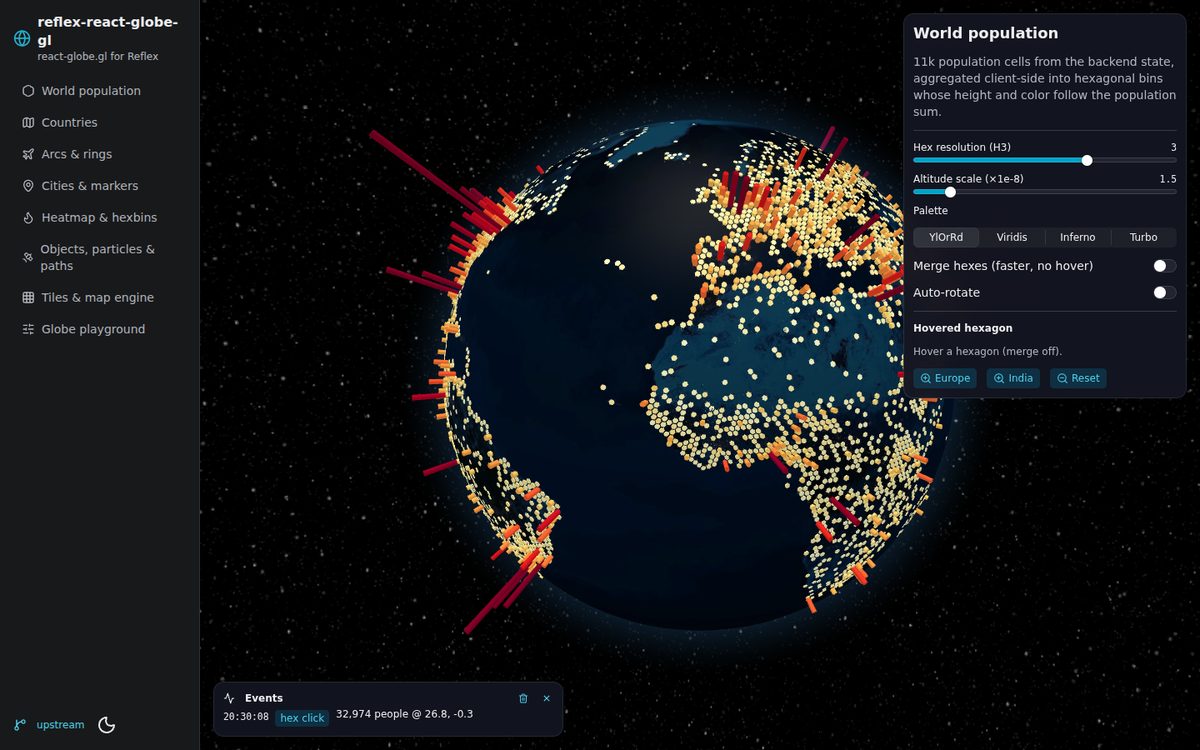
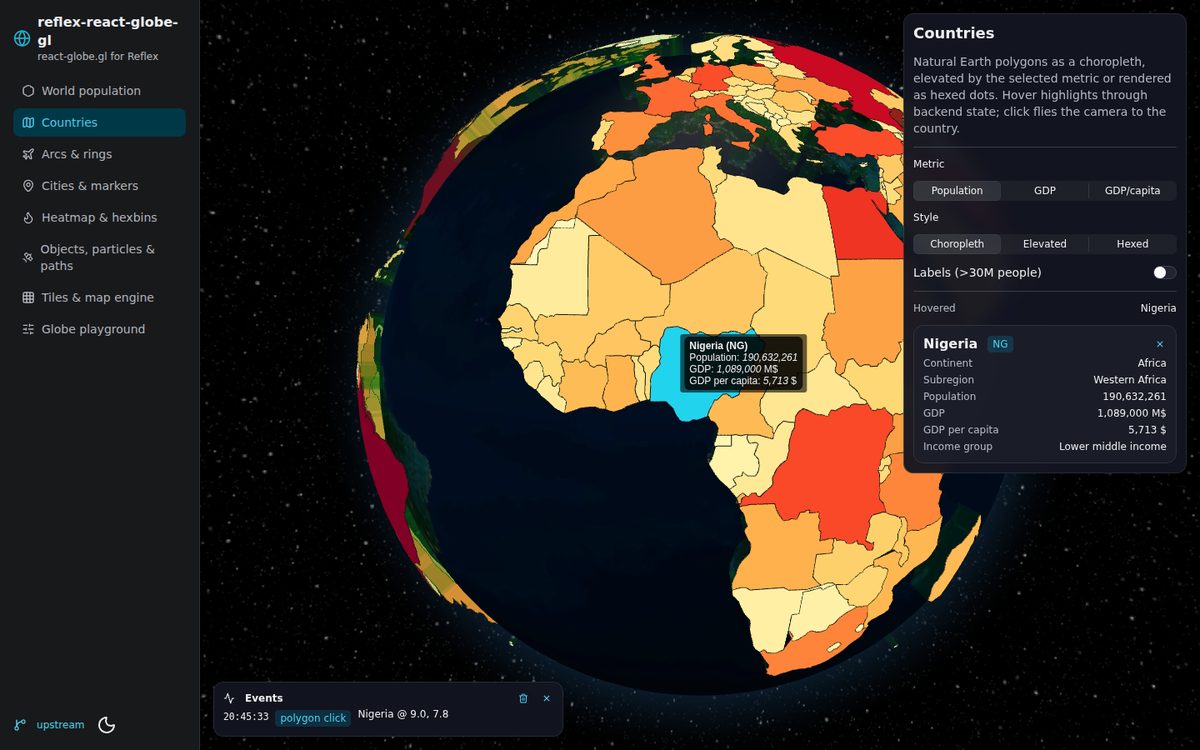
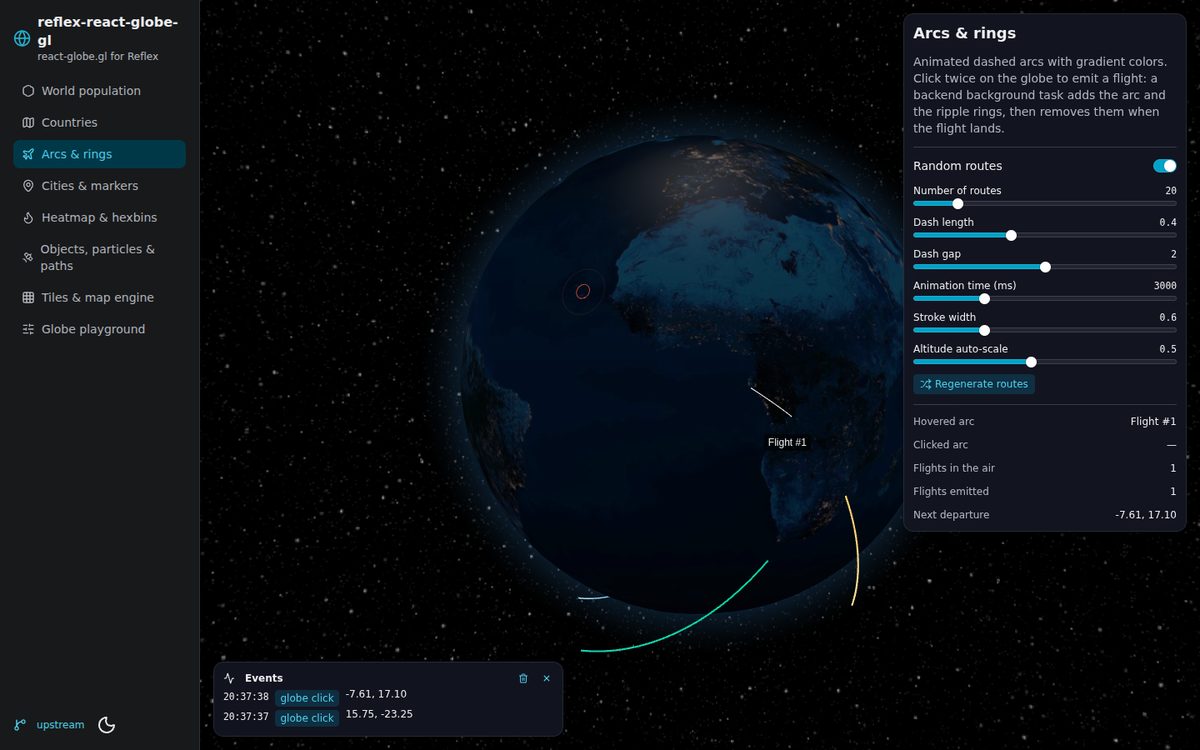
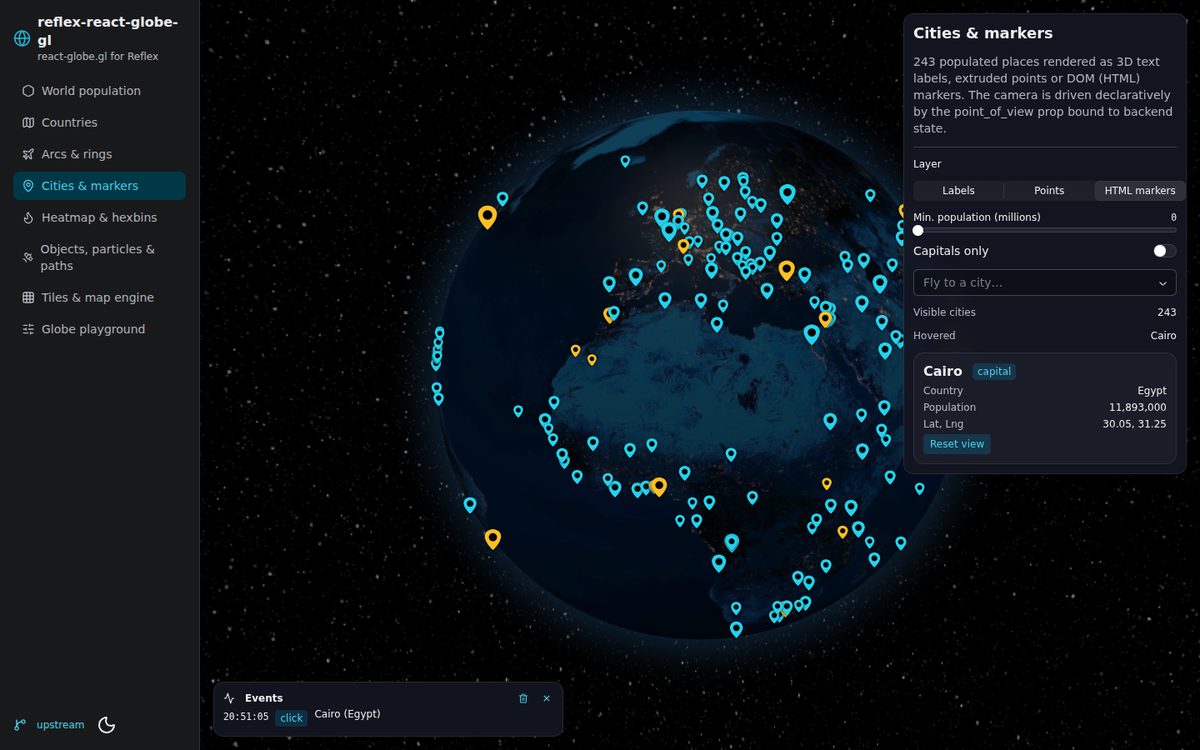
- Complete API: every prop and callback of
react-globe.gl2.38 — globe, points, arcs, polygons, paths, heatmaps, hex bins, hexed polygons, tiles, particles, rings, labels, HTML elements, 3D objects and custom layers — plusanimate_in,wait_for_globe_readyandrenderer_config. - Reflex-friendly events: callbacks receive plain, JSON-safe dicts (the ThreeJS internals, DOM events and circular references are stripped in the browser).
- Responsive: fills its container by default (no more window-sized canvas).
- Declarative imperative API: camera (
point_of_view), orbit controls (auto_rotate, …),animation_pausedandglobe_material_optionsare regular props bound to your state. - Actions for the imperative methods (
fly_to,get_point_of_view,get_screen_coords, …) usable directly as event triggers or returned from event handlers. - Helpers to write accessor functions from Python:
js,constant,attr,color_scale,tooltip,tile_url,three_mesh,three_material.
Installation
pip install reflex-react-globe-gl
# or
uv add reflex-react-globe-gl
Requires Python 3.11+ and reflex>=0.10.0. The npm packages (react-globe.gl@2.38.0, three@0.186.0) are
installed automatically by Reflex the first time the app compiles.
Quick start
import reflex as rx
import reflex_react_globe_gl as rg

IMG = "https://cdn.jsdelivr.net/npm/three-globe/example/img"


class State(rx.State):
    cities: list[dict] = [
        {"name": "Lagos", "lat": 6.52, "lng": 3.38, "size": 0.3},
        {"name": "Paris", "lat": 48.86, "lng": 2.35, "size": 0.5},
        {"name": "Tokyo", "lat": 35.68, "lng": 139.69, "size": 0.8},
    ]
    selected: str = ""

    @rx.event
    def select(self, city: dict):
        self.selected = city["name"]
        return rg.fly_to("globe", city["lat"], city["lng"], altitude=1.2)


def index() -> rx.Component:
    return rx.box(
        rg.globe(
            id="globe",
            globe_image_url=f"{IMG}/earth-night.jpg",
            background_image_url=f"{IMG}/night-sky.png",
            points_data=State.cities,
            point_altitude="size",          # attribute name
            point_color=rg.constant("orange"),  # constant value
            point_radius=0.6,
            point_label="name",
            on_point_click=State.select,
            auto_rotate=True,
            auto_rotate_speed=0.4,
        ),
        rx.text("Selected: ", State.selected, position="absolute", top="1em", left="1em"),
        height="100vh",
        position="relative",
    )


app = rx.App()
app.add_page(index)
Concepts
Sizing
By default the globe fills its container (width: 100%; height: 100%, observed with a
ResizeObserver). Give the parent a height (e.g. height="100vh") or style the globe itself
(style={"height": "600px"} sizes the container). Explicit pixel width / height props
(rg.globe(..., height=600)) override the measured size.
Accessor props
Like upstream, accessor props (point_lat, arc_color, hex_altitude, …) accept:
| Value | Meaning | Example |
|---|---|---|
str |
attribute name read from each datum | point_lat="latitude" |
| number / bool | constant | point_radius=0.5 |
| JS function | computed per datum | point_altitude=rg.js("d => d.pop * 1e-7") |
A plain string is always an attribute name, so constant strings (colors!) need rg.constant("red").
Accessor functions run in the browser. They can reference state vars through f-strings and are re-applied whenever those vars change:
polygon_cap_color=rg.js(
    f"d => d.properties.ADMIN === {State.hovered} ? 'steelblue' : 'rgba(200, 0, 0, 0.6)'"
),
Helpers:
| Helper | Produces |
|---|---|
rg.js("d => …") |
any JS expression (supports embedded state vars) |
rg.constant(value) |
() => value |
rg.attr("properties.NAME", default) |
nested attribute accessor |
rg.color_scale("d.sumWeight", "YlOrRd", (0, 1e7), "sqrt") |
value → color (15 palettes or a list of hex colors; linear, sqrt, log, pow; any argument may be a state var) |
rg.tooltip("<b>{name}</b><br/>{properties.POP_EST}") |
HTML tooltip from a template (values are escaped) |
rg.tile_url("https://tile.openstreetmap.org/{z}/{x}/{y}.png") |
globe_tile_engine_url builder |
rg.three_mesh("OctahedronGeometry", [1.5, 0], "MeshLambertMaterial", {"color": "cyan"}) |
object_three_object / custom_three_object factory |
rg.three_material("MeshLambertMaterial", {...}) |
material for tile_material, polygon_cap_material, … |
Inside rg.js you can use the global window.ReflexGlobe namespace, which exposes THREE,
colorScale, PALETTES and get(id) (the globe handle, e.g. for getCoords).
Events
All layer callbacks are exposed with snake_case names (on_point_click, on_arc_hover,
on_hex_polygon_right_click, on_custom_layer_click, …) plus on_globe_ready,
on_globe_click, on_globe_right_click and on_zoom. Handlers receive JSON-safe values and may
accept only a prefix of the arguments:
| Trigger | Handler arguments |
|---|---|
on_<layer>_click, on_<layer>_right_click |
(datum, coords, event) — coords = {lat, lng, altitude}, event = {clientX, clientY, button, shiftKey, …} |
on_<layer>_hover |
(datum_or_None, previous_or_None) |
on_globe_click, on_globe_right_click |
(coords, event) |
on_zoom |
(pov) — {lat, lng, altitude}, throttled by zoom_throttle_ms (150 ms) |
on_html_element_click |
(datum, event) — markers created with html_markup |
on_html_element_hover |
(datum_or_None) |
Keys starting with __ and keys listed in event_data_exclude (default ["geometry"], so GeoJSON
geometries are not shipped over the websocket on every hover) are removed from datums; arrays are
capped at 2000 items. Regular DOM events (on_click, on_mouse_move, …) go to the container.
Reflex extensions
| Prop | Description |
|---|---|
point_of_view / pov_transition_ms |
declarative camera {lat, lng, altitude}; the camera moves when it changes |
auto_rotate, auto_rotate_speed, enable_zoom, enable_rotate, enable_pan |
orbit controls shortcuts |
controls_options |
any OrbitControls attribute (minDistance, maxDistance, zoomSpeed, …) |
animation_paused |
pause / resume the render loop |
globe_material_options |
attributes applied to the globe MeshPhongMaterial (color, emissive, emissiveIntensity, shininess, bumpScale, opacity, transparent, wireframe, …) |
html_markup |
attribute or JS function returning an HTML string per html_elements_data item (simpler than html_element), enables on_html_element_click/hover |
event_data_exclude |
keys stripped from event datums |
zoom_throttle_ms |
throttle interval of on_zoom |
globe_tile_engine_max_level |
max zoom level of the slippy-map engine |
Imperative actions
Give the globe an id and use the actions (they are rx.call_script event specs):
rx.button("Tokyo", on_click=rg.fly_to("globe", 35.68, 139.69, altitude=1.2, transition_ms=1500))
rx.button("Where am I?", on_click=rg.get_point_of_view("globe", State.receive_pov))
| Action | Upstream method |
|---|---|
fly_to / point_of_view(id, lat, lng, altitude, transition_ms) |
pointOfView(pov, ms) |
get_point_of_view(id, callback) |
pointOfView() |
pause_animation(id), resume_animation(id) |
pauseAnimation(), resumeAnimation() |
set_controls(id, **options) |
controls() attributes |
clear_tile_cache(id) |
globeTileEngineClearCache() |
get_screen_coords(id, lat, lng, alt, callback=…) |
getScreenCoords() |
to_globe_coords(id, x, y, callback=…) |
toGlobeCoords() |
get_coords(id, lat, lng, alt, callback=…) |
getCoords() |
get_globe_radius(id, callback=…) |
getGlobeRadius() |
run_js(id, code) |
anything else: globe and THREE are in scope (globe.scene(), globe.lights(), globe.camera(), globe.renderer(), globe.postProcessingComposer()) |
Performance tips
- Keep large datasets in state and load them in
on_load; data identity is preserved between renders, so layers are only rebuilt when the data actually changes. - Accessors without state vars are stabilized automatically; accessors that embed state vars are
re-applied when the component re-renders. To switch between a few fixed functions, prefer
rx.cond/rx.matchover embedding the var (see the tiles demo). hex_bin_merge=True,points_merge=Trueandenable_pointer_interaction=Falsetrade interactivity for speed on very large datasets.
Demo app
react_globe_gl_demo/ is a multi-page Reflex app that exercises the whole API:
| Page | Features |
|---|---|
| World population | hex bins from 11k cells, state-driven resolution / altitude / palette, hover & click |
| Countries | choropleth, elevated and hexed polygons, labels, hover highlight, click → details + fly-to |
| Arcs & rings | animated dashed arcs, "emit arcs on click" orchestrated by a backend background task, ripple rings |
| Cities & markers | labels / points / HTML markers, declarative camera bound to state, rings around the selection |
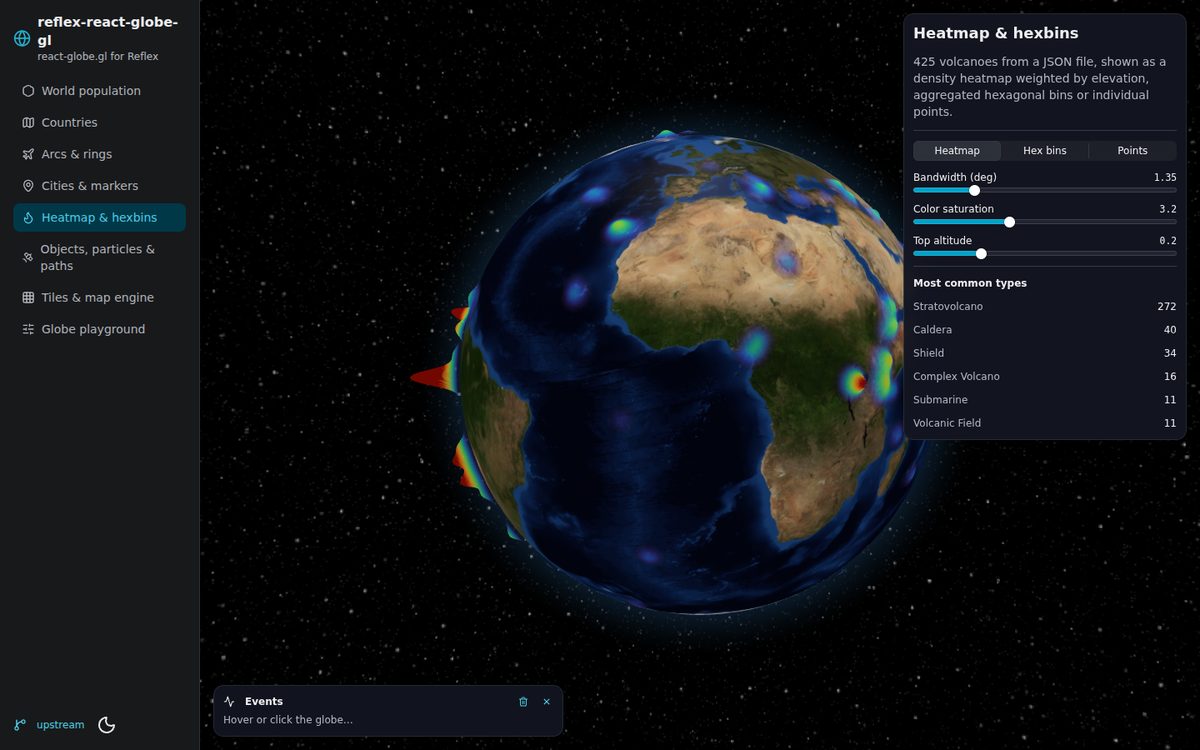
| Heatmap & hexbins | volcano heatmap, hex bins and points on the same dataset |
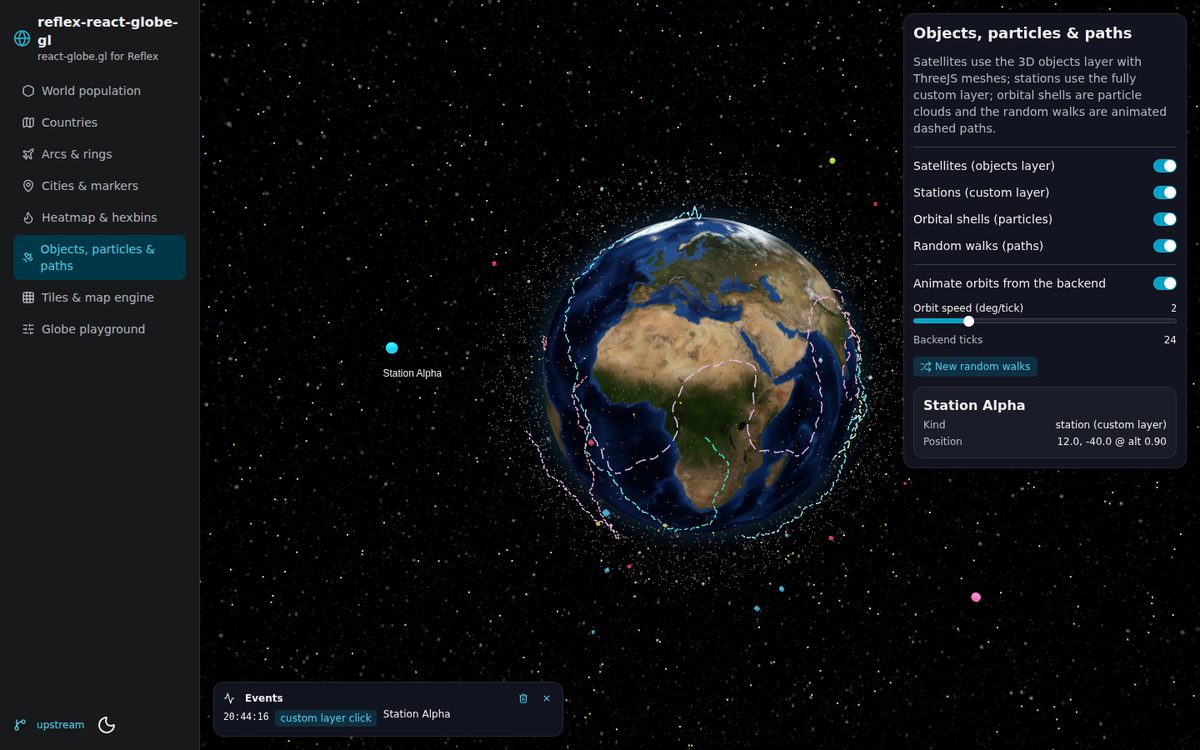
| Objects, particles & paths | ThreeJS meshes (objects layer), custom layer, particle clouds, animated paths, satellites moved from the backend |
| Tiles & map engine | slippy-map tile engine (OSM, CARTO, ESRI) and the tiles layer with custom materials |
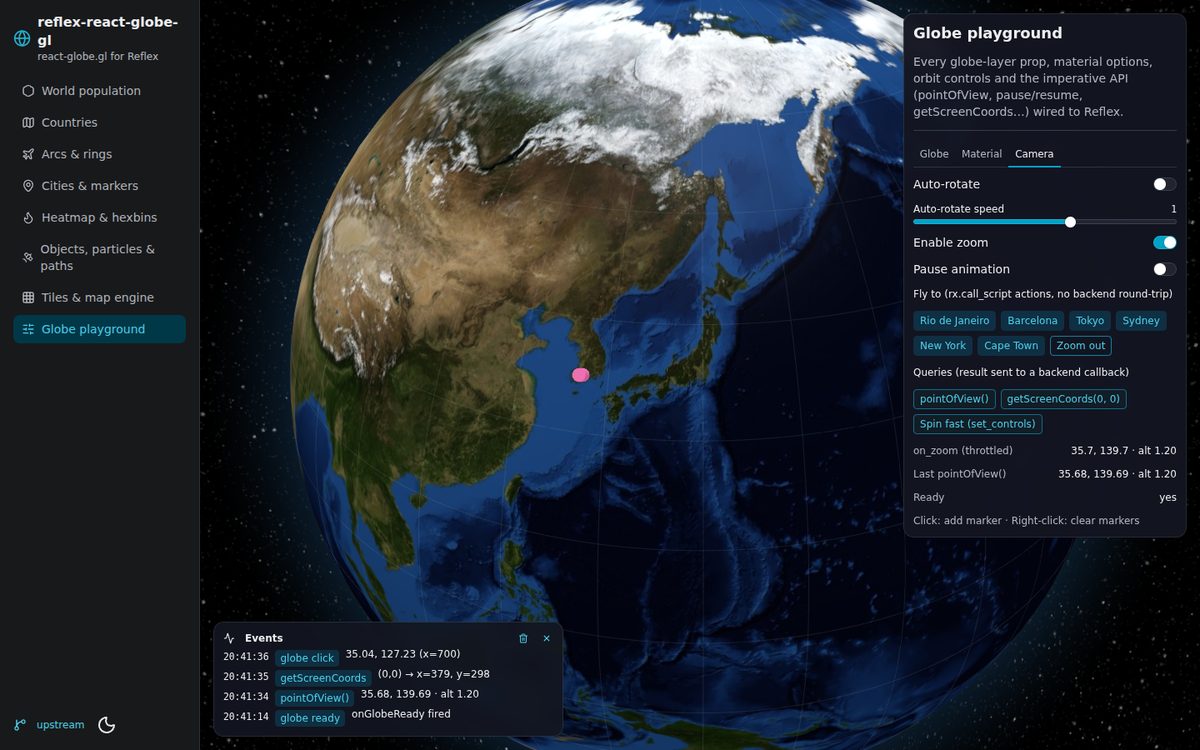
| Globe playground | globe images, atmosphere, graticules, material, orbit controls, pause, fly-to and query actions |
git clone https://github.com/ecrespo/reflex-react-globe-gl
cd reflex-react-globe-gl
uv venv && uv pip install -e ".[dev]"
cd react_globe_gl_demo
uv run reflex run
Globe textures are loaded from jsDelivr. To serve them locally, copy the images from
three-globe/example/img into
react_globe_gl_demo/assets/img/ and run with GLOBE_IMG_BASE=/img uv run reflex run.
Development
uv pip install -e ".[dev]"
uv run pytest                      # Python + JS wrapper tests (the latter need Node 24)
# regenerate the .pyi stubs (Reflex 0.10 removed `reflex component build`), then build sdist + wheel
PYTHONPATH=. uv run --python 3.13 python -m reflex_base.utils.pyi_generator custom_components/reflex_react_globe_gl
uv build
Project layout:
custom_components/reflex_react_globe_gl/
├── react_globe_gl.py   # the Globe component (all props / events)
├── globe_wrapper.js    # React wrapper around react-globe.gl (sizing, events, registry…)
├── helpers.py          # js / constant / color_scale / tooltip / tile_url / three_mesh…
└── actions.py          # fly_to / get_point_of_view / set_controls / run_js…
react_globe_gl_demo/    # demo app
tests/                  # pytest suite
Credits
- react-globe.gl, globe.gl and three-globe by Vasco Asturiano (MIT).
- Demo datasets from Natural Earth and the react-globe.gl examples.
License
MIT © Ernesto Crespo
1 maintainer

Metadata
1 maintainer
Release files for reflex-react-globe-gl 0.2.0
For a detailed explanation of source distributions (sdists) and built distributions (wheels), please see the package formats documentation.
Source distribution (sdist)
| File | Size | Uploaded | Provenance | |
|---|---|---|---|---|
| reflex_react_globe_gl-0.2.0.tar.gz | 50.6 kB | With provenance | Details |
Built distribution (wheel)
| File | Interpreter | ABI | Platform | Reset |
|---|---|---|---|---|
| reflex_react_globe_gl-0.2.0-py3-none-any.whl | Python 3 | none | any | Details |
Total release size: 91.7 kB
Release files / reflex_react_globe_gl-0.2.0.tar.gz
| Download URL | reflex_react_globe_gl-0.2.0.tar.gz |
|---|---|
| Size | 50.6 kB |
| Tags | Source |
|
SHA-256 checksum How to use checksums |
13c55cb145f8bdfbe8ce96ae81a33962967ac3b643c2f395ac3be63df63ef656
|
|
BLAKE2b-256 checksum How to use checksums |
c2d03cda0d4d67cbfe3d4523df8d2c53408512de941c890a64d647ffd6683282
|
| Upload date | |
|
Uploaded using Trusted Publishing? What is trusted publishing? |
Yes |
| Uploaded via |
twine/7.0.0 CPython/3.13.14
|
Provenance
Provenance describes where a file came from. On PyPI, provenance is shared via attestations, which provide a verifiable record of the build or publishing details. View details, limitations and caveats.


PyPI Publish Attestation
PyPI verified that this artifact, at this checksum, originated from the publisher listed below.
Signed by GitHub Actions, verified by PyPI on Oct 25, 2026.
Transparency logRelease files / reflex_react_globe_gl-0.2.0-py3-none-any.whl
| Download URL | reflex_react_globe_gl-0.2.0-py3-none-any.whl |
|---|---|
| Size | 41.1 kB |
| Tags | Python 3 |
|
SHA-256 checksum How to use checksums |
3e8653fa47a6dd0f1ed1c6263fe56153fc28fe41ada0bc2db16c86a28177ed6b
|
|
BLAKE2b-256 checksum How to use checksums |
01ea209a5a3d491a50d5465ff4ecc97e96fb9d9862ed95f0fdc83ef053ef2654
|
| Upload date | |
|
Uploaded using Trusted Publishing? What is trusted publishing? |
Yes |
| Uploaded via |
twine/7.0.0 CPython/3.13.14
|
Provenance
Provenance describes where a file came from. On PyPI, provenance is shared via attestations, which provide a verifiable record of the build or publishing details. View details, limitations and caveats.
PyPI Publish Attestation
PyPI verified that this artifact, at this checksum, originated from the publisher listed below.
Signed by GitHub Actions, verified by PyPI on Oct 25, 2026.
Transparency logSecurity for reflex-react-globe-gl 0.2.0
Provenance
Provenance describes where a file came from. On PyPI, provenance is shared via attestations, which provide a verifiable record of the build or publishing details. View details, limitations and caveats.
Full provenance
All 2 files in this release have been uploaded with provenance metadata.
Attestation for reflex_react_globe_gl-0.2.0.tar.gz
PyPI Publish Attestation
PyPI verified that this artifact, at this checksum, originated from the publisher listed below.
Signed by GitHub Actions, verified by PyPI on Oct 25, 2026.
Transparency logA note on package security
PyPI is a repository for distributing packages, not a service for auditing them. While third-party security researchers and our staff do their best to detect and remove malicious packages, PyPI cannot guarantee the quality, security or suitability of any given package.
To learn more about protecting yourself from malicious actors, visit our package security documentation.














