
reflex-react-joyride
Guided product tours and onboarding walkthroughs for Reflex, powered by react-joyride v3.
- Wraps react-joyride 3.2.0 through its
useJoyridehook, so the tour's controls are reachable from Python - Typed props for everything:
Step,TourOptions,Locale,TourStyles,FloatingOptions—snake_casein Python,camelCasein the browser - Uncontrolled (
run) or controlled (step_index) mode, whichever fits your State - Python actions:
start,next_step,prev_step,go_to,skip,reset,replay,stop,open_tooltip,get_state - One catch-all
on_eventplus a dedicated trigger per event (on_tour_start,on_step_after,on_target_not_found, ...) with a flat, JSON-safe payload - Custom tooltip and beacon written as ordinary Reflex components
- Step content and titles accept Reflex components, not just strings
- Constants mirroring react-joyride's literals:
EVENTS,ACTIONS,STATUS,LIFECYCLE,ORIGIN
Screenshots
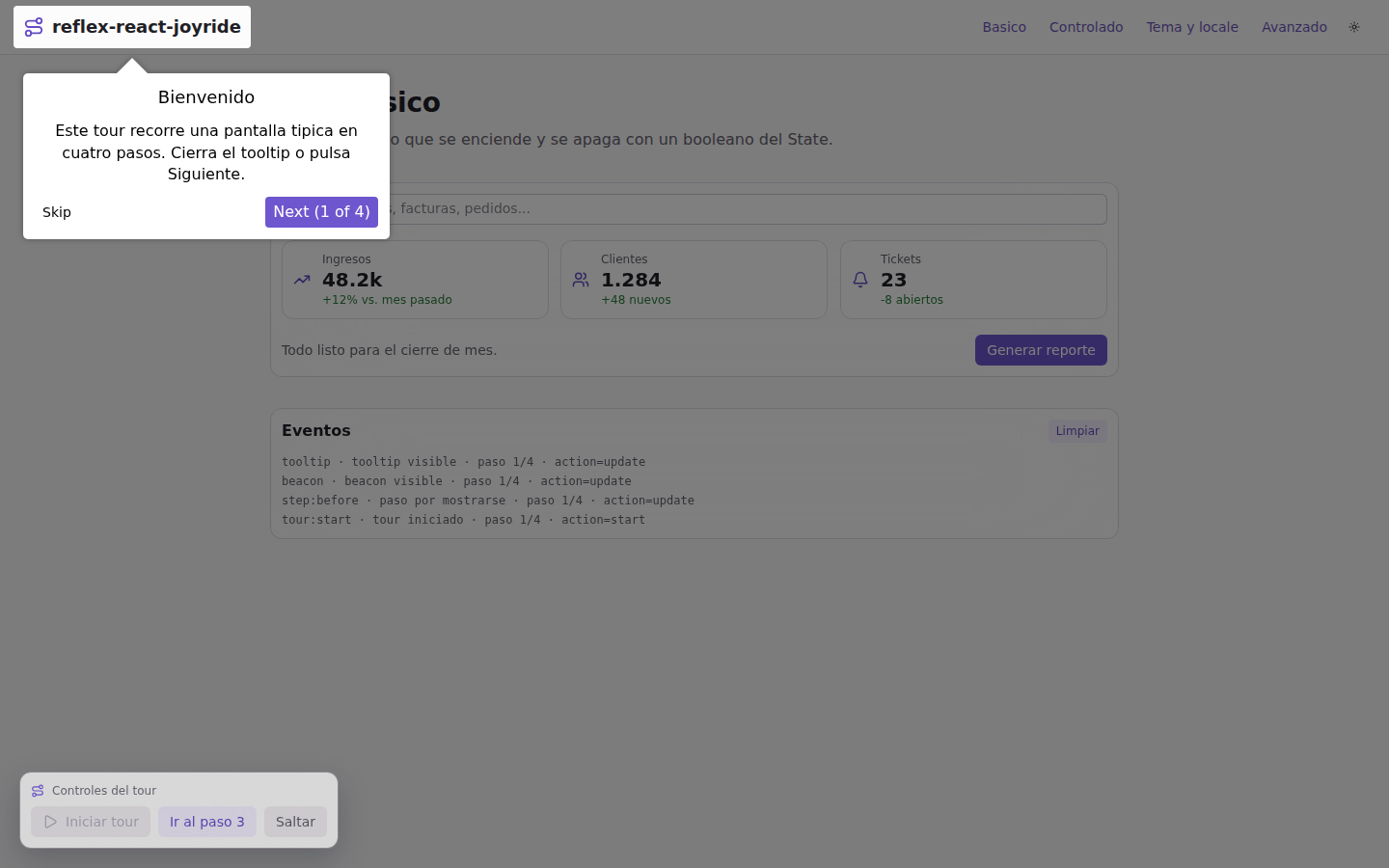
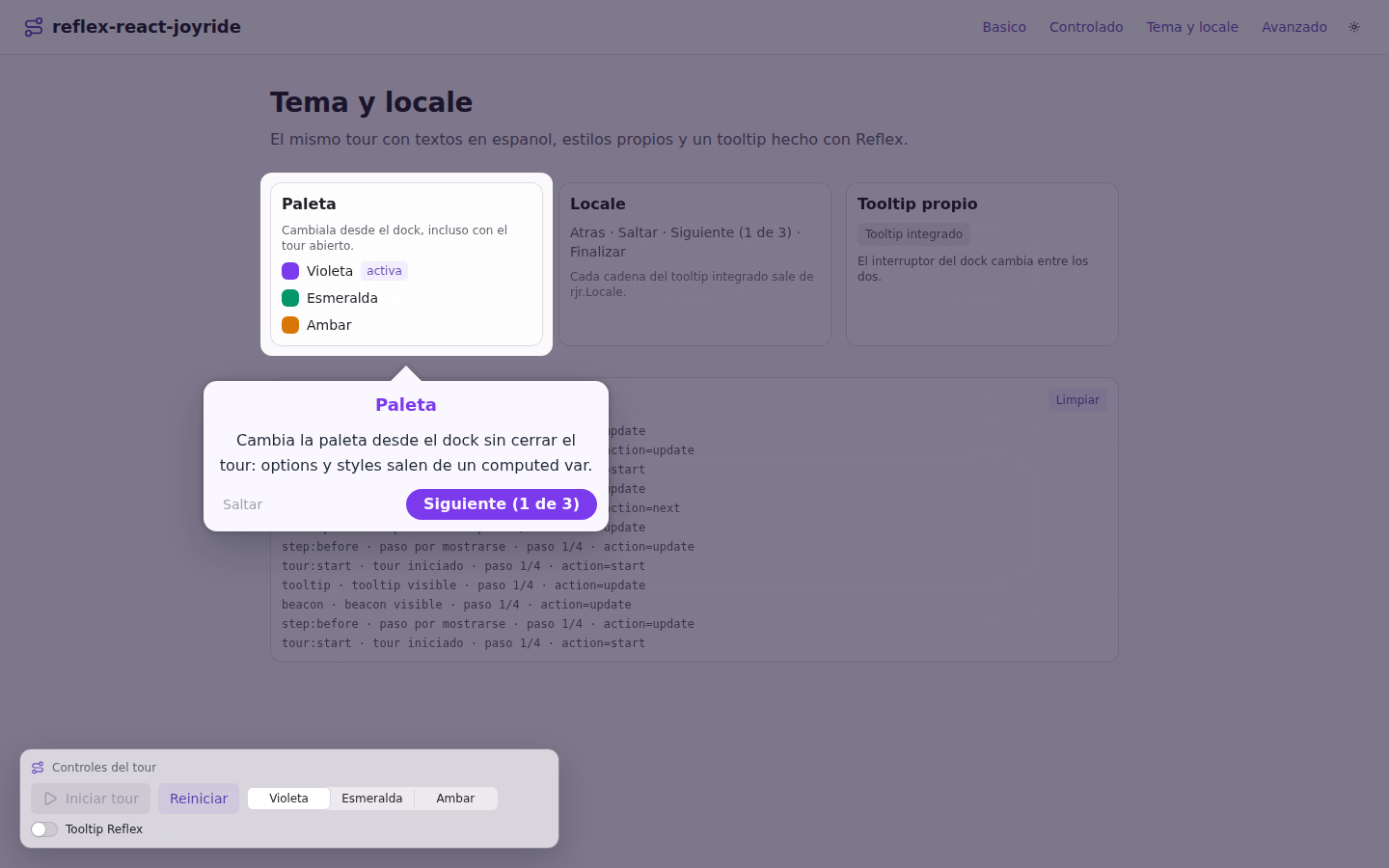
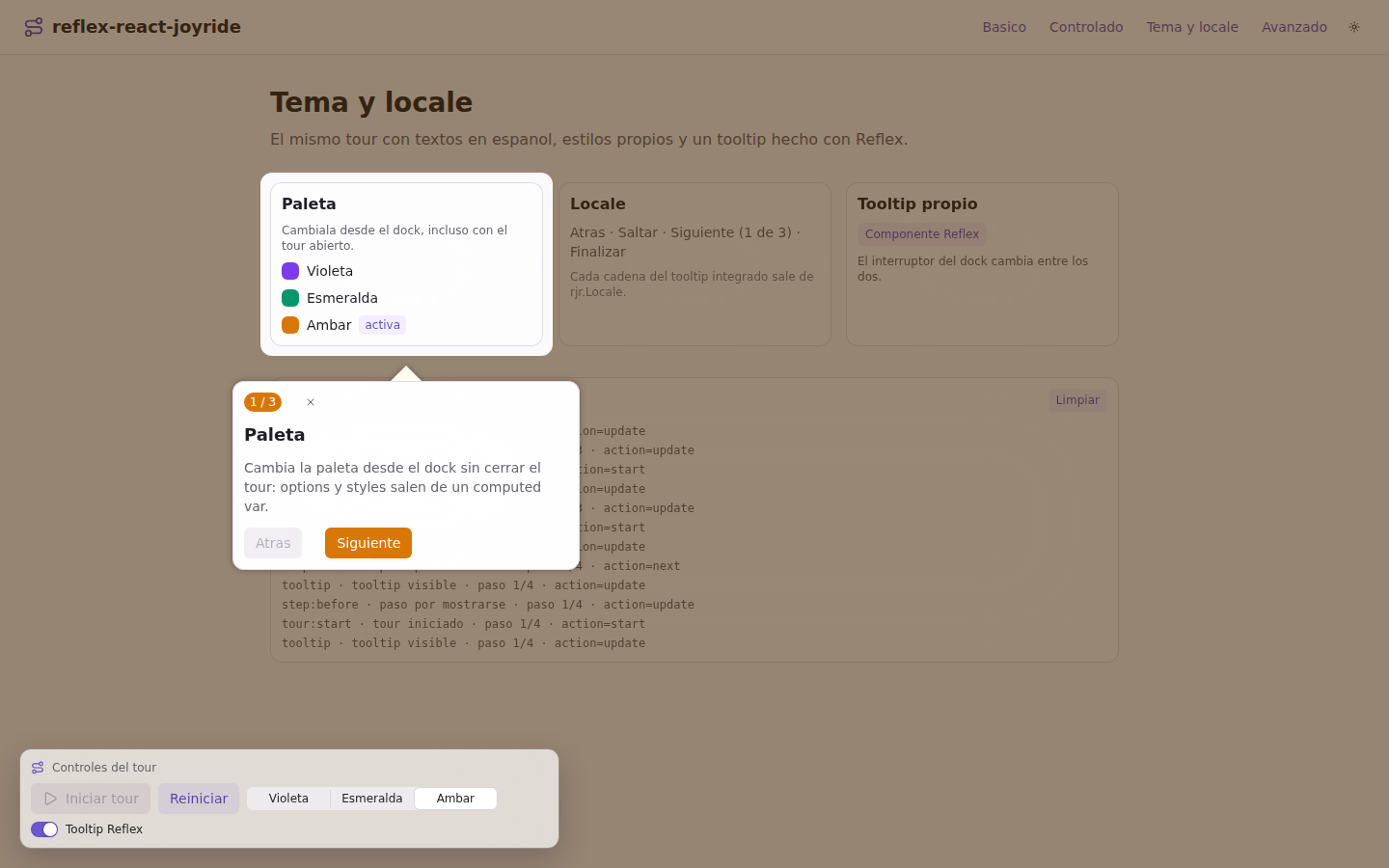
The four pages of the demo app, in order:
 |
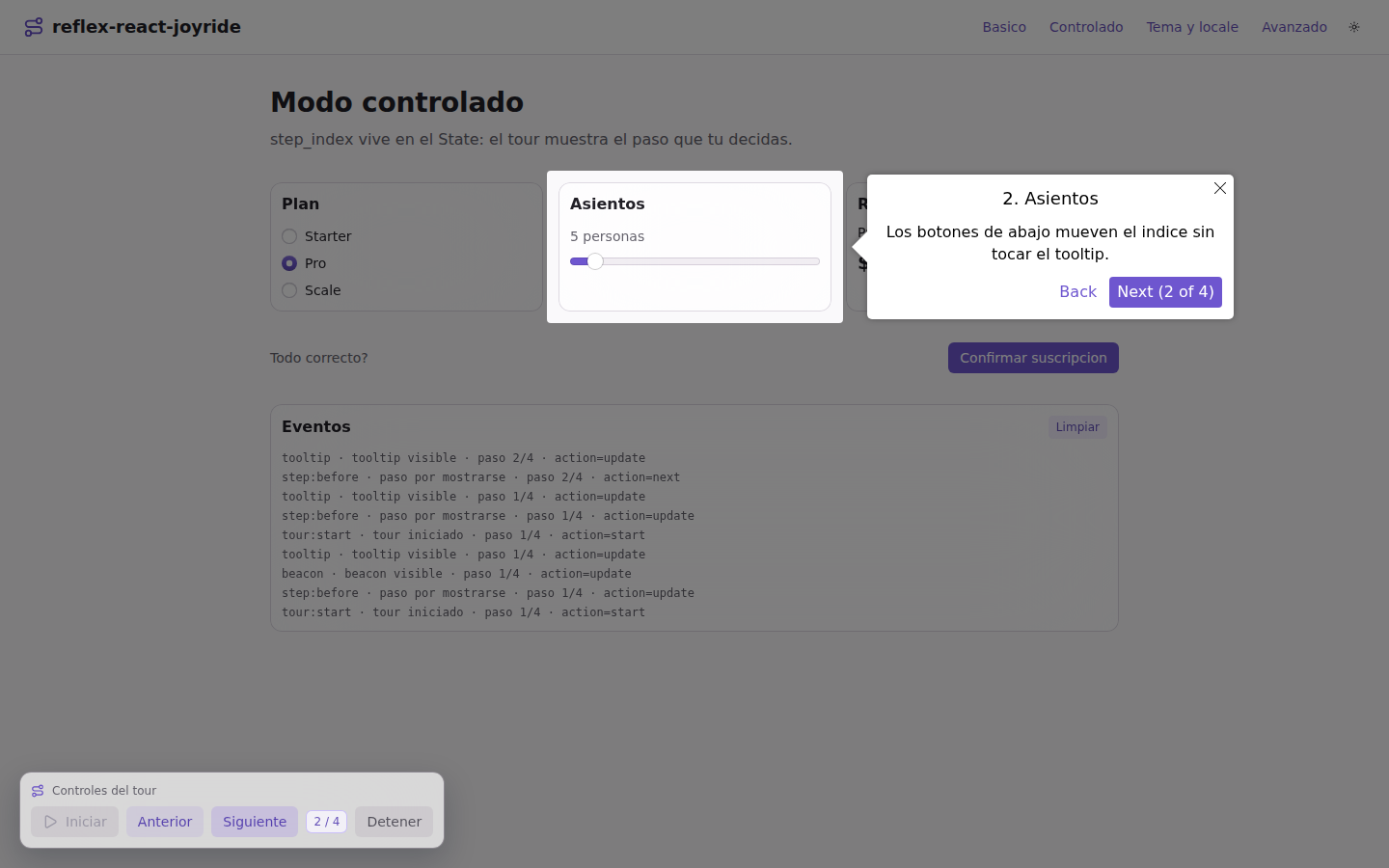 |
| A continuous tour over a small dashboard, with the event log filling up | Controlled mode: the step index lives in the State and external buttons drive it |
 |
 |
locale, options and styles restyling the built-in tooltip |
The same step rendered by a Reflex component through the tooltip render prop |
 |
 |
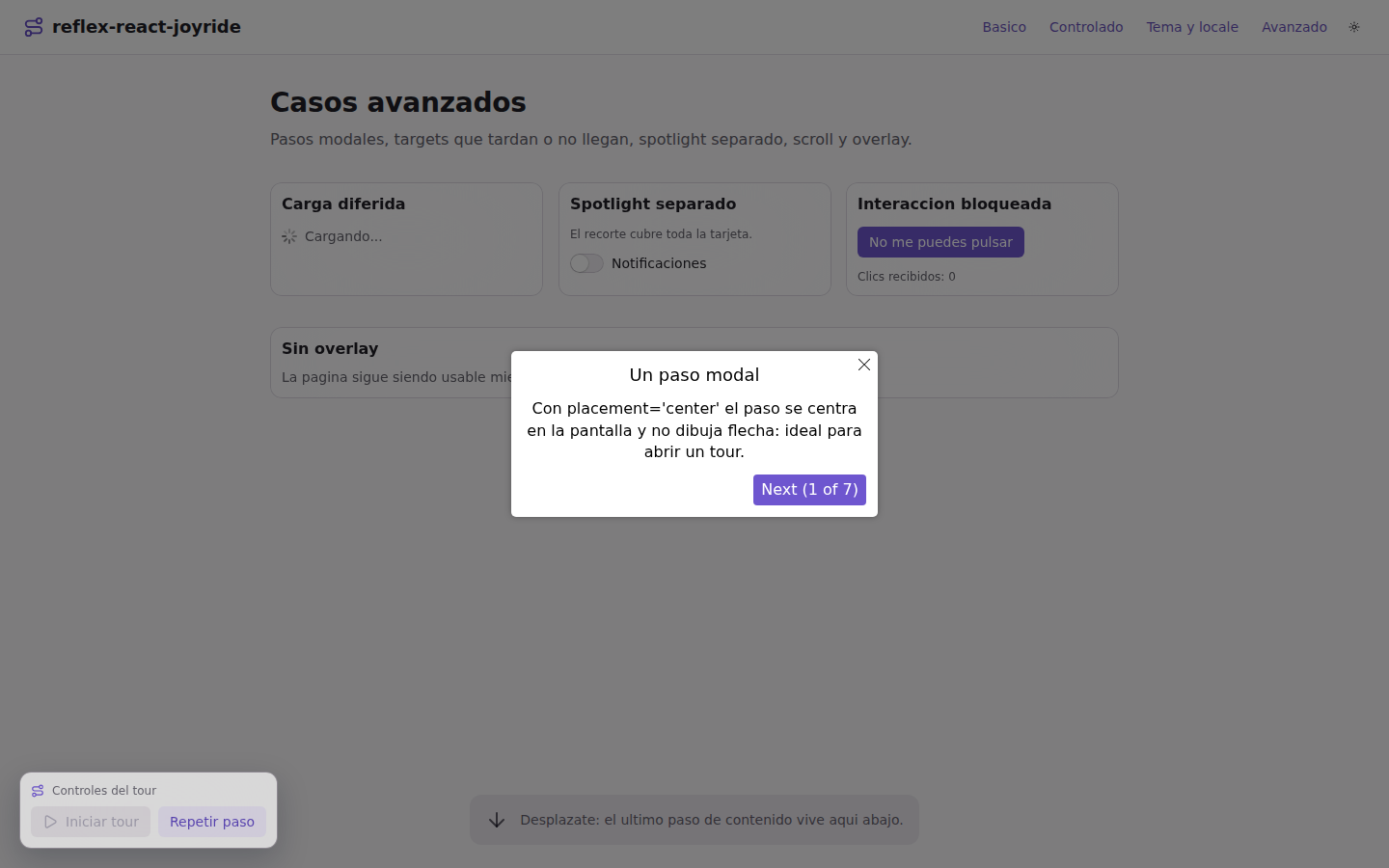
placement="center" on body for a modal-like opening step |
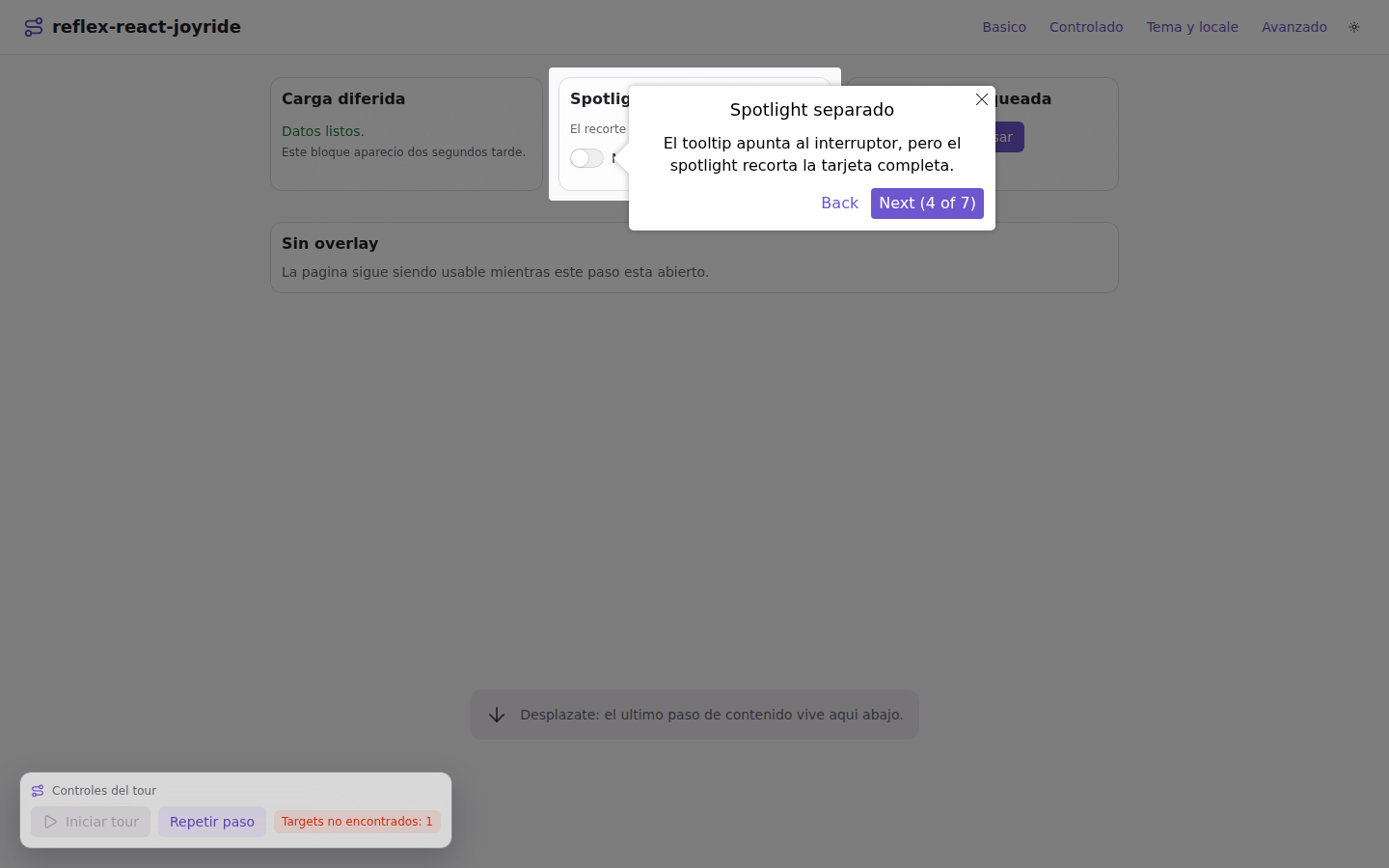
A spotlight over a different element than the one the tooltip points at |
Installation
pip install reflex-react-joyride
# or
uv add reflex-react-joyride
Quick start
import reflex as rx
import reflex_react_joyride as rjr


class TourState(rx.State):
    run: bool = False

    @rx.event
    def start(self):
        self.run = True

    @rx.event
    def finished(self, event: rjr.JoyrideEvent):
        self.run = False


def index() -> rx.Component:
    return rx.vstack(
        rjr.joyride(
            tour_id="welcome",
            run=TourState.run,
            continuous=True,
            steps=[
                rjr.Step(target="#logo", title="Welcome", content="This is the app."),
                rjr.Step(target="#cta", content="Start here.", placement="top"),
            ],
            options=rjr.TourOptions(show_progress=True, primary_color="#7c3aed"),
            on_tour_end=TourState.finished,
        ),
        rx.heading("Acme", id="logo"),
        rx.button("Get started", id="cta"),
        rx.button("Take the tour", on_click=TourState.start),
    )
Steps
A step needs a target (any CSS selector) and some content. Everything in
TourOptions can be overridden per step:
rjr.Step(
    target="#sidebar",
    title="Navigation",
    content=rx.vstack(rx.text("Every section lives here."), rx.code("Cmd+K")),
    placement="right",  # top | bottom | left | right | auto | center (+ -start / -end)
    spotlight_padding=16,
    show_progress=True,
    id="sidebar",  # echoed back as event["step_id"]
    data={"section": "nav"},  # echoed back as event["step_data"], keys untouched
)
target="body" with placement="center" gives a modal-like step, which is a
good opener. Plain dicts work as well as Step objects, and so do steps kept in
a State var:
class State(rx.State):
    steps: list[dict] = [{"target": "#logo", "content": "Hi", "show_progress": True}]


rjr.joyride(steps=State.steps)
snake_case keys are converted to the camelCase react-joyride expects, both
for literal props (in Python) and for values coming from the State (in the
browser), so you never have to write spotlightPadding yourself. Keys that are
already camelCase pass through untouched.
Theming
options sets behaviour and colors for the whole tour, styles overrides the
CSS of every element react-joyride renders, and locale replaces the strings:
rjr.joyride(
    steps=STEPS,
    options=rjr.TourOptions(
        primary_color="#059669",
        background_color="#f2fbf7",
        overlay_color="rgba(4, 47, 36, 0.55)",
        show_progress=True,
        skip_beacon=True,  # go straight to the tooltip, no beacon
        spotlight_radius=12,
        buttons=["back", "skip", "primary"],
        width=420,
        z_index=1000,
    ),
    styles=rjr.TourStyles(
        tooltip={"border_radius": "14px", "box_shadow": "0 18px 40px rgba(15, 23, 42, 0.18)"},
        button_primary={"border_radius": "999px", "padding": "8px 18px"},
    ),
    locale=rjr.Locale(
        back="Atrás",
        close="Cerrar",
        last="Finalizar",
        next="Siguiente",
        next_with_progress="Siguiente ({current} de {total})",
        skip="Saltar",
    ),
)
CSS properties inside styles are converted too: border_radius becomes
borderRadius.
Controlled mode
Pass step_index and react-joyride stops advancing on its own — it renders
exactly the step your State asks for. Move the index from on_step_after:
class State(rx.State):
    run: bool = False
    index: int = 0

    @rx.event
    def advance(self, event: rjr.JoyrideEvent):
        self.index = max(0, event["index"] + (-1 if event["action"] == rjr.ACTIONS.PREV else 1))

    @rx.event
    def skip_missing(self, event: rjr.JoyrideEvent):
        self.index = event["index"] + 1

    @rx.event
    def finished(self, _event: rjr.JoyrideEvent):
        self.run, self.index = False, 0


rjr.joyride(
    steps=STEPS,
    run=State.run,
    step_index=State.index,
    continuous=True,
    on_step_after=State.advance,
    on_target_not_found=State.skip_missing,
    on_tour_end=State.finished,
)
This is what you want when a step should only open after your own code did something — finished a request, opened a drawer, switched a tab.
Events
Every trigger receives the same flat dict:
| key | meaning |
|---|---|
type |
the event, e.g. tour:start, step:after, error:target_not_found |
action |
what triggered it: start, next, prev, close, skip, update, ... |
index, size, is_last_step |
where we are in the tour |
status |
idle, ready, waiting, running, paused, skipped, finished |
lifecycle |
init, ready, beacon, tooltip, complete, ... |
origin |
which control fired it: button_primary, overlay, keyboard, ... |
controlled, waiting, scrolling |
tour flags |
step_id, step_target, step_title, step_data |
about the current step |
error |
the message for error events |
Triggers: on_event (all of them), on_tour_start, on_tour_end,
on_status_change, on_step_before, on_step_after, on_beacon,
on_tooltip, on_scroll_start, on_scroll_end, on_target_not_found,
on_error.
Compare against the constants instead of raw strings:
@rx.event
def on_tour_event(self, event: rjr.JoyrideEvent):
    if event["type"] == rjr.EVENTS.TOUR_END and event["status"] in rjr.FINISHED_STATUSES:
        self.onboarding_done = True
Python actions
Give the tour a tour_id and you can drive it from anywhere, without keeping
the index in your State:
rx.button("Start", on_click=rjr.start("welcome"))
rx.button("Step 3", on_click=rjr.go_to("welcome", 2))
rx.button("Next", on_click=rjr.next_step("welcome"))
rx.button("Replay this step", on_click=rjr.replay("welcome"))
rx.button("Skip", on_click=rjr.skip("welcome"))
start, stop, next_step, prev_step, go_to, close, skip, reset,
replay, open_tooltip, and get_state(tour_id, callback) which sends the
current tour state to an event handler. They are no-ops (with a console warning)
when no tour with that id is mounted.
The tour still needs run=True to be running; the actions drive a running tour,
they do not switch it on.
Custom tooltip and beacon
Pass a function returning a Reflex component. It receives what react-joyride
passes to a custom tooltip, plus current, total, progress, content,
title, stepId, stepData, isFirstStep and isLastStep (these are
JavaScript props, so their keys stay camelCase):
def tooltip(props):
    return rx.card(
        rx.vstack(
            rx.badge(props["progress"], radius="full"),
            rx.heading(props["title"], size="4"),
            rx.text(props["content"], size="2"),
            rx.hstack(
                rx.button(
                    "Back",
                    variant="soft",
                    on_click=rjr.prev_step("welcome"),
                    disabled=props["isFirstStep"].to(bool),
                ),
                rx.button(
                    rx.cond(props["isLastStep"].to(bool), "Done", "Next"), on_click=rjr.next_step("welcome")
                ),
            ),
        ),
        width="360px",
    )


rjr.joyride(steps=STEPS, tour_id="welcome", tooltip=tooltip, beacon=lambda _p: rx.box(...))
The component is rendered inside react-joyride's own wrapper, so the ARIA attributes and positioning are handled for you. It can read your State like any other component.
Rendering above the overlay
react-joyride portals the overlay into document.body, and Reflex's Radix theme
root is a stacking context (z-index: 0), so the overlay paints above the whole
app no matter how large a z-index you give your own elements. If you need
something clickable while a tour runs — a control bar, a chat widget — render
the tour inside the app instead and give your element a higher z-index than
the tour's:
(rx.box(id="tour-root"),)
(rjr.joyride(steps=STEPS, portal_element="#tour-root", options=rjr.TourOptions(z_index=1000)),)
(rx.box(my_controls, position="fixed", bottom="1rem", left="1rem", z_index="1200"),)
Otherwise anything under the overlay is inert while a step is open, which is usually exactly what you want.
Demo app
The react_joyride_demo/ folder is a four page Reflex app covering the basics,
controlled mode, theming with a Reflex tooltip, and the awkward cases (targets
that appear late or never, spotlight targets, scrolling, modal steps, blocked
interaction):
uv sync
cd react_joyride_demo
uv run reflex run
Development
uv sync                         # creates .venv and installs the package in editable mode
uv run pytest
uv run ruff check .
uv run ruff format --check .
uv run reflex component build   # generates the .pyi stubs and builds dist/
License
MIT © Ernesto Crespo
1 maintainer

Download files
Download the file for your platform. If you're not sure which to choose, learn more about installing packages.
Source Distribution
Built Distribution
Filter files by name, interpreter, ABI, and platform.
If you're not sure about the file name format, learn more about wheel file names.
Copy a direct link to the current filters
File details
Details for the file reflex_react_joyride-0.1.0.tar.gz.
File metadata
- Download URL: reflex_react_joyride-0.1.0.tar.gz
- Upload date:
- Size: 27.8 kB
- Tags: Source
- Uploaded using Trusted Publishing? Yes
- Uploaded via:
twine/7.0.0 CPython/3.13.14
File hashes
| Algorithm | Hash digest | |
|---|---|---|
| SHA256 |
5b4da47dcac91df62d2f4ea7b294f372b2504c41053ba01d158e13bca018d185
|
|
| MD5 |
5ec2c1c7116862262cb751112f530fdf
|
|
| BLAKE2b-256 |
25af14f33af0cf4684243c08dda461d9909ba47bedc0fe20c0884f1839bed744
|
Provenance
The following attestation bundles were made for reflex_react_joyride-0.1.0.tar.gz:
Publisher:
release.yml on ecrespo/reflex-react-joyride
-
Statement:
-
Statement type:
https://in-toto.io/Statement/v1 -
Predicate type:
https://docs.pypi.org/attestations/publish/v1 -
Subject name:
reflex_react_joyride-0.1.0.tar.gz -
Subject digest:
5b4da47dcac91df62d2f4ea7b294f372b2504c41053ba01d158e13bca018d185 - Sigstore transparency entry: 2870891169
- Sigstore integration time:
-
Permalink:
ecrespo/reflex-react-joyride@64dd9a8404d0576b97162747b324c11d0bb50c7e -
Branch / Tag:
refs/tags/v0.1.0 - Owner: https://github.com/ecrespo
-
Access:
public
-
Token Issuer:
https://token.actions.githubusercontent.com -
Runner Environment:
github-hosted -
Publication workflow:
release.yml@64dd9a8404d0576b97162747b324c11d0bb50c7e -
Trigger Event:
push
-
Statement type:
File details
Details for the file reflex_react_joyride-0.1.0-py3-none-any.whl.
File metadata
- Download URL: reflex_react_joyride-0.1.0-py3-none-any.whl
- Upload date:
- Size: 25.3 kB
- Tags: Python 3
- Uploaded using Trusted Publishing? Yes
- Uploaded via:
twine/7.0.0 CPython/3.13.14
File hashes
| Algorithm | Hash digest | |
|---|---|---|
| SHA256 |
43c17a727218dfe53742b01d9f0df612667c939b6c87311824b9b41ed6506cea
|
|
| MD5 |
cc08e220c6cd51227e624f526e678b36
|
|
| BLAKE2b-256 |
5675527402ba8a86ebd80f8b281a597b2cf9ff6deea776d11d6bc1c2f0acf39a
|
Provenance
The following attestation bundles were made for reflex_react_joyride-0.1.0-py3-none-any.whl:
Publisher:
release.yml on ecrespo/reflex-react-joyride
-
Statement:
-
Statement type:
https://in-toto.io/Statement/v1 -
Predicate type:
https://docs.pypi.org/attestations/publish/v1 -
Subject name:
reflex_react_joyride-0.1.0-py3-none-any.whl -
Subject digest:
43c17a727218dfe53742b01d9f0df612667c939b6c87311824b9b41ed6506cea - Sigstore transparency entry: 2870891216
- Sigstore integration time:
-
Permalink:
ecrespo/reflex-react-joyride@64dd9a8404d0576b97162747b324c11d0bb50c7e -
Branch / Tag:
refs/tags/v0.1.0 - Owner: https://github.com/ecrespo
-
Access:
public
-
Token Issuer:
https://token.actions.githubusercontent.com -
Runner Environment:
github-hosted -
Publication workflow:
release.yml@64dd9a8404d0576b97162747b324c11d0bb50c7e -
Trigger Event:
push
-
Statement type:













