
reflex-vercel-analytics
Vercel Web Analytics for Reflex, powered by @vercel/analytics.
- Wraps @vercel/analytics 2.0.1 (the
Analyticscomponent from@vercel/analytics/react) in a small React bridge, mounted once around the whole app withrva.install(app) - Config file:
vercel_analytics.tomlnext torxconfig.py(or[tool.reflex-vercel-analytics]inpyproject.toml, or JSON), validated on load, withVERCEL_ANALYTICS_*environment overrides; Vercel's own build variables (VERCEL_OBSERVABILITY_CLIENT_CONFIG,VERCEL_OBSERVABILITY_BASEPATH) are picked up automatically - Automatic SPA page views with route templates: one page view per React Router navigation, reported as
/post/[pid]instead of/post/42, exactly like the Next.js adapter does, with the script's own pushState tracking disabled so nothing is counted twice;exclude_pathsfor routes you don't want reported - Custom events from Python:
rva.track("Signup", {"method": "email"})as a trigger or returned from an event handler, with optional featureflags; names, keys and values are checked against Vercel's limits (255 characters, flat scalar values) before anything is sent - Privacy: a
beforeSendhook that strips (include_search = false) or redacts (redact_search_params) query strings,opt_out/opt_inremembered in localStorage, optional Do-Not-Track / Global Privacy Control respect - Development mode that loads Vercel's debug script (console only, nothing is sent), resolved automatically from
reflex runvs--env prod, andon_ready/on_page_view/on_eventtriggers that report what the bridge does to your State
Why not @vercel/analytics/next?
The Next.js entry point reads the route from next/navigation. Reflex 0.8+ builds the frontend with Vite and React Router, so that import cannot resolve. This package uses the framework-agnostic @vercel/analytics/react adapter and obtains the same information (path + route template) from React Router's useLocation() / useParams(); the SDK label sent to Vercel is @vercel/analytics/reflex.
Screenshots
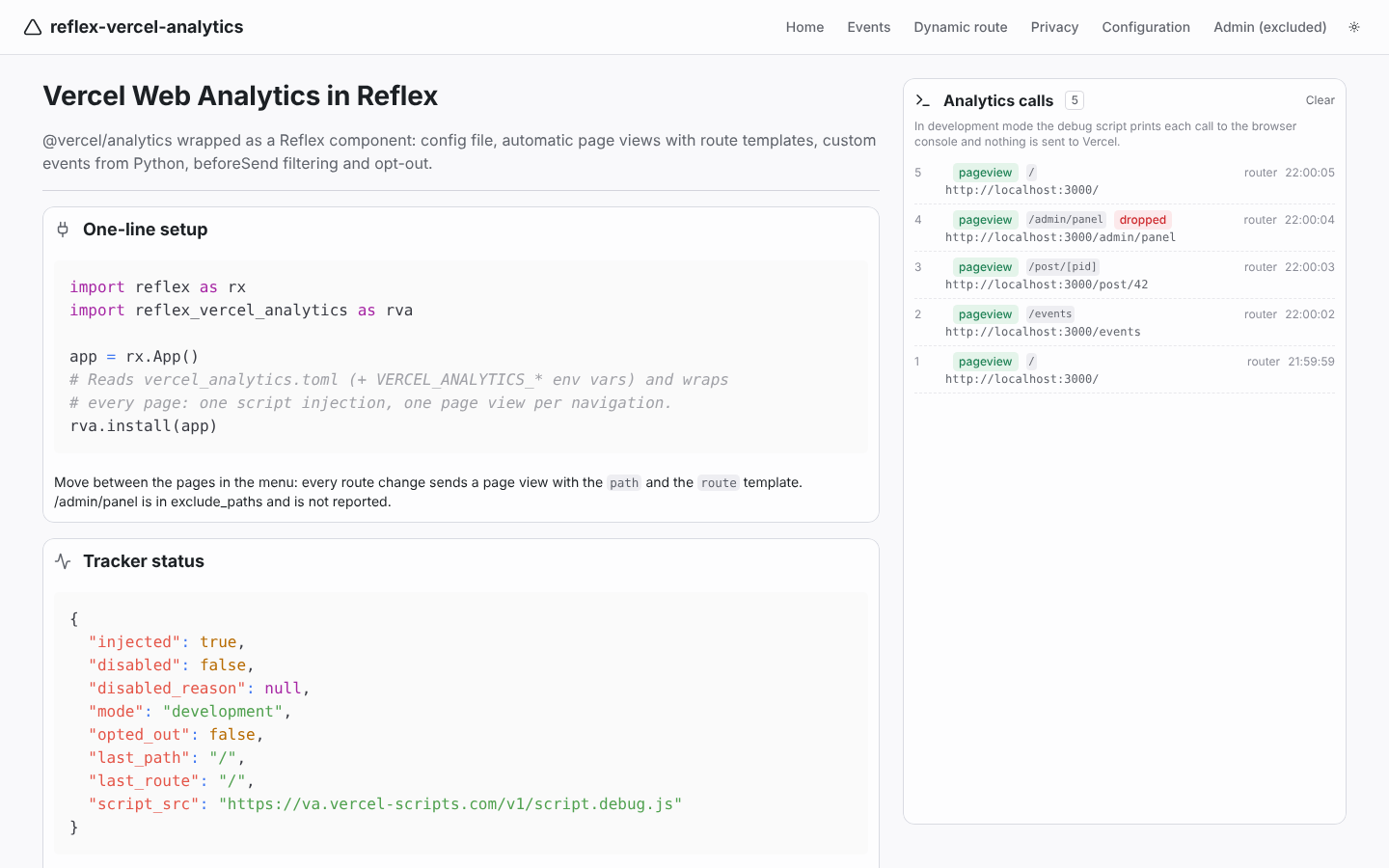
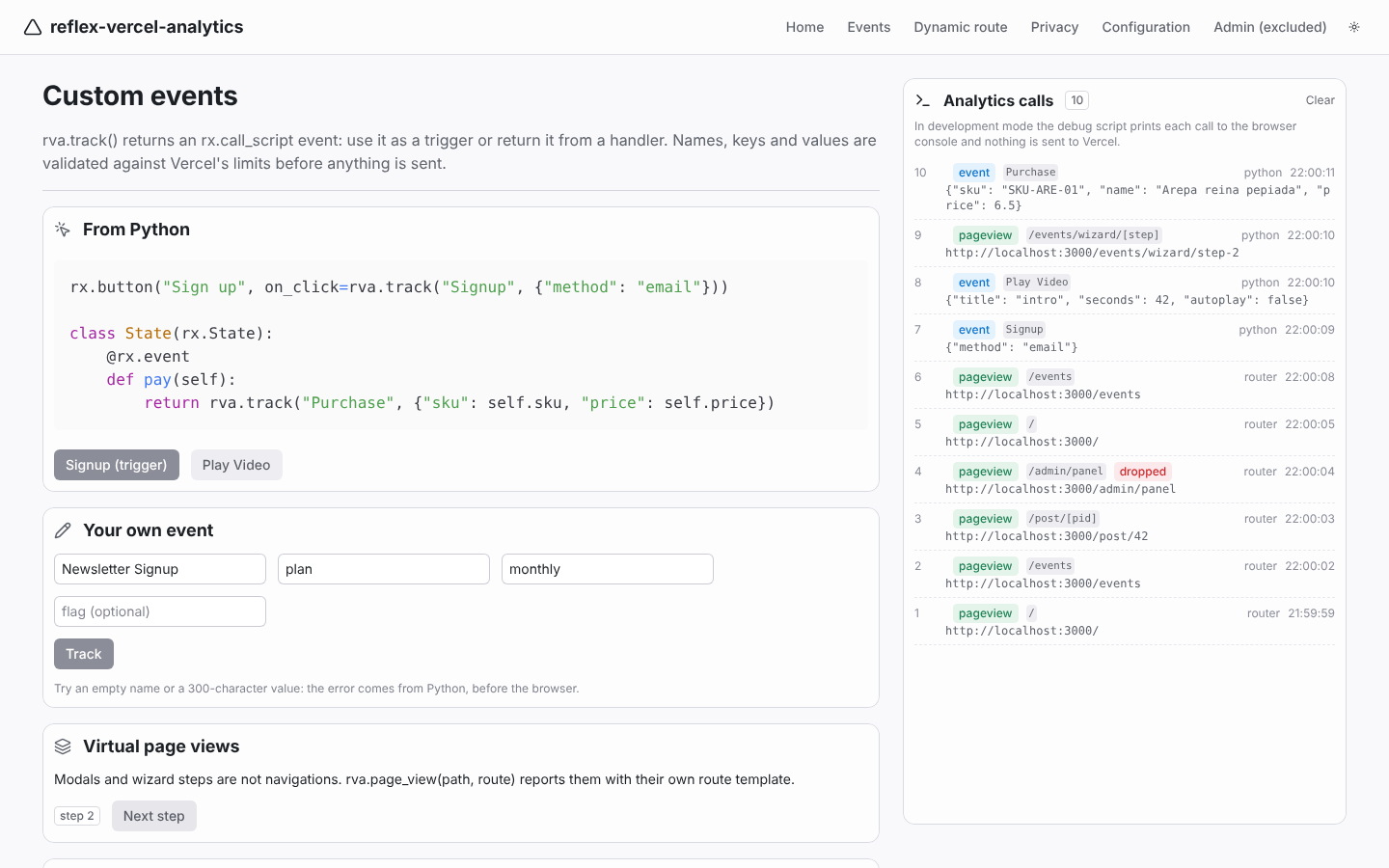
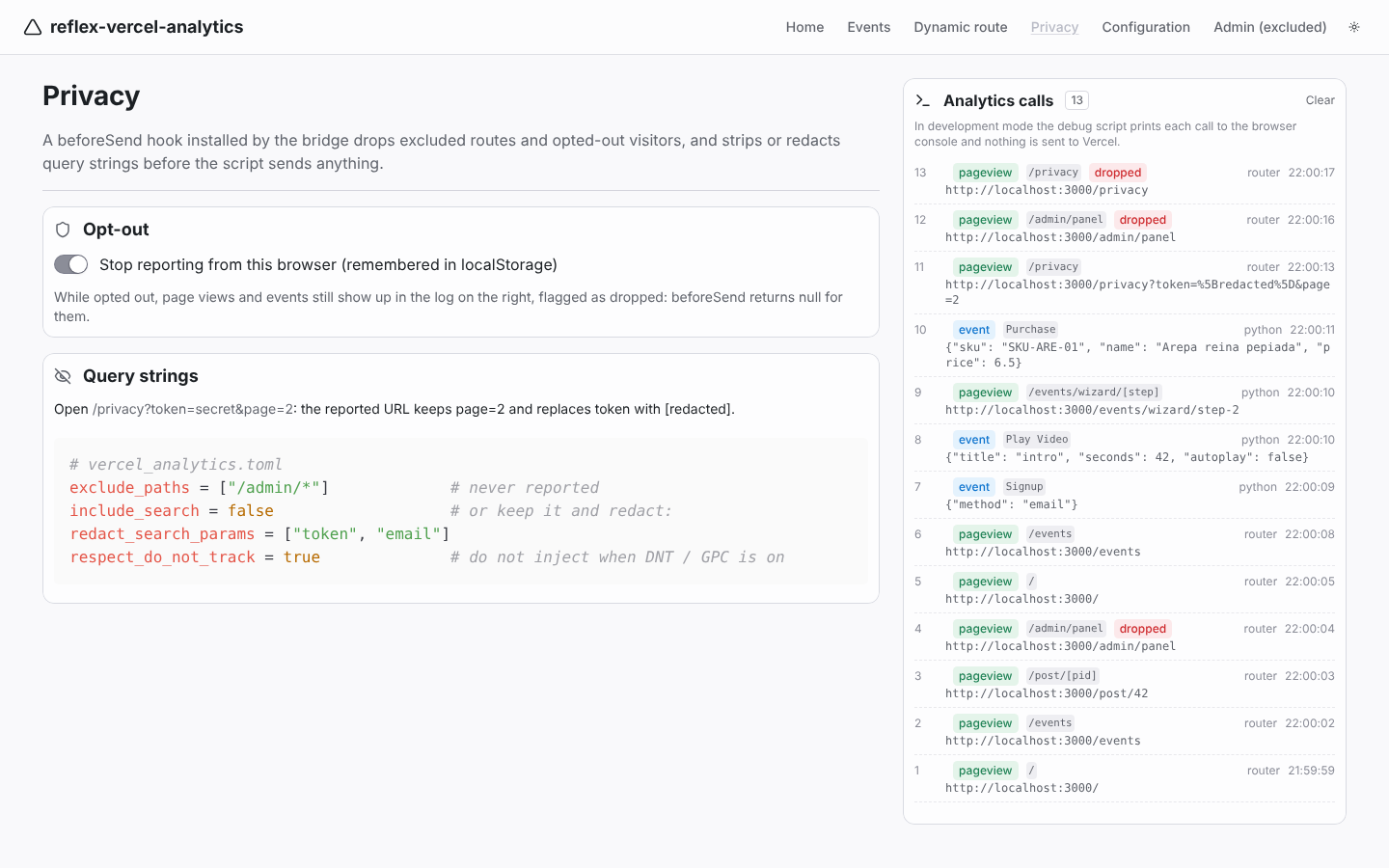
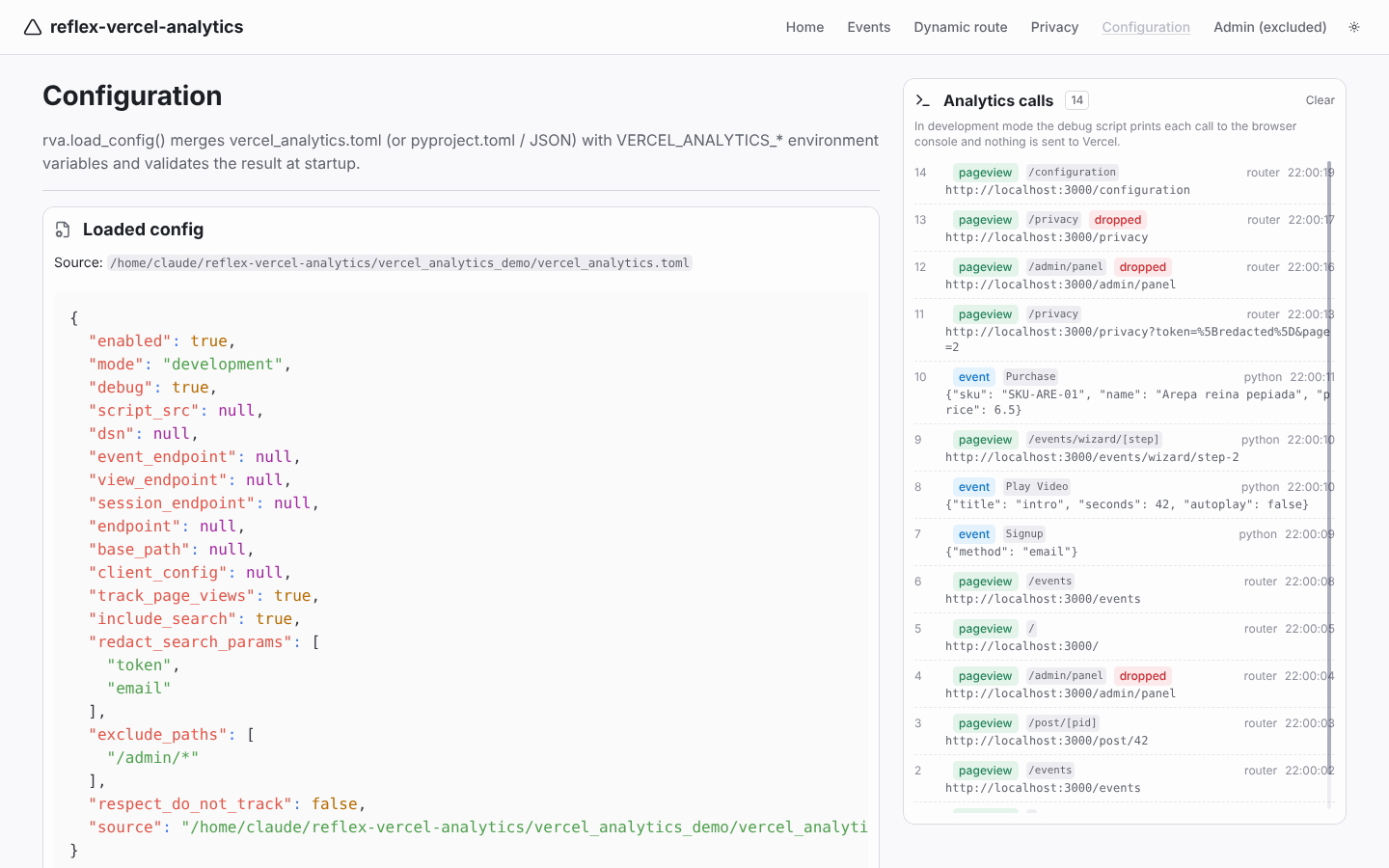
The demo app ships with mode = "development", so the panel on the right shows each page view and event the bridge issues while the debug script logs them to the browser console.
 |
 |
Tracker status and the page views recorded so far, /post/42 reported as /post/[pid] |
Custom events from a trigger, a handler, a form validated in Python, a virtual page view |
 |
 |
Opt-out, excluded routes shown as dropped, ?token=secret redacted |
The loaded vercel_analytics.toml, the props the bridge receives and the env overrides |
Installation
pip install reflex-vercel-analytics
# or
uv add reflex-vercel-analytics
The npm package (@vercel/analytics@2.0.1) is installed by Reflex automatically the first time the app compiles.
Quick start
-
Enable Web Analytics for the project in the Vercel dashboard (Project > Analytics > Enable).
-
Install the component on the app:
import reflex as rx
import reflex_vercel_analytics as rva

app = rx.App()
rva.install(app)
- Track events:
def index() -> rx.Component:
    return rx.vstack(
        rx.button("Sign up", on_click=rva.track("Signup", {"method": "email"})),
        rx.button("Watch intro", on_click=rva.track("Play Video", {"title": "intro"})),
    )
Page views are reported automatically from then on. Under reflex run the bridge loads Vercel's debug script, which prints every call to the browser console and sends nothing; under reflex run --env prod (or an exported frontend) it loads the production script.
That is all you need when the Reflex frontend is deployed on Vercel. For other hosts see Hosting outside Vercel.
The config file
A config file is optional: with no file and no environment variables the defaults above apply. rva.load_config() (which install and vercel_analytics call for you) looks for, in order:
- the file named by
$VERCEL_ANALYTICS_CONFIG(.tomlor.json); vercel_analytics.tomlin the directory wherereflex runstarts;pyproject.toml, if it has a[tool.reflex-vercel-analytics]table.
Then any VERCEL_ANALYTICS_<FIELD> environment variable overrides that field. Unknown keys and malformed values raise rva.ConfigError at startup, not silently in the browser.
enabled = true
mode = "auto"                    # "development" under `reflex run`, "production" with --env prod
debug = true                     # console logging in development mode
track_page_views = true          # one page view per navigation, with the route template
include_search = true            # keep "?query" in the reported URL
redact_search_params = ["token", "email"]   # ...but replace these values with [redacted]
exclude_paths = ["/admin/*", "/preview"]    # "/x" exact, "/x/*" prefix
respect_do_not_track = false     # skip injection when DNT / Global Privacy Control is on

# Script and endpoints: only needed outside Vercel or for proxies / multi-app domains.
script_src = ""                  # alternative URL for the analytics script
dsn = ""                         # project DSN when the script is not served by the Vercel deployment
event_endpoint = ""              # where custom events are reported
view_endpoint = ""               # where page views are reported
session_endpoint = ""
base_path = ""                   # "<base_path>/insights/script.js" and "<base_path>/insights"
client_config = ""               # JSON with defaults, the shape of VERCEL_OBSERVABILITY_CLIENT_CONFIG
Environment variables: VERCEL_ANALYTICS_MODE, _ENABLED, _DEBUG, _TRACK_PAGE_VIEWS, _INCLUDE_SEARCH, _RESPECT_DO_NOT_TRACK (booleans), _EXCLUDE_PATHS, _REDACT_SEARCH_PARAMS (comma separated), _SCRIPT_SRC, _DSN, _EVENT_ENDPOINT, _VIEW_ENDPOINT, _SESSION_ENDPOINT, _ENDPOINT, _BASE_PATH, _CLIENT_CONFIG.
VERCEL_ANALYTICS_MODE=production reflex run --env prod
VERCEL_ANALYTICS_EXCLUDE_PATHS="/admin/*,/preview" reflex run
You can also build the config in code: rva.install(app, rva.VercelAnalyticsConfig(mode="production")), pass a path (rva.install(app, "config/analytics.toml")), or skip files entirely with config=False and plain props.
mode
@vercel/analytics guesses the mode from NODE_ENV, which Vite does not expose the same way. This package resolves auto on the Python side instead: development under reflex run, production under reflex run --env prod and reflex export. Force one with mode = "production" or VERCEL_ANALYTICS_MODE.
Actions
All helpers return an rx.call_script event: use them as triggers, or return/yield them from an event handler. Calls made before the script has loaded are queued by the SDK (window.vaq) and sent once it is ready; when tracking is disabled they do nothing.
| Helper | What it does |
|---|---|
track(name, properties=None, *, flags=None, **properties) |
custom event (window.va("event", ...)) |
page_view(path=None, route=None) |
manual page view for virtual pages (modals, wizard steps) |
opt_out(), opt_in() |
stop / resume reporting from this browser (localStorage flag, enforced by beforeSend) |
get_status(callback) |
send the tracker status dict to a State handler |
validate_event_name(name), validate_properties(props) |
the checks track runs, to validate user input before sending |
From a handler, with values from the State:
class Shop(rx.State):
    cart: list[dict] = []

    @rx.event
    def pay(self):
        order_id = save_order(self.cart)
        total = sum(i["price"] * i["quantity"] for i in self.cart)
        return rva.track("Purchase", {"order": order_id, "total": total, "items": len(self.cart)})
Arguments must be plain Python values; read State vars inside a handler rather than passing State.var to a helper. Vercel accepts only strings, numbers, booleans and null as property values (no nested objects or lists), and caps event names, keys and values at 255 characters; track raises ValueError otherwise. Custom events require a Pro or Enterprise plan on Vercel.
Feature flags
rva.track("Checkout", {"total": 42}, flags=["new-checkout"])
rva.track("Checkout", flags={"new-checkout": True})
Page views and routes
Every client-side navigation sends one page view with the concrete path and the route template, which is what the Vercel dashboard groups by:
| Reflex route | Browser path | Reported route |
|---|---|---|
/post/[pid] |
/post/42 |
/post/[pid] |
/docs/[...slug] |
/docs/a/b |
/docs/[...slug] |
/events |
/events?tab=2 |
/events |
Virtual pages get their own template through rva.page_view("/wizard/step-2", route="/wizard/[step]").
With track_page_views = false the bridge sends nothing itself and the injected script tracks pushState on its own (no route templates, no on_page_view); exclude_paths and the query-string filters still apply through beforeSend.
Privacy
exclude_paths: navigations to these routes are not queued at all, and events fired while on them are dropped bybeforeSend.include_search = falseremoves the query string from every reported URL;redact_search_paramskeeps the query string but replaces the listed values with[redacted](Vercel's recommendation for sensitive data). The URL fragment (#...) is always removed, since OAuth implicit flows and magic links carry tokens there.rva.opt_out()sets a localStorage flag; from then onbeforeSendreturnsnullfor every event untilrva.opt_in().respect_do_not_track = trueskips the injection entirely when the browser sendsDNT: 1or Global Privacy Control.
Vercel Web Analytics does not use cookies and does not store IP addresses, which is why no consent-mode machinery is needed here; see Vercel's privacy policy for Web Analytics.
Component props
rva.vercel_analytics(...) / rva.install(app, ...) accept every config field as a prop (mode, debug, track_page_views, include_search, redact_search_params, exclude_paths, respect_do_not_track, script_src, dsn, event_endpoint, view_endpoint, session_endpoint, endpoint, base_path), plus:
| Prop | Description |
|---|---|
enabled |
master switch; False injects nothing and turns every action into a no-op |
config_string |
the JSON Vercel passes as VERCEL_OBSERVABILITY_CLIENT_CONFIG ({"analytics": {"scriptSrc": ..., "eventEndpoint": ..., "viewEndpoint": ...}}) |
framework |
SDK label, reflex by default |
on_ready |
{injected, disabled, disabled_reason, mode, opted_out, last_path, last_route, script_src} once after mounting |
on_page_view |
{path, route, url, dropped} after each automatic page view |
on_event |
{source, type, name, data, path, route, url, dropped, timestamp} for every page view and event the bridge issues (debugging only: one backend round trip per call) |
Mount it once. install puts it in app.extra_app_wraps, so it lives above the pages and is not re-created on navigation; you can also place rva.vercel_analytics() in a shared layout yourself.
Deploying on Vercel
A Reflex app has two halves: the frontend (reflex export --frontend-only, a static Vite build) and the backend (Python). Web Analytics only concerns the frontend:
- Deploy the exported frontend as a Vercel project and enable Web Analytics for it. Vercel serves
/_vercel/insights/script.jsand the collection endpoints on that domain, which is what the SDK uses by default. - Build with
mode = "production"(orreflex export, whereautoresolves to production). - If Vercel provides
VERCEL_OBSERVABILITY_CLIENT_CONFIG/VERCEL_OBSERVABILITY_BASEPATHat build time (Resilient Intake),load_config()forwards them to the component automatically, so the script and endpoints match what a Next.js project would use.
Hosting outside Vercel
The default script URL (/_vercel/insights/script.js) and endpoints only exist on a Vercel deployment. On another host (Reflex Cloud, your own server) point the SDK at a Vercel project explicitly:
mode = "production"
script_src = "https://<your-project>.vercel.app/_vercel/insights/script.js"
view_endpoint = "https://<your-project>.vercel.app/_vercel/insights/view"
event_endpoint = "https://<your-project>.vercel.app/_vercel/insights/event"
dsn = "<project DSN>"
Whether a given setup is accepted by Vercel is up to Vercel; script_src, the endpoints and dsn are the knobs @vercel/analytics exposes for it, and the development mode lets you verify the integration locally regardless of hosting.
How it works
vercel_analytics.toml ─┐
VERCEL_ANALYTICS_* env ┼─> load_config() -> VercelAnalyticsConfig -> props (mode resolved)
VERCEL_OBSERVABILITY_* ┘                                              │
rva.install(app) ── extra_app_wraps ──> <ReflexVercelAnalytics> (vercel_analytics.jsx)
                                          ├─ <Analytics beforeSend=... route={null}>  (@vercel/analytics/react)
                                          │    └─ injects the script once (disableAutoTrack)
                                          ├─ useLocation() + useParams() -> pageview({route, path}) per navigation
                                          ├─ beforeSend: exclude_paths, include_search, redact_search_params, opt-out
                                          └─ window.__reflexVA  <── rva.track(...), rva.page_view(...) (rx.call_script)
Demo app
git clone https://github.com/ecrespo/reflex-vercel-analytics
cd reflex-vercel-analytics
uv sync
uv pip install -e .
cd vercel_analytics_demo
uv run reflex run
Six pages (home, events, /post/[pid], privacy, configuration, and /admin/panel, which is excluded) with a live log of every page view and custom event. Open the browser console to see what the debug script receives. To send real data from a Vercel deployment:
VERCEL_ANALYTICS_MODE=production uv run reflex export --frontend-only
Development
uv sync
uv pip install -e .
uv run pre-commit install --install-hooks   # ruff, uv.lock and file checks on commit; pytest on push
uv run pytest
uv run ruff check .
uv run --python 3.13 python scripts/generate_pyi.py       # regenerate vercel_analytics.pyi after changing props
uv build                                    # sdist + wheel in dist/
Continuous integration
.github/workflows/ci.yml runs on every push and pull request:
| Job | Checks |
|---|---|
pre-commit |
uv.lock is current, file hygiene, ruff lint + format |
pytest |
the test suite on Python 3.10, 3.11, 3.12 and 3.13 |
build + smoke test |
uv build, twine check --strict, the wheel ships the JSX bridge and stubs, then the wheel and the sdist are each installed in a clean environment and exercised by scripts/smoke_test.py |
vercel_analytics.pyi is current |
regenerating the stub produces no diff |
demo app compiles |
reflex compile of the demo, with the bridge and @vercel/analytics@2.0.1 in the compiled frontend |
Run the same gate locally (nothing is uploaded) with scripts/prepublish.sh or scripts/prepublish.sh vX.Y.Z.
Releasing
.github/workflows/publish.yml publishes to PyPI through Trusted Publishing, so no API token is stored. The pre-publication is a pre-release on PyPI (X.Y.ZrcN): pip and uv skip pre-releases unless they are pinned, so users never get it by accident.
| Trigger | Result |
|---|---|
| Actions > Publish > Run workflow | dry run: CI, release checks, build, smoke tests; nothing is uploaded |
GitHub pre-release, tag vX.Y.ZrcN |
X.Y.ZrcN on PyPI, after approval, then verified |
GitHub release, tag vX.Y.Z |
X.Y.Z on PyPI, after approval, then verified |
Each upload waits for approval on the pypi environment and is then installed from PyPI in a clean environment and smoke-tested. scripts/check_release.py stops the run before building if the tag isn't v<version>, if the pre-release flag doesn't match the version (rcN/bN/aN must be pre-releases, final versions must not), if a final version has no ## X.Y.Z entry in CHANGELOG.md, or if the version already exists on PyPI.
One-time setup:
- On pypi.org/manage/account/publishing, Add a new pending publisher > GitHub: project
reflex-vercel-analytics, ownerecrespo, repositoryreflex-vercel-analytics, workflowpublish.yml, environmentpypi. - In GitHub > Settings > Environments, create
pypiand add yourself as a required reviewer.
Release procedure:
- Set the version (
uv version 0.2.0rc1), add theCHANGELOG.mdentry and runscripts/prepublish.sh v0.2.0rc1. - Push to
mainand create a GitHub release taggedv0.2.0rc1with Set as a pre-release ticked; approve thepypideployment. Try it in a real app withpip install reflex-vercel-analytics==0.2.0rc1. - When the candidate is good,
uv version 0.2.0, push, and create a normal release taggedv0.2.0.
Notes
- Never send personally identifiable information (emails, names, phone numbers) as event properties; it violates Vercel's terms.
- Ad blockers commonly block
va.vercel-scripts.comand/_vercel/insights; the SDK logs a one-line message to the console when the script fails to load and the queue simply never drains. endpointis deprecated in@vercel/analytics2.x in favour ofevent_endpoint/view_endpoint; it is still forwarded for older setups.
License
MIT
1 maintainer

Metadata
1 maintainer
Release files for reflex-vercel-analytics 0.1.0
For a detailed explanation of source distributions (sdists) and built distributions (wheels), please see the package formats documentation.
Source distribution (sdist)
| File | Size | Uploaded | Provenance | Actions |
|---|---|---|---|---|
| reflex_vercel_analytics-0.1.0.tar.gz | 32.9 kB | With provenance | Details for reflex_vercel_analytics-0.1.0.tar.gz |
Built distribution (wheel)
| File | Interpreter | ABI | Platform | Actions Reset |
|---|---|---|---|---|
| reflex_vercel_analytics-0.1.0-py3-none-any.whl | Python 3 | none | any | Details for reflex_vercel_analytics-0.1.0-py3-none-any.whl |
Total release size: 61.0 kB
Release files / reflex_vercel_analytics-0.1.0.tar.gz
| Download URL | reflex_vercel_analytics-0.1.0.tar.gz |
|---|---|
| Size | 32.9 kB |
| Tags | Source |
|
SHA-256 checksum How to use checksums |
83b831fcb891f8912d78d783af73f49c6ea3e8f7df41f8f5c36a70b30b444130
|
|
BLAKE2b-256 checksum How to use checksums |
035fd4b25f7763334b9c914b98a4e9d14074f26a93a3fd389ed4b9e56dd487f5
|
| Upload date | |
|
Uploaded using Trusted Publishing? What is trusted publishing? |
Yes |
| Uploaded via |
twine/7.0.0 CPython/3.13.16
|
Provenance
Provenance describes where a file came from. On PyPI, provenance is shared via attestations, which provide a verifiable record of the build or publishing details. View details, limitations and caveats.


PyPI Publish Attestation
PyPI verified that this artifact, at this checksum, originated from the publisher listed below.
Signed by GitHub Actions, verified by PyPI on Nov 2, 2026.
Transparency logRelease files / reflex_vercel_analytics-0.1.0-py3-none-any.whl
| Download URL | reflex_vercel_analytics-0.1.0-py3-none-any.whl |
|---|---|
| Size | 28.1 kB |
| Tags | Python 3 |
|
SHA-256 checksum How to use checksums |
05a77ace9a2792b0434df40b8d78c65a77d6106005af5a498365a67db27efa0a
|
|
BLAKE2b-256 checksum How to use checksums |
9a1d9b03504352a8f930d1e7106b2ec9d1637e25e5dafabcf293c79935abd365
|
| Upload date | |
|
Uploaded using Trusted Publishing? What is trusted publishing? |
Yes |
| Uploaded via |
twine/7.0.0 CPython/3.13.16
|
Provenance
Provenance describes where a file came from. On PyPI, provenance is shared via attestations, which provide a verifiable record of the build or publishing details. View details, limitations and caveats.
PyPI Publish Attestation
PyPI verified that this artifact, at this checksum, originated from the publisher listed below.
Signed by GitHub Actions, verified by PyPI on Nov 2, 2026.
Transparency logSecurity for reflex-vercel-analytics 0.1.0
Provenance
Provenance describes where a file came from. On PyPI, provenance is shared via attestations, which provide a verifiable record of the build or publishing details. View details, limitations and caveats.
Full provenance
All 2 files in this release have been uploaded with provenance metadata.
Attestation for reflex_vercel_analytics-0.1.0.tar.gz
PyPI Publish Attestation
PyPI verified that this artifact, at this checksum, originated from the publisher listed below.
Signed by GitHub Actions, verified by PyPI on Nov 2, 2026.
Transparency logA note on package security
PyPI is a repository for distributing packages, not a service for auditing them. While third-party security researchers and our staff do their best to detect and remove malicious packages, PyPI cannot guarantee the quality, security or suitability of any given package.
To learn more about protecting yourself from malicious actors, visit our package security documentation.













