
Refrain
Discord Rich Presence for Apple Music on Linux.






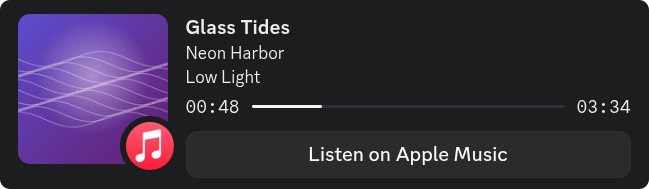
Refrain shows what you're listening to on Apple Music as your Discord status
— whether the audio is playing in a browser tab on music.apple.com or
streaming from your phone over Bluetooth.
What it does
- Reads playback metadata from MPRIS — the standard way a Linux program says what it is playing — for Apple Music in any major browser, and over Bluetooth from any device that reports its track (AVRCP). Firefox and its relatives report the page they play; Chromium-based browsers need KDE's Plasma Browser Integration, which works outside KDE too — see troubleshooting.
- Forwards track + cover art to Discord via the local IPC socket.
- Optionally scrobbles to Last.fm alongside Discord (opt-in, with a crash-safe offline queue).
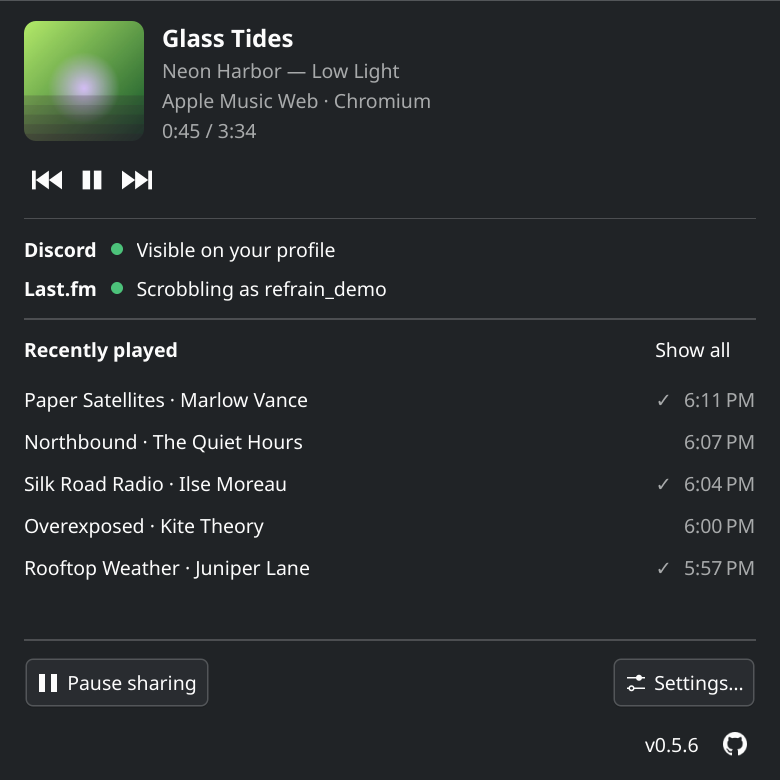
- Lives in your system tray with Play/Pause/Next/Previous controls.
- Keeps a recently played list — cover, time, source — of the last 30 songs by default, on your machine only.
- Provides a settings window (PySide6) for everything users typically want to tweak — privacy mode, sources, autostart, Bluetooth device picker.
Requirements
- Linux with D-Bus
- Python ≥ 3.11
- Discord desktop client running (Refrain talks to its IPC socket)
- For Bluetooth: BlueZ with AVRCP enabled
Install
| Channel | Install |
|---|---|
| PyPI (any distro with Python ≥ 3.11) | pipx install --system-site-packages refrain — see below |
| AUR (Arch / CachyOS / Manjaro / EndeavourOS) | yay -S refrain (stable) or yay -S refrain-git (latest main) |
| AppImage (portable single-file, glibc 2.35 or newer) | Download from the latest release, chmod +x, run it |
| From source | See below |
The AppImage needs FUSE 2, which current distros no longer install by
default: libfuse2t64 on Debian and Ubuntu, fuse-libs on Fedora,
libfuse2 on openSUSE, fuse2 on Arch. Without it, start the AppImage
with --appimage-extract-and-run.
A Flatpak manifest exists under packaging/flatpak/ for users who want to
build it themselves; a Flathub submission is on the roadmap but not
currently active. Build files for the live channels live under
packaging/.
See packaging/README.md for build instructions.
Which versions can still be downloaded, and why the others were taken
down: docs/releases.md.
From PyPI
Current distros no longer let pip install into the system Python, so
install with pipx. dbus-python and PyGObject come
from your distro; --system-site-packages lets Refrain use them instead of
compiling its own. On Debian and Ubuntu:
sudo apt update && sudo apt install pipx python3-dbus python3-gi libxcb-cursor0
pipx install --system-site-packages refrain
pipx ensurepath   # once, if ~/.local/bin isn't on your PATH yet
refrain --install-desktop
Commands for Fedora and openSUSE, the source build, where the files land
and how to remove them again: docs/install.md.
Tested on
Ten distributions are tested before every release, from Arch to Debian 13,
on Plasma, GNOME, XFCE, Cinnamon, LXQt, Budgie, MATE and the tiling window
managers. docs/install.md names them, and
docs/test-matrix.md has the per-row checks and the
distros that are out of scope.
First-time setup
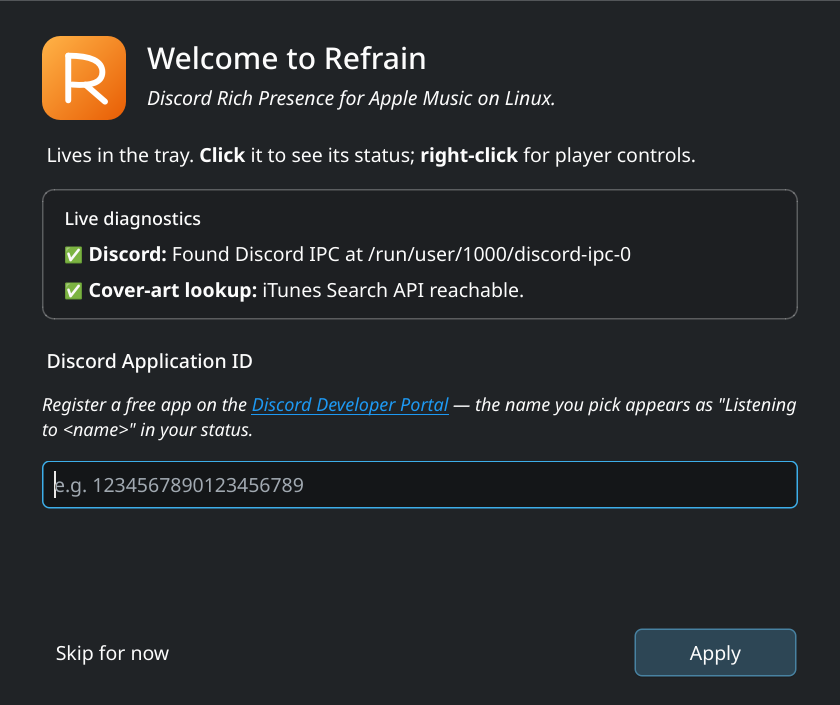
Refrain needs a Discord Application ID to push status updates. Each user registers their own (free, takes 30 seconds):
- Open https://discord.com/developers/applications and click New Application.
- Give it a name you're entitled to use — that name is what shows up under "Listening to ..." in your Discord status. You can also upload a square image as the application icon; with Look up the application's name on Discord switched on, Refrain puts it in the corner of the album cover, and uses it in place of a cover it hasn't got.
- Copy the Application ID from the General Information page.
- Launch Refrain → Settings → General → Application ID → paste, OK.
- In Discord: Settings → Activity privacy → Share your detected activities with others. A fresh Discord install has this switch off, and with it off nobody sees your status — Refrain looks connected either way. The Discord desktop app is required; Discord in a browser can't receive a status.
The first time you launch Refrain without a configured ID, the welcome wizard pops up with the setup steps + a live diagnostics panel that probes your D-Bus session and Discord IPC socket so you know up front whether your environment can host the RPC at all.
After the wizard, the Status window says You're all set. Play a song and it shows up in Discord within a few seconds.
Last.fm scrobbling
Refrain can scrobble to Last.fm alongside the
Discord status — a second, independent channel, never a replacement.
It's opt-in and off by default. Register your own free
API account, then fill in
Settings → Last.fm. The shared secret and session token are stored in
your OS keyring, never in config.toml.
Full walkthrough, the scrobble rules and troubleshooting:
docs/lastfm.md.
Privacy
Refrain is local-first: no Refrain server, no account, no telemetry, and the author receives nothing. Two lookups are on by default and can be switched off — cover art at Apple and the update check at GitHub. Everything else only runs once you set it up: Discord needs an Application ID, Last.fm is opt-in. Data always goes directly to that provider, never through anything of ours.
Privacy → Off is the global kill switch (no Discord status, no
scrobbling) while keeping the tray + controls running. The Recently
played list never leaves your machine.
Every data flow, what is kept and for how long, and how to erase it —
written to GDPR transparency expectations — is in
PRIVACY.md.
Documentation
Using Refrain
- Installing — per-distro commands, source build, uninstall, file locations
- Interface — tray, Status window, Recently played, notifications
- Settings — every tab, field by field
- Configuration file — what
config.tomlholds - Updates — update check and AppImage self-update
- Bluetooth quick-start — pair + AVRCP setup walkthrough
- Last.fm scrobbling — API account + connect walkthrough
When something is wrong
- FAQ
- Known limitations and troubleshooting — what doesn't work, and what to check when something fails
- Developer mode — local timing and usage metrics, and the live log. Never sent
About the project
- Test matrix — the distributions checked before each release, and the checklist used
- Architecture overview — threads, D-Bus surface, file paths
- Privacy & data protection — every data flow, retention, erasure
- Security policy
- Changelog · Releases — every version, and why some were removed
- Roadmap
- Contributing — dev setup, testing, code style
- Packaging guide — AUR, Flatpak, AppImage build steps
Contributing
See CONTRIBUTING.md for dev setup, testing, and the
source/UI architecture. PRs welcome — especially for distribution packaging
(Flatpak, AUR, AppImage) and for additional Bluetooth device shapes.
Contact
- General questions, feedback, feature ideas → contact@rockykln.com
- Security reports → report@rockykln.com (also: GitHub private advisory)
- Bugs → please use the issue tracker
License
Refrain License (Use-Only) — see LICENSE.
Refrain is source-available but not open source. In short:
- Anyone may use, copy, and redistribute the unmodified Software.
- Anyone may read, study, and reference the source code.
- Modifications and derivative works may not be redistributed. Forks on GitHub are fine only for preparing a pull request.
- The "Refrain" name and logo may not be used to imply endorsement of or affiliation with modified versions.
Third-party dependencies (PySide6, pypresence, dbus-python) retain
their original licenses (LGPL / MIT).
Legal
Refrain is an independent project. It is not affiliated with, sponsored by, or endorsed by Apple, Discord, Last.fm or KDE, and "Refrain" is not a registered trademark. All product names and trademarks belong to their respective owners and are used only to describe what Refrain interoperates with.
Full notice — trademarks, licence, third-party components, and what data
leaves your machine — in LEGAL.md. The same text is reachable
inside the app under Settings → Legal.
Stats
| Stat | Value |
|---|---|
| Lines of code | 14,539 |
| Lines in the repository | 102,005 |
| Words in the repository | 368,361 |
| Words of documentation | 55,849 |
| Automated tests | 2,603 |
| Test coverage | 100 % |
| Days since the first release | 170 |
| Versions released | 27 |
| Commits | 337 |
| Languages | 16 |
| Runtime dependencies | 3 |
| Browsers tested | 6 (Chrome, Chromium, Brave, Vivaldi, Firefox, Zen) |
| Ways to install | 3 (PyPI, AUR, AppImage) |
As of v0.5.6.
1 maintainer

Metadata
1 maintainer
Release files for refrain 0.5.6
For a detailed explanation of source distributions (sdists) and built distributions (wheels), please see the package formats documentation.
Source distribution (sdist)
| File | Size | Uploaded | Provenance | |
|---|---|---|---|---|
| refrain-0.5.6.tar.gz | 1.3 MB | With provenance | Details |
Built distribution (wheel)
| File | Interpreter | ABI | Platform | Reset |
|---|---|---|---|---|
| refrain-0.5.6-py3-none-any.whl | Python 3 | none | any | Details |
Total release size: 1.9 MB
Release files / refrain-0.5.6.tar.gz
| Download URL | refrain-0.5.6.tar.gz |
|---|---|
| Size | 1.3 MB |
| Tags | Source |
|
SHA-256 checksum How to use checksums |
cb93b022435075a76633a217b29bc4fecf3698b0df51a236e0304abaf91f2eb8
|
|
BLAKE2b-256 checksum How to use checksums |
7b4ad2e5b0a9d954cc6b7a77884574692300f2c2268976d4ba90b0d566268279
|
| Upload date | |
|
Uploaded using Trusted Publishing? What is trusted publishing? |
Yes |
| Uploaded via |
twine/7.0.0 CPython/3.13.14
|
Provenance
Provenance describes where a file came from. On PyPI, provenance is shared via attestations, which provide a verifiable record of the build or publishing details. View details, limitations and caveats.


PyPI Publish Attestation
PyPI verified that this artifact, at this checksum, originated from the publisher listed below.
Signed by GitHub Actions, verified by PyPI on Oct 22, 2026.
Transparency logRelease files / refrain-0.5.6-py3-none-any.whl
| Download URL | refrain-0.5.6-py3-none-any.whl |
|---|---|
| Size | 620.6 kB |
| Tags | Python 3 |
|
SHA-256 checksum How to use checksums |
b5a5d0266d968977b37b298d213205f131032100cb8a351430feb01dd70b0553
|
|
BLAKE2b-256 checksum How to use checksums |
54c9c8be3e5338757c35e7f670426f6dc7c8f65c8195a6d8e62dfaa63fabdf7c
|
| Upload date | |
|
Uploaded using Trusted Publishing? What is trusted publishing? |
Yes |
| Uploaded via |
twine/7.0.0 CPython/3.13.14
|
Provenance
Provenance describes where a file came from. On PyPI, provenance is shared via attestations, which provide a verifiable record of the build or publishing details. View details, limitations and caveats.
PyPI Publish Attestation
PyPI verified that this artifact, at this checksum, originated from the publisher listed below.
Signed by GitHub Actions, verified by PyPI on Oct 22, 2026.
Transparency logSecurity for refrain 0.5.6
Provenance
Provenance describes where a file came from. On PyPI, provenance is shared via attestations, which provide a verifiable record of the build or publishing details. View details, limitations and caveats.
Full provenance
All 2 files in this release have been uploaded with provenance metadata.
Attestation for refrain-0.5.6.tar.gz
PyPI Publish Attestation
PyPI verified that this artifact, at this checksum, originated from the publisher listed below.
Signed by GitHub Actions, verified by PyPI on Oct 22, 2026.
Transparency logA note on package security
PyPI is a repository for distributing packages, not a service for auditing them. While third-party security researchers and our staff do their best to detect and remove malicious packages, PyPI cannot guarantee the quality, security or suitability of any given package.














