
Refrapy is a Python software package with a graphical interface for seismic refraction data analysis.


Project description

Refrapy is a graphical application for seismic refraction data analysis. It is written in Python and uses open source libraries from numerical and geophysics python communities to provide a visual interface for geophycists analyse seismic refraction data.
Installation
Before proceeding it should be advised that currently Refrapy only works with python versions from 3.9 to 3.12 and that one that one of this versions should be installed in your system. Besides that, It is also important to mention that Refrapy depends on tkinter (a wrapper around Tcl/Tk GUI framework), and although tkinter comes with python, some distributions / operational systems consider this package is an optional python package that must be installed independently. Feel free to open an issue if you encounter any issue while installing this package.
Stand-alone application installation
Below we provide two installation methods for using Refrapy as a stand-alone application.
Installing Refrapy with pipx
pipx install refrapy
pipx is a community open source tool for installing stand-alone python applications from Python Package Index (PYPI). It installs the application in an isolated environment and makes it available in the user space without affecting other environments. For pipx installation instructions and usage see its official documentation.
Installing Refrapy with uv
uv tool install --python-preference only-system refrapy
uv is an open source python packaging tool developed by Astral. For instalation instructions follow the instructions in the official uv documentation.
Virtual environment installation (not recommended)
Since Refrapy is a stand-alone application, installing it inside a virtual environment is not recommended and should be used only in case the previous procedures do not work, or to test the application and it's execution. Another, very specific, use case should be when using Refrapy only as a support tool for a data analysis within a python environment, but even in this case it should be possible to install it as a stand-alone application and call it inside the environment as any regular program in your computer.
Below we indicate a two methods for installing Refrapy inside a virtual environment, using pip+venv and uv. In all this cases you must (inside a terminal) create a new folder for the project and move inside this directory.
Installing Refrapy with pip/env
For installing Refrapy inside a virtual environment you must first create it in a folder, by running in your terminal:
python -m venv env_name
where env_name is the name of the folder containing your environment.
Different procedures are used to activate your environment on Linux and Mac or on Windows. To activate your environment on Linux or Mac, run:
source env_name/bin/activate
on Windows Powershell run:
env_name\Scripts\Activate.ps1
and if you receive an error message it may be necessary to run the following command on your terminal before activating the virtual environment you just created:
Set-ExecutionPolicy -ExecutionPolicy RemoteSigned -Scope CurrentUser
A list of activation scripts can be found on python's official documentation.
After this you just need to install the package using:
pip install refrapy
and do not forget to run deactivate when you are done with your work in this environment.
Using Refrapy
There are two applications bundled with Refrapy, Refrapick and Refrainv.
Refrapick
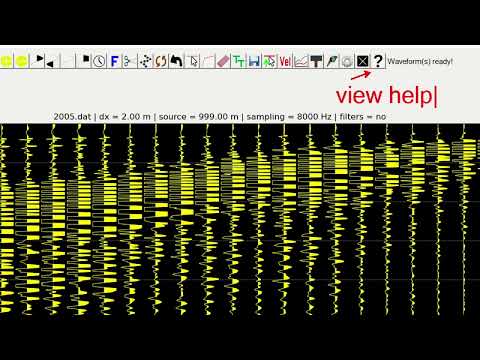
The Refrapick program is used for basic waveform processing and for first breaks picking. The software is aimed to work mainly around SEG2 files, but all waveform formats readable by ObsPy can be used. However, there are a few conditions that need to be considered when reading multichannel waveform data. Waveform files with missing data traces cannot be used as input, which can occur with files that have already passed through some other processing software, where one or more traces were removed manually, probably due to being bad noisy data. Thus, it is recommended the use of original files (i.e., without any editing). Also, receivers and source position may not be well defined in the file header or may fail to be properly read. In such cases, instead of obtaining this information automatically (conventional attempt), dialog boxes appear so that the user can enter these required values.
For calling Refrapick, on your terminal, call:
refrapy pick
For usage, follow the instructions on the video below:
Refrainv
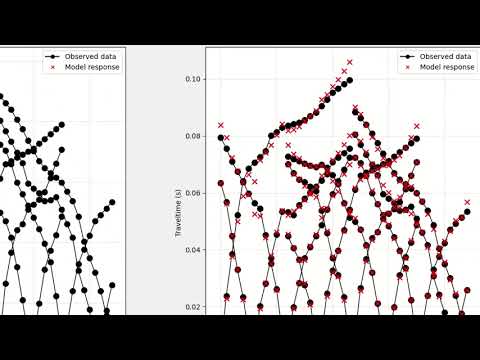
The Refrainv program is used to run a time-terms and a traveltimes tomography inversion. The latter is powered by pyGIMLi (https://www.pygimli.org/). The program presents an individual frame for each inversion method, where each frame has three main panels: the traveltime plotting panel (upper left), used to view and interact with the observed data; the fit and editing panel (upper right), used to edit traveltimes, by clicking on data points and dragging them up or down, and to view the graphical fit between the observed and calculated traveltimes; and the velocity model plotting panel (bottom).
For calling Refrapick, on your terminal, call:
refrapy inv
For usage, follow the instructions on the video below:
Reporting errors and asking questions
We encourage users to open an issue in this repository when encountering an error or when in doubt about a functionality or any other subject regarding the use of the software.
Acknowledgement and citation
Victor José Cavalcanti Bezerra Guedes
Refrapy was originally developed Ms. Victor C. B. Guedes under the supervision of Prof. Susanne Maciel from University of Brasilia. This project is being hosted on AlgoSismos and has been packaged by @aureliobarbosa.
If you use Refrapy in your work please cite the following paper:
Guedes, V.J.C.B., Maciel, S.T.R., Rocha, M.P., 2022. Refrapy: A Python program for seismic refraction data analysis, Computers and Geosciences. https://doi.org/10.1016/j.cageo.2021.105020.
Release history Release notifications | RSS feed


Download files
Download the file for your platform. If you're not sure which to choose, learn more about installing packages.
Source Distribution
Built Distribution
Filter files by name, interpreter, ABI, and platform.
If you're not sure about the file name format, learn more about wheel file names.
Copy a direct link to the current filters
File details
Details for the file refrapy-0.2.3.tar.gz.
File metadata
- Download URL: refrapy-0.2.3.tar.gz
- Upload date:
- Size: 10.7 MB
- Tags: Source
- Uploaded using Trusted Publishing? No
- Uploaded via: uv/0.5.24
File hashes
| Algorithm | Hash digest | |
|---|---|---|
| SHA256 |
0c900a7483b30feb6022d8badd0818f04c1f9acd0aaaacc3c7a57107fe4bfb3f
|
|
| MD5 |
b493b10dd5d88fd5a2086234bb132ce7
|
|
| BLAKE2b-256 |
c2f3adea3d55b7b4905c6ae82819c229c6746fa190b9203a2889285365454643
|
File details
Details for the file refrapy-0.2.3-py3-none-any.whl.
File metadata
- Download URL: refrapy-0.2.3-py3-none-any.whl
- Upload date:
- Size: 10.6 MB
- Tags: Python 3
- Uploaded using Trusted Publishing? No
- Uploaded via: uv/0.5.24
File hashes
| Algorithm | Hash digest | |
|---|---|---|
| SHA256 |
2a3988d4d4b3978388facb3f08b1849a7084471329c1633c16edaa646a34b1f2
|
|
| MD5 |
9a494cf743e1cb3b4ba876249a215486
|
|
| BLAKE2b-256 |
b6b4b6771d7a02df358992fc59cfa7da5ff133c26850f48187b5e7fe69828463
|






