


Reggie is a regression testing framework for scientific simulation codes. It helps automate test execution, output comparison, and result validation for code development and continuous integration workflows. Examples can be found in PICLas and FLEXI.
Table of Contents
- Reggie
- Analyze routines: analyze.ini
- Command line arguments for program execution: command_line.ini
- Externals: externals.ini
- Compile flag combinations for c-make in: builds.ini
- Runs
Reggie
Show the available options of the regression checker
reggie --help
Installation
The latest release is published to PyPI and can be installed with
pip install reggie-framework
For access to newer features and to keep an editable package for development the installation is done with
git clone https://github.com/reggie-framework/reggie.git
cd reggie
pip install -e .
If you want to help develop Reggie, please consider that Reggie uses pre-commit for maintaining code quality. Pre-commit can be installed with
pre-commit install
and will execute the pre-commit hooks automatically.
Ruff linter and formatter
Reggie uses Ruff for code linting and formatting of all .py files to maintain consistent code quality and style. Ruff is a fast Python linter and formatter that combines multiple individual tools like flake8, black, isort, etc.
Pre-commit Integration
Ruff is integrated with pre-commit to automatically check and format code before each commit. The configuration is defined in .pre-commit-config.yaml and includes:
- Ruff linter hook
- Ruff formatter hook
All hooks can be tested with pre-commit before commiting your changes with
pre-commit run
Note that all pre-commit hooks only run on files that have been staged. The pre-commit hooks can be ignored with the additional flag
--no-verify
When creating a commit:
- The linter will display errors immediately
- The formatter will:
- Fail if it finds issues
- Apply automatic fixes
- Unstage the modified files
After formatter changes:
- Review the applied changes
- Re-stage the files
- Try committing again (formatter should pass if no new changes were made)
Some linter errors can be fixed automatically with
ruff check --fix
while others require manual corrections.
Note that the flag --unsafe-fixes can change the functionality of the code, while --fix should keep it.
Ruff configuration
Ruff's configuration is managed through the pyproject.toml file in the project root and specifies linting rules, checks, excludes, etc.
To suppress a violation inline, Ruff uses a noqa system similar to Flake8. To ignore an individual violation, add # noqa: {code} to the end of the line, like so:
# Ignore F841.
x = 1  # noqa: F841
# Ignore E741 and F841.
i = 1  # noqa: E741, F841
# Ignore _all_ violations.
x = 1  # noqa
Similar to the linter it is also possible to ignore code blocks for the formatter with
# fmt: off
_code_
# fmt: on
or a python specific block with
if condition: # fmt: skip
Code Coverage
"In software engineering, code coverage, also called test coverage, is a percentage measure of the degree to which the source code of a program is executed when a particular test suite is run." - Wikipedia
gcovr: Coverage of the .f90 code
Reggie supports code coverage analysis using gcovr. To enable code coverage:
-
Compile the executable with the
--coverageflag in your build configuration. For examplemkdir build_poisson_code_coverage && cd build_poisson_code_coverage cmake .. -DPICLAS_EQNSYSNAME=poisson -DPICLAS_TIMEDISCMETHOD=Leapfrog -DLIBS_USE_PETSC=ON -DPICLAS_CODE_COVERAGE=ON make -jThis generates additional
.gcnoand.gcdafiles per object file, which track all compiled lines and the number of calls per line.CAUTION: The
.gcnoand.gcdafiles are not deleted bymake clean! These files must be manually deleted before running new coverage tests, as they may be corrupted or retain results from previous runs. -
Run reggie with the
-o(or--coverage) option to generate the coverage report, for examplereggie -e bin/piclas ../regressioncheck/CHE_poisson_p_adaption/Laplace_h_N1_pAdaptionType0/ -o 1
The -o parameter accepts an optional numeric argument to specify the output format: the default generates a .json file,
1 enables additional .html output, and 2 produces .xml output.
All output files are stored in the Coverage directory. Separate reports are generated per build and then combined into a single report across all builds.
This combined report can be inspected as an HTML file at Coverage/combined_report/html/combined_report.html.
Other formats such as .json or .xml are used for combining reports or visualisation on GitLab.
Examples:
reggie -b /path/to/basedirectory /path/to/regressiontests -o
reggie /path/to/single/regressiontest -e /path/to/executable -o 1
reggie /path/to/single/regressiontest -e /path/to/executable -o 2
Python coverage.py package: Coverage of the reggie code itself
It is also possible to generate a report of the reggie tool itself. For this, each reggie call is wrapped with the Python coverage tool. Make sure that the package is installed.
python3 -m pip install coverage
and then run the coverage tool
mkdir -p Coverage/reggie
COVERAGE_REGGIE_DIR="${PWD}/Coverage/reggie"
reggiecov() { coverage run -a --data-file=${COVERAGE_REGGIE_DIR}/.coverage --source=reggie -m reggie.reggie "$@" }
reggiecov -e bin/piclas ../regressioncheck/CHE_poisson_p_adaption/Laplace_h_N1_pAdaptionType0
This generates a coverage report of all used lines in the reggie module. To convert the report to html, run
cd Coverage/reggie/ && coverage html && cd ../../
which should signal a successful html creation with Wrote HTML report to htmlcov/index.html.
The report can be inspected using the Coverage/reggie/index.html file.
firefox ./Coverage/reggie/htmlcov/index.html
Continuous Integration (CI)
The GitHub Actions workflow .github/workflows/ci.yml runs on every push to main and on every pull request.
It can also be started manually from the Actions tab (workflow_dispatch), where the piclas testcases can be selected via the inputs testcase_dir_build, testcase_dir and testcase.
The jobs depend on each other as follows:
Setup and caching
- Setup venv creates a virtual environment with an editable install of reggie plus additional tools (currently linter and pyhope). The
.venvdirectory is cached with a key derived frompyproject.toml, so it is only rebuilt when the dependencies change. All downstream jobs restore this cache instead of reinstalling. - Clone piclas performs a shallow clone of the piclas repository. The cache key is the upstream HEAD commit, so the clone (and every build based on it) is only redone when piclas is updated.
- Build piclas compiles the piclas executable for the selected testcase. The build directory is cached with the piclas commit and the testcase in the key (since the build could change for different testcases). Download and build are separate jobs so that this build runs in parallel to the regressioncheck that builds piclas within reggie.
Linting and compatibility
- Lint / ruff, ty, vulture run the linter, the type checker and the dead-code checker on the
reggiepackage (configuration inpyproject.toml). - Compatibility installs reggie on all supported Python versions (3.10 - 3.14) and executes
reggie --helpto catch version-specific breakage.
Regressionchecks
The regressioncheck jobs execute reggie on the checks in the regressioncheck directory:
- Regressioncheck runs one job per
CHE_Analyze_*check in--dry-runmode, i.e. without executing an executable: the analyze routines work on the reference output files stored in the repository. - Regressioncheck (hdf5 tools) does the same for checks that additionally needs the
hdf5-toolspackage and is therefore separate. - Regressioncheck (with piclas pre-build) runs a real piclas testcase with the pre-compiled executable from build_piclas.
- Regressioncheck (with piclas builds) lets reggie compile piclas itself, including the gcovr code coverage option (
-o 12), and then runs the testcase.
Coverage
The coverage of the reggie tool itself is collected while the regressionchecks run:
- Every regressioncheck job wraps the reggie call with the Python coverage tool:
coverage run --parallel-mode -m reggie.reggie .... The configuration (measured source and excluded files) is defined in the[tool.coverage.run]section ofpyproject.toml. - Each job uploads its
.coverage.*data file as an artifact (coverage-data-*). - The Coverage job downloads all data files, merges them with
coverage combineand prints the report to the job log and to the workflow run's summary page ($GITHUB_STEP_SUMMARY). It also generates an XML and a browsable HTML report, which are uploaded as thereggie-coverage-reportartifact. - The Coverage bot job posts the result of
coverage.xmlas a comment on pull requests targetingmain(using orgoro/coverage), including the coverage of the lines changed in the pull request. The thresholds for overall and new code are configured in the workflow and fail the job when the coverage drops below them.
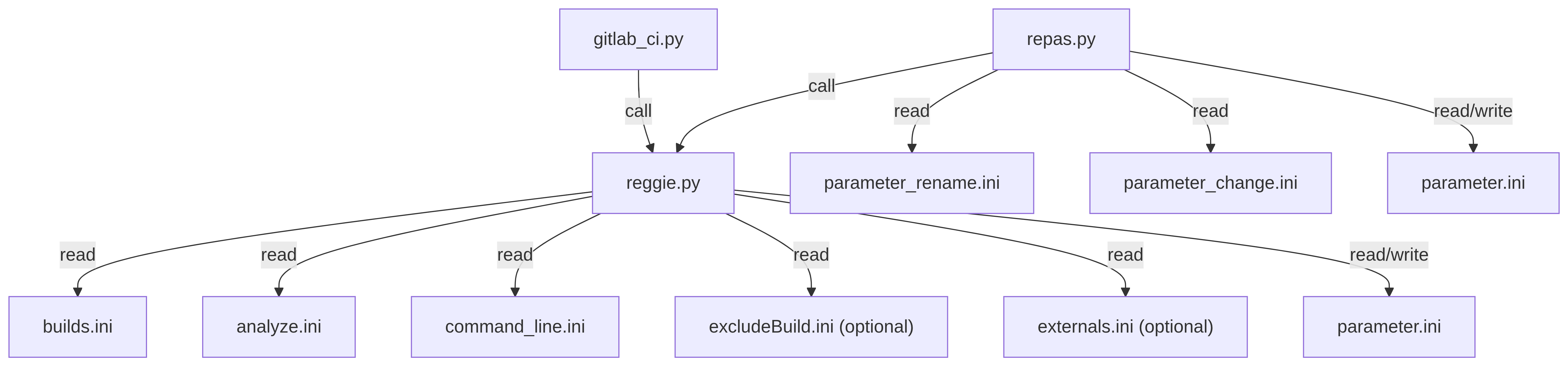
Code hierarchy and required .ini files
gitlab-ci.py
│   gitlab-ci.yml
│
└───reggie.py
    │   builds.ini
    │   analyze.ini;
    |   command_line.ini;
    |   excludeBuild.ini;
    |   externals.ini (opt);
    │
    └───flexi
    |   parameter_flexi.ini
    |   ...
    └───piclas
    │   parameter_piclas.ini
    │   ...
    └───hopr
        parameter_hopr.ini
        ...
Analyze routines for "analyze.ini"
Overview
- Table of Contents
- Reggie
- Analyze routines for "analyze.ini"
- Overview
- Table of Functions
- L2 error file
- L2 error upper limit
- h-convergence test
- p-convergence test
- h5diff
- h5diff (multiple files)
- h5diff (additional options)
- vtudiff
- vtudiff (additional options)
- h5 array bounds check
- Data file line comparison
- integrate data columns
- compare data column
- Compare across commands
- Check polar-angle distribution
- Clean-up files
- Command Line
- Externals
- Builds
- Runs
Table of Functions
The parameters used in analyze.ini and example arguments are given in the following table. Note that if you intend to use white spaces in variable names they must be supplied in form of \s in the variable name.
Example: "Initial Timestep" becomes "Initial\sTimestep" (or "Initial\s Timestep") because all white spaces are removed from the variable name automatically.
The intention of a white space must be stated explicitly.
| analyze | options | values (examples) | Default values | Description |
|---|---|---|---|---|
| L2 error in file | analyze_L2_file | L2error.txt | None | data file containing the L2 errors for comparing with |
| analyze_L2_file_tolerance | 6e-2 | None | relative/absolute deviation between two L2 errors (from output and from reference file) | |
| analyze_L2_file_tolerance_type | relative | absolute | relative or absolute comparison | |
| analyze_L2_file_error_name | L_2_ERROR | L_2 | string name of the L2 error in the std.out file | |
| L2 error | analyze_L2 | 1e-5 | None | L2 upper boundary for all nVar. If one L2 error is above the boundary, this test fails |
| analyze_L2_error_name | L_2_ERROR | L_2 | string name of the L2 error in the std.out file | |
| h-convergence test | analyze_Convtest_h_cells | 1,2,4,8 | None | number of cells (in each direction, or in the direction of the convergence test variable) |
| analyze_Convtest_h_tolerance | 0.3 | 0.02 | relative deviation from the p+1 convergence rate to the calculated one | |
| analyze_Convtest_h_rate | 1.0 | 1.0 | ratio of successful tests versus failed tests regarding the number of nVar | |
| analyze_Convtest_h_error_name | L_2_ERROR | L_2 | string name of the L2 error in the std.out file | |
| p-convergence test | analyze_Convtest_p_rate | 0.6 | None | ratio of successful tests versus failed tests regarding the number of nVar |
| analyze_Convtest_p_percentage | 0.5 | 0.75 | ratio of increasing EOC samples vs. total number of samples (for the p-convergence, the EOC must increase with p) | |
| analyze_Convtest_p_error_name | L_2_ERROR | L_2 | string name of the L2 error in the std.out file | |
| h5diff | h5diff_file | particle_State_00.0000.h5 | None | name of calculated .h5 file (output from current run) |
| h5diff_reference_file | particle_State_00.0000.h5_ref | None | reference .h5 file (must be placed in repository) for comparing with the calculated one | |
| h5diff_data_set | DG_Solution or DG_Solution\sField1 | None | name of dataset for comparing (e.g. DG_Solution or DG_Solution vs. Field1 when the datasets in the two files have different names) | |
| h5diff_tolerance_value | 1.0e-2 | 1e-5 | relative/absolute deviation between two elements in a .h5 array | |
| h5diff_tolerance_type | relative | absolute | relative or absolute comparison | |
| h5diff_one_diff_per_run | True | False | when multiple reference files are supplied, these can either be used in every run (h5diff_one_diff_per_run=F) or one each run (h5diff_one_diff_per_run=T) | |
| h5diff_sort | True | False | Sort h5 arrays before comparing them, which circumvents problems when comparing arrays that are written in arbitrary order due to multiple MPI processes writing the dataset (currently only 2-dimensional m x n arrays are implemented) | |
| h5diff_sort_dim | 1 | -1 | Sorting dimension of a 2-dimensional m x n array (1: sort array by rows, 2: sort array by columns) | |
| h5diff_sort_var | 0 | -1 | Sorting variable of the specified dimension. The array will be sorted for this variable in ascending order (note that variables start at 0) | |
| h5diff_reshape | True | False | Re-shape h5 arrays before comparing them, effectively removing rows or columns (for example). This is currently only implemented for 2-dimensional m x n arrays and 3D and 4D (the latter two can only be reduced in the last dimension). | |
| h5diff_reshape_dim | 1 | -1 | Select the dimension, which is to be changed (decreased, note that variables start at 0) | |
| h5diff_reshape_value | 11 | -1 | Value to which the selected dimension is to be changed (decreased) | |
| h5diff_flip | True | False | Re-shape the h5 array before comparing it with the reference by transposing the array. This is currently only implemented for 2-dimensional m x n arrays. | |
| h5diff_max_differences | 15 | 0 | Maximum number of allowed differences that are detected by h5diff for the test to pass without failure | |
| h5diff_var_attribute | VarNamesSurface | None | name of attribute in the h5 file containing the column names of the given dataset | |
| h5diff_var_name | Spec001_ImpactNumber | None | name of column containing the data which should be compared | |
| vtudiff | vtudiff_file | particle_Solution_00.0000.vtu | None | name of calculated .vtu file (output from current run) |
| vtudiff_reference_file | particle_Solution_00.0000_ref.vtu | None | reference .vtu file (must be placed in repository) for comparing with the calculated one | |
| vtudiff_relative_tolerance_value | 1.0e-5 | 1e-2 | relative deviation between two elements in a .vtu array | |
| vtudiff_absolute_tolerance_value | 1.0e-8 | 1e-5 | absolute deviation between two elements in a .vtu array | |
| vtudiff_array_name | DG_Solution or DG_Solution\sField1 | None | name of .vtu array for comparing (e.g. DG_Solution or DG_Solution vs. Field1 when the datasets in the two files have different names) | |
| h5 array bounds check | check_hdf5_file | tildbox_State_01.0000.h5 | None | name of calculated .h5 file (output from current run) |
| check_hdf5_data_set | PartData | None | name of data set for comparing (e.g. DG_Solution) | |
| check_hdf5_span | 1 | 2 | Checks elements of a 2-dimensional m x n array (1: check array elements by rows, 2: check array elements by columns) | |
| check_hdf5_dimension | 0:2 | None | dimension of data set (note that dimensions start at 0) | |
| check_hdf5_limits | -10.0:10.0 | None | bounding interval for all elements in h5 array for all dimensions supplied under check_hdf5_dimension | |
| data file line | compare_data_file_one_diff_per_run | True | True | if multiple reference files are supplied, these can either be used in every run or one each run |
| compare_data_file_name | Database.csv | None | name of calculated ASCII data file (usually .csv file) | |
| compare_data_file_reference | Database.csv_ref | None | name of reference file (must be placed in repository) | |
| compare_data_file_tolerance | 6e-2 | None | relative/absolute deviation between two elements (in e.g. .csv file) | |
| compare_data_file_tolerance_type | relative | absolute | relative or absolute comparison | |
| compare_data_file_line | 50 | last | line number in calculated data file (e.g. .csv file) | |
| compare_data_file_delimiter | : | , | delimiter symbol, default is comma ',' (note that a comma cannot be supplied in this file as it is a delimiter itself) | |
| compare_data_file_max_differences | 5 | 0 | Maximum number of allowed differences that are detected by comparison with a reference value for the test to pass without failure | |
| integrate data columns | integrate_line_file | Database.csv | None | name of calculated output file (e.g. .csv file) |
| integrate_line_delimiter | : | , | delimiter symbol, default is comma ',' (note that a comma cannot be supplied in this file as it is a delimiter itself) | |
| integrate_line_columns | 0:5 | None | two columns for the values x and y supplied as 'x:y' (Note that columns start at 0) | |
| integrate_line_integral_value | 44.00 | None | integral value used for comparison | |
| integrate_line_tolerance_value | 0.8e-2 | None | tolerance that is used in comparison | |
| integrate_line_tolerance_type | relative | None | type of tolerance, either 'absolute' or 'relative' | |
| integrate_line_option | DivideByTimeStep | None | special option, e.g., calculating a rate by dividing the integrated values by the timestep which is used in the values 'x' | |
| integrate_line_multiplier | 1 | 1 | factor for multiplying the result (in order to acquire a physically meaning value for comparison) | |
| integrate_line_multiplier | 1 | 1 | factor for multiplying the result (in order to acquire a physically meaning value for comparison) | |
| compare data column | compare_column_file | PartAnalyze.csv | None | name of calculated output file (e.g. .csv file) |
| compare_column_reference_file | Reference.csv | None | name of of the reference file | |
| compare_column_delimiter | : | , | delimiter symbol, default is comma ',' (note that a comma cannot be supplied in this file as it is a delimiter itself) | |
| compare_column_index | 0 | None | column indices for comparison, multiple columns per file are possible (Note that the index of the column start at 0) | |
| compare_column_tolerance_value | 0.8e-2 | None | tolerance that is used in comparison | |
| compare_column_tolerance_type | relative | None | type of tolerance, either 'absolute' or 'relative' | |
| compare_column_multiplier | 1 | 1 | factor for multiplying the result (in order to acquire a physically meaning value for comparison) | |
| compare across commands | compare_across_commands_ file |
ElemTimeStatistics.csv | None | name of calculated output file (e.g. csv) |
| compare_across_commands_ column_delimiter |
: | , | delimiter symbol, default is comma ',' (note that a comma cannot be supplied in this file as it is a delimiter itself) | |
| compare_across_commands_ column_index |
0 | None | column index for comparison (note that first column has index 0) | |
| compare_across_commands_ line_number |
1 | last | line number for comparison (note that first line has number 1) | |
| compare_across_commands_ tolerance_value |
0.1 | 0.1 | tolerance value for deviation among the values to be compared | |
| compare_across_commands_ tolerance_type |
absolute | relative | tolerance type to be used in comparison | |
| compare_across_commands_ reference |
1 | 0 | command number for taking reference value (according to numbering cmd_0001, cmd_0002,...) - default value 0 takes average of all calculated values | |
| check polar-angle distribution | check_distribution_file | particle_State_00.0000.h5 | None | name of calculated output file (e.g. .h5 file) |
| check_distribution_data_set | PartData | PartData | name of the data set containing the particle data | |
| check_distribution_one_check_per_run | True | False | when multiple reference distributions are supplied, these can either be used in every run (check_distribution_one_check_per_run=F) or one each run (check_distribution_one_check_per_run=T) | |
| check_distribution_normal | 1.:1.:0. | 1.:0.:0. | surface outward normal vector "nx:ny:nz" | |
| check_distribution_velocity_columns | 4:5:6 | 3:4:5 | columns of the velocity vector vx:vy:vz in the data set (note that columns start at 0) | |
| check_distribution_double | T | F | use the double cosine A*cos^n(theta) - B*cos^m(theta) distribution instead of cos^n(theta) | |
| check_distribution_exponent | 2.0 | 1.0 | exponent n for the single cos^n(theta) distribution or exponent n of the A*cos^n(theta) term for the double cosine distribution | |
| check_distribution_A | 1.77 | None | parameter A of the double cosine distribution (required if check_distribution_double=T) | |
| check_distribution_exponent2 | 3.28 | None | parameter m of the double cosine distribution (required if check_distribution_double=T) | |
| check_distribution_B | 0.90 | None | parameter B of the double cosine distribution (required if check_distribution_double=T) | |
| check_distribution_tolerance | 0.02 | 0.01 | minimum allowed Kolmogorov-Smirnov p-value | |
| check_distribution_bins | 100 | 60 | number of cos(theta) bins used for the flux/polar plots (use more bins for higher particle numbers to resolve structure near the normal) | |
| clean-up files after run | clean_up_files | State | None | remove all unwanted files directly after the run is completed. The wild card character is "*" |
L2 error file
- Compare all L2 errors calculated for all nVar against supplied values in a data file
- relative or absolute comparison possible
Template for copying to analyze.ini
 ! L2 error from file
analyze_L2_file                = L2error.txt
analyze_L2_file_tolerance      = 1e-2
analyze_L2_file_tolerance_type = relative
Note that the errors (in this example in L2error.txt) must be supplied in the following format
L_2 : 1.5942413E+09 1.9238600E+09 1.2437159E+10 7.1690941E+01 1.4439652E+02 1.4360107E-01 1.5516452E+09 3.2439672E-02
L2 error upper limit
- Compare all L2 errors calculated for all nVar against an upper boundary analyze_L2
Template for copying to analyze.ini
!L2 error norm
analyze_L2=1e7
h-convergence test
- Determine the rate of convergence versus decreasing the average spacing between two DOF by running multiple different grids
- Requires multiple mesh files
Template for copying to analyze.ini
! h-convergence test
analyze_Convtest_h_cells=1,2,4,8
analyze_Convtest_h_tolerance=0.3
analyze_Convtest_h_rate=1
p-convergence test
- Determine an increasing rate of convergence by increasing the polynomial degree (for a constant mesh)
Template for copying to analyze.ini
! p-convergence test
analyze_Convtest_p_rate=0.8
analyze_Convtest_p_percentage=0.75
h5diff
-
Compares two arrays from two .h5 files element-by-element either with an absolute or relative difference (when comparing with zero, h5diff automatically uses an absolute comparison).
-
Requires h5diff, which is compiled within the HDF5 package (set the corresponding environment variable).
`export PATH=/opt/hdf5/X.X.XX/bin/:$PATH` -
Requires h5py for checking if the datasets which are to be compared by h5diff are of the same dimensions.
Template for copying to analyze.ini
! hdf5 diff
h5diff_file            =          single-particle_State_000.00000005000000000.h5
h5diff_reference_file  = single-particle_reference_State_000.0000000500000000.h5
h5diff_data_set        = DG_Source
h5diff_tolerance_value = 1.0e-2
h5diff_tolerance_type  = relative
h5diff (multiple files)
- Compares multiple arrays from multiple .h5 files element-by-element either with an absolute or relative difference (when comparing with zero, h5diff automatically uses an absolute comparison).
- Requires h5diff, which is compiled within the HDF5 package.
Example with h5diff_one_diff_per_run = F
Each comparison defined in analyze.ini is performed in each run. The following example considers two runs (e.g. the time step is changed between the runs) and compares two files with two separate reference files in each run, hence, multiple file output can be analyzed.
Template for copying to analyze.ini
! hdf5 diff
h5diff_file            = sharpSOD_State_0000000.100000000.h5        , sharpSOD_QDS_0000000.100000000.h5
h5diff_reference_file  = reggie_sharpSOD_State_0000000.100000000.h5 , reggie_sharpSOD_QDS_0000000.100000000.h5
h5diff_data_set        = DG_Solution                                , FieldData
h5diff_tolerance_value = 1.0e-12                                    , 1.0e-12
h5diff_tolerance_type  = absolute                                   , absolute
Example with h5diff_one_diff_per_run = T
A different comparison is performed in each run, where each column in analyze.ini is only used for one of the runs. The following example considers 4 runs (the polynomial degree is varied) and in every run only one file is compared with a reference file, which is different for each run. This can be used when the mesh is varied in each run, e.g., Cartesian and split2hex meshes and the resulting .h5 files are used for comparison.
Template for copying to analyze.ini
! hdf5 diff
h5diff_one_diff_per_run= T
h5diff_allow_reorder   = T                                                         , T                                                         , T                                                         , T
h5diff_file            = hdg_slab_DielectricGlobal_000.00000000000000000.h5        , hdg_slab_DielectricGlobal_000.00000000000000000.h5        , hdg_slab_DielectricGlobal_000.00000000000000000.h5        , hdg_slab_DielectricGlobal_000.00000000000000000.h5
h5diff_reference_file  = hdg_slab_DielectricGlobal_000.00000000000000000_ref_N3.h5 , hdg_slab_DielectricGlobal_000.00000000000000000_ref_N5.h5 , hdg_slab_DielectricGlobal_000.00000000000000000_ref_N7.h5 , hdg_slab_DielectricGlobal_000.00000000000000000_ref_N9.h5
h5diff_data_set        = DG_Solution                                               , DG_Solution                                               , DG_Solution                                               , DG_Solution
h5diff_tolerance_value = 1.0e-2                                                    , 1.0e-2                                                    , 1.0e-2                                                    , 1.0e-2
h5diff_tolerance_type  = relative                                                  , relative                                                  , relative                                                  , relative
h5diff (additional options)
Dataset Sorting
- Further options include the pre-sorting of a dataset before the actual comparison via h5diff is performed. This circumvents problems when comparing arrays that are written in arbitrary order due to multiple MPI processes writing the dataset (currently only 2-dimensional m x n arrays are implemented)
- The sorting can be performed for rows
mby settingh5diff_sort_dim=1or columnsnbyh5diff_sort_dim=2 - The corresponding variable is selected via
h5diff_sort_var. Note that variables start at 0 and end at m-1 or n-1 for rows or columns, respectively.
The following example considers an 8 x 4481 array PartData, which is to be sorted by the values in
the first row (select the rows via h5diff_sort_dim=1 and the variable h5diff_sort_var=0)
Template for copying to analyze.ini
! hdf5 diff
h5diff_file             = sphere_PartStateBoundary_000.00000010000000000.h5
h5diff_reference_file   = sphere_PartStateBoundary_000.00000010000000000_ref.h5
h5diff_data_set         = PartData
h5diff_tolerance_value  = 1.0e-2
h5diff_tolerance_type   = relative
h5diff_sort             = T
h5diff_sort_dim         = 1
h5diff_sort_var         = 0
Dataset Re-Shaping
- datasets may be reshaped prior to comparison, e.g., made smaller by decreasing a dimension
The following example considers an 14497 x 12 array PartData, which is to be re-shaped to an 14497 x 11 array, effectively removing the 12th column.
Template for copying to analyze.ini
! hdf5 diff
h5diff_file             = sphere_PartStateBoundary_000.00000010000000000.h5
h5diff_reference_file   = sphere_PartStateBoundary_000.00000010000000000_ref.h5
h5diff_data_set         = PartData
h5diff_tolerance_value  = 1.0e-2
h5diff_tolerance_type   = relative
h5diff_reshape          = T
h5diff_reshape_dim      = 0
h5diff_reshape_value    = 11
Multiple dataset names
When the datasets in the file and reference differ, simply supply both names. Instead of
h5diff_data_set = DG_Solution
simply add the second name and add the "\s" delimiter, because white spaces are always removed by default
h5diff_data_set = DG_Solution\sField1
where "DG_Solution" corresponds to the dataset name in h5diff_file and "Field1" to the dataset in h5diff_reference_file.
Compare variables
This option allows for comparison of a single column of the selected dataset to avoid unnecessary computation. Simply provide the name of the attribute of the hdf5 file, which contains all names of the different columns in the dataset and additionally the name of the column, which should be compared.
Both variables also take '_' as placeholder when using more than one analyze to compare all variables.
Template for copying to analyze.ini
! hdf5 diff
h5diff_file             = sphere_PartStateBoundary_000.00000010000000000.h5      , sphere_PartStateBoundary_2_000.00000010000000000.h5
h5diff_reference_file   = sphere_PartStateBoundary_000.00000010000000000_ref.h5  , sphere_PartStateBoundary_2_000.00000010000000000_ref.h5
h5diff_data_set         = PartData                                               , PartData2
h5diff_tolerance_value  = 1.0e-2                                                 , 1.0e-2
h5diff_tolerance_type   = relative                                               , relative
h5diff_var_attribute    = VarNamesSurface                                        , _
h5diff_var_name         = Spec001_ImpactNumber                                   , _
vtudiff
-
Compares the point, field and cell data arrays (if not empty) of two .vtu files for each array element-by-element either with an absolute and/or relative difference (depending on which tolerance values are given - if no tolerance is given both default values are used).
-
Requires vtk for reading-in data to python.
Note that piclas2vtk needs to be set as external, since otherwise no .vtu file is created for comparison. Template for copying to analyze.ini
! vtu diff
vtudiff_file                       = single-particle_State_000.00000005000000000.h5
vtudiff_reference_file             = single-particle_reference_State_000.0000000500000000.h5
vtudiff_relative_tolerance_value   = 1.0e-2
vtudiff_absolute_tolerance_value   = 1.0
vtudiff (additional options)
Compare single array
For comparison of only one array simply add the array name with
vtudiff_array_name = DG_Solution
,where "DG_Solution" is the array name in the .vtu file. This variable takes also '_' as placeholder, when using more than one analyze to compare all arrays.
Template for copying to analyze.ini
! vtu diff
vtudiff_file                       = single-particle_State_000.00000005000000000.h5           , single-particle_State_2_000.00000005000000000.h5
vtudiff_reference_file             = single-particle_reference_State_000.0000000500000000.h5  , single-particle_reference_State_2_000.0000000500000000.h5
vtudiff_relative_tolerance_value   = 1.0e-2                                                   , 1.0e-2
vtudiff_absolute_tolerance_value   = 1.0                                                      , 1.0
vtudiff_array_name                 = DG_Solution                                              , _
h5 array bounds check
- Check if all elements of a h5 array are within a supplied interval
- Requires h5py python module (analyze will fail if the module cannot be found)
Template for copying to analyze.ini
! check if particles are outside of domain at tEnd
check_hdf5_file        = tildbox_State_001.00000000000000000.h5
check_hdf5_data_set    = PartData
check_hdf5_span        = 2 ! 1: check array elements by rows, 2: check array elements by columns
check_hdf5_dimension   = 0:2
check_hdf5_limits      = -10.0:10.0
Data file line comparison
- Compare a single line in, e.g., a .csv file element-by-elements
- The data is delimited by a comma on default but can be changed by setting "compare_data_file_delimiter = :" (when, e.g., ":" is to be used as the delimiter)
- relative of absolute comparison
- Possibility to perform one comparison per run (e.g. supply 10 data and reference files for 10 different runs), default is true
Example 1 of 4
Template for copying to analyze.ini
! compare the last row in Database.csv with a reference file
compare_data_file_name      = Database.csv
compare_data_file_reference = Database_reference.csv
compare_data_file_tolerance = 2.0
compare_data_file_tolerance_type = relative
compare_data_file_one_diff_per_run = T
Note that a comma is the default delimiter symbol for reading the data from the supplied file. The variable "compare_data_file_delimiter" cannot be set as custom delimiter symbol "," because the comma is used for splitting the keywords in analyze.ini. However, other symbols can be supplied using "compare_data_file_delimiter" instead of a comma.
Example 2 of 4
When different runs produce different output (e.g. changing the initial conditions, here, the temperature is varied), multiple reference files can be supplied. The following example produces the same output file (Database.csv) but compares with different reference files (Database_TX000K_ref.csv).
! compare the last row in Database.csv with a reference file
compare_data_file_name      = Database.csv
compare_data_file_reference = Database_T1000K_ref.csv, Database_T2000K_ref.csv, Database_T3000K_ref.csv, Database_T4000K_ref.csv, Database_T5000K_ref.csv
compare_data_file_tolerance = 2.0
compare_data_file_tolerance_type = relative
Example 3 of 4
Additionally, multiple output files (Database_TX000K.csv) can be supplied in combination with multiple reference files (Database_TX000K_ref.csv). See the following example.
! compare the last row in Database.csv with a reference file
compare_data_file_name      = Database_T1000K.csv, Database_T2000K.csv, Database_T3000K.csv, Database_T4000K.csv, Database_T5000K.csv
compare_data_file_reference = Database_T1000K_ref.csv, Database_T2000K_ref.csv, Database_T3000K_ref.csv, Database_T4000K_ref.csv, Database_T5000K_ref.csv
compare_data_file_tolerance = 2.0
compare_data_file_tolerance_type = relative
Note that for this example, the number of supplied output files, reference files and runs must be the same.
Example 4 of 4
Additionally, the tolerance type and value can be altered.
! compare the last row in Database.csv with a reference file
compare_data_file_name           = Database_T1000K.csv, Database_T2000K.csv, Database_T3000K.csv, Database_T4000K.csv, Database_T5000K.csv
compare_data_file_reference      = Database_T1000K_ref.csv, Database_T2000K_ref.csv, Database_T3000K_ref.csv, Database_T4000K_ref.csv, Database_T5000K_ref.csv
compare_data_file_tolerance      = 1e-2    , 5e-2    , 1e-10    , 1e-10
compare_data_file_tolerance_type = relative, relative, absolute, absolute
Note that for this example, the number of all varied parameters must be the same (in this case 4) otherwise it will not work.
integrate data columns
- Integrate the data in a column over another column, e.g., x:y in a data file as integral(y(x), x, x(1), x(end)) via the trapezoid rule
- The data is delimited by a comma on default but can be changed by setting "integrate_line_delimiter = :" (when, e.g., ":" is to be used as the delimiter)
- special options are available for calculating, e.g., rates (something per second)
Template for copying to analyze.ini
! ===================================================================================================================
! integrate columns x:y in a data file as integral(y(x), x, x(1), x(end))
! check the emission current of electrons: Current = Q*MPF*q/delta_t_database = 44 A
! ===================================================================================================================
! with   Q = integrate nPartIn(t) from t=0 to t=3E-11 = 4.500111958051274e-10 for p=9 (integrate nPartIN over time)
!      MPF = 1e6
!        q = 1.6022e-19 (charge of one electron)
!       dt = ? (depends on polynomial degree and mesh)
! ===================================================================================================================
! for p = 9: 551 timesteps  -->  0.44769549409291E-09*IntegrateLineMultiplier = 44 A
integrate_line_file            = Database.csv          ! data file name
integrate_line_columns         = 0:5                   ! columns x:y
integrate_line_integral_value  = 44.00                 ! Ampere
integrate_line_tolerance_value = 0.8e-2                ! tolerance
integrate_line_tolerance_type  = relative              ! absolute or relative comparison
integrate_line_option          = DivideByTimeStep      ! the first column in Database.csv is used for this option
integrate_line_multiplier      = 5.340588433333334e-03 ! = MPF*q/tend = 1e6*1.60217653E-19/3E-11
Note that a comma is the default delimiter symbol for reading the data from the supplied file. The variable "integrate_line_delimiter" cannot be set as custom delimiter symbol "," because the comma is used for splitting the keywords in analyze.ini. However, other symbols can be supplied using "integrate_line_delimiter" instead of a comma.
compare data column
- compares the data in a column with a reference file
- The data is delimited by a comma on default but can be changed by setting "compare_column_delimiter = :" (when, e.g., ":" is to be used as the delimiter)
- Comparison of several columns is possible by providing a list of the column indices
- If only a single column (e.g. from a large PartAnalyze.csv) is compared, it is possible to provide a reference file, which only contains a single column to reduce its size
- Possibility to perform one comparison per run (e.g. supply 10 data and reference files for 10 different runs), default is true
- Possibility to perform one comparison per restart file, default is false. Overwrites the one comparison per run parameter above, as the command line runs are one level above
Template for copying to analyze.ini
! compare columns in a data file
compare_column_file                       = PartAnalyze.csv ! data file name
compare_column_reference_file             = reference.csv   ! reference data file name
compare_column_index                      = 0,1             ! columns index (starts at 0)
compare_column_tolerance_value            = 0.8e-2          ! tolerance
compare_column_tolerance_type             = relative        ! absolute or relative comparison
compare_column_multiplier                 = 5e-3            ! fixed factor
compare_column_one_diff_per_run           = T
compare_column_one_diff_per_restart_file  = F
Note that a comma is the default delimiter symbol for reading the data from the supplied file. The variable "compare_column_delimiter" cannot be set as custom delimiter symbol "," because the comma is used for splitting the keywords in analyze.ini. However, other symbols can be supplied using "compare_column_delimiter" instead of a comma.
Compare across commands
- Description: compare data from corresponding runs of different commands, e.g.
cmd_*/run_0001(=cmd_0001/run_0001vs.cmd_0002/run_0001vs.cmd_0003/run_0001vs. ...),cmd_*/run_0002,cmd_*/run_0003, etc. - Purpose: allows to investigate e.g. the parallel efficiency in a strong scaling test, if the different command directories originate from an increasing number of MPI threads (command_line.ini:
MPI=2,4,6,...) and the PID is written to the csv-file - data to be compared is a singular value per run, written to a csv-file and specified through row number (first line = 1) and column index (first column = 0)
- two referencing types are supported, specified through
compare_across_commands_reference:- a value ≥ 1 is interpreted as command index (cf. directory names
cmd_0001,cmd_0002, etc.), e.g. the value 1 would compare all data against that of the first command - the value 0 takes the average (arithmetic mean) of all extracted data as reference
- a value ≥ 1 is interpreted as command index (cf. directory names
- Caution: The default delimiter symbol for reading the data from the supplied csv-file is a comma. The variable
compare_across_commands_column_delimitercannot be set to character "," because the comma is used for splitting the keywords in analyze.ini. Any other delimiter symbol, however, is acceptable.
Template for copying to analyze.ini
compare_across_commands_file            = ElemTimeStatistics.csv    ! name of output file
compare_across_commands_column_index    = 5                         ! column index (starts at 0)
compare_across_commands_line_number     = 3                         ! line number (starts at 1)
compare_across_commands_tolerance_value = 0.2                       ! tolerance
compare_across_commands_tolerance_type  = relative                  ! absolute or relative comparison
compare_across_commands_reference       = 1                         ! command number for taking reference value (1,2,...), or 0 for average
Make sure to provide a file command_line.ini with multiple commands, e.g. for a strong scaling test
MPI=2,4,6,8
Check polar-angle distribution
- Check the polar-angle distribution of particle velocities in an .h5 file against an analytical emission distribution using a Kolmogorov-Smirnov test
- Supports the single cosine distribution dN/dOmega ~ cos^n(theta) and the double cosine distribution dN/dOmega ~ A*cos^n(theta) - B*cos^m(theta) (e.g. for sputtering distributions whose maximum is off-normal)
- The polar angle theta is calculated between each particle's velocity vector and the supplied surface outward normal vector
- Requires h5py python module (analyze will fail if the module cannot be found)
- If
use_matplot_lib = Tis set, two plots are created per run:<file>_distribution.png(polar-angle PDF and flux per solid angle compared with the analytical distribution) and<file>_distribution_polar.png(polar lobe plot of the flux per solid angle) - Multiple checks can be defined in a single analyze.ini by supplying comma-separated lists for the options. Options given as a single value are used for every check, while lists must all have the same length. When more than one check is defined, the plots are named
<file>_check1_distribution.png,<file>_check2_distribution.png, etc. where<file>_check1_distribution.pngcorresponds to the first column in the analyze.ini file.
Template for copying to analyze.ini (single cosine distribution cos^n(theta))
! check the polar-angle distribution of emitted particle velocities against cos^n(theta)
check_distribution_file             = particle_state.h5
check_distribution_data_set         = PartData
check_distribution_normal           = 1.:0.:0.
check_distribution_velocity_columns = 3:4:5
check_distribution_tolerance        = 0.01
check_distribution_exponent         = 1.0
Template for copying to analyze.ini (double cosine distribution A*cos^n(theta) - B*cos^m(theta))
! check the polar-angle distribution of emitted particle velocities against
! A*cos^n(theta) - B*cos^m(theta) (e.g. an off-normal sputtering lobe)
check_distribution_file             = particle_state.h5
check_distribution_data_set         = PartData
check_distribution_normal           = 1.:0.:0.
check_distribution_velocity_columns = 3:4:5
check_distribution_tolerance        = 0.01
check_distribution_double           = T
check_distribution_exponent         = 0.95
check_distribution_A                = 1.77
check_distribution_exponent2        = 3.28
check_distribution_B                = 0.90
Example with check_distribution_one_check_per_run = F
Each comparison defined in analyze.ini is performed in each run. The following example considers two runs (e.g. different exponents) and compares two separate files in each run, hence, two distributions can be analyzed.
Template for copying to analyze.ini
! check the polar-angle distribution of emitted particle velocities against
! cos^n(theta) (check 1) and A*cos^n(theta) - B*cos^m(theta) (check 2)
check_distribution_file               = particle_state.h5 , particle_state_2.h5
check_distribution_data_set           = PartData
check_distribution_one_check_per_run  = F
check_distribution_normal             = 1.:0.:0.
check_distribution_velocity_columns   = 3:4:5
check_distribution_tolerance          = 0.01
check_distribution_double             = F                 ,F
check_distribution_exponent           = 0.5               ,1.0
check_distribution_A                  = 2.00
check_distribution_exponent2          = 3.0
check_distribution_B                  = 1.0
Example with check_distribution_one_check_per_run = T
A different comparison is performed in each run, where each column in analyze.ini is only used for one of the runs. The following example considers 2 runs (which produce a single outputfile each) and in every run only one file is compared with a reference distribution, which is different for each run. Note that in this case the number of runs and the number of analyzes have to be equal. Options which contain only a single value are copied for the other checks.
Template for copying to analyze.ini
! check the polar-angle distribution of emitted particle velocities against
! cos^n(theta) (check 1) and A*cos^n(theta) - B*cos^m(theta) (check 2)
check_distribution_file               = particle_state.h5 , particle_state.h5
check_distribution_data_set           = PartData
check_distribution_one_check_per_run  = T
check_distribution_normal             = 1.:0.:0.
check_distribution_velocity_columns   = 3:4:5
check_distribution_tolerance          = 0.01
check_distribution_double             = F                 ,F
check_distribution_exponent           = 0.5               ,1.0
check_distribution_A                  = 2.00
check_distribution_exponent2          = 3.0
check_distribution_B                  = 1.0
Clean-up files
- remove all unwanted files directly after the run is completed. The wild card character is "*"
Template for copying to analyze.ini
clean_up_files = *_State_*, *.csv, *.dat
Command Line
parameters used in command_line.ini and example arguments
| function | options | values | Default values | Description |
|---|---|---|---|---|
| mpirun | MPI | 1,2,4,8 | None | number of MPI threads with which the runs are repeated |
| additional info | cmd_suffix | DSMC.ini | None | additional information that is appended to the command line argument that is used for running a program |
| restart from file | restart_file | My_State_000.0000005123.h5 | None | supply the name of a state file from which all simulations are to be re-started |
| link to database | database | SpeciesDatabase.h5 | None | supply the name of a database file and its relative path (e.g. ../../../SpeciesDatabase.h5) |
Example
- run multiple different MPI threads
- use additional parameter file DSMC.ini
Template for copying to command_line.ini
! command line parameters
MPI=2
cmd\_suffix=DSMC.ini
database = ../../../SpeciesDatabase.h5
Externals
parameters used in externals.ini
| function | options | values | Default values | Description |
|---|---|---|---|---|
| mpirun | MPI | 1,2,4,8 | None | number of MPI threads with which the runs are repeated |
| name of external binary in bin folder | externalbinary | hopr | None | supply the external binary name (the binary is assumed to lie in each "build/bin/" directory |
| directory of ini-files or ini-file for external binary | externaldirectory | hopr | None | supply the relative path (starting from each example folder) to the directory of the parameterfiles or directly the parameterfiles name for the external binary |
| runtime of external (pre or post) | externalruntime | pre,post | None | supply the runtime of the external binary and its parameterfiles as pre- or postprocessing |
| Pre-execution command | cmd_pre_execute | ln\s-s\s../cube_mesh.h5 | None | Run additional script before external in executed (e.g. create an symbolic link) |
Example
- supply two external binaries: hopr and posti
- supply two directories with parameter files for each external tool
- different run times for hopr and posti
- (optional: run different MPI threads with hopr and posti, see above)
Template for copying to externals.ini
! external parameters
externalbinary    = hopr,posti
externaldirectory = hopr,posti
externalruntime   = pre,post
MPI               = 1,2

! do not mix multiple definitions for binary, directory and runtime
nocrosscombination:externalbinary,externaldirectory,externalruntime,MPI
To execute the hopr.ini directly in the test folder
MPI               = 1
externalbinary    = ./hopr/build/bin/hopr
externaldirectory = hopr.ini
externalruntime   = pre
Builds
parameters used in builds.ini and example arguments
| function | options | values | Default values | Description |
|---|---|---|---|---|
| program to execute | binary | ./bin/flexi | None | set the relative binary path in build directory |
| compile flags | CMAKE_BUILD_TYPE | DEBUG | None | set compile flags to the corresponding settings |
| exclude combinations | EXCLUDE: | FLEXI_VISCOSITY=sutherland,FLEXI_PARABOLIC=OFF | None | exclude specific combinations of compile flags, these will be skipped |
Runs
Exclude runs directly
In order to exclude runs see the following example
! =============================================================================== !
! Species1 - CH4
! =============================================================================== !
Part-Species1-MWTemperatureIC=1000,4000
Part-Species1-TempVib=2000,3000

! exclude combinations
EXCLUDE:Part-Species1-MWTemperatureIC=1000,Part-Species1-TempVib=3000
Use the same parameter list for multiple parameters in parameter.ini
In order to exclude runs see the following example in which 10 runs are performed, but the parameters are exchanged parallely. Modify the parameter.ini file.
! =============================================================================== !
! Species1 - CH4
! =============================================================================== !
Part-Species1-MWTemperatureIC=crosscombinations
Part-Species1-TempVib=crosscombinations
Part-Species1-TempRot=crosscombinations
Part-Species1-TempElec=crosscombinations
! =============================================================================== !
! Species2 - CH3
! =============================================================================== !
Part-Species2-MWTemperatureIC=crosscombinations
Part-Species2-TempVib=crosscombinations
Part-Species2-TempRot=crosscombinations
Part-Species2-TempElec=crosscombinations
! =============================================================================== !
! Species3 - H2
! =============================================================================== !

Part-Species3-MWTemperatureIC=crosscombinations
Part-Species3-TempVib=crosscombinations
Part-Species3-TempRot=crosscombinations
Part-Species3-TempElec=crosscombinations
! =============================================================================== !
! Species4 - H
! =============================================================================== !
Part-Species4-MWTemperatureIC=crosscombinations
Part-Species4-TempElec=crosscombinations

crosscombinations=1000,2000,3000,4000,5000,6000,7000,8000,9000,10000
Example
Template for copying to builds.ini
! relative binary path in build directory
binary=./bin/flexi

! fixed compiler flags
CMAKE_BUILD_TYPE=DEBUG
FLEXI_BUILD_HDF5=OFF
FLEXI_PAPI=OFF
FLEXI_POLYNOMIAL_DEGREE=N
FLEXI_MKL=OFF
FLEXI_SPLIT_DG=OFF

! include combinations
FLEXI_2D=OFF,ON
FLEXI_EQNSYSNAME=navierstokes,linearscalaradvection
FLEXI_LIFTING=br1,br2
FLEXI_MPI=ON!,OFF
FLEXI_NODETYPE=GAUSS,GAUSS-LOBATTO
FLEXI_PARABOLIC=ON,OFF
FLEXI_VISCOSITY=constant,sutherland,powerlaw
FLEXI_FV=ON,OFF
FLEXI_FV_RECONSTRUCTION=ON,OFF
FLEXI_GCL=ON,OFF

! exclude combinations
EXCLUDE:FLEXI_VISCOSITY=sutherland,FLEXI_PARABOLIC=OFF
EXCLUDE:FLEXI_VISCOSITY=powerlaw,FLEXI_PARABOLIC=OFF
EXCLUDE:FLEXI_VISCOSITY=sutherland,FLEXI_EQNSYSNAME=linearscalaradvection
EXCLUDE:FLEXI_VISCOSITY=powerlaw,FLEXI_EQNSYSNAME=linearscalaradvection
EXCLUDE:FLEXI_LIFTING=br2,FLEXI_EQNSYSNAME=linearscalaradvection
EXCLUDE:FLEXI_FV=ON,FLEXI_FV_RECONSTRUCTION=OFF,FLEXI_PARABOLIC=ON
EXCLUDE:FLEXI_FV=OFF,FLEXI_FV_RECONSTRUCTION=ON
EXCLUDE:FLEXI_GCL=ON,FLEXI_FV=ON ! Not yet implemented
EXCLUDE:FLEXI_NODETYPE=GAUSS-LOBATTO,FLEXI_VISCOSITY=sutherland
EXCLUDE:FLEXI_NODETYPE=GAUSS-LOBATTO,FLEXI_VISCOSITY=powerlaw
EXCLUDE:FLEXI_LIFTING=br2,FLEXI_VISCOSITY=sutherland
EXCLUDE:FLEXI_LIFTING=br2,FLEXI_VISCOSITY=powerlaw
3 maintainers


Download files
Download the file for your platform. If you're not sure which to choose, learn more about installing packages.
Source Distribution
Built Distribution
Filter files by name, interpreter, ABI, and platform.
If you're not sure about the file name format, learn more about wheel file names.
Copy a direct link to the current filters
File details
Details for the file reggie_framework-1.1.0.tar.gz.
File metadata
- Download URL: reggie_framework-1.1.0.tar.gz
- Upload date:
- Size: 126.8 kB
- Tags: Source
- Uploaded using Trusted Publishing? Yes
- Uploaded via:
twine/6.1.0 CPython/3.13.12
File hashes
| Algorithm | Hash digest | |
|---|---|---|
| SHA256 |
01c94967bc313bc1963d51670230ac6141589e28723581f3f3a13ad0e5d075ea
|
|
| MD5 |
a4b776ac65da6eb293db2c52c99fba77
|
|
| BLAKE2b-256 |
6dc11ff28667ecfaed68355600703242409ffb06585a74da822ee71e119529a8
|
Provenance
The following attestation bundles were made for reggie_framework-1.1.0.tar.gz:
Publisher:
release.yml on reggie-framework/reggie
-
Statement:
-
Statement type:
https://in-toto.io/Statement/v1 -
Predicate type:
https://docs.pypi.org/attestations/publish/v1 -
Subject name:
reggie_framework-1.1.0.tar.gz -
Subject digest:
01c94967bc313bc1963d51670230ac6141589e28723581f3f3a13ad0e5d075ea - Sigstore transparency entry: 2116519520
- Sigstore integration time:
-
Permalink:
reggie-framework/reggie@cb5357626f06c25a44194ea9527958fab6132950 -
Branch / Tag:
refs/tags/v1.1.0 - Owner: https://github.com/reggie-framework
-
Access:
public
-
Token Issuer:
https://token.actions.githubusercontent.com -
Runner Environment:
github-hosted -
Publication workflow:
release.yml@cb5357626f06c25a44194ea9527958fab6132950 -
Trigger Event:
push
-
Statement type:
File details
Details for the file reggie_framework-1.1.0-py3-none-any.whl.
File metadata
- Download URL: reggie_framework-1.1.0-py3-none-any.whl
- Upload date:
- Size: 123.6 kB
- Tags: Python 3
- Uploaded using Trusted Publishing? Yes
- Uploaded via:
twine/6.1.0 CPython/3.13.12
File hashes
| Algorithm | Hash digest | |
|---|---|---|
| SHA256 |
05c879ab202dcb5b2af448aa31e45e9fd9b1e778d9d4f2342523cf8cf3da4acb
|
|
| MD5 |
22aad4b6e554ac32f8c42247fe475099
|
|
| BLAKE2b-256 |
4cafb65916b4b9ef539907762b1e3671b714df7825ecdc59e17b0db123854c18
|
Provenance
The following attestation bundles were made for reggie_framework-1.1.0-py3-none-any.whl:
Publisher:
release.yml on reggie-framework/reggie
-
Statement:
-
Statement type:
https://in-toto.io/Statement/v1 -
Predicate type:
https://docs.pypi.org/attestations/publish/v1 -
Subject name:
reggie_framework-1.1.0-py3-none-any.whl -
Subject digest:
05c879ab202dcb5b2af448aa31e45e9fd9b1e778d9d4f2342523cf8cf3da4acb - Sigstore transparency entry: 2116519618
- Sigstore integration time:
-
Permalink:
reggie-framework/reggie@cb5357626f06c25a44194ea9527958fab6132950 -
Branch / Tag:
refs/tags/v1.1.0 - Owner: https://github.com/reggie-framework
-
Access:
public
-
Token Issuer:
https://token.actions.githubusercontent.com -
Runner Environment:
github-hosted -
Publication workflow:
release.yml@cb5357626f06c25a44194ea9527958fab6132950 -
Trigger Event:
push
-
Statement type:







