
relaybay



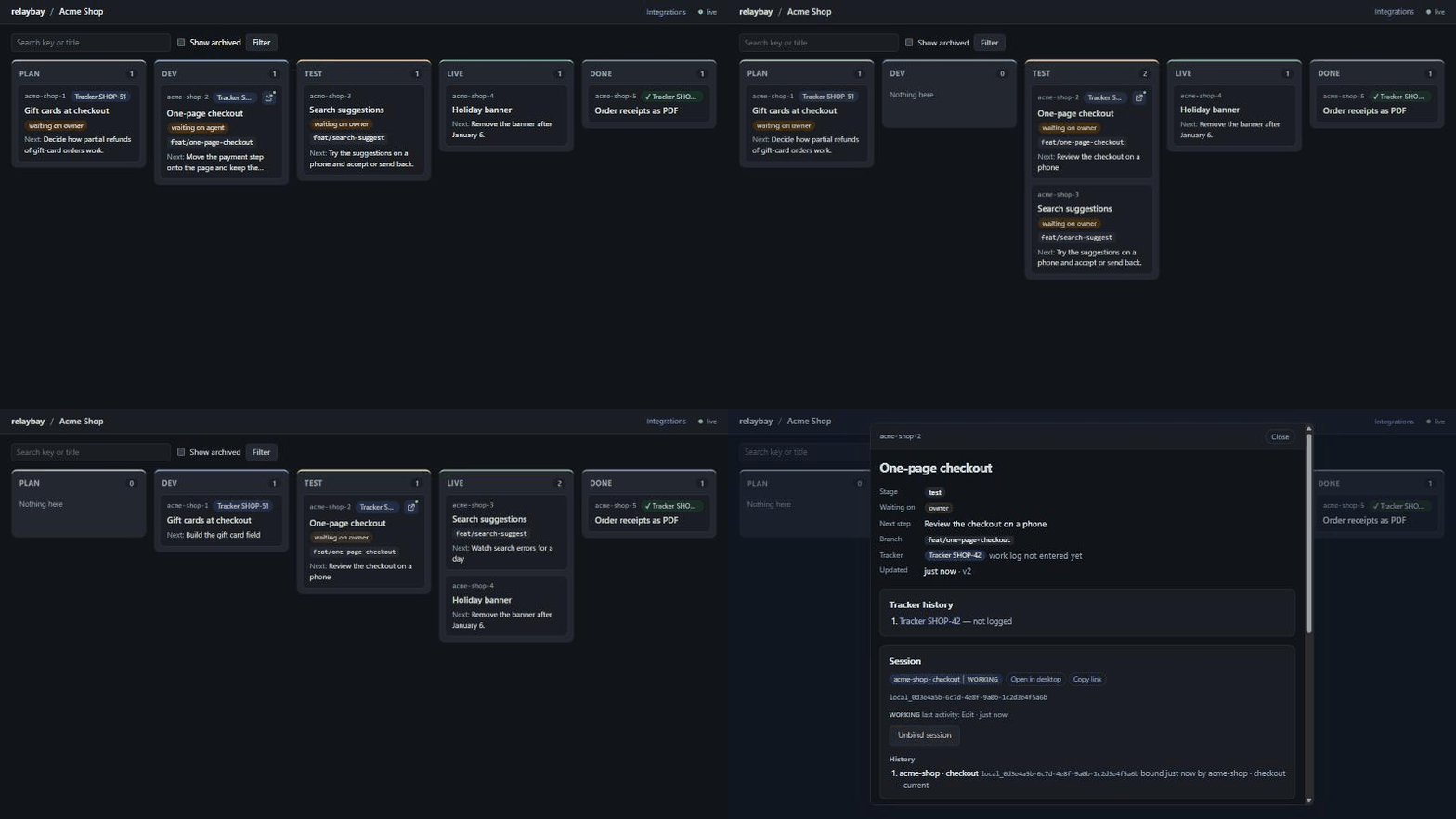
A live board and MCP server for people who run many Claude Code sessions across many repositories. Sessions report their work through MCP tools; you watch projects → tasks → stages → reports update in the browser, on the desktop or on your phone.
Status: 0.6, early. relaybay is built for my own workflow first and changes quickly; Windows is what it runs on every day, macOS and Linux are beta. Expect rough edges; issues and ideas are welcome.
Why relaybay
- One board for every session. Ten repositories, ten Claude Code sessions: the board shows which one is working, which one waits for you and what it did, without opening each terminal.
- Accept the work by eye. Agents write a checklist of what to check and attach screenshots; you accept or reject step by step, and your comments reach the agent in its next turn.
- Local and plain. One process, SQLite, bound to
127.0.0.1, token-protected, no telemetry; an installer for Windows, macOS and Linux, oruvx relaybayfrom the command line.
Quick start
uv tool install relaybay      # or: pipx install relaybay  ·  or run it once: uvx relaybay
relaybay serve                # prints the board's login link and the MCP URL
relaybay setup                # shows how it connects Claude Code (then --apply --expect <hash>)
Just looking? relaybay demo --home ./relaybay-demo fills a folder with two made-up projects, then
relaybay serve --home ./relaybay-demo --port 8766 shows them.
Open the login link once; the browser keeps a cookie. relaybay token prints the token again with
the claude mcp add … command for Claude Code. Docker, Windows/macOS/Linux details and a procedure
your coding agent can follow for you:
Install ·
Install with your coding agent.
Something off? relaybay doctor.
Install
The desktop program (a tray icon, the board in a window, the server inside, start at login) comes as an installer on each release. The installers are not signed with a certificate, so the OS warns once:
- Windows (x64): run
relaybay-<version>-windows-x64-setup.exe. It installs for your user only, without admin rights, into%LOCALAPPDATA%\Programs\relaybay. SmartScreen says "Windows protected your PC": click More info, then Run anyway. - macOS (Apple silicon, beta): open
relaybay-<version>-macos-arm64.dmgand drag relaybay to Applications. The first start is blocked: System Settings → Privacy & Security → Open Anyway (macOS 15 no longer offers right-click → Open), or runxattr -dr com.apple.quarantine /Applications/relaybay.app. - Linux (amd64
.deb, beta):sudo apt install ./relaybay_<version>_amd64.deb. A tray icon and the board in your browser (no window); GNOME needs the AppIndicator extension for the tray.
Then connect Claude Code from the installed program: relaybay setup, then
relaybay setup --apply --expect <hash> (or Settings → Reconnect Claude Code in the program).
Check the files with SHA256SUMS.txt from the same release if you like.
The command line (any OS, Python 3.12+): uv tool install relaybay, pipx install relaybay,
uvx relaybay, or the Docker image ghcr.io/codenator81/relaybay. Details:
Install; a server in Docker with the
program as its client:
how-to.
Documentation: codenator81.github.io/relaybay · Specification (how it behaves now) · Roadmap · Architecture
Features
- Board — projects with per-stage counts; per project, columns
plan → dev → review → test → live → doneon two pages with cards showing only the essentials: key, tracker badge, an "open in desktop" icon when a desktop session works on the task, title, waiting-on person, branch and the next step (a Compact toggle leaves key, tracker, title and who it waits on, with a chevron per card). Click a card to open the task in a dialog over the live board (its own URL,/p/<project>?task=<key>, full screen on a phone): description and progress in full, reports, session history, "Open in desktop", unbinding the session and editing the task. Each task also has a page of its own (/t/<key>). Live updates over Server-Sent Events, catch-up after sleep or a dropped connection, a stage tab bar on narrow screens; ← / → switch the two board pages. - Quick switcher and saved filters — Ctrl+K (Cmd+K on macOS) finds any task, project or session by a few letters; board filters by stage, waiting-on and session stay in the URL and can be saved as chips on the board and items in the sidebar.
- Review — agents write what you should check by eye as a checklist and attach screenshots
(
review_steps_set,attach_file); you accept or reject each step in the task's Review tab, look at screenshots full screen, draw on them and drop numbered pins for the agent, paste your own with Ctrl+V, and each decision reaches the agent as a comment. Tasks waiting for acceptance are in the Inbox's Review queue; an optional browser notification (Settings → Notifications) says when one arrives, and the desktop program's tray says it with no tab open. How agents make screenshot files: Screenshots for review. - Next step that keeps up — sessions pass the next step and who acts next together with a stage change or a report; a next step left over from before the last stage change shows muted and marked "stale".
- Done column and archive — the
donecolumn shows tasks closed in the lastdone_window_days(default 7); older ones are archived and come back with "Show archived" or a search by key or title (/p/<project>?archived=1,?q=…). Done cards hide "waiting on" and the next step. - External tracker mark — a task can carry its issue in any tracker (tracker name, issue key,
optional link) and a "work log entered" mark. The card shows the issue as a badge at the top (a
link when a URL is set, ✓ once logged). With
require_tracker_log = truea done task without the mark shows "not logged" and stays out of the archive until it is marked. Every issue key a task has had is kept in its tracker history (task dialog,/t/<key>,task_get), and new work on a logged task (a report, a progress change, a move back fromliveordone) clears the mark again, so it always means "the log covers everything done". - Comments to agents — write a comment on a task (dialog or task page) and the agent of the
bound session gets it through its hooks with its next prompt or tool call; the thread shows
"sent / delivered / read" live,
Stopreminds the agent (at most twice) until it acknowledges, and agents answer withcomment_add(their replies land in your Inbox). An opt-in wake-up hook (relaybay setup --apply --wake, Claude Code 2.1.309+) wakes an idle session for a new comment. - Intake and backlog — a watcher you run (Telegram and e-mail examples in
examples/intake/) posts chat and mail messages; relaybay ties them to the waiting task and marks it "answer received", and only a trusted source on a task with autonomy on lets the agent go on by itself. Findings and ideas wait on the backlog until you plan them (guide). - Stands & access — per project, the local, test and live environments with their base URL and
how agents reach them (ssh alias, kube context, database host, GitOps repository, log links),
stored as references only, never secrets; agents' permission level per environment (
none,read,ask,full; live isreadby default), changed only by you on the board (agents propose withenvironment_propose). ThePreToolUsehook warns about or blocks a command aimed at an environment its level forbids — a safety net against mistakes, not a sandbox — and every agent tool call that touches live lands in a journal (the Audit page, with filters). A No live now switch on a session denies it any touch of live at its next tool call. - Policy as data — the levels, the guard and the secret checks come from a policy, not from
the code: a preset (
default,strict,trusted), an optionalpolicy.jsonin the data directory and project or environment layers, each value showing which layer set it (Settings → Policy,policy_get). A trusted machine can give agents full access with the guard only journaling and keep harmless test passwords on local and test stands (masked, not sent to agents unless you say so, never on live). Agents propose changes withpolicy_propose. - Docs & rules — per project, versioned documents (spec, status, task notes, runbooks) with section anchors and diffs, edited on the board or by agents, linked from tasks down to a section, or pointing at the repository they live in; decisions that supersede each other instead of being deleted, memory notes and blocks agents keep for the next session, full-text search over all of it, and the rules.
- Plan and checkpoints — agents write the task's plan (
plan_set) and mark each step done with one line,as plannedordeviation: why; you accept the plan in the task's Plan tab, deviations stand out on the card, and the agent's own Claude Code todo shows under the current step. By default a move todevneeds an accepted plan unless the task is sizeS. The plan stays alive: work added after a report is a new step (plan_step_add, the acceptance kept) and takes the task back todev. - Map — a live graph of how your agents interact: sessions in a box per project, who started whom, who messages whom (sender, recipient and time, never the text) and where the owner commented (Agents view, the default); the Structure and Now views add open tasks and who can touch which environment. A project filter that keeps linked sessions of other projects, faded, and collapsing projects.
- Usage — tokens by session and model, per day and week and per project, read locally from the
Claude Code transcripts the hooks report: only
usagenumbers and the model name are kept, never prompt or output text, and no prices or quotas. Turn it off withusage_enabled = false. - MCP server — Streamable HTTP at
/mcpin the same process: create and update tasks, change stages, keep a task's description and progress summary current, add reports and decisions, bind and unbind sessions, get a markdown snapshot of a project. A plain session name never replaces a task's desktop session binding: it becomes that session's alias.task_patchtakes any task fields as one JSON object, so clients with an older tool schema can still set new fields. - Working rules — the server tells every connected session how to work with the board (MCP
instructions: read the snapshot, pick a task, keep next step / waiting on / progress current,
report as
state · size · gist) and serves the rules as data: report format, what a stage move needs (by default an accepted plan beforedevunless the task is sizeS, a report beforetest,progressbeforedone), a description template and free-text guidance. Global rules come fromconfig.toml, a project can override them; agents read them throughrules_getorrelaybay://rules/<project>, andproject_snapshotstarts with the rules version. Rules are versioned: agents change them withrules_proposeand the owner accepts or rolls back in Settings → Rules. A stage move that misses a rule succeeds with a warning (or is refused withrules_mode = "strict"), in MCP responses and on the board. - Desktop program — an installer per OS puts relaybay in the tray with the board in its own window (on Linux in the browser) and the server inside: start at login, Restart server and Logs in the tray menu, a daily update check with Update to X.Y.Z that downloads and checks the release's installer, a backup of the data before a new version migrates it, and an external server mode that makes the program and the CLI clients of a relaybay running elsewhere (for example in Docker).
- Local and private — one process, SQLite, binds to
127.0.0.1, token-protected, no telemetry, no CDN. The only outbound calls are a daily check of the latest GitHub release (a line in the Inbox, or a dot on the tray icon, when a newer one is out) and, when you click Update in the program, the download of that release's installer.update_check = falseturns the check off: inconfig.tomlfor the server, indesktop.tomlfor the program.
Bring your markdown
Briefs, a task registry, task notes and memory notes in markdown files come over with a dry run first, and go back out for git history and backup: import and export.
relaybay import ./notes                               # the plan and its hash; writes nothing
relaybay import ./notes --apply --expect <hash>       # write exactly that plan
relaybay export ./notes --apply                       # the board back to the same layout
Connect Claude Code
claude mcp add --transport http --scope user relaybay http://127.0.0.1:8765/mcp \
  --header "Authorization: Bearer <token>"
user scope adds relaybay once for all repositories. See
docs/connect-claude-code.md for .mcp.json and a short instruction
snippet for your project's CLAUDE.md / AGENTS.md that tells the agent when to call the tools.
Live session status (hooks)
relaybay setup                         # what it found, the exact diff and its hash
relaybay setup --apply --expect <hash> # adds relaybay's hooks to ~/.claude/settings.json
relaybay setup --check                 # end-to-end check, one ok/FAIL line per item
The hooks let the board show whether each session is working, waiting for you, idle or gone,
unbind a session from its task when it ends, and hand your comments to the agent of the task's
session. Setup adds only its own entries (other hooks stay as
they are), never writes the token into the file, and --remove takes them out again. The same plan
and buttons are on the board under Settings → Integrations. Hooks stay silent when relaybay is not
running. Details: docs/connect-claude-code.md.
Schema changes and long-running sessions
A Claude Code session keeps the parameter schema of a tool it already loaded, even after relaybay
restarts and the client reconnects: new tools appear, but new parameters of an existing tool do
not. Use task_patch(task, fields={...}) for fields your client does not know yet (the allowed
names are at the end of task_get and in relaybay://schema/task), or refresh the schemas by
reconnecting the server in the client (/mcp in the CLI) or starting a new session. See
docs/mcp-tools.md. A release only adds
to the MCP tools; a removal is announced first by a Deprecated: … line
(contract).
The tool reference is in docs/mcp-tools.md.
Configuration
Settings come from defaults, then config.toml in the data directory, then RELAYBAY_* environment
variables, then command-line flags.
| Setting | Default | Env | Flag |
|---|---|---|---|
| data directory | data_dir in the desktop program's desktop.toml, else the per-user data dir (platformdirs) |
RELAYBAY_HOME |
--home |
| bind address | 127.0.0.1 |
RELAYBAY_HOST |
--host |
| port | 8765 |
RELAYBAY_PORT |
--port |
| extra allowed Host names | none | RELAYBAY_ALLOWED_HOSTS (comma-separated) |
— |
| desktop session link | claude://claude.ai/epitaxy/{id} |
RELAYBAY_DESKTOP_LINK_TEMPLATE |
— |
| days a done task stays in the done column | 7 |
RELAYBAY_DONE_WINDOW_DAYS |
— |
| keep done tasks without the tracker work log on the board | false |
RELAYBAY_REQUIRE_TRACKER_LOG |
— |
what a stage move that misses a rule does: warn or strict |
warn |
RELAYBAY_RULES_MODE |
— |
waiting_on names that mean you (listed in the Inbox) |
owner, me, you |
RELAYBAY_OWNER_NAMES (comma-separated) |
— |
| the global policy file (policy reference) | policy.json in the data directory |
RELAYBAY_POLICY_FILE |
— |
legacy: the guard mode (off, log, warn, block), a layer under the policy file |
from the policy (warn) |
RELAYBAY_GUARD_MODE |
— |
legacy: agents' level per environment kind ([permission_defaults]), a layer under the policy file |
from the policy (local full, test full, live read) |
— | — |
folder with Claude Code's .claude/ and .claude.json (setup, Integrations) |
your home directory | RELAYBAY_CLAUDE_HOME |
--claude-home |
extra folders attach_file may read screenshots from (besides the project repository and the temp folder) |
none | RELAYBAY_ATTACHMENT_ROOTS (comma-separated) |
— |
| largest screenshot / screenshots per task, MB | 10 / 200 |
RELAYBAY_ATTACHMENTS_MAX_MB / RELAYBAY_ATTACHMENTS_TASK_MAX_MB |
— |
the server's update check of the latest GitHub release (update_check) |
true |
RELAYBAY_UPDATE_CHECK |
— |
hours between update checks (update_check_hours) |
24 |
RELAYBAY_UPDATE_CHECK_HOURS |
— |
backups kept in backups/, one taken when a new version starts (backup_keep; 0 takes none) |
5 |
RELAYBAY_BACKUP_KEEP |
— |
The data directory holds relaybay.sqlite, the token file, attachments/ (screenshots),
backups/ (taken when a new version starts), last_version (the version that last started it),
logs/ (the desktop program's log), the optional config.toml and the optional
policy.json (what agents may do; see
Full access on a trusted local machine
for an example):
port = 8765
allowed_hosts = ["my-laptop.lan"]   # needed only when you bind to a LAN address
desktop_link_template = "claude://claude.ai/epitaxy/{id}"  # {id} = desktop session id (local_…)
done_window_days = 7                # older done tasks are archived
require_tracker_log = false         # true: done tasks without the tracker work log stay and show "not logged"
owner_names = ["owner", "me"]       # waiting_on values listed in the Inbox
rules_mode = "warn"                 # "strict": a stage move or report that misses a rule is refused
coordinators = []                   # sessions that may use rules_update: a guard against mistakes, not access control

[stages.labels]                     # display names; the stage keys stay plan/dev/review/test/live/done
dev = "in progress"
done = "shipped"

[reports.labels]                    # report badges: inspected/changed/verified/committed/pushed/blocked, S/M/L
verified = "checked"

[reports.hints]                     # badge tooltips
M = "medium change"

[rules]                             # global working rules, merged over the built-in defaults; a change makes a new version
guidance = "Ask the owner before anything goes live."
description_template = "Goal:\nWhy:\nDone when:"

[rules.report_format]               # states/sizes: a subset of the built-in ones
sizes = ["S", "M", "L"]

[rules.stage_requirements]          # per target stage; a list replaces the default, [] drops it
test = [{ kind = "report_since_stage_change" }]
done = [{ kind = "field_present", field = "progress" }]
A rules error in config.toml (unknown key, stage, rule kind or field) stops relaybay serve
with a message that names the key. A broken project override never stops the server: it is
logged, the project falls back to the global rules, and rules_get and project_snapshot say
"project override ignored: ". Project overrides and the merge rules are described in
docs/mcp-tools.md.
relaybay token --rotate creates a new token; restart the server and update the Claude Code entry.
Troubleshooting: "token not valid"
Each data folder has its own token. relaybay serve prints the folder it uses (Data folder: …);
run relaybay token with the same --home (or RELAYBAY_HOME). relaybay token prints its folder
and warns when the server on the port uses a different token (another folder, or a rotation without
a restart). After relaybay token --rotate, restart the server. relaybay doctor checks this and
everything else in one command (troubleshooting).
Roadmap
- 0.1.0 — board, MCP tools, working rules, hooks and
relaybay setup, packaging (uv tool install,uvx,pipx, Docker),relaybay doctor, docs site, demo workspace. - 0.2.0 — sidebar navigation and Inbox, comments to agents, project environments and access, policy as data.
- 0.3.0 — review checklist with screenshots, memory and documents.
- 0.4.0 — map and usage, rules versioning, screenshot annotations, documents on the board.
- 0.5.0 — intake from chats and e-mail with an autonomy switch, the backlog.
- 0.6.0 — the desktop program: installers, tray, window, autostart, updates.
- 0.6.1 — desktop fixes: the program follows the machine's theme, the window keeps its state.
- 0.7+, agents inside — a runner and embedded terminal with your own
claude, role profiles, coordinator and manager pages. - 0.7+, workers — scheduled workers per project.
- 1.0 — a stable MCP contract, complete documentation, a migration path, tested on three operating systems.
Details and status: docs/ROADMAP.md. Designs of upcoming steps are in docs/design/, decisions in docs/adr/. relaybay sends no telemetry.
Contributing and feedback
- Questions, ideas, show and tell: Discussions.
- Bugs and feature requests: issues
(include
relaybay doctoroutput for bugs). - Security problems: report privately, see SECURITY.md.
- Code: CONTRIBUTING.md; AI coding tools: AGENTS.md. Everyone follows the Code of Conduct; how decisions are made: GOVERNANCE.md.
License
1 maintainer

Metadata
1 maintainer
Release files for relaybay 0.8.1
For a detailed explanation of source distributions (sdists) and built distributions (wheels), please see the package formats documentation.
Source distribution (sdist)
| File | Size | Uploaded | Provenance | Actions |
|---|---|---|---|---|
| relaybay-0.8.1.tar.gz | 1.4 MB | With provenance | Details for relaybay-0.8.1.tar.gz |
Built distribution (wheel)
| File | Interpreter | ABI | Platform | Actions Reset |
|---|---|---|---|---|
| relaybay-0.8.1-py3-none-any.whl | Python 3 | none | any | Details for relaybay-0.8.1-py3-none-any.whl |
Total release size: 2.1 MB
Release files / relaybay-0.8.1.tar.gz
| Download URL | relaybay-0.8.1.tar.gz |
|---|---|
| Size | 1.4 MB |
| Tags | Source |
|
SHA-256 checksum How to use checksums |
c0a62db281b078607dec7a4ad6cb4ce291329a77dd0024748630505276a56081
|
|
BLAKE2b-256 checksum How to use checksums |
431f7301dd09890e66443902071dd9887f72fce53c88e7c624c6a71700274075
|
| Upload date | |
|
Uploaded using Trusted Publishing? What is trusted publishing? |
Yes |
| Uploaded via |
twine/7.0.0 CPython/3.13.16
|
Provenance
Provenance describes where a file came from. On PyPI, provenance is shared via attestations, which provide a verifiable record of the build or publishing details. View details, limitations and caveats.


PyPI Publish Attestation
PyPI verified that this artifact, at this checksum, originated from the publisher listed below.
Signed by GitHub Actions, verified by PyPI on Nov 9, 2026.
Transparency logRelease files / relaybay-0.8.1-py3-none-any.whl
| Download URL | relaybay-0.8.1-py3-none-any.whl |
|---|---|
| Size | 726.1 kB |
| Tags | Python 3 |
|
SHA-256 checksum How to use checksums |
02c4933c70096af49096daf8946530a62f63d98d7ab52ac745e92f883aa7849d
|
|
BLAKE2b-256 checksum How to use checksums |
15eeb656680b396646f4649d553aaffb46be50ee59e2782468a9a1e6819f060f
|
| Upload date | |
|
Uploaded using Trusted Publishing? What is trusted publishing? |
Yes |
| Uploaded via |
twine/7.0.0 CPython/3.13.16
|
Provenance
Provenance describes where a file came from. On PyPI, provenance is shared via attestations, which provide a verifiable record of the build or publishing details. View details, limitations and caveats.
PyPI Publish Attestation
PyPI verified that this artifact, at this checksum, originated from the publisher listed below.
Signed by GitHub Actions, verified by PyPI on Nov 9, 2026.
Transparency logSecurity for relaybay 0.8.1
Provenance
Provenance describes where a file came from. On PyPI, provenance is shared via attestations, which provide a verifiable record of the build or publishing details. View details, limitations and caveats.
Full provenance
Both files in this release have been uploaded with provenance metadata.
Attestation for relaybay-0.8.1.tar.gz
PyPI Publish Attestation
PyPI verified that this artifact, at this checksum, originated from the publisher listed below.
Signed by GitHub Actions, verified by PyPI on Nov 9, 2026.
Transparency logA note on package security
PyPI is a repository for distributing packages, not a service for auditing them. While third-party security researchers and our staff do their best to detect and remove malicious packages, PyPI cannot guarantee the quality, security or suitability of any given package.
To learn more about protecting yourself from malicious actors, visit our package security documentation.














