
Simple Kafka-based reliable AI streaming

Project description
Reliable AI Streams
Simple Kafka-based reliable streaming for AI applications. Handles reconnections, replays, and ensures no message loss.
Features
- Reliable streaming (survives page refreshes)
- Replay from any point
- Simple API
- Production-ready
- Type-safe
- Real-time streaming
- Multiple subscribers support
Architecture
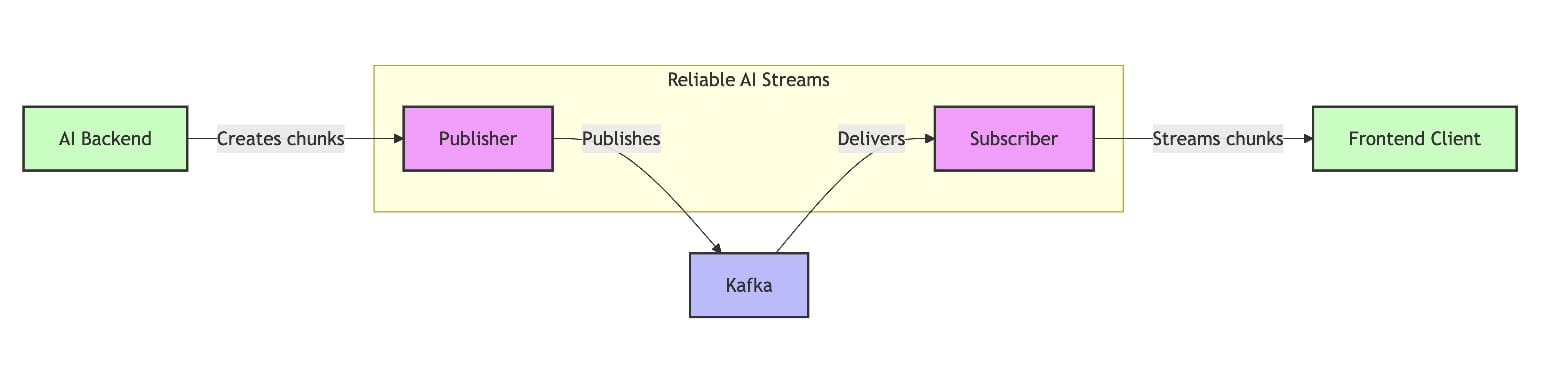
Installation
pip install reliable-ai-streams
Quick Start
from reliable_ai_streams import Publisher, Subscriber, Chunk

# Publish
with Publisher() as pub:
    chunk = Chunk(
        conversation_id="chat-123",
        content="Hello!",
        type="text"
    )
    pub.publish(chunk)

# Subscribe
with Subscriber() as sub:
    for chunk in sub.subscribe("chat-123"):
        print(chunk.content)
        if chunk.type == "finish":
            break
Configuration
Set via environment variables:
KAFKA_BOOTSTRAP_SERVERS=localhost:9092
KAFKA_TOPIC_PREFIX=ai-stream
KAFKA_REPLICATION_FACTOR=1
Or pass directly:
from reliable_ai_streams import Config, Publisher

config = Config(
    bootstrap_servers="kafka:9092",
    replication_factor=1
)
publisher = Publisher(config)
Examples
1. Simple Chat Application
Real-time chat where server streams messages to clients.
Start Server:
python examples/simple_get_stream_example/chat_server.py
Start Client:
python examples/simple_get_stream_example/chat_client.py
Type messages in the server terminal and watch them stream in real-time to all connected clients!
Features:
- Real-time message streaming
- Multiple clients support
- Word-by-word streaming simulation
2. AI Response Streaming
Simulates AI generating responses and streaming them to frontend clients.
Start AI Server:
python examples/ai_server_client/ai_server.py
Start Frontend Client:
python examples/ai_server_client/frontend_client.py conv-001
Or run complete demo:
python examples/ai_server_client/demo.py
Features:
- Simulates AI response generation
- Handles multiple conversations
- Replay from any offset
- Interactive mode
Usage:
# Watch specific conversation
python examples/ai_server_client/frontend_client.py conv-001

# Watch multiple conversations
python examples/ai_server_client/frontend_client.py conv-001 conv-002 conv-003

# Interactive mode
python examples/ai_server_client/frontend_client.py interactive
3. FastAPI Integration
from fastapi import FastAPI
from fastapi.responses import StreamingResponse
from reliable_ai_streams import Publisher, Subscriber, Config, Chunk
import asyncio

app = FastAPI()

config = Config(bootstrap_servers="localhost:9092", replication_factor=1)
publisher = Publisher(config)
subscriber = Subscriber(config)

@app.on_event("startup")
def startup():
    publisher.connect()
    subscriber.connect()

@app.on_event("shutdown")
def shutdown():
    publisher.disconnect()
    subscriber.disconnect()

@app.post("/chat")
async def chat(conversation_id: str, message: str):
    """Start AI generation."""

    async def generate():
        # Simulate AI response
        response = f"You said: {message}"
        for word in response.split():
            yield Chunk(
                conversation_id=conversation_id,
                content=word + " ",
                type="text"
            )
            await asyncio.sleep(0.1)

        yield Chunk(
            conversation_id=conversation_id,
            content="",
            type="finish"
        )

    # Publish in background
    asyncio.create_task(
        publisher.publish_stream(conversation_id, generate())
    )

    return {"conversation_id": conversation_id}

@app.get("/stream/{conversation_id}")
def stream(conversation_id: str, from_offset: int = None):
    """Stream AI response via SSE."""

    def event_stream():
        for chunk in subscriber.subscribe(conversation_id, from_offset):
            yield f"data: {chunk.to_json().decode()}\n\n"
            if chunk.type == "finish":
                break

    return StreamingResponse(
        event_stream(),
        media_type="text/event-stream",
    )
Run:
uvicorn your_app:app --reload
Test:
# Start chat
curl -X POST "http://localhost:8000/chat?conversation_id=test-123&message=Hello"

# Stream response
curl "http://localhost:8000/stream/test-123"
4. Async Streaming
import asyncio
from reliable_ai_streams import Publisher, Config, Chunk

async def generate_ai_response(conversation_id: str):
    """Simulate AI generating a response."""
    words = ["Hello", "there!", "How", "can", "I", "help", "you?"]

    for word in words:
        yield Chunk(
            conversation_id=conversation_id,
            content=word + " ",
            type="text"
        )
        await asyncio.sleep(0.3)

    yield Chunk(
        conversation_id=conversation_id,
        content="",
        type="finish"
    )

async def main():
    config = Config(bootstrap_servers="localhost:9092", replication_factor=1)

    with Publisher(config) as publisher:
        await publisher.publish_stream(
            "demo-123",
            generate_ai_response("demo-123")
        )

asyncio.run(main())
5. Replay from Offset
from reliable_ai_streams import Subscriber, Config

config = Config(bootstrap_servers="localhost:9092", replication_factor=1)

# Subscribe from beginning
with Subscriber(config, group_id="replay-client") as sub:
    for chunk in sub.subscribe("chat-123", from_offset=0):
        print(f"Replayed: {chunk.content}")
        if chunk.type == "finish":
            break
6. Error Handling
from reliable_ai_streams import Publisher, Chunk

with Publisher() as pub:
    try:
        # Normal chunks
        pub.publish(Chunk(
            conversation_id="chat-123",
            content="Processing...",
            type="text"
        ))

        # Simulate error
        raise Exception("Something went wrong!")

    except Exception as e:
        # Send error chunk
        pub.publish(Chunk(
            conversation_id="chat-123",
            content=str(e),
            type="error"
        ))
Running Examples
Prerequisites
- Start Kafka:
docker-compose up -d
- Install package:
pip install reliable-ai-streams
Example 1: Simple Chat
# Terminal 1
python examples/simple_get_stream_example/chat_server.py

# Terminal 2
python examples/simple_get_stream_example/chat_client.py

# Terminal 3 (optional - another client)
python examples/simple_get_stream_example/chat_client.py Client-2
Example 2: AI Server
# Terminal 1
python examples/ai_server_client/ai_server.py

# Terminal 2 (wait 5 seconds after server starts)
python examples/ai_server_client/frontend_client.py conv-001
Example 3: Complete Demo
python examples/ai_server_client/demo.py
Docker Compose Setup
The repository includes a docker-compose.yml for easy Kafka setup:
services:
  kafka:
    image: apache/kafka:latest
    container_name: kafka-test
    ports:
      - "9092:9092"
    environment:
      KAFKA_NODE_ID: 1
      KAFKA_PROCESS_ROLES: broker,controller
      KAFKA_LISTENERS: PLAINTEXT://0.0.0.0:9092,CONTROLLER://0.0.0.0:9093
      KAFKA_ADVERTISED_LISTENERS: PLAINTEXT://localhost:9092
      KAFKA_CONTROLLER_LISTENER_NAMES: CONTROLLER
      KAFKA_LISTENER_SECURITY_PROTOCOL_MAP: CONTROLLER:PLAINTEXT,PLAINTEXT:PLAINTEXT
      KAFKA_CONTROLLER_QUORUM_VOTERS: 1@localhost:9093
      KAFKA_OFFSETS_TOPIC_REPLICATION_FACTOR: 1
    volumes:
      - kafka_data:/var/lib/kafka/data

volumes:
  kafka_data:
Start Kafka:
docker-compose up -d
Stop Kafka:
docker-compose down
Clean up (remove data):
docker-compose down -v
Development Setup
# Clone repository
git clone https://github.com/AryamanGurjar/reliable_ai_stream
cd reliable-ai-streams

# Create virtual environment
python -m venv venv
source venv/bin/activate  # Windows: venv\Scripts\activate

# Install in editable mode
pip install -e .

# Or with dev dependencies
pip install -e ".[dev]"

# Setup environment
cp .env.example .env
# Edit .env with your Kafka settings

# Start Kafka
docker-compose up -d

# Run examples
python examples/simple_get_stream_example/chat_server.py
Testing
# Install test dependencies
pip install -e ".[dev]"

# Start Kafka
docker-compose up -d

# Run tests
pytest tests/

# Run specific test
pytest tests/test_publisher.py -v

# Run with coverage
pytest --cov=reliable_ai_streams tests/
API Reference
Publisher
from reliable_ai_streams import Publisher, Config, Chunk

# Initialize
config = Config(bootstrap_servers="localhost:9092")
publisher = Publisher(config)

# Connect
publisher.connect()

# Publish single chunk
chunk = Chunk(
    conversation_id="chat-123",
    content="Hello",
    type="text"
)
publisher.publish(chunk)
# Publish stream (async)
async def generate():
    yield Chunk(conversation_id="chat-123", content="Hello", type="text")
    yield Chunk(conversation_id="chat-123", content="", type="finish")

await publisher.publish_stream("chat-123", generate())

# Disconnect
publisher.disconnect()

# Or use context manager
with Publisher(config) as pub:
    pub.publish(chunk)
Subscriber
from reliable_ai_streams import Subscriber, Config

# Initialize
config = Config(bootstrap_servers="localhost:9092")
subscriber = Subscriber(config, group_id="my-app")

# Connect
subscriber.connect()

# Subscribe
for chunk in subscriber.subscribe("chat-123"):
    print(chunk.content)
    if chunk.type == "finish":
        break

# Subscribe from offset
for chunk in subscriber.subscribe("chat-123", from_offset=10):
    print(chunk.content)

# Disconnect
subscriber.disconnect()

# Or use context manager
with Subscriber(config) as sub:
    for chunk in sub.subscribe("chat-123"):
        print(chunk.content)
Chunk
from reliable_ai_streams import Chunk

# Create chunk
chunk = Chunk(
    conversation_id="chat-123",
    content="Hello",
    type="text"  # "text", "finish", or "error"
)

# Serialize
json_bytes = chunk.to_json()

# Deserialize
chunk = Chunk.from_json(json_bytes)

# Access fields
print(chunk.id)              # Auto-generated UUID
print(chunk.conversation_id) # "chat-123"
print(chunk.content)         # "Hello"
print(chunk.type)            # "text"
print(chunk.timestamp)       # datetime object
Config
from reliable_ai_streams import Config

# From environment variables
config = Config()

# Or specify directly
config = Config(
    bootstrap_servers="localhost:9092",
    topic_prefix="ai-stream",
    num_partitions=1,
    replication_factor=1,
    retention_hours=168,
    compression=True
)

# Get Kafka config
kafka_config = config.kafka_config()
Environment Variables
# Kafka connection
KAFKA_BOOTSTRAP_SERVERS=localhost:9092

# Security (optional - for production)
KAFKA_SECURITY_PROTOCOL=SASL_SSL
KAFKA_SASL_MECHANISM=SCRAM-SHA-256
KAFKA_SASL_USERNAME=your-username
KAFKA_SASL_PASSWORD=your-password

# Topic settings
KAFKA_TOPIC_PREFIX=ai-stream
KAFKA_NUM_PARTITIONS=1
KAFKA_REPLICATION_FACTOR=3

# Message settings
KAFKA_RETENTION_HOURS=168
KAFKA_COMPRESSION=true
Use Cases
- AI Response Streaming: Stream LLM responses to frontend
- Real-time Chat: Build chat applications with message persistence
- Live Updates: Stream data updates to multiple clients
- Replay Support: Allow users to replay conversations
- Multi-client: Support multiple clients reading same stream
- Mobile Apps: Handle reconnections gracefully
- Gaming: Stream game events to players
- Analytics: Stream analytics data in real-time
Production Considerations
- Security: Use SASL/SSL for production
- Replication: Set
replication_factor=3for high availability - Monitoring: Monitor Kafka metrics
- Retention: Adjust
retention_hoursbased on needs - Partitions: Increase partitions for higher throughput
- Consumer Groups: Use unique group IDs per application
Troubleshooting
Connection Issues
# Check if Kafka is running
docker ps

# View Kafka logs
docker-compose logs -f kafka

# Test connection
python -c "from reliable_ai_streams import Publisher, Config; Publisher(Config()).connect(); print(':white_check_mark: Connected')"
Messages Not Appearing
# Check topic exists
docker exec kafka-test kafka-topics.sh --bootstrap-server localhost:9092 --list

# Check consumer group
docker exec kafka-test kafka-consumer-groups.sh --bootstrap-server localhost:9092 --list
Offset Issues
# Reset to beginning
with Subscriber(config) as sub:
    for chunk in sub.subscribe("chat-123", from_offset=0):
        print(chunk.content)
Contributing
Contributions welcome! Please:
- Fork the repository
- Create a feature branch
- Add tests for new features
- Ensure all tests pass
- Submit a pull request
Support
Release history Release notifications | RSS feed


Download files
Download the file for your platform. If you're not sure which to choose, learn more about installing packages.
Source Distribution
Built Distribution
Filter files by name, interpreter, ABI, and platform.
If you're not sure about the file name format, learn more about wheel file names.
Copy a direct link to the current filters
File details
Details for the file reliable_ai_streams-1.0.1.tar.gz.
File metadata
- Download URL: reliable_ai_streams-1.0.1.tar.gz
- Upload date:
- Size: 13.4 kB
- Tags: Source
- Uploaded using Trusted Publishing? No
- Uploaded via: twine/6.2.0 CPython/3.13.2
File hashes
| Algorithm | Hash digest | |
|---|---|---|
| SHA256 |
95823cd3afba35f02ec1e8ed356883a9ad12bbe4c6d6f6ed606ec2ccba24e3d3
|
|
| MD5 |
99e0f32214bfa3e974810cd0a3298909
|
|
| BLAKE2b-256 |
ef9e11e221d318782da53e98a1d9567a1ad441249fdaf3d4439ee3981434556e
|
File details
Details for the file reliable_ai_streams-1.0.1-py3-none-any.whl.
File metadata
- Download URL: reliable_ai_streams-1.0.1-py3-none-any.whl
- Upload date:
- Size: 10.5 kB
- Tags: Python 3
- Uploaded using Trusted Publishing? No
- Uploaded via: twine/6.2.0 CPython/3.13.2
File hashes
| Algorithm | Hash digest | |
|---|---|---|
| SHA256 |
265031a293b23e801fff9284dce027755bf5c32f8d8775e737a7e6ddb81674f1
|
|
| MD5 |
1be96493cfaa71888635a35c88174b2a
|
|
| BLAKE2b-256 |
2990a677da93d237c6f3a4f3aad4483221c3799157c196bb52ecdbb5cf27393b
|






