
Private-by-default operations dashboard for Reliquary miner fleets
Verified details
These details have been verified by PyPIProject links
GitHub Statistics
Maintainers

Project description
Reliquary Fleet



Private-by-default operations dashboard for Reliquary miners. It combines live
miner health, validator truth, sealed-window rewards, exact reward EMA, and
chain/metagraph state in one responsive page at http://127.0.0.1:9091.
Reliquary Fleet uses read-only HTTP, R2, and SSH probes. It does not require a wallet seed, coldkey, or hotkey private key.
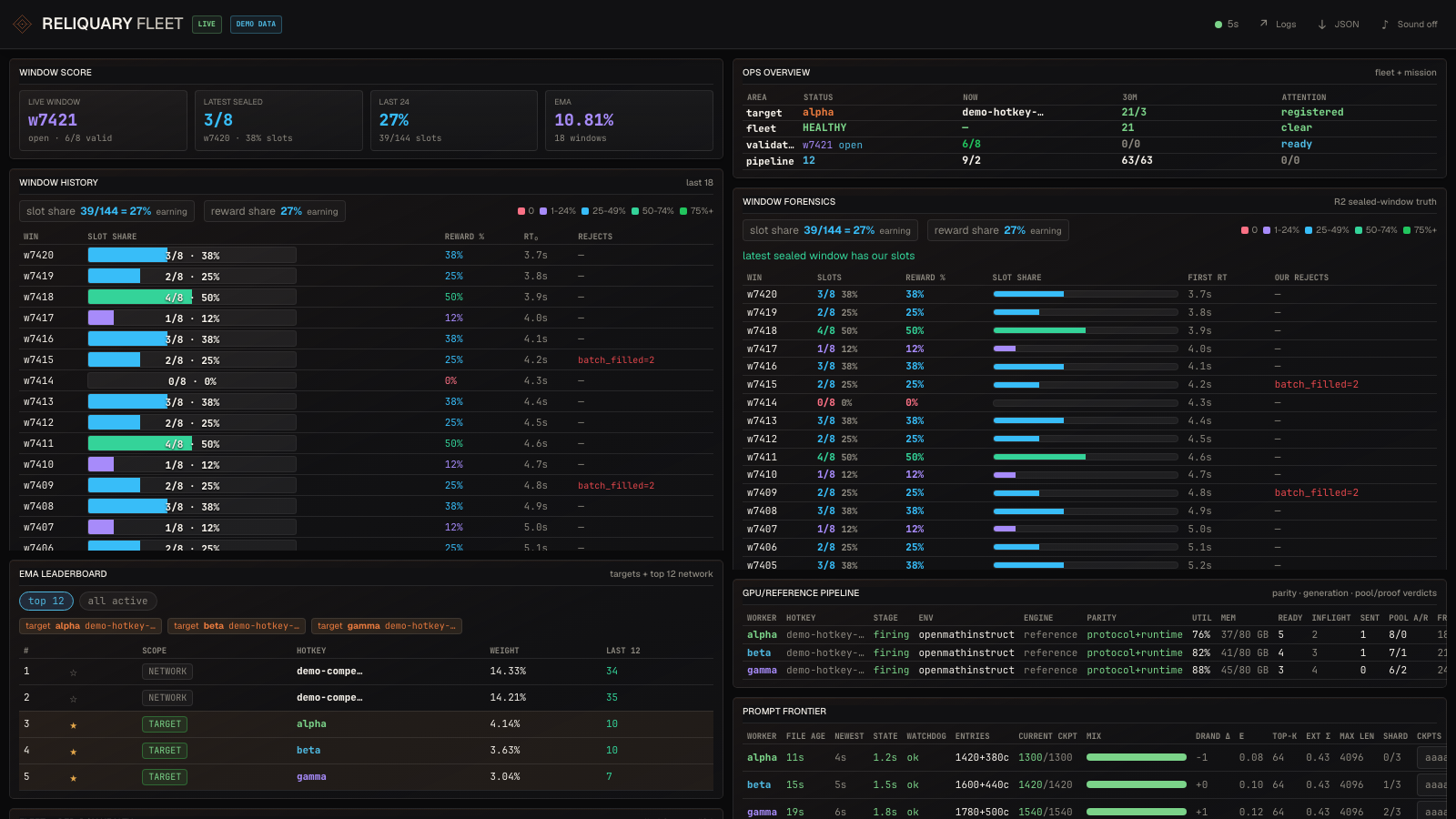
Dashboard preview uses deterministic demo data.
What you get
- Fleet summary — live health, exact provisioned model/checkpoint parity, throughput, OOM-free streak, current window + state, per-environment math/code fill, and validator pool/proof admission rate.
- Submit-disabled accelerator labs — separate RTX/B200 host, GPU, source/checkpoint and aggregate offline-evidence or immutable selector-artifact telemetry. Lab rows have no wallet identity and are excluded from every live-miner, selection, accounting and readiness total.
- EMA leaderboard — replays the validator's exact EMA against cached R2 windows. Star any hotkey to mark it as "yours" and have it tinted + included in the "your share" totals.
- Live event tail — merged journal events from every miner box, color-coded per box.
- Validator-side events — direct
docker logs reliquary-trainertail over SSH. Worker-confirmed pool accept/reject plus seal/fail lifecycle events. - Validator rundown — deployment fingerprint (image SHA + uptime), error counters (Window iteration failed / submission worker / window timeout / randomness retries), throughput, reject reason breakdown. Timeframe pills: 10m / 30m / 60m / all.
- Auction-v2 liveness — event-loop and endpoint latency percentiles, per-environment admission queue/workers/proof activity, prepare/commit/total latency, immutable seal-drain snapshots, and archive enqueue continuity.
- Chain / Baseline / Network RTT — stake + emission per UID, throughput drift vs 6h baseline, latency from each box to the validator.
- Last N windows — slot share per recent window + reject summary, with internal scroll.
Install
# Recommended: isolated application install.
pipx install reliquary-fleet

# Or install beside Reliquary in an existing virtual environment.
python -m pip install reliquary-fleet

# Create an owner-only starter config in your OS user config directory.
reliquary-fleet init
Edit the path printed by init, replace every example host and hotkey, then:
reliquary-fleet doctor
reliquary-fleet doctor --connect
reliquary-fleet serve --open
Upgrade without replacing config or cached history:
pipx upgrade reliquary-fleet
# or: python -m pip install --upgrade reliquary-fleet
Source checkout
git clone https://github.com/reliquadotai/reliquary-fleet.git
cd reliquary-fleet

python3 -m venv .venv && source .venv/bin/activate
pip install -r requirements.txt

# Configure the dashboard.
cp config.example.yaml config.yaml
$EDITOR config.yaml

# Optionally export R2 creds via env instead of putting them in yaml.
# Env wins over yaml when both are set.
export R2_ENDPOINT="https://<account>.r2.cloudflarestorage.com"
export R2_BUCKET="reliquary"
export AWS_ACCESS_KEY_ID="..."
export AWS_SECRET_ACCESS_KEY="..."

./run.sh
# Open http://127.0.0.1:9091
Prerequisites
- SSH access to every box you list in
fleet:and to the validator host. Passwordless key auth — the dashboard runsssh -i <key> -o BatchMode=yes ...and a password prompt will hang the poller. Test withssh root@<host> 'docker ps'first. - Read-only lab access for every optional
labs:host. A running lab service must exposeRELIQUARY_SUBMIT_DISABLED_LAB=1andRELIQUARY_LANE_START_ALLOWED=0; evidence databases are opened in SQLite read-only mode, while completed artifact-only jobs are read from an immutable checksummed manifest. Only aggregate counters and whitelisted artifact metadata leave the host. - Cloudflare R2 read access to the bucket the validator publishes window archives to. The validator writes
reliquary/dataset/window-<N>.json.gz— you need GET + LIST on that prefix. A scoped Access Key ID + Secret with read-only is sufficient. - Python 3.10-3.13 on Linux or macOS.
Configuration
Run reliquary-fleet init to create the default private config. An explicit
--config path wins, followed by RELIQUARY_FLEET_CONFIG, a checkout-local
./config.yaml, and finally the per-user config. The full shape is documented
inline in config.example.yaml. The minimum useful configuration is:
validator:
  url: "http://YOUR_VALIDATOR_IP:8080"
  ssh:
    host: "root@YOUR_VALIDATOR_IP"
    key:  "~/.ssh/id_ed25519"

fleet:
  - alias:  "your-miner-1"        # ssh alias or user@host
    hotkey: "5Grwva..."           # SS58
    label:  "m1"
    color:  "cyan"

labs:
  - alias: "root@YOUR_OFFLINE_GPU"
    label: "offline-selector-lab"
    color: "yellow"
    selector_artifact_manifest: "/srv/reliquary-selector/artifacts/challenger/manifest.json"
    source_manifest: "/srv/reliquary-miner-pro/state/source-manifest.env"

r2:
  endpoint: "https://<account>.r2.cloudflarestorage.com"
  bucket:   "reliquary"
  access_key_id:     "..."
  secret_access_key: "..."
labs: is deliberately not an alternate fleet syntax. A lab entry rejects a
hotkey, never enters the owned-key set, and cannot affect /healthz fleet
readiness. The dashboard reports its service and evidence status separately so
an idle or failed experiment cannot be mistaken for a stopped live miner—and
an active experiment cannot be mistaken for production mining.
A lab may configure evidence_db, selector_artifact_manifest, or both. The
selector manifest is opened read-only, must be a non-symlink regular file with
no group/world write bits, and must pass its canonical SHA-256 checksum before
the dashboard exposes its whitelisted identity, window range, row counts and
held-out calibration metrics. shadow_only and rejected remain offline
artifact states; neither can affect miner readiness or live accounting.
Bounded selector-search reports additionally expose rolling GPU lift, positive
value-fold coverage, the final deterministic CPU challenger and explicit
activation blockers. A positive challenger remains visibly shadow_only
until every blocker is cleared; the dashboard never infers eligibility from
lift alone.
For a deliberate same-host multi-lane miner, list every possible service under
unit + allowed_units, then put only the exact simultaneous set under
coordinated_units. A single active allowed service remains valid. More than
one is valid only when the active set exactly equals coordinated_units; an
unexpected, transitional, or differently paired service set still fails
closed as multiple_allowed_units_active.
dashboard.refresh_seconds is the idle delay after each completed probe, not
the maximum duration of the SSH and validator work itself. /healthz uses the
separate dashboard.health_poll_stale_seconds budget (60 seconds by default)
so normal bounded probes do not flap readiness; set it just above the slowest
expected complete probe cycle so a stuck poller still fails closed.
When a logical box can switch between the legacy reference service and the
named Math/Code services, keep the legacy unit/env_file and explicitly
allow each replacement with its lane-specific state path:
  - alias: "ubuntu@your-h100"
    hotkey: "5..."
    label: "h100-reserve1"
    color: "cyan"
    unit: "reliquary-miner-pro.service"
    env_file: "/srv/reliquary-miner-pro/state/miner-pro.env"
    allowed_units:
      - unit: "reliquary-miner-pro@math-reserve1.service"
        env_file: "/srv/reliquary-miner-pro/state/miner-pro-math-reserve1.env"
      - unit: "reliquary-miner-pro@code-reserve1.service"
        env_file: "/srv/reliquary-miner-pro/state/miner-pro-code-reserve1.env"
Exactly one of a row's primary/replacement units may be active. Separately
configured rows on the same SSH host may run concurrently (for example Code
shards code-reserve1 and code-reserve2): each row collects only its own
service, while their union becomes the host-wide allowlist. Any active
reliquary-miner-pro@*.service outside that union remains a fail-closed unit
selection error. This preserves lane-specific environment, frontier, and
quarantine checks without treating an intended sibling shard as unexpected.
For one fixed named lane, configure that service directly as unit, provide
its exact env_file, and omit allowed_units. Remove obsolete sibling rows:
every configured row is a required live fleet member, not a historical lane.
Code auction readiness
Reference opencodeinstruct lanes have an additional fail-closed readiness
contract. The dashboard compares the selected service's live /proc values
with its root-only EnvironmentFile and requires:
- the miner and source-pinned grader services to be persistently enabled;
- exact Code pre-screening plus
RELIQUARY_CODE_AUCTION_POLICY=deadline_aware; - a non-empty current systemd InvocationID and a
code_auction_readinessstartup attestation found only inside that invocation's journal; - the root-owned grader socket, versioned bundle source, and successful grader canary counters to match the validator's public source revision;
- full private/public source revisions with
PROVISIONED_OK=1, with the public revision equal to a fresh, error-freestatus=okvalidator health sample; retained last-good health is never used; and - a healthy v1 Code outcome ledger containing the validator's exact current model repository, checkpoint revision, checkpoint number, public source revision, runtime profile hash, and Code environment tuple.
The SQLite probe uses mode=ro and PRAGMA query_only=ON; it never creates or
updates the ledger, scans the attempts table, or exports prompt, completion,
wallet, or attempt identifiers. Ledger v1's explicit partitions registry
records this six-field identity at startup and dynamic checkpoint changes, so
an exact current empty
partition is ready before its first natural attempt. The dashboard never
guesses currentness from attempt timestamps. Math and legacy lanes do not
inherit these Code-only readiness gates.
Newer schema-v1 ledgers may also contain the additive generation_outcomes
table. When present, the dashboard shows only aggregate counts for the exact
current six-field partition and active Code lane: natural-EOS completions,
local token-limit terminations, and safe-deadline cancellations. The displayed
natural-EOS rate is complete / (complete + local_token_limit); safe deadlines
are right-censored by window position and never count as failures in that
denominator. Ledgers created before this optional table remain ready and are
shown as legacy telemetry. No prompt, completion, attempt key, reward, or
wallet data is read or exported.
The grader service name, socket, bundle link, metrics port, and expected socket
mode have non-secret defaults under code_readiness: in
config.example.yaml. The startup attestation is invocation-scoped and must be
emitted only after the active binary has installed the pre-screen/policy and
verified the configured grader and ledger:
code_auction_readiness {"schema_version":1,"prescreen_enabled":true,"auction_policy":"deadline_aware","ledger_path":"/srv/reliquary-miner-pro/state/code-auction.sqlite3","ledger_available":true,"ledger_partition_registered":true,"ledger_schema_version":1,"grader_socket":"/tmp/reliquary-grader.sock","grader_source_revision":"<40-hex-public-source-revision>","process_pid":1234,"miner_source_revision":"<40-hex-private-source-revision>","public_source_revision":"<40-hex-public-source-revision>","runtime_profile_hash":"<64-hex-profile-hash>"}
Managing the fleet
Two ways to edit:
- Edit the active config and restart — canonical source of truth. Best for the initial onboarding of a box.
reliquary-fleet doctorprints the active path. - Live in the dashboard — click ★ on any EMA-leaderboard row to mark that hotkey as "yours." It is persisted in the private application state directory. Starred hotkeys appear in the "our share" totals and are tinted in the leaderboard.
The set of hotkeys treated as "yours" is the union of every hotkey: under fleet:, the persistent star state, and starred_hotkeys: in the config.
Daily operator loop
Use this order when you open the dashboard. It keeps the brain calm and prevents chasing the wrong hotkey.
- Target key: in Fleet and Chain, confirm the row label and short SS58 prefix match the miner you care about.
- Chain registration: check Chain - netuid 81 before reading performance.
active target, not registered on netuid 81means the dashboard is targeting the right key, but the key cannot yet be counted as a registered SN81 miner. - Live window: check Mission control or Window score for the current window, state, and separate math/code
valid/targetpressure. If an environment is already full and our pool accepts are zero, this is a timing/slot-race problem. - Per-box health: check Fleet for process alive, uptime, the atomic source-manifest model identity, GPU memory/utilization, disk, OOM age, and validator-confirmed
pool/30m. The model cell compares the provisioned checkpoint (or explicitly reset clean base) with live validator state, unless PID/start-bound load or generation evidence attests a newer exact runtime checkpoint.pool/30mis/verdictsproof/pool admission, not selection or earnings. A live GPU withpool/30m = 0means the box is running but not entering the validator pool. - Pipeline: check GPU/cache pipeline for ready/inflight/submitted. If these stay zero while GPU memory is loaded, inspect miner logs for local skip/reward filtering.
- Validator liveness: use the auction-v2 ingress liveness block to separate queue pressure from expensive preparation. Compare Math/Code queue depth, workers, prepare p95/p99, commit-lock p99 and total p95/p99; then verify each seal drain is
okand its queue/workers/reservations snapshot is empty. Archive enqueue gaps and seal timeouts make/healthzdegraded only when the validator explicitly reports them; an older schema with no fields remains compatible. - Validator proof: use Validator-side events and Validator rundown for proof/pool truth. Good results require this sequence for the target hotkey: submit received, proof finished accepted=true, then candidate accepted into the pool. That still does not imply earnings; use sealed R2 rows for final batch selection and
rewards_by_hotkey. - Recent windows: use Last N windows for the last 24-window result quality. Archive-v2
completedobjects remain reward evidence.abortedtombstones retain numeric continuity and show their failure stage/type, but are excluded from slots, rewards, EMA and training interpretation.
When the dashboard and chain disagree, trust chain registration for ownership/stake, direct /verdicts only for proof/pool acceptance, and sealed R2 rows for final selection plus rewards_by_hotkey for reward. Miner-local logs are useful for debugging, but neither they nor /verdicts accepted=true prove earnings.
Architecture (one paragraph)
fleet.py is the data layer — pure helpers for SSH-polling each box, fetching /state, /health, and full-hotkey /verdicts from the validator, downloading + caching multi-environment R2 archives, replaying rewards_by_hotkey exactly, and parsing the validator's structured lifecycle stream.
fleet_web.py is the presentation layer — a FastAPI app that renders each panel as an HTMX fragment. A background poller thread keeps state warm so each /api/* endpoint returns in <1 ms. The HTML page itself polls each fragment endpoint on its own cadence (1–30 s) via HTMX.
/api/export.json keeps the validator's full health_raw payload and also adds a stable normalized validator.liveness object. Consumers can read the normalized object across old and new validator builds: reported=false, empty maps and null counters mean “not reported,” never a measured zero. Archive-v2 lifecycle and per-environment seal-drain evidence are exported on each explicit-lifecycle window.
State is module-level singletons under a lock; no local database or Redis is
required. Installed runs keep owner-only baseline, window cache, star state,
and the duplicate-instance lock in the OS user state directory. Set
RELIQUARY_FLEET_STATE_DIR or pass --state-dir to override it. Source
checkouts retain the compatible ./state layout.
Operations
- Foreground service:
reliquary-fleet serve; stop cleanly withCtrl-C. - Open automatically:
reliquary-fleet serve --open. - Custom paths:
reliquary-fleet serve --config /path/config.yaml --state-dir /path/state. - Remote access: prefer
ssh -L 9091:127.0.0.1:9091 operator-host. A non-loopback bind is refused unless--allow-remoteis supplied and must sit behind authenticated TLS. - Logs: stdout/stderr are service-ready and do not include R2 credentials or signed URLs.
- Reset state: use the path printed by
reliquary-fleet doctor. Removingstarred.jsonclears manual stars; removingwindow_cache_v2.json.gzprogressively rebuilds sealed-window history.
Troubleshooting
| Symptom | Likely cause |
|---|---|
R2 unavailable on every panel |
R2_ENDPOINT / R2_BUCKET unset or credentials lack GetObject/ListBucket on the prefix |
| Validator panel shows "unreachable" | validator.url wrong, validator container down, or :8080 blocked by host firewall |
| Box stuck at "warming…" | passwordless SSH to that box not working — test with ssh <alias> 'true' |
one environment's valid/target never moves |
inspect /health proof reservations/rejects and miner parity/quarantine state; the aggregate /state count can hide a starved environment |
port already in use on launch |
another instance is still running — lsof -nP -iTCP:9091 -sTCP:LISTEN then kill <pid> |
License
MIT. Bundled third-party notices are in THIRD_PARTY_NOTICES.md.
Project details
Verified details
These details have been verified by PyPIProject links
GitHub Statistics
Maintainers


Download files
Download the file for your platform. If you're not sure which to choose, learn more about installing packages.
Source Distribution
Built Distribution
Filter files by name, interpreter, ABI, and platform.
If you're not sure about the file name format, learn more about wheel file names.
Copy a direct link to the current filters
File details
Details for the file reliquary_fleet-1.0.1.tar.gz.
File metadata
- Download URL: reliquary_fleet-1.0.1.tar.gz
- Upload date:
- Size: 324.0 kB
- Tags: Source
- Uploaded using Trusted Publishing? Yes
- Uploaded via: twine/6.1.0 CPython/3.13.14
File hashes
| Algorithm | Hash digest | |
|---|---|---|
| SHA256 |
0da36001080b43f1c1180b97de7f2b53f669e0187af96b273b78707bd5fffb8c
|
|
| MD5 |
049ae587580d253583ea763450780224
|
|
| BLAKE2b-256 |
a042cdd1b0d09dc8f4f6b0a1f148abfb68b4195f9a80368a6b365ae91461f647
|
Provenance
The following attestation bundles were made for reliquary_fleet-1.0.1.tar.gz:
Publisher:
publish.yml on reliquadotai/reliquary-fleet
-
Statement:
-
Statement type:
https://in-toto.io/Statement/v1 -
Predicate type:
https://docs.pypi.org/attestations/publish/v1 -
Subject name:
reliquary_fleet-1.0.1.tar.gz -
Subject digest:
0da36001080b43f1c1180b97de7f2b53f669e0187af96b273b78707bd5fffb8c - Sigstore transparency entry: 2216963483
- Sigstore integration time:
-
Permalink:
reliquadotai/reliquary-fleet@57647545ac8eb49a6d9a3d4ad9c7f18b6d0e5d31 -
Branch / Tag:
refs/tags/v1.0.1 - Owner: https://github.com/reliquadotai
-
Access:
public
-
Token Issuer:
https://token.actions.githubusercontent.com -
Runner Environment:
github-hosted -
Publication workflow:
publish.yml@57647545ac8eb49a6d9a3d4ad9c7f18b6d0e5d31 -
Trigger Event:
release
-
Statement type:
File details
Details for the file reliquary_fleet-1.0.1-py3-none-any.whl.
File metadata
- Download URL: reliquary_fleet-1.0.1-py3-none-any.whl
- Upload date:
- Size: 273.7 kB
- Tags: Python 3
- Uploaded using Trusted Publishing? Yes
- Uploaded via: twine/6.1.0 CPython/3.13.14
File hashes
| Algorithm | Hash digest | |
|---|---|---|
| SHA256 |
b82b4f77adbf1cd4ecadb70022d3b1688f18f5888ef07b87c208b3d68ad9cb8a
|
|
| MD5 |
252fe61abcd6d48cdad593af9ec7d740
|
|
| BLAKE2b-256 |
3e5bd1f59f7dfc1979cefac51e4a12112486ae975f27bdce1563d10bf8021ab8
|
Provenance
The following attestation bundles were made for reliquary_fleet-1.0.1-py3-none-any.whl:
Publisher:
publish.yml on reliquadotai/reliquary-fleet
-
Statement:
-
Statement type:
https://in-toto.io/Statement/v1 -
Predicate type:
https://docs.pypi.org/attestations/publish/v1 -
Subject name:
reliquary_fleet-1.0.1-py3-none-any.whl -
Subject digest:
b82b4f77adbf1cd4ecadb70022d3b1688f18f5888ef07b87c208b3d68ad9cb8a - Sigstore transparency entry: 2216963536
- Sigstore integration time:
-
Permalink:
reliquadotai/reliquary-fleet@57647545ac8eb49a6d9a3d4ad9c7f18b6d0e5d31 -
Branch / Tag:
refs/tags/v1.0.1 - Owner: https://github.com/reliquadotai
-
Access:
public
-
Token Issuer:
https://token.actions.githubusercontent.com -
Runner Environment:
github-hosted -
Publication workflow:
publish.yml@57647545ac8eb49a6d9a3d4ad9c7f18b6d0e5d31 -
Trigger Event:
release
-
Statement type:






