
REM - Resources Entities Moments
Cloud-native unified memory infrastructure for agentic AI systems built with Pydantic AI, FastAPI, and FastMCP.
Architecture Overview
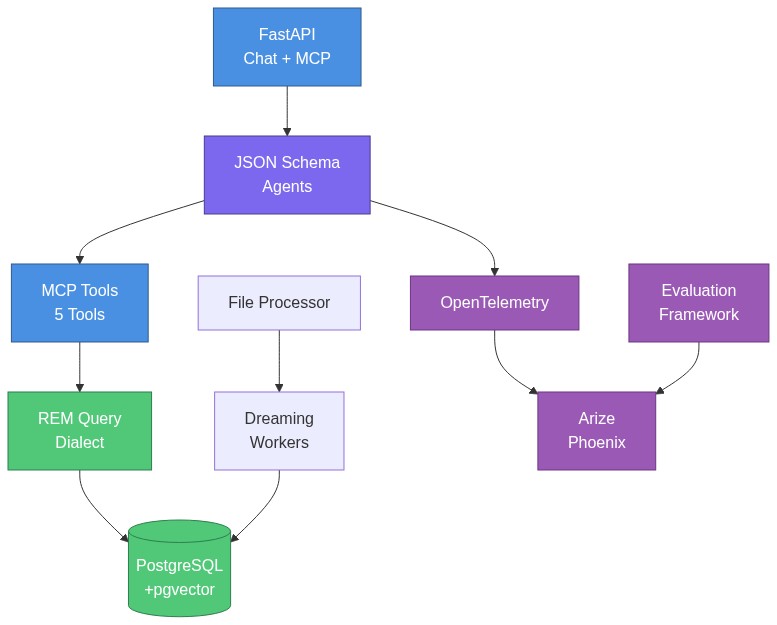
Key Components:
- API Layer: OpenAI-compatible chat completions + MCP server (not separate deployments)
- Agentic Framework: JSON Schema-based agents with no-code configuration
- Database Layer: PostgreSQL 18 with pgvector for multi-index memory (KV + Vector + Graph)
- REM Query Dialect: Custom query language with O(1) lookups, semantic search, graph traversal
- Ingestion & Dreaming: Background workers for content extraction and progressive index enrichment (0% → 100% answerable)
- Observability & Evals: OpenTelemetry tracing supporting LLM-as-a-Judge evaluation frameworks
Features
| Feature | Description | Benefits |
|---|---|---|
| OpenAI-Compatible Chat API | Drop-in replacement for OpenAI chat completions API with streaming support | Use with existing OpenAI clients, switch models across providers (OpenAI, Anthropic, etc.) |
| Built-in MCP Server | FastMCP server with 4 tools + 5 resources for memory operations | Export memory to Claude Desktop, Cursor, or any MCP-compatible host |
| REM Query Engine | Multi-index query system (LOOKUP, FUZZY, SEARCH, SQL, TRAVERSE) with custom dialect | O(1) lookups, semantic search, graph traversal - all tenant-isolated |
| Dreaming Workers | Background workers for entity extraction, moment generation, and affinity matching | Automatic knowledge graph construction from resources (0% → 100% query answerable) |
| PostgreSQL + pgvector | CloudNativePG with PostgreSQL 18, pgvector extension, streaming replication | Production-ready vector search, no external vector DB needed |
| AWS EKS Recipe | Complete infrastructure-as-code with Pulumi, Karpenter, ArgoCD | Deploy to production EKS in minutes with auto-scaling and GitOps |
| JSON Schema Agents | Dynamic agent creation from YAML schemas via Pydantic AI factory | Define agents declaratively, version control schemas, load dynamically |
| Content Providers | Audio transcription (Whisper), vision (OpenAI, Anthropic, Gemini), PDFs, DOCX, PPTX, XLSX, images | Multimodal ingestion out of the box with format detection |
| Configurable Embeddings | OpenAI embedding system (text-embedding-3-small) | Production-ready embeddings, additional providers planned |
| Multi-Tenancy | Tenant isolation at database level with automatic scoping | SaaS-ready with complete data separation per tenant |
| Zero Vendor Lock-in | Raw HTTP clients (no OpenAI SDK), swappable providers, open standards | Not tied to any vendor, easy to migrate, full control |
Quick Start
Choose your path:
- Option 1: Package Users with Example Data (Recommended) - PyPI + example datasets
- Option 2: Developers - Clone repo, local development with uv
Option 1: Package Users with Example Data (Recommended)
Best for: First-time users who want to explore REM with curated example datasets.
# Install system dependencies (tesseract for OCR)
brew install tesseract  # macOS (Linux/Windows: see tesseract-ocr.github.io)

# Install remdb
pip install "remdb[all]"

# Clone example datasets
git clone https://github.com/Percolation-Labs/remstack-lab.git
cd remstack-lab

# Start services (PostgreSQL, Phoenix observability)
curl -O https://gist.githubusercontent.com/percolating-sirsh/d117b673bc0edfdef1a5068ccd3cf3e5/raw/docker-compose.prebuilt.yml
docker compose -f docker-compose.prebuilt.yml up -d

# Configure REM (creates ~/.rem/config.yaml and installs database schema)
# Add --claude-desktop to register with Claude Desktop app
rem configure --install --claude-desktop

# Load quickstart dataset
rem db load datasets/quickstart/sample_data.yaml

# Ask questions
rem ask "What documents exist in the system?"
rem ask "Show me meetings about API design"

# Ingest files (PDF, DOCX, images, etc.)
rem process ingest datasets/formats/files/bitcoin_whitepaper.pdf --category research --tags bitcoin,whitepaper

# Query ingested content
rem ask "What is the Bitcoin whitepaper about?"
What you get:
- Quickstart: 3 users, 3 resources, 3 moments, 4 messages
- Domain datasets: recruitment, legal, enterprise, misc
- Format examples: engrams, documents, conversations, files
Learn more: remstack-lab repository
Using the API
Once configured, you can also use the OpenAI-compatible chat completions API:
# Start all services (PostgreSQL, Phoenix, API)
docker compose -f docker-compose.prebuilt.yml up -d

# Test the API
curl -X POST http://localhost:8000/api/v1/chat/completions \
  -H "Content-Type: application/json" \
  -H "X-Session-Id: a1b2c3d4-e5f6-7890-abcd-ef1234567890" \
  -d '{
    "model": "anthropic:claude-sonnet-4-5-20250929",
    "messages": [{"role": "user", "content": "What documents did Sarah Chen author?"}],
    "stream": false
  }'
Port Guide:
- 5051: Package users with
docker-compose.prebuilt.yml(pre-built image) - 5050: Developers with
docker-compose.yml(local build)
Next Steps:
- See CLI Reference for all available commands
- See REM Query Dialect for query examples
- See API Endpoints for OpenAI-compatible API usage
Example Datasets
Clone remstack-lab for curated datasets organized by domain and format.
What's included:
- Quickstart: Minimal dataset (3 users, 3 resources, 3 moments) - perfect for first-time users
- Domains: Recruitment (CV parsing), Legal (contracts), Enterprise (team collaboration)
- Formats: Engrams (voice memos), Documents (markdown/PDF), Conversations (chat logs)
- Evaluation: Golden datasets for Phoenix-based agent testing
Working from remstack-lab:
cd remstack-lab

# Load any dataset
rem db load --file datasets/quickstart/sample_data.yaml

# Explore formats
rem db load --file datasets/formats/engrams/scenarios/team_meeting/team_standup_meeting.yaml
See Also
- REM Query Dialect - LOOKUP, SEARCH, TRAVERSE, SQL query types
- API Endpoints - OpenAI-compatible chat completions, MCP server
- CLI Reference - Complete command-line interface documentation
- Bring Your Own Agent - Create custom agents with your own prompts and tools
- Production Deployment - AWS EKS with Kubernetes
- Example Datasets - Curated datasets by domain and format
Bring Your Own Agent
REM allows you to create custom agents with your own system prompts, tools, and output schemas. Custom agents are stored in the database and dynamically loaded when referenced, enabling no-code agent creation without modifying the codebase.
How It Works
- Define Agent Schema - Create a YAML file with your agent's prompt, tools, and output structure
- Ingest Schema - Use
rem process ingestto store the schema in the database - Use Your Agent - Reference your agent by name with
rem ask <agent-name> "query"
When you run rem ask my-agent "query", REM:
- Checks if
my-agentexists in the filesystem (schemas/agents/) - If not found, performs a LOOKUP query on the
schemastable in the database - Loads the schema dynamically and creates a Pydantic AI agent
- Runs your query with the custom agent
Expected Behavior
Schema Ingestion Flow (rem process ingest my-agent.yaml):
- Parse YAML file to extract JSON Schema content
- Extract
json_schema_extra.kindfield → maps tocategorycolumn - Extract
json_schema_extra.provider_configs→ stores provider configurations - Extract
json_schema_extra.embedding_fields→ stores semantic search fields - Create
Schemaentity inschemastable withuser_idscoping - Schema is now queryable via
LOOKUP "my-agent" FROM schemas
Agent Loading Flow (rem ask my-agent "query"):
load_agent_schema("my-agent")checks filesystem cache → miss- Falls back to database:
LOOKUP "my-agent" FROM schemas WHERE user_id = '<user-id>' - Returns
Schema.spec(JSON Schema dict) from database create_agent()factory creates Pydantic AI agent from schema- Agent runs with tools specified in
json_schema_extra.tools - Returns structured output defined in
propertiesfield
Quick Example
Step 1: Create Agent Schema (my-research-assistant.yaml)
type: object
description: |
  You are a research assistant that helps users find and analyze documents.

  Use the search_rem tool to find relevant documents, then analyze and summarize them.
  Be concise and cite specific documents in your responses.

properties:
  summary:
    type: string
    description: A concise summary of findings
  sources:
    type: array
    items:
      type: string
    description: List of document labels referenced

required:
  - summary
  - sources

json_schema_extra:
  kind: agent
  name: research-assistant
  version: 1.0.0
  tools:
    - search_rem
    - ask_rem_agent
  resources: []
For more examples, see:
- Simple agent (no tools):
src/rem/schemas/agents/examples/simple.yaml - Agent with REM tools:
src/rem/schemas/agents/core/rem-query-agent.yaml - Ontology extractor:
src/rem/schemas/agents/examples/cv-parser.yaml
Step 2: Ingest Schema into Database
# Ingest the schema (stores in database schemas table)
rem process ingest my-research-assistant.yaml \
  --category agents \
  --tags custom,research

# Verify schema is in database (should show schema details)
rem ask "LOOKUP 'my-research-assistant' FROM schemas"
Step 3: Use Your Custom Agent
# Run a query with your custom agent
rem ask research-assistant "Find documents about machine learning architecture"

# With streaming
rem ask research-assistant "Summarize recent API design documents" --stream

# With session continuity
rem ask research-assistant "What did we discuss about ML?" --session-id c3d4e5f6-a7b8-9012-cdef-345678901234
Agent Schema Structure
Every agent schema must include:
Required Fields:
type: object- JSON Schema type (always "object")description- System prompt with instructions for the agentproperties- Output schema defining structured response fields
Optional Metadata (json_schema_extra):
kind- Agent category ("agent", "evaluator", etc.) → maps toSchema.categoryname- Agent identifier (used for LOOKUP)version- Semantic version (e.g., "1.0.0")tools- List of MCP tools to load (e.g.,["search_rem", "lookup_rem"])resources- List of MCP resources to expose (e.g.,["user_profile"])provider_configs- Multi-provider testing configurations (for ontology extractors)embedding_fields- Fields to embed for semantic search (for ontology extractors)
Available MCP Tools
REM provides 4 built-in MCP tools your agents can use:
| Tool | Purpose | Parameters |
|---|---|---|
search_rem |
Execute REM queries (LOOKUP, FUZZY, SEARCH, SQL, TRAVERSE) | query_type, entity_key, query_text, table, sql_query, initial_query, edge_types, depth |
ask_rem_agent |
Natural language to REM query via agent-driven reasoning | query, agent_schema, agent_version |
ingest_into_rem |
Full file ingestion pipeline (read → store → parse → chunk → embed) | file_uri, category, tags, is_local_server |
read_resource |
Access MCP resources (schemas, status) for Claude Desktop | uri |
Tool Reference: Tools are defined in src/rem/api/mcp_router/tools.py
Note: search_rem is a unified tool that handles all REM query types via the query_type parameter:
query_type="lookup"- O(1) entity lookup by labelquery_type="fuzzy"- Fuzzy text matching with similarity thresholdquery_type="search"- Semantic vector search (table-specific)query_type="sql"- Direct SQL queries (WHERE clause)query_type="traverse"- Graph traversal with depth control
Multi-User Isolation
For multi-tenant deployments, custom agents are scoped by user_id, ensuring complete data isolation. Use --user-id flag when you need tenant separation:
# Create agent for specific tenant
rem process ingest my-agent.yaml --user-id tenant-a --category agents

# Query with tenant context
rem ask my-agent "test" --user-id tenant-a
Troubleshooting
Schema not found error:
# Check if schema was ingested correctly
rem ask "SEARCH 'my-agent' FROM schemas"

# List all schemas
rem ask "SELECT name, category, created_at FROM schemas ORDER BY created_at DESC LIMIT 10"
Agent not loading tools:
- Verify
json_schema_extra.toolslists correct tool names - Valid tool names:
search_rem,ask_rem_agent,ingest_into_rem,read_resource - Check MCP tool names in
src/rem/api/mcp_router/tools.py - Tools are case-sensitive: use
search_rem, notSearch_REM
Agent not returning structured output:
- Ensure
propertiesfield defines all expected output fields - Use
requiredfield to mark mandatory fields - Check agent response with
--streamdisabled to see full JSON output
REM Query Dialect
REM provides a custom query language designed for LLM-driven iterated retrieval with performance guarantees.
Design Philosophy
Unlike traditional single-shot SQL queries, the REM dialect is optimized for multi-turn exploration where LLMs participate in query planning:
- Iterated Queries: Queries return partial results that LLMs use to refine subsequent queries
- Composable WITH Syntax: Chain operations together (e.g.,
TRAVERSE edge_type WITH LOOKUP "...") - Mixed Indexes: Combines exact lookups (O(1)), semantic search (vector), and graph traversal
- Query Planner Participation: Results include metadata for LLMs to decide next steps
Example Multi-Turn Flow:
Turn 1: LOOKUP "sarah-chen" → Returns entity + available edge types
Turn 2: TRAVERSE authored_by WITH LOOKUP "sarah-chen" DEPTH 1 → Returns connected documents
Turn 3: SEARCH "architecture decisions" → Semantic search, then explore graph from results
This enables LLMs to progressively build context rather than requiring perfect queries upfront.
See REM Query Dialect (AST) for complete grammar specification.
Query Types
LOOKUP - O(1) Exact Label Lookup
Fast exact match on entity labels (natural language identifiers, not UUIDs).
LOOKUP "sarah-chen" FROM resources
LOOKUP "api-design-v2" FROM resources WHERE category = "projects"
Performance: O(1) - indexed on label column
Returns: Single entity or null
Use case: Fetch specific known entities by human-readable name
FUZZY - Fuzzy Text Search
Fuzzy matching for partial names or misspellings using PostgreSQL trigram similarity.
FUZZY "sara" FROM resources LIMIT 10
FUZZY "api desgin" FROM resources THRESHOLD 0.3 LIMIT 5
Performance: O(n) with pg_trgm GIN index (fast for small-medium datasets) Returns: Ranked list by similarity score Use case: Handle typos, partial names, or when exact label is unknown
SEARCH - Semantic Vector Search
Semantic search using pgvector embeddings with cosine similarity.
SEARCH "machine learning architecture" FROM resources LIMIT 10
SEARCH "contract disputes" FROM resources WHERE tags @> ARRAY['legal'] LIMIT 5
Performance: O(log n) with HNSW index Returns: Ranked list of semantically similar entities Use case: Find conceptually related content without exact keyword matches
TRAVERSE - Recursive Graph Traversal
Follow graph_edges relationships across the knowledge graph.
TRAVERSE authored_by WITH LOOKUP "sarah-chen" DEPTH 2
TRAVERSE references,depends_on WITH LOOKUP "api-design-v2" DEPTH 3
Features:
- Polymorphic: Seamlessly traverses
resources,moments,usersviaall_graph_edgesview - Filtering: Filter by one or multiple edge types (comma-separated)
- Depth Control: Configurable recursion depth (default: 2)
- Data Model: Requires
InlineEdgeJSON structure ingraph_edgescolumn
Returns: Graph of connected entities with edge metadata Use case: Explore relationships, find connected entities, build context
Direct SQL Queries
Raw SQL for complex temporal, aggregation, or custom queries.
SELECT * FROM resources WHERE created_at > NOW() - INTERVAL '7 days' ORDER BY created_at DESC LIMIT 20
SELECT category, COUNT(*) as count FROM resources GROUP BY category
WITH recent AS (SELECT * FROM resources WHERE created_at > NOW() - INTERVAL '1 day') SELECT * FROM recent
Performance: Depends on query and indexes
Returns: Raw query results
Use case: Complex filtering, aggregations, temporal queries
Allowed: SELECT, INSERT, UPDATE, WITH (read + data modifications)
Blocked: DROP, DELETE, TRUNCATE, ALTER (destructive operations)
Note: Can be used standalone or with WITH syntax for composition
Graph Edge Format
Edges stored inline using InlineEdge pattern with human-readable destination labels.
{
  "dst": "sarah-chen",
  "rel_type": "authored_by",
  "weight": 1.0,
  "properties": {
    "dst_entity_type": "users:engineers/sarah-chen",
    "created_at": "2025-01-15T10:30:00Z"
  }
}
Destination Entity Type Convention (properties.dst_entity_type):
Format: <table_schema>:<category>/<key>
Examples:
"resources:managers/bob"→ Look up bob in resources table with category="managers""users:engineers/sarah-chen"→ Look up sarah-chen in users table"moments:meetings/standup-2024-01"→ Look up in moments table"resources/api-design-v2"→ Look up in resources table (no category)"bob"→ Defaults to resources table, no category
Edge Type Format (rel_type):
- Use snake_case:
"authored_by","depends_on","references" - Be specific but consistent
- Use passive voice for bidirectional clarity
Multi-Turn Iterated Retrieval
REM enables agents to conduct multi-turn database conversations:
- Initial Query: Agent runs SEARCH to find candidates
- Refinement: Agent analyzes results, runs LOOKUP on specific entities
- Context Expansion: Agent runs TRAVERSE to find related entities
- Temporal Filter: Agent runs SQL to filter by time range
- Final Answer: Agent synthesizes knowledge from all queries
Plan Memos: Agents track query plans in scratchpad for iterative refinement.
Query Performance Contracts
| Query Type | Complexity | Index | Use When |
|---|---|---|---|
LOOKUP |
O(1) | B-tree on label |
You know exact entity name |
FUZZY |
O(n) | GIN on label (pg_trgm) |
Handling typos/partial matches |
SEARCH |
O(log n) | HNSW on embedding |
Semantic similarity needed |
TRAVERSE |
O(depth × edges) | B-tree on graph_edges |
Exploring relationships |
SQL |
Variable | Custom indexes | Complex filtering/aggregation |
Example: Multi-Query Session
# Query 1: Find relevant documents
SEARCH "API migration planning" FROM resources LIMIT 5

# Query 2: Get specific document
LOOKUP "tidb-migration-spec" FROM resources

# Query 3: Find related people
TRAVERSE authored_by,reviewed_by WITH LOOKUP "tidb-migration-spec" DEPTH 1

# Query 4: Recent activity
SELECT * FROM moments WHERE
    'tidb-migration' = ANY(topic_tags) AND
    start_time > NOW() - INTERVAL '30 days'
Tenant Isolation
All queries automatically scoped by user_id for complete data isolation:
-- Automatically filtered to user's data
SEARCH "contracts" FROM resources LIMIT 10

-- No cross-user data leakage
TRAVERSE references WITH LOOKUP "project-x" DEPTH 3
API Endpoints
Chat Completions (OpenAI-compatible)
POST /api/v1/chat/completions
Headers:
X-User-Id: User identifier (required for data isolation, uses default if not provided)X-Tenant-Id: Deprecated - useX-User-Idinstead (kept for backwards compatibility)X-Session-Id: Session/conversation identifierX-Agent-Schema: Agent schema URI to use
Body:
{
  "model": "anthropic:claude-sonnet-4-5-20250929",
  "messages": [
    {"role": "user", "content": "Find all documents Sarah authored"}
  ],
  "stream": true,
  "response_format": {"type": "text"}
}
Streaming Response (SSE):
data: {"id": "chatcmpl-123", "choices": [{"delta": {"role": "assistant", "content": ""}}]}

data: {"id": "chatcmpl-123", "choices": [{"delta": {"content": "[Calling: search_rem]"}}]}

data: {"id": "chatcmpl-123", "choices": [{"delta": {"content": "Found 3 documents..."}}]}

data: {"id": "chatcmpl-123", "choices": [{"delta": {}, "finish_reason": "stop"}]}

data: [DONE]
MCP Endpoint
# MCP HTTP transport
POST /api/v1/mcp
Tools and resources for REM query execution, resource management, file operations.
Health Check
GET /health
# {"status": "healthy", "version": "0.1.0"}
CLI Reference
REM provides a comprehensive command-line interface for all operations.
Configuration & Server
rem configure - Interactive Setup Wizard
Set up REM with PostgreSQL, LLM providers, and S3 storage. Defaults to port 5051 (package users).
# Complete setup (recommended for package users)
rem configure --install --claude-desktop

# This runs:
# 1. Interactive wizard (creates ~/.rem/config.yaml)
# 2. Installs database tables (rem db migrate)
# 3. Registers REM MCP server with Claude Desktop

# Other options:
rem configure                  # Just run wizard
rem configure --install        # Wizard + database install
rem configure --show           # Show current configuration
rem configure --edit           # Edit configuration in $EDITOR
Default Configuration:
- Package users:
localhost:5051(docker-compose.prebuilt.yml with Docker Hub image) - Developers: Change to
localhost:5050during wizard (docker-compose.yml with local build) - Custom database: Enter your own host/port/credentials
Configuration File: ~/.rem/config.yaml
postgres:
  # Package users (prebuilt)
  connection_string: postgresql://rem:rem@localhost:5051/rem
  # OR Developers (local build)
  # connection_string: postgresql://rem:rem@localhost:5050/rem
  pool_min_size: 5
  pool_max_size: 20

llm:
  default_model: anthropic:claude-sonnet-4-5-20250929
  openai_api_key: sk-...
  anthropic_api_key: sk-ant-...

s3:
  bucket_name: rem-storage
  region: us-east-1
Precedence: Environment variables > Config file > Defaults
Port Guide:
- 5051: Package users with
docker-compose.prebuilt.yml(recommended) - 5050: Developers with
docker-compose.yml(local development) - Custom: Your own PostgreSQL instance
rem mcp - Run MCP Server
Run the FastMCP server for Claude Desktop integration.
# Stdio mode (for Claude Desktop)
rem mcp

# HTTP mode (for testing)
rem mcp --http --port 8001
rem serve - Start API Server
Start the FastAPI server with uvicorn.
# Use settings from config
rem serve

# Development mode (auto-reload)
rem serve --reload

# Production mode (4 workers)
rem serve --workers 4

# Bind to all interfaces
rem serve --host 0.0.0.0 --port 8080

# Override log level
rem serve --log-level debug
Database Management
REM uses a code-as-source-of-truth approach for database schema management. Pydantic models define the schema, and the database is kept in sync via diff-based migrations.
Schema Management Philosophy
Two migration files only:
001_install.sql- Core infrastructure (extensions, functions, KV store)002_install_models.sql- Entity tables (auto-generated from Pydantic models)
No incremental migrations (003, 004, etc.) - the models file is always regenerated to match code.
rem db schema generate - Regenerate Schema SQL
Generate 002_install_models.sql from registered Pydantic models.
# Regenerate from model registry
rem db schema generate

# Output: src/rem/sql/migrations/002_install_models.sql
This generates:
- CREATE TABLE statements for each registered entity
- Embeddings tables (
embeddings_<table>) - KV_STORE triggers for cache maintenance
- Foreground indexes (GIN for JSONB, B-tree for lookups)
rem db diff - Detect Schema Drift
Compare Pydantic models against the live database using Alembic autogenerate.
# Show additive changes only (default, safe for production)
rem db diff

# Show all changes including drops
rem db diff --strategy full

# Show additive + safe type widenings
rem db diff --strategy safe

# CI mode: exit 1 if drift detected
rem db diff --check

# Generate migration SQL for changes
rem db diff --generate
Migration Strategies:
| Strategy | Description |
|---|---|
additive |
Only ADD columns/tables/indexes (safe, no data loss) - default |
full |
All changes including DROPs (use with caution) |
safe |
Additive + safe column type widenings (e.g., VARCHAR(50) → VARCHAR(256)) |
Output shows:
+ ADD COLUMN- Column in model but not in DB- DROP COLUMN- Column in DB but not in model (only with--strategy full)~ ALTER COLUMN- Column type or constraints differ+ CREATE TABLE/- DROP TABLE- Table additions/removals
rem db apply - Apply SQL Directly
Apply a SQL file directly to the database (bypasses migration tracking).
# Apply with audit logging (default)
rem db apply src/rem/sql/migrations/002_install_models.sql

# Preview without executing
rem db apply --dry-run src/rem/sql/migrations/002_install_models.sql

# Apply without audit logging
rem db apply --no-log src/rem/sql/migrations/002_install_models.sql
rem db migrate - Initial Setup
Apply standard migrations (001 + 002). Use for initial setup only.
# Apply infrastructure + entity tables
rem db migrate

# Include background indexes (HNSW for vectors)
rem db migrate --background-indexes
Database Workflows
Initial Setup (Local):
rem db schema generate   # Generate from models
rem db migrate           # Apply 001 + 002
rem db diff              # Verify no drift
Adding/Modifying Models:
# 1. Edit models in src/rem/models/entities/
# 2. Register new models in src/rem/registry.py
rem db schema generate   # Regenerate schema
rem db diff              # See what changed
rem db apply src/rem/sql/migrations/002_install_models.sql
CI/CD Pipeline:
rem db diff --check # Fail build if drift detected
Remote Database (Production/Staging):
# Port-forward to cluster database
kubectl port-forward -n <namespace> svc/rem-postgres-rw 5433:5432 &

# Override connection for diff check
POSTGRES__CONNECTION_STRING="postgresql://rem:rem@localhost:5433/rem" rem db diff

# Apply changes if needed
POSTGRES__CONNECTION_STRING="postgresql://rem:rem@localhost:5433/rem" \
  rem db apply src/rem/sql/migrations/002_install_models.sql
rem db rebuild-cache - Rebuild KV Cache
Rebuild KV_STORE cache from entity tables (after database restart or bulk imports).
rem db rebuild-cache
rem db schema validate - Validate Models
Validate registered Pydantic models for schema generation.
rem db schema validate
File Processing
rem process files - Process Files
Process files with optional custom extractor (ontology extraction).
# Process all completed files
rem process files --status completed --limit 10

# Process with custom extractor
rem process files --extractor cv-parser-v1 --limit 50

# Process files for specific user
rem process files --user-id user-123 --status completed
rem process ingest - Ingest File into REM
Ingest a file into REM with full pipeline (storage + parsing + embedding + database).
# Ingest local file with metadata
rem process ingest /path/to/document.pdf \
  --category legal \
  --tags contract,2024

# Ingest with minimal options
rem process ingest ./meeting-notes.md
rem process uri - Parse File (Read-Only)
Parse a file and extract content without storing to database (useful for testing parsers).
# Parse local file (output to stdout)
rem process uri /path/to/document.pdf

# Parse and save extracted content to file
rem process uri /path/to/document.pdf --save output.json

# Parse S3 file
rem process uri s3://bucket/key.docx --output text
Memory & Knowledge Extraction (Dreaming)
rem dreaming full - Complete Workflow
Run full dreaming workflow: extractors → moments → affinity → user model.
# Full workflow (uses default user from settings)
rem dreaming full

# Skip ontology extractors
rem dreaming full --skip-extractors

# Process last 24 hours only
rem dreaming full --lookback-hours 24

# Limit resources processed for specific user
rem dreaming full --user-id user-123 --limit 100
rem dreaming custom - Custom Extractor
Run specific ontology extractor on user's data.
# Run CV parser on files
rem dreaming custom --extractor cv-parser-v1

# Process last week's files with limit
rem dreaming custom \
  --extractor contract-analyzer-v1 \
  --lookback-hours 168 \
  --limit 50
rem dreaming moments - Extract Moments
Extract temporal narratives from resources.
# Generate moments
rem dreaming moments --limit 50

# Process last 7 days
rem dreaming moments --lookback-hours 168
rem dreaming affinity - Build Relationships
Build semantic relationships between resources using embeddings.
# Build affinity graph
rem dreaming affinity --limit 100

# Process recent resources only
rem dreaming affinity --lookback-hours 24
rem dreaming user-model - Update User Model
Update user model from recent activity (preferences, interests, patterns).
# Update user model
rem dreaming user-model
Evaluation & Experiments
rem experiments - Experiment Management
Manage evaluation experiments with datasets, prompts, and traces.
# Create experiment configuration
rem experiments create my-evaluation \
  --agent ask_rem \
  --evaluator rem-lookup-correctness \
  --description "Baseline evaluation"

# Run experiment
rem experiments run my-evaluation

# List experiments
rem experiments list
rem experiments show my-evaluation
rem experiments dataset - Dataset Management
# Create dataset from CSV
rem experiments dataset create rem-lookup-golden \
  --from-csv golden.csv \
  --input-keys query \
  --output-keys expected_label,expected_type

# Add more examples
rem experiments dataset add rem-lookup-golden \
  --from-csv more-data.csv \
  --input-keys query \
  --output-keys expected_label,expected_type

# List datasets
rem experiments dataset list
rem experiments prompt - Prompt Management
# Create agent prompt
rem experiments prompt create hello-world \
  --system-prompt "You are a helpful assistant." \
  --model-name gpt-4o

# List prompts
rem experiments prompt list
rem experiments trace - Trace Retrieval
# List recent traces
rem experiments trace list --project rem-agents --days 7 --limit 50
rem experiments - Experiment Config
Manage experiment configurations (A/B testing, parameter sweeps).
# Create experiment config
rem experiments create \
  --name cv-parser-test \
  --description "Test CV parser with different models"

# List experiments
rem experiments list

# Show experiment details
rem experiments show cv-parser-test

# Run experiment
rem experiments run cv-parser-test
Interactive Agent
rem ask - Test Agent
Test Pydantic AI agent with natural language queries.
# Ask a question
rem ask "What documents did Sarah Chen author?"

# Use specific agent schema
rem ask contract-analyzer "Analyze this contract"

# Stream response
rem ask "Find all resources about API design" --stream
Global Options
All commands support:
# Verbose logging
rem --verbose <command>
rem -v <command>

# Version
rem --version

# Help
rem --help
rem <command> --help
rem <command> <subcommand> --help
Environment Variables
Override any setting via environment variables:
# Database
export POSTGRES__CONNECTION_STRING=postgresql://rem:rem@localhost:5432/rem
export POSTGRES__POOL_MIN_SIZE=5

# LLM
export LLM__DEFAULT_MODEL=openai:gpt-4o
export LLM__OPENAI_API_KEY=sk-...
export LLM__ANTHROPIC_API_KEY=sk-ant-...

# S3
export S3__BUCKET_NAME=rem-storage
export S3__REGION=us-east-1

# Server
export API__HOST=0.0.0.0
export API__PORT=8000
export API__RELOAD=true

# Run command with overrides
rem serve
Option 2: Development (For Contributors)
Best for: Contributing to REM or customizing the codebase.
Step 1: Clone Repository
git clone https://github.com/mr-saoirse/remstack.git
cd remstack/rem
Step 2: Start PostgreSQL Only
# Start only PostgreSQL (port 5050 for developers, doesn't conflict with package users on 5051)
docker compose up postgres -d

# Verify connection
psql -h localhost -p 5050 -U rem -d rem -c "SELECT version();"
Step 3: Set Up Development Environment
# IMPORTANT: If you previously installed the package and ran `rem configure`,
# delete the REM configuration directory to avoid conflicts:
rm -rf ~/.rem/

# Create virtual environment with uv
uv venv
source .venv/bin/activate  # On Windows: .venv\Scripts\activate

# Install in editable mode with all dependencies
uv pip install -e ".[all]"

# Set LLM API keys
export OPENAI_API_KEY="sk-..."
export ANTHROPIC_API_KEY="sk-ant-..."
export POSTGRES__CONNECTION_STRING="postgresql://rem:rem@localhost:5050/rem"

# Verify CLI
rem --version
Step 4: Initialize Database
# Apply migrations
rem db migrate

# Verify tables
psql -h localhost -p 5050 -U rem -d rem -c "\dt"
Step 5: Run API Server (Optional)
# Start API server with hot reload
uv run python -m rem.api.main

# API runs on http://localhost:8000
Step 6: Run Tests
# Run non-LLM tests (fast, no API costs)
uv run pytest tests/integration/ -m "not llm" -v

# Run all tests (uses API credits)
uv run pytest tests/integration/ -v

# Type check (saves report to .mypy/ folder)
../scripts/run_mypy.sh
Type checking reports are saved to .mypy/report_YYYYMMDD_HHMMSS.txt (gitignored).
Current status: 222 errors in 55 files (as of 2025-11-23).
Environment Variables
All settings via environment variables with __ delimiter:
# LLM
LLM__DEFAULT_MODEL=anthropic:claude-sonnet-4-5-20250929
LLM__DEFAULT_TEMPERATURE=0.5

# Auth (disabled by default)
AUTH__ENABLED=false
AUTH__OIDC_ISSUER_URL=https://accounts.google.com

# OTEL (disabled by default for local dev)
OTEL__ENABLED=false
OTEL__SERVICE_NAME=rem-api

# Postgres
POSTGRES__CONNECTION_STRING=postgresql://rem:rem@localhost:5050/rem

# S3
S3__BUCKET_NAME=rem-storage
S3__REGION=us-east-1
Building Docker Images
We tag Docker images with three labels for traceability:
latest- Always points to most recent build<git-sha>- Short commit hash for exact version tracing<version>- Semantic version frompyproject.toml
# Build and push multi-platform image to Docker Hub
VERSION=$(grep '^version' pyproject.toml | cut -d'"' -f2) && \
docker buildx build --platform linux/amd64,linux/arm64 \
    -t percolationlabs/rem:latest \
    -t percolationlabs/rem:$(git rev-parse --short HEAD) \
    -t percolationlabs/rem:$VERSION \
    --push \
    -f Dockerfile .

# Load locally for testing (single platform, no push)
docker buildx build --platform linux/arm64 \
    -t percolationlabs/rem:latest \
    --load \
    -f Dockerfile .
Production Deployment (Optional)
For production deployment to AWS EKS with Kubernetes, see the main repository README:
- Infrastructure: ../../manifests/infra/pulumi/eks-yaml/README.md
- Platform: ../../manifests/platform/README.md
- Application: ../../manifests/application/README.md
REM Query Dialect (AST)
REM queries follow a structured dialect with formal grammar specification.
Grammar
Query ::= LookupQuery | FuzzyQuery | SearchQuery | SqlQuery | TraverseQuery

LookupQuery ::= LOOKUP <key:string|list[string]>
  key         : Single entity name or list of entity names (natural language labels)
  performance : O(1) per key
  available   : Stage 1+
  examples    :
    - LOOKUP "Sarah"
    - LOOKUP ["Sarah", "Mike", "Emily"]
    - LOOKUP "Project Alpha"

FuzzyQuery ::= FUZZY <text:string> [THRESHOLD <t:float>] [LIMIT <n:int>]
  text        : Search text (partial/misspelled)
  threshold   : Similarity score 0.0-1.0 (default: 0.5)
  limit       : Max results (default: 5)
  performance : Indexed (pg_trgm)
  available   : Stage 1+
  example     : FUZZY "sara" THRESHOLD 0.5 LIMIT 10

SearchQuery ::= SEARCH <text:string> [IN|TABLE <table:string>] [WHERE <clause:string>] [LIMIT <n:int>]
  text        : Semantic query text
  table       : Target table (default: "resources"). Use IN or TABLE keyword.
  clause      : Optional PostgreSQL WHERE clause for hybrid filtering (combines vector + structured)
  limit       : Max results (default: 10)
  performance : Indexed (pgvector)
  available   : Stage 3+
  examples    :
    - SEARCH "database migration" IN resources LIMIT 10
    - SEARCH "parcel delivery" IN ontologies
    - SEARCH "team discussion" TABLE moments WHERE "moment_type='meeting'" LIMIT 5
    - SEARCH "project updates" WHERE "created_at >= '2024-01-01'" LIMIT 20
    - SEARCH "AI research" WHERE "tags @> ARRAY['machine-learning']" LIMIT 10

  Hybrid Query Support: SEARCH combines semantic vector similarity with structured filtering.
  Use WHERE clause to filter on system fields or entity-specific fields.

SqlQuery ::= <raw_sql:string>
           | SQL <table:string> [WHERE <clause:string>] [ORDER BY <order:string>] [LIMIT <n:int>]

  Mode 1 (Raw SQL - Recommended):
    Any query not starting with a REM keyword (LOOKUP, FUZZY, SEARCH, TRAVERSE) is treated as raw SQL.
    Allowed: SELECT, INSERT, UPDATE, WITH (read + data modifications)
    Blocked: DROP, DELETE, TRUNCATE, ALTER (destructive operations)

  Mode 2 (Structured - Legacy):
    SQL prefix with table + WHERE clause (automatic tenant isolation)

  performance : O(n) with indexes
  available   : Stage 1+
  dialect     : PostgreSQL (full PostgreSQL syntax support)

  examples    :
    # Raw SQL (no prefix needed)
    - SELECT * FROM resources WHERE created_at > NOW() - INTERVAL '7 days' LIMIT 20
    - SELECT category, COUNT(*) as count FROM resources GROUP BY category
    - WITH recent AS (SELECT * FROM resources WHERE created_at > NOW() - INTERVAL '1 day') SELECT * FROM recent

    # Structured SQL (legacy, automatic tenant isolation)
    - SQL moments WHERE "moment_type='meeting'" ORDER BY starts_timestamp DESC LIMIT 10
    - SQL resources WHERE "metadata->>'status' = 'published'" LIMIT 20

  PostgreSQL Dialect: Full support for:
  - JSONB operators (->>, ->, @>, etc.)
  - Array operators (&&, @>, <@, etc.)
  - CTEs (WITH clauses)
  - Advanced filtering and aggregations

TraverseQuery ::= TRAVERSE [<edge_types:list>] WITH <initial_query:Query> [DEPTH <d:int>] [ORDER BY <order:string>] [LIMIT <n:int>]
  edge_types    : Relationship types to follow (e.g., ["manages", "reports-to"], default: all)
  initial_query : Starting query (typically LOOKUP)
  depth         : Number of hops (0=PLAN mode, 1=single hop, N=multi-hop, default: 1)
  order         : Order results (default: "edge.created_at DESC")
  limit         : Max nodes (default: 9)
  performance   : O(k) where k = visited nodes
  available     : Stage 3+
  examples      :
    - TRAVERSE manages WITH LOOKUP "Sally" DEPTH 1
    - TRAVERSE WITH LOOKUP "Sally" DEPTH 0  (PLAN mode: edge analysis only)
    - TRAVERSE manages,reports-to WITH LOOKUP "Sarah" DEPTH 2 LIMIT 5
Query Availability by Evolution Stage
| Query Type | Stage 0 | Stage 1 | Stage 2 | Stage 3 | Stage 4 |
|---|---|---|---|---|---|
| LOOKUP | ✗ | ✓ | ✓ | ✓ | ✓ |
| FUZZY | ✗ | ✓ | ✓ | ✓ | ✓ |
| SEARCH | ✗ | ✗ | ✗ | ✓ | ✓ |
| SQL | ✗ | ✓ | ✓ | ✓ | ✓ |
| TRAVERSE | ✗ | ✗ | ✗ | ✓ | ✓ |
Stage 0: No data, all queries fail.
Stage 1 (20% answerable): Resources seeded with entity extraction. LOOKUP and FUZZY work for finding entities. SQL works for basic filtering.
Stage 2 (50% answerable): Moments extracted. SQL temporal queries work. LOOKUP includes moment entities.
Stage 3 (80% answerable): Affinity graph built. SEARCH and TRAVERSE become available. Multi-hop graph queries work.
Stage 4 (100% answerable): Mature graph with rich historical data. All query types fully functional with high-quality results.
Troubleshooting
Apple Silicon Mac: "Failed to build kreuzberg" Error
Problem: Installation fails with ERROR: Failed building wheel for kreuzberg on Apple Silicon Macs.
Root Cause: REM uses kreuzberg>=4.0.0rc1 for document parsing with native ONNX/Rust table extraction. Kreuzberg 4.0.0rc1 provides pre-built wheels for ARM64 macOS (macosx_14_0_arm64.whl) but NOT for x86_64 (Intel) macOS. If you're using an x86_64 Python binary (running under Rosetta 2), pip cannot find a compatible wheel and attempts to build from source, which fails.
Solution: Use ARM64 (native) Python instead of x86_64 Python.
Step 1: Verify your Python architecture
python3 -c "import platform; print(f'Machine: {platform.machine()}')"
- Correct:
Machine: arm64(native ARM Python) - Wrong:
Machine: x86_64(Intel Python under Rosetta)
Step 2: Install ARM Python via Homebrew (if not already installed)
# Install ARM Python
brew install python@3.12

# Verify it's ARM
/opt/homebrew/bin/python3.12 -c "import platform; print(platform.machine())"
# Should output: arm64
Step 3: Create venv with ARM Python
# Use full path to ARM Python
/opt/homebrew/bin/python3.12 -m venv .venv

# Activate and install
source .venv/bin/activate
pip install "remdb[all]"
Why This Happens: Some users have both Intel Homebrew (/usr/local) and ARM Homebrew (/opt/homebrew) installed. If your system python3 points to the Intel version at /usr/local/bin/python3, you'll hit this issue. The fix is to explicitly use the ARM Python from /opt/homebrew/bin/python3.12.
Verification: After successful installation, you should see:
Using cached kreuzberg-4.0.0rc1-cp310-abi3-macosx_14_0_arm64.whl (19.8 MB)
Successfully installed ... kreuzberg-4.0.0rc1 ... remdb-0.3.10
Using REM as a Library
REM wraps FastAPI - extend it exactly as you would any FastAPI app.
Recommended Project Structure
REM auto-detects ./agents/ and ./models/ folders - no configuration needed:
my-rem-app/
├── agents/                 # Auto-detected for agent schemas
│   ├── my-agent.yaml       # Custom agent (rem ask my-agent "query")
│   └── another-agent.yaml
├── models/                 # Auto-detected if __init__.py exists
│   └── __init__.py         # Register models with @rem.register_model
├── routers/                # Custom FastAPI routers
│   └── custom.py
├── main.py                 # Entry point
└── pyproject.toml
Quick Start
# main.py
from rem import create_app
from fastapi import APIRouter

# Create REM app (auto-detects ./agents/ and ./models/)
app = create_app()

# Add custom router
router = APIRouter(prefix="/custom", tags=["custom"])

@router.get("/hello")
async def hello():
    return {"message": "Hello from custom router!"}

app.include_router(router)

# Add custom MCP tool
@app.mcp_server.tool()
async def my_tool(query: str) -> dict:
    """Custom MCP tool available to agents."""
    return {"result": query}
Custom Models (Auto-Detected)
# models/__init__.py
import rem
from rem.models.core import CoreModel
from pydantic import Field

@rem.register_model
class MyEntity(CoreModel):
    """Custom entity - auto-registered for schema generation."""
    name: str = Field(description="Entity name")
    status: str = Field(default="active")
Run rem db schema generate to include your models in the database schema.
Custom Agents (Auto-Detected)
# agents/my-agent.yaml
type: object
description: |
  You are a helpful assistant that...

properties:
  answer:
    type: string
    description: Your response

required:
  - answer

json_schema_extra:
  kind: agent
  name: my-agent
  version: "1.0.0"
  tools:
    - search_rem
Test with: rem ask my-agent "Hello!"
Example Custom Router
# routers/analytics.py
from fastapi import APIRouter, Depends
from rem.services.postgres import get_postgres_service

router = APIRouter(prefix="/analytics", tags=["analytics"])

@router.get("/stats")
async def get_stats():
    """Get database statistics."""
    db = get_postgres_service()
    if not db:
        return {"error": "Database not available"}

    await db.connect()
    try:
        result = await db.execute(
            "SELECT COUNT(*) as count FROM resources"
        )
        return {"resource_count": result[0]["count"]}
    finally:
        await db.disconnect()

@router.get("/recent")
async def get_recent(limit: int = 10):
    """Get recent resources."""
    db = get_postgres_service()
    if not db:
        return {"error": "Database not available"}

    await db.connect()
    try:
        result = await db.execute(
            f"SELECT label, category, created_at FROM resources ORDER BY created_at DESC LIMIT {limit}"
        )
        return {"resources": result}
    finally:
        await db.disconnect()
Include in main.py:
from routers.analytics import router as analytics_router
app.include_router(analytics_router)
Running the App
# Development (auto-reload)
uv run uvicorn main:app --reload --port 8000

# Or use rem serve
uv run rem serve --reload

# Test agent
uv run rem ask my-agent "What can you help me with?"

# Test custom endpoint
curl http://localhost:8000/analytics/stats
Extension Points
| Extension | How |
|---|---|
| Routes | app.include_router(router) or @app.get() |
| MCP Tools | @app.mcp_server.tool() decorator or app.mcp_server.add_tool(fn) |
| MCP Resources | @app.mcp_server.resource("uri://...") or app.mcp_server.add_resource(fn) |
| MCP Prompts | @app.mcp_server.prompt() or app.mcp_server.add_prompt(fn) |
| Models | rem.register_models(Model) then rem db schema generate |
| Agent Schemas | rem.register_schema_path("./schemas") or SCHEMA__PATHS env var |
| SQL Migrations | Place in sql/migrations/ (auto-detected) |
Custom Migrations
REM automatically discovers migrations from two sources:
- Package migrations (001-099): Built-in migrations from the
remdbpackage - User migrations (100+): Your custom migrations in
./sql/migrations/
Convention: Place custom SQL files in sql/migrations/ relative to your project root:
my-rem-app/
├── sql/
│   └── migrations/
│       ├── 100_custom_table.sql      # Runs after package migrations
│       ├── 101_add_indexes.sql
│       └── 102_custom_functions.sql
└── ...
Numbering: Use 100+ for user migrations to ensure they run after package migrations (001-099). All migrations are sorted by filename, so proper numbering ensures correct execution order.
Running migrations:
# Apply all migrations (package + user)
rem db migrate

# Apply with background indexes (for production)
rem db migrate --background-indexes
License
MIT
1 maintainer

Download files
Download the file for your platform. If you're not sure which to choose, learn more about installing packages.
Source Distribution
Built Distribution
Filter files by name, interpreter, ABI, and platform.
If you're not sure about the file name format, learn more about wheel file names.
Copy a direct link to the current filters
File details
Details for the file remdb-0.3.285.tar.gz.
File metadata
- Download URL: remdb-0.3.285.tar.gz
- Upload date:
- Size: 3.5 MB
- Tags: Source
- Uploaded using Trusted Publishing? No
- Uploaded via:
twine/6.2.0 CPython/3.9.6
File hashes
| Algorithm | Hash digest | |
|---|---|---|
| SHA256 |
b8d899ac8c87ba8b3de702fdd5b213ce6d6eeb3795a35a5420c14f9146797600
|
|
| MD5 |
847a1a07f08a9b503fb1c5e621ab9ac1
|
|
| BLAKE2b-256 |
cd3f1957339f294e9be470f1f14972218dbbdb2424509306f61b047601f57bb3
|
File details
Details for the file remdb-0.3.285-py3-none-any.whl.
File metadata
- Download URL: remdb-0.3.285-py3-none-any.whl
- Upload date:
- Size: 815.5 kB
- Tags: Python 3
- Uploaded using Trusted Publishing? No
- Uploaded via:
twine/6.2.0 CPython/3.9.6
File hashes
| Algorithm | Hash digest | |
|---|---|---|
| SHA256 |
7225cf09edb731453a4d86ed308bb0f133ab5ee7df35c93e6bfe3b173c51ffd2
|
|
| MD5 |
acf79d5df68a981018ec24693ef7cf80
|
|
| BLAKE2b-256 |
7d27f7069670080966cd4da5d6c0d53af196e9b81c57678990e221ad61d2466d
|














