
ReMe Studio
English | 简体中文
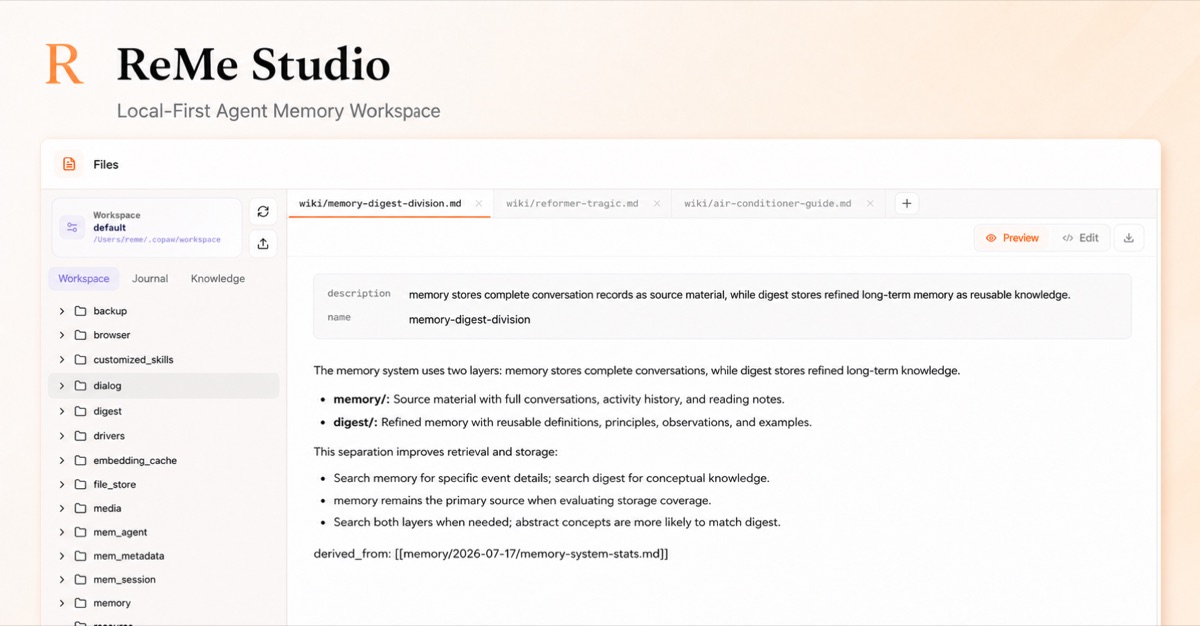
ReMe Studio is the local web workspace for ReMe. It lets you browse and edit user-owned workspace files, explore memory links, and chat with the ReMe Agent without moving durable memory into a separate application database. Search indexes, graphs, and other derived metadata remain rebuildable from the source files.
Installation
Install Studio together with ReMe's optional integrations:
pip install "reme-ai[core]"
For Studio without the other optional integrations, use pip install "reme-ai[web]". The base reme-ai package is
headless and does not include the frontend assets.
Features
- Workspace browsing: browse the full workspace or focus on journal and knowledge files through dedicated views. The navigator refreshes as files change on disk.
- Markdown editing and preview: open multiple files in tabs, render Markdown front matter and GitHub Flavored Markdown, edit with Monaco, save with optimistic modification-time checks, and download files locally.
- Memory graph: inspect indexed wikilinks under the
wiki,personal, andprocedureknowledge roots, follow inbound and outbound links, and open the corresponding Markdown source. - Agent chat: stream conversations with the read-only workspace Agent, see tool calls and token usage, and drag workspace files into the conversation as references.
- Service management: inspect service and component memory usage, review the effective redacted configuration and version, and rebuild derived indexes without modifying source memory files.
- Personalization: switch between English and Chinese, and use light, dark, or system appearance.
Requirements
- Python 3.11 or newer with ReMe installed.
- A running ReMe HTTP service. Agent chat additionally requires a working Agent and model configuration.
- Node.js 22.13 or newer is required only when developing or building Studio from source.
See the repository README for ReMe installation and backend configuration.
Development
Start ReMe from the repository root, then run the frontend in another terminal:
# Terminal 1, from the repository root
reme start

# Terminal 2
cd website
npm install
npm run dev
Open http://localhost:3000. The frontend connects to
http://127.0.0.1:2333 by default. Override it when needed:
NEXT_PUBLIC_REME_API_URL=http://127.0.0.1:8000 npm run dev
ReMe-hosted static build
ReMe can serve Studio from the same FastAPI process as its HTTP API. Build the static variant and restart ReMe:
cd website
npm ci
npm run build:static
cd ..
reme start
Open http://127.0.0.1:2333. The static build uses same-origin requests by default. For standalone static development,
run npm run dev:static and set
VITE_REME_API_URL to the running ReMe service URL when necessary.
The regular npm run build command remains the vinext/Sites deployment build;
npm run build:static creates dist-static/ exclusively for FastAPI and Python package distribution.
Configuration
The workspace hides dotfiles and dot-directories. It displays only Markdown and text files by default. Configure the
allowed extensions as a comma-separated list in .env.local:
NEXT_PUBLIC_REME_WORKSPACE_EXTENSIONS=md,txt,mdx
The memory graph requires an index built by ReMe. Rebuilding the index from the Studio settings regenerates derived data from workspace files and does not modify the source memory.
Checks
npm run format:check
npm run lint
npm run build
npm run build:static
npm test
简体中文
English | 简体中文
ReMe Studio 是 ReMe 的本地 Web 工作区。你可以在这里浏览和编辑自己拥有的工作区文件、探索记忆之间的联系,并与 ReMe Agent 对话,而无需将持久记忆迁移到独立的应用数据库中。搜索索引、图谱和其他派生元数据均可根据源文件重建。
安装
安装 Studio 和 ReMe 的可选集成功能:
pip install "reme-ai[core]"
如果只需要 Studio,不需要其他可选集成,可以使用 pip install "reme-ai[web]"。基础 reme-ai 包以无界面模式分发,
不包含前端资源。
功能
- 浏览工作区:浏览完整工作区,或通过独立视图聚焦日记和知识文件;磁盘中的文件发生变化后,导航器会自动刷新。
- Markdown 编辑与预览:在多个标签页中打开文件,渲染 Markdown front matter 和 GitHub Flavored Markdown,使用 Monaco 编辑器编辑,通过修改时间检查安全保存,并可将文件下载到本地。
- 记忆图谱:查看知识库
wiki、personal和procedure目录中已索引的 wikilink,检查入链和出链,并从图谱打开对应的 Markdown 源文件。 - Agent 对话:与只读工作区 Agent 进行流式对话,查看工具调用和 token 用量,还可将工作区文件拖入对话作为引用。
- 服务管理:查看服务及组件的内存使用情况、当前生效的脱敏配置和版本,并在不修改记忆源文件的情况下重建派生索引。
- 个性化设置:切换中英文界面,并使用浅色、深色或跟随系统的外观。
环境要求
- Python 3.11 或更高版本,并已安装 ReMe。
- 正在运行的 ReMe HTTP 服务。Agent 对话还需要可用的 Agent 和模型配置。
- 只有从源码开发或构建 Studio 时才需要 Node.js 22.13 或更高版本。
ReMe 的安装和后端配置请参阅仓库中文 README。
本地开发
先在仓库根目录启动 ReMe,然后在另一个终端运行前端:
# 终端 1:仓库根目录
reme start

# 终端 2
cd website
npm install
npm run dev
打开 http://localhost:3000。前端默认连接 http://127.0.0.1:2333,需要时可覆盖该地址:
NEXT_PUBLIC_REME_API_URL=http://127.0.0.1:8000 npm run dev
由 ReMe 托管的静态构建
ReMe 可以通过提供 HTTP API 的同一个 FastAPI 进程托管 Studio。构建静态版本并重启 ReMe:
cd website
npm ci
npm run build:static
cd ..
reme start
打开 http://127.0.0.1:2333。静态构建默认使用同源请求。进行独立的静态开发时,运行
npm run dev:static;如有需要,将 VITE_REME_API_URL 设置为正在运行的 ReMe 服务地址。
常规的 npm run build 命令仍用于 vinext/Sites 部署构建;npm run build:static 仅为 FastAPI 和 Python 包分发生成
dist-static/。
配置
工作区会隐藏点文件和点目录,并且默认只显示 Markdown 和文本文件。可以在 .env.local 中通过逗号分隔的列表配置允许显示的扩展名:
NEXT_PUBLIC_REME_WORKSPACE_EXTENSIONS=md,txt,mdx
记忆图谱依赖 ReMe 构建的索引。在 Studio 设置中重建索引时,只会根据工作区文件重新生成派生数据,不会修改记忆源文件。
检查
npm run format:check
npm run lint
npm run build
npm run build:static
npm test
1 maintainer

Download files
Download the file for your platform. If you're not sure which to choose, learn more about installing packages.
Source Distribution
Built Distribution
Filter files by name, interpreter, ABI, and platform.
If you're not sure about the file name format, learn more about wheel file names.
Copy a direct link to the current filters
File details
Details for the file reme_ai_studio-0.4.1.7.tar.gz.
File metadata
- Download URL: reme_ai_studio-0.4.1.7.tar.gz
- Upload date:
- Size: 3.6 MB
- Tags: Source
- Uploaded using Trusted Publishing? No
- Uploaded via: twine/7.0.0 CPython/3.13.14
File hashes
| Algorithm | Hash digest | |
|---|---|---|
| SHA256 |
0c0d5626ec49fee355f0a855eda6bb5a53eedae5a9f97f7317385739312d8e69
|
|
| MD5 |
9f6fc180fe036e855036d57f67ba1f68
|
|
| BLAKE2b-256 |
4ea7689f04a4522c07655fda3e9d87f22c35438afbd33fb62c900ab48c8b5666
|
File details
Details for the file reme_ai_studio-0.4.1.7-py3-none-any.whl.
File metadata
- Download URL: reme_ai_studio-0.4.1.7-py3-none-any.whl
- Upload date:
- Size: 3.7 MB
- Tags: Python 3
- Uploaded using Trusted Publishing? No
- Uploaded via: twine/7.0.0 CPython/3.13.14
File hashes
| Algorithm | Hash digest | |
|---|---|---|
| SHA256 |
d100b55c8fc890a41e5c803e357bbbd98a9e6561fb91379b5f09427acf760c0e
|
|
| MD5 |
249edc385909e194a1c7c397a4394186
|
|
| BLAKE2b-256 |
797029dd9a1a634a4612915990b122377c73edae458d08b508b6e4370bd60053
|







