
Remember Me, Refine Me.

Project description











A memory management toolkit for AI agents — Remember Me, Refine Me.
Previous versions: 0.3.x · 0.2.x · MemoryScope
🧠 ReMe is a memory management toolkit for AI agents. It turns conversations and resources into readable, editable, and searchable file-based long-term memory.
✨ Core Ideas
- Memory as File: Markdown files with frontmatter and wikilinks serve as memory nodes that both users and agents can read and write directly.
- Self-evolving knowledge base: Auto Memory, Auto Resource, and Auto Dream progressively transform conversations and resources into long-term Markdown memories, while automatically building wikilink relationships.
- Progressive hybrid search: ReMe combines wikilinks, BM25, and embeddings for hybrid retrieval across keyword matching, semantic recall, and relationship expansion.
- Agent-friendly integration: SKILL.md + CLI integration makes it easy for different agents to read, write, maintain, and reuse memory.

Use Cases
- Personal assistants: Provide long-term memory for agents such as QwenPaw.
- Coding assistants: Preserve coding style, project background, and workflow experience across sessions.
- Knowledge QA: Progressively transform resources and conversations into a searchable, traceable, and linked Markdown knowledge base.
- Task automation: Reuse successful paths, lessons from failures, and operation procedures from past tasks.
🚀 Quick Start
Installation
ReMe requires Python 3.11+.
Install from pip:
pip install "reme-ai[core]"
Install from source:
git clone https://github.com/agentscope-ai/ReMe.git
cd ReMe
pip install -e ".[core]"
Environment Variables
Configure environment variables:
cat > .env <<'EOF'
EMBEDDING_API_KEY=sk-xxx
EMBEDDING_BASE_URL=https://dashscope.aliyuncs.com/compatible-mode/v1
LLM_API_KEY=sk-xxx
LLM_BASE_URL=https://dashscope.aliyuncs.com/compatible-mode/v1
EOF
Start the Service
reme start
The default service address is 127.0.0.1:2333. If the port is occupied, specify another port:
reme start service.port=8181
# reme start workspace_dir=/tmp/reme-demo service.port=8181
After startup, check the service status. If you use a custom port, replace 2333 in the URL below with that port.
reme version
curl -s http://127.0.0.1:2333/version -H 'Content-Type: application/json' -d '{}'
Agent Integration
ReMe integrates with supported agent frameworks through SKILL.md + CLI + hooks (optional). A typical integration looks like this:
- Add the memory skill to the agent and grant the agent permission to call the CLI.
- Call
auto_memoryandproactivefrom agent hooks as needed, so conversations are automatically consolidated into daily memories and proactive reminders can be read at the right time. auto_indexandauto_resourceare triggered by file monitoring to maintain indexes and process resources.auto_dreamis triggered by a scheduled task to further organize daily memories into reusable long-term digest memories.
QwenPaw 2.0 will integrate the new ReMe version. A Claude Code plugin will also be released later to reduce manual integration work.
For more details, see the Quick Start.
📁 Memory System
Memory as File, File as Memory.
ReMe treats memory as files, progressively processing raw conversations and external resources from session/ and resource/ into daily/, then consolidating them into reusable long-term knowledge nodes under digest/.
Directory Structure
<workspace_dir>/
├── metadata/       # Persistent system state such as indexes, graphs, and catalogs
├── session/        # Raw conversations and agent sessions
│   ├── dialog/
│   │   └── <session_id>.jsonl
│   ├── agentscope/
│   └── claude_code/
├── resource/            # External raw materials
│   └── YYYY-MM-DD/
│       └── <resource>.<ext>
├── daily/               # Lightly processed memory: daily facts, conversation summaries, resource readings
│   ├── YYYY-MM-DD.md
│   └── YYYY-MM-DD/
│       ├── <session_id>.md
│       ├── <resource_stem>.md
│       └── interests.yaml
└── digest/              # Long-term memory: personal facts, procedural experience, knowledge nodes
    ├── personal/
    ├── procedure/
    └── wiki/

Automatic Memory Flow
ReMe's automatic memory flow gradually turns raw conversations and resources into searchable, traceable, and reusable file-based memory. During normal operation, background watchers maintain indexes and process resources, agent hooks trigger conversation memory, and long-term consolidation plus proactive reminders run through scheduled tasks or on-demand calls.
Automatic Memory Capabilities
| Capability | How it runs | Purpose | Main parameters |
|---|---|---|---|
auto_index |
Background maintenance via index_update_loop |
Scans on startup and continuously watches Markdown/JSONL changes in daily/, digest/, and resource/; updates chunk, BM25, embedding, and wikilink graph indexes. |
Config: watch_dirs, watch_suffixes |
auto_memory |
Agent after-reply hook; also callable on demand | Saves raw conversation text and turns long-term valuable information into daily/<date>/<session_id>.md memory cards. |
Required: messages; optional: session_id, memory_hint |
auto_resource |
Automatically triggered by resource watching; also callable on demand | Reads resource changes under resource/<date>/ and creates or updates LLM-named daily resource cards linked by source_resource. |
Required: changes; each item may include path, file_path, change |
auto_dream |
Scheduled by dream_cron; also callable on demand |
Scans daily input for a given date, extracts long-term memory units, integrates them into digest/, and writes daily/<date>/interests.yaml. |
date, hint, topic_count, topic_diversity_days |
proactive |
Read on demand before agent proactive reminders | Reads interests.yaml generated by auto_dream and exposes topics worth attention to the upper-level agent; the caller decides whether to remind the user. |
date, include_content |

|

|

|

|
Workspace Operation Interface
ReMe operates the workspace through a unified CLI / Service Job interface. Agents usually only need retrieval, read, write, edit, and automatic memory commands. Lower-level indexing, frontmatter, and file operation commands are mainly for maintenance, debugging, or advanced integration.
Workspace Operation Interface
| Category | name | Description | Parameters |
|---|---|---|---|
| System status | version |
Returns the ReMe package version. | None |
| System status | health_check |
Returns a health-check summary for ReMe components. | None |
| System status | help |
Lists registered jobs and their metadata. | None |
| Retrieval/read | search |
Performs hybrid retrieval in the workspace with vector recall, BM25, and RRF fusion. | Required: query; optional: limit, min_score |
| Retrieval/read | node_search |
Recalls similar digest nodes by candidate abstraction name and description, mainly for auto_dream deduplication or association. |
Required: query; optional: limit |
| Retrieval/read | traverse |
Traverses the wikilink graph from a specified path. | Required: path; optional: depth, direction |
| Retrieval/read | read |
Reads a Markdown file under the workspace. | Required: path; optional: start_line, end_line |
| Retrieval/read | read_image |
Reads an image file under the workspace and returns base64. | Required: path |
| Index | reindex |
Clears file-store indexes and rebuilds indexes from existing files. | Config: watch_dirs, watch_suffixes |
| Daily | daily_list |
Lists notes for a day. | date |
| Daily | daily_reindex |
Rebuilds the day-index page daily/<date>.md. |
date |
| Metadata | frontmatter_read |
Reads file frontmatter. | Required: path |
| Metadata | frontmatter_update |
Merges key-values into file frontmatter. | Required: path, metadata |
| Metadata | frontmatter_delete |
Deletes specified keys from file frontmatter. | Required: path, keys |
| File operation | stat |
Gets workspace path status, including size, mtime, existence, and file/directory type. | Required: path |
| File operation | list |
Lists files under a workspace path. | path, recursive, limit |
| File operation | write |
Creates or overwrites a Markdown file and writes name/description frontmatter. | Required: path, name, description, content; optional: metadata |
| File operation | edit |
Performs full-text find-and-replace on a Markdown file. | Required: path, old, new |
| File operation | move |
Moves or renames a workspace file and rewrites inbound wikilinks by default. | Required: src_path, dst_path; optional: overwrite, retarget |
| File operation | delete |
Deletes a workspace file or folder and returns inbound wikilinks that still exist. | Required: path |
🤝 Community and Support
- Issues and requests: Check Open Issues first. If there is no related discussion, open a new issue with background, expected behavior, and impact scope.
- Code contributions: Before making changes, read the contribution guide and code framework, and follow the CLI / Service / Application / Job / Step / Component layering.
- Documentation contributions: For user-visible installation, configuration, invocation, or behavior changes, update
docs/zh/orREADME.mdaccordingly. - Commit convention: Conventional Commits are recommended, for example
feat(search): add link expansion optionordocs(zh): update quick start. - Pre-submit checks: Before submitting a PR, try to run
pre-commit run --all-filesandpytest. If tests depending on LLMs, embeddings, or external services cannot run, explain that in the PR. - Get help: Use GitHub Issues for bugs and feature requests. Project documentation is available at https://reme.agentscope.io/.
Contributors
Thanks to everyone who has contributed to ReMe:

📄 Citation
@software{AgentscopeReMe2026,
  title = {AgentscopeReMe: Memory Management Kit for Agents},
  author = {ReMe Team},
  url = {https://reme.agentscope.io},
  year = {2026}
}
⚖️ License
This project is open source under the Apache License 2.0. See LICENSE for details.
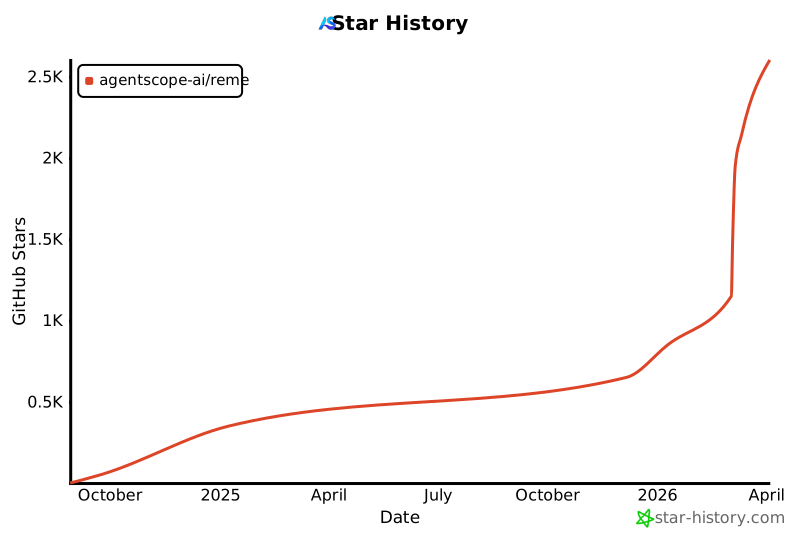
📈 Star History
Release history Release notifications | RSS feed


Download files
Download the file for your platform. If you're not sure which to choose, learn more about installing packages.
Source Distribution
Built Distribution
Filter files by name, interpreter, ABI, and platform.
If you're not sure about the file name format, learn more about wheel file names.
Copy a direct link to the current filters
File details
Details for the file reme_ai-0.4.0.4.tar.gz.
File metadata
- Download URL: reme_ai-0.4.0.4.tar.gz
- Upload date:
- Size: 198.9 kB
- Tags: Source
- Uploaded using Trusted Publishing? No
- Uploaded via: twine/6.1.0 CPython/3.13.12
File hashes
| Algorithm | Hash digest | |
|---|---|---|
| SHA256 |
53fa13698c129c9d667aa4b0dbf753d594a0e8580746a6fc53b43b4142eb1192
|
|
| MD5 |
bd75171bcf7f8bed13d2846d53659dbc
|
|
| BLAKE2b-256 |
9676f03d07bccdeddbca375fb545646e450ddcae8ffb2da2e9bdb39bef444059
|
File details
Details for the file reme_ai-0.4.0.4-py3-none-any.whl.
File metadata
- Download URL: reme_ai-0.4.0.4-py3-none-any.whl
- Upload date:
- Size: 255.2 kB
- Tags: Python 3
- Uploaded using Trusted Publishing? No
- Uploaded via: twine/6.1.0 CPython/3.13.12
File hashes
| Algorithm | Hash digest | |
|---|---|---|
| SHA256 |
924098457efda6e06968bea5429456c8e009a270217cfa5023b1afa1360ffeb5
|
|
| MD5 |
a0d7cad871e1c9f9f952e6afdfa34ff9
|
|
| BLAKE2b-256 |
2dfede9f5547bbe840befc78c082d7d5aaaf892d75331e8cf0d4c908ec8c3989
|






