
Remedy
Windows 11 Linux WSLg PyPI CLI
One continuous partner — not a thin chat wrapper, not a farm of bots.
Download for Windows
·
Install on Linux
·
Owner’s manual
·
What’s new
·
pip install remedy-ai
Not a medical product; the name means unsticking problems and finishing requests.
F1 opens the same Help wiki offline inside the app.
About
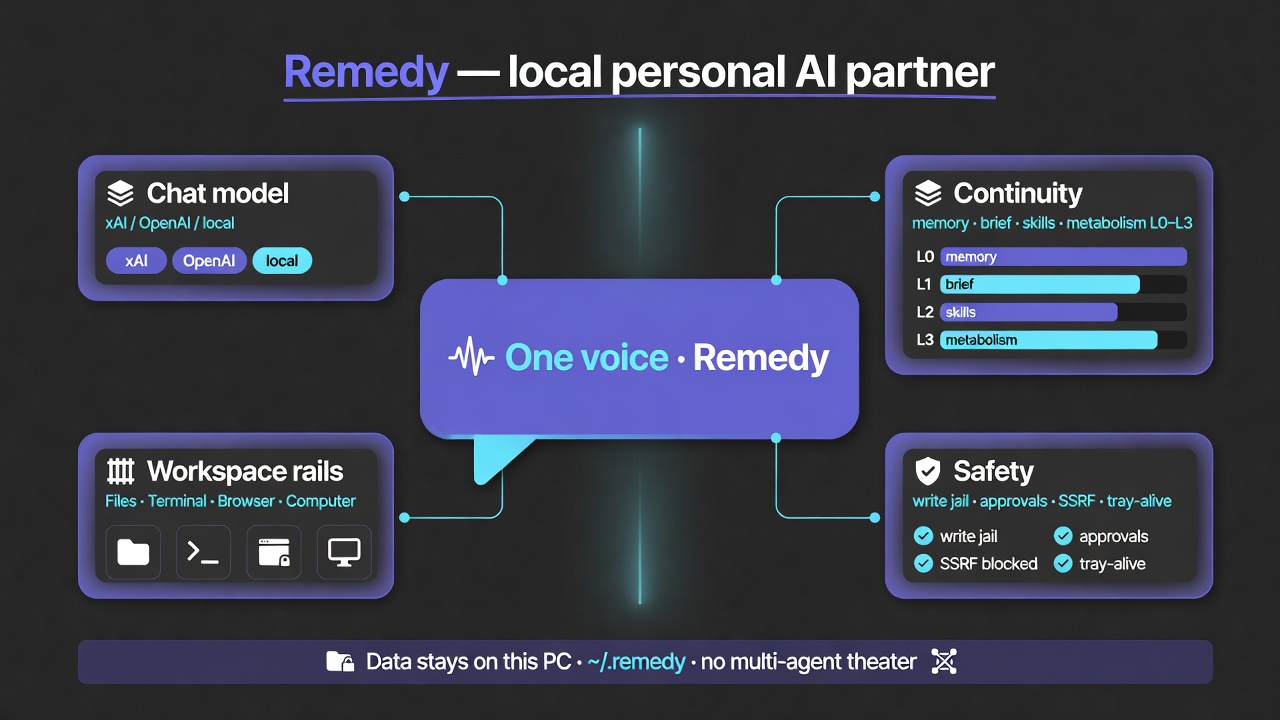
Remedy is a true AI partner — more than a coder/builder — that helps you track and complete your goals through research, design, code, and most importantly action. It’s a Windows + Linux desktop partner (Tauri + local FastAPI) that keeps continuity on disk under ~/.remedy while you pick the chat model (xAI, OpenAI, Anthropic, Google, DeepSeek, Groq, Mistral, OpenRouter, Ollama, Custom).
| Who it’s for | Owners who want power without multi-agent theater — chat, files, this-PC shell, browser rail, computer use |
| What stays local | Memory, Session Brief, skills, approvals, DPAPI secrets, optional SmolVLM2 vision |
| What you bring | Your API keys / local Ollama — no Remedy cloud account for core use |
| Current | v0.26.1 on PyPI · GitHub Releases |
From the creator: My name is Ahmi, I hope you enjoy my Remedy.
In-app: title-bar / tray → About Remedy · Settings → About.
What’s new
Latest: v0.26.1 — Build finishes pages and drives the host. (0.26.0: Windows + Linux desktop.)
| Highlight | Why it matters |
|---|---|
Host Bridge + /stretch |
POSIX→cmd, pwsh -File, host_run / host_which; /stretch maps this PC; /whoami includes the census |
| Agency that runs tools | Review / implement keep tools on; work turns cannot finish as chat; Settings no longer steal the active session model |
| Vendor-neutral GPU | NVIDIA / AMD / Intel probe; RMB autofit sizes context from VRAM, not a logo |
| ✕ → tray always | Title-bar close hides to tray; local API stays warm. Tray Quit for full stop |
| Write jail + security | Project write roots, C:/ + $HOME shell dests, files API refuse for SAM/hosts, packaged self-inject off |
| Browser rail polish | Video fullscreen stays in-rail; mobile/desktop site toggle; chat images with Bearer media; same-window OAuth |
Also in 0.20–0.23: L0–L3 tiers, build_drive + companion, Soul Field, evidence ledger, Time Crystal, messengers, signed Skills Library, Remedy Desktop.exe (not generic app.exe).
Full owner notes → docs/manual/13-whats-new.md · engineering detail → CHANGELOG.md
Earlier: 0.19.0 parallel multi-provider · 0.18.x
Two desktops, one partner
v0.26.0 made Remedy truly multiplatform — the same partner on Windows and Linux, the same ~/.remedy home, the same local API on 127.0.0.1:7400. 0.26.1 is the Build finish/drive fix on that line.
| Windows | Linux | |
|---|---|---|
| Install | NSIS installer from Releases | PyPI / source · packaged .deb / AppImage once a Linux desktop asset is published |
| Runs on | Windows 10 / 11 | Native Linux, incl. WSLg |
| Close ✕ | Hides to the tray (API stays warm) | Minimizes to the taskbar (WSLg has no tray) |
| Maximize | Standard | Work-area — avoids covering the taskbar / panels |
| Autostart | Start with Windows | Not yet — no toggle on Linux |
| CLI | remedy / Remedy Desktop.exe |
python -m remedy ≡ remedy |
Same skills, same messengers, same continuity — pick your shell.
Contents
- About · What’s new · Two desktops, one partner
- What you get — product at a glance
- Why it’s different — local continuity + metabolism
- Workspace on your PC — files, terminal, browser, computer
- Local brain (SmolVLM2) — vision + efficiency without a second persona
- Continuity workers — silent nano swarm
- Messengers — chat where you already are
- Skills & Library
- Memory & long work
- Install
- Security
- Slash commands
- Architecture
- CLI & API
- Development
- Support · License
Owner’s manual (GitHub + F1)
| Start here | Overview |
| What’s new | 13-whats-new |
| All chapters | docs/manual/ · index |
| Continuity | How Remedy works |
| Local SmolVLM2 | Vision decoder |
| This PC / Host | Coding agency · RMB |
| Metabolism | Partner metabolism |
| Security | Security & data |
Also: CHANGELOG.md · AGENTS.md
What you get
One partner, two desktops. One local API. Your data under ~/.remedy.
| Capability | |
|---|---|
| Chat partner | Streaming markdown, Plan/Build, multi-provider parallel tabs, attachments, image markup |
| Workspace | Files · Terminal · Browser · Scratch · Computer use — rails beside chat |
| This PC | Host Bridge (POSIX→cmd, host_run) · /stretch home census · vendor-neutral GPU/VRAM |
| Local brain | SmolVLM2 2.2B visual decoder · optional RMB llama.cpp host (autofit from this PC) |
| Continuity | Session Brief, partner memory, skills, context budget — silent workers, one voice |
| Metabolism | 0.22.0+ Soul Field + organism pulse, L0–L3 tiers, evidence, governor (manual) |
| Messengers | Telegram, Discord, Slack, Mattermost, Matrix, WhatsApp, Teams, Google Chat, Signal (Settings) |
| Skills | Progressive disclosure · Installed | Library · signed community catalog |
| Memory | Durable facts · this-home census · Progress snapshots · plans — calm UI, not scare-logs |
| Agency | file_edit, build_drive, companion, Host Bridge, write jail, spread_run, web tools, approvals |
| Always ready | 0.20.0+ title-bar ✕ → tray (API stays up); tray Quit for full stop |
| Web UI | Same SPA at http://127.0.0.1:7400/ (Switch to WebUI → tray) |
| Updates | Minisign-signed auto-update from GitHub Releases |
Your chat model is yours: xAI, OpenAI, Anthropic, Google, DeepSeek, Groq, Mistral, OpenRouter, Ollama, or Custom. Continuity and local SmolVLM2 live on disk, not in a Remedy cloud.
Why it’s different
You  →  Continuity (brief · memory · skills · budget · local SmolVLM2)  →  Your model  →  Tools
              ↑________________ learn / compress / remember ________________|
| You feel | What’s actually happening |
|---|---|
| Fast | Hot path stays cheap; heavy work is background |
| Cheaper | Less tool sludge re-sent; local SmolVLM2 where it saves paid calls |
| Same partner | Switch providers anytime — identity is local |
Deep dive: Continuity philosophy · In-app F1.
Workspace on your PC
Remedy is a workbench, not only a chat box. Icon rails open real tools next to the conversation:
| Tool | What it is |
|---|---|
| Files | Project / session file browser — open, copy path, drag into chat |
| Terminal | In-app PowerShell (ConPTY). Agent shell uses Host Bridge — POSIX rewritten to cmd, PowerShell via pwsh -File |
| Browser | Embedded WebView2 (Chromium) research pane; ↗ opens system browser when you need full Chrome |
| Scratch | Quick notes pad bound to the session |
| Computer use | Click / type / screenshot this desktop when you enable it |
Left · chat · right layout; popout / fullscreen for Terminal, Browser, Scratch.
Manual: Chat & sessions · Desktop notes
Local brain (SmolVLM2)
On-device efficiency — not a second chatbot.
| Job | Local SmolVLM2 2.2B |
|---|---|
| Visual decoder | Images → structured text briefs so any chat model can reason about screenshots |
| Prefer-local vision | Decode here first; save provider vision tokens when you want |
| Harness assist | Session Brief can refresh in the background without another paid API call |
| Continuity assist | Optional nano refine when the server is already up (never blocks the hot path) |
How it ships: not in the installer → one first-run download → ~/.remedy/vision/ → llama-server on 127.0.0.1 → auto-starts with Remedy. CPU by default; CUDA when NVIDIA is available.
Optional RMB (Remedy Muscle Bridge) is a separate on-device llama.cpp chat host — Settings → local models. Autofit sizes context and GPU layers from this PC’s VRAM (NVIDIA / AMD / Intel), not a vendor logo.
Manual: Local vision & on-device SmolVLM2 · RMB
Continuity workers
Silent local workers (sometimes called the nano swarm in code). They measure, prune, rank, and distill. They do not take the microphone.
| Worker | Job |
|---|---|
| Token | Context fill, compress nudge, usage calibration |
| Router | Intent → policy (memory / skill / plan / tool / chat) |
| Memory | Session Brief touch |
| Pattern | Tool sequences, stuck signals, learn pre-gate |
| Skill | Ranking and feedback for procedures |
Heuristics first; local SmolVLM2 only when already running and useful.
Operators: Continuity workers · /harness
Messengers
Talk to Remedy where you already chat. Sessions show up in the desktop list (e.g. TG · …) with shared history.
| Platform | Status (catalog) |
|---|---|
| Telegram | Ready — long-poll bot (allowlist recommended) |
| Discord · Slack · Mattermost · Matrix | Ready adapters |
| WhatsApp · Teams · Google Chat · Signal | Partial (webhooks / signal-cli / setup-dependent) |
Configure under Settings → Messengers. Empty allowlist = ignore inbound (unless you allow all).
Security defaults stay local-first: no public doorway by accident.
Skills & Library
| Path | Meaning |
|---|---|
| Learn from work | Multi-step success → probation skills → promote over sessions |
| Installed | Bundled + learned + trusted library packs on this machine |
| Library | Signed community catalog (remedy-skills) — install → quarantine → Trust |
Format: agentskills.io · Lifecycle: SKILL_LIFECYCLE.md · Manual: Skills
Memory & long work
- Durable memory — SQLite + FTS5, profile, handoffs, living partner facts
- This home —
/stretch(alias/home) maps hardware, PATH tools, rooms, local ports;/whoamiincludes the census - Memory Harness — lean send-view for the model; full transcript kept
- Progress — mid-task snapshots (calm wording: progress, not “the app crashed”)
- Plans — Plan mode outlines; Build executes with approvals
- Time travel — restore chat (+ best-effort files) to an earlier step
/compact · /harness · /stretch · /whoami · Memory manual
Install
| Windows | Download the latest Windows installer → run Setup |
| Linux | Install from PyPI / source — .deb / AppImage once a Linux desktop asset is published |
| Anywhere | pip install remedy-ai → remedy chat (CLI · WebUI) |
Then F1 Help · /help commands.
SmartScreen? Solo builds are not Authenticode-signed yet — More info → Run anyway. Install only from this repo’s Releases. Updates are minisign-verified. Autostart = Startup folder (not registry Run).
Local API: 127.0.0.1:7400 (sidecar).
Security
Maximum capability for you. No accidental LAN doorway.
| Layer | Default |
|---|---|
| API | Loopback + Bearer token |
| CORS | No wildcard while auth is on |
| Secrets | ~/.remedy/auth/ (DPAPI on Windows when available) |
| Scope | Project / home / full machine (opt-in) |
| Write jail | Shell dests stay in write roots (C:/, $HOME, python/node oneshots) |
| Approvals | Ask default |
| Skills | Quarantine until Trust |
| Messengers | Allowlist-first |
No Remedy cloud account for core use. Chat goes to your provider (or local Ollama).
Security & data
Slash commands
/help · /new · /reset · /clear · /sessions · /models · /thinking |
Session & UI |
/memory · /remember · /forget · /pin · /whoami · /stretch · /home |
Memory |
/goals · /goal · /plans · /plan … |
Plans |
/compact · /harness |
Harness |
/approve · /deny |
Approvals |
/export · /import · /import-session |
I/O |
/skills · /handoff · /security-status · /init · /helper · /tip |
Skills & tips |
Full list: Commands
Architecture
┌─ Desktop (Tauri 2) ─────────────────────────────────────┐
│  React SPA · tray · updates · Files/Terminal/Browser   │
│              │                                           │
│  remedy serve · FastAPI :7400                            │
│    gateway · core · host bridge · memory · skills · vision │
└──────────────────────────────────────────────────────────┘
     CLI · WebUI · Telegram · Discord · Slack · …
CLI & API
# Package name on PyPI is remedy-ai
pip install remedy-ai

remedy chat
remedy serve --host 127.0.0.1 --port 7400 --skip-setup
# Web UI http://127.0.0.1:7400/  ·  /docs  ·  /dashboard
WebUI is the same SPA as desktop (desktop/dist). After UI changes:
cd desktop && npm run build, then restart serve if needed — see AGENTS.md (Desktop SPA vs WebUI).
Development
git clone https://github.com/AhmiDarrow/RemedyAI.git && cd RemedyAI
uv sync --group dev
uv run pytest -q          # 560+ tests; currently ~2318
cd desktop && npm test && npm run build
python scripts/check_docs.py
cd desktop && npm run tauri:dev   # full shell (set REMEDY_DEV_ROOT to repo)
Release: python scripts/sync_version.py X.Y.Z · python scripts/sync_help_manual.py · python scripts/check_docs.py · tag vX.Y.Z · GitHub Actions.
Signing: AGENTS.md · WINDOWS_SIGNING.md
Support
patreon.com/cw/AhmiDarrow — thank you.
License
Source-available — LICENSE · COMMERCIAL.md
| Who | Terms |
|---|---|
| Solo / small indies (< $1M revenue and < 20 FTE) | Free under LICENSE |
| Personal / education / research | Free |
| Larger orgs, SaaS, commercial resale | Written license — ahmitdarrow@gmail.com |
Copyright © 2025–2026 Ahmi Darrow.
My name is Ahmi, I hope you enjoy my Remedy.
1 maintainer

Download files
Download the file for your platform. If you're not sure which to choose, learn more about installing packages.
Source Distribution
Built Distribution
Filter files by name, interpreter, ABI, and platform.
If you're not sure about the file name format, learn more about wheel file names.
Copy a direct link to the current filters
File details
Details for the file remedy_ai-0.26.1.tar.gz.
File metadata
- Download URL: remedy_ai-0.26.1.tar.gz
- Upload date:
- Size: 1.3 MB
- Tags: Source
- Uploaded using Trusted Publishing? No
- Uploaded via: twine/6.2.0 CPython/3.13.13
File hashes
| Algorithm | Hash digest | |
|---|---|---|
| SHA256 |
1c5635d369c90359a0babce5e185f4f50d49ba5e149767cb9114f75b4badb83c
|
|
| MD5 |
573ddc7a5b1bd267c5986233fbc8020f
|
|
| BLAKE2b-256 |
a7a5af4600c0e7a0c35eefcebdeaf5a5b50fb7113070fa83aa75c8fc36ef1348
|
File details
Details for the file remedy_ai-0.26.1-py3-none-any.whl.
File metadata
- Download URL: remedy_ai-0.26.1-py3-none-any.whl
- Upload date:
- Size: 1.5 MB
- Tags: Python 3
- Uploaded using Trusted Publishing? No
- Uploaded via: twine/6.2.0 CPython/3.13.13
File hashes
| Algorithm | Hash digest | |
|---|---|---|
| SHA256 |
2228f5123bfba24a5b7a52eb7100e3d47aa23c863864682a87a3e4c5136f2515
|
|
| MD5 |
08fefba75a589a01ed33418024937e30
|
|
| BLAKE2b-256 |
a99962f85ca77a87b7f9a6f82599ac82ab3cf99e3ed85075c4ce38881407a7ae
|







