
Renamef
A privacy-oriented app that renames or summarizes documents using a local LLM.
(name pronounced in a Shakespearean manner with an English accent, followed by a snobbish twitch of an eyebrow)
Features
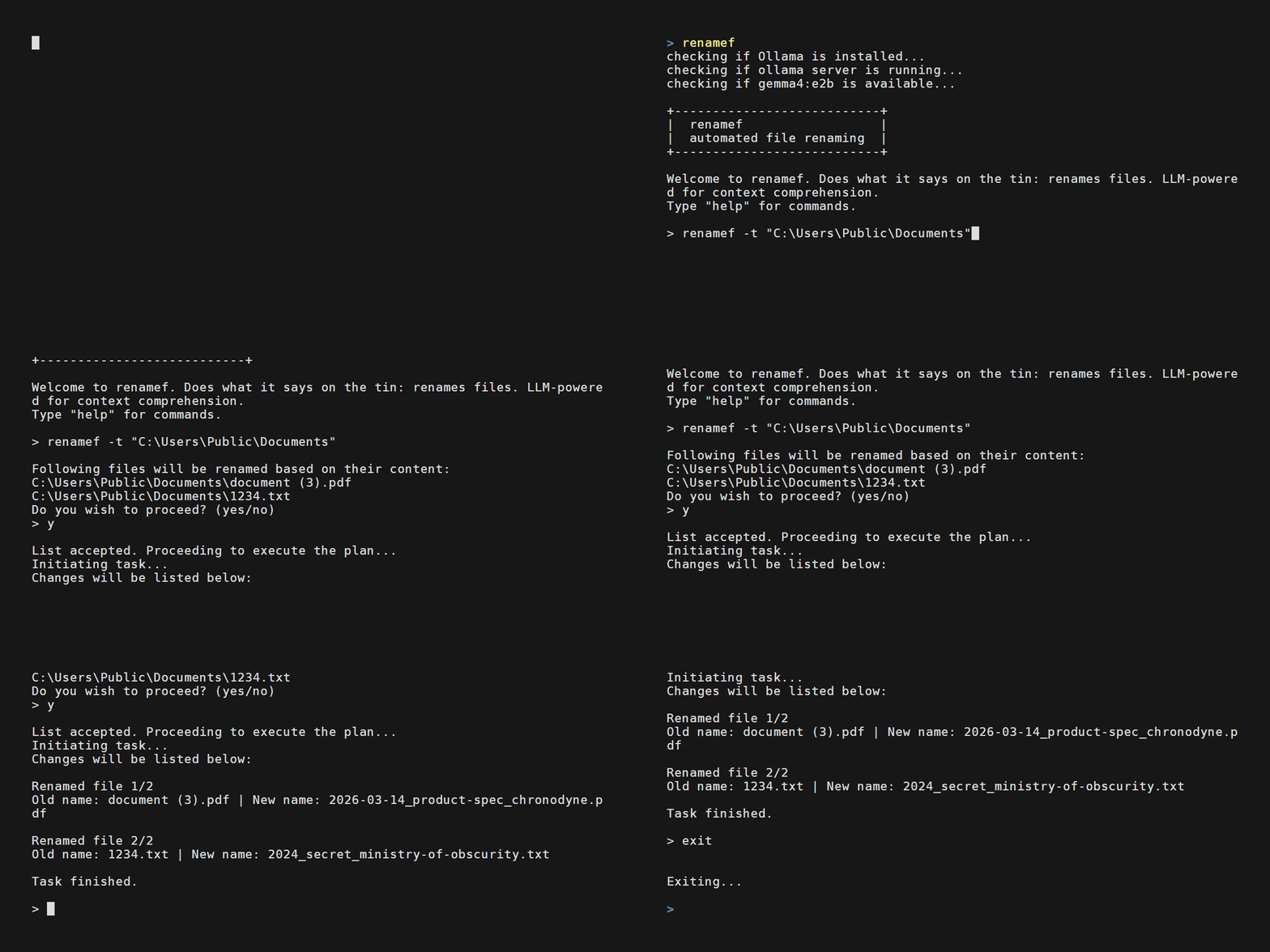
Renamef's greatest strength is privacy: no data leaves your local machine and you can automate the renaming of (theoretically) as many files as you want.
One can use features like listf or summf to list files in a directory or give you a summary of a given file. renamef is the meat of the app and allows one to rename all files in a directory (or its subdirectories) in an automated context-aware manner.
Requirements
Recommended System specs
- OS: Linux, Windows or Mac
- Memory: 6GB VRAM (normal PC) or 16GB unified system memory (Mac)
- Disk Space: 10GB (PC) or 13GB (Mac) — Ollama installation + model takes majority of the space
Other
- Renamef requires Python installed on your machine.
- Renamef will check if you have Ollama installed, if not, it will attempt to install it for you and subsequently pull the relevant model from Ollama to your machine.
Installation
...
Usage
- Open terminal
- Type
renamefto launch the app - Type
helpfor a list of commands - Type
<command> -hfor command-specific guidance and more examples
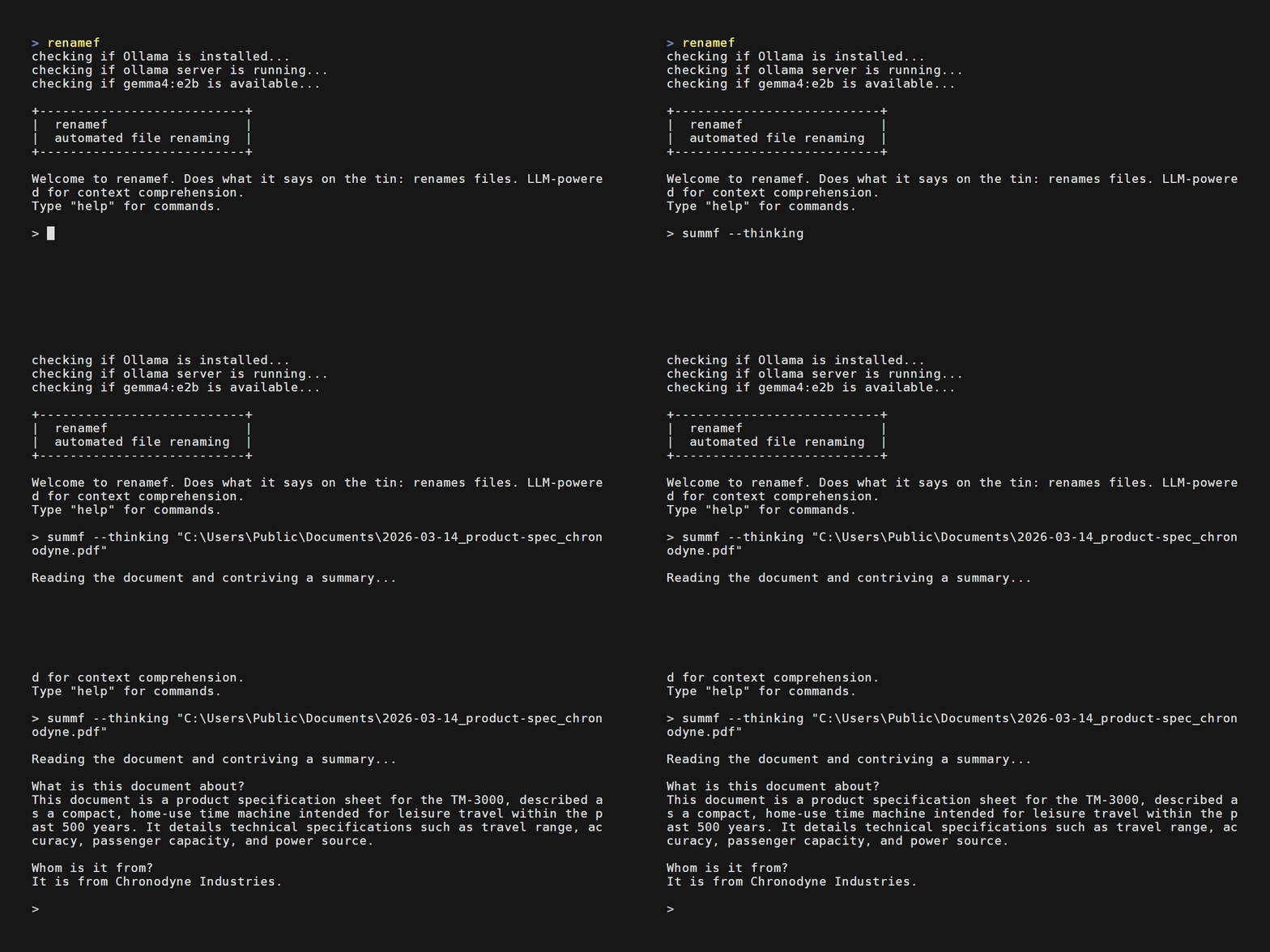
Example: summf --thinking "C:\Users\Public\Documents\2026-03-14_product-spec_chronodyne.pdf"
Configuration
The following things can be configured in renamef:
- LLM used
- Supported languages (by default they are English, German and Finnish)
- Location of the tessdata folder
You can do any of the above by editing the renamef/config.toml file in the project's root with a text editor of your choice.
Changing the model
The underlying LLM can be changed simply by changing the model's name to one you wish to use. You can find a list of local models from the Ollama website.
Note, that larger models will require more VRAM or system memory than the default model.
Expanding language support
- Download additional languages from tesseract-ocr/tessdata
- Copy them to the tessdata folder in this project's root.
- Add the additional language (s) to the
renamef/config.tomlfile's "languages" variable under [ocr].
For example, to support Swedish you would download the swe.traineddata from Tesseract, add it to the renamef/config.toml file like so: languages = "eng+deu+fin+swe", and you are good to go!
Changing tessdata folder path
In renamef/config.toml change the tessdata = "default" entry to an absolute path of your choice, e.g. tessdata = "C:\Users\Public\Documents\tessdata"
Limitations
- Renamef only supports the following file types: pdf, txt, md, png, jpeg, jpg, webp, gif
- By default, Renamef uses a small 2 billion parameter local model (Gemma 4 e2b). Model accuracy varied in tests, but was still useful. Results improved with thinking mode on.
- Umlauts and Swedish characters in paths or file names are not currently supported. Note, that their presence inside documents is not an issue.
- By default, Renamef can read documents in three languages: English, German and Finnish.
License
This project is licensed under the GNU AGPL-3.0 or later — see LICENSE.
It depends on PyMuPDF and pymupdf4llm by Artifex Software, licensed under AGPL-3.0. Bundled Tesseract language data (tessdata/) is licensed under Apache 2.0 — see tessdata/LICENSE. The LLM (Gemma 4) is downloaded via Ollama and is subject to its own license.
1 maintainer

Metadata
1 maintainer
Release files for renamef 26.11.0
For a detailed explanation of source distributions (sdists) and built distributions (wheels), please see the package formats documentation.
Source distribution (sdist)
| File | Size | Uploaded | Provenance | Actions |
|---|---|---|---|---|
| renamef-26.11.0.tar.gz | 30.7 MB | Without provenance | Details for renamef-26.11.0.tar.gz |
Built distribution (wheel)
| File | Interpreter | ABI | Platform | Actions Reset |
|---|---|---|---|---|
| renamef-26.11.0-py3-none-any.whl | Python 3 | none | any | Details for renamef-26.11.0-py3-none-any.whl |
Total release size: 61.3 MB
Release files / renamef-26.11.0.tar.gz
| Download URL | renamef-26.11.0.tar.gz |
|---|---|
| Size | 30.7 MB |
| Tags | Source |
|
SHA-256 checksum How to use checksums |
48720bd2095a58ac10c9571688f6b5e9d090e3d868076d24b55cae9d028ce69c
|
|
BLAKE2b-256 checksum How to use checksums |
e6f40d801f875b236d754d304e284903cd7e40e911b9229b5ed4a6e5f4e5b056
|
| Upload date | |
|
Uploaded using Trusted Publishing? What is trusted publishing? |
No |
| Uploaded via |
twine/7.0.0 CPython/3.14.6
|
Release files / renamef-26.11.0-py3-none-any.whl
| Download URL | renamef-26.11.0-py3-none-any.whl |
|---|---|
| Size | 30.6 MB |
| Tags | Python 3 |
|
SHA-256 checksum How to use checksums |
96d16e010a85482d83b468e511cd887f44a9f38257dc6fc1e7efc0310f1523c2
|
|
BLAKE2b-256 checksum How to use checksums |
46923e946735602ac3456e8ad64c7e75af48ee094bb3d0c47c0cd06f29feaa12
|
| Upload date | |
|
Uploaded using Trusted Publishing? What is trusted publishing? |
No |
| Uploaded via |
twine/7.0.0 CPython/3.14.6
|
Security for renamef 26.11.0
Provenance
Provenance describes where a file came from. On PyPI, provenance is shared via attestations, which provide a verifiable record of the build or publishing details. View details, limitations and caveats.
No provenance found
None of the files in this release were uploaded with provenance metadata.
A note on package security
PyPI is a repository for distributing packages, not a service for auditing them. While third-party security researchers and our staff do their best to detect and remove malicious packages, PyPI cannot guarantee the quality, security or suitability of any given package.
To learn more about protecting yourself from malicious actors, visit our package security documentation.













