
A LaTeX CV/resume framework
Verified details
These details have been verified by PyPIProject links
GitHub Statistics
Maintainers

Project description





RenderCV allows you to create a high-quality CV as a PDF from a YAML input file. It supports Markdown syntax and gives you complete control over the $\LaTeX$ code.
The primary motivation behind RenderCV is to provide a concrete framework that allows:
- Version controlling a CV's content and design separately and in an organized manner.
- Building an automated pipeline that updates the final output (PDF, $\LaTeX$, Markdown, HTML, and PNGs) whenever the content is modified.
- Making the CV's design uniform and nicely structured without room for human errors.
RenderCV offers built-in $\LaTeX$ and Markdown templates ready to produce high-quality CVs. However, the templates are entirely arbitrary and can easily be updated to leverage RenderCV's capabilities with custom CV themes.
RenderCV takes a YAML file that looks like this:
cv:
  name: John Doe
  location: Your Location
  email: youremail@yourdomain.com
  sections:
    this_is_a_section_title:
      - This is a type of entry, TextEntry—just a plain string.
      - You may have as many entries as you want under a section.
      - RenderCV offers a variety of entry types such as TextEntry,
        BulletEntry, EducationEntry, ExperienceEntry, NormalEntry,
        OneLineEntry, PublicationEntry.
      - Each entry type has its own set of attributes and different
        looks.
    my_education_section:
      - institution: Boğaziçi University
        area: Mechanical Engineering
        degree: BS
        start_date: 2024-09
        end_date: 2029-05
        highlights:
          - 'GPA: 3.9/4.0 ([Transcript](https://example.com))'
          - '**Coursework:** Structural Analysis, Thermodynamics,
            Heat Transfer'
    experience:
      ...
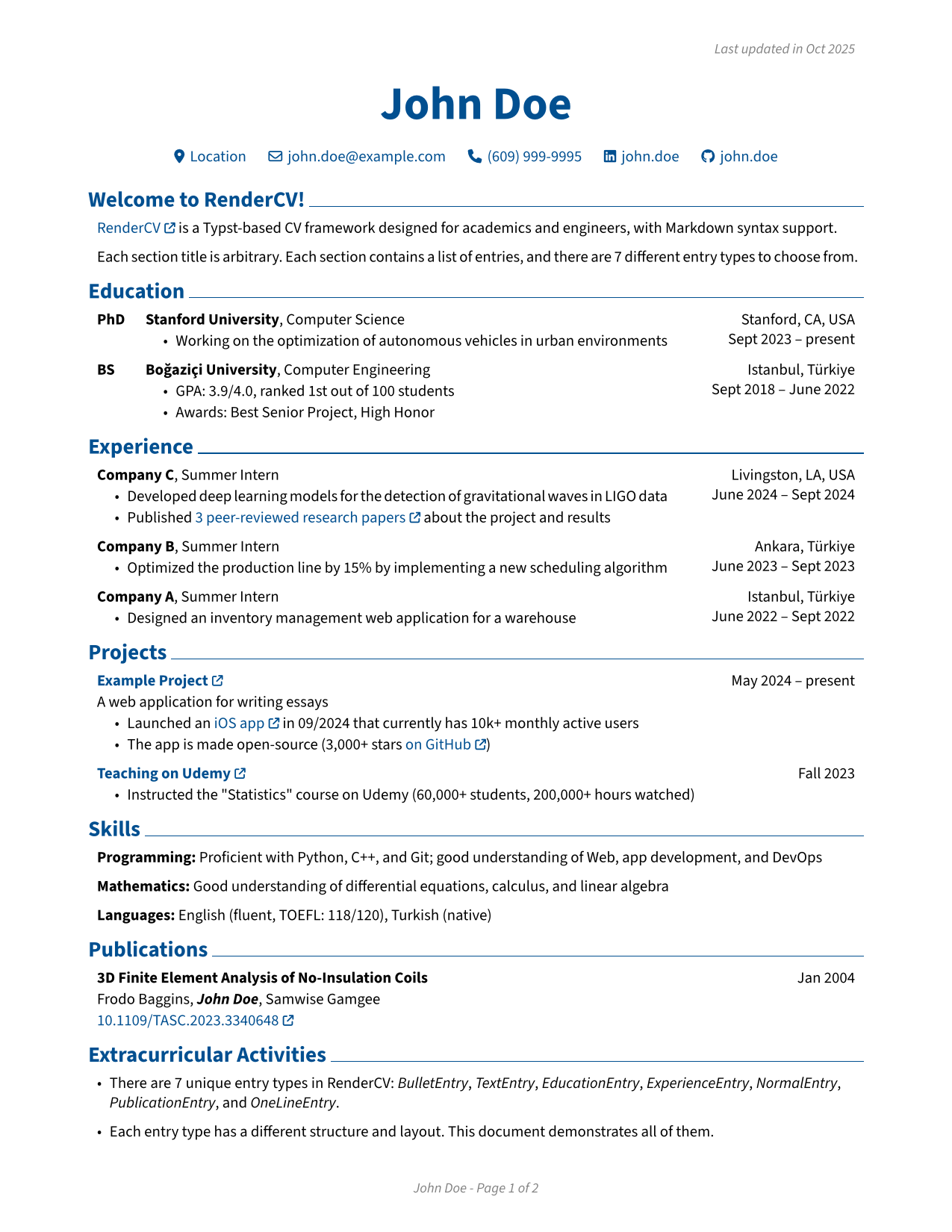
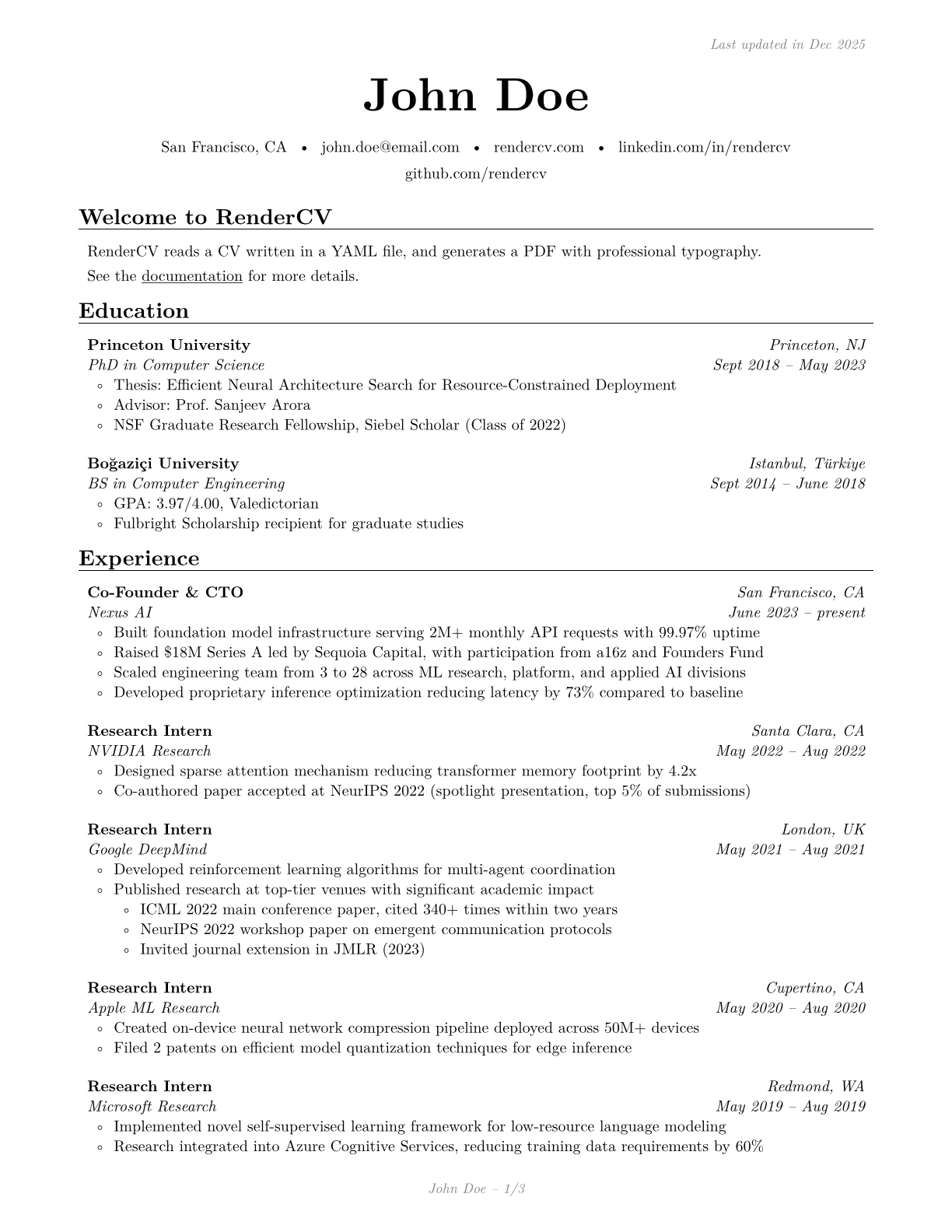
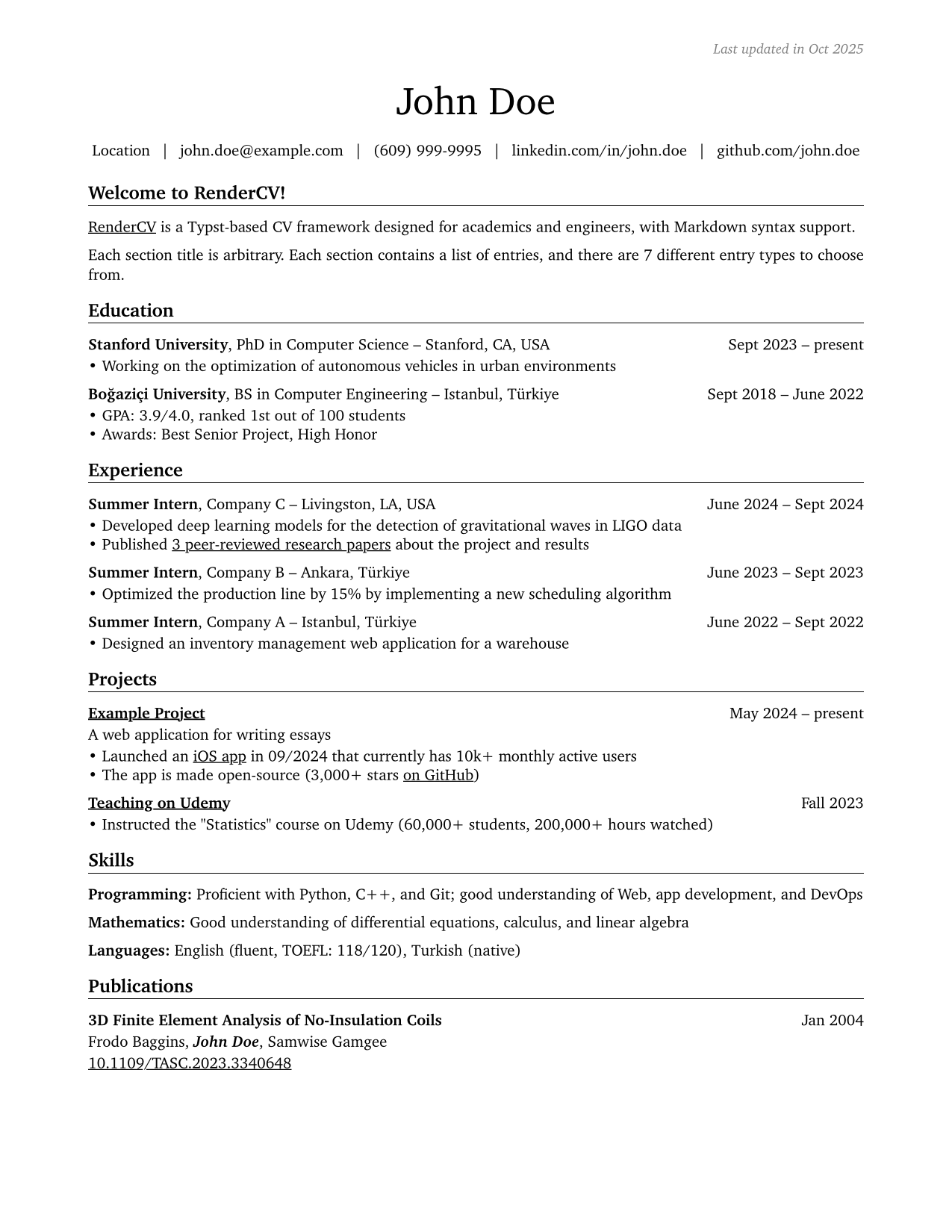
Then, it produces one of these PDFs with its corresponding $\LaTeX$ code, Markdown file, HTML file, and images as PNGs. Each of these is an example of one of 4 built-in themes of RenderCV. Click on the images below to preview PDF files.
 |
 |
|---|---|
 |
 |
The contents of the HTML file can be pasted into Grammarly or any word processor for spelling and grammar checking.

It also validates the input file. If there are any problems, it tells users where the problems are and how they can fix them.
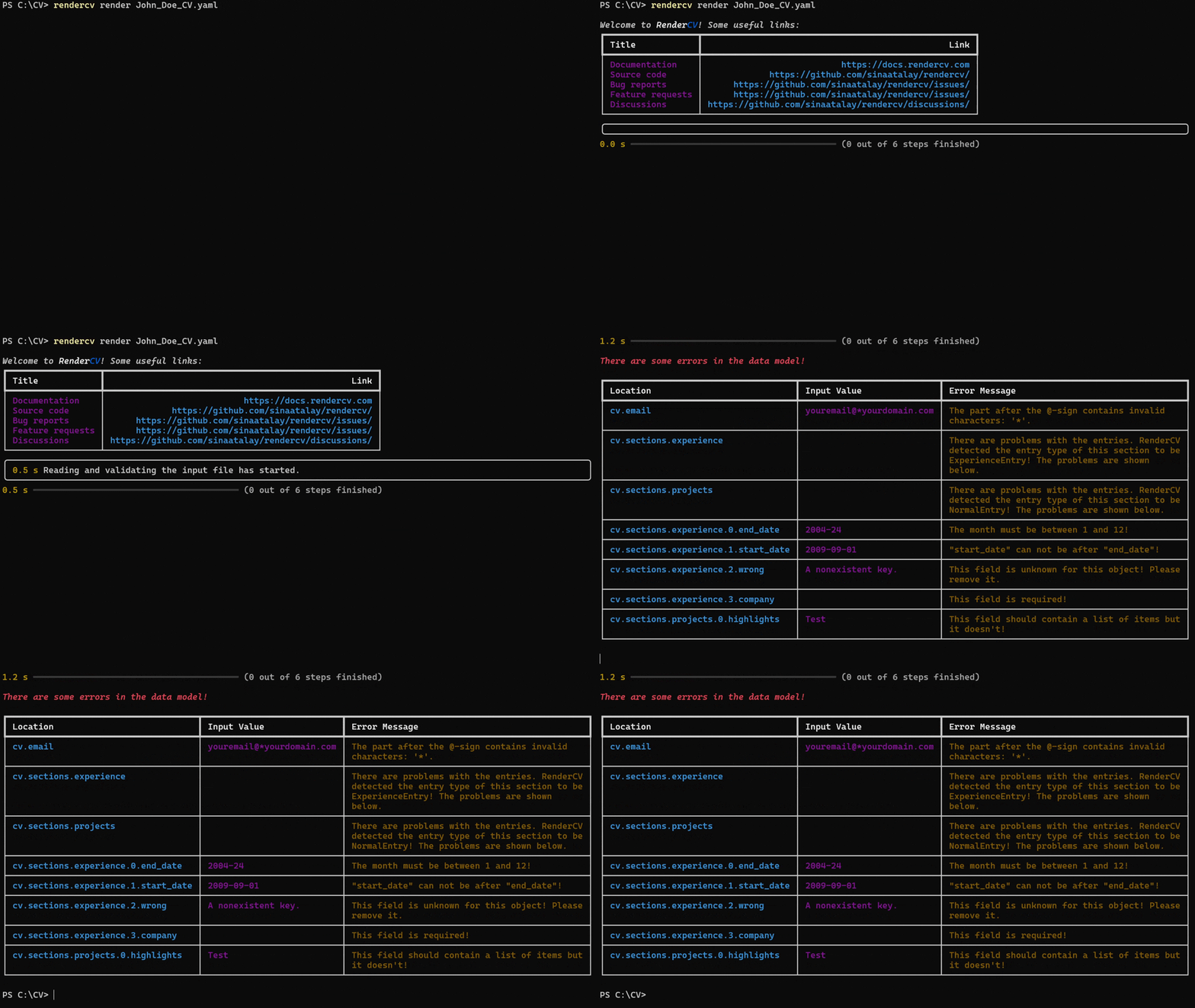
RenderCV comes with a JSON Schema so that the YAML input file can be filled out interactively.
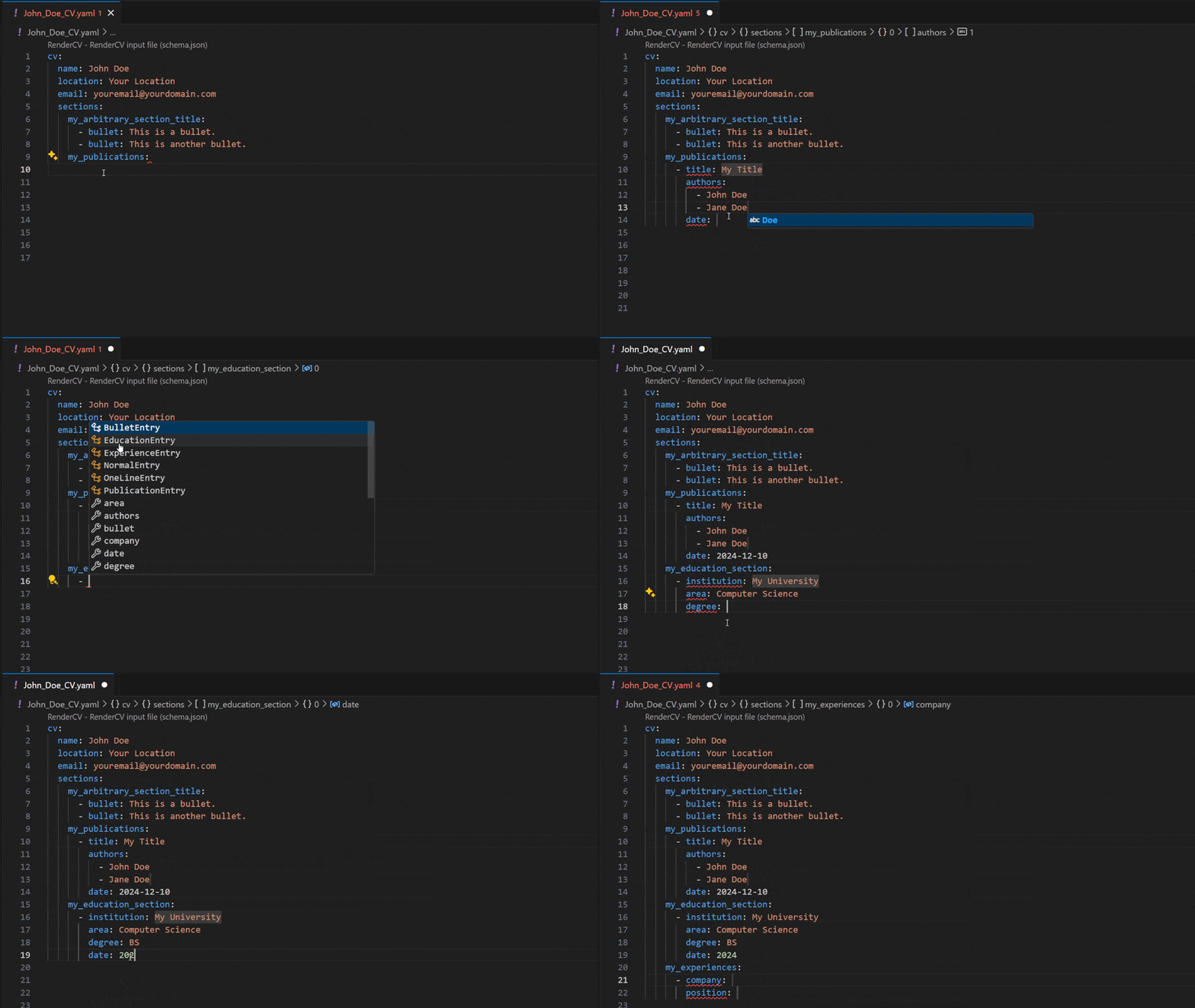
Quick Start Guide
Either use the RenderCV App, rendercv-pipeline, or follow the steps below.
- Install Python (3.10 or newer).
- Run the command below in a terminal to install RenderCV.
pip install rendercv
- Run the command below to generate starting input files.
rendercv new "Full Name"
- Edit the contents of
Full_Name_CV.yamlin your favorite editor (tip: use an editor that supports JSON Schemas). - Run the command below to generate your CV.
rendercv render Full_Name_CV.yaml
Here, you can find a comprehensive user guide that covers the YAML input file structure and command-line interface (CLI) in greater detail.
Motivation
Writing the content of a CV and designing a CV are separate issues that should be treated separately. RenderCV attempts to provide this separation. This approach encourages users to concentrate on the content without getting distracted by the appearance of their CV and vice versa.
RenderCV also provides a set of utilities that automate most of the manual work involved in the CV updating process. After updating a single sentence or date in the YAML input file written in pure English, RenderCV will:
- Re-create your $\LaTeX$ file,
- Render a new PDF file,
- Create a new Markdown file,
- Create a new HTML document, and
- Create images of each page of the PDF file as PNGs.
Why use RenderCV instead of $\LaTeX$? I can version-control $\LaTeX$ code too!
RenderCV is not a replacement for $\LaTeX$. It is a set of utilities designed to create and manage $\LaTeX$ CVs. If you're currently using $\LaTeX$ to create your CV, you should try RenderCV. Using your existing $\LaTeX$ themes in RenderCV is very easy.
Advantages of RenderCV over using pure $\LaTeX$:
- RenderCV will separate the content of your CV from your $\LaTeX$ code. They will sit in independent files, and RenderCV will use both to generate your CV.
- You will be able to version-control your $\LaTeX$ code and content separately.
- Updating your content in a YAML file is easier than updating a complex $\LaTeX$ file.
- A pure $\LaTeX$ CV will have many code duplications because a CV is a document with a list of sections that contain a list of entries. RenderCV has only one $\LaTeX$ code for each entry type, duplicated automatically based on the YAML input file.
- Spell-checking is not very straightforward in $\LaTeX$ documents.
Documentation
Contributing
All contributions to RenderCV are welcome! To get started, please read the developer guide.
Project details
Verified details
These details have been verified by PyPIProject links
GitHub Statistics
Maintainers
Release history Release notifications | RSS feed


Download files
Download the file for your platform. If you're not sure which to choose, learn more about installing packages.
Source Distribution
Built Distribution
Filter files by name, interpreter, ABI, and platform.
If you're not sure about the file name format, learn more about wheel file names.
Copy a direct link to the current filters
File details
Details for the file rendercv_hb-1.17.tar.gz.
File metadata
- Download URL: rendercv_hb-1.17.tar.gz
- Upload date:
- Size: 59.3 MB
- Tags: Source
- Uploaded using Trusted Publishing? Yes
- Uploaded via: twine/5.1.1 CPython/3.12.7
File hashes
| Algorithm | Hash digest | |
|---|---|---|
| SHA256 |
cdd0e4ddd7c427f90b184588651ccf620b6f7ebc52ddf02c3787af8dee8b67d2
|
|
| MD5 |
4621405347b003e03fb69e39febd977b
|
|
| BLAKE2b-256 |
8fb50e0669c9b9b6494026534fe29c07a81fb18390d5acc0b580c6acd1210d5f
|
File details
Details for the file rendercv_hb-1.17-py3-none-any.whl.
File metadata
- Download URL: rendercv_hb-1.17-py3-none-any.whl
- Upload date:
- Size: 48.1 MB
- Tags: Python 3
- Uploaded using Trusted Publishing? Yes
- Uploaded via: twine/5.1.1 CPython/3.12.7
File hashes
| Algorithm | Hash digest | |
|---|---|---|
| SHA256 |
311271a9c7d912f4dd64dd278d9e9ce0e7f3cad077db0090ed9ae22d2ef43deb
|
|
| MD5 |
d7a72951c13b5387f51771f48feaa5a2
|
|
| BLAKE2b-256 |
f436e1e0097a806e9a2b076e3c8ea066bd36b61523eceb8c05016d375e1d6aaa
|






