
Rent or Buy?
Should you buy a home, or rent and invest the money you would have put into it? Rent or Buy? simulates both choices over the years you plan to stay. It tells you which one leaves you wealthier, by how much, and how sure you can be.
Try it at rent-or-buy-sim.com. It opens in any web browser and needs no account.
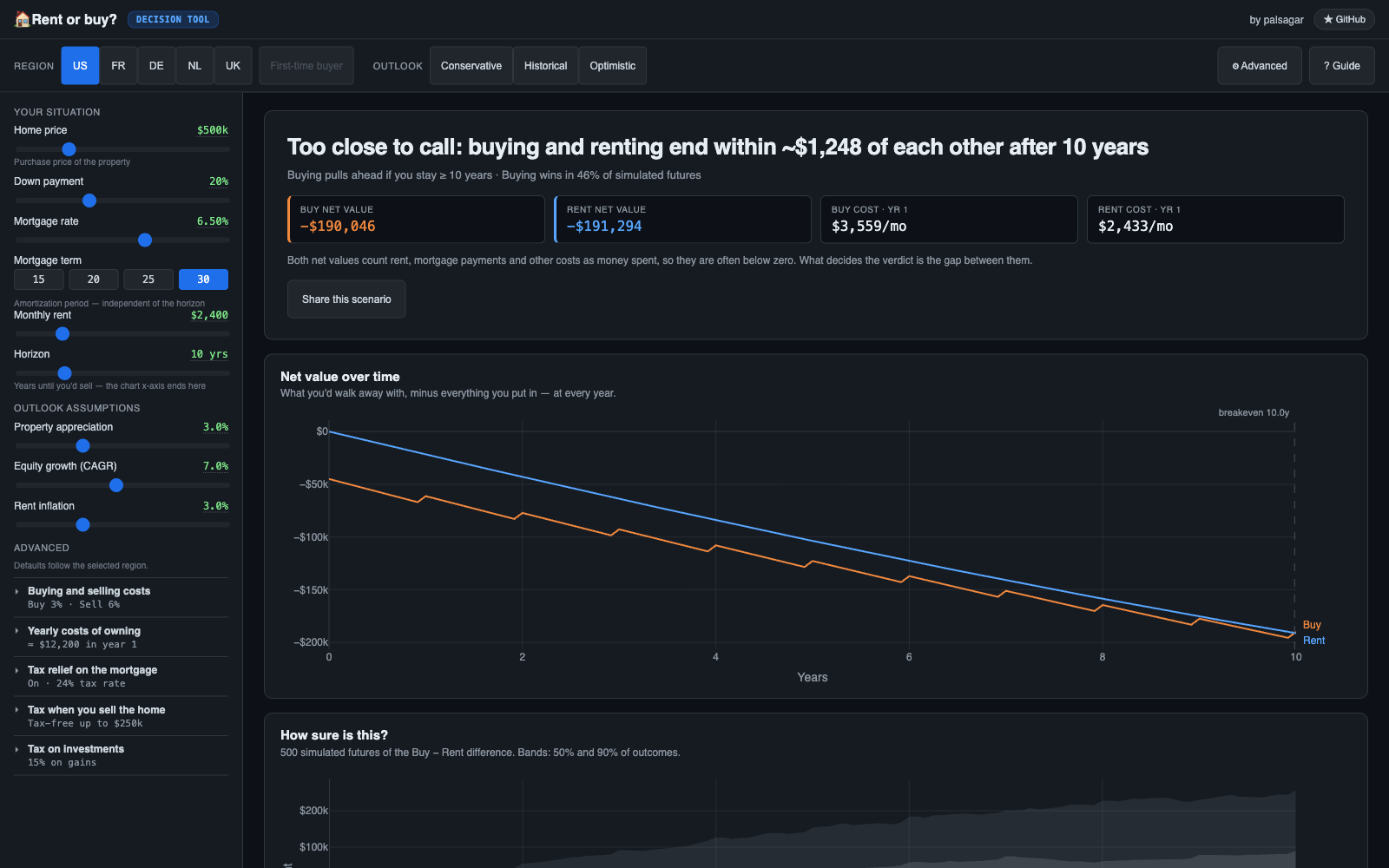
What it shows you
- The verdict. The headline says which choice comes out ahead at the end of your stay and by how much. Below it are the breakeven year and the share of simulated futures in which that choice wins. When the two choices end close together, the app says the answer is too close to call instead of picking a side.
- The decision chart. It draws the net value of buying and of renting for every year of your stay. Net value is what you would walk away with, minus everything you put in.
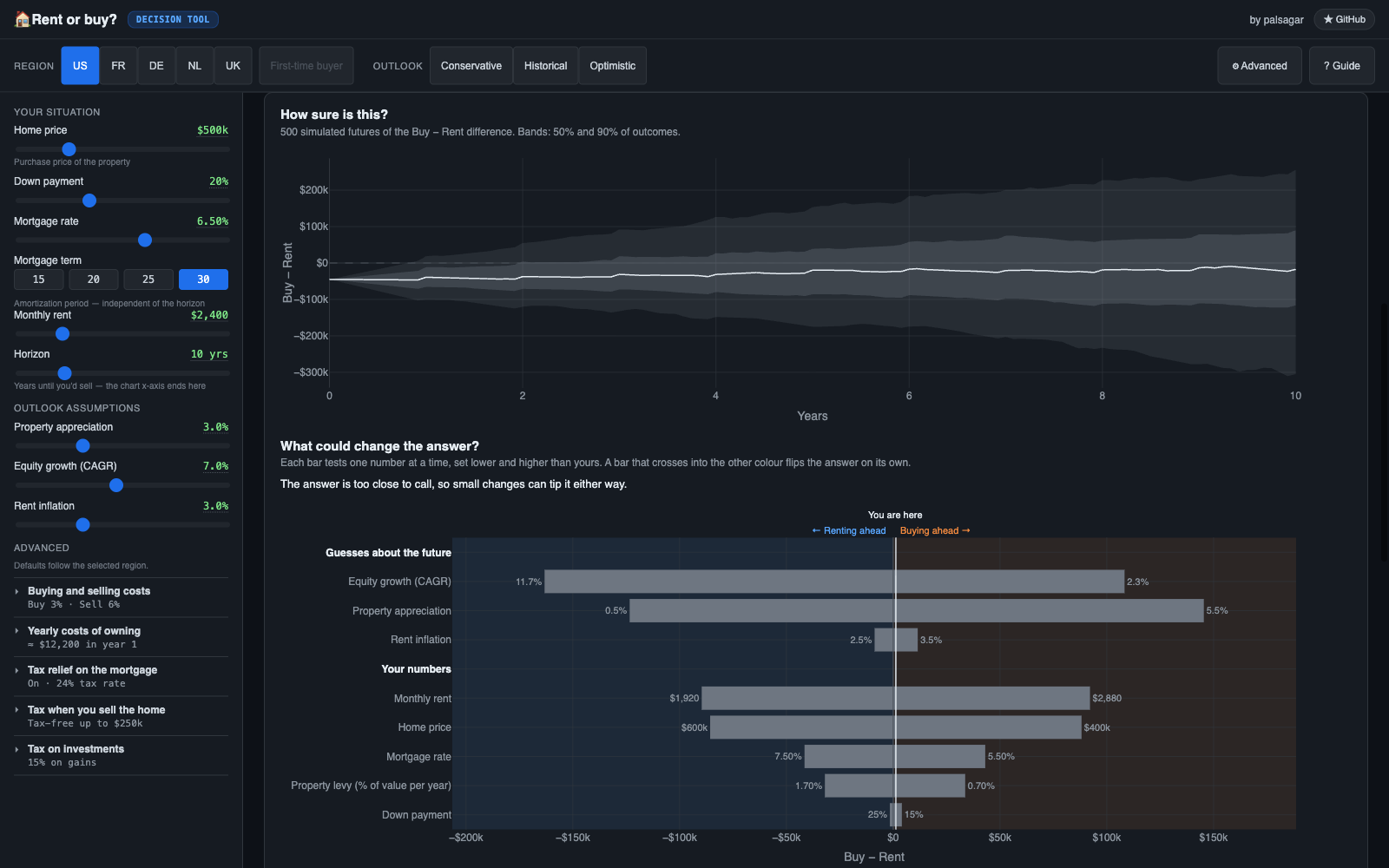
- How sure is this? A fan chart shows the spread of outcomes across the simulated futures, where growth and inflation vary from year to year.
- What could change the answer? A tornado chart tests one number at a time, lower and higher than yours. A sentence above it names the single changes that would flip the verdict. Each bar end prints the value that was tested. A side that stops at a slider limit is marked (min) or (max).
- Region presets. The United States, France (Lyon), Germany (Köln), the Netherlands and the United Kingdom (England and Northern Ireland) each set local tax rules, buying costs, typical prices and the currency.
- First-time-buyer relief. In regions that offer it, this is on by default. Where the law caps the price that qualifies, it switches itself off above that cap.
- Market outlook. Pick conservative, historical or optimistic assumptions for home prices, investment returns and rent increases.
- Advanced settings in plain language. Groups at the end of the inputs panel cover buying and selling costs, the yearly costs of owning, tax relief on the mortgage, tax when you sell the home, and tax on investments. Each group shows a one-line summary. A dot marks any value you changed from the region default, and you can reset a group to those defaults.
- Shareable links. The address bar always holds your exact scenario, and the Share button copies or shares it.
- Help when you need it. A guided tour is offered on your first visit, and the Guide explains the ideas behind the numbers. You can replay the tour from the Guide.
You can also see how much cash each choice costs you over time, read every figure in a year-by-year table, and download that table as CSV.
Get started
Install from PyPI
You need Python 3.12 or newer.
pip install rent-vs-buy-simulator
rent-vs-buy
Open http://localhost:8501. To use another port, set PORT, for example PORT=9000 rent-vs-buy.
Run from a clone
You need uv.
git clone https://github.com/palsagar/rent-vs-buy-simulator.git
cd rent-vs-buy-simulator
uv run uvicorn simulator.server:app --reload --port 8501
Open http://localhost:8501.
Develop
uv sync                                      # set up
uv run pytest                                # Python tests
npm ci && npx playwright install chromium
npx playwright test                          # browser tests
uv run ruff check src/ tests/                # lint
uv run ruff format src/ tests/               # format
uv run ty check src/                         # type check
See CONTRIBUTING.md for the full guide: branches, pull-request titles, financial-change rules and troubleshooting.
The frontend has no build step. The browser loads the ES modules in src/simulator/static/ as they are.
Learn more
- CONTRIBUTING.md: how to set up, test and submit a change.
- docs/README.md: the index of all documentation.
- docs/architecture.md: how the server, the engine and the frontend fit together.
- docs/formulas.md: the math behind net value, the Monte Carlo simulation and the taxes.
- docs/adr/README.md: the design decisions and why they were made.
- CONTEXT.md: the words the project uses and what each one means.
- DEPLOYMENT.md: running the app in Docker and wiring up analytics.
- CHANGELOG.md: what changed in each release.
1 maintainer

Metadata
1 maintainer
Release files for rent-vs-buy-simulator 2.2.1
For a detailed explanation of source distributions (sdists) and built distributions (wheels), please see the package formats documentation.
Source distribution (sdist)
| File | Size | Uploaded | |
|---|---|---|---|
| rent_vs_buy_simulator-2.2.1.tar.gz | 1.3 MB | Details |
Built distribution (wheel)
| File | Interpreter | ABI | Platform | Reset |
|---|---|---|---|---|
| rent_vs_buy_simulator-2.2.1-py3-none-any.whl | Python 3 | none | any | Details |
Total release size: 2.3 MB
Release files / rent_vs_buy_simulator-2.2.1.tar.gz
| Download URL | rent_vs_buy_simulator-2.2.1.tar.gz |
|---|---|
| Size | 1.3 MB |
| Tags | Source |
|
SHA-256 checksum How to use checksums |
c0727326a79a7fe8bf9ee26b344fee55953c9c1d0c2ec64711469d09659a056a
|
|
BLAKE2b-256 checksum How to use checksums |
ac832c3637b844315f3e3d74a32e1b49ba48082585bb04ea018e3522b70fcd7f
|
| Upload date | |
|
Uploaded using Trusted Publishing? What is trusted publishing? |
Yes |
| Uploaded via |
uv/0.13.0 {"installer":{"name":"uv","version":"0.13.0","subcommand":["publish"]},"python":null,"implementation":{"name":null,"version":null},"distro":{"name":"Ubuntu","version":"24.04","id":"noble","libc":null},"system":{"name":null,"release":null},"cpu":null,"openssl_version":null,"setuptools_version":null,"rustc_version":null,"ci":true}
|
Release files / rent_vs_buy_simulator-2.2.1-py3-none-any.whl
| Download URL | rent_vs_buy_simulator-2.2.1-py3-none-any.whl |
|---|---|
| Size | 1.0 MB |
| Tags | Python 3 |
|
SHA-256 checksum How to use checksums |
34915e18d661a482a796600b25d13f2e32a198002a6a3656493df8eedbf17f47
|
|
BLAKE2b-256 checksum How to use checksums |
d077dea4274d40f795a39294e88b8db31b548303123a9c9efbf17e29c04489d6
|
| Upload date | |
|
Uploaded using Trusted Publishing? What is trusted publishing? |
Yes |
| Uploaded via |
uv/0.13.0 {"installer":{"name":"uv","version":"0.13.0","subcommand":["publish"]},"python":null,"implementation":{"name":null,"version":null},"distro":{"name":"Ubuntu","version":"24.04","id":"noble","libc":null},"system":{"name":null,"release":null},"cpu":null,"openssl_version":null,"setuptools_version":null,"rustc_version":null,"ci":true}
|














