
🏠 rental-inbox
Your StreetEasy & Zillow alert emails + Craigslist, turned into one ranked, mapped apartment dashboard for NYC + Jersey City.




Quickstart
The only prerequisite is uv — it fetches a Python for you if the machine doesn't have one. Install it first:
macOS / Linux — paste this whole block, that's the entire install:
curl -LsSf https://astral.sh/uv/install.sh | sh
~/.local/bin/uvx rental-inbox
(The full path skips the "restart your terminal" dance on first install.
From any new terminal afterwards, plain uvx rental-inbox works.)
Windows:
powershell -ExecutionPolicy ByPass -c "irm https://astral.sh/uv/install.ps1 | iex"
then open a new terminal and run uvx rental-inbox.
That creates ~/rental-inbox/ (config, database, plugin folder), serves the
dashboard at http://127.0.0.1:8377, and opens it in your browser by itself
(--no-browser to skip; if the port is taken, the next free one is picked
automatically).
First run opens a four-step wizard: connect Gmail (skippable — Craigslist works without it), tick the areas you want (the five boroughs + Jersey City) and optionally drag a box on the map, build your searches as beds/baths/price rows, then hit Start hunting and it runs the first check.
Want to look around with fake data first?
uvx rental-inbox --demo
40 seeded listings in a throwaway temp folder, a DEMO DATA badge in the
header, and inbox checks disabled. Your real ~/rental-inbox/ is never touched.
Prefer a permanent install:
uv tool install rental-inbox && rental-inbox   # or:
pipx install rental-inbox && rental-inbox
How it works
The listing sites block scrapers, so this reads their email instead. StreetEasy and Zillow return 403 to plain HTTP requests (Cloudflare). That was probed, confirmed, and left alone — there is no evasion code in this repo. But both sites will happily email you every new match for a saved search, so rental-inbox logs into your Gmail over IMAP (read-only), pulls the alert emails from the last 30 days, and parses the listing cards out of the HTML. You need one saved search with email alerts turned on; the app re-filters and ranks whatever those alerts contain.
Craigslist is scraped directly, because it permits it. It serves a static
no-JS results page over plain HTTP. The fetch is one urllib GET per search
per borough you've selected in the wizard (Jersey City rides the NYC site's
New Jersey subarea, filtered to JC listings), sequential, jittered 2–4s apart —
no browser, no concurrency (so more boroughs means a slower, but still polite,
check). Search cards omit beds and baths, so the listing page is fetched once
per kept listing (≤12 per check, 0.8s apart) to fill them in.
Building facts come free from NYC open data. Each address is geocoded once against NYC GeoSearch (keyless) for coordinates plus a BBL tax-lot id; the BBL goes to PLUTO (keyless) for building class, floor count, unit count and year built — which is how a listing gets labelled Elevator, Walk-up or Condo when the ad never said. Nearest transit is pure local math over a station list vendored in the package (MTA subway, plus the four JC-side PATH stops), so it costs no network call at all. Every result is cached in the database: one lookup per address, ever.
Nothing leaves your machine. Listings live in SQLite at
~/rental-inbox/data/listings.db. The server binds 127.0.0.1 only. The Gmail
app password is written to ~/rental-inbox/.env with mode 600 and is used for
exactly two things: reading your alert emails, and sending your starred
listings to yourself. There is no account, no telemetry, no cloud.
flowchart LR
  A["Gmail alerts<br/>StreetEasy · Zillow"] --> P
  B["Craigslist"] --> P
  C["RentCast API<br/>optional key"] --> P
  D["your plugins<br/>~/rental-inbox/sources/"] --> P
  P["ingest pipeline<br/>dedupe · caps · geo gates · scoring"] --> S[("SQLite")]
  S --> W["FastAPI dashboard<br/>table · map · email digest"]
  N["Open data<br/>GeoSearch · Census · PLUTO · MTA+PATH"] -.-> S
Features
- Every source in one table — StreetEasy + Zillow alert emails, Craigslist, any plugin you drop in, and the optional RentCast API (free key, budgeted to one fetch a day, run from the dashboard's check).
- Deterministic HIGH / MEDIUM / LOW scoring from neighborhood tier, budget headroom, no-fee, and move-in window. No LLM anywhere in the ranking.
- Your searches are the filter — each listing is filed under the first
[[search]]row it fits (beds/baths/price); anything matching none is dropped, which narrows the platforms' own alerts further. - Geography you draw — area checkboxes (five boroughs + Jersey City) plus an optional rectangle on a Leaflet map. Anything outside is auto-archived, and archives are restorable.
- Dedupe by source + normalized address, so one apartment repeated across a month of alert emails is a single row — email links are per-send tracker tokens, so the address has to be the key.
- Price tracking — a re-sighting at a new price keeps the old one, shows a ↓ / ↑ badge, and re-scores the listing (a drop can promote it).
- Building and transit facts on every row: elevator/walk-up/condo, floors, year built, nearest subway/PATH station with walk minutes, distance from an optional anchor address.
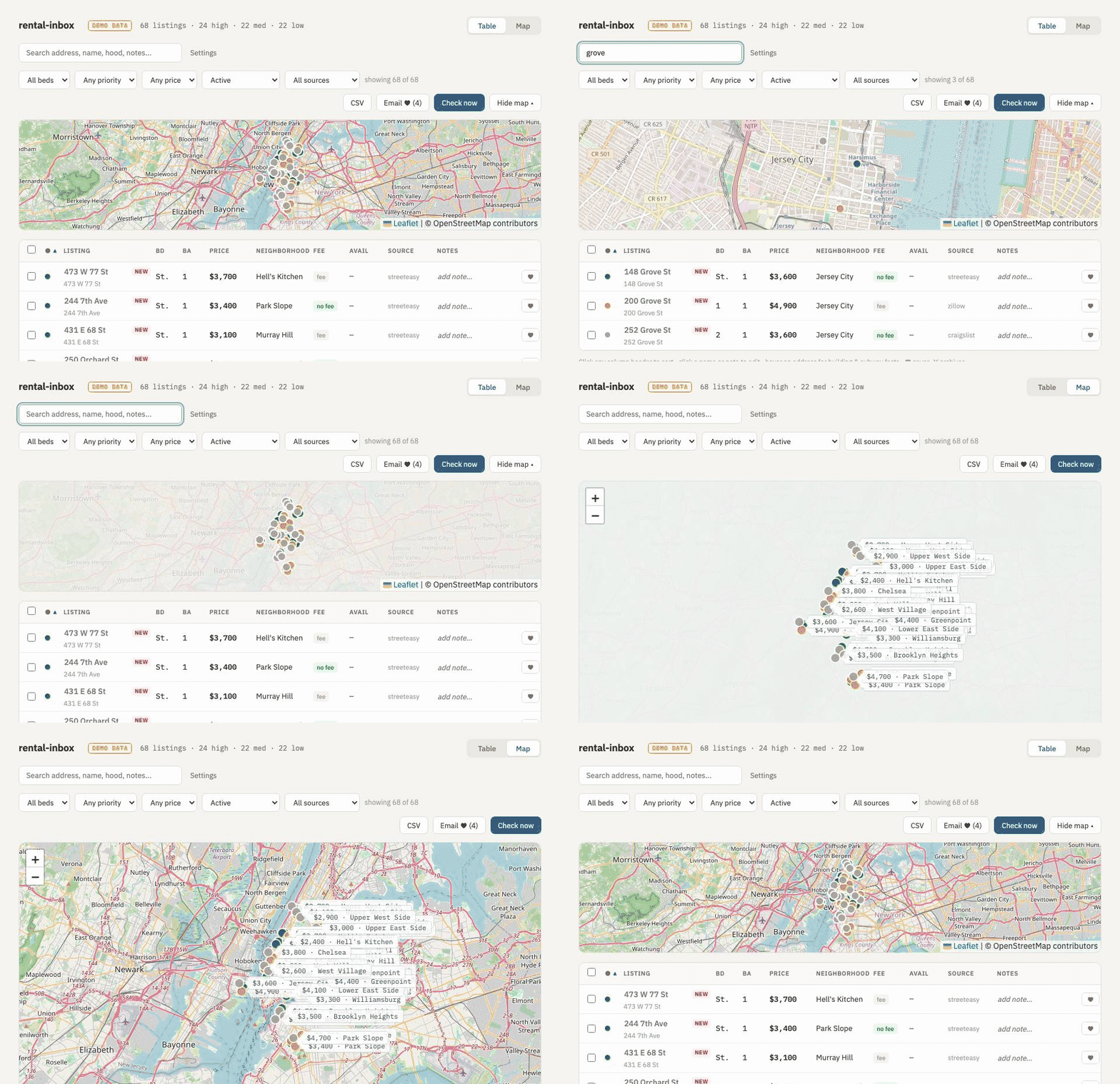
- Dense sortable table with a live map strip, plus a full map view; filters for beds, priority, price, source and archived state; free-text search across address, nickname, neighborhood and notes.
- Inline nicknames and notes, ♥ to save, ✕ to archive, checkbox multi-select for bulk archive.
- Shareable view state — filters, sort and view live in the URL hash; CSV export of exactly what you're looking at.
- Email digest — one click sends your starred listings to yourself as photo cards over Gmail SMTP. Never automatic.
- Checks itself every 30 minutes while the app is open (configurable, 0 to
turn off), or on demand with Check now.
rental-inbox pulldoes the same from a terminal or cron job — email, Craigslist and plugins; RentCast's daily fetch runs only from the dashboard.
Add your own source
Drop a .py file into ~/rental-inbox/sources/ that defines fetch(search):
# ~/rental-inbox/sources/mysite.py
from rental_inbox.models import Listing

SOURCE = "mysite"                      # optional; defaults to the filename

def fetch(search):                     # called once per [[search]] in config.toml
    return [Listing(url="https://example.com/listing/1", source=SOURCE,
                    search_type=search.name, price=3200,
                    address="123 Example St", neighborhood="Chelsea",
                    beds=1, baths=1)]
Presence in the folder is the toggle — no config entry. Your rows go through
the same dedupe, per-check caps, geo gates and scoring as the built-ins, and a
plugin that crashes is skipped with a note on stderr instead of killing the
check. A commented _template.py is written into the folder on first run
(files starting with _ are ignored).
Full guide, field reference and debugging: docs/plugins.md.
Trying it with a different Gmail account
Run a completely separate instance — its own config, database, and port — without touching your main one:
uvx rental-inbox --home ~/rental-inbox-test
The wizard will ask for that account's Gmail address and app password. Two things to know:
- StreetEasy/Zillow only email alerts to the account where the saved search was created. Log into those sites as the test account and set up alerts — or simply forward a few alert emails to the test address; forwarded alerts are picked up too.
- After a check, the banner tells you exactly what happened ("read N alert emails · M listings · K new"). If it says the inbox had zero alert emails, the account isn't receiving alerts yet — that's an alert-setup issue, not an app issue.
FAQ
Is it safe to give it a Gmail password?
It never sees your Google password. You create a 16-character app password at
myaccount.google.com/apppasswords
(needs 2-Step Verification), which the wizard verifies with one throwaway IMAP
login and then writes to ~/rental-inbox/.env, chmod 600, on your machine
only. It is never logged, never echoed back by the API, and never sent anywhere
except Gmail. Revoke it at any time from the same page and the app simply stops
reading mail.
Why not just scrape Zillow and StreetEasy?
They answer plain HTTP with a Cloudflare 403. Working around that would mean
browser automation and fingerprint evasion, which this project deliberately
doesn't do — see hunt/http.py: blocked means blocked. The alert emails carry
price, beds, baths, photo, broker and neighborhood, which is most of what a
search card shows anyway.
Does it work outside NYC? NYC and Jersey City. JC is opt-in (tick it in the wizard) and honest about its data: StreetEasy doesn't list New Jersey, so JC rows come from your Zillow alerts and Craigslist; building facts (elevator/walk-up, floors, year built) come from NYC's PLUTO data, which stops at the Hudson, so those stay blank for JC; nearest-transit uses the JC PATH stations. Anywhere else: no — the enrichment is NYC open data. The email parsers, dedupe and scoring are city-agnostic, so a port is a real possibility — see docs/superpowers/specs/2026-08-30-city-port-design.md. PRs welcome.
Does it work with non-Gmail mail?
Not in v1. Mail search uses Gmail's X-GM-RAW extension (so it also finds
alerts forwarded to you) and Gmail app passwords. PRs welcome.
Where is my data?
All of it in ~/rental-inbox/: config.toml, .env, sources/, and
data/listings.db. That folder is the entire state of the app, and none of it
goes anywhere else.
Something is stuck in demo mode.
RENTAL_INBOX_DEMO=1 in the environment puts any instance into demo
behaviour — DEMO badge, checks disabled — even one pointed at your real data
folder. serve --demo sets it for its own process; don't export it yourself.
How do I uninstall?
rm -rf ~/rental-inbox removes every file the app created, then
uv tool uninstall rental-inbox (or pipx uninstall rental-inbox).
Development
git clone https://github.com/osaidd/rental-inbox
cd rental-inbox
uv sync
uv run pytest
uv run rental-inbox serve
Point a dev run at a scratch data folder with RENTAL_INBOX_HOME=/tmp/ri-dev
(or --config /path/to/config.toml) so it never touches your real one.
- Make it yours (searches, areas, scoring, plugins): docs/customize.md
- Internals and module map: ARCHITECTURE.md
- Writing a source plugin: docs/plugins.md
- Contributing: CONTRIBUTING.md
- macOS double-click app: docs/mac-app.md
License
MIT — see LICENSE.
1 maintainer

Metadata
1 maintainer
Release files for rental-inbox 1.0.6
For a detailed explanation of source distributions (sdists) and built distributions (wheels), please see the package formats documentation.
Source distribution (sdist)
| File | Size | Uploaded | |
|---|---|---|---|
| rental_inbox-1.0.6.tar.gz | 154.4 kB | Details |
Built distribution (wheel)
| File | Interpreter | ABI | Platform | Reset |
|---|---|---|---|---|
| rental_inbox-1.0.6-py3-none-any.whl | Python 3 | none | any | Details |
Total release size: 282.0 kB
Release files / rental_inbox-1.0.6.tar.gz
| Download URL | rental_inbox-1.0.6.tar.gz |
|---|---|
| Size | 154.4 kB |
| Tags | Source |
|
SHA-256 checksum How to use checksums |
d513aff95ffeb7fb90ca95653e699a7294827f849428bcf2504eb9d84b1209c9
|
|
BLAKE2b-256 checksum How to use checksums |
546b7b6fc25eccc0891b9a5ade71b4c9527bca3d8fd5732d4592935f98375625
|
| Upload date | |
|
Uploaded using Trusted Publishing? What is trusted publishing? |
Yes |
| Uploaded via |
twine/7.0.0 CPython/3.13.14
|
Provenance
Provenance describes where a file came from. On PyPI, provenance is shared via attestations, which provide a verifiable record of the build or publishing details. View details, limitations and caveats.


PyPI Publish Attestation
PyPI verified that this artifact, at this checksum, originated from the publisher listed below.
Signed by GitHub Actions, verified by PyPI on Sep 2, 2026.
Transparency logRelease files / rental_inbox-1.0.6-py3-none-any.whl
| Download URL | rental_inbox-1.0.6-py3-none-any.whl |
|---|---|
| Size | 127.6 kB |
| Tags | Python 3 |
|
SHA-256 checksum How to use checksums |
037bc50b315fb8c576d688f8f55eadf3da30b13abfc1e8ee66a72bc7635a1bc6
|
|
BLAKE2b-256 checksum How to use checksums |
a3cb99e00dbf2ea20d6367452e79525a699b6ae0e4c3066abce5a08b1d9b63a0
|
| Upload date | |
|
Uploaded using Trusted Publishing? What is trusted publishing? |
Yes |
| Uploaded via |
twine/7.0.0 CPython/3.13.14
|
Provenance
Provenance describes where a file came from. On PyPI, provenance is shared via attestations, which provide a verifiable record of the build or publishing details. View details, limitations and caveats.
PyPI Publish Attestation
PyPI verified that this artifact, at this checksum, originated from the publisher listed below.
Signed by GitHub Actions, verified by PyPI on Sep 2, 2026.
Transparency log













