
Reny
A lightweight, fast, and safe batch renaming and filesystem organization tool.
Background
reny was originally created as the renamer component inside the larger batchmp (Batch Media Processing) suite. It was spun off into its own standalone package to provide for a lightweight, safe, pure-filesystem organizing tool without FFmpeg / Mutagen media dependencies.
If you need advanced media operations (like denoising, cover-art extraction, or format transcoding), check out the original batchmp project. If you just need to safely organize your files with surgical precision, reny is all you need.
Installation
You can safely install reny from the PyPI package using pipx:
pipx install reny
(Note: If this is your first time using pipx, you may need to run pipx ensurepath once to ensure the installed tools are available in your terminal).
Features
- Dry-Run by Default:
renywill always visualize targeted changes and ask for confirmation before it ever touches your files - Virtual Views: Preview how a directory structure would look when reorganised by type, size, or date without moving or changing anything
- Filtering & Leveling: Precise targeting using include/exclude patterns and recursion control with
end_level/start_levelparameters - Indexing: Multi-level indexing across nested directories, supporting multiple indexing schemes
- Padding: Automatically pad existing numbers in filenames with leading zeros to fix sorting orders
- Flattening: Safely collapse nested directory structures into a single folder
- Regex Replacement: Powerful batch renaming using standard regular expressions
- Git Integration: Automatically detects and displays file and directory modification statuses using
--git - Color Outputs: Rich terminal highlighting for different file types using
--color, grouping extensions visually
Examples
Basic Operations
Print current directory structure:
reny
(Without arguments, reny defaults to the print command)
Limit Recursion Depth (-el):
Use -el (end level) to control exactly how deep reny recurses. For example, to add an index only to files inside immediate subdirectories (depth 1), while ignoring deeper nested folders:
reny -r -el 1 index
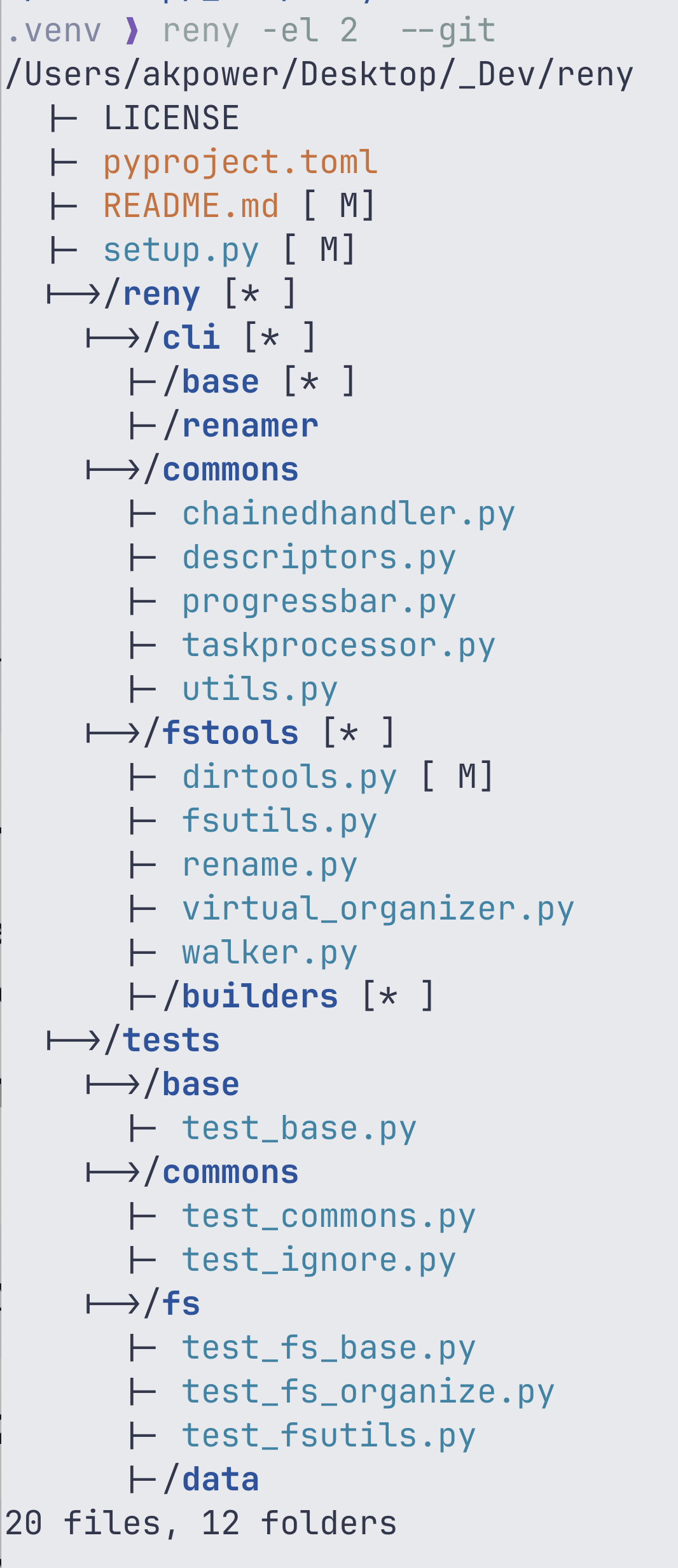
Visualize with Git info (--git):
To visually inspect changes in a repository, reny will automatically bubble up file modifications to their parent directories, even with shallow directory levels.
Add a sequential index to all .txt files recursively:
reny -r -in '*.txt' index
Pad existing numbers with leading zeros (e.g., 2 kms.png becomes 02 kms.png):
reny pad -md 2
Regex Replace: Change spaces to underscores in all filenames:
reny replace -fs ' ' -rs '_'
Advanced Operations & Virtual Views
Flattening nested directories: Collapse all sub-directories and bring their files up to the current folder level:
reny flatten
Organize by File Type:
Move files into sub-directories grouped by their file extension (e.g., png/, pdf/):
reny organize -b type
Virtual Views (Dry-Run Preview): Preview how files would look if organized by year and month, without actually moving any files on your drive:
reny --color 0 print -b date --date-format "%Y/%m"
Virtual view by date:
~/Downloads
  |- 2025/
    |- 01/
      |- document.pdf
    |- 02/
      |- image.png
💡 The --color 0 parameter is used to disable terminal colors
Ignore Files (.renyignore)
By default, reny will automatically detect a .renyignore file in your target directory (falling back to a global ~/.renyignore if none is found) to cleanly exclude specific directories from processing.
You can also explicitly pass any file, like a standard .gitignore, to automatically parse and exclude those paths from the output.
reny -r -el 2 -ig .gitignore --color 0
~/Desktop/_Dev/reny
  |- LICENSE
  |- pyproject.toml
  |- README.md
  |- setup.py
  |->/reny
    |- __init__.py
    |->/cli
      |- __init__.py
      |-/base
      |-/renamer
    |->/commons
      |- __init__.py
      |- chainedhandler.py
      |- descriptors.py
      |- progressbar.py
      |- taskprocessor.py
      |- utils.py
    |->/fstools
      |- __init__.py
      |- dirtools.py
      |- fsutils.py
      |- rename.py
      |- virtual_organizer.py
      |- walker.py
      |-/builders
  |->/tests
    |- __init__.py
    |->/base
      |- __init__.py
      |- test_base.py
    |->/commons
      |- __init__.py
      |- test_commons.py
      |- test_ignore.py
    |->/fs
      |- __init__.py
      |- test_fs_base.py
      |- test_fs_organize.py
      |- test_fsutils.py
      |-/data
28 files, 12 folders
Real-World Scenario: Downloads Cleanup
A safe, two-step workflow to tame a chaotic downloads folder by grouping files by their extension and sorting them by size to see what's eating up your disk space.
Step 1: Preview the cleanup with size statistics (Shows you the largest file categories first, without moving any files)
reny -s sd print -b type -ss
Step 2: Commit the organization (Actually moves the files into their respective subdirectories)
reny organize -b type
Documentation & Tutorials
Although reny is a standalone project, its core organizing logic is inherited directly from batchmp. You can find detailed tutorials and deep-dives on how to master its capabilities in the original blog posts:
- Renamer Organize & Virtual Views – Highly recommended reading for mastering virtual directory views
- BatchMP Tools Tutorial, Part II: renaming files with renamer
- Practical BatchMP Series
Usage
Run reny --help to see all available filesystem operations!
Development
To set up the project for development:
- Clone the repository and navigate into it:
git clone https://github.com/akpw/reny.git
cd reny
- Create and activate a virtual environment:
python3 -m venv .venv
source .venv/bin/activate
- Install the project in editable mode along with testing dependencies:
pip install -e ".[test]"
Running Tests
The project uses pytest for its test suite. Because reny performs real filesystem operations, the tests are designed to dynamically create and clean up safe temporary sandbox folders during execution.
To run the full test suite:
pytest -v --tb=short tests/
To run a specific test file:
pytest tests/fs/test_fs_organize.py
1 maintainer

Download files
Download the file for your platform. If you're not sure which to choose, learn more about installing packages.
Source Distribution
Built Distribution
Filter files by name, interpreter, ABI, and platform.
If you're not sure about the file name format, learn more about wheel file names.
Copy a direct link to the current filters
File details
Details for the file reny-1.0.7.tar.gz.
File metadata
- Download URL: reny-1.0.7.tar.gz
- Upload date:
- Size: 51.3 kB
- Tags: Source
- Uploaded using Trusted Publishing? No
- Uploaded via:
twine/6.2.0 CPython/3.14.6
File hashes
| Algorithm | Hash digest | |
|---|---|---|
| SHA256 |
a7235ea6d9bd899197fc01ac8a2d446a16f818c108805c1c7f2babe3d0f35004
|
|
| MD5 |
8699cc2be8e2f710234398cef77bc2c9
|
|
| BLAKE2b-256 |
a845586e8c2ec06c44cbfbfd5772f063998424a441b736ebeb6de7f1185fbfd9
|
File details
Details for the file reny-1.0.7-py3-none-any.whl.
File metadata
- Download URL: reny-1.0.7-py3-none-any.whl
- Upload date:
- Size: 63.3 kB
- Tags: Python 3
- Uploaded using Trusted Publishing? No
- Uploaded via:
twine/6.2.0 CPython/3.14.6
File hashes
| Algorithm | Hash digest | |
|---|---|---|
| SHA256 |
1dafc9ebe02055cdb6e6f8b86c84ef685873902462346bc56695c6c784c4a467
|
|
| MD5 |
63bcab25a0f30881a505ec195152e387
|
|
| BLAKE2b-256 |
b41ae38961fd4664207578d2923ab93715d55f57a1b4846fb54fc7602a5a03c7
|














