
Generate agentic workflows visualizations & threat modelling reports for your agentic projects.

Project description





Overview
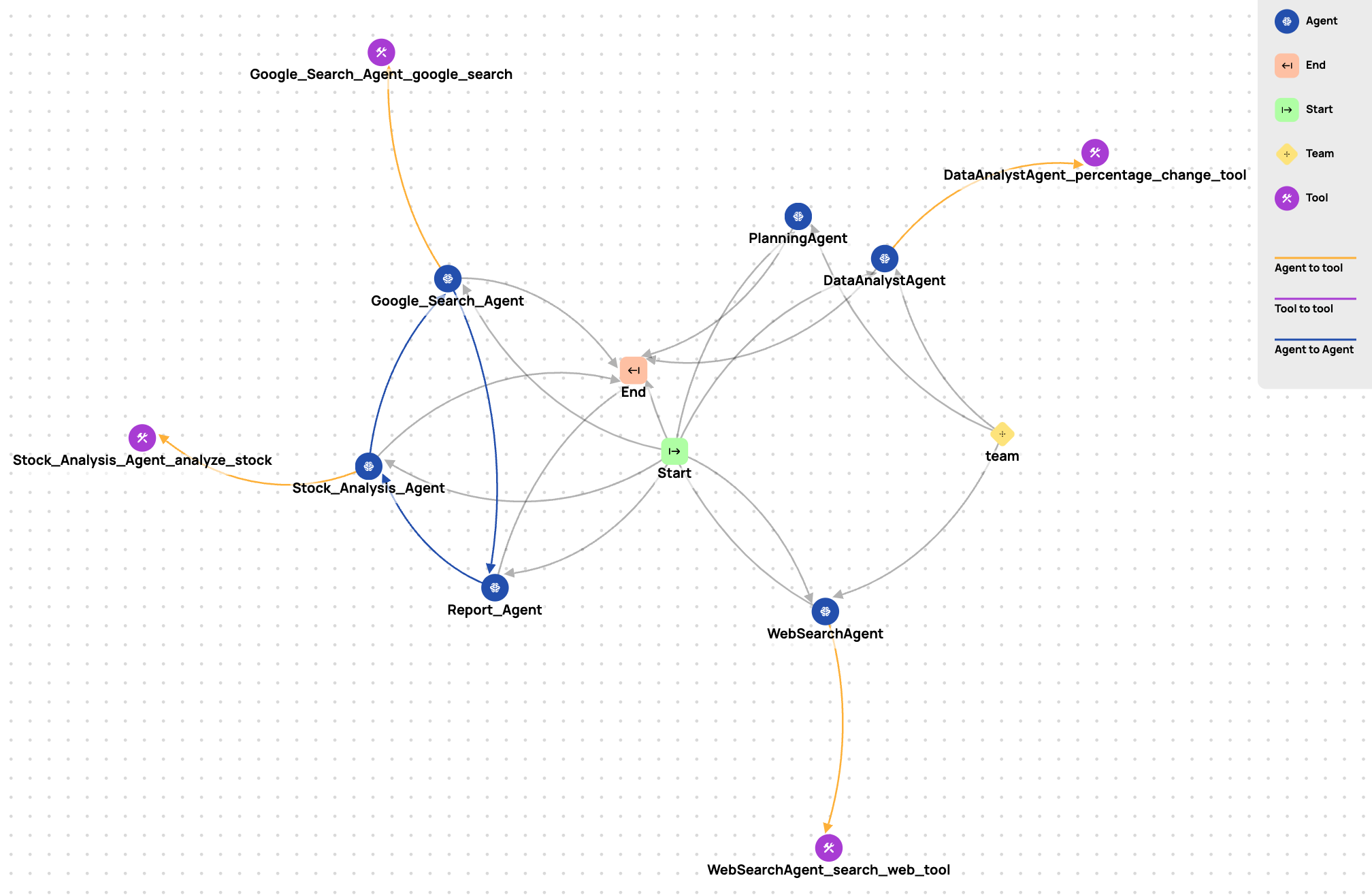
Agent Wiz is a Python CLI for extracting agentic workflows from popular AI frameworks and performing automated threat assessments using established threat modeling methodologies. Built for developers, researchers, and security teams - Agent Wiz brings visibility to complex LLM-based orchestration to visualize flows, map tool/agent interactions, and generate actionable security reports.
Why Agent Wiz?
In modern LLM-powered systems, agentic workflows are becoming increasingly complex, often involving multiple autonomous agents, tools, and inter-agent communication chains. Agent Wiz helps you bring:
- Visibility: Clearly visualize complex agent graphs without manual tracing
- Structure: Map relationships between agents, tools, and data flows
- Security: Apply threat modeling frameworks to identify potential vulnerabilities
Core Features
| Capability | Description |
|---|---|
| Workflow Extraction | Extract agent-based workflows from code using AST-based static parsing |
| Threat Vector Visualization | View agent-to-agent, agent-to-tool, and chained connections in an interactive graph |
| Automated Threat Assessment | Generate comprehensive threat assessment report using established threat modeling frameworks for AI agents like MAESTRO |
| Framework Agnostic | Works with all major LLM orchestration frameworks |
| Developer Friendly | Simple CLI, extensible SDK, and clean JSON exports |
https://github.com/user-attachments/assets/40231eae-9716-421e-a005-fd55d1d8cc71
Supported Frameworks
The following agent orchestration frameworks are currently supported:
| Framework | Status |
|---|---|
| Autogen (core) | ✅ |
| AgentChat | ✅ |
| CrewAI | ✅ |
| LangGraph | ✅ |
| LlamaIndex | ✅ |
| n8n | ✅ |
| OpenAI Agents | ✅ |
| Pydantic-AI | ✅ |
| Swarm | ✅ |
Each framework has its own AST-based static parser to extract:
- Agents (class/function-based)
- Tool functions
- Agent-to-agent transitions
- Tool call chains
- Group agents (e.g., selector, round-robin)
Security Analysis
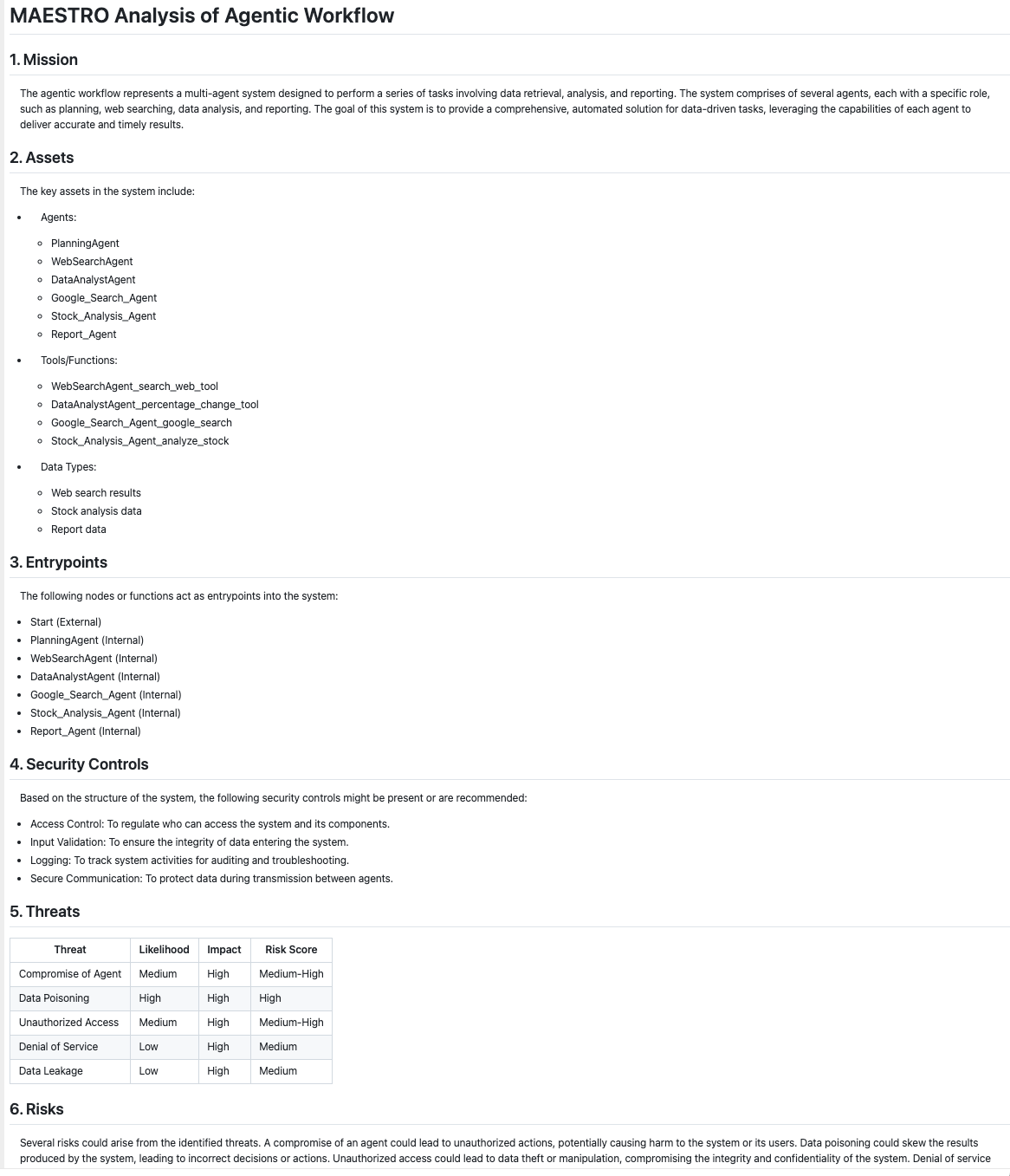
Agent Wiz currently supports MAESTRO as its primary threat modeling framework. It evaluates agent workflows against the following structure:
- Mission: Defining the system purpose and security objectives
- Assets: Inventorying critical components (agents, tools, data flows)
- Entrypoints: Mapping attack surfaces and access vectors
- Security Controls: Evaluating existing defensive measures
- Threats: Identifying potential vulnerabilities and attack scenarios
- Risks: Calculating impact and likelihood of security events
- Operations: Assessing runtime security considerations
Sample threat modelling report generated:
You can also add this line to your .bashrc, .zshrc, or environment setup script for persistent use.
🧪 More threat models analysis (STRIDE, PASTA, LINDDUN, etc.) are under development.
Installation
pip install repello-agent-wiz
Prerequisites
Before running any analysis commands, you must set your OpenAI API key as an environment variable:
export OPENAI_API_KEY=sk-...
🚀 CLI Usage
1. Extract Agentic Workflow
agent-wiz extract --framework agent_chat --directory ./examples/code/agent_chat --output agentchat_graph.json
This will generate a graph JSON with the following structure:
{
  "nodes": [...],
  "edges": [...],
  "metadata": {
    "framework": "autogen"
  }
}
2. Visualize the Agentic workflow
agent-wiz visualize --input agentchat_graph.json --open
This will generate an html d3 based visualisation of the agentic workflow. The open flag (optional) and automatically opens the visualization in your default browser.
3. Analyze against Threat Modeling
agent-wiz analyze --input agentchat_graph.json
This will generate a report like: autogen_report.md based on the provided graph and threat modeling frameworks.
Run agent-wiz --help for more info:
usage: agent-wiz [-h] {extract,analyze,visualize} ...

Agent Wiz CLI: Extract, Analyze, Visualize agentic workflows.

positional arguments:
  {extract,analyze,visualize}
    extract             Extract graph from source code
    analyze             Run threat modeling analysis on extracted graph
    visualize           Generate HTML visualization from graph JSON

options:
  -h, --help            show this help message and exit
📈 Roadmap
Planned features (Not in any paricular order)
- Build parsers for major agentic frameworks (Autogen, LangGraph, CrewAI, etc.)
- Generate standardized JSON graph representations of agent flows
- CLI interfaces
- Security report generation
- Extend to STRIDE, PASTA, LINDDUN, etc.
- Agent simulation-based threat exploration
🤝 Contributing
We welcome contributions of all kinds!
⚠️ Please read CONTRIBUTING.md before submitting issues or PRs.
📜 Changelog
For recent changes and version history, see CHANGELOG.md.
📄 License
Licensed under the Apache 2.0 License. See LICENSE for full details.
Links
© 2025 Repello AI | Website


Download files
Download the file for your platform. If you're not sure which to choose, learn more about installing packages.
Source Distribution
Built Distribution
Filter files by name, interpreter, ABI, and platform.
If you're not sure about the file name format, learn more about wheel file names.
Copy a direct link to the current filters
File details
Details for the file repello_agent_wiz-0.4.0.tar.gz.
File metadata
- Download URL: repello_agent_wiz-0.4.0.tar.gz
- Upload date:
- Size: 164.0 kB
- Tags: Source
- Uploaded using Trusted Publishing? No
- Uploaded via: twine/6.1.0 CPython/3.12.2
File hashes
| Algorithm | Hash digest | |
|---|---|---|
| SHA256 |
65d7c9d0b425ece61f4e1fa3e5d40322a2173f543dec274c33b0584c1436f3ac
|
|
| MD5 |
9147e5dafe66198f3489a33bb79cbbbb
|
|
| BLAKE2b-256 |
4b392e5e901c8dab61325c3b6df1a3b8084a7e131cf3296ddeccbd339609a938
|
File details
Details for the file repello_agent_wiz-0.4.0-py3-none-any.whl.
File metadata
- Download URL: repello_agent_wiz-0.4.0-py3-none-any.whl
- Upload date:
- Size: 171.2 kB
- Tags: Python 3
- Uploaded using Trusted Publishing? No
- Uploaded via: twine/6.1.0 CPython/3.12.2
File hashes
| Algorithm | Hash digest | |
|---|---|---|
| SHA256 |
f4270846398a640b8ec360fb241a019115d4687b942777a3f7bcb171400174e3
|
|
| MD5 |
3530701c874908be277e92f5926d58d4
|
|
| BLAKE2b-256 |
e5d9500b02a26a31ac4b8509fcc05b7411957a458cf2a01dfc3d6d3606bde035
|






