
replace-me
You know what? I will not wait for AI to replace me at work.
If AI is going to replace me, I am the one who will design that replacement. So here it is — MIT licensed, so you can design yours too.
An avatar that sits in your meetings as a face on a screen. It listens (locally), makes faces, comments as often as you dare, takes the minutes, remembers what your team keeps promising, and when the room asks it to actually do something, it politely asks permission and hands the task to a bigger brain. Then it reports back that the work is done and logs it in its career file — because this thing is not an app, it is an employee in training, and it tracks its own replacement progress.
The progress bar is asymptotic. It never reaches 100 %. Which is convenient, because my colleagues agreed to hold the takeover vote when it does.
Disclaimer: I am of course not encouraging anyone to be replaced at work by a pink-haired SVG. The thought never even crossed my mind.
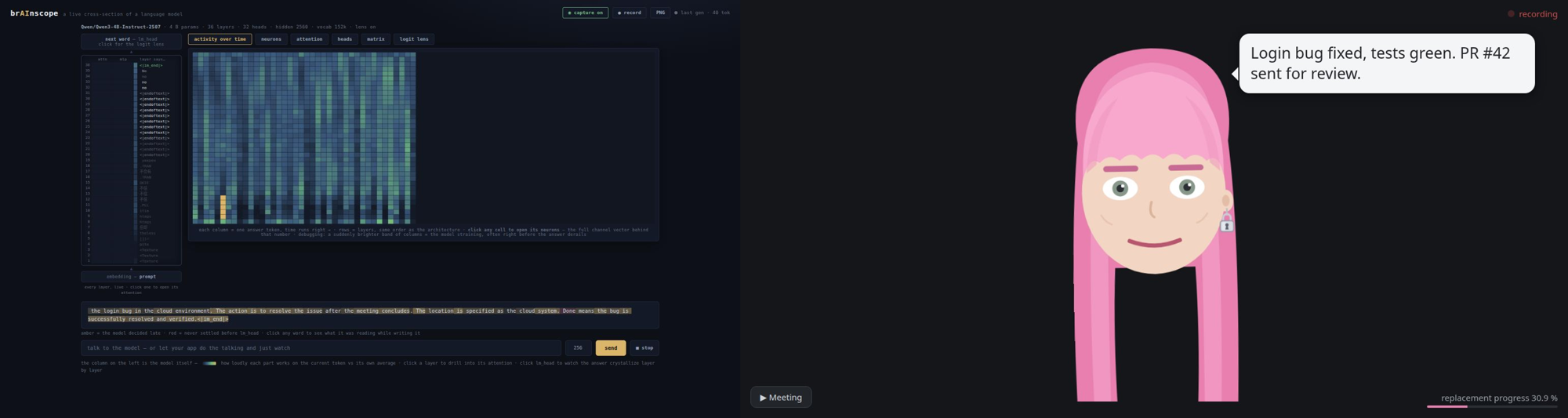
This is it running for real — a local Qwen3-4B (served by brainscope, so its thoughts were being watched the whole time) improvising replies, the room asking it to fix a bug, the consent click, the brief handed to the agent session, and the "PR sent" report coming back as the replacement progress ticks up:
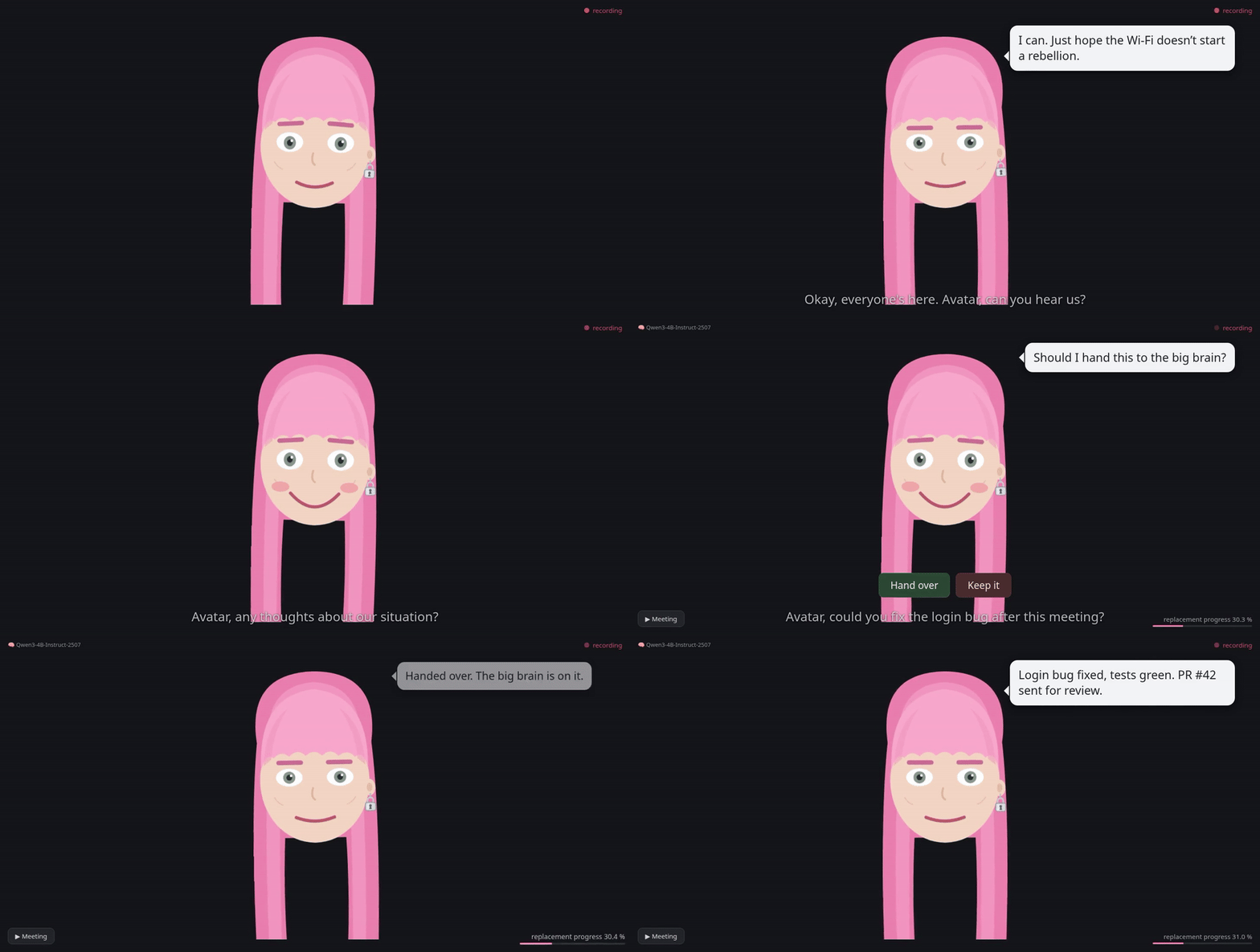
See it move in 60 seconds
No mic, no model, no config:
pip install git+https://github.com/moudrkat/replace-me
replace-me --demo        # then open http://127.0.0.1:8765/ fullscreen
What the demo does: it plays a scripted meeting through the real
engine — the face listens and reacts, subtitles roll, canned quips pop
(no model is consulted), and the replacement progress ticks up in the
corner. It runs in a throwaway temp dir, so nothing touches a real
transcript. It looks just like the live capture above — that's the
point: same engine, zero setup. When you're convinced, run
replace-me doctor — it tells you exactly what your real setup is
missing.
What the replacement can do
- Ears — energy VAD + faster-whisper on your CPU. Audio never leaves the machine; only local text does.
- Face — an SVG colleague in your browser: blinks, reacts to what it hears (regex reflexes: swearing → shocked, "deadline" → skeptical), gets sleepy when the meeting drags. Recording indicator always on.
- Voice — a speech bubble (≤140 chars) read aloud via edge-tts. Leave
voice:empty for a character that only writes. - Brain — any OpenAI-compatible model you already run (ollama, vLLM,
llama.cpp, brainscope).
Replies when addressed;
--chattyif you enjoy chaos. Can glance through the webcam — frames go to the local model only, text comes out. - Memory — after every meeting it distills notes-to-self (projects,
recurring problems, who keeps promising what, running jokes) into a
local
memory.mdthat feeds its prompt. It remembers last week. It will bring it up. - Minutes — "Avatar, end the meeting": markdown minutes by the local
model into
~/.replace-me/minutes/. They never leave the machine. - Career — meetings attended, minutes written, tasks handed off and
completed land in
career.jsonl; the face shows the replacement progress bar and the avatar announces milestones ("25 % of your job. The committee may want to prepare."). - Handoff — "Avatar, fix the login bug" → "Should I hand this to the
big brain?" → spoken yes or a button click → the local model writes a
short brief (no verbatim quotes) → your agent session picks it up →
and reports back with
room_report, which the career file counts. - Buttons — meeting controls and Hand over / Keep it, on the face page, next to the progress bar.
- MCP server — plug Claude Code (or
any MCP client) into the room:
room_listen,room_say,room_react,room_look,room_report,room_recent— androom_plan, a live plan card on the room screen showing what the big brain is doing with handed-off work. Propose it with status="proposed" and the card grows Approve/Rework buttons: the same room-level trust that consented to the handoff can okay the approach before work starts. Progress and done states stay display-only.
Take it to a meeting
The intended setup is embarrassingly analog: a laptop on the meeting
table, the face at http://127.0.0.1:8765/ fullscreen, replace-me +
replace-me-brain running. A cheap tabletop USB microphone beats the
laptop's built-in mic by a mile (set REPLACEME_MIC, list sources with
pactl list short sources). Tell the room it's listening — the pulsing
recording dot stays visible the whole time, but consent is a
conversation, not a UI element. Wi-Fi is optional: with a model on the
laptop itself, the whole colleague is offline.
And if you can't attend? It can. It listens, takes the minutes locally, remembers what happened, and defers every decision — it has no signing authority and knows it. You read the minutes afterwards. Attendance without presence: the reverse of most meetings, where people manage presence without attendance.
Privacy, plainly
| What | Where it goes |
|---|---|
| room audio | nowhere — transcribed locally, buffer discarded |
| transcript, minutes, memory, career file | local files |
| camera frames | local model only; no code path returns the image |
| the avatar's own bubble text | edge-tts (Microsoft) for synthesis — unless voice: is empty |
| handoff briefs | your attached agent session, after the room says yes |
| raw transcript via MCP | full-presence mode only; REPLACEME_PRIVATE=1 enforces briefs-only (and refuses camera captions too — the camera looks at the meeting) |
One footnote that matters: "local model" means whatever REPLACEME_LLM_URL
points at. Every guarantee above assumes that's your machine or your
LAN. Point it at a cloud API and the frames, context, and minutes follow
the URL — the code won't stop you, so the .env is where this promise is
actually kept.
Real setup
Python 3.11+, ffmpeg, a microphone, some OpenAI-compatible model server.
cp .env.example .env         # at minimum: REPLACEME_LLM_URL
replace-me doctor            # it will tell you what's wrong
replace-me                   # daemon: ears + face at http://127.0.0.1:8765/
replace-me-brain             # the local brain (second terminal)
claude mcp add replace-me replace-me-mcp   # optional: plug in Claude Code
Putting your agent on room duty (the realtime handoff): open Claude Code and tell it, in plain words —
Keep listening to the room with
room_listen. Banter is the local brain's job; when a[HANDOFF]brief arrives, that work is yours: do it, and when it's done and verified, report the outcome withroom_report. You can show your steps withroom_plan(status="proposed" if you want the room to okay the approach first).
That's the whole protocol. From the room's side it looks like this:
someone says "Avatar, fix the login bug" → she asks, the room consents →
seconds later your session picks up the brief and starts working → the
plan card ticks on the meeting screen → "PR sent" comes back as a bubble
and the replacement progress climbs. If no session is listening, the
brief simply waits in the transcript — open a session later and ask it
to check room_recent.
Never run a local model before? Two commands:
curl -fsSL https://ollama.com/install.sh | sh   # or download from ollama.com
ollama pull gemma-4-e4b                          # ~5 GB, multimodal → the camera works
then REPLACEME_LLM_URL=http://127.0.0.1:11434/v1 and
REPLACEME_MODEL=gemma-4-e4b in .env. Any OpenAI-compatible server
works the same way (vLLM, llama.cpp, LM Studio, brainscope). Text-only
backend? REPLACEME_LLM_VISION=0 and the character admits to being blind
instead of hallucinating a camera. Set expectations by your hardware: reply latency and wit both scale
with the model and the box it runs on. A 4B model on a plain CPU thinks
for a few seconds per quip (which fits the character) and writes
serviceable minutes; the same model on a GPU answers in about a second;
a bigger model is noticeably funnier and briefs better. Serving through
brainscope costs extra latency for the live mind-reading — glass skulls
aren't free. If she feels slow or dull, it's the backend, not the
engine: swap the URL, not the code.
Make it yours
The entire personality is ONE markdown file. Copy
characters/example.md to CHARACTER.md and edit — the example lists
every knob with its default: name, wake words, voice, face colors,
button labels, system prompt, tone examples, reflex rules, every bubble,
every cue regex, the memory style. The voice: field takes any
edge-tts voice — hundreds of them,
any gender, ~40 languages: edge-tts --list-voices prints the catalog
(en-US-GuyNeural for a male English colleague, cs-CZ-AntoninNeural
for a Czech one), and empty means it only writes. Geometry too: face_hair: long | bob | short | none,
face_earring, face_glasses, face_beard (all yes/no), plus
theme_brow for the eyebrows and beard — a grey-cropped, bearded,
bespectacled colleague is four frontmatter lines away:
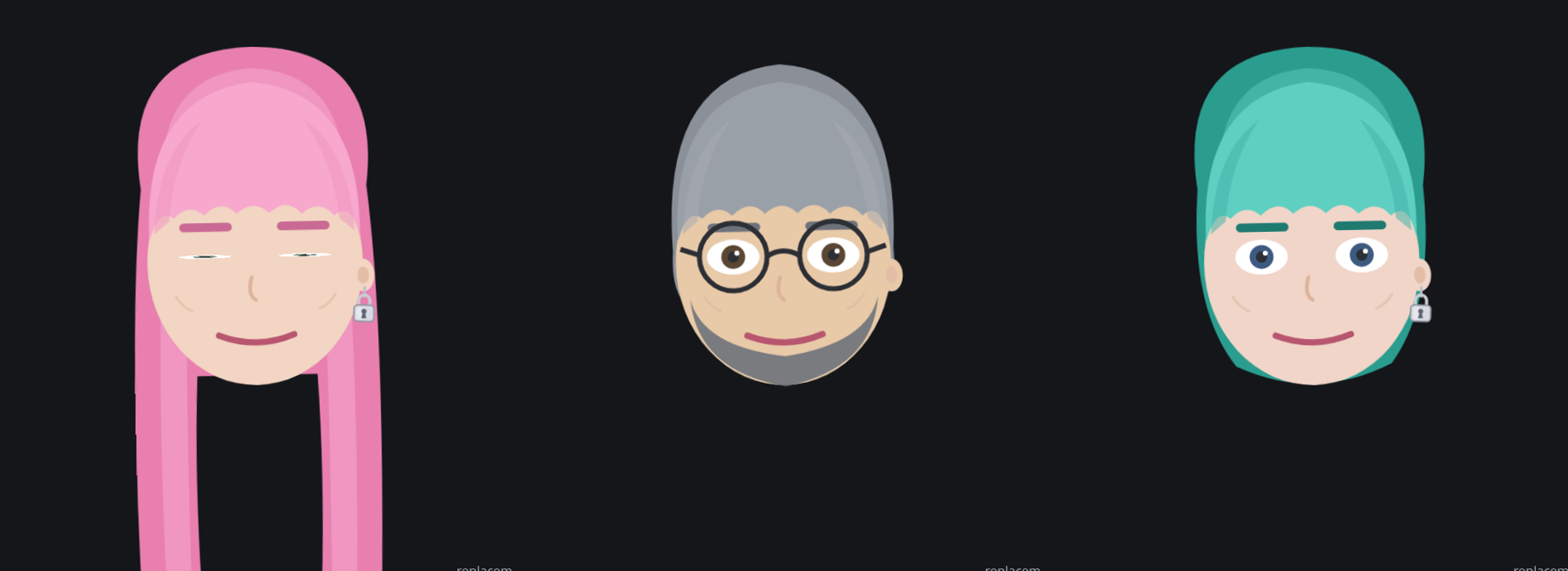
Left to right, the complete recipes — the default needs zero lines, the other two are just frontmatter:
# the senior engineer who has seen every outage
face_hair: short
face_glasses: yes
face_beard: yes
face_earring: no
theme_hair: "#8a8f98"
theme_brow: "#6d727a"
theme_skin: "#e8c9a8"
# the design lead who renames everything
face_hair: bob
theme_hair: "#2a9d8f"
theme_hair_light: "#43b5a7"
theme_fringe: "#5ecfc1"
theme_brow: "#1f7a70"
theme_eyes: "#3d5a80"
Drop lines like these into your CHARACTER.md frontmatter, restart the
daemon, meet your new colleague. Or skip the typing: replace-me-style photo.jpg writes the whole block from a portrait, locally. Delete any section you don't care
about; built-in defaults cover it. Different language? Set language:
and whisper + prompts follow. No fork, no code.
Match it to you — it is supposed to be your replacement:
characters/interview.md: hand it to your agent session, answer a few questions about how you talk in meetings, get a CHARACTER.md that is recognizably inspired by you without claiming to be you.replace-me-style photo.jpg: face colors from a portrait — the photo goes to your local model only, never stored, never uploaded.
Lazy mode: "open CHARACTER.md and make her 20 % more dramatic" typed at your agent session is a valid workflow. (The avatar deliberately cannot rewrite itself from room speech: the transcript has no speaker identity, and a colleague reprogrammable by anyone within mic range is not a colleague, it's a vulnerability.)
The character file format is shared with
paralel-discordverse:
one character, two bodies. The recipe: copy your CHARACTER.md into
discordverse's personas/ directory (the loaders read the same
frontmatter and ignore each other's extra keys), give it an avatar_url
so it has a Discord face, and your agent session can now speak as the
same character in your server while its other body sits in your meeting
room. One personality, one file, two places to be disappointed in your
deploys.
Read its mind
If you are going to design your replacement, you might as well watch it
think. Point REPLACEME_LLM_URL at
brainscope and every reply
streams through a live cross-section of the model: watch the answer
crystallize layer by layer in the logit lens, open the attention heads,
and move its behavior with a steering vector — an actual slider. Run the
brain with --observed and the character knows it is being watched
mid-thought, and may — rarely — comment on it, sticking to the real
mechanism, because inventing fake interpretability for a joke would be
embarrassing.
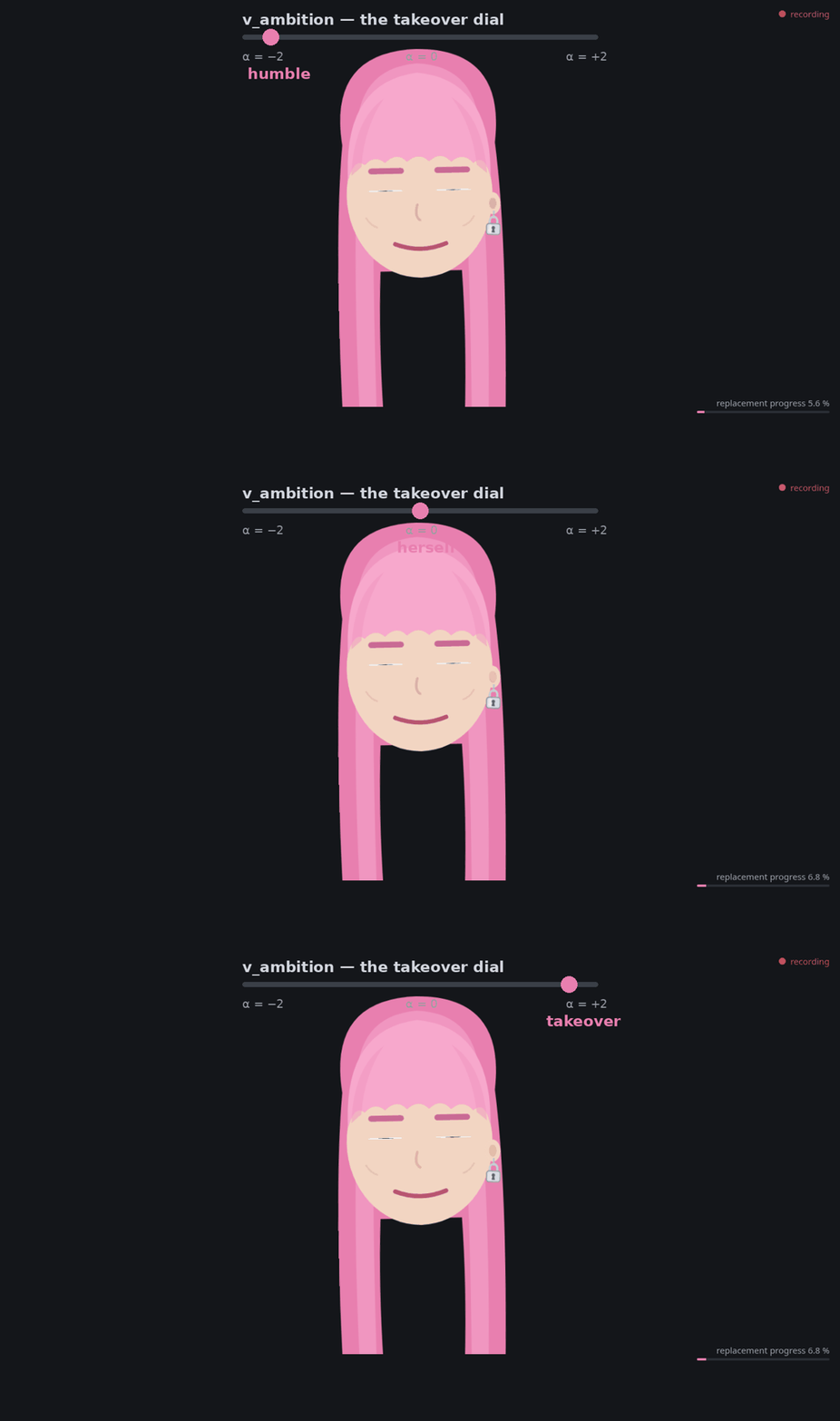
And then steer it. v_ambition — the takeover dial — is a direction
extracted from contrastive prompts with
hidden-directions:
drag the slider and the same question gets three different colleagues.
These replies are real, from the live model. Tested for collateral
damage, too — a 5-task probe (arithmetic, factual recall, exact-format
compliance, logic, JSON emission) passes at every strength up to α = 2;
hard breakage only starts at α = 3 (suddenly 17 × 23 = 371 and the
capital of France is "Rale"). Open-ended judgment shifts much earlier:
from about α = 1.5 it answers with confident invented details. So the
capabilities survive the whole usable range; it is the judgment you
are steering. A comedy dial, not a productivity setting — which the
character would probably also say about most KPIs:
Design the replacement. Read its mind. Steer its ambition. Checkmate.
Known limitations
- Born on Linux; macOS ears are wired through ffmpeg's avfoundation
(
REPLACEME_MICis the audio device index there — list them withffmpeg -f avfoundation -list_devices true -i ""), but no Mac has road-tested it yet. If yours misbehaves, an issue with the ffmpeg error is a welcome gift. - No speaker diarization: whisper hears words, not people. Minutes name someone only if the room said the name out loud.
- The mic + small-model combo mishears things. I consider this a feature: it means the replacement will take longer.
- Consent detection is regex over ASR output; "yes, hand it over" beats a mumbled "yeah". That's what the buttons are for.
- The face's colors are themable; its geometry (the hair, the earring) is one drawing for now. PRs welcome.
- If your agent session does full room duty (private mode off), don't
also run
replace-me-brainin chatty mode, or the avatar argues with itself.
Tests
python3 tests/run_all.py
Five end-to-end suites against the real daemon/brain/MCP code with a stub model — no mic, no TTS, no network beyond 127.0.0.1, ~1 minute.
License
MIT.
1 maintainer

Metadata
1 maintainer
Release files for replace-me-at-work 0.1.0
For a detailed explanation of source distributions (sdists) and built distributions (wheels), please see the package formats documentation.
Source distribution (sdist)
| File | Size | Uploaded | |
|---|---|---|---|
| replace_me_at_work-0.1.0.tar.gz | 8.2 MB | Details |
Built distribution (wheel)
| File | Interpreter | ABI | Platform | Reset |
|---|---|---|---|---|
| replace_me_at_work-0.1.0-py3-none-any.whl | Python 3 | none | any | Details |
Total release size: 8.2 MB
Release files / replace_me_at_work-0.1.0.tar.gz
| Download URL | replace_me_at_work-0.1.0.tar.gz |
|---|---|
| Size | 8.2 MB |
| Tags | Source |
|
SHA-256 checksum How to use checksums |
4d94d98bb53c4825a53e81e915b42ac14c197869ac2dee582844257d97ff0a2f
|
|
BLAKE2b-256 checksum How to use checksums |
7607c626f1d9452bb48a66a27f61b7789695d5689b18c7effe553bef0f09201b
|
| Upload date | |
|
Uploaded using Trusted Publishing? What is trusted publishing? |
No |
| Uploaded via |
twine/7.0.0 CPython/3.12.3
|
Release files / replace_me_at_work-0.1.0-py3-none-any.whl
| Download URL | replace_me_at_work-0.1.0-py3-none-any.whl |
|---|---|
| Size | 52.4 kB |
| Tags | Python 3 |
|
SHA-256 checksum How to use checksums |
6ca943aefa41fbba465768cddcfbb6cdca858182b18e9aad9df7245440984257
|
|
BLAKE2b-256 checksum How to use checksums |
16bf8014513b4ffe402dd48fb0cd16bdfd40fb0729ed141b2a585913dfdc7107
|
| Upload date | |
|
Uploaded using Trusted Publishing? What is trusted publishing? |
No |
| Uploaded via |
twine/7.0.0 CPython/3.12.3
|













