
 repo-healthcheck


Consolidates every GitHub repo you can see (and, with --gitlab, your GitLab
projects too) into a single health-check view, so you can spot what's missing
(README, CLAUDE.md, branch protection, license, contributors, description,
topics, project structure, staleness) without clicking through each repo
individually.
$ repo-healthcheck
prints a table sorted worst-first (most issues on top), so problem repos never get buried below healthy ones.
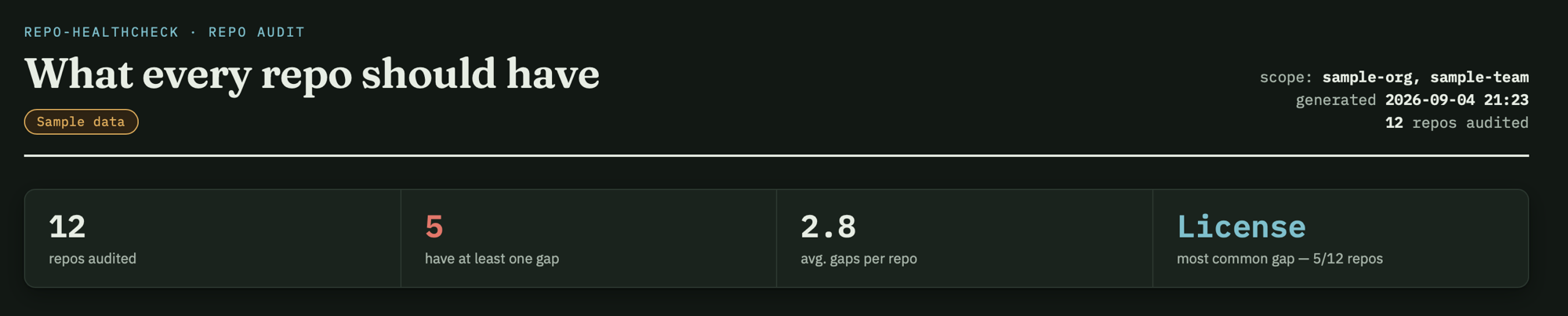
Two HTML export options:
--html report.html-- a plain static table, every issue spelled out as text.--dashboard report.html-- an interactive page: a compact checklist per repo, click-to-filter chips (missing / has, multi-select), a "Forks only" / "Originals only" toggle, and click any column header to sort (click another header to add it as a tie-breaker, building a multi-column sort in click order). This is the one worth opening in a browser and actually using, not just reading.
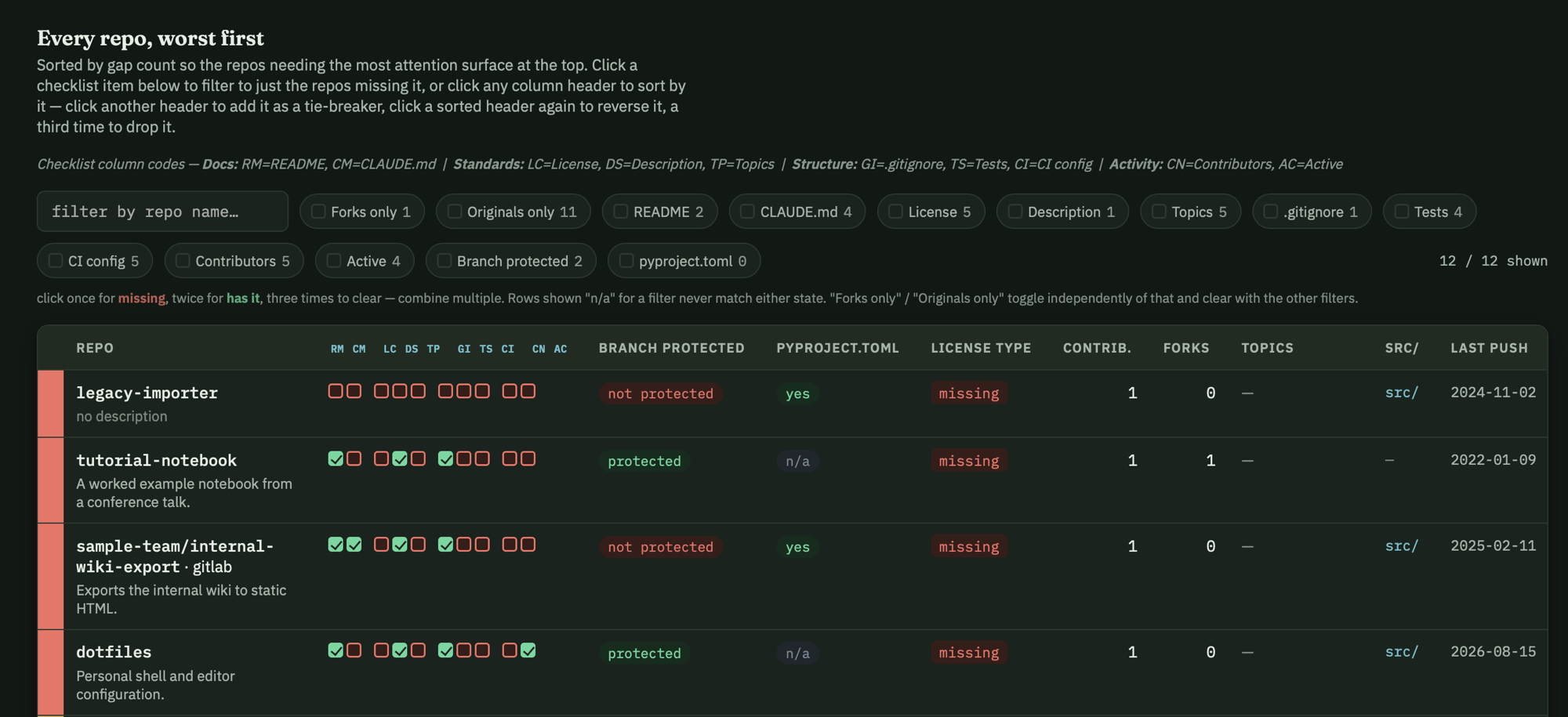
Repo names are shown without the owner prefix for whichever account most of
the report's repos belong to (hover, or the terminal table's title, still
shows the full name) -- a repo under any other owner keeps owner/name so
it isn't confused with that account's repo of the same short name.
What it checks
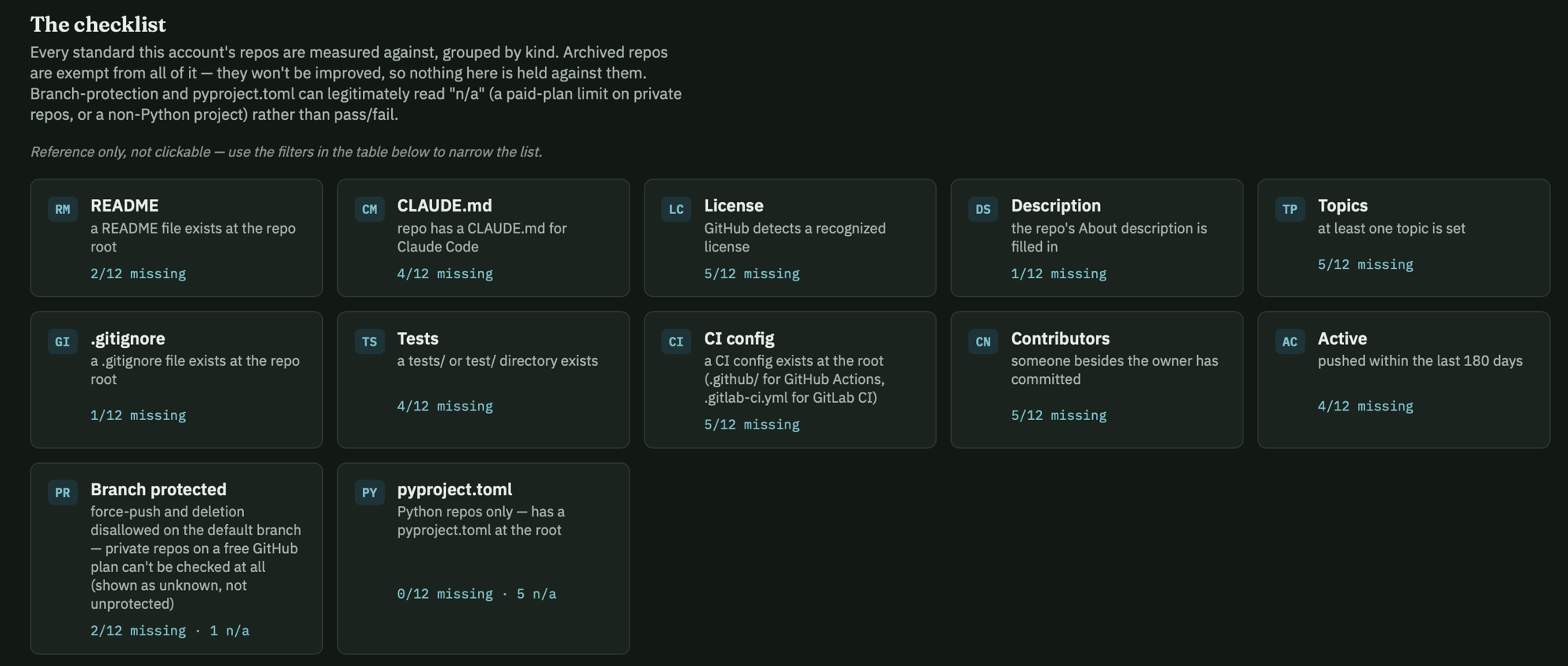
| check | flagged when | why it matters |
|---|---|---|
| README | repo has no README* at the root |
without one, nobody (including future-you) knows what the repo does or how to run it |
| CLAUDE.md | repo has no CLAUDE.md at the root |
Claude Code has no project context to work from, so it has to re-derive conventions every session |
| main branch protected | force pushes or branch deletion are allowed on the default branch (see below) | without it, a single bad push --force or accidental delete can destroy history with no recovery path |
| license | no license file, or one GitHub/GitLab can't classify and isn't a recognizable GNU license (see below) | with none, the legal default is "all rights reserved" -- others can't safely reuse or contribute even if that's not what you intended |
| contributors | only the owner has ever committed (forks are exempt) | a signal for whether the project has any outside review or use, not a requirement -- solo tools are fine, it's just informational |
| description | the repo description is empty | the description is what shows up in search and repo lists -- without it, the repo is unidentifiable at a glance |
| topics | no topics are set | topics are how repos get surfaced in GitHub search and org-wide browsing; with none, the repo is invisible there |
| .gitignore | repo has no .gitignore at the root |
without one it's easy to accidentally commit things you don't want in history -- build artifacts, .venv, and worse, .env files or credentials |
| tests directory | repo has no tests/ or test/ at the root |
no place for tests to live signals there likely aren't any, so regressions go uncaught |
| CI config | repo has no .github/ at the root (GitLab: no .gitlab-ci.yml; forks are exempt) |
without CI, tests (if any exist) only run when someone remembers to run them locally |
| pyproject.toml | Python repos only -- no pyproject.toml at the root |
without it there's no standard place for dependencies/tooling config, making the repo harder to set up or package |
| stale | no push in --stale-days days (default 180) |
long-untouched repos tend to have outdated dependencies and are the ones most likely to be forgotten entirely |
src/ layout is detected (--html shows it as a column) but never counted
as an issue -- whether a repo should use one depends on its shape (a
deliberate single-file tool, like this project's own source one-file-tools,
correctly skips it), which isn't something to auto-enforce.
"Protected" is a specific, minimal bar, not "any protection rule
exists": branch protection is on, and both force-push and branch deletion
are disallowed for the default branch. It deliberately does not require PR
review counts or passing status checks -- reasonable for a team, not for
solo work, and this tool covers both. Also: GitHub's branch-protection API
is a paid-plan feature for private repos -- it 403s with "Upgrade to
GitHub Pro" regardless of your token's permissions, so most private repos on
a free plan will show ? (unknown) here rather than a real answer. Public
repos always get a definitive answer. (GitLab has no equivalent paid-plan
gate, so ? there means a genuine permission problem, not an expected
plan restriction.)
License detection has one narrow fallback beyond trusting the host's own
classification. GitHub sometimes reports a standard, unmodified GNU
license as NOASSERTION ("Other") -- its detector isn't perfect. Since GNU
licenses always state their own name in the title ("GNU GENERAL PUBLIC
LICENSE", etc.), the tool fetches the actual license file text in that case
and checks for that name, resolving it to GPL / LGPL / AGPL / GFDL
instead of leaving it unrecognized. This is deliberately narrow -- it isn't
a general license classifier, just a targeted fix for a real, observed gap
(GitHub's /license endpoint resolves the file case-insensitively; GitLab's
raw-file endpoint needs the exact-cased name, recovered from a root-tree
lookup done only in this fallback path). Any other unrecognized license
still shows as unrecognized, as before.
Archived repos are shown but never flagged -- an archived repo won't be improved, so there's no point calling out what it's missing.
Auth
Reads GITHUB_TOKEN if set, otherwise falls back to gh auth token (so if
you're already logged in via the gh CLI, no extra setup is needed). Token
scope: classic repo (to see private repos) or none (public only);
fine-grained needs read-only "Contents" + "Metadata".
By default it fetches everything the token can see -- your own repos plus
every org you're a member of -- in one call (GitHub's
affiliation=owner,collaborator,organization_member does this natively, no
per-org looping needed). Pass --owner NAME to instead check one specific
user's/org's public repos.
GitLab
Pass --gitlab to also fetch your GitLab projects, alongside GitHub (not
instead of it) -- both appear in the same table, tagged (gitlab) /
· gitlab in the renderers so they're not mistaken for GitHub repos.
$ export GITLAB_TOKEN=glpat-xxx
$ repo-healthcheck --gitlab
--gitlab-owner NAME-- only that user's public GitLab projects, instead of everything the token can see (tokenless works here, same as--ownerfor GitHub, subject to GitLab's unauthenticated rate limit). GitLab groups aren't a supported target, only users.--gitlab-url URL-- for a self-managed GitLab instance instead ofgitlab.com.--gitlab-token-env NAME-- if your token isn't inGITLAB_TOKEN.
Token scope: read_api. Unlike GitHub's gh auth token fallback, there's
no CLI-token fallback for GitLab -- set GITLAB_TOKEN directly.
One column is always blank for GitLab rows: language, since GitLab's
project-list endpoint doesn't include it (a per-project call would be
needed, not worth it for one column).
Install
uv sync
uv run repo-healthcheck --help
Tests
uv run pytest
1 maintainer

Metadata
1 maintainer
Release files for repo-healthcheck 0.1.0
For a detailed explanation of source distributions (sdists) and built distributions (wheels), please see the package formats documentation.
Source distribution (sdist)
| File | Size | Uploaded | Provenance | |
|---|---|---|---|---|
| repo_healthcheck-0.1.0.tar.gz | 35.8 kB | With provenance | Details |
Built distribution (wheel)
| File | Interpreter | ABI | Platform | Reset |
|---|---|---|---|---|
| repo_healthcheck-0.1.0-py3-none-any.whl | Python 3 | none | any | Details |
Total release size: 73.2 kB
Release files / repo_healthcheck-0.1.0.tar.gz
| Download URL | repo_healthcheck-0.1.0.tar.gz |
|---|---|
| Size | 35.8 kB |
| Tags | Source |
|
SHA-256 checksum How to use checksums |
805ce4cbb171038f0221f0a817b1b17432533de872566255537f3239e51fb223
|
|
BLAKE2b-256 checksum How to use checksums |
f157fa459508a675f27906b4bfb14359e160b83e9f33af245bc24a87ef7edbbb
|
| Upload date | |
|
Uploaded using Trusted Publishing? What is trusted publishing? |
Yes |
| Uploaded via |
twine/7.0.0 CPython/3.13.14
|
Provenance
Provenance describes where a file came from. On PyPI, provenance is shared via attestations, which provide a verifiable record of the build or publishing details. View details, limitations and caveats.


PyPI Publish Attestation
PyPI verified that this artifact, at this checksum, originated from the publisher listed below.
Signed by GitHub Actions, verified by PyPI on Sep 5, 2026.
Transparency logRelease files / repo_healthcheck-0.1.0-py3-none-any.whl
| Download URL | repo_healthcheck-0.1.0-py3-none-any.whl |
|---|---|
| Size | 37.4 kB |
| Tags | Python 3 |
|
SHA-256 checksum How to use checksums |
1847ddd29a08b53e42caa9befd6792dbfecc6f45a431af7dd927bae2bf2bd9e7
|
|
BLAKE2b-256 checksum How to use checksums |
a0a3f1f6c8993fac16db29aa3c55b743d656a3807dbbf1e44aab77adaff1b49d
|
| Upload date | |
|
Uploaded using Trusted Publishing? What is trusted publishing? |
Yes |
| Uploaded via |
twine/7.0.0 CPython/3.13.14
|
Provenance
Provenance describes where a file came from. On PyPI, provenance is shared via attestations, which provide a verifiable record of the build or publishing details. View details, limitations and caveats.
PyPI Publish Attestation
PyPI verified that this artifact, at this checksum, originated from the publisher listed below.
Signed by GitHub Actions, verified by PyPI on Sep 5, 2026.
Transparency logSecurity for repo-healthcheck 0.1.0
Provenance
Provenance describes where a file came from. On PyPI, provenance is shared via attestations, which provide a verifiable record of the build or publishing details. View details, limitations and caveats.
Full provenance
All 2 files in this release have been uploaded with provenance metadata.
Attestation for repo_healthcheck-0.1.0.tar.gz
PyPI Publish Attestation
PyPI verified that this artifact, at this checksum, originated from the publisher listed below.
Signed by GitHub Actions, verified by PyPI on Sep 5, 2026.
Transparency logA note on package security
PyPI is a repository for distributing packages, not a service for auditing them. While third-party security researchers and our staff do their best to detect and remove malicious packages, PyPI cannot guarantee the quality, security or suitability of any given package.
To learn more about protecting yourself from malicious actors, visit our package security documentation.













