
Project:

Package:



Development:





Contents
Overview
RepoAuditorWeb audits GitHub repositories for best practices. Each requirement explains why it matters, and each failure includes step-by-step instructions for resolving it.
Requirements are grouped into modules:
| Module | Description | Requirements | Included by Default |
|---|---|---|---|
GitHub |
Repository settings, rulesets, and branch protection. | 43 | No |
CommunityStandards |
Files in GitHub's community profile checklist, such as README, CODE_OF_CONDUCT, CONTRIBUTING, LICENSE, SECURITY, issue templates, and pull request templates. |
7 | No |
ScientificSoftware |
Files expected of scientific software, such as CITATION.cff. |
1 | No |
Every requirement has a default that can be customized or skipped, so the audit can be tailored to the conventions of a team or organization. Additional modules can be defined in separate packages; see Custom Modules.
How to use RepoAuditorWeb
Run repoauditorweb to open the web experience, where modules and requirements are configured before the audit is executed:
uvx repoauditorweb --url https://github.com/<owner>/<repo> --GitHub-include --CommunityStandards-include
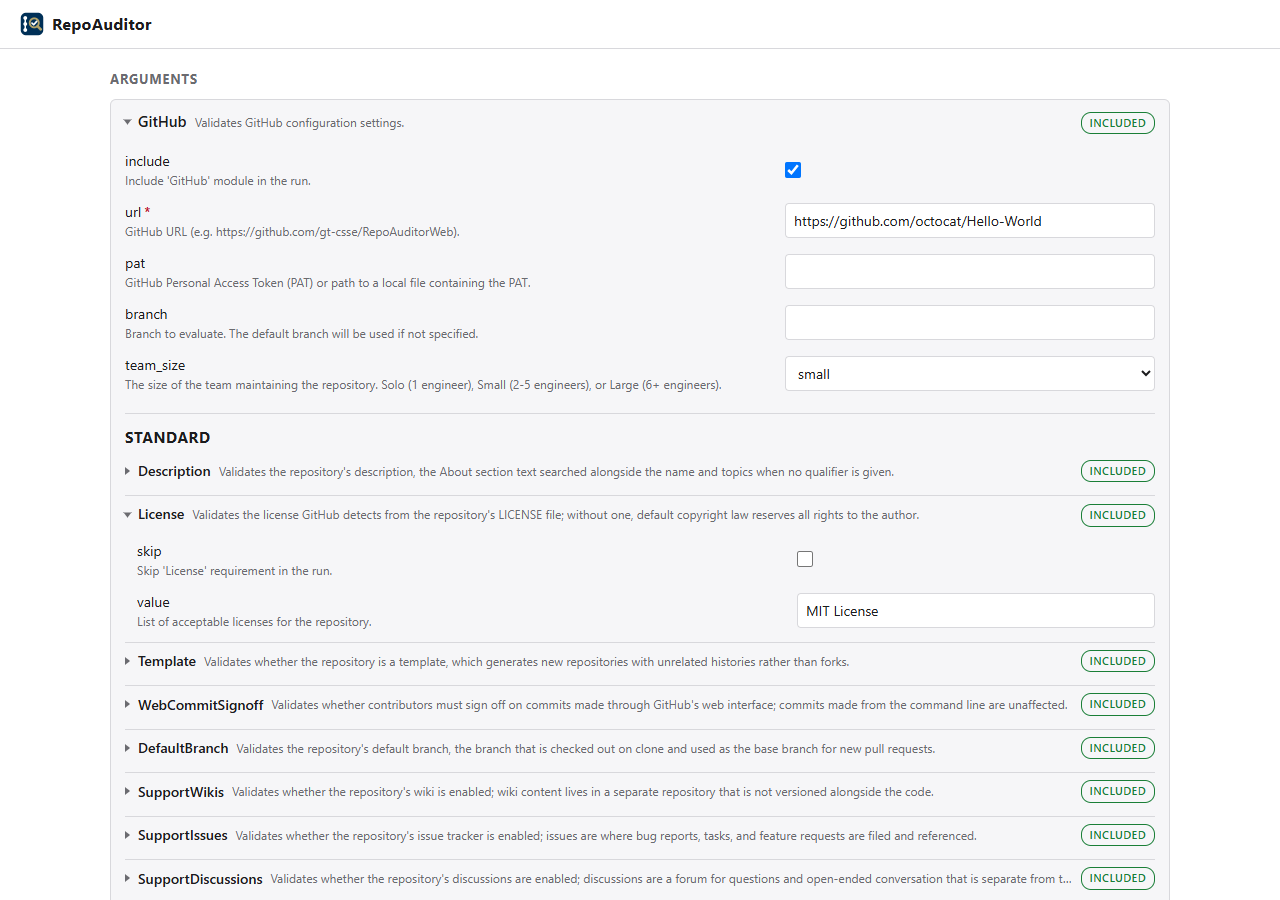
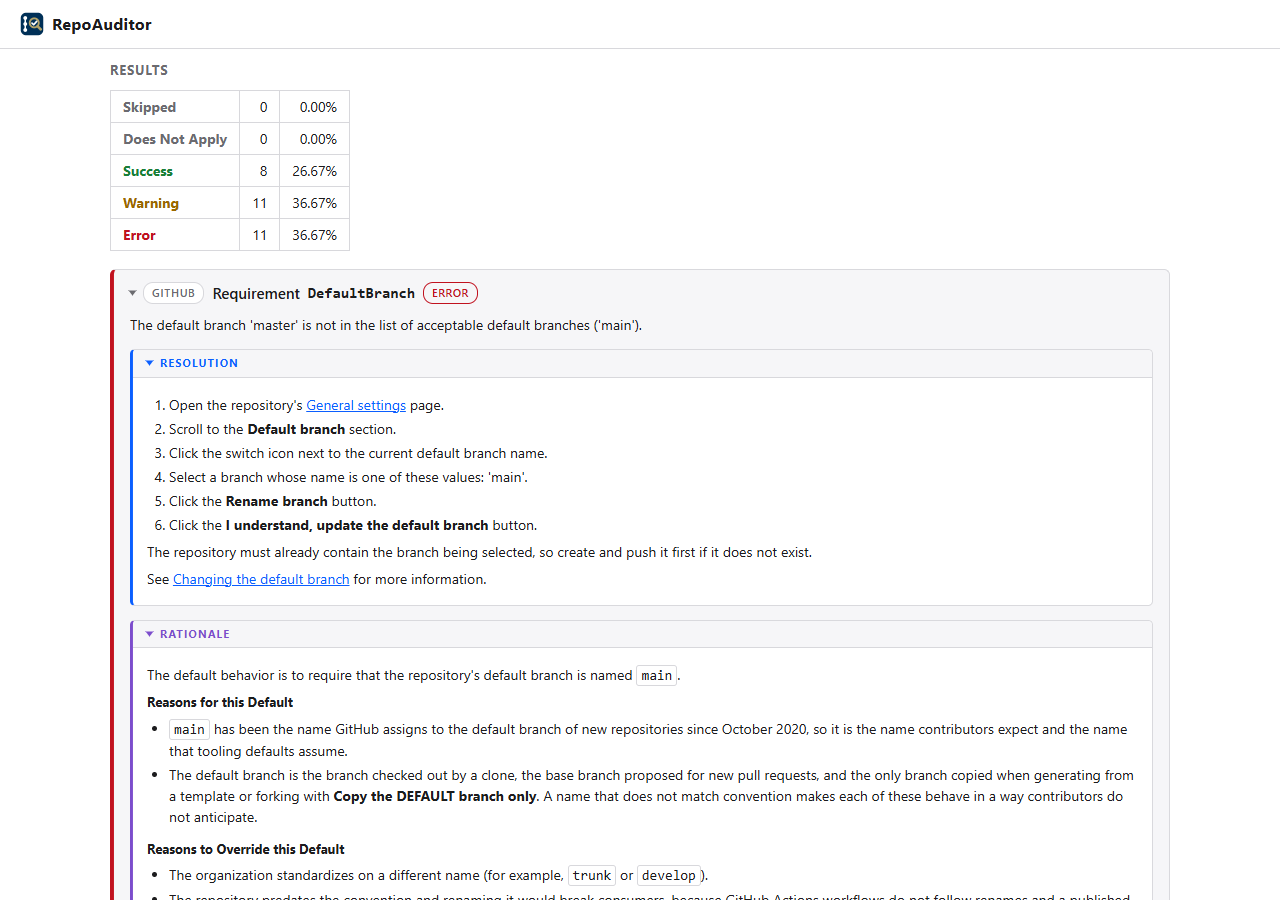
Click Execute to run the audit. The results summarize the outcome of each requirement and, for each failure, describe how to resolve it and the rationale behind the requirement's default:
Experiences
Select the experience with --experience:
| Experience | Description |
|---|---|
web (default) |
Opens a window to configure and execute the audit. |
tui |
Configures and executes the audit within the terminal. |
console |
Executes the audit and writes the results to the terminal. |
json |
Executes the audit and writes the results to stdout as JSON; status information is written to stderr. |
--execute runs the audit immediately in the web and tui experiences.
Options
Every module and requirement contributes command line options; run repoauditorweb --help for the complete list. Common options include:
| Option | Description |
|---|---|
--url |
The GitHub repository to audit; applied to every included module. |
--pat |
A GitHub Personal Access Token (PAT), or the path to a file containing one. Some requirements can only be evaluated with a PAT. |
--branch |
The branch to evaluate; the default branch is used if not specified. |
--<Module>-include |
Include a module in the audit. |
--<Module>-<Requirement>-skip |
Skip a requirement. |
--evaluate-all |
Evaluate requirements that would otherwise be suppressed because a parent setting is not enabled. |
--no-resolution, --no-rationale |
Omit resolutions or rationales from the results. |
--url, --pat, and --branch can also be provided through the environment variables REPO_AUDITOR_WEB_GITHUB_URL, REPO_AUDITOR_WEB_GITHUB_PAT, and REPO_AUDITOR_WEB_GITHUB_BRANCH.
Configuration Files
--config loads option values from a YAML file, so that an audit configuration can be stored and shared. Keys are the option names without the leading --, with - replaced by _. Values provided on the command line take precedence over values in the file.
url: https://github.com/<owner>/<repo>
GitHub_include: true
GitHub_team_size: large
GitHub_DefaultBranch_value: [main, master]
CommunityStandards_include: true
uvx repoauditorweb --config audit.yaml
Installation
| Installation Method | Command |
|---|---|
| Via uv | uv add RepoAuditorWeb |
| Via pip | pip install RepoAuditorWeb |
Installation is not necessary when using uvx, which downloads and runs RepoAuditorWeb in a temporary environment. Once installed, run repoauditorweb directly.
Verifying Signed Artifacts
Artifacts are signed and verified using py-minisign and the public key in the file ./minisign_key.pub.
To verify that an artifact is valid, visit the latest release and download the .minisign signature file that corresponds to the artifact, then run the following command, replacing <filename> with the name of the artifact to be verified:
uv run --with py-minisign python -c "import minisign; minisign.PublicKey.from_file('minisign_key.pub').verify_file('<filename>'); print('The file has been verified.')"
Development
Please visit Contributing and Development for information on contributing to this project.
Additional Information
Additional information can be found at these locations.
| Title | Document | Description |
|---|---|---|
| Code of Conduct | CODE_OF_CONDUCT.md | Information about the norms, rules, and responsibilities we adhere to when participating in this open source community. |
| Contributing | CONTRIBUTING.md | Information about contributing to this project. |
| Custom Modules | docs/custom_modules.md | Information about defining custom modules in separate packages. |
| Development | DEVELOPMENT.md | Information about development activities involved in making changes to this project. |
| Governance | GOVERNANCE.md | Information about how this project is governed. |
| Maintainers | MAINTAINERS.md | Information about individuals who maintain this project. |
| Security | SECURITY.md | Information about how to privately report security issues associated with this project. |
License
RepoAuditorWeb is licensed under the MIT license.
1 maintainer

Metadata
1 maintainer
Release files for repoauditorweb 0.64.2
For a detailed explanation of source distributions (sdists) and built distributions (wheels), please see the package formats documentation.
Source distribution (sdist)
| File | Size | Uploaded | |
|---|---|---|---|
| repoauditorweb-0.64.2.tar.gz | 153.9 kB | Details |
Built distribution (wheel)
| File | Interpreter | ABI | Platform | Reset |
|---|---|---|---|---|
| repoauditorweb-0.64.2-py3-none-any.whl | Python 3 | none | any | Details |
Total release size: 400.5 kB
Release files / repoauditorweb-0.64.2.tar.gz
| Download URL | repoauditorweb-0.64.2.tar.gz |
|---|---|
| Size | 153.9 kB |
| Tags | Source |
|
SHA-256 checksum How to use checksums |
c5b1c2be0a350b44c7c19b72c948fc6edb0452e40f8375560b25cd652227bd91
|
|
BLAKE2b-256 checksum How to use checksums |
fd68864aa0e75e2bf3e666dd8489e1d13b817e3e7132b06042a6faf189eae7ea
|
| Upload date | |
|
Uploaded using Trusted Publishing? What is trusted publishing? |
No |
| Uploaded via |
uv/0.12.23 {"installer":{"name":"uv","version":"0.12.23","subcommand":["publish"]},"python":null,"implementation":{"name":null,"version":null},"distro":{"name":"Ubuntu","version":"24.04","id":"noble","libc":null},"system":{"name":null,"release":null},"cpu":null,"openssl_version":null,"setuptools_version":null,"rustc_version":null,"ci":true}
|
Release files / repoauditorweb-0.64.2-py3-none-any.whl
| Download URL | repoauditorweb-0.64.2-py3-none-any.whl |
|---|---|
| Size | 246.6 kB |
| Tags | Python 3 |
|
SHA-256 checksum How to use checksums |
51991a8e481f04a49a766d24a20538acbf2fb728551d046e593252675ae8d667
|
|
BLAKE2b-256 checksum How to use checksums |
0691403e46a84dbe72b0a29678e52a257527162de5fd079b698b93e229881d4e
|
| Upload date | |
|
Uploaded using Trusted Publishing? What is trusted publishing? |
No |
| Uploaded via |
uv/0.12.23 {"installer":{"name":"uv","version":"0.12.23","subcommand":["publish"]},"python":null,"implementation":{"name":null,"version":null},"distro":{"name":"Ubuntu","version":"24.04","id":"noble","libc":null},"system":{"name":null,"release":null},"cpu":null,"openssl_version":null,"setuptools_version":null,"rustc_version":null,"ci":true}
|














