
Create F-Droid repositories with ease


Project description
Repomaker



Installation
There are several different ways to install Repomaker.
Flatpak
Repomaker is available as Flatpak and
distributed on Flathub.
Once you got Flatpak installed on your system,
either go to your system's app store or execute the following commands
(without sudo!):
$ flatpak remote-add --if-not-exists flathub https://flathub.org/repo/flathub.flatpakrepo
$ flatpak install flathub org.fdroid.Repomaker
$ flatpak run --runtime=org.gnome.Sdk org.fdroid.Repomaker
On a server / Docker
There is a test image available in Docker for quickly trying out Repomaker. Note that you can run Repomaker on a server and make use of its multi user functionality. See Docker docs and the general docs for more information on that topic.
PyPi
If you don't want or can't install Repomaker with one of the mentioned methods, you can install it with pip from PyPi.
Requirements
Please make sure you have the following requirements installed before proceeding with the installation.
Install
pipfor installation of Python 3 dependenciesvirtualenvto create an isolated Python environment- Python development and build files for installing/building some dependencies
On Debian, you can simply run this:
apt install python3-pip python3-wheel python3-dev virtualenv build-essential
Runtime
keytoolfrom Java Runtime Environment (JRE)jarsignerfrom Java JDK for signing the repo indexeslibmagicfor mime-type detectionrsyncto publish repositoriesgitto publish repositories to git mirrorsrcloneto publish repositories
On Debian, you can simply run this:
sudo apt install fdroidserver libmagic1 rsync rclone git \
    python3-pyqt5.qtwebengine python3-pyqt5.qtwebkit
Install into virtual environment
To not mess with other Python libraries you have installed, we will install repomaker into its own isolated Python environment.
virtualenv -p /usr/bin/python3 repomaker
source repomaker/bin/activate
pip install repomaker[gui]
You should now be able to start by typing:
repomaker
Troubleshooting
First check that you really have all dependencies from above installed.
If the installation fails with something about openssl,
try to install libssl-dev with apt install libssl-dev.
If the graphical user interface fails to start,
you can try running repomaker-server and repomaker-tasks.
If that works, you should be able to open 127.0.0.1:8000
in your browser.
Development
To work on repomaker, you need npm to fetch CSS and JavaScript dependencies: apt install npm.
Then run npm install to install these dependencies.
If you want to run repomaker in your browser rather then using the GUI, you can start it like this:
virtualenv -p /usr/bin/python3 repomaker
source repomaker/bin/activate
./setup.sh
./run.sh
Vagrant VM
There also a Vagrant setup based on the GitLab CI setup, it is a quick way to get a development setup. First, set up Vagrant on your machine, then run:
$ cd repomaker
$ vagrant up
$ vagrant ssh
vagrant@basebox-buster64:~$ ip a | sed -En 's,.*inet +(192\.168\.[0-9]+\.[0-9]+).*,open http://\1:8000,p'
open http://192.168.121.37:8000
vagrant@basebox-buster64:~$ cd $CI_PROJECT_DIR
vagrant@basebox-buster64:/builds/fdroid/repomaker$ ./tests/test-units.sh
Translation
- GNU gettext
apt install gettext
License
This program is free software: you can redistribute it and/or modify it under the terms of the GNU Affero General Public License as published by the Free Software Foundation, either version 3 of the License, or (at your option) any later version.
This program is distributed in the hope that it will be useful, but WITHOUT ANY WARRANTY; without even the implied warranty of MERCHANTABILITY or FITNESS FOR A PARTICULAR PURPOSE. See the GNU Affero General Public License for more details.
Translating
Everything can be translated. See Translation and Localization for more info.
- To update translations, run
./update-translations.sh. - To add a new translation, run
python3 manage.py makemessages -l <lg>where<lg>is the language code, e.g.de.
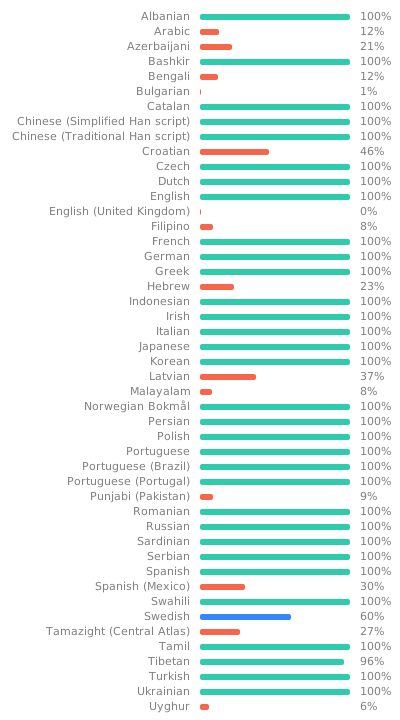
Release history Release notifications | RSS feed


Download files
Download the file for your platform. If you're not sure which to choose, learn more about installing packages.
Source Distributions
Built Distribution
Filter files by name, interpreter, ABI, and platform.
If you're not sure about the file name format, learn more about wheel file names.
Copy a direct link to the current filters
File details
Details for the file repomaker-1.0.0b8-py3-none-any.whl.
File metadata
- Download URL: repomaker-1.0.0b8-py3-none-any.whl
- Upload date:
- Size: 8.8 MB
- Tags: Python 3
- Uploaded using Trusted Publishing? No
- Uploaded via: twine/6.2.0 CPython/3.14.5
File hashes
| Algorithm | Hash digest | |
|---|---|---|
| SHA256 |
de1508cd0ef4f94b70e6b5d5c9126d94aa5b0a3a76223dfcade8362992fdf6be
|
|
| MD5 |
d0d4f8d8b8b26cb1ee3305e2ec95d594
|
|
| BLAKE2b-256 |
466b8bfe1945e802aa8c4d40540aceec833f791e0d17a906f1e3bd5e069fd953
|






