
QR code plugin for reportlab and RML language

Project description




Install
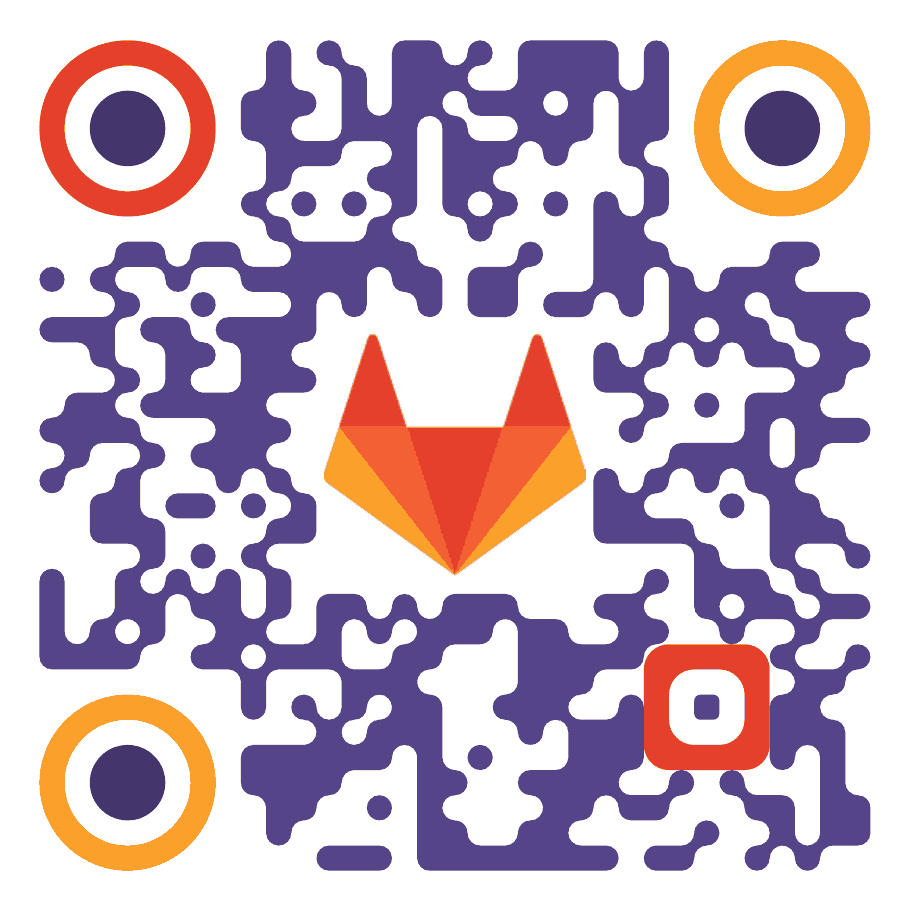
pip install reportlab_qr_code_generatorExample output
Why is this better than x?
Including image to PDF
Images are blurry.
reportlab-qrcode
Reportlab qrcode is vector QR code generator for reportlab. My project is better in some aspects:
Images can be directly added to Reportlab RML code.
Better rendering:
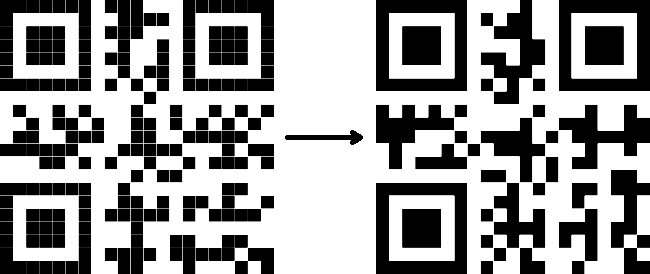
This library merges adjacent blocks to single area whihch produces image without gaps in every situation.
Smaller output
First paragraph of Lorem ipsum products using reportlab-qrcode vector image with size 181 418 bytes. My code with produces only 34 131 bytes (81% reduction in size).
Customizable colors
Usage
This package allows insert QR codes to reportlab document.
This package can be used directly from reportlab RML file or from python code.
RML
To insert QR code from rml file use this code:
<plugInGraphic module="reportlab_qr_code" function="qr">parameters;format;contents</plugInGraphic>Parameters is key=value list delimited using ‘,’ character, e.g. size=10cm,padding=1cm.
Format is either ‘text’ or ‘base64’ for simple text and base64 encoding. QR code contents is after second semicolon.
Complete example:
<illustration height="5cm" width="5cm" align="center">
        <plugInGraphic module="reportlab_qr_code" function="qr">size=5cm,padding=0.5cm;text;Simple text</plugInGraphic>
</illustration>
Python API
QR code can be inserted to canvas using qr_draw(canvas, contents, **params) function.
from reportlab.pdfgen import canvas
from reportlab_qr_code import qr_draw

c = canvas.Canvas("out.pdf")
qr_draw(c, "Hello world", x="1cm", y="1cm", size="10cm")
Command line interface
This module can be used as standalone command to generate PDF document.
Example:
python -m reportlab_qr_code "Content" --outfile qr.pdfContent argument is optional. Without this argument, command will read from stdin. Output file is optional too, without argument, command will write to stdout.
Arguments:
- --outfile
Output file or stdout if omitted
- --base64
Base64 encoded text
- --compress
PDF compression (default enabled)
- --no-compress
Disable compression
- --version
QR code version
- --error_correction
Error correction strength (L, M, Q or H)
- --size
Code size (e.g. 10cm)
- --padding
Padding around code (e.g. 1cm or 1 for one pixel or 5%)
- --fg
Foreground color
- --bg
Background color
- --invert
Invert
- --negative
Instead of invert bits, inverts whole image
- --radius
Round code (radius)
- --enhanced-path
Enhanced path rendering
- --no-enhanced-path
Disable path enhancement
- --gradient
Either "linear x1 y1 x2 y2 colors" or "radial x y radius colors" Dimensions are in range (0, 1), position (0, 0) is top left corner, (1, 1) is bottom right corner. Colors is list "[position] color" e.g. "0.0 #ffffff 1.0 #000000". Position is optional. Without position argument, distances are calculated automatically. Example: --gradient "linear 0.0 0.0 0.1 1.0 0.5 \#1050c0 0.3 \#1050c0 0.7 \#e0e000"
- --hole
Coordinates in form x:y:w:h. Allowed are absolute length units, relative units (%) and pixels (without unit suffix).
- --draw
Select area to draw. Possuble values are: 'all', 'eye[1-3]', 'eyes', 'eyepupil[1-3]', 'eyepupils', 'eyeball[1-3]', 'eyeballs', 'align', 'alignpupils', 'alignballs'. It’s possible to combine operations with +/- symbol e.g. all-eyes-align. To show only eye1 and eye3 without pupil it’s possible to write something like eye1+eye3-eyepupil3. Arguments passed before first draw are globally set. Arguments after draw are specific for preceding draw call.
- --format
Output format, one of PDF, EPS, SVG, PNG, GIF, JPG, TIFF, BMP, PPM, but only PDF supports full set of features.
Some crazy examples:
# 1
python -m reportlab_qr_code "Padding 1cm" \
        --outfile qr.pdf \
        --error_correction L \
        --size 10cm \
        --padding 1cm \
        --radius 0.5 \
        --enhanced-path \
        --gradient "linear 0 1 1 0 0.1 \#ff0000 0.9 \#0000ff"
# 2
python -m reportlab_qr_code "Padding 1cm" \
        --outfile qr.pdf \
        --error_correction L \
        --size 10cm \
        --padding 1cm \
        --radius 3.5 \
        --gradient "linear 1 0 0 1 0.1 \#ff0000 0.9 \#0000ff"
# 3
python -m reportlab_qr_code "OPENSOURCE" \
        --outfile qr.pdf \
        --size 10cm \
        --padding 1cm \
        --radius 1.5 \
        --bg "\#ddddcc" \
        --fg="\#665510"
# 4
python -m reportlab_qr_code "Padding 1cm" \
        --outfile qr.pdf \
        --error_correction L \
        --size 10cm \
        --padding 1cm \
        --radius 3.5 \
        --enhanced-path \
        --gradient "linear 0 1 1 0 0.1 \#ff0000 0.9 \#0000ff"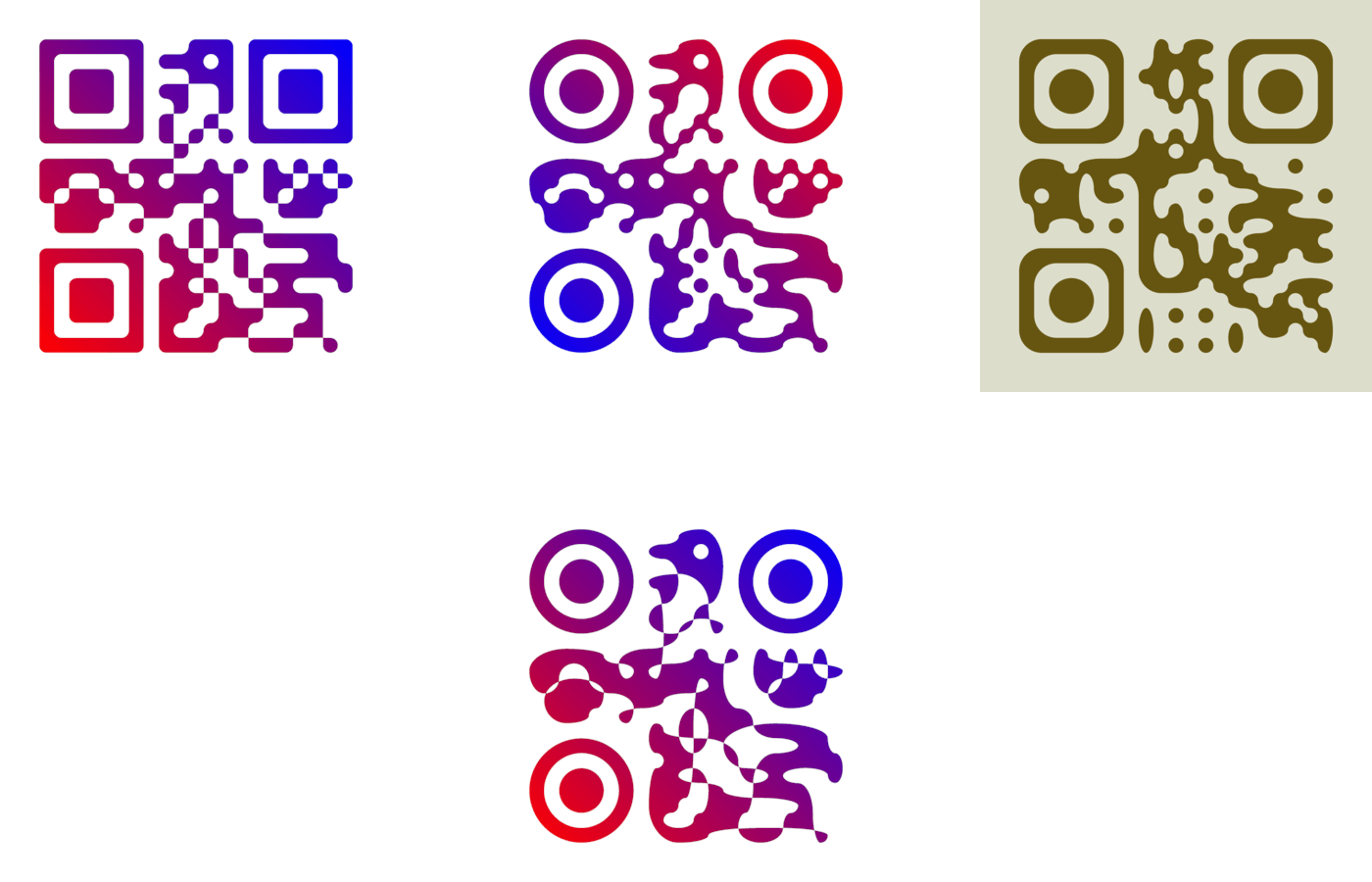
Parameter list
Name |
Default |
Description |
|---|---|---|
size |
5cm |
size of code |
padding |
2.5 |
padding size, without any unit this meanss 2.5 QR code pixels, it can be absolute value (like 1cm) or relative value (10%) |
fg |
black |
foreground color |
bg |
transparent |
background color |
invert |
False |
invert pixel values |
mask |
False |
render only mask |
negative |
False |
render negative of code |
version |
1 |
version passed to qr code library |
error_correction |
‘L’ |
error_correction passed to qr code library (can be L, M, Q or H) |
x |
0 |
x offset |
y |
0 |
y offset |
hole |
[] |
list of holes in form x:y:w:h… (can be repeated) |
draw |
+all |
select elements to draw. Prefix + (plus) means include, - (minus) exclude. Allowed options are: 'all', 'eye[1-3]', 'eyes', 'eyepupil[1-3]', 'eyepupils', 'eyeball[1-3]', 'eyeballs', 'align', 'alignpupils' and 'alignballs' |
Examples
Python examle:
from reportlab.pdfgen import canvas
from reportlab_qr_code import qr_draw

def main():
        c = canvas.Canvas("py.pdf")
        qr_draw(c, "Hello world", x="1cm", y="1cm", size="19cm", bg="#eeeeee")
        c.showPage()
        c.save()

if __name__ == "__main__":
        main()
RML document example:
<!DOCTYPE document SYSTEM "rml_1_0.dtd" [
<!ENTITY lines5 "
        0cm 0cm 0cm 0.5cm
        0cm 0cm 0.5cm 0cm
        5cm 0cm 4.5cm 0cm
        5cm 0cm 5cm 0.5cm
        0cm 5cm 0.5cm 5cm
        0cm 5cm 0cm 4.5cm
        5cm 5cm 5cm 4.5cm
        5cm 5cm 4.5cm 5cm
">
<!ENTITY lines3 "
        0cm 0cm 0cm 0.5cm
        0cm 0cm 0.5cm 0cm
        3cm 0cm 2.5cm 0cm
        3cm 0cm 3cm 0.5cm
        0cm 3cm 0.5cm 3cm
        0cm 3cm 0cm 2.5cm
        3cm 3cm 3cm 2.5cm
        3cm 3cm 2.5cm 3cm
">
]>
<document filename="test.pdf" invariant="1" compression="1">
<template>
        <pageTemplate id="main" pagesize="17cm,39cm">
                <frame id="main" x1="0.5cm" y1="0.0cm" width="5cm" height="39cm"/>
                <frame id="main" x1="6cm" y1="0.0cm" width="5cm" height="39cm"/>
                <frame id="main" x1="11.5cm" y1="0.0cm" width="5cm" height="39cm"/>
        </pageTemplate>
</template>
<stylesheet>
        <paraStyle name="Normal" fontSize="12" leading="16" spaceBefore="16" />
</stylesheet>
<story>

        <para style="Normal">Simple text </para>
        <illustration height="5cm" width="5cm" align="center">
                <plugInGraphic module="reportlab_qr_code" function="qr">;text;Simple text</plugInGraphic>
                <lineMode width="0.5" /><lines>&lines5;</lines>
        </illustration>

        <condPageBreak height="7cm"/>

        <para>Custom size</para>
        <illustration height="3cm" width="3cm" align="center">
                <plugInGraphic module="reportlab_qr_code" function="qr">size=3cm;text;Custom size</plugInGraphic>
                <lineMode width="0.5" /><lines>&lines3;</lines>
        </illustration>

        <condPageBreak height="7cm"/>

        <para>Base 64 encoded</para>
        <illustration height="5cm" width="5cm" align="center">
                <plugInGraphic module="reportlab_qr_code" function="qr">;base64;QmFzZSA2NCBlbmNvZGVk</plugInGraphic>
                <lineMode width="0.5" /><lines>&lines5;</lines>
        </illustration>

        <condPageBreak height="7cm"/>

        <para>Custom colors</para>
        <illustration height="5cm" width="5cm" align="center">
                <plugInGraphic module="reportlab_qr_code" function="qr">bg=#eeeeee,fg=#a00000;text;Custom colors</plugInGraphic>
                <lineMode width="0.5" /><lines>&lines5;</lines>
        </illustration>

        <condPageBreak height="7cm"/>

        <para>Padding 20%</para>
        <illustration height="5cm" width="5cm" align="center">
                <plugInGraphic module="reportlab_qr_code" function="qr">padding=20%;text;Padding 20%</plugInGraphic>
                <lineMode width="0.5" /><lines>&lines5;</lines>
        </illustration>

        <condPageBreak height="7cm"/>

        <para>Padding 1cm</para>
        <illustration height="5cm" width="5cm" align="center">
                <plugInGraphic module="reportlab_qr_code" function="qr">padding=1cm;text;Padding 1cm</plugInGraphic>
                <lineMode width="0.5" /><lines>&lines5;</lines>
        </illustration>

        <condPageBreak height="7cm"/>

        <para>Padding 1 pixel</para>
        <illustration height="5cm" width="5cm" align="center">
                <plugInGraphic module="reportlab_qr_code" function="qr">padding=1;text;Padding 1 pixel</plugInGraphic>
                <lineMode width="0.5" /><lines>&lines5;</lines>
        </illustration>

        <condPageBreak height="7cm"/>

        <para>Error correction M</para>
        <illustration height="5cm" width="5cm" align="center">
                <plugInGraphic module="reportlab_qr_code" function="qr">error_correction=M;text;Error correction</plugInGraphic>
                <lineMode width="0.5" /><lines>&lines5;</lines>
        </illustration>

        <condPageBreak height="7cm"/>

        <para>Error correction L</para>
        <illustration height="5cm" width="5cm" align="center">
                <plugInGraphic module="reportlab_qr_code" function="qr">error_correction=L;text;Error correction</plugInGraphic>
                <lineMode width="0.5" /><lines>&lines5;</lines>
        </illustration>

        <condPageBreak height="7cm"/>

        <para>Version 10</para>
        <illustration height="5cm" width="5cm" align="center">
                <plugInGraphic module="reportlab_qr_code" function="qr">version=10;text;Version 10</plugInGraphic>
                <lineMode width="0.5" /><lines>&lines5;</lines>
        </illustration>

        <condPageBreak height="7cm"/>

        <para style="Normal">Small radius</para>
        <illustration height="5cm" width="5cm" align="center">
                <plugInGraphic module="reportlab_qr_code" function="qr">radius=0.5;text;Small radius</plugInGraphic>
                <lineMode width="0.5" /><lines>&lines5;</lines>
        </illustration>

        <condPageBreak height="7cm"/>

        <para style="Normal">Round with better path</para>
        <illustration height="5cm" width="5cm" align="center">
                <plugInGraphic module="reportlab_qr_code" function="qr">radius=0.5,enhanced_path=1;text;ROUND WITH BETTER PATH</plugInGraphic>
                <lineMode width="0.5" /><lines>&lines5;</lines>
        </illustration>

        <condPageBreak height="7cm"/>

        <para style="Normal">Large radius</para>
        <illustration height="5cm" width="5cm" align="center">
                <plugInGraphic module="reportlab_qr_code" function="qr">radius=3.5;text;Large radius</plugInGraphic>
                <lineMode width="0.5" /><lines>&lines5;</lines>
        </illustration>

        <condPageBreak height="7cm"/>

        <para>Inverted</para>
        <illustration height="5cm" width="5cm" align="center">
                <plugInGraphic baseDir="." module="utils" function="gradient" />
                <plugInGraphic module="reportlab_qr_code" function="qr">padding=0,fg=#ffffff,invert=1;text;Inverted</plugInGraphic>
                <lineMode width="2" />
                <stroke color="#ffffff" />
                <rect x="0" y="0" width="5cm" height="5cm" fill="0" stroke="1" />
        </illustration>

        <condPageBreak height="7cm"/>

        <para>Mask</para>
        <illustration height="5cm" width="5cm" align="center">
                <lineMode width="0.5" /><lines>&lines5;</lines>
                <plugInGraphic module="reportlab_qr_code" function="qr">mask=1,radius=0.5,enhanced_path=1;text;Mask</plugInGraphic>
                <plugInGraphic baseDir="." module="utils" function="gradient" />
        </illustration>

        <condPageBreak height="7cm"/>

        <para style="Normal">Hole</para>
        <illustration height="5cm" width="5cm" align="center">
                <plugInGraphic module="reportlab_qr_code" function="qr">hole=20%:40%:60%:20%,error_correction=H,radius=0.3,enhanced_path=1;text;Hole inside QR code</plugInGraphic>
                <setFont name="Helvetica" size="18"/>
                <drawString x="1.8cm" y="2.35cm">Logo</drawString>
                <lineMode width="0.5" /><lines>&lines5;</lines>
        </illustration>

        <condPageBreak height="7cm"/>

        <para style="Normal">Logo</para>
        <illustration height="5cm" width="5cm" align="center">
                <plugInGraphic module="reportlab_qr_code" function="qr">padding=2,radius=0.5,hole=35%:35%:30%:30%,fg=#554488,error_correction=H,draw=all-align-eyes,draw=alignpupils,radius=0.25,draw=alignballs,fg=#e24329,radius=1,draw=eyeball2+eyeball3,radius=3.5,fg=#fca326,draw=eyeball1,radius=3.5,fg=#e24329,draw=eyepupils,fg=#44366d,radius=3.5;text;https://about.gitlab.com/</plugInGraphic>
                <lineMode width="0.5" /><lines>&lines5;</lines>
                <image file="gitlab.svg" x="1.8cm" y="1.8cm" width="1.4cm" height="1.4cm"/>
        </illustration>
</story>
</document>
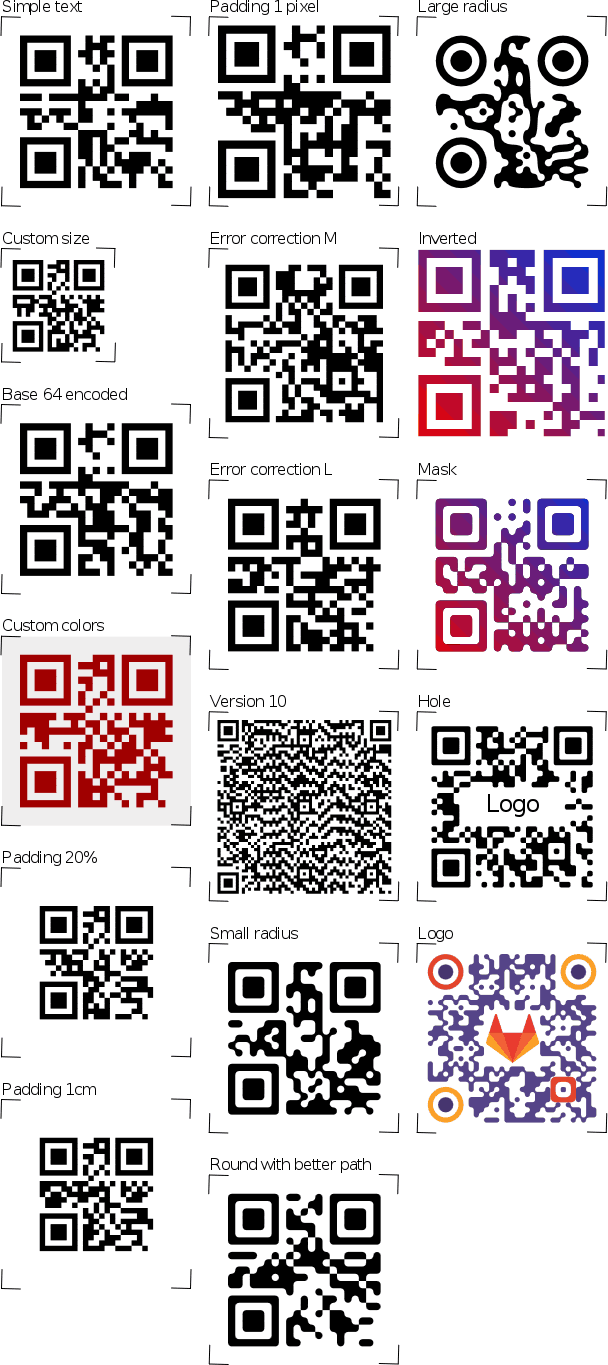
Output:
Release history Release notifications | RSS feed


Download files
Download the file for your platform. If you're not sure which to choose, learn more about installing packages.
Source Distribution
Built Distribution
Filter files by name, interpreter, ABI, and platform.
If you're not sure about the file name format, learn more about wheel file names.
Copy a direct link to the current filters
File details
Details for the file reportlab_qr_code_generator-1.9.0.tar.gz.
File metadata
- Download URL: reportlab_qr_code_generator-1.9.0.tar.gz
- Upload date:
- Size: 31.6 kB
- Tags: Source
- Uploaded using Trusted Publishing? No
- Uploaded via: twine/6.2.0 CPython/3.13.13
File hashes
| Algorithm | Hash digest | |
|---|---|---|
| SHA256 |
5c88e3fd98ddab4d7ce2761486c2f9116c6edf50e8f59c26efdf46be65d2158d
|
|
| MD5 |
c72e714c14f9ababc2fcba5ef9f22934
|
|
| BLAKE2b-256 |
b15c02ab9281f36518f3503342f6684527ab83fc4642d6608dbe24da1b57e84b
|
File details
Details for the file reportlab_qr_code_generator-1.9.0-py3-none-any.whl.
File metadata
- Download URL: reportlab_qr_code_generator-1.9.0-py3-none-any.whl
- Upload date:
- Size: 15.8 kB
- Tags: Python 3
- Uploaded using Trusted Publishing? No
- Uploaded via: twine/6.2.0 CPython/3.13.13
File hashes
| Algorithm | Hash digest | |
|---|---|---|
| SHA256 |
1a7a9e24fa7a1c55af73bd3439faf98b037026deec36928df6022d68d6024377
|
|
| MD5 |
ea4d5cc8c1891c3e6f086957938aff42
|
|
| BLAKE2b-256 |
c62d13f729714bccd78511d4634268f923b9a68966de4d4facb4472d4c6b7cec
|






