
reprexlite: Python reproducible examples for sharing







reprexlite is a tool for rendering reproducible examples of Python code for sharing. With a convenient CLI and lightweight dependencies, you can quickly get it up and running in any virtual environment. It has an optional integration with IPython for easy use with IPython or in Jupyter or VS Code. This project is inspired by R's reprex package.
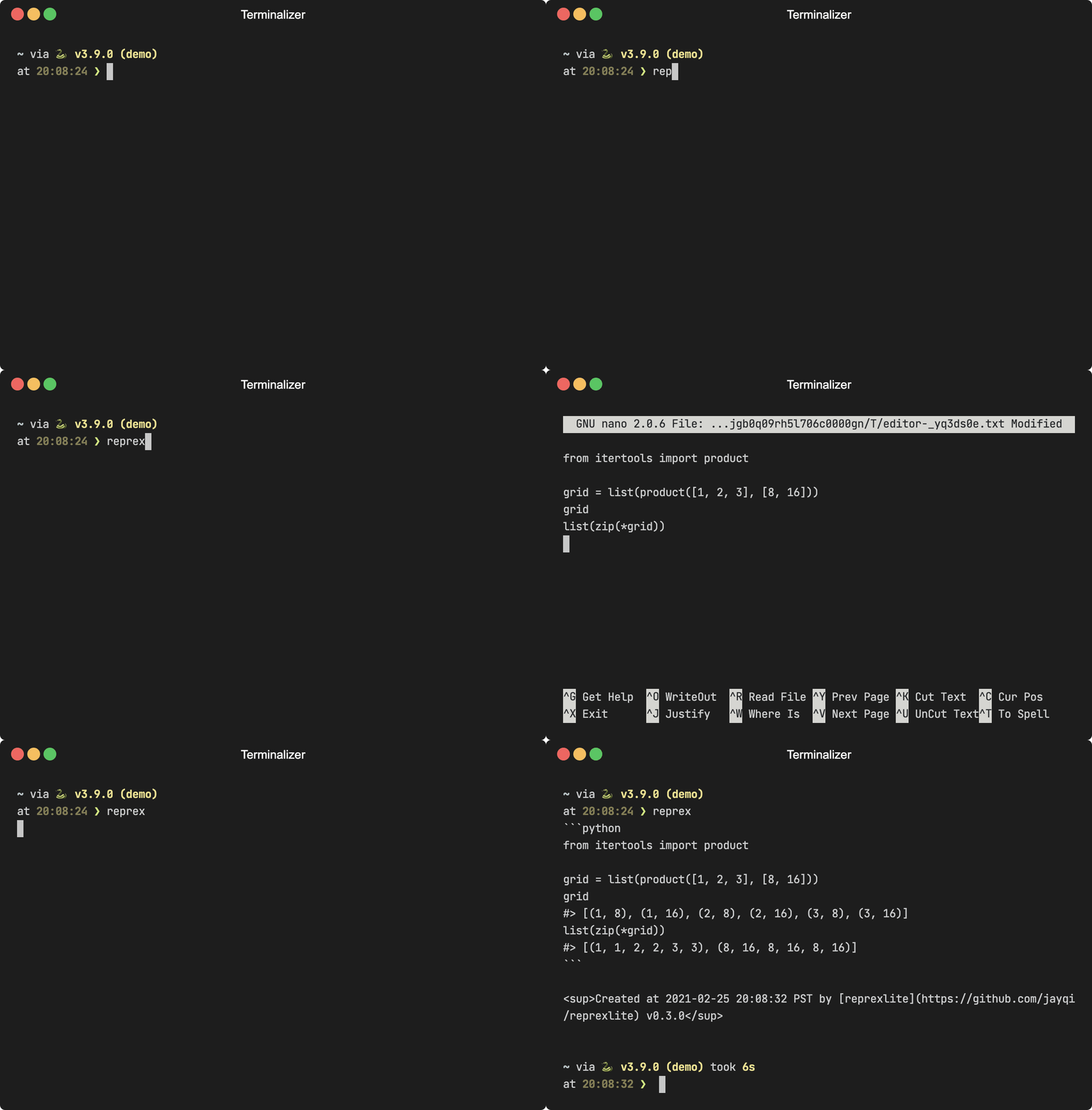
What it does
- Paste or type some Python code that you're interested in sharing.
- reprexlite will execute that code in an isolated namespace. Any returned values or standard output will be captured and displayed as comments below their associated code.
- The rendered reprex will be printed for you to share. Its format can be easily copied, pasted, and run as-is by someone else. Here's an example of an outputted reprex:
from itertools import product

grid = list(product([1, 2, 3], [8, 16]))
grid
#> [(1, 8), (1, 16), (2, 8), (2, 16), (3, 8), (3, 16)]
list(zip(*grid))
#> [(1, 1, 2, 2, 3, 3), (8, 16, 8, 16, 8, 16)]
Writing a good reprex takes thought and effort (see "Reprex Do's and Don'ts" for tips). The goal of reprexlite is to be a tool that seamlessly handles the mechanical stuff, so you can devote your full attention to the important, creative work of writing the content.
Reprex-style code formatting—namely, with outputs as comments—is also great for documentation. Users can copy and run with no modification. Consider using reprexlite when writing your documentation instead of copying code with >>> prompts from an interactive Python shell. In fact, reprexlite can parse code with >>> prompts and convert it into a reprex for you instead.
reprexlite is a lightweight alternative to reprexpy and is similarly meant as a port of the R package reprex.
Why reproducible examples?
If you're asking for help or reporting a bug, you are more likely to succeed in getting others to help you if you include a good reprex. If you're writing documentation, your readers will appreciate examples that they can easily run. See "Design Philosophy" for more on both "Why reproducible examples?" and "Why reprexlite?"
Installation
reprexlite is available on PyPI:
pip install reprexlite
Optional dependencies can be specified using the "extras" mechanism, e.g., reprexlite[ipython]. Available extras are:
black: for optionally autoformatting your codeipython: to use the IPython interactive shell editor or%%reprexIPython cell magicpygments: for syntax highlighting and rendering the output as RTF
Development version
The development version of reprexlite is available on GitHub:
pip install https://github.com/jayqi/reprexlite.git#egg=reprexlite
Basic usage
Command-line interface
The easiest way to use reprexlite is through the CLI. It allows you to create a reprex without entering a Python session. Simply invoke the command:
reprex
This will take you into your system's default command-line text editor where you can type or paste your Python code. On macOS, for example, this will be vim. You can set your default editor using the $VISUAL or $EDITOR environment variables—I'm personally a fan of nano/pico.
Once you're done, reprexlite will print out your reprex to console.
To see available options, use the --help flag.
IPython integrations
There are two kinds of IPython integration:
- IPython interactive shell editor, which opens up a special IPython session where all cells are run through reprexlite
- Cell magics, which let you designate individual cells in a normal IPython or Jupyter notebook for being run through reprexlite
IPython interactive shell editor
Requires IPython. [ipython]
reprexlite optionally supports an IPython interactive shell editor. This is basically like a normal IPython interactive shell except that all cells are piped through reprexlite for rendering instead of the normal cell execution. It has the typical advantages of using IPython like auto-suggestions, history scrolling, and syntax highlighting. You can start the IPython editor by using the --editor/-e option:
reprex -e ipython
If you need to configure anything, use the other CLI options alongside the editor option when launching the shell.
Compared to using the IPython cell magic (next section), you don't need to load the reprexlite extension or write out the %%reprex cell magic every use.
IPython/Jupyter Cell Magic
Requires IPython. [ipython]
reprexlite also has an optional IPython extension with a %%reprex cell magic. That means you can easily create a reprex in an IPython shell (requires IPython), in Jupyter (requires Jupyter), or in VS Code's Interactive Python window (requires ipykernel). This can be handy if you're already working in a Jupyter notebook and want to share some code and output, which otherwise doesn't neatly copy and paste in a nice format.
To use, simply load the extension with
%load_ext reprexlite
and then put %%reprex at the top of a cell you want to create a reprex for:
%%reprex
from itertools import product

grid = list(product([1, 2, 3], [8, 16]))
grid
list(zip(*grid))
The magic accepts the same inline option flags as the CLI. Use the line magic %reprex (note single %) to print out help. See the documentation for more details.
Python library
The same functionality as the CLI is also available from the reprex function with an equivalent API. Simply pass a string with your code, and it will print out the reprex, as well as return a Reprex object that contains all the data and formatting machinery. See the API documentation for more details.
from reprexlite import reprex

code = """
from itertools import product

grid = list(product([1, 2, 3], [8, 16]))
grid
list(zip(*grid))
"""

reprex(code)
#> ```python
#> from itertools import product
#>
#> grid = list(product([1, 2, 3], [8, 16]))
#> grid
#> #> [(1, 8), (1, 16), (2, 8), (2, 16), (3, 8), (3, 16)]
#> list(zip(*grid))
#> #> [(1, 1, 2, 2, 3, 3), (8, 16, 8, 16, 8, 16)]
#> ```
#>
#> <sup>Created at 2021-02-26 00:32:00 PST by [reprexlite](https://github.com/jayqi/reprexlite) v0.3.0</sup>
#> <reprexlite.formatting.GitHubReprex object at 0x109059f10>
1 maintainer

Metadata
1 maintainer
Release files for reprexlite 1.0.0
For a detailed explanation of source distributions (sdists) and built distributions (wheels), please see the package formats documentation.
Source distribution (sdist)
| File | Size | Uploaded | |
|---|---|---|---|
| reprexlite-1.0.0.tar.gz | 22.1 kB | Details |
Built distribution (wheel)
| File | Interpreter | ABI | Platform | Reset |
|---|---|---|---|---|
| reprexlite-1.0.0-py3-none-any.whl | Python 3 | none | any | Details |
Total release size: 45.0 kB
Release files / reprexlite-1.0.0.tar.gz
| Download URL | reprexlite-1.0.0.tar.gz |
|---|---|
| Size | 22.1 kB |
| Tags | Source |
|
SHA-256 checksum How to use checksums |
13801f66f84ef41ee8cd045d55ccd0883695708f9edf6b4d300951ad6a08ec8b
|
|
BLAKE2b-256 checksum How to use checksums |
874cf32fb1e0669f7b8dd36df64130758ad914b8c675565ea0d70b903ed1571a
|
| Upload date | |
|
Uploaded using Trusted Publishing? What is trusted publishing? |
No |
| Uploaded via |
twine/6.1.0 CPython/3.8.20
|
Release files / reprexlite-1.0.0-py3-none-any.whl
| Download URL | reprexlite-1.0.0-py3-none-any.whl |
|---|---|
| Size | 22.9 kB |
| Tags | Python 3 |
|
SHA-256 checksum How to use checksums |
35745f74b4783e29ea7d0251a7e2f2143062856b8bf724821ba72d6fe2f5ec71
|
|
BLAKE2b-256 checksum How to use checksums |
f6ab7275459c7672b15207fdfbd8436afa2a9c0ce2f596baa92b88124c6b19ee
|
| Upload date | |
|
Uploaded using Trusted Publishing? What is trusted publishing? |
No |
| Uploaded via |
twine/6.1.0 CPython/3.8.20
|














